
WinUI 3运行时本地化
我正在开发WinUI 3应用程序,目前坚持本地化。虽然我为不同的区域性编写了单独的resw资源文件,并使用x:Uid进行本地化,但我还是找不到在应用运行时更改语言的方法。
设置Windows.Globalization.ApplicationLanguages.PrimaryLanguageOverride只适用于设置启动语言。
WinUI 3中的运行时本地化是否可能?
回答 4
Stack Overflow用户
发布于 2021-12-22 04:14:42
原始答案:
我觉得你走在正确的轨道上。如果您试图在运行时更改语言,请调用将Windows.Globalization.ApplicationLanguages.PrimaryLanguageOverride设置为新语言"string“的方法。但在此之后,您还必须使用重新加载页面,以便新语言生效。
private void ReloadLanguage(string languageOverride)
{
    // Change the app language
    Windows.Globalization.ApplicationLanguages.PrimaryLanguageOverride = languageOverride;

    // Be sure to clear the Frame stack so that cached Pages are removed, otherwise they will have the old language.
    Frame.BackStack.Clear();

    // Reload the page that you want to have the new language
    Frame.Navigate(typeof(MainPage));

}
-或-
对于需要/希望一次刷新一个的UI组件,您必须使用打给你的ResourceLoader。
private void RefreshUIText()
{
    var resourceLoader = Windows.ApplicationModel.Resources.ResourceLoader.GetForCurrentView();
    this.myXAMLTextBlockElement.Text = resourceLoader.GetString("Farewell");
}
最新答案:
根据ResourceContext".,他们建议随时为您更改语言,以便“从默认的微软在线文档中重新加载字符串”。我知道这并不理想,但它似乎奏效了。
下面给出了下面的示例解决方案:
MainWindow.xaml
<Grid>
    <Frame x:Name="MainFrame"/>
</Grid>
MainWindow.xaml.cs
public MainWindow()
{
    this.InitializeComponent();
    MainFrame.Navigate(typeof(MainPage));
}
MainPage.xaml
<Grid>
    <StackPanel>
        <TextBlock x:Uid="Greeting" x:Name="Greeting" Text="" Margin="15"/>
        <TextBlock x:Uid="Farewell" x:Name="Farewell" Text="" Margin="15"/>
        <Button x:Name="SelectLanguageButton" Click="SelectLanguageButton_Click" Content="Select Language" Margin="15"/>
    </StackPanel>
</Grid>
MainPage.xaml.cs
public sealed partial class MainPage : Page
{
    public MainPage()
    {
        this.InitializeComponent();
        this.Loaded += MainPage_Loaded;
    }

    private void MainPage_Loaded(object sender, RoutedEventArgs e)
    {
        RefreshUIText();
    }

    private void SelectLanguageButton_Click(object sender, RoutedEventArgs e)
    {
        Frame.Navigate(typeof(LanguagePage));
    }

    private void RefreshUIText()
    {
        var resourceLoader = Windows.ApplicationModel.Resources.ResourceLoader.GetForViewIndependentUse();
        this.Greeting.Text = resourceLoader.GetString("Greeting/Text");
        this.Farewell.Text = resourceLoader.GetString("Farewell/Text");
    }
}
LanguagePage.xaml
<Grid>
    <StackPanel>
        <Button x:Name="EnglishButton" Click="EnglishButton_Click" Content="English" Margin="15"/>
        <Button x:Name="FrenchButton" Click="FrenchButton_Click" Content="French" Margin="15"/>
    </StackPanel>
</Grid>
LanguagePage.xaml.cs
public sealed partial class LanguagePage : Page
{
    public LanguagePage()
    {
        this.InitializeComponent();
    }

    private void EnglishButton_Click(object sender, RoutedEventArgs e)
    {
        ReloadLanguage("en");
    }

    private void FrenchButton_Click(object sender, RoutedEventArgs e)
    {
        ReloadLanguage("fr");
    }

    private void ReloadLanguage(string languageOverride)
    {
        // Change the app language
        Windows.Globalization.ApplicationLanguages.PrimaryLanguageOverride = languageOverride;

        // Be sure to clear the Frame stack so that cached Pages are removed, otherwise they will have the old language.
        Frame.BackStack.Clear();

        // Reload the page that you want to have the new language
        Frame.Navigate(typeof(MainPage));
    }
}
资源文件和内容,解决方案资源管理器
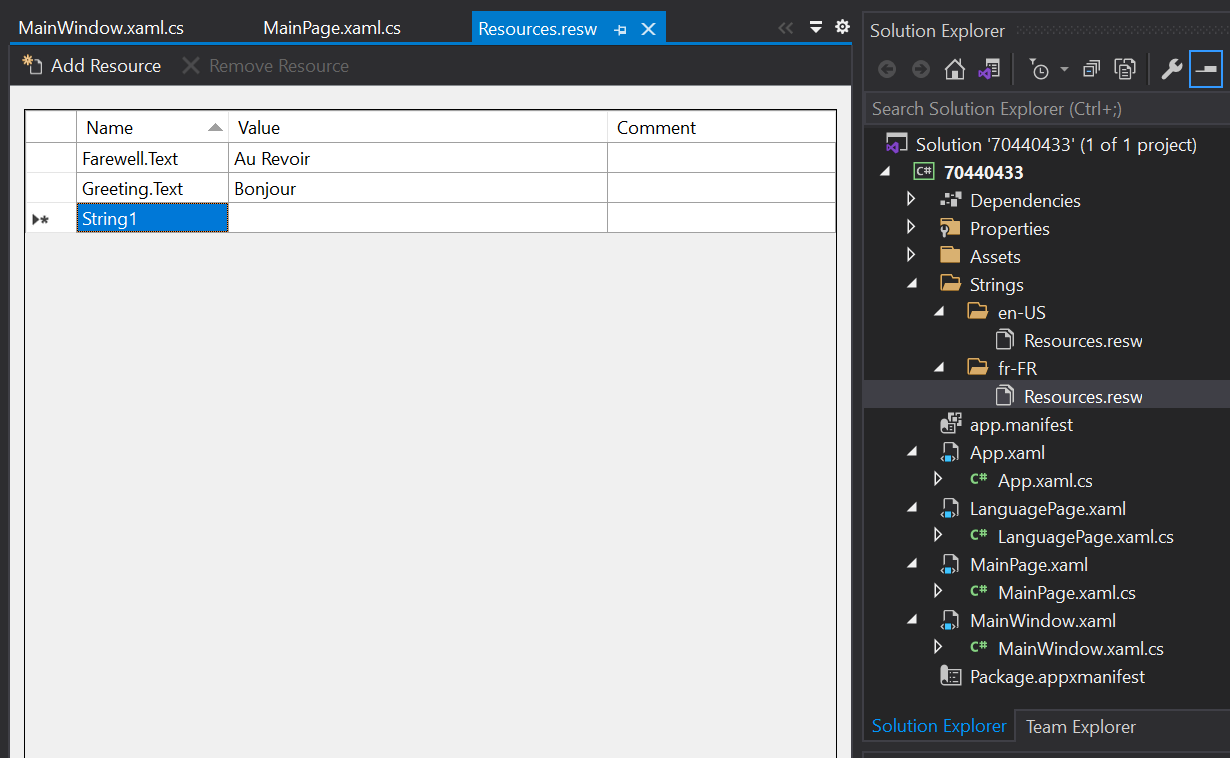
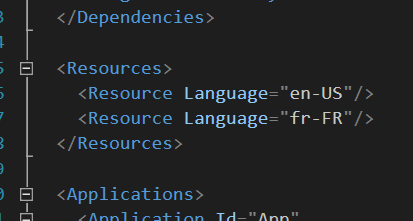
还记得在Package.appxmanifest文件中添加语言声明
Stack Overflow用户
发布于 2022-04-25 19:34:46
我在这个问题上花了很多时间。以下是我真诚的建议:不要试图本地化您的视图,。此外,不要尝试在RunTime处理对语言的更改。没有人这样做,你永远不会在投资中看到一个投资回报。
在视图模型中进行所有本地化,并使用.NET的DI中内置的StringLocalizer类。首先将字符串定位器添加到DI中:
this.serviceProvider = new ServiceCollection()
            .AddLogging()
            .AddLocalization();
然后,在.NET或.Net标准库中的视图模型中添加以下初始化:
private readonly IStringLocalizer<LandingViewModel> stringLocalizer;

public MyViewModel(IStringLocalizer<MyViewModel> stringLocalizer)
{
    this.stringLocalizer = stringLocalizer;
}
现在,如果您有一些想要显示的文本,比如在一个按钮上,您将拥有:
public string SignUpText => this.stringLocalizer["SignUp"];在XAML中,你应该有:
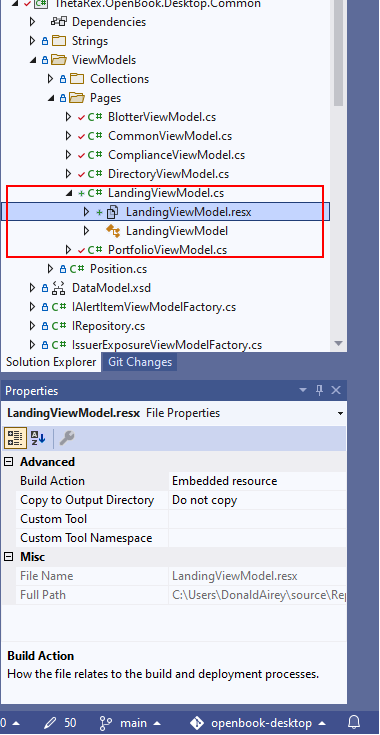
<Button Content="{x:Bind ViewModel.SignUpText}"/>最后,为RESX文件提供与视图模型相同的名称。它应该是一个嵌入式资源,没有定制工具,这一点很重要:
Stack Overflow用户
发布于 2021-12-23 15:20:25
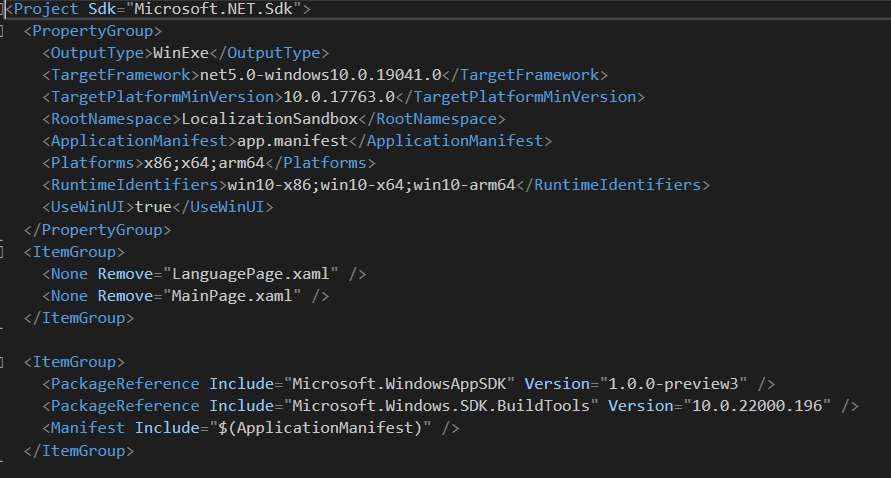
我创建了新的项目--空白应用程序,它与WAP(桌面中的WinUI 3)一起打包,带有最新的项目模板,并附带了VS扩展Windows应用程序SDK C# VS2019。正如你注意到的-我正在使用VS 2019,社区版。下面附上一个项目的csproj配置。
主窗口中有一个框架,可以导航到主页面。主页面上只有一个按钮,导致单击LanguagePage。
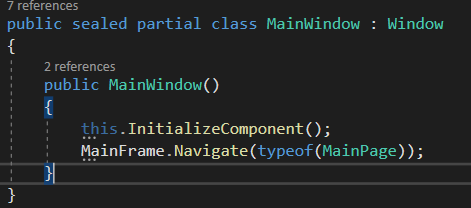
目标是改变语言,清除导航堆栈,并导航回主页。然而,SetAppLanguage中的各种场景并没有产生想要的结果。
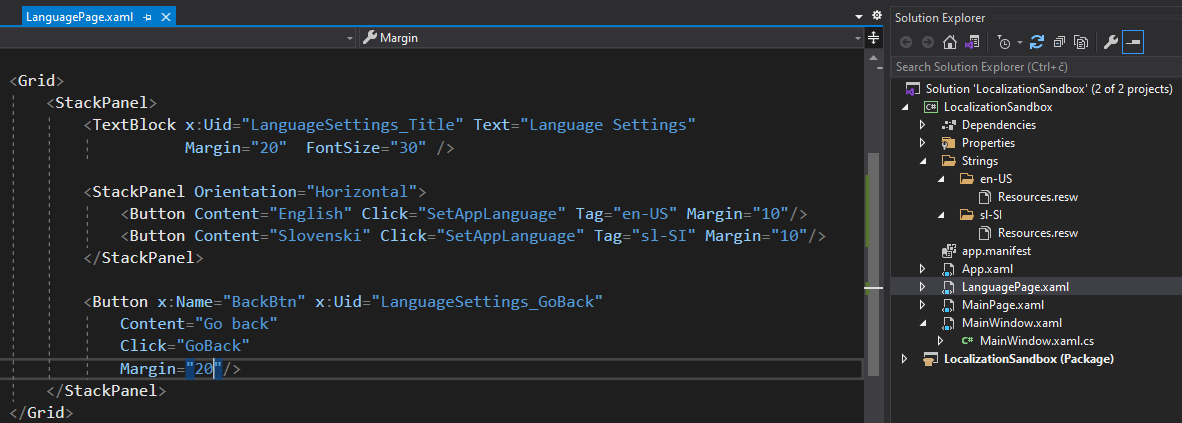
请看一看https://www.py4u.net/discuss/731870 -所有的方案,没有影响的图形用户界面。然而,Windows.ApplicationModel.Resources.Core.ResourceContext.GetForCurrentView();正在抛出一个COMException:“资源上下文可能不会在没有CoreWindow的线程上创建。”
https://stackoverflow.com/questions/70440433
复制相似问题
腾讯云开发者

Copyright © 2013 - 2026 Tencent Cloud. All Rights Reserved. 腾讯云 版权所有
深圳市腾讯计算机系统有限公司 ICP备案/许可证号:粤B2-20090059  粤公网安备44030502008569号
腾讯云计算(北京)有限责任公司 京ICP证150476号 | 京ICP备11018762号