
如何在excel中的一个单元格中拆分多行数据
如何在excel中的一个单元格中拆分多行数据
提问于 2021-12-18 20:36:33
我在一个单元格中接收这些数据,作为从TV导出的数据。我需要拆分这个数据,以便它出现在各个行中。我更喜欢通过VBA而不是公式来实现这一点,因为我需要它在没有太多人工干预的情况下自动操作。有人知道我是怎么做到的吗?不幸的是,列的文本不适用于此示例。
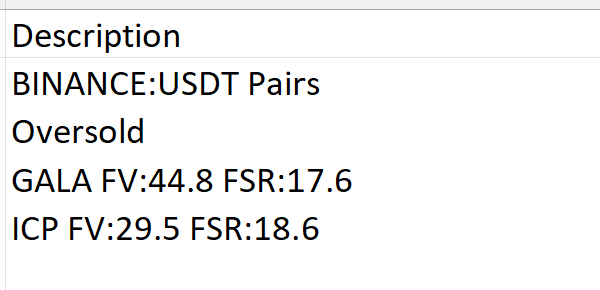
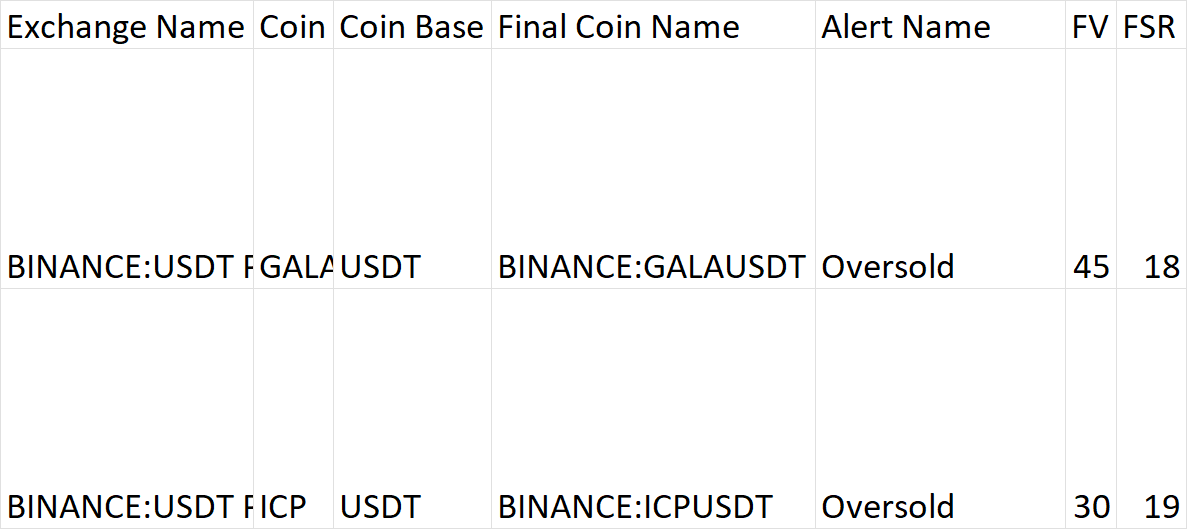
前2行BINANCE:USDT对和超卖需要在线路上与Gala和ICP。
回答 1
Stack Overflow用户
发布于 2021-12-18 23:10:02
将多行单元拆分为另一个工作表
- 调整常量部分中的值.
Option Explicit

Sub SplitCoins()

    ' Source
    Const sName As String = "Sheet1"
    Const sfCellAddress As String = "A2"
    Const sDelimiter As String = vbLf ' maybe 'vbCrLf'?
    ' Destination
    Const dName As String = "Sheet2"
    Const dfCellAddress As String = "A2"
    Const dcCount As Long = 7
    Const dhCount As Long = 2
    ' Workbook
    Dim wb As Workbook: Set wb = ThisWorkbook ' workbook containing this code

    Dim sws As Worksheet: Set sws = wb.Worksheets(sName)
    If sws.AutoFilterMode Then sws.AutoFilterMode = False
    Dim sData As Variant
    sData = GetColumnRange(RefColumn(sws.Range(sfCellAddress)))
    Dim srCount As Long: srCount = UBound(sData, 1)

    Dim dws As Worksheet: Set dws = wb.Worksheets(dName)
    Dim dCell As Range: Set dCell = dws.Range(dfCellAddress)

    Dim drCount As Long
    Dim sr As Long
    Dim dr As Long
    Dim c As Long

    Dim sSubStrings() As String
    Dim h67SubStrings() As String

    Dim sString As String
    Dim h1String As String
    Dim h3String As String
    Dim hcString As String
    Dim hbString As String
    Dim huString As String
    Dim h6String As String
    Dim h7string As String

    For sr = 1 To srCount
        sString = CStr(sData(sr, 1))
        If Len(sString) > 0 Then
            sSubStrings = Split(sString, sDelimiter)
            drCount = UBound(sSubStrings) - LBound(sSubStrings) - dhCount + 1
            ReDim dData(1 To drCount, 1 To dcCount)
            dr = 0
            For c = 2 To UBound(sSubStrings)
                dr = dr + 1
                h1String = sSubStrings(0)
                dData(dr, 1) = h1String
                h3String = sSubStrings(c)
                hcString = Left(h3String, InStr(1, h3String, " ") - 1)
                dData(dr, 2) = hcString
                hbString = Left(h1String, InStr(1, h1String, ":"))
                huString = Split(Right(h1String, Len(h1String) _
                    - Len(hbString)), " ")(0)
                dData(dr, 3) = huString
                dData(dr, 4) = hbString & hcString & huString
                dData(dr, 5) = sSubStrings(1)
                h67SubStrings = Split(h3String, " ")
                dData(dr, 6) = Round(Split(h67SubStrings(1), ":")(1), 0)
                dData(dr, 7) = Round(Split(h67SubStrings(2), ":")(1), 0)
                ' If your decimal separator is a comma then use:
                'dData(dr, 6) = Round(Replace(Split(h67SubStrings(1), ":")(1), _
                    ".", ","), 0)
                'dData(dr, 7) = Round(Replace(Split(h67SubStrings(2), ":")(1), _
                    ".", ","), 0)
            Next c
            dCell.Resize(drCount, dcCount).Value = dData
            Set dCell = dCell.Offset(drCount)
            Erase dData
        End If
    Next sr

    MsgBox "Data split.", vbInformation

End Sub


''''''''''''''''''''''''''''''''''''''''''''''''''''''''''''''''''''''''''''''''
' Purpose:      Writes the values from a column ('ColumnNumber')
'               of a range ('rg') to a 2D one-based one-column array.
''''''''''''''''''''''''''''''''''''''''''''''''''''''''''''''''''''''''''''''''
Function GetColumnRange( _
    ByVal rg As Range, _
    Optional ByVal ColumnNumber As Long = 1) _
As Variant
    If rg Is Nothing Then Exit Function
    If ColumnNumber < 1 Then Exit Function
    If ColumnNumber > rg.Columns.Count Then Exit Function

    With rg.Columns(ColumnNumber)
        If rg.Rows.Count = 1 Then
            Dim Data As Variant: ReDim Data(1 To 1, 1 To 1): Data(1, 1) = .Value
            GetColumnRange = Data
        Else
            GetColumnRange = .Value
        End If
    End With

End Function


''''''''''''''''''''''''''''''''''''''''''''''''''''''''''''''''''''''''''''''''
' Purpose:      Creates a reference to the one-column range from the first cell
'               of a range ('FirstCell') to the bottom-most non-empty cell
'               of the first cell's worksheet column.
''''''''''''''''''''''''''''''''''''''''''''''''''''''''''''''''''''''''''''''''
Function RefColumn( _
    ByVal FirstCell As Range) _
As Range
    If FirstCell Is Nothing Then Exit Function

    With FirstCell.Cells(1)
        Dim lCell As Range
        Set lCell = .Resize(.Worksheet.Rows.Count - .Row + 1) _
            .Find("*", , xlFormulas, , , xlPrevious)
        If lCell Is Nothing Then Exit Function
        Set RefColumn = .Resize(lCell.Row - .Row + 1)
    End With

End Function页面原文内容由Stack Overflow提供。腾讯云小微IT领域专用引擎提供翻译支持
原文链接:
https://stackoverflow.com/questions/70406935
复制相关文章
相似问题
腾讯云开发者

Copyright © 2013 - 2026 Tencent Cloud. All Rights Reserved. 腾讯云 版权所有
深圳市腾讯计算机系统有限公司 ICP备案/许可证号:粤B2-20090059  粤公网安备44030502008569号
腾讯云计算(北京)有限责任公司 京ICP证150476号 | 京ICP备11018762号