
AWS动态库存不会提取重复的主机名
AWS动态库存不会提取重复的主机名
提问于 2021-12-18 11:09:41
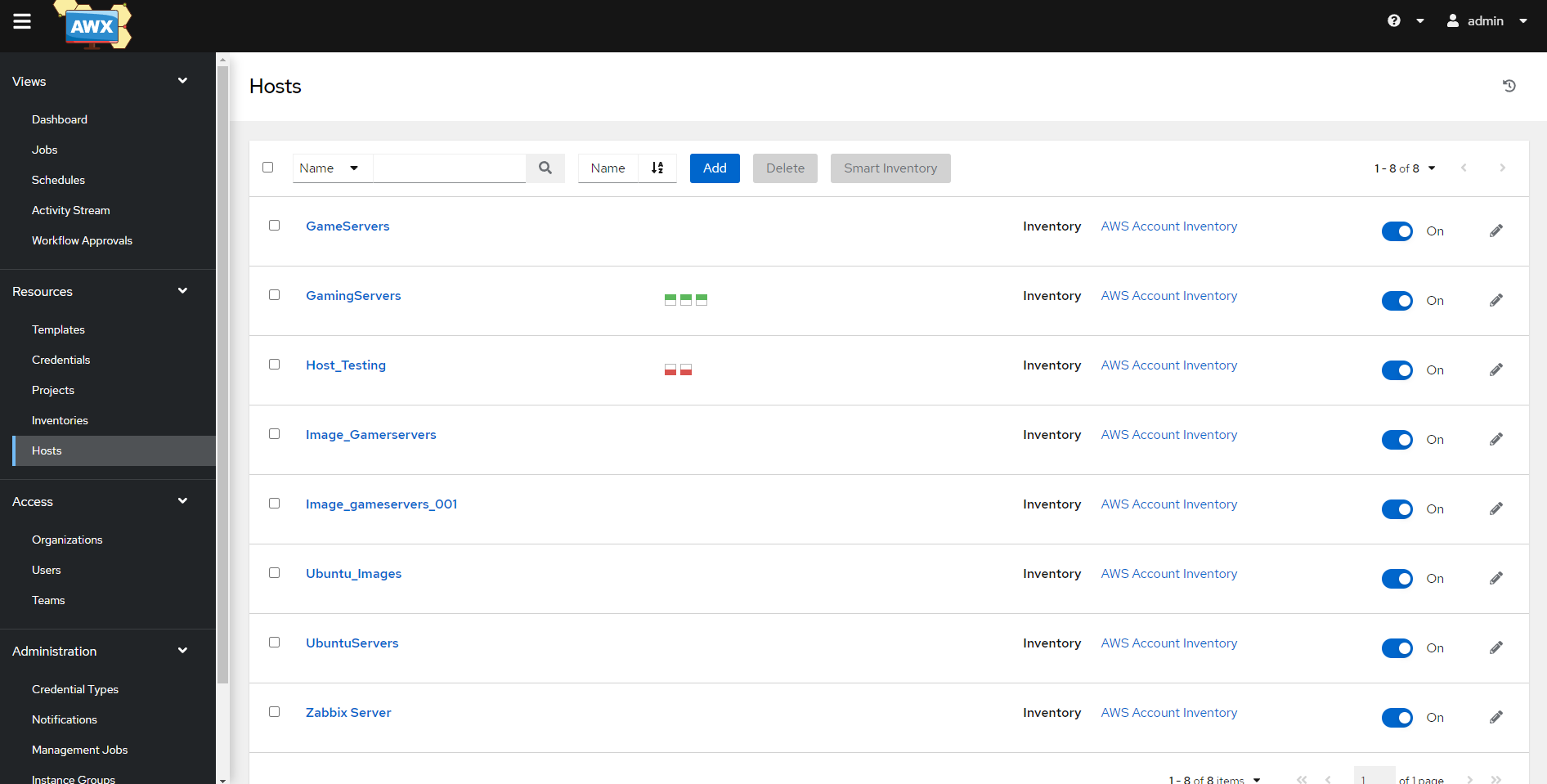
我使用Ansible inventory yaml文件获取正在运行的主机列表,但我只获得唯一的命名主机。正如您在AWS EC2中所看到的,我有三个服务器名为GamingServers,但我只得到其中一个主机。

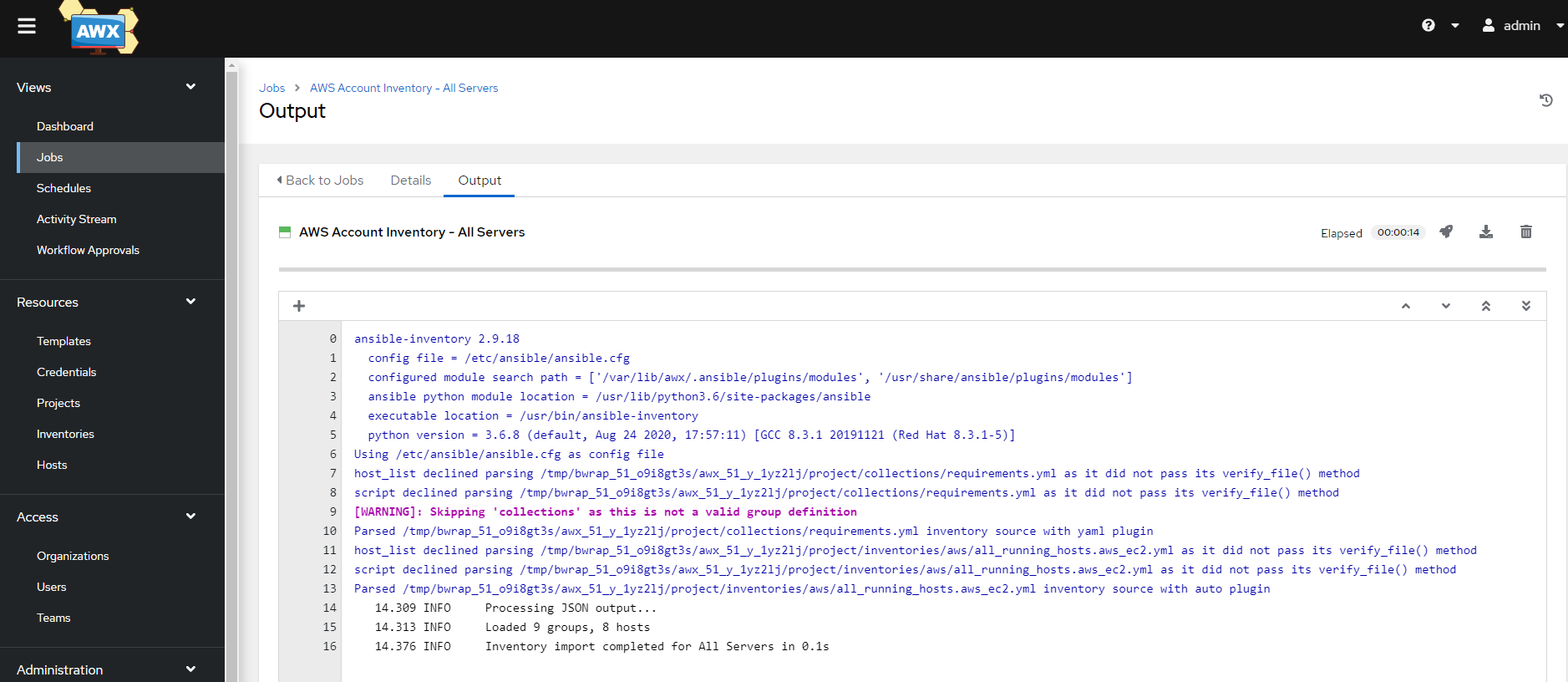
当AWX运行脚本时,它只得到一个主机。我有14个主机,但有些是重复的名字。
即使标签名是重复的,我如何才能让所有正在运行的主机?
inventory.yml
plugin: aws_ec2
regions:
  - us-east-1
  - us-west-1
  - us-west-2
  - ap-south-1
filters:
  "instance-state-name": running
strict_permissions: False
hostnames:
  - tag:Name
keyed_groups:
- prefix: tag_Name_
  key: tags.Name
  separator: ""
compose:
  ansible_host: public_ip_address
# Can use IAM role in future to avoid IAM users and static passwords
#iam_role_arn: "asdfas"
更新:当我尝试@β.εηοιτ.βε回答时,我会得到以下错误
[WARNING]:  * Failed to parse /tmp/bwrap_95_9mfzyo3u/awx_95_d5iml868/project/in
ventories/aws/all_running_hosts.aws_ec2.yml with auto plugin: Invalid filter
'{'name': 'instance-id', 'separator': '_', 'prefix': 'tag:Name'}' provided;
filter must be one of ['affinity', 'architecture', 'availability-zone', 'block-
device-mapping.attach-time', 'block-device-mapping.delete-on-termination',
'block-device-mapping.device-name', 'block-device-mapping.status', 'block-
device-mapping.volume-id', 'client-token', 'dns-name', 'group-id', 'group-
name', 'host-id', 'hypervisor', 'iam-instance-profile.arn', 'image-id',
'instance-id', 'instance-lifecycle', 'instance-state-code', 'instance-state-
name', 'instance-type', 'instance.group-id', 'instance.group-name', 'ip-
address', 'kernel-id', 'key-name', 'launch-index', 'launch-time', 'monitoring-
state', 'network-interface.addresses.association.ip-owner-id', 'network-
interface.addresses.association.public-ip', 'network-
interface.addresses.primary', 'network-interface.addresses.private-ip-address',
'network-interface.association.allocation-id', 'network-
interface.association.association-id', 'network-interface.association.ip-owner-
id', 'network-interface.association.public-ip', 'network-
interface.attachment.attach-time', 'network-interface.attachment.attachment-
id', 'network-interface.attachment.delete-on-termination', 'network-
interface.attachment.device-index', 'network-interface.attachment.instance-id',
'network-interface.attachment.instance-owner-id', 'network-
interface.attachment.status', 'network-interface.availability-zone', 'network-
interface.description', 'network-interface.group-id', 'network-interface.group-
name', 'network-interface.ipv6-addresses.ipv6-address', 'network-interface.mac-
address', 'network-interface.network-interface-id', 'network-interface.owner-
id', 'network-interface.private-dns-name', 'network-interface.requester-
managed', 'network-interface.source-dest-check', 'network-interface.status',
'network-interface.subnet-id', 'network-interface.vpc-id', 'owner-id',
'placement-group-name', 'platform', 'private-dns-name', 'private-ip-address',
'product-code', 'product-code.type', 'ramdisk-id', 'reason', 'requester-id',
'reservation-id', 'root-device-name', 'root-device-type', 'source-dest-check',
'spot-instance-request-id', 'state-reason-code', 'state-reason-message',
'subnet-id', 'tag', 'tag-key', 'tag-value', 'tenancy', 'virtualization-type',
'vpc-id'].回答 1
Stack Overflow用户
发布于 2021-12-18 13:03:07
这是由于使用
hostnames:
  - tag:Name
但是,在Ansible库存中,主机名是唯一的标识符。
因此,场景背后真正发生的是实例正在覆盖自身,因为它们具有相同的主机名。
如果您想保持将tag:Name作为主机名的可读性,并将这些多个实例包含在库存中,那么您可以在这里做的是将标签的主机名与唯一值(如主机的实例ID )组合在一起,如下所示:
hostnames:
  - name: 'instance-id'
    separator: '_'
    prefix: 'tag:Name'
这将给您提供主机名如下:
GamingServer_i-05245d11820c11f4bGamingServer_i-01b11144ac8cec108GamingServer_i-031df0231c429149a
页面原文内容由Stack Overflow提供。腾讯云小微IT领域专用引擎提供翻译支持
原文链接:
https://stackoverflow.com/questions/70402903
复制相关文章
相似问题
腾讯云开发者

Copyright © 2013 - 2026 Tencent Cloud. All Rights Reserved. 腾讯云 版权所有
深圳市腾讯计算机系统有限公司 ICP备案/许可证号:粤B2-20090059  粤公网安备44030502008569号
腾讯云计算(北京)有限责任公司 京ICP证150476号 | 京ICP备11018762号