
您能在不影响框大小的情况下显示图像吗?
您能在不影响框大小的情况下显示图像吗?
提问于 2021-12-17 01:11:14
嘿,在页脚上工作,我想在特定的位置添加一个图像,但是当我添加它的时候,它会影响盒子的大小(正如它应该的那样),因为我把它放在盒子里,我想知道是否可以把它设置为背景或者放在所有的页脚后面,如果这在不影响框的情况下是有意义的。
这就是我所拥有的:
<Box
        px={{ xs: 1, sm: 6 }}
        py={{ xs: 3, sm: 8 }}
        bgcolor="text.secondary"
        color="white"
      >
        <Container maxWidth="lg">
          <ThemeProvider theme={Oxanium}>

            <Grid container spacing={5}>
              <Grid item xs={12} sm={4}>
                <Box borderBottom={1}>
                  <Typography variant="h6" component="div" sx={{ flexGrow: 1 }}>Social Media</Typography>
                </Box>
                <Box sx={{ display: "flex" }}>
                  <Box>
                    <IconButton href="">
                      <TwitterIcon />
                    </IconButton>
                  </Box>

                  <Box>
                    <IconButton href="" color="inherit">
                      <FacebookIcon />
                    </IconButton>
                  </Box>

                  <Box>
                    <IconButton href="" color="inherit">
                      <InstagramIcon />
                    </IconButton>
                  </Box>

                  <Box>
                    <IconButton href="" color="inherit">
                      <YouTubeIcon />
                    </IconButton>
                  </Box>

                  <Box>
                    <IconButton href="" color="inherit">
                      <Icon>
                        <img src={TwitchIcon} height={25} width={25} />
                      </Icon>
                    </IconButton>
                  </Box>
                </Box>
              </Grid>

              <Grid item xs={12} sm={4}>
                <Box borderBottom={1}>
                  <Typography variant="h6" component="div" sx={{ flexGrow: 1 }}>Gamer Tag</Typography>
                </Box>
                <Box sx={{ display: "flex" }}>
                  <Box>
                    <IconButton href="" color="inherit">
                      <Icon>
                        <img src={SteamIcon} height={25} width={25} />
                      </Icon>
                    </IconButton>
                  </Box>
                  <Box>
                    <IconButton href="/" color="inherit">
                      <Icon>
                        <img src={EpicGamesIcon} height={25} width={25} />
                      </Icon>
                    </IconButton>
                  </Box>
                </Box>
              </Grid>

              <Grid item xs={12} sm={4}>
                <Box borderBottom={1}>
                  <Typography variant="h6" component="div" sx={{ flexGrow: 1 }}> Server </Typography>
                </Box>
                <Box sx={{ display: "flex" }}>
                  <Box>
                    <IconButton href="" color="inherit">
                      <Icon>
                        <img src={DiscordIcon} height={25} width={25} />
                      </Icon>
                    </IconButton>
                  </Box>
                </Box>
              </Grid>
            </Grid>

            <img src={Duskull} height={100} width={100} />

          </ThemeProvider>
        </Container>
      </Box>
这就是它的样子:
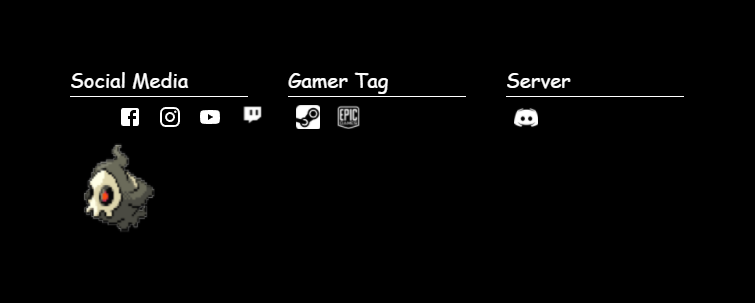
没有gif的情况是这样的:

这就是我想要达到的目标:

最接近我想要的结果
<Box style={{ right:235, position: "absolute",  alignSelf: "flex-end" }}>
   <img src={Duskull} height={100} width={100} />
</Box>

任何其他的东西,只要在页面中修复它,或者在页面角本身,而不是那个小黑匣子。
回答 1
Stack Overflow用户
回答已采纳
发布于 2021-12-17 02:12:32
我会给GIF绝对位置,让它脱离页面流,这样它就不会影响方框样式和页脚容器的相对位置,所以GIF仍然定位在页脚中,然后用右0和顶部/底部属性定位GIF。
页面原文内容由Stack Overflow提供。腾讯云小微IT领域专用引擎提供翻译支持
原文链接:
https://stackoverflow.com/questions/70387373
复制相关文章
相似问题
腾讯云开发者

Copyright © 2013 - 2026 Tencent Cloud. All Rights Reserved. 腾讯云 版权所有
深圳市腾讯计算机系统有限公司 ICP备案/许可证号:粤B2-20090059  粤公网安备44030502008569号
腾讯云计算(北京)有限责任公司 京ICP证150476号 | 京ICP备11018762号