
如何使用图像作为全息图像的象形文字
如何使用图像作为全息图像的象形文字
提问于 2021-12-16 21:03:35
我使用的是全息视图和bokeh后端,但对于其中一个层,我需要在多个点显示图像。我已经找到了这个bokeh演示(https://docs.bokeh.org/en/latest/docs/reference/models/glyphs/image_url.html),它可以做我想做的事情,但是我想不出如何让add_glyph通过全息视图工作。
我试图使用全息视图挂钩来访问bokeh后端,如下所示:
def update_plot(plot, element):
    plot.state.add_glyph(source, image1)

my_plot.opts(hooks=[update_bouys]
但我不能得到我的照片。
当我像下面这样使用hv.render时,我确实得到了图像,但这使用了bokeh显示,这意味着我不能在我的全息视图图上覆盖它。
b = hv.render(my_plot)
b.add_glyph(source, image1)
show(b)
如果有人能向我展示一个类似于bokeh演示的例子,它使用全息视图作为前端,那将是非常棒的。谢谢
回答 1
Stack Overflow用户
回答已采纳
发布于 2021-12-16 21:43:56
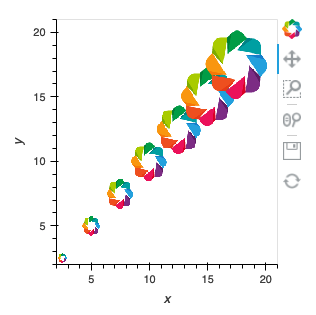
在HoloViews中,您只需使用RGB元素:https://holoviews.org/reference/elements/bokeh/RGB.html
import holoviews as hv
hv.extension('bokeh')

hv.Overlay([hv.RGB.load_image('logo.png', bounds=(2*i,2*i,3*i,3*i))
            for i in range(1,8)])
页面原文内容由Stack Overflow提供。腾讯云小微IT领域专用引擎提供翻译支持
原文链接:
https://stackoverflow.com/questions/70385613
复制相关文章
相似问题
腾讯云开发者

Copyright © 2013 - 2026 Tencent Cloud. All Rights Reserved. 腾讯云 版权所有
深圳市腾讯计算机系统有限公司 ICP备案/许可证号:粤B2-20090059  粤公网安备44030502008569号
腾讯云计算(北京)有限责任公司 京ICP证150476号 | 京ICP备11018762号