
使用Azure函数访问Playfab数据
使用Azure函数访问Playfab数据
提问于 2021-12-16 05:33:31
如何使用Azure函数访问读/写/修改/删除Playfab数据?
回答 1
Stack Overflow用户
发布于 2021-12-17 04:19:50
下面的步骤将帮助您使用Playfab访问azure函数
- 在VS代码中创建Azure函数,将azure函数部署到门户,并使用云脚本注册您的函数,下面是使用playfab.
中的azure函数调用云脚本的示例代码。
//This snippet assumes that your game client is already logged into PlayFab.

using PlayFab;
using PlayFab.CloudScriptModels;

private void CallCSharpExecuteFunction()
{
    PlayFabCloudScriptAPI.ExecuteFunction(new ExecuteFunctionRequest()
    {
        Entity = new PlayFab.CloudScriptModels.EntityKey()
        {
            Id = PlayFabSettings.staticPlayer.EntityId, //Get this from when you logged in,
            Type = PlayFabSettings.staticPlayer.EntityType, //Get this from when you logged in
        },
        FunctionName = "HelloWorld", //This should be the name of your Azure Function that you created.
        FunctionParameter = new Dictionary<string, object>() { { "inputValue", "Test" } }, //This is the data that you would want to pass into your function.
        GeneratePlayStreamEvent = false //Set this to true if you would like this call to show up in PlayStream
    }, (ExecuteFunctionResult result) =>
    {
        if (result.FunctionResultTooLarge ?? false)
        {
            Debug.Log("This can happen if you exceed the limit that can be returned from an Azure Function, See PlayFab Limits Page for details.");
            return;
        }
        Debug.Log($"The {result.FunctionName} function took {result.ExecutionTimeMilliseconds} to complete");
        Debug.Log($"Result: {result.FunctionResult.ToString()}");
    }, (PlayFabError error) =>
    {
        Debug.Log($"Opps Something went wrong: {error.GenerateErrorReport()}");
    });
}
PlayFab CloudScript Context, Variables and Server SDKs
- 您需要通过Package安装PlayFab SDK。若要在Visual代码中执行此打开终端或CMD控制台,请输入:
dotnet add package PlayFabAllSDK
- 我们已经创建了一些将与cSharpSDK.
一起发货的助手
- 如果您使用的是最新的.
,则需要编辑.csproj文件,并在默认的PropertyGroup或NETCOREAPP3_1中包含<DefineConstants>NETCOREAPP2_0</DefineConstants>。
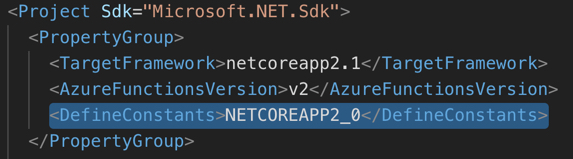
脚本的
- 执行可以通过几种方法(API、计划任务、PlayStream事件、段输入和退出方法)进行。执行的上下文对于实现CloudScript非常重要。有关如何使用脚本的上下文的详细信息,请参阅Using CloudScript context models tutorial .
。
有关更多信息,请查看Cloud Script Using Azure Functions和Playfab Cloud Script
页面原文内容由Stack Overflow提供。腾讯云小微IT领域专用引擎提供翻译支持
原文链接:
https://stackoverflow.com/questions/70374253
复制相关文章
相似问题
腾讯云开发者

Copyright © 2013 - 2026 Tencent Cloud. All Rights Reserved. 腾讯云 版权所有
深圳市腾讯计算机系统有限公司 ICP备案/许可证号:粤B2-20090059  粤公网安备44030502008569号
腾讯云计算(北京)有限责任公司 京ICP证150476号 | 京ICP备11018762号