
布谷鸟启动错误,无法关闭“cuckoo1”
布谷鸟启动错误,无法关闭“cuckoo1”
提问于 2021-12-14 02:54:04
我以普通用户的身份运行布谷鸟,这是windows,主机是ubuntu,但它显示如下:
'''
log file:
CuckooCriticalError: Please update your configuration. Unable to shut 'cuckoo1' down or find the machine in its proper state: The virtual machine 'cuckoo1' doesn't exist! Please create one or more Cuckoo analysis VMs and properly fill out the Cuckoo configuration!

'''
所以我检查了我的virtualbox.conf,就像这样,我只是复制了一些内容:
'''

[virtualbox]
# Specify which VirtualBox mode you want to run your machines on.
# Can be "gui" or "headless". Please refer to VirtualBox's official
# documentation to understand the differences.
mode = headless

# Path to the local installation of the VBoxManage utility.
path = /usr/bin/VBoxManage
# If you are running Cuckoo on Mac OS X you have to change the path as follows:
# path = /Applications/VirtualBox.app/Contents/MacOS/VBoxManage

# Default network interface.
interface = vboxnet0

# Specify a comma-separated list of available machines to be used. For each
# specified ID you have to define a dedicated section containing the details
# on the respective machine. (E.g. cuckoo1,cuckoo2,cuckoo3)
machines = cuckoo1

# If remote control is enabled in cuckoo.conf, specify a port range to use.
# Virtualbox will bind the VRDP interface to the first available port.
controlports = 5000-5050


[cuckoo1]
# Specify the label name of the current machine as specified in your
# VirtualBox configuration.
label = cuckoo1

# Specify the operating system platform used by current machine
# [windows/darwin/linux].
platform = windows

# Specify the IP address of the current virtual machine. Make sure that the
# IP address is valid and that the host machine is able to reach it. If not,
# the analysis will fail.
ip = 192.168.56.101

# (Optional) Specify the snapshot name to use. If you do not specify a snapshot
# name, the VirtualBox MachineManager will use the current snapshot.
# Example (Snapshot1 is the snapshot name):
snapshot = Snapshot1

# (Optional) Specify the name of the network interface that should be used
# when dumping network traffic from this machine with tcpdump. If specified,
# overrides the default interface specified in auxiliary.conf
# Example (vboxnet0 is the interface name):
interface = vboxnet0


'''
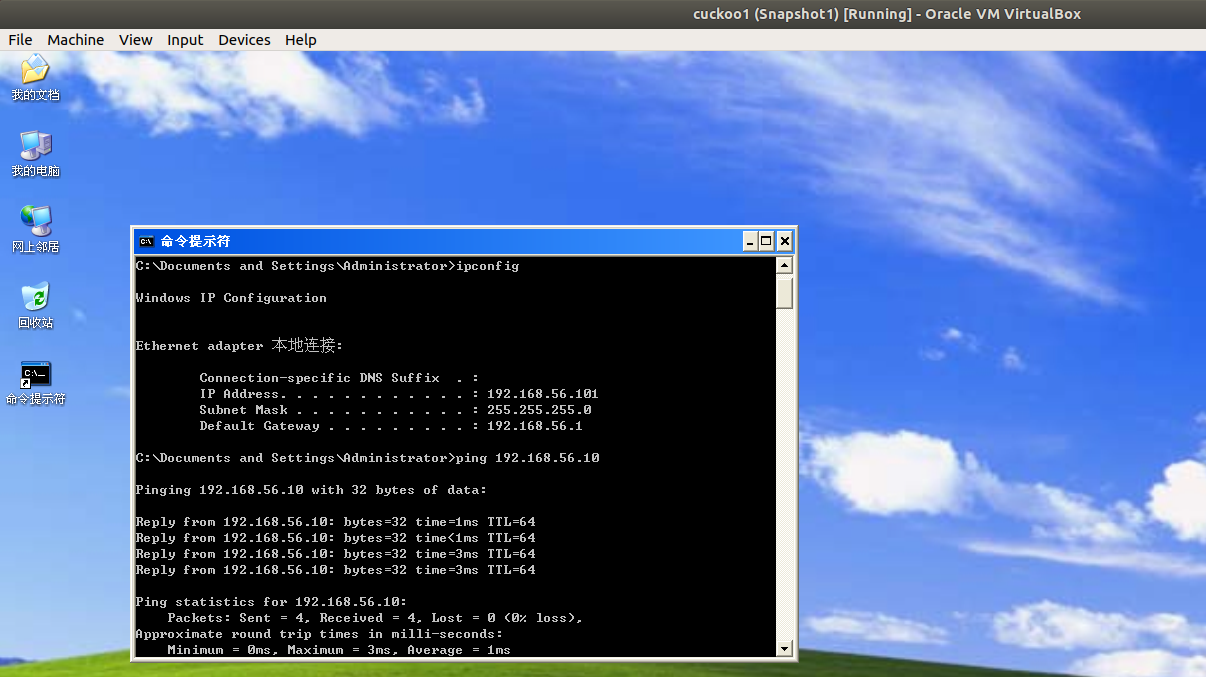
然后,为了避免ip产生的原因,我检查了客人的ip内容,并对主机进行了平压。
回答 1
Stack Overflow用户
回答已采纳
发布于 2022-03-30 11:03:04
我已经解决了这个问题。原因是,我启动virtualbox作为根,但我启动杜鹃作为用户。由于unix的电源管理,使得普通用户无法监视root用户。所以我用普通用户启动virtualbox。完了。
页面原文内容由Stack Overflow提供。腾讯云小微IT领域专用引擎提供翻译支持
原文链接:
https://stackoverflow.com/questions/70343259
复制相关文章
相似问题
腾讯云开发者

Copyright © 2013 - 2026 Tencent Cloud. All Rights Reserved. 腾讯云 版权所有
深圳市腾讯计算机系统有限公司 ICP备案/许可证号:粤B2-20090059  粤公网安备44030502008569号
腾讯云计算(北京)有限责任公司 京ICP证150476号 | 京ICP备11018762号