
基于动态更新的selectInput动态更新selectInput
我试图根据动态更新的selectInput()值动态更新selectInput()值。我可以获得动态更新的第一个值,但是当我尝试使用这些值来更新进一步的值时,我会得到一个错误:
Warning: Error in [.data.frame: undefined columns selected
  [No stack trace available]
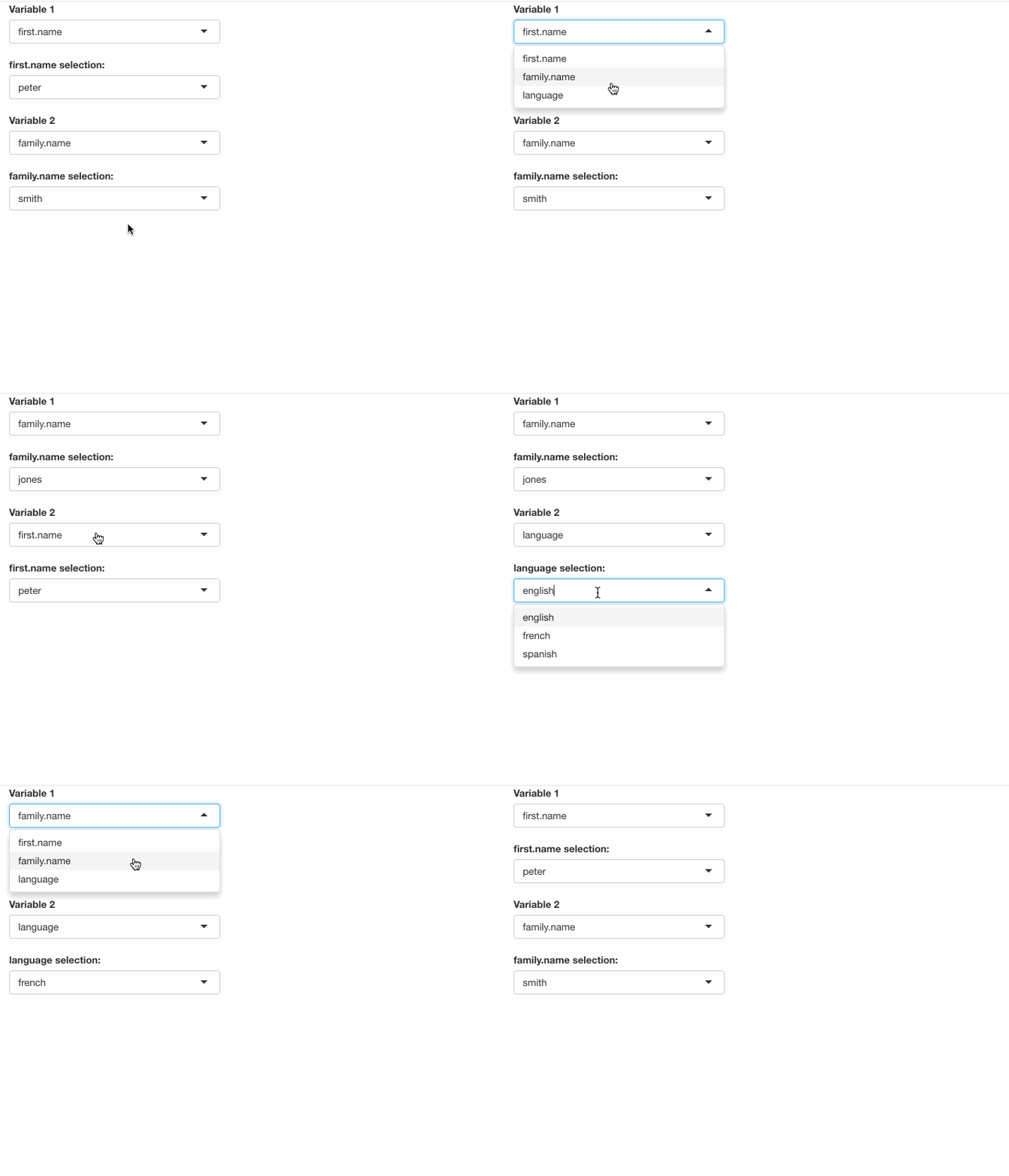
我要找的行为是:
从dataframe
- Filter中选择变量,从variable
- Select中选择值,从dataframe
- Filter中选择另一个变量,从变量
中选择值
一旦一个变量被选中,我不希望这个选择在以后的选择中作为选项出现。我希望筛选器选项基于所选变量填充。
下面是一个可重复的例子:
library('shiny')

#create sample data
df = data.frame('first.name' = c('peter', 'paul', 'patricia'),
                  'family.name' = c('smith', 'jones', 'gibbon'),
                  'language' = c('english', 'french', 'spanish'))
#create the UI
ui <- fluidPage(

  #Create first selector for variable 1, based on column names
  selectInput(inputId = 'var1',
              label = 'Variable 1',
              choices = colnames(df)),

  #create selector for filtering, populated based on the selection for variable 1
  #leave values for label and choice blank - to be populated by updateSelectInput()
  selectInput(inputId = 'var1_subselect',
              label = '',
              choices = ''),

  #create selector for variable 2, should not include variable one
  selectInput(inputId = 'var2',
              label = 'Variable 2',
              choices = ''),

  #create selector for filtering, populated based on the selection for variable 2
  selectInput(inputId = 'var2_subselect',
              label = '',
              choices = '')

)

#Create the server
server <- function(session, input, output) {
 observe({
   updateSelectInput(session,
                     inputId = 'var1_subselect', #for var1_subselect
                     label = paste(input$var1, 'selection:'), #Get the label from the value for var1
                     choices = unique(df[input$var1])) #Get the choices based on unique values far var1
 })

  observe({
    updateSelectInput(session,
                      inputId = 'var2', #for var2
                      label = 'Variable 2', #Label is standard
                      choices = setdiff(colnames(df), input$var1)) #Get choices from the colnames for the df, excluding the choice for var1
  })

  #Everything works up to this point, however when i add the following effort to filter the values for var 2, i get an error

  observe({
    updateSelectInput(session,
                      inputId = 'var2_subselect', #for var2_subselect
                      label = paste(input$var2, 'selection:'), #Get the label from the value for var2
                      choices = unique(df[input$var2])) #Get the choices based on the unique values of var2
  })

}

#call the app
shinyApp(ui, server)当我调用第三个observe({})函数时,就会得到一个错误。我猜想这是因为我试图调用一个基于反应性输入的输入。
我试图使用UI中的uiOutput()和服务器中的renderUI({})来解决这个问题,但是当我尝试基于动态更新的内容动态更新内容时,我遇到了同样的问题。
回答 1
Stack Overflow用户
发布于 2021-12-11 02:04:34
一个小而简单的解决方法是使用[[而不是[过滤数据。在本文中,The difference between bracket [ ] and double bracket [[ ]] for accessing the elements of a list or dataframe解释了两者之间的较高层次差异。
在这里,[[总是返回一个向量,而[返回一个数据文件,它在大多数情况下都能正常工作,但是在没有为var2做选择时失败,这意味着var2是空的。
[返回
df[''][
(df,"")中的.data.frame错误:选定的未定义列
这是您收到的错误消息。
而对于[[,它返回NULL。
df[['']]
#NULL这是choices参数在selectInput中所接受的。
完整的代码-
library(shiny)

#create sample data
df = data.frame('first.name' = c('peter', 'paul', 'patricia'),
                'family.name' = c('smith', 'jones', 'gibbon'),
                'language' = c('english', 'french', 'spanish'))
#create the UI
ui <- fluidPage(

  #Create first selector for variable 1, based on column names
  selectInput(inputId = 'var1',
              label = 'Variable 1',
              choices = colnames(df)),

  #create selector for filtering, populated based on the selection for variable 1
  #leave values for label and choice blank - to be populated by updateSelectInput()
  selectInput(inputId = 'var1_subselect',
              label = '',
              choices = ''),

  #create selector for variable 2, should not include variable one
  selectInput(inputId = 'var2',
              label = 'Variable 2',
              choices = ''),

  #create selector for filtering, populated based on the selection for variable 2
  selectInput(inputId = 'var2_subselect',
              label = '',
              choices = '')

)

#Create the server
server <- function(session, input, output) {
  observe({
    updateSelectInput(session,
                      inputId = 'var1_subselect', #for var1_subselect
                      label = paste(input$var1, 'selection:'), #Get the label from the value for var1
                      choices = unique(df[[input$var1]])) #Get the choices based on unique values far var1
  })

  observe({
    updateSelectInput(session,
                      inputId = 'var2', #for var2
                      label = 'Variable 2', #Label is standard
                      choices = setdiff(colnames(df), input$var1)) #Get choices from the colnames for the df, excluding the choice for var1
  })

  observe({
     updateSelectInput(session,
                       inputId = 'var2_subselect', #for var2_subselect
                       label = paste(input$var2, 'selection:'), #Get the label from the value for var2
                       choices = unique(df[[input$var2]])) #Get the choices based on the unique values of var2
   })

}

#call the app
shinyApp(ui, server)
https://stackoverflow.com/questions/70312032
复制相似问题
腾讯云开发者

Copyright © 2013 - 2026 Tencent Cloud. All Rights Reserved. 腾讯云 版权所有
深圳市腾讯计算机系统有限公司 ICP备案/许可证号:粤B2-20090059  粤公网安备44030502008569号
腾讯云计算(北京)有限责任公司 京ICP证150476号 | 京ICP备11018762号