
ListTile tileColor溢流ListView
ListTile tileColor溢流ListView
提问于 2021-12-10 17:31:57
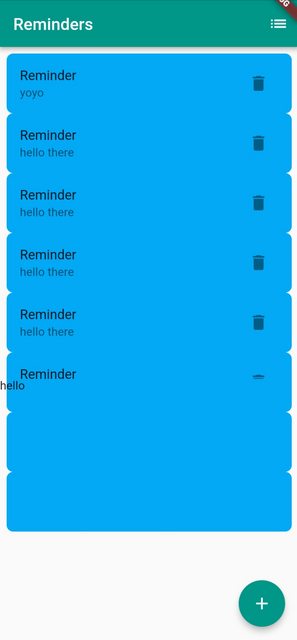
我有一个ListView和ListTiles,它设置了tileColor属性。ListTile中的所有文本和图标都是剪裁的,而tileColor在ListView之外是可见的。我如何剪辑整个ListTile,使ListView之外的任何东西都是可见的?我尝试过将ListView包装在不同的容器中,而ListTile包装在容器中却没有任何结果。
class MyApp extends StatelessWidget {
  const MyApp({Key? key}) : super(key: key);

  @override
  Widget build(BuildContext context) {
    return MaterialApp(
      title: 'Flutter Demo',
      theme: ThemeData(
        primarySwatch: Colors.teal,
      ),
      home: const MyHomePage(title: 'Reminders'),
    );
  }
}

class MyHomePage extends StatefulWidget {
  const MyHomePage({Key? key, required this.title}) : super(key: key);

  final String title;

  @override
  State<MyHomePage> createState() => _MyHomePageState();
}

class _MyHomePageState extends State<MyHomePage> {
  List _reminders = <String>[];

  void _addReminder(String text) {
    setState(() {
      _reminders.add(text);
    });
  }

  Widget _buildRow(String text, int i) {
    return ListTile(
      title: Text('[enter image description here][1]Reminder'),
      trailing: IconButton(
          onPressed: () {
            setState(() {
              _reminders.removeAt(i);
            });
          },
          icon: Icon(Icons.delete)),
      subtitle: Text(text),
      tileColor: Colors.lightBlue,
      shape: RoundedRectangleBorder(borderRadius: BorderRadius.circular(8)),
    );
  }

  void _showMenu() {}

  @override
  Widget build(BuildContext context) {
    return Scaffold(
      appBar: AppBar(
        title: Text(widget.title),
        actions: [IconButton(onPressed: _showMenu, icon: const Icon(Icons.list))],
      ),
      body: Column(
        children: <Widget>[
          Container(
            height: 400,
            child: ListView.builder(
              padding: EdgeInsets.all(8),
              itemBuilder: (context, i) => _buildRow(_reminders[i], i),
              itemCount: _reminders.length,
            ),
          ),
          Container(
            height: 100,
            width: double.infinity,
            child: Text('hello'),
          )
        ],
      ),
      floatingActionButton: FloatingActionButton(
        onPressed: () {
          _addReminder('hello there');
        },
        child: const Icon(Icons.add),
      ),
    );
  }
}
回答 3
Stack Overflow用户
回答已采纳
发布于 2021-12-16 18:43:11
要解决你的问题,把瓷砖包在材料里。这是一个经过测试的解决方案。说明在代码下面。
简短的版本:
  Widget _buildRow(String text, int i) {
    return Material(
        child: ListTile(
          title: Text('[enter image description here][$i]Reminder'),
          trailing: IconButton(
            onPressed: () {
              setState(() {
                _reminders.removeAt(i);
              });
            },
            icon: const Icon(Icons.delete)),
        subtitle: Text(text),
        tileColor: Colors.lightBlue,
        shape: RoundedRectangleBorder(borderRadius: BorderRadius.circular(8)),
    ));
  }
完整的工作示例:
进口‘包装:颤振/材料。飞镖’;
(){
runApp(const MyApp());
}
类MyApp扩展StatelessWidget {
const MyApp({Key? key}) : super(key: key);@overrideWidget build(BuildContext context) { return MaterialApp( title: 'Flutter Demo', theme: ThemeData( primarySwatch: Colors.teal, ), home: const MyHomePage(title: 'Reminders'), );}}
类MyHomePage扩展StatefulWidget {
const MyHomePage({Key? key, required this.title}) : super(key: key);final String title;@overrideState<MyHomePage> createState() => _MyHomePageState();}
类_MyHomePageState扩展状态{
final List _reminders = <String>[];void _addReminder(String text) { setState(() { _reminders.add(text); });}Widget _buildRow(String text, int i) { return Material(child: ListTile( title: Text('[enter image description here][$i]Reminder'), trailing: IconButton( onPressed: () { setState(() { _reminders.removeAt(i); }); }, icon: const Icon(Icons.delete)), subtitle: Text(text), tileColor: Colors.lightBlue, shape: RoundedRectangleBorder(borderRadius: BorderRadius.circular(8)), ));}void _showMenu() {}@overrideWidget build(BuildContext context) { return Scaffold( appBar: AppBar( title: Text(widget.title), actions: [IconButton(onPressed: _showMenu, icon: const Icon(Icons.list))], ), body: Column( children: <Widget>[ Container( height: 400, child: ClipRect( child: ListView.builder( shrinkWrap: true, padding: const EdgeInsets.all(8), itemBuilder: (context, i) => _buildRow(_reminders[i], i), itemCount: _reminders.length, ), ) ), Container( color: Colors.white, width: double.infinity, child: Text('hello'), ) ], ), floatingActionButton: FloatingActionButton( onPressed: () { _addReminder('hello there'); }, child: const Icon(Icons.add), ), );}}
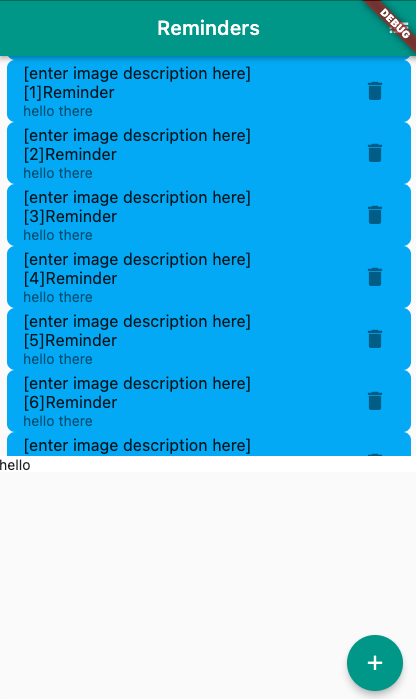
这可能被认为是一个bug,但它是预期的行为。瓷砖的颜色是由ListTile的第一个材料小部件祖先绘制的(我相信这使它能够优化昂贵的裁剪)。有关更多信息,请参见ListTile文档。
Stack Overflow用户
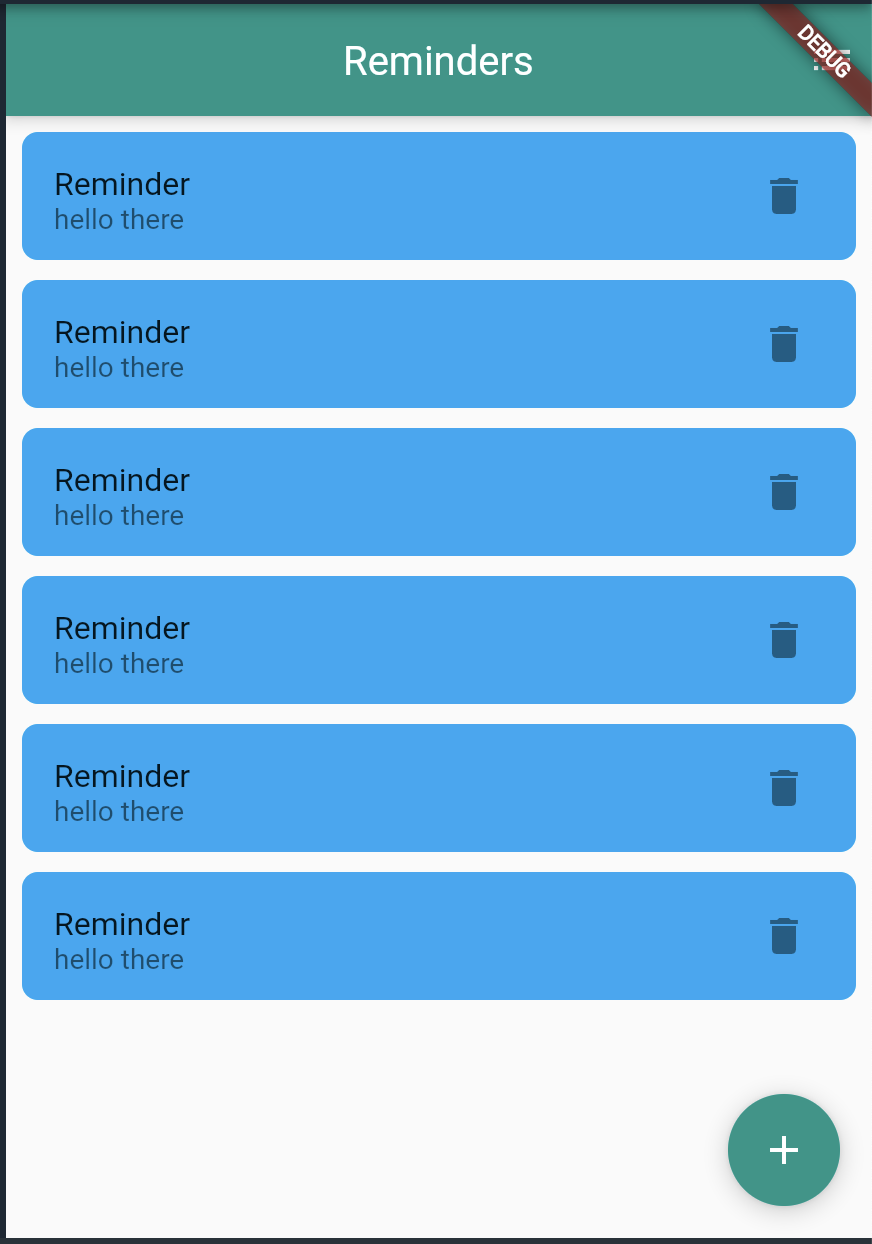
发布于 2021-12-10 17:58:52
// Copyright (c) 2019, the Dart project authors.  Please see the AUTHORS file
// for details. All rights reserved. Use of this source code is governed by a
// BSD-style license that can be found in the LICENSE file.

import 'package:flutter/material.dart';

void main() => runApp(const MyApp());

class MyApp extends StatelessWidget {
  const MyApp({Key? key}) : super(key: key);

  @override
  Widget build(BuildContext context) {
    return MaterialApp(
      title: 'Flutter Demo',
      theme: ThemeData(
        primarySwatch: Colors.teal,
      ),
      home: const MyHomePage(title: 'Reminders'),
    );
  }
}

class MyHomePage extends StatefulWidget {
  const MyHomePage({Key? key, required this.title}) : super(key: key);

  final String title;

  @override
  State<MyHomePage> createState() => _MyHomePageState();
}

class _MyHomePageState extends State<MyHomePage> {
  // ignore: prefer_final_fields
  List _reminders = <String>[];

  void _addReminder(String text) {
    setState(() {
      _reminders.add(text);
    });
  }

  Widget _buildRow(String text, int i) {
    return ListTile(
      title: const Text('Reminder'),
      trailing: IconButton(
          onPressed: () {
            setState(() {
              _reminders.removeAt(i);
            });
          },
          icon: const Icon(Icons.delete)),
      subtitle: Text(text),
      tileColor: Colors.lightBlue,
      shape: RoundedRectangleBorder(borderRadius: BorderRadius.circular(8)),
    );
  }

  void _showMenu() {}

  @override
  Widget build(BuildContext context) {
    return Scaffold(
      appBar: AppBar(
        title: Text(widget.title),
        actions: [IconButton(onPressed: _showMenu, icon: const Icon(Icons.list))],
      ),
      body: ListView.separated(
              padding: const EdgeInsets.all(8),
              itemBuilder: (context, i) => _buildRow(_reminders[i], i),
              itemCount: _reminders.length, separatorBuilder: (BuildContext context, int index) {
              return const SizedBox(height:10);},
            ),
      floatingActionButton: FloatingActionButton(
        onPressed: () {
          _addReminder('hello there');
        },
        child: const Icon(Icons.add),
      ),
    );
  }

}
Stack Overflow用户
发布于 2021-12-16 13:33:05
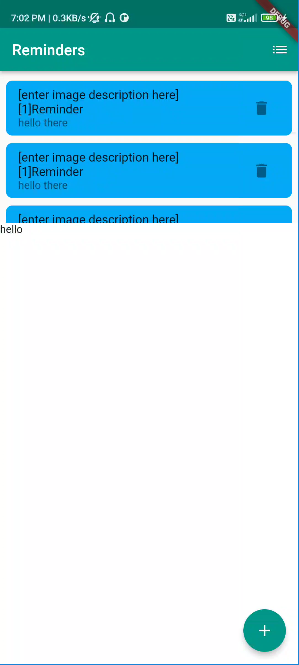
这是我的解决方案代码
class MyApp extends StatelessWidget {
  const MyApp({Key? key}) : super(key: key);

  @override
  Widget build(BuildContext context) {
    return MaterialApp(
      title: 'Flutter Demo',
      theme: ThemeData(
        primarySwatch: Colors.teal,
      ),
      home: const MyHomePage(title: 'Reminders'),
    );
  }
}

class MyHomePage extends StatefulWidget {
  const MyHomePage({Key? key, required this.title}) : super(key: key);

  final String title;

  @override
  State<MyHomePage> createState() => _MyHomePageState();
}

class _MyHomePageState extends State<MyHomePage> {
  List _reminders = <String>[];

  void _addReminder(String text) {
    setState(() {
      _reminders.add(text);
    });
  }

  Widget _buildRow(String text, int i) {
    return Container(
      margin: EdgeInsets.symmetric(vertical: 5),
      child: ListTile(
        title: Text('[enter image description here][1]Reminder'),
        trailing: IconButton(
            onPressed: () {
              setState(() {
                _reminders.removeAt(i);
              });
            },
            icon: Icon(Icons.delete)),
        subtitle: Text(text),
        tileColor: Colors.lightBlue,
        shape: RoundedRectangleBorder(borderRadius: BorderRadius.circular(8)),
      ),
    );
  }

  void _showMenu() {}

  @override
  Widget build(BuildContext context) {
    return Scaffold(
      appBar: AppBar(
        title: Text(widget.title),
        actions: [
          IconButton(onPressed: _showMenu, icon: const Icon(Icons.list))
        ],
      ),
      body: Column(
        children: <Widget>[
          SizedBox(
            height: 200,
            child: ListView.builder(
              scrollDirection: Axis.vertical,
              padding: EdgeInsets.all(8),
              itemBuilder: (context, i) => _buildRow(_reminders[i], i),
              itemCount: _reminders.length,
            ),
          ),
          Expanded(
            child: Container(
              color: Colors.white,
              width: double.infinity,
              child: Text('hello'),
            ),
          )
        ],
      ),
      floatingActionButton: FloatingActionButton(
        onPressed: () {
          _addReminder('hello there');
        },
        child: const Icon(Icons.add),
      ),
    );
  }
}
这是ss
页面原文内容由Stack Overflow提供。腾讯云小微IT领域专用引擎提供翻译支持
原文链接:
https://stackoverflow.com/questions/70308347
复制相关文章
相似问题
腾讯云开发者

Copyright © 2013 - 2026 Tencent Cloud. All Rights Reserved. 腾讯云 版权所有
深圳市腾讯计算机系统有限公司 ICP备案/许可证号:粤B2-20090059  粤公网安备44030502008569号
腾讯云计算(北京)有限责任公司 京ICP证150476号 | 京ICP备11018762号