
在amazon网页产品上刮ASIN
在amazon网页产品上刮ASIN
提问于 2021-12-06 22:02:04
首先,为我糟糕的英语感到抱歉。实际上,我制作了一个在亚马逊网页上找到数据的脚本。我需要使用python和selenium在amazon的网页上搜索。我已经编写了这个代码,以便在下面的代码中进行如下操作:
    firstResult = driver.find_element_by_css_selector('div[data-index="1"]>div')
    asin = firstResult.get_attribute('data-asin')
但这不起作用,我在结果上有一些错误:
selenium.common.exceptions.NoSuchElementException: Message: no such element: Unable to locate element: {"method":"css selector","selector":"div[data-index="1"]>div"}
  (Session info: headless chrome=96.0.4664.45)
在网页上有编号的源代码部分(ASIN突出显示):
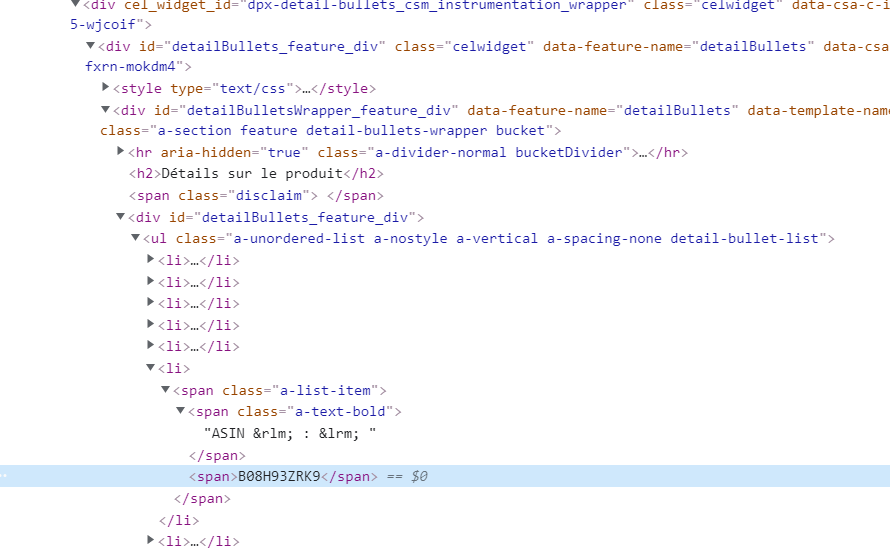
有人知道如何用硒在蟒蛇里刮这个ASIN吗?泰伊求救!
回答 1
Stack Overflow用户
回答已采纳
发布于 2021-12-07 06:54:09
您可以等待并查找位于该标签旁边的跨度。
wait=WebDriverWait(driver, 60)
driver.get('https://www.amazon.fr/PlayStation-%C3%89dition-Standard-DualSense-Couleur/dp/B08H93ZRK9')
elem=wait.until(EC.presence_of_element_located((By.XPATH," //span[@class='a-list-item' and contains (.,'ASIN')]//span[2]")))
print(elem.text)
进口:
from selenium.webdriver.common.by import By
from selenium.webdriver.support.ui import WebDriverWait
from selenium.webdriver.support import expected_conditions as EC
产出:
B08H93ZRK9另一件事是,url实际上在末尾具有相同的值。它可以得到一个简单的字符串操作的driver.current_url,
https://www.amazon.fr/PlayStation-%C3%89dition-Standard-DualSense-Couleur/dp/ B08H93ZRK9
页面原文内容由Stack Overflow提供。腾讯云小微IT领域专用引擎提供翻译支持
原文链接:
https://stackoverflow.com/questions/70252516
复制相关文章
相似问题
腾讯云开发者

Copyright © 2013 - 2026 Tencent Cloud. All Rights Reserved. 腾讯云 版权所有
深圳市腾讯计算机系统有限公司 ICP备案/许可证号:粤B2-20090059  粤公网安备44030502008569号
腾讯云计算(北京)有限责任公司 京ICP证150476号 | 京ICP备11018762号