
如何保护MongoDB?我被黑了
如何保护MongoDB?我被黑了
提问于 2021-12-05 05:54:00
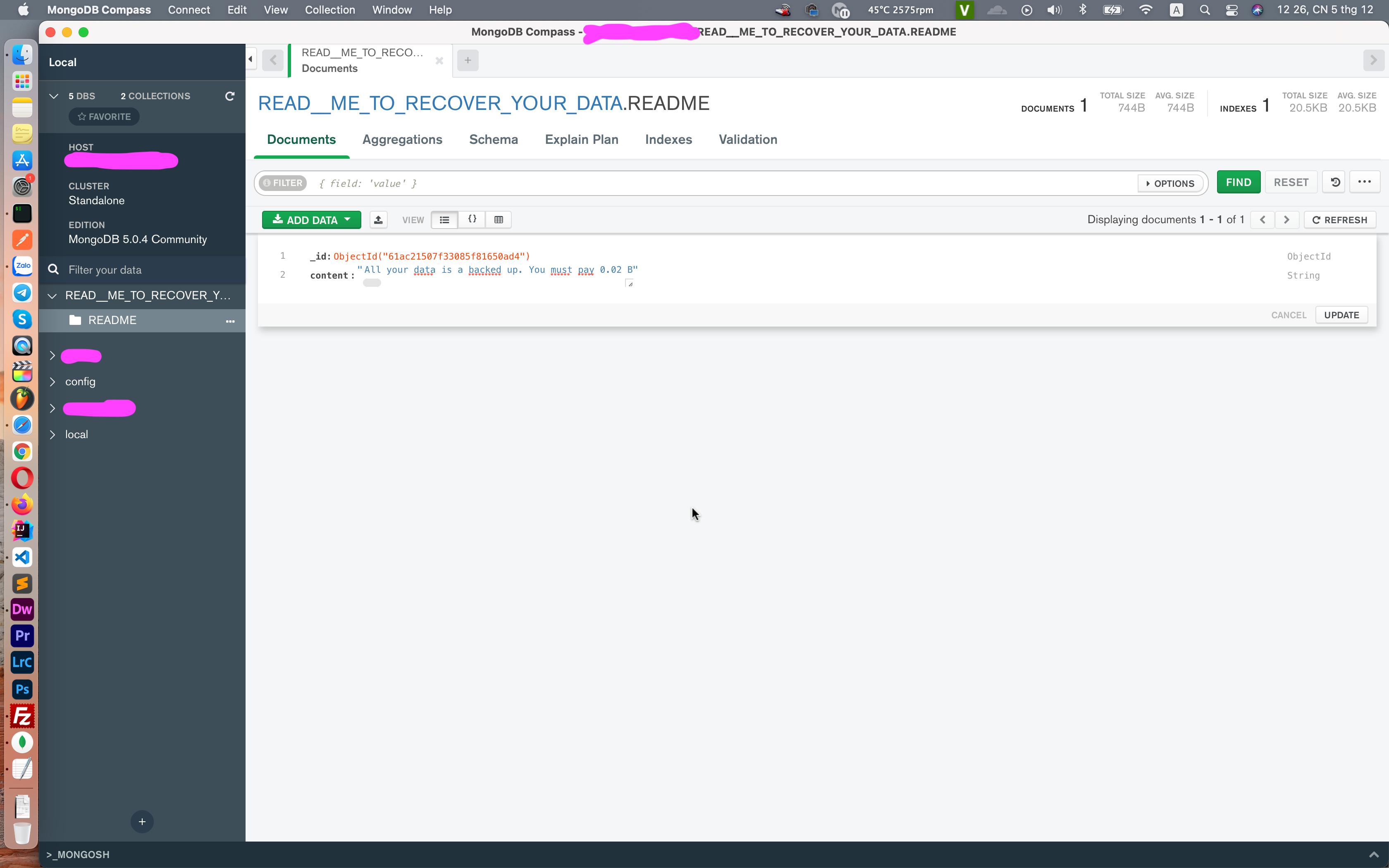
我以前不使用MongoDB,设置好一切后,我的mongoDB已经被黑了1秒,请帮我回答我的问题:“如何保护我的mongoDB?”
回答 1
Stack Overflow用户
回答已采纳
发布于 2021-12-05 07:00:39
要保护MongoDB,您需要:
- 启用安全性(在mongod.conf文件中),
- 创建数据库用户进行身份验证,
- 可以将端口27001 (默认)更改为任何端口,如27000 (在mongod.conf文件中),可以添加特定的ip地址以允许连接和访问数据库(在mongod.conf文件中)。
您需要找到mongod.conf并打开它。(将mongod.conf存储在您的pc窗口/mac/ubuntu中)
security:
  authorization: enabled
关闭端口27001上的MongoDB实例
mongo admin --port 27001 --eval 'db.shutdownServer()'使用新配置重新启动MongoDB实例
mongod -f mongod.conf使用以下内容在管理数据库上创建第一个用户
mongo
>use admin

db.createUser({
  user: "USER_NAME_HERE",
  pwd: "PASSWORD_HERE",
  roles: [ { role: "userAdminAnyDatabase", db: "admin" } ]
});
例子:
db.createUser({
  user: "AdminUser",
  pwd: "57d49$4%0beqwe#adb4d",
  roles: [ { role: "userAdminAnyDatabase", db: "admin" } ]
});
之后,运行下面的检查用户是通过身份验证的
语法:db.auth( "USER_NAME_HERE","PASSWORD_HERE“)
db.auth( "AdminUser", "57d49$4%0beqwe#adb4d" )若要检查用户:
db.getUsers()它将返回:
[
        {
                "_id" : "admin.AdminUser",
                "userId" : UUID("31ccb892-d3ef-46b6-8ac1-2e9b5be11892"),
                "user" : "globalAdminUser",
                "db" : "admin",
                "roles" : [
                        {
                                "role" : "userAdminAnyDatabase",
                                "db" : "admin"
                        }
                ],
                "mechanisms" : [
                        "SCRAM-SHA-1",
                        "SCRAM-SHA-256"
                ]
        }
]
现在您的数据库是安全的,只有经过身份验证的用户才能访问它。
你可以把芒果和褶皱联系起来:
mongo admin --port 27001 --username 'AdminUser' --password '57d49$4%0beqwe#adb4d'页面原文内容由Stack Overflow提供。腾讯云小微IT领域专用引擎提供翻译支持
原文链接:
https://stackoverflow.com/questions/70231824
复制相关文章
相似问题
腾讯云开发者

Copyright © 2013 - 2026 Tencent Cloud. All Rights Reserved. 腾讯云 版权所有
深圳市腾讯计算机系统有限公司 ICP备案/许可证号:粤B2-20090059  粤公网安备44030502008569号
腾讯云计算(北京)有限责任公司 京ICP证150476号 | 京ICP备11018762号