
使用VBA将多列转置为多行
使用VBA将多列转置为多行
提问于 2016-04-02 05:05:56
这就是我正在尝试执行的那种转换。
为了说明,我把它做成了表格。基本上,前三列应该重复,无论有多少种颜色可用。
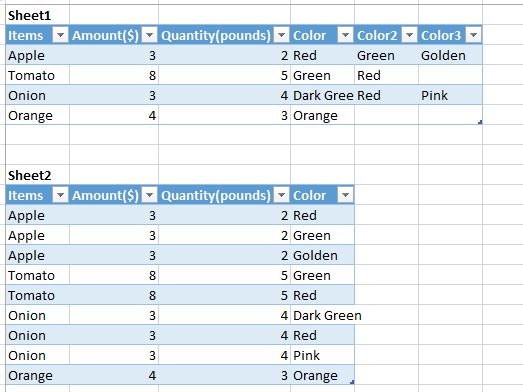
我搜索了类似的问题,但找不到我想要多个列重复的时候。
我在网上找到了这段代码
Sub createData()
    Dim dSht As Worksheet
    Dim sSht As Worksheet
    Dim colCount As Long
    Dim endRow As Long
    Dim endRow2 As Long

    Set dSht = Sheets("Sheet1") 'Where the data sits
    Set sSht = Sheets("Sheet2") 'Where the transposed data goes

    sSht.Range("A2:C60000").ClearContents
    colCount = dSht.Range("A1").End(xlToRight).Column

     '// loops through all the columns extracting data where "Thank" isn't blank
    For i = 2 To colCount Step 2
        endRow = dSht.Cells(1, i).End(xlDown).Row
        For j = 2 To endRow
            If dSht.Cells(j, i) <> "" Then
                endRow2 = sSht.Range("A50000").End(xlUp).Row + 1
                sSht.Range("A" & endRow2) = dSht.Range("A" & j)
                sSht.Range("B" & endRow2) = dSht.Cells(j, i)
                sSht.Range("C" & endRow2) = dSht.Cells(j, i).Offset(0, 1)
            End If
        Next j
    Next i
End Sub
我尝试将步骤2改为1,并将j改为从4开始。
另一个具有两个可变集合的示例:

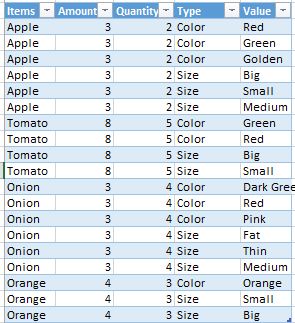
回答 3
Stack Overflow用户
回答已采纳
发布于 2016-04-02 05:49:54
这里有一个通用的“取消透视”方法(所有“固定”列必须出现在要取消透视的列的左侧)
测试sub:
Sub Tester()

    Dim p

    'get the unpivoted data as a 2-D array
    p = UnPivotData(Sheets("Sheet1").Range("A1").CurrentRegion, _
                  3, False, False)

    With Sheets("Sheet1").Range("H1")
        .CurrentRegion.ClearContents
        .Resize(UBound(p, 1), UBound(p, 2)).Value = p 'populate array to sheet
    End With

    'EDIT: alternative (slower) method to populate the sheet
    '      from the pivoted dataset.  Might need to use this
    '      if you have a large amount of data
    'Dim r As Long, c As Long
    'For r = 1 To Ubound(p, 1)
    'For c = 1 To Ubound(p, 2)
    '    Sheets("Sheet2").Cells(r, c).Value = p(r, c)
    'Next c
    'Next r

End Sub
UnPivot函数-不需要任何修改:
Function UnPivotData(rngSrc As Range, fixedCols As Long, _
                   Optional AddCategoryColumn As Boolean = True, _
                   Optional IncludeBlanks As Boolean = True)

    Dim nR As Long, nC As Long, data, dOut()
    Dim r As Long, c As Long, rOut As Long, cOut As Long, cat As Long
    Dim outRows As Long, outCols As Long

    data = rngSrc.Value 'get the whole table as a 2-D array
    nR = UBound(data, 1) 'how many rows
    nC = UBound(data, 2) 'how many cols

    'calculate the size of the final unpivoted table
    outRows = nR * (nC - fixedCols)
    outCols = fixedCols + IIf(AddCategoryColumn, 2, 1)

    'resize the output array
    ReDim dOut(1 To outRows, 1 To outCols)

    'populate the header row
    For c = 1 To fixedCols
        dOut(1, c) = data(1, c)
    Next c
    If AddCategoryColumn Then
        dOut(1, fixedCols + 1) = "Category"
        dOut(1, fixedCols + 2) = "Value"
    Else
        dOut(1, fixedCols + 1) = "Value"
    End If

    'populate the data
    rOut = 1
    For r = 2 To nR
        For cat = fixedCols + 1 To nC

            If IncludeBlanks Or Len(data(r, cat)) > 0 Then
                rOut = rOut + 1
                'Fixed columns...
                For c = 1 To fixedCols
                    dOut(rOut, c) = data(r, c)
                Next c
                'populate unpivoted values
                If AddCategoryColumn Then
                    dOut(rOut, fixedCols + 1) = data(1, cat)
                    dOut(rOut, fixedCols + 2) = data(r, cat)
                Else
                    dOut(rOut, fixedCols + 1) = data(r, cat)
                End If
            End If

        Next cat
    Next r

    UnPivotData = dOut
End FunctionStack Overflow用户
发布于 2016-04-02 05:51:18
这里有一种使用数组的方法(最快?)。这种方法比linked question更好,因为它不会在循环中读取和写入range对象。我已经对代码进行了注释,因此您应该不会有理解它的问题。
Option Explicit

Sub Sample()
    Dim wsThis As Worksheet, wsThat As Worksheet
    Dim ThisAr As Variant, ThatAr As Variant
    Dim Lrow As Long, Col As Long
    Dim i As Long, k As Long

    Set wsThis = Sheet1: Set wsThat = Sheet2

    With wsThis
        '~~> Find Last Row in Col A
        Lrow = .Range("A" & .Rows.Count).End(xlUp).Row
        '~~> Find total value in D,E,F so that we can define output array
        Col = Application.WorksheetFunction.CountA(.Range("D2:F" & Lrow))

        '~~> Store the values from the range in an array
        ThisAr = .Range("A2:F" & Lrow).Value

        '~~> Define your new array
        ReDim ThatAr(1 To Col, 1 To 4)

        '~~> Loop through the array and store values in new array
        For i = LBound(ThisAr) To UBound(ThisAr)
            k = k + 1

            ThatAr(k, 1) = ThisAr(i, 1)
            ThatAr(k, 2) = ThisAr(i, 2)
            ThatAr(k, 3) = ThisAr(i, 3)

            '~~> Check for Color 1
            If ThisAr(i, 4) <> "" Then ThatAr(k, 4) = ThisAr(i, 4)

            '~~> Check for Color 2
            If ThisAr(i, 5) <> "" Then
                k = k + 1
                ThatAr(k, 1) = ThisAr(i, 1)
                ThatAr(k, 2) = ThisAr(i, 2)
                ThatAr(k, 3) = ThisAr(i, 3)
                ThatAr(k, 4) = ThisAr(i, 5)
            End If

            '~~> Check for Color 3
            If ThisAr(i, 6) <> "" Then
                k = k + 1
                ThatAr(k, 1) = ThisAr(i, 1)
                ThatAr(k, 2) = ThisAr(i, 2)
                ThatAr(k, 3) = ThisAr(i, 3)
                ThatAr(k, 4) = ThisAr(i, 6)
            End If
        Next i
    End With

    '~~> Create headers in Sheet2
    Sheet2.Range("A1:D1").Value = Sheet1.Range("A1:D1").Value

    '~~> Output the array
    wsThat.Range("A2").Resize(Col, 4).Value = ThatAr
End Sub
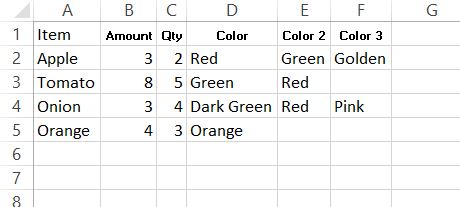
SHEET1
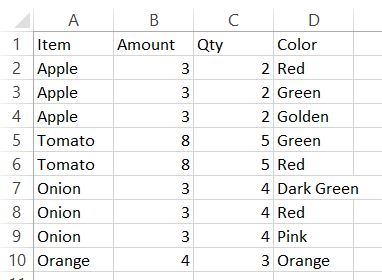
SHEET2
Stack Overflow用户
发布于 2021-02-19 22:16:32
添加LET函数允许使用此非VBA解决方案。
=LET(data,B3:F6,
     dataRows,ROWS(data),
     dataCols,COLUMNS(data),
     rowHeaders,OFFSET(data,0,-1,dataRows,1),
     colHeaders,OFFSET(data,-1,0,1,dataCols),
     dataIndex,SEQUENCE(dataRows*dataCols),
     rowIndex,MOD(dataIndex-1,dataRows)+1,
     colIndex,INT((dataIndex-1)/dataRows)+1,
FILTER(CHOOSE({1,2,3}, INDEX(rowHeaders,rowIndex), INDEX(colHeaders,colIndex), INDEX(data,rowIndex,colIndex)), index(data,rowIndex,colIndex)<>""))页面原文内容由Stack Overflow提供。腾讯云小微IT领域专用引擎提供翻译支持
原文链接:
https://stackoverflow.com/questions/36365839
复制相关文章
相似问题
腾讯云开发者

Copyright © 2013 - 2026 Tencent Cloud. All Rights Reserved. 腾讯云 版权所有
深圳市腾讯计算机系统有限公司 ICP备案/许可证号:粤B2-20090059  粤公网安备44030502008569号
腾讯云计算(北京)有限责任公司 京ICP证150476号 | 京ICP备11018762号