
如何更改按钮的外观
如何更改按钮的外观
提问于 2010-12-03 16:44:45
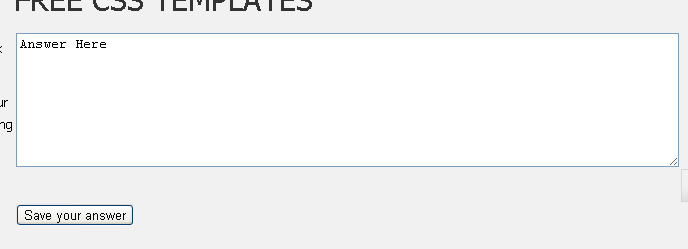
大家好,我正在尝试更改按钮和textArea皮肤的皮肤(形状)为另一个。比如第二张图片。

回答 4
Stack Overflow用户
回答已采纳
发布于 2010-12-03 16:56:59
你有不止一种这样做的可能性:
使用背景图片(适用于所有浏览器,但我个人不喜欢它为每个小细节重新编辑和保存图像文件) CSS:
button {
  background: url('some image..');
  width: <width of the background image>;
  height: <height of the background image>;
  ...
}

button:hover {
  background: url('mouseover image');
  ...
}
或者,您可以使用较新的CSS属性来创建按钮。它们提供了你想要的一切,而且比使用背景图片要酷得多,但缺点是今天没有多少浏览器完全支持这一点(有些浏览器在很长一段时间内都不会支持,是的,IE,我是指你):
button {
  border: solid 1px somecolor;
  color: #eee;
  border-radius:5px;
 -moz-border-radius:5px;
  background: -moz-linear-gradient(top, #5E5E5E 0%, #474747 51%, #0a0e0a 51%, #0a0809 100%);
  background: -webkit-gradient(linear, left top, left bottom, color-stop(0%,#5E5E5E), color-stop(51%,#474747), color-stop(51%,#0a0e0a), color-stop(100%,#0a0809));
}
button:hover {
  color: white;
}看看这里来创建CSS渐变:http://www.colorzilla.com/gradient-editor/
对使用纯CSS3的可能性的印象和教程:
- http://technology.posterous.com/make-css3-buttons-that-are-extremely-fancy
- http://www.kulturbanause.de/2010/05/css3-als-photoshop-ersatz-buttons-und-grafiken/ (在德语中,但是,您将能够看到按钮并阅读CSS neverthenless)
- Simpler示例,这可能正是您需要的:http://capturedsparks.com/pure-css3-buttons/
您可以使用它们相同的属性来设置文本区的样式:border、background、字体颜色的color等。
Stack Overflow用户
发布于 2010-12-03 16:48:17
<button type="submit" style="border: 0; background: transparent">
    <img src="/images/Btn.PNG" width="90" heght="50" alt="submit" />
</button>Stack Overflow用户
发布于 2010-12-03 16:50:14
您可以将样式应用到底部或提交HTML标记,例如:
<input type="submit" class="mybotton" value="Continue" />这样你就可以添加背景图片了:
.mybotton{
    background-image: url(buttonimage.png);
}
致以问候!
页面原文内容由Stack Overflow提供。腾讯云小微IT领域专用引擎提供翻译支持
原文链接:
https://stackoverflow.com/questions/4343798
复制相关文章
相似问题
腾讯云开发者

Copyright © 2013 - 2026 Tencent Cloud. All Rights Reserved. 腾讯云 版权所有
深圳市腾讯计算机系统有限公司 ICP备案/许可证号:粤B2-20090059  粤公网安备44030502008569号
腾讯云计算(北京)有限责任公司 京ICP证150476号 | 京ICP备11018762号