
在WPF中去掉按钮边框?
在WPF中去掉按钮边框?
提问于 2010-05-25 04:07:57
我试图摆脱按钮边框,只显示文本,但是即使我将borderThickness设置为0,并将边框刷设置为透明,文本周围的细线也会显示出来。
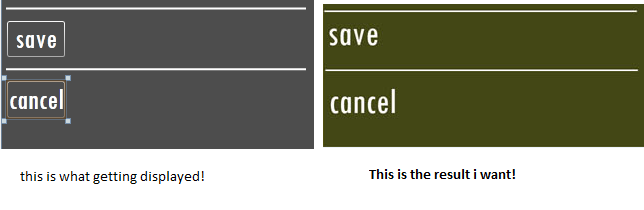
保存按钮的xaml代码:
<Button Content="save" Name="btnSaveEditedText"
                Background="Transparent"
                Foreground="White"
                FontFamily="Tw Cen MT Condensed"
                FontSize="30"
                Margin="-280,0,0,10"
                Width="60"
                BorderBrush="Transparent"
                BorderThickness="0"/>
有什么方法可以去掉按钮边框吗?
回答 4
Stack Overflow用户
回答已采纳
发布于 2010-05-25 04:12:46
您需要覆盖按钮的ControlTemplate:
<Button Content="save" Name="btnSaveEditedText"
                Background="Transparent"
                Foreground="White"
                FontFamily="Tw Cen MT Condensed"
                FontSize="30"
                Margin="-280,0,0,10"
                Width="60"
                BorderBrush="Transparent"
                BorderThickness="0">
    <Button.Template>
        <ControlTemplate TargetType="Button">
             <ContentPresenter Content="{TemplateBinding Content}"/>
        </ControlTemplate>
    </Button.Template>
</Button>Stack Overflow用户
发布于 2013-01-22 23:36:26
我最近发现的最有用的方法是让你的按钮使用工具栏的样式。这将仅使用图像或文本,同时仅在鼠标悬停时显示按钮边框。
<Button Style="{StaticResource {x:Static ToolBar.ButtonStyleKey}}"
        Content="save"
        Name="btnSaveEditedText"
        Background="Transparent"
        Foreground="White"
        FontFamily="Tw Cen MT Condensed"
        FontSize="30"
        Margin="-280,0,0,10"
        Width="60"
        BorderBrush="Transparent"
BorderThickness="0" />Stack Overflow用户
发布于 2010-05-25 04:17:55
您需要为按钮创建一个新模板。
最简单的方法是在Expression Blend中打开项目,选择按钮,然后右键单击并选择"Edit Template > Edit a Copy..“。这会将现有模板复制到您可以修改的模板中。如果您在资源字典中创建它,则会更容易。
然后选择模板,并在Resource选项卡(在UI的右侧)上选择ButtonFocusVisual。选择属性选项卡,然后展开其他部分。其中包含BorderStyle和BorderThickness字段(以及其他字段)。将样式设置为None。
页面原文内容由Stack Overflow提供。腾讯云小微IT领域专用引擎提供翻译支持
原文链接:
https://stackoverflow.com/questions/2899948
复制相关文章
相似问题
腾讯云开发者

Copyright © 2013 - 2026 Tencent Cloud. All Rights Reserved. 腾讯云 版权所有
深圳市腾讯计算机系统有限公司 ICP备案/许可证号:粤B2-20090059  粤公网安备44030502008569号
腾讯云计算(北京)有限责任公司 京ICP证150476号 | 京ICP备11018762号