
如何在java的itext pdf库中为段落添加边框?
我在使用java中的itext pdf库中创建了一个段落。我必须在段落中添加边框,而不是整个文档。该怎么做呢?
回答 2
Stack Overflow用户
发布于 2015-05-05 22:36:38
请看一下BorderForParagraph示例。它展示了如何为如下段落添加边框:
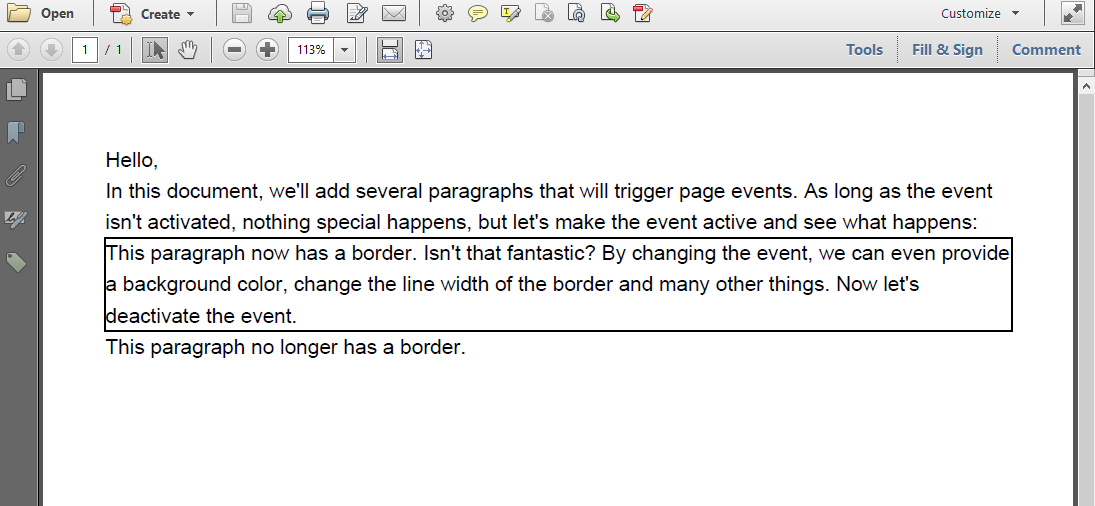
没有允许您为Paragraph创建边框的方法,但您可以创建一个PdfPageEvent实现,该实现允许您根据Paragraph的开始位置和结束位置绘制矩形
class ParagraphBorder extends PdfPageEventHelper {
    public boolean active = false;
    public void setActive(boolean active) {
        this.active = active;
    }

    public float offset = 5;
    public float startPosition;

    @Override
    public void onParagraph(PdfWriter writer, Document document, float paragraphPosition) {
        this.startPosition = paragraphPosition;
    }

    @Override
    public void onParagraphEnd(PdfWriter writer, Document document, float paragraphPosition) {
        if (active) {
            PdfContentByte cb = writer.getDirectContentUnder();
            cb.rectangle(document.left(), paragraphPosition - offset,
                document.right() - document.left(), startPosition - paragraphPosition);
            cb.stroke();
        }
    }
}如您所见,我引入了一个名为active的boolean参数。默认情况下,我已将此参数设置为false。我还创建了一个offset (更改此值以微调结果)和一个startPosition参数。
每次iText开始渲染Paragraph对象时,startPosition值都会更新。每次iText结束呈现Paragraph时,如果active为true,就会绘制一个矩形(否则什么都不会发生)。
我们像这样使用这个事件:
public void createPdf(String dest) throws IOException, DocumentException {
    Document document = new Document();
    PdfWriter writer = PdfWriter.getInstance(document, new FileOutputStream(dest));
    ParagraphBorder border = new ParagraphBorder();
    writer.setPageEvent(border);
    document.open();
    document.add(new Paragraph("Hello,"));
    document.add(new Paragraph("In this document, we'll add several paragraphs that will trigger page events. As long as the event isn't activated, nothing special happens, but let's make the event active and see what happens:"));
    border.setActive(true);
    document.add(new Paragraph("This paragraph now has a border. Isn't that fantastic? By changing the event, we can even provide a background color, change the line width of the border and many other things. Now let's deactivate the event."));
    border.setActive(false);
    document.add(new Paragraph("This paragraph no longer has a border."));
    document.close();
}如您所见,我们使用setPageEvent()方法将事件声明给PdfWriter。我们像这样激活事件:
border.setActive(true);我们像这样停用它:
border.setActive(false);这是,只是概念的证明,!如果希望对跨多页的段落有效,则需要实现onStartPage()和onEndPage()方法。这在BorderForParagraph2中显示
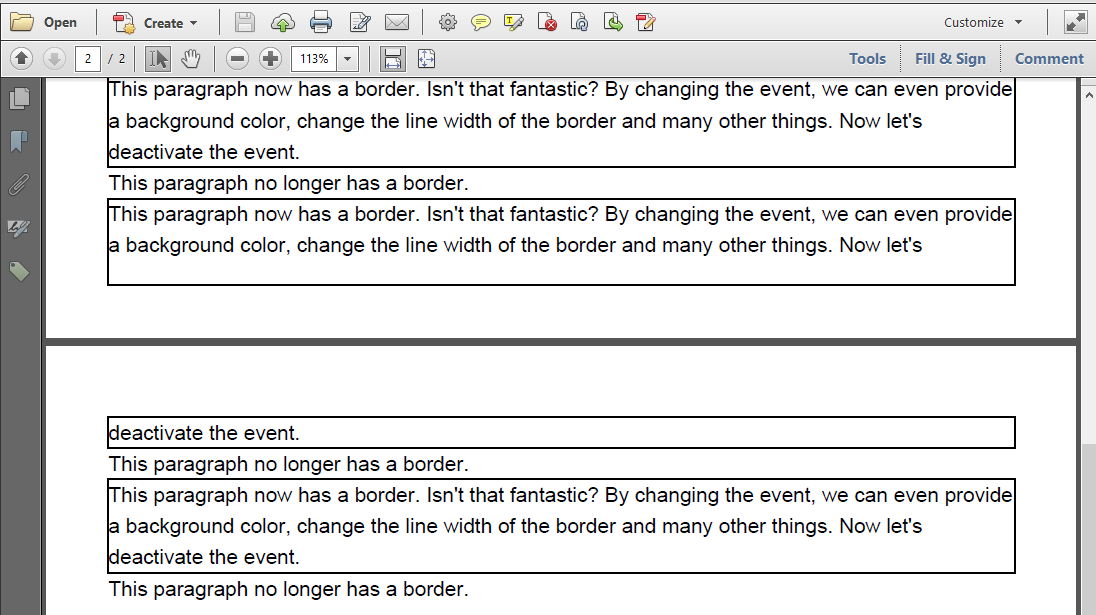
onStartPage()和onEndPage()的实现是很简单的:
class ParagraphBorder extends PdfPageEventHelper {
    public boolean active = false;
    public void setActive(boolean active) {
        this.active = active;
    }

    public float offset = 5;
    public float startPosition;

    @Override
    public void onStartPage(PdfWriter writer, Document document) {
        startPosition = document.top();
    }

    @Override
    public void onParagraph(PdfWriter writer, Document document, float paragraphPosition) {
        this.startPosition = paragraphPosition;
    }

    @Override
    public void onEndPage(PdfWriter writer, Document document) {
        if (active) {
            PdfContentByte cb = writer.getDirectContentUnder();
            cb.rectangle(document.left(), document.bottom() - offset,
                document.right() - document.left(), startPosition - document.bottom());
            cb.stroke();
        }
    }

    @Override
    public void onParagraphEnd(PdfWriter writer, Document document, float paragraphPosition) {
        if (active) {
            PdfContentByte cb = writer.getDirectContentUnder();
            cb.rectangle(document.left(), paragraphPosition - offset,
                document.right() - document.left(), startPosition - paragraphPosition);
            cb.stroke();
        }
    }
}Stack Overflow用户
发布于 2015-05-05 21:08:28
试试这个:
public static void main(String[] args) {
     Document document = new Document();
    // step 2
    PdfWriter writer=PdfWriter.getInstance(document, new FileOutputStream("somepath"));
    document.setPageSize(PageSize.LETTER);
    document.setMargins(36, 72, 108, 180);
    document.setMarginMirroring(false);
    // step 3
    document.open();
    // step 4
    Rectangle rect= new Rectangle(36,108);
    rect.enableBorderSide(1);
    rect.enableBorderSide(2);
    rect.enableBorderSide(4);
    rect.enableBorderSide(8);
    rect.setBorder(2);
    rect.setBorderColor(BaseColor.BLACK);
    rect.setBorderWidth(2);
    document.add(rect);
}https://stackoverflow.com/questions/30053684
复制相似问题
腾讯云开发者

Copyright © 2013 - 2026 Tencent Cloud. All Rights Reserved. 腾讯云 版权所有
深圳市腾讯计算机系统有限公司 ICP备案/许可证号:粤B2-20090059  粤公网安备44030502008569号
腾讯云计算(北京)有限责任公司 京ICP证150476号 | 京ICP备11018762号