
严重: jdbcrealm.invaliduserreason WEB9102:网络登录失败
我正在尝试使用MySQL数据库获取登录表单,但仍然收到以下错误:
update -->我今天做了一些修改这是我现在得到的:
SEVERE: jdbcrealm.invaliduserreason
WARNING: WEB9102: Web Login Failed: com.sun.enterprise.security.auth.login.common.LoginException: Login failed: Security Exception
WARNING: WEB9102: Web Login Failed: com.sun.enterprise.security.auth.login.common.LoginException: Login failed: Security Exception
WARNING: WEB9102: Web Login Failed: com.sun.enterprise.security.auth.login.common.LoginException: Login failed: Security Exception这就是我从堆栈跟踪中得到的所有信息。我将遵循本教程:http://blog.eisele.net/2011/01/jdbc-security-realm-and-form-based.html
这是我在glassfish-web.xml上的映射:
  <security-role-mapping>
    <role-name>user</role-name>
    <group-name>user</group-name>
  </security-role-mapping>
这是我的web.xml:
<security-constraint>
    <display-name>user</display-name>
    <web-resource-collection>
        <web-resource-name>Users Area</web-resource-name>
        <description>Protected Users Area</description>
        <url-pattern>/user/*</url-pattern>
        <http-method>GET</http-method>
        <http-method>PUT</http-method>
        <http-method>HEAD</http-method>
        <http-method>POST</http-method>
        <http-method>OPTIONS</http-method>
        <http-method>TRACE</http-method>
        <http-method>DELETE</http-method>
    </web-resource-collection>
    <auth-constraint>
        <description/>
        <role-name>user</role-name>
    </auth-constraint>
</security-constraint>
<login-config>
    <auth-method>FORM</auth-method>
    <realm-name>jdbcRealm</realm-name>
    <form-login-config>
        <form-login-page>/login.jsp</form-login-page>
        <form-error-page>/login-error.jsp</form-error-page>
    </form-login-config>
</login-config>
<security-role>
    <description>user security role</description>
    <role-name>user</role-name>
</security-role>
这是我的登录表:
    <form action="j_security_check" class="form" method="post">

            <p class="email">
                    <input type="text" name="j_username" id="j_username"/>
                    <label for="j_username">E-mail / Username</label>
            </p>

            <p class="pwd">
                    <input type="password" name="j_password" id="j_password" />
                    <label for="j_password">Password</label>
            </p>

            <p class="submit">
                    <input name="login" type="submit" value="Login" />
                    <input name="reset_pwd" type="submit" value="Reset Password">
            </p>

    </form>
这是我在服务器中设置的领域的屏幕截图。我暂时没有使用加密来简化事情:
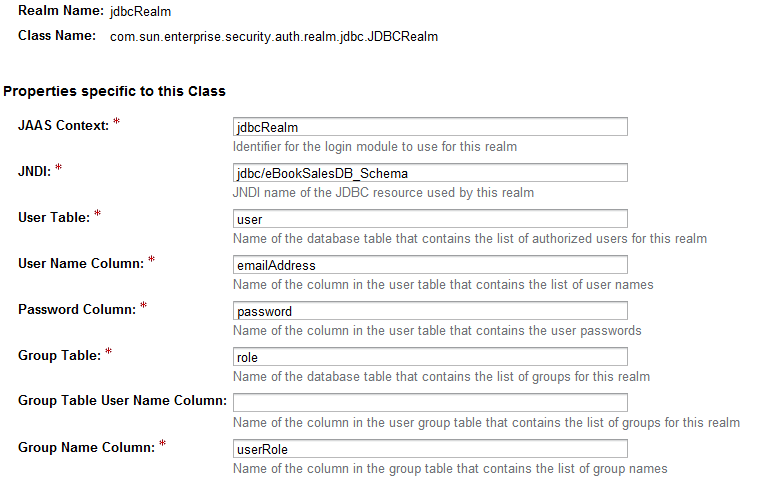
因为我在堆栈中除了我在上面发布的内容之外什么都没有。我真的不知道出了什么问题。如果有人能在正确的方向上推动我,我将不胜感激。
回答 3
Stack Overflow用户
发布于 2012-07-21 09:09:30
在Glassfish中的jdbcRealm设置中,请确保在算法中写入"none“(而不是SHA-256或其他任何内容)。如果将该字段留空,它将不起作用。
希望这能帮到你。
Stack Overflow用户
发布于 2013-08-06 21:45:35
愚蠢和整洁的东西为我解决了它;领域是小写字母,特别是在表格和列的名称中,它们在我的mysql数据库中是大写的。记住在你的领域中检查你的表的大小写敏感性。
Stack Overflow用户
发布于 2015-10-26 16:12:34
如果您使用的是Glassfish 4,则需要填写数据库用户和数据库密码字段,该字段显示在设置->服务器-配置->安全->领域-> (jdbcRealm)中
https://stackoverflow.com/questions/11007071
复制相似问题
腾讯云开发者

Copyright © 2013 - 2026 Tencent Cloud. All Rights Reserved. 腾讯云 版权所有
深圳市腾讯计算机系统有限公司 ICP备案/许可证号:粤B2-20090059  粤公网安备44030502008569号
腾讯云计算(北京)有限责任公司 京ICP证150476号 | 京ICP备11018762号