VisionForge SDK使用教程02- yolov8实现垃圾检测调用

VisionForge SDK使用教程02- yolov8实现垃圾检测调用

零一未来AI星球
发布于 2026-09-15 19:40:55
发布于 2026-09-15 19:40:55
VisionForge SDK使用教程02- yolov8实现垃圾检测调用
项目背景与需求
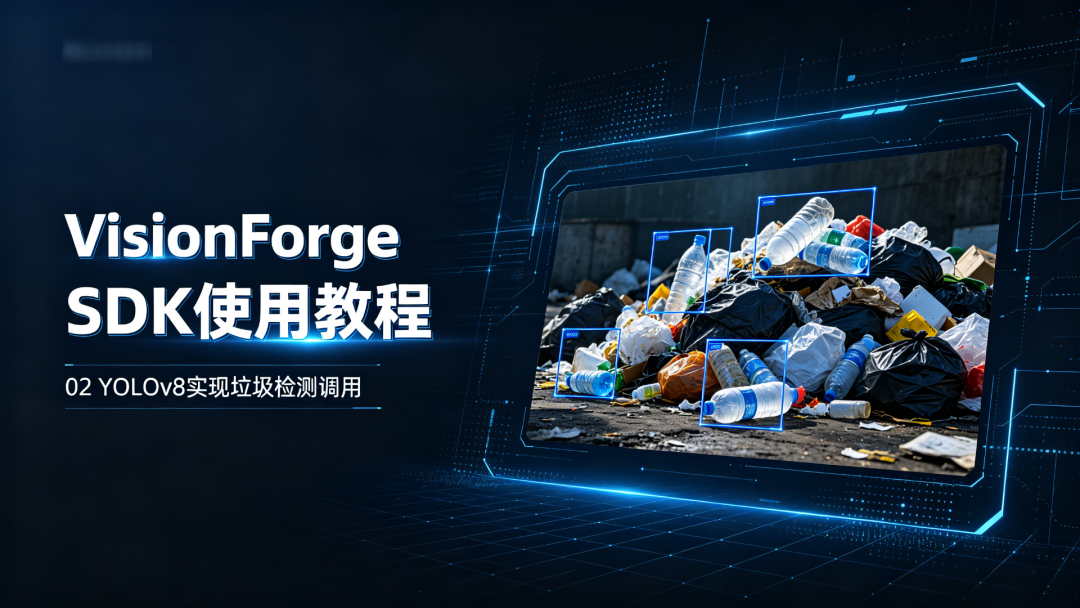
随着城市化进程的加速和环保意识的提高,垃圾管理已成为城市环境治理的重要组成部分。传统的垃圾监测主要依靠人工巡查,存在效率低下、覆盖范围有限、实时性差等问题。为了提高垃圾检测的效率和覆盖率,VisionForge SDK结合了先进的深度学习技术,开发了基于YOLOv8的垃圾检测系统。
该系统能够自动识别各类场景中的垃圾,包括公共场所、街道、水域等,为城市清洁、环境保护和资源回收提供数据支持,助力实现智能化城市管理。
主要应用场景:
- 城市街道监测:实时监测街道、人行道等公共区域的垃圾堆积情况
- 水域垃圾监测:识别河流、湖泊等水域中的漂浮垃圾
- 景区环境监测:监测旅游景区内的垃圾分布,及时清理
- 垃圾分类辅助:辅助垃圾分类系统进行初步识别和分类
- 工业区环境监测:监控工业园区的垃圾排放和处理情况
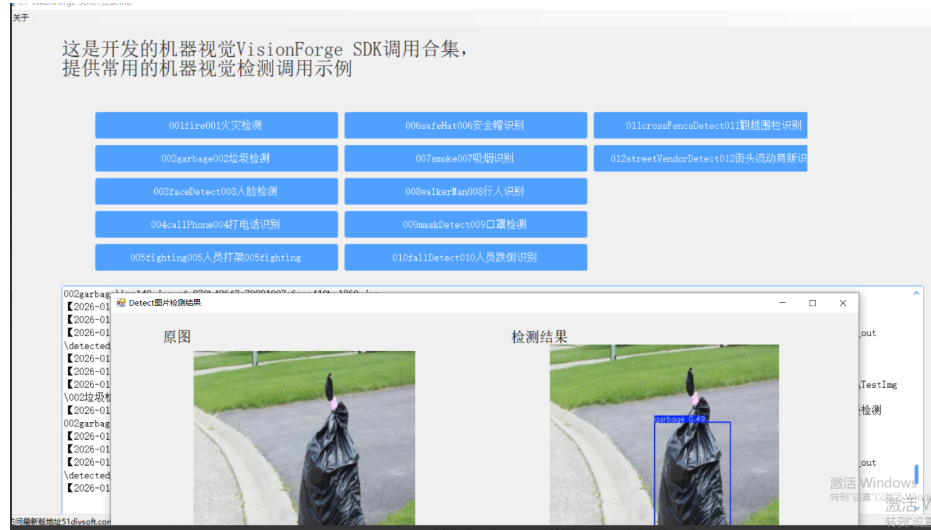
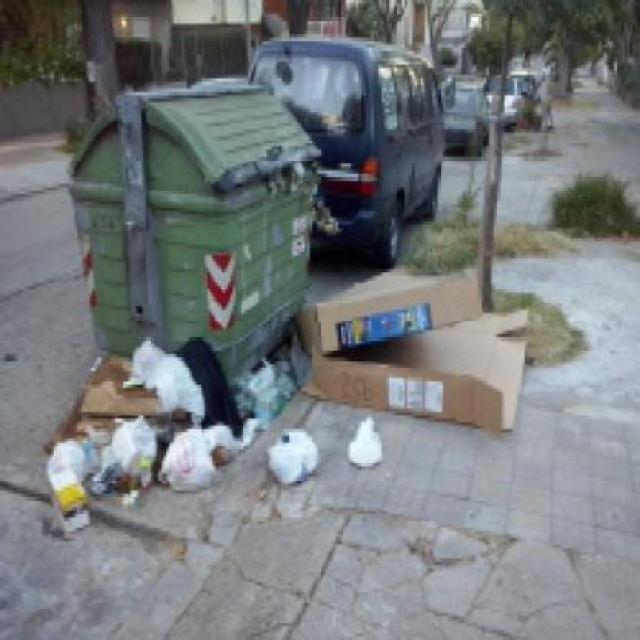
原始图片
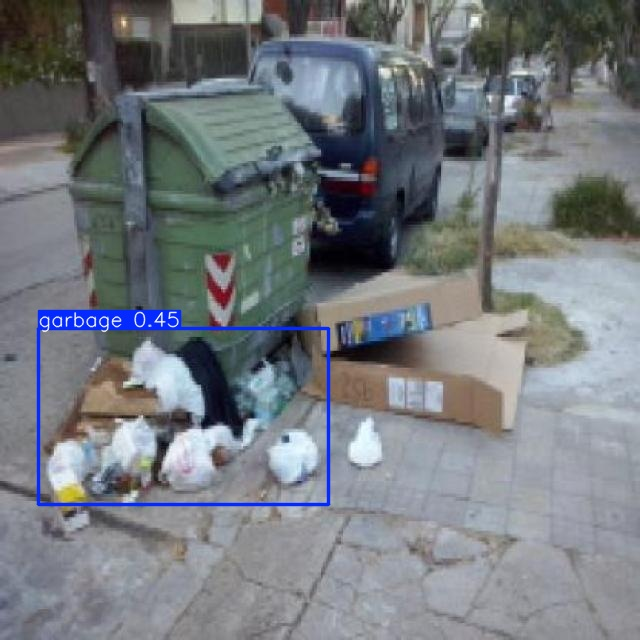
检测后图片
项目地址: https://gitee.com/51diysoft/VisionForgeSDK
YOLOv8介绍
YOLO(You Only Look Once)是一种高效的目标检测算法,YOLOv8是其最新的版本,由Ultralytics公司于2023年1月发布。相比之前的版本,YOLOv8在检测精度、推理速度和易用性方面都有显著提升,非常适合垃圾检测这类需要实时性和准确性的应用场景。
YOLOv8主要特点:
- 更高的精度:在保持实时性能的同时,提供了更高的目标检测精度
- 更快的推理速度:优化的网络结构和训练方法,大幅提升了推理速度
- 更强的泛化能力:能够适应不同场景和光照条件下的目标检测
- 更简洁的API:提供了更加易用和灵活的接口,便于集成和二次开发
- 支持多种设备:可以在CPU、GPU等多种硬件平台上高效运行
YOLOv8在垃圾检测中的优势:
- 多尺度检测能力:能够同时检测不同大小的垃圾,从微小的烟头到大型的废弃物品
- 复杂场景适应:在不同光线、天气和背景条件下仍能保持良好的检测效果
- 实时处理:能够实时分析视频流或图片,及时发现垃圾问题
- 低误报率:经过专门训练的垃圾检测模型,对垃圾有较高的识别准确率
- 易于部署:可以部署在边缘设备上,实现本地实时检测
1. API基本信息
- API地址:
http://127.0.0.1:18001/api/ai/detect - 请求方法:POST
- 内容类型:multipart/form-data
- 模型编码:
002garbage
2. 请求参数
参数名 | 类型 | 必选 | 描述 |
|---|---|---|---|
file | 文件 | 是 | 要检测的图片文件,支持jpg、jpeg、png等常见格式 |
model_code | 字符串 | 否 | 模型编码,垃圾检测为"002garbage" |
3. 返回格式
API返回JSON格式的数据,包含以下字段:
{
  "original_url": "http://127.0.0.1:18001/uploads/20251023/source/[文件名].jpg",
  "detected_url": "http://127.0.0.1:18001/uploads/20251023/out/detected_[文件名].jpg",
  "detections": [
    {
      "class": "garbage",
      "class_id": 0,
      "confidence": 0.45255401730537415,
      "bbox": {
        "xmin": 38.9366455078125,
        "ymin": 328.44854736328125,
        "xmax": 328.25250244140625,
        "ymax": 504.1689453125
      }
    }
  ],
  "image_size": {
    "width": 640,
    "height": 640
  },
  "model_used": {
    "code": "002garbage",
    "name": "垃圾检测",
    "is_fallback": false
  },
  "message": "使用垃圾检测模型: 垃圾检测 (002garbage)"
}
4. 返回字段说明
字段名 | 类型 | 描述 |
|---|---|---|
original_url | 字符串 | 原始图片的URL地址 |
detected_url | 字符串 | 检测结果图片的URL地址,包含标注的边界框 |
detections | 数组 | 检测到的目标列表 |
detections[0].class | 字符串 | 检测到目标的类别,垃圾检测中为"garbage" |
detections[0].class_id | 整数 | 类别ID,垃圾类别ID为0 |
detections[0].confidence | 浮点数 | 检测置信度,范围0-1,值越高表示越确定 |
detections[0].bbox | 对象 | 边界框坐标信息 |
detections[0].bbox.xmin | 浮点数 | 左上角X坐标 |
detections[0].bbox.ymin | 浮点数 | 左上角Y坐标 |
detections[0].bbox.xmax | 浮点数 | 右下角X坐标 |
detections[0].bbox.ymax | 浮点数 | 右下角Y坐标 |
image_size | 对象 | 图片尺寸信息 |
image_size.width | 整数 | 图片的像素宽度 |
image_size.height | 整数 | 图片的像素高度 |
model_used | 对象 | 使用的模型信息 |
model_used.code | 字符串 | 模型编码 |
model_used.name | 字符串 | 模型名称 |
model_used.is_fallback | 布尔值 | 是否使用了备选模型 |
message | 字符串 | 操作消息提示 |
5. 错误响应格式
当请求失败时,API会返回HTTP状态码和错误信息:
{
  "detail": "错误信息描述"
}
常见错误码:
- 400 Bad Request: 无效的请求参数,如上传的文件不是图片
- 500 Internal Server Error: 服务器内部错误,如处理图片时发生异常
6. 调用示例
Python调用示例
import requests
# 图片文件路径
image_path = "E:\\PyProject_yywl\\01ultralytics-main-garbage\\SDKDemo\\pythonWeb\\images\\002garbage\\test_garbage1.jpg"
# API URL
url = "http://127.0.0.1:18001/api/ai/detect"
# 发送请求
with open(image_path, "rb") as f:
    files = {"file": f}
    data = {"model_code": "002garbage"}
    try:
        response = requests.post(url, files=files, data=data)
        response.raise_for_status()  # 检查请求是否成功
        # 处理返回结果
        result = response.json()
        print("检测结果:")
        print(f"原图URL: {result['original_url']}")
        print(f"检测结果图URL: {result['detected_url']}")
        print(f"图片尺寸: {result['image_size']['width']}x{result['image_size']['height']}")
        print(f"检测到目标数量: {len(result['detections'])}")
        # 打印每个检测目标的信息
        for i, detection in enumerate(result['detections'], 1):
            print(f"\n目标 {i}:")
            print(f"  类别: {detection['class']}")
            print(f"  类别ID: {detection['class_id']}")
            print(f"  置信度: {detection['confidence']:.4f}")
            print(f"  位置: ({detection['bbox']['xmin']:.2f}, {detection['bbox']['ymin']:.2f}) - ({detection['bbox']['xmax']:.2f}, {detection['bbox']['ymax']:.2f})")
    except requests.exceptions.RequestException as e:
        print(f"请求出错: {e}")
    except Exception as e:
        print(f"处理结果时出错: {e}")
C#调用示例
using System;
using System.IO;
using System.Net.Http;
using System.Net.Http.Headers;
using System.Threading.Tasks;
class GarbageDetectionExample
{
    static async Task Main()
    {
        string imagePath = @"E:\PyProject_yywl\01ultralytics-main-garbage\SDKDemo\pythonWeb\images\002garbage\test_garbage1.jpg";
        string apiUrl = "http://127.0.0.1:18001/api/ai/detect";
        string modelCode = "002garbage";
        try
        {
            using (var httpClient = new HttpClient())
            using (var formData = new MultipartFormDataContent())
            {
                // 添加模型编码字段
                formData.Add(new StringContent(modelCode), "model_code");
                // 读取图片文件
                byte[] imageData = File.ReadAllBytes(imagePath);
                var imageContent = new ByteArrayContent(imageData);
                imageContent.Headers.ContentType = MediaTypeHeaderValue.Parse("image/jpeg");
                formData.Add(imageContent, "file", Path.GetFileName(imagePath));
                // 发送请求
                Console.WriteLine("发送垃圾检测请求...");
                var response = await httpClient.PostAsync(apiUrl, formData);
                // 处理响应
                if (response.IsSuccessStatusCode)
                {
                    string responseBody = await response.Content.ReadAsStringAsync();
                    Console.WriteLine("检测成功!");
                    Console.WriteLine("检测结果:");
                    Console.WriteLine(responseBody);
                }
                else
                {
                    Console.WriteLine("发生错误: {ex.Message}");
            Console.WriteLine(ex.StackTrace);
        }
    }
}
Java调用示例
import java.io.File;
import java.io.IOException;
import java.io.InputStream;
import java.io.OutputStream;
import java.net.HttpURLConnection;
import java.net.URL;
import java.nio.charset.StandardCharsets;
public class GarbageDetectionExample {
    public static void main(String[] args) {
        String imagePath = "E:\\PyProject_yywl\\01ultralytics-main-garbage\\SDKDemo\\pythonWeb\\images\\002garbage\\test_garbage1.jpg";
        String apiUrl = "http://127.0.0.1:18001/api/ai/detect";
        String modelCode = "002garbage";
        try {
            // 创建连接
            URL url = new URL(apiUrl);
            HttpURLConnection connection = (HttpURLConnection) url.openConnection();
            connection.setRequestMethod("POST");
            connection.setDoOutput(true);
            // 设置multipart/form-data请求
            String boundary = "JavaFormBoundary" + System.currentTimeMillis();
            connection.setRequestProperty("Content-Type", "multipart/form-data; boundary=" + boundary);
            // 准备请求体
            OutputStream outputStream = connection.getOutputStream();
            // 添加model_code字段
            outputStream.write(('--' + boundary + "\r\n").getBytes(StandardCharsets.UTF_8));
            outputStream.write("Content-Disposition: form-data; name=\"model_code\"\r\n\r\n".getBytes(StandardCharsets.UTF_8));
            outputStream.write(modelCode.getBytes(StandardCharsets.UTF_8));
            outputStream.write("\r\n".getBytes(StandardCharsets.UTF_8));
            // 添加文件字段
            File imageFile = new File(imagePath);
            outputStream.write(('--' + boundary + "\r\n").getBytes(StandardCharsets.UTF_8));
            outputStream.write("Content-Disposition: form-data; name=\"file\"; filename=\"".getBytes(StandardCharsets.UTF_8));
            outputStream.write(imageFile.getName().getBytes(StandardCharsets.UTF_8));
            outputStream.write("\"\r\n".getBytes(StandardCharsets.UTF_8));
            outputStream.write("Content-Type: image/jpeg\r\n\r\n".getBytes(StandardCharsets.UTF_8));
            // 写入文件内容
            byte[] buffer = new byte[1024];
            java.io.FileInputStream fileInputStream = new java.io.FileInputStream(imageFile);
            int bytesRead;
            while ((bytesRead = fileInputStream.read(buffer)) != -1) {
                outputStream.write(buffer, 0, bytesRead);
            }
            fileInputStream.close();
            // 结束请求体
            outputStream.write("\r\n--" + boundary + "--\r\n".getBytes(StandardCharsets.UTF_8));
            outputStream.flush();
            outputStream.close();
            // 获取响应
            int responseCode = connection.getResponseCode();
            if (responseCode == HttpURLConnection.HTTP_OK) {
                // 读取响应内容
                InputStream inputStream = connection.getInputStream();
                StringBuilder responseBuilder = new StringBuilder();
                byte[] responseBuffer = new byte[1024];
                int responseBytesRead;
                while ((responseBytesRead = inputStream.read(responseBuffer)) != -1) {
                    responseBuilder.append(new String(responseBuffer, 0, responseBytesRead, StandardCharsets.UTF_8));
                }
                inputStream.close();
                // 打印响应结果
                System.out.println("检测结果:");
                System.out.println(responseBuilder.toString());
            } else {
                System.out.println("请求失败,响应码: " + responseCode);
            }
            connection.disconnect();
        } catch (IOException e) {
            e.printStackTrace();
        }
      }
    }
}```
## 7. 返回结果示例解析
以下是一个实际垃圾检测结果的中文解析:
```json
{
  "original_url": "http://14.103.236.44:18001/uploads/20251023/source/5ffac28592c04299901e76fee975e1db.jpg",
  "detected_url": "http://14.103.236.44:18001/uploads/20251023/out/detected_5ffac28592c04299901e76fee975e1db.jpg",
  "detections": [
    {
      "class": "garbage",
      "class_id": 0,
      "confidence": 0.45255401730537415,
      "bbox": {
        "xmin": 38.9366455078125,
        "ymin": 328.44854736328125,
        "xmax": 328.25250244140625,
        "ymax": 504.1689453125
      }
    }
  ],
  "image_size": {
    "width": 640,
    "height": 640
  },
  "model_used": {
    "code": "002garbage",
    "name": "垃圾检测",
    "is_fallback": false
  },
  "message": "使用垃圾检测模型: 垃圾检测 (002garbage)"
}
中文解析说明:
- 图片信息:
- 原始图片已保存并可通过URL
http://14.103.236.44:18001/uploads/20251023/source/5ffac28592c04299901e76fee975e1db.jpg访问 - 带检测框的结果图片可通过URL
http://14.103.236.44:18001/uploads/20251023/out/detected_5ffac28592c04299901e76fee975e1db.jpg访问 - 图片尺寸为 640×640 像素
- 原始图片已保存并可通过URL
- 检测到的目标:
- 总共检测到1个垃圾目标
- 目标详情:
- 类别:garbage(垃圾)
- 类别ID:0
- 置信度:约45.26%(0.4526)
- 位置:左上角坐标(38.94, 328.45),右下角坐标(328.25, 504.17)
- 模型信息:
- 使用了垃圾检测模型(002garbage)
- 未使用备选模型
8. 注意事项
- 图片大小不宜过大,建议控制在10MB以内以提高处理速度
- 垃圾检测的置信度阈值已设置为0.25,IOU阈值为0.45,以提高检测率
- 对于模糊或部分遮挡的垃圾,检测准确率可能会降低
- 不同类型的垃圾可能有不同的检测效果,建议针对特定场景进行模型优化
- 为保证服务稳定性,请勿频繁发送大量请求
- 服务器端会定期清理历史图片数据,请及时保存重要数据
9. 故障排查
如果遇到API调用问题,可以从以下几个方面排查:
- 确认服务是否正常运行(检查端口18001是否被占用)
- 验证API URL是否正确(包含/api前缀)
- 检查图片文件格式是否支持
- 确认是否正确设置了model_code参数为"002garbage"
- 查看服务器日志获取详细错误信息
10. VisionForge SDK使用说明
VisionForge SDK提供了更便捷的方式来调用AI检测API。SDK的主要功能包括:
- upload_image_for_detection:上传图片并获取检测结果
- print_detection_result:格式化打印检测结果
- detect_and_save_result:检测图片并将结果保存到JSON文件
- detect_image(异步方法):异步上传图片并获取检测结果
使用SDK的优势:
- 简化了API调用过程
- 提供了错误处理机制
- 自动保存检测结果到文件系统
- 格式化输出检测结果,便于查看
- 支持同步和异步两种调用方式
SDK使用示例
from VisionForge_SDK_python import detect_and_save_result, detect_image, run_async_demo
import asyncio
# 同步调用示例
image_path = r".\images\002garbage\test_garbage1.jpg"
result = detect_and_save_result(image_path, model_code="002garbage")
# 异步调用示例
async def main():
    result = await detect_image(image_path, model_code="002garbage")
    return result
# 运行异步示例
if __name__ == "__main__":
    # 同步检测
    print("===== 同步垃圾检测 =====")
    detect_and_save_result(image_path, model_code="002garbage")
    # 异步检测
    print("\n===== 异步垃圾检测 =====")
    asyncio.run(run_async_demo())
11. 相关资料
您的关注就是我们前进的动力!一起学习进步!
VisionForgeSDK: VisionForge SDK 为用户提供新一代人工智能解决方案,释放数据的真正潜力; 1、火灾监测识别系统:可用于森林、厂区等防火区域; 2、垃圾监测识别系统:支持常见垃圾监测; 3、人脸轨迹提取系统:根据视频画面提取人员的时间活动轨迹,追踪目标; 4、智慧工地监测系统:实时监控施工场景,保障工人安全,提高管理效率; 5、头盔监测识别系统:头盔佩戴等
本文参与 腾讯云自媒体同步曝光计划,分享自微信公众号。
原始发表:2026-08-18,如有侵权请联系 cloudcommunity@tencent.com 删除
目录
腾讯云开发者

Copyright © 2013 - 2026 Tencent Cloud. All Rights Reserved. 腾讯云 版权所有
深圳市腾讯计算机系统有限公司 ICP备案/许可证号:粤B2-20090059  粤公网安备44030502008569号
腾讯云计算(北京)有限责任公司 京ICP证150476号 | 京ICP备11018762号