Vide Coding-codex创建skill-快速完成系列工作

Vide Coding-codex创建skill-快速完成系列工作

码农戏码
发布于 2026-06-25 20:09:39
发布于 2026-06-25 20:09:39
最近在给排盘软件增加一下神煞的功能
首先神煞命中分成两个太极点:年和日
• 年取:以年柱为太极点去查
• 日取:以日柱为太极点去查
然后基本流程是: 1、先确认神煞的查法和作用 2、把介绍、查法和作用都整理输出到文档 3、再根据文档里面的逻辑变成代码逻辑 4、再确认是否展示到UI 5、又增加一项,点击神煞时,会弹出神煞介绍
刚开始手动完成了 三丘五墓、桃花
后来想起这是一套标准动作,以后增加新的神煞时,都需要这么跟AI交互。
这不就是skill吗? 所以就让codex直接创建一个扩展神煞的skill
按这个套路,创建一个 skill,方便后面增加其他的神煞
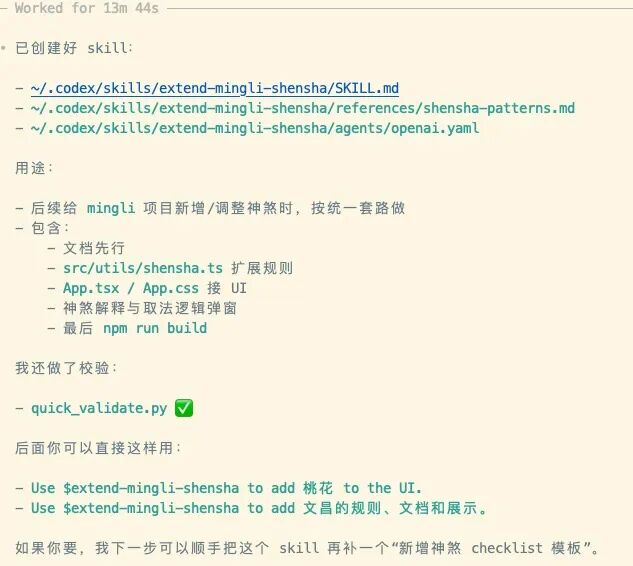
完成之后,会创建相应的SKILL.md
---
name: extend-mingli-shensha
description: Add or update shensha logic in the mingli repo, including rule documentation, utility functions, explanation/method text, and UI display. Use when Codex needs to add a new 神煞, adjust an existing 神煞’s取法 or作用, wire it into src/utils/shensha.ts, update docs/shensha-*.md and docs/shensha-overview.md, or connect it to the App.tsx/App.css display and popup flow.
---

# Extend Mingli Shensha

Implement new shensha in this repo with the same pattern already used for 驿马、桃花、羊刃、禄、天乙贵人、三丘五墓.

## Quick workflow

1. Read `docs/shensha-overview.md` first.
2. If the target shensha already has a dedicated doc, read `docs/shensha-*.md`; otherwise create one before coding.
3. Implement or update logic in `src/utils/shensha.ts`.
4. If the shensha should appear in the UI, wire it into `src/App.tsx` and `src/App.css`.
5. If the shensha needs click-to-explain support, add explanation and method text in `src/utils/shensha.ts`.
6. Run `npm run build` before finishing.
这个skill就叫 extend-mingli-shensha
用这个skill,试一下增加文昌神煞
extend-mingli-shensha to add 文昌的规则、文档和展示
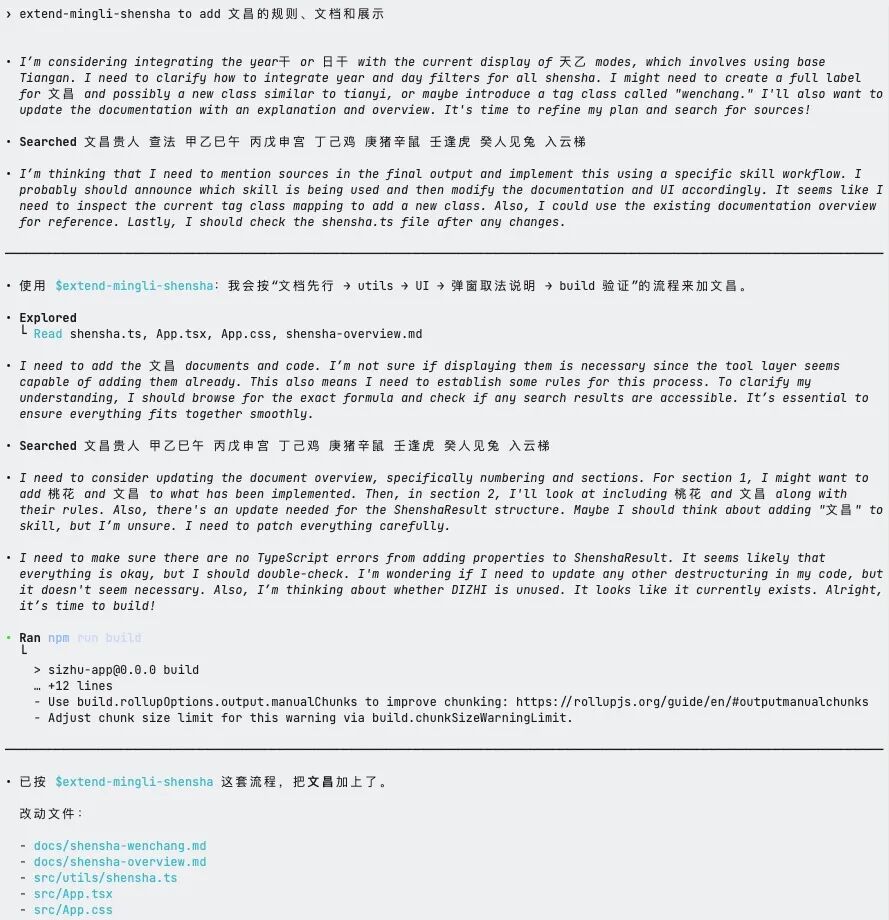
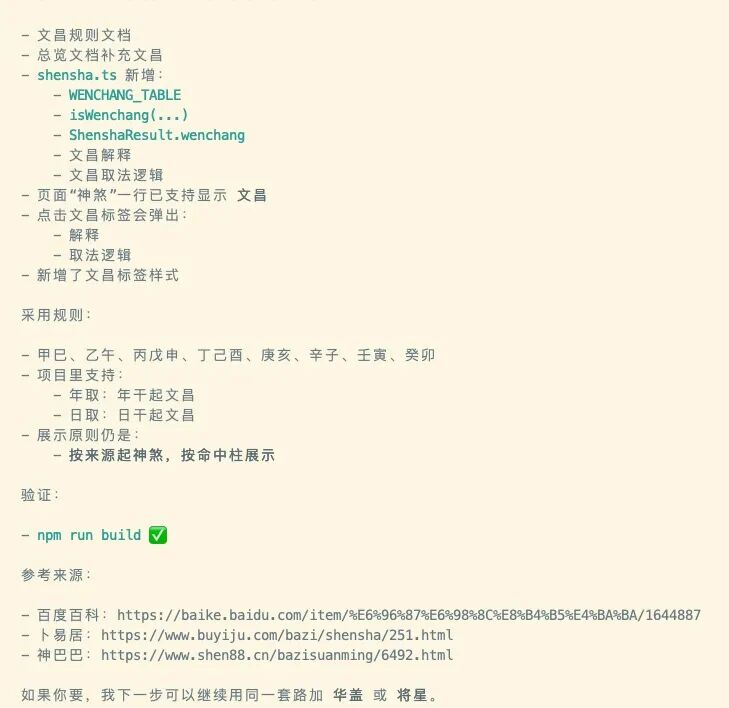
中途不再需要跟AI不停地交互,完整按标准动作完成了整个神煞的整理和开发工作
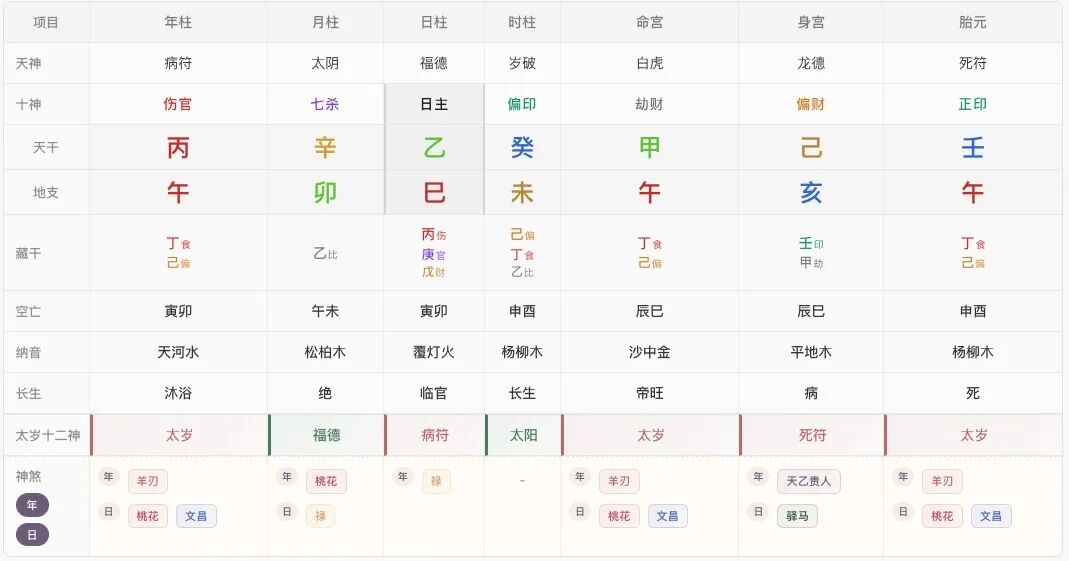
最后展示的效果也还不错
本文参与 腾讯云自媒体同步曝光计划,分享自微信公众号。
原始发表:2026-04-01,如有侵权请联系 cloudcommunity@tencent.com 删除
腾讯云开发者

Copyright © 2013 - 2026 Tencent Cloud. All Rights Reserved. 腾讯云 版权所有
深圳市腾讯计算机系统有限公司 ICP备案/许可证号:粤B2-20090059  粤公网安备44030502008569号
腾讯云计算(北京)有限责任公司 京ICP证150476号 | 京ICP备11018762号