学会 systemctl,你就能搞定80%的Linux服务问题(推荐新手)

学会 systemctl,你就能搞定80%的Linux服务问题(推荐新手)

一根头发丝的宽度
发布于 2026-05-06 20:44:45
发布于 2026-05-06 20:44:45
systemctl到底在干嘛
- 服务启动失败,应该怎么排查
- 一套可复用的Linux服务管理思路
你有没有遇到过这种情况:
👉 装了个服务(比如 nginx) 👉 潇洒敲下:
systemctl start nginx
👉 结果:
Job for nginx.service failed
你懵了。
你开始:
- 重启 ❌
- 再试一遍 ❌
- 百度 ❌
最后发现:
👉 你根本不知道 systemctl 在干嘛
❗一、systemctl不是命令,而是“服务管理器”
很多人以为:
systemctl = 启动 / 停止 服务的工具
👉 正确认知是:
systemctl 是 systemd 的控制入口
🧠 那 systemd 又是什么?
👉 一句话讲清:
systemd 是 Linux 的“服务管家”
它负责:
- 启动系统服务
- 管理服务生命周期
- 记录日志
- 处理依赖关系
👉 你可以这样理解:
你(用户) → systemctl → systemd → 服务(nginx/mysql)
🧩 二、服务到底是怎么运行的?
先建立一个正确模型👇
.service 文件 → systemd → 启动程序 → 运行成进程
🔍 举个例子(nginx)
/usr/lib/systemd/system/nginx.service
里面大概是:
[Service]
ExecStartPre=/usr/sbin/nginx -t -q -g 'daemon on; master_process on;'
ExecStart=/usr/sbin/nginx -g 'daemon on; master_process on;'
👉 意思就是:
systemd 按这个配置去启动 nginx
🧠 三、你每天用的systemctl,本质在干嘛?
✅ 1️⃣ 启动服务
systemctl start nginx
👉 本质:读取 .service 文件,执行 ExecStart
✅ 2️⃣ 停止服务
systemctl stop nginx
👉 本质:发送停止信号
✅ 3️⃣ 查看状态(最重要🔥)
systemctl status nginx
👉 你能看到:
- 是否运行
- 是否失败
- 错误日志(前几行)
✅ 4️⃣ 开机自启
systemctl enable nginx
👉 本质:创建启动链接
🚨 四、服务启动失败,到底怎么查?
✅ 标准排错模型
服务问题 = 状态 + 日志 + 资源 + 依赖
① 状态(入口)
systemctl status nginx
👉 看是否 failed / inactive
② 日志(核心)
journalctl -u nginx -xe
👉 重点看:
- permission denied
- port in use
- config error
③ 资源(容易忽略)
top
free -m
df -h
👉 很多服务是“被系统压死的”
④ 依赖(高手才会看🔥)
systemctl list-dependencies nginx
👉 有些服务启动失败,是依赖没起来
记住这句话:
❗不要反复 start,要“看信息”
🔥 五、真实排错案例
下面带你完整走一遍 “制造故障 → 排查 → 修复”的全流程。
场景:nginx启动失败
❌ 第一步:制造一个配置错误
- 打开 nginx 配置文件:
vim /etc/nginx/nginx.conf
- 在
http { ... }块里,随便加一行错误配置,比如:
http {
    this_is_a_wrong_directive;
    ...
}
- 保存退出。
- 尝试重启 nginx:
systemctl restart nginx
你会看到经典的失败提示:
Job for nginx.service failed because the control process exited with error code.
See "systemctl status nginx.service" and "journalctl -xe" for details.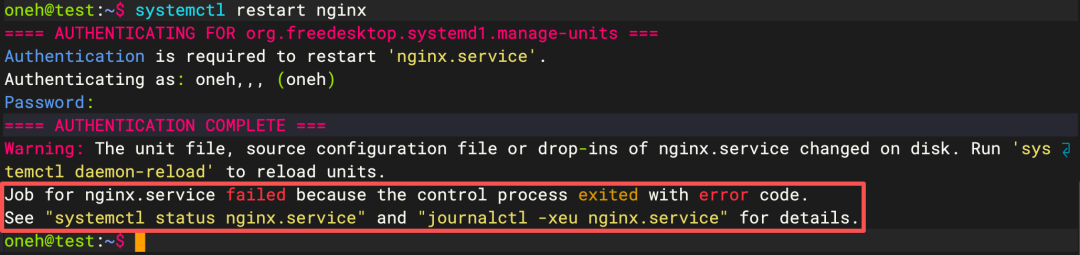
✅ 第二步:开始排查
1️⃣ 查看状态
systemctl status nginx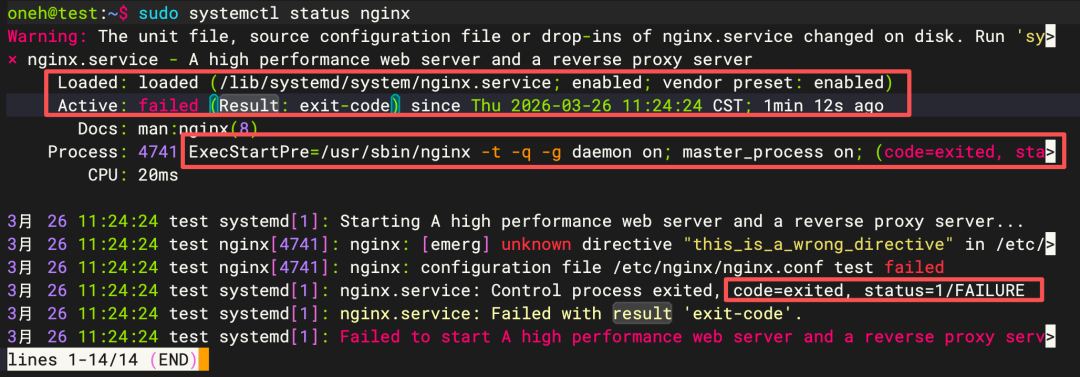
从状态里,我们通常已经能知道是 配置检查阶段(ExecStartPre)就失败了。
2️⃣ 查看详细日志(关键)
journalctl -u nginx -xe
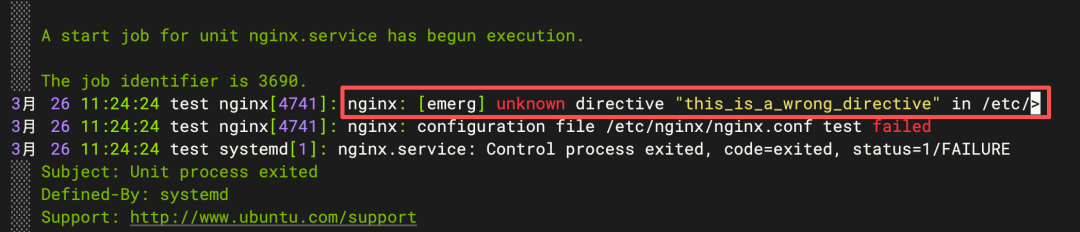
- 如果日志太多,可以只看最新几条:
journalctl -u nginx -n 20 --no-pager
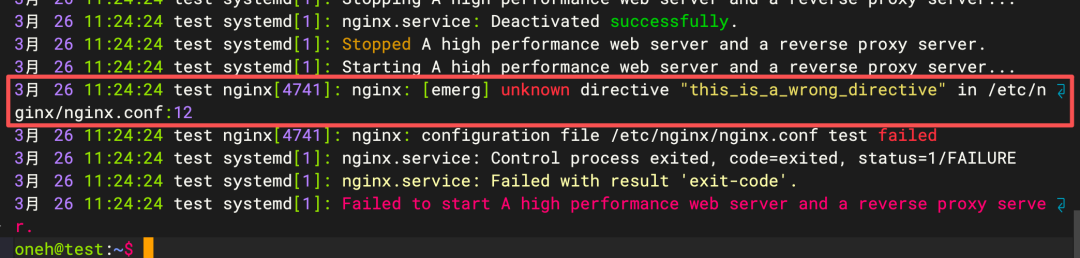
到这里,我们已经定位到问题:配置文件第12行有未知指令。
3️⃣ 修复问题
重新打开配置文件,删除或修正错误行:
vim /etc/nginx/nginx.conf
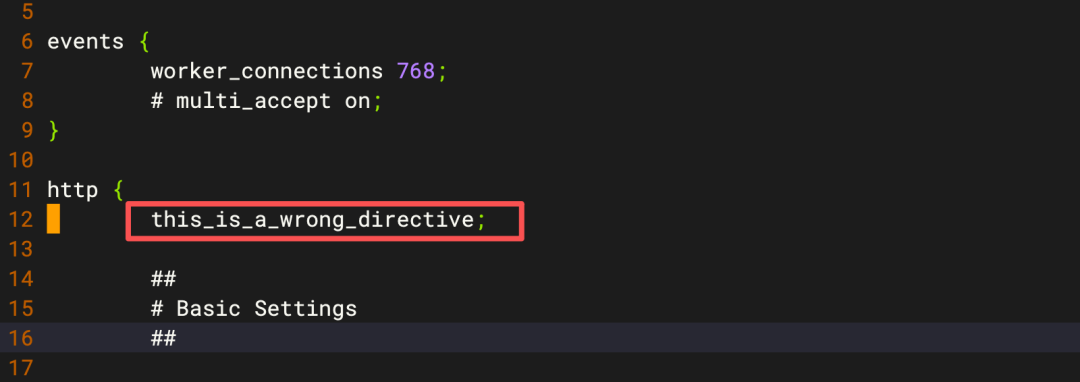
删除 this_is_a_wrong_directive;这一行。
4️⃣ 测试配置(可选但推荐)
nginx -t
输出:
nginx: the configuration file /etc/nginx/nginx.conf syntax is ok
nginx: configuration file /etc/nginx/nginx.conf test is successful
5️⃣ 重新启动服务
systemctl start nginx
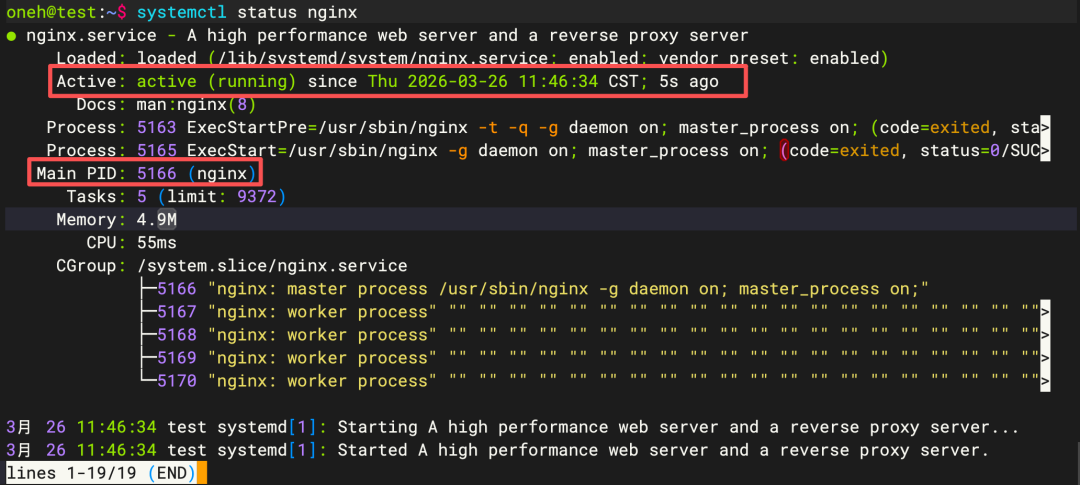
6️⃣ 确认状态
systemctl status nginx
🧠 六、高手和新手的区别(很关键)
❌ 新手
不停重启服务
✅ 高手
先看状态 → 再看日志 → 再定位问题
👉 区别在于:
❗有没有“系统思维”
👉 一个非常实用的技巧:
不要只用 systemctl,

要配合这三个一起用:

- journalctl(看日志)
- ps(看进程)
- ss(看端口)
👉 这三件套,基本能解决80%的问题
📚 七、你现在应该怎么练?
👉 给你一个最简单的方法:
🎯 每次操作都问自己:
我现在是在操作哪一层?
比如:
- systemctl → 服务层
- ps → 进程层
- ss → 网络层
👉 这样你会越来越清晰
🚀 八、最后一句话(记住)
👉 不懂 systemctl:
你只是会装服务
👉 懂了 systemctl:
你才真正会“管服务”
📌 下一篇预告
👉 Linux网络排错:为什么你的服务访问不了?
本文参与 腾讯云自媒体同步曝光计划,分享自微信公众号。
原始发表:2026-03-26,如有侵权请联系 cloudcommunity@tencent.com 删除
评论
登录后参与评论
推荐阅读
目录
腾讯云开发者

Copyright © 2013 - 2026 Tencent Cloud. All Rights Reserved. 腾讯云 版权所有
深圳市腾讯计算机系统有限公司 ICP备案/许可证号:粤B2-20090059  粤公网安备44030502008569号
腾讯云计算(北京)有限责任公司 京ICP证150476号 | 京ICP备11018762号