代码实战:如何使用Python绘制弯曲箭头的风场 (2.0版)

代码实战:如何使用Python绘制弯曲箭头的风场 (2.0版)

用户11172986
发布于 2026-04-24 19:19:58
发布于 2026-04-24 19:19:58
代码实战:如何使用Python绘制弯曲箭头的风场 (2.0版)
1. 项目简介
本项目展示了如何使用Python绘制弯曲箭头的风场可视化。相比传统的 quiver 图和 streamplot 图,弯曲箭头能够更直观、更优雅地展示风场的流动特征。
项目基于 GitHub 上的 curved-quivers 思想,通过自定义 modplot 模块中的 velovect 函数实现,并成功应用于 ERA5 气象数据的可视化中。
提示: 需要将github的modplot.py代码下载并置于绘图文件夹中
2. 核心技术栈
- Matplotlib: 基础绘图框架。
- NumPy: 数值计算与网格处理。
- Xarray: 处理 ERA5 气象数据。
- Cartopy: 地理坐标投影与地图特征绘制。
- Modplot: 自定义模块,包含核心的
velovect函数(需将参考代码下载至绘图文件夹)。
3. 关键问题与解决方案
在实战过程中,直接调用 velovect 绘制 ERA5 风场时遇到了 IndexError 报错。
3.1 问题描述
报错信息如下:
IndexError: index 361 is out of bounds for axis 1 with size 361
原因:在 modplot.py 的 _integrate_rk12 函数内部调用的 interpgrid 函数中,当插值点接近或正好位于边界上时,计算 x + 1 或 y + 1 导致索引超出了数组的合法范围。
3.2 解决方案
修改 interpgrid 函数,使用 np.clip 对索引进行边界限制,确保所有索引均在有效范围内。
修改后的 interpgrid 函数代码:
def interpgrid(a, xi, yi):
    """Fast 2D, linear interpolation on an integer grid"""

    Ny, Nx = np.shape(a)

    if isinstance(xi, np.ndarray):
        x = xi.astype(int)
        y = yi.astype(int)
        # 使用 np.clip 来确保 xn 和 yn 不会超出边界
        xn = np.clip(x + 1, 0, Nx - 1)
        yn = np.clip(y + 1, 0, Ny - 1)
    else:
        x = int(xi)
        y = int(yi)
        # 对于单个整数索引,直接进行边界检查
        xn = min(x + 1, Nx - 1)
        yn = min(y + 1, Ny - 1)

    # 确保原始索引也在有效范围内
    x = np.clip(x, 0, Nx - 1)
    y = np.clip(y, 0, Ny - 1)

    a00 = a[y, x]
    a01 = a[y, xn]
    a10 = a[yn, x]
    a11 = a[yn, xn]

    xt = xi - x
    yt = yi - y

    a0 = a00 * (1 - xt) + a01 * xt
    a1 = a10 * (1 - xt) + a11 * xt
    ai = a0 * (1 - yt) + a1 * yt

    ifnot isinstance(xi, np.ndarray):
        if np.ma.is_masked(ai):
            raise TerminateTrajectory

    return ai
改进点:
- 对数组类型的索引使用
np.clip确保不越界。 - 对单个整数索引使用
min函数限制最大值。 - 确保原始索引
x和y也在有效范围内。
4. 代码实现示例
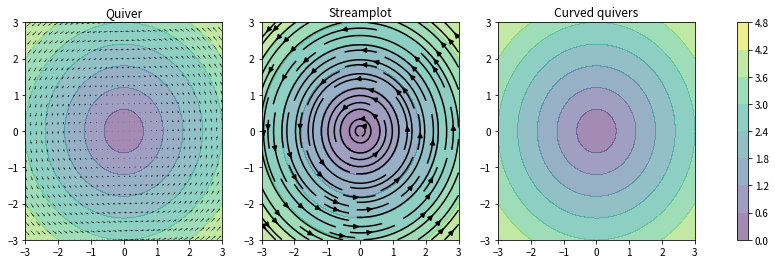
4.1 基础绘图对比 (Quiver vs Streamplot vs Curved Quivers)
import matplotlib.pyplot as plt
import numpy as np
from modplot import velovect

w = 3
Y, X = np.mgrid[-w:w:241j, -w:w:361j]

# 定义矢量场 U, V (旋转场)
U = -Y
V = X
W = np.sqrt(U**2 + V**2)

f, (ax1, ax2, ax3) = plt.subplots(1, 3, figsize=(15,4))

# 1. 传统 Quiver 图
s=10
ax1.quiver(X[::s,::s],Y[::s,::s],U[::s,::s],V[::s,::s])

# 2. Streamplot 流线图
ax2.streamplot(X,Y,U,V, color='k')

# 3. Curved Quivers 弯曲箭头图 (使用 velovect)
# 注意:此处需确保 modplot.py 已包含上述修复
grains = 15
tmp = np.linspace(-3, 3, grains)
xs = np.tile(tmp, grains)
ys = np.repeat(tmp, grains)
seed_points = np.array([list(xs), list(ys)])

velovect(ax3, X, Y, U, V, arrowstyle='fancy', scale=2.0, grains=15, color='k')

# 添加背景等值线
for ax in ax1, ax2, ax3:
 cs = ax.contourf(X,Y, W, cmap=plt.cm.viridis, alpha=0.5, zorder=-1)
 ax.set_xlim([-3,3])
 ax.set_ylim([-3,3])

ax1.set_title("Quiver")
ax2.set_title("Streamplot")
ax3.set_title("Curved quivers")

plt.colorbar(cs, ax=[ax1,ax2,ax3])
plt.show()
image
image
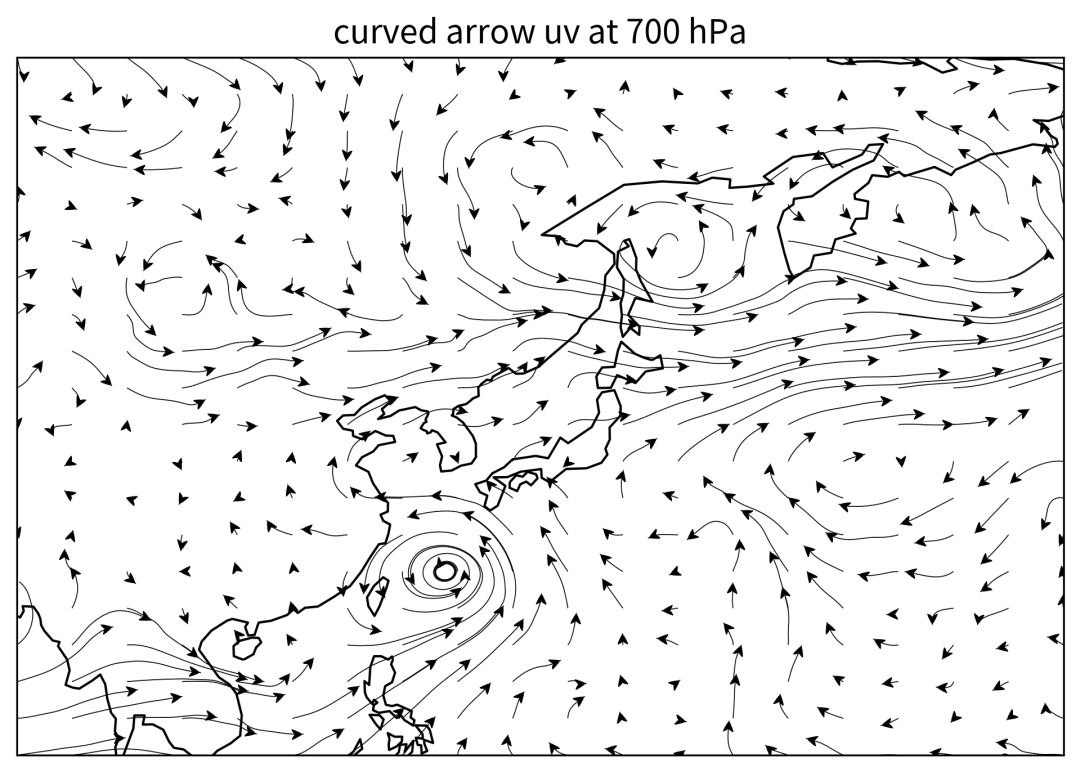
4.2 ERA5 实战数据可视化
import xarray as xr
import numpy as np
import matplotlib.pyplot as plt
import cartopy.crs as ccrs
import cartopy.feature as cfeature
from modplot import velovect

# 1. 读取数据
ds = xr.open_dataset('/home/mw/input/era58091/ERA5-2023-08_pl.nc')
# 选取 700hPa 等压面数据
u = ds['u'].sel(level=700, time='2023-08-02T00:00:00.000000000')
v = ds['v'].sel(level=700, time='2023-08-02T00:00:00.000000000')

# 纬度反转以适配绘图习惯
u_reversed = u.sel(latitude=slice(None, None, -1))
v_reversed = v.sel(latitude=slice(None, None, -1))

# 构建网格
lon = u_reversed['longitude']
lat = u_reversed['latitude']
Lon, Lat = np.meshgrid(lon, lat)

# 2. 定义绘图函数
def plot_uv(u, v, lon, lat):
    fig = plt.figure(figsize=(8, 6), dpi=300)
    ax = plt.axes(projection=ccrs.PlateCarree())

    # 绘制弯曲箭头
    velovect(ax, lon, lat, u, v,
             arrowstyle='fancy',
             linewidth=0.4,
             scale=8,
             grains=20,
             color='k')

    # 添加地理特征
    ax.add_feature(cfeature.COASTLINE)
    ax.set_title('Curved Arrow UV at 700 hPa', fontsize=14)
    ax.set_xlabel('Longitude', fontsize=12)
    ax.set_ylabel('Latitude', fontsize=12)

    plt.savefig('curved_arrow_wind.png', bbox_inches='tight')

# 3. 执行绘图
plot_uv(u_reversed.data, v_reversed.data, Lon, Lat)
image
image
5. 应用价值
这种弯曲箭头的风场可视化方法在气象分析、流体力学模拟等领域具有重要应用价值:
- 直观性:能够清晰展示风场的旋转、辐合辐散特征。
- 美观性:相比传统的短箭头,流线型箭头更具视觉美感。
- 信息量:结合等值线填充,可同时展示标量场(如风速、位势高度)和矢量场特征。
6. 参考资源
- Curved Quivers GitHub
- StackOverflow 相关讨论
本文参与 腾讯云自媒体同步曝光计划,分享自微信公众号。
原始发表:2025-12-30,如有侵权请联系 cloudcommunity@tencent.com 删除
评论
登录后参与评论
推荐阅读
目录
腾讯云开发者

Copyright © 2013 - 2026 Tencent Cloud. All Rights Reserved. 腾讯云 版权所有
深圳市腾讯计算机系统有限公司 ICP备案/许可证号:粤B2-20090059  粤公网安备44030502008569号
腾讯云计算(北京)有限责任公司 京ICP证150476号 | 京ICP备11018762号