WRF | 如何基于 wrfout 绘制艾玛图(Emagram)

WRF | 如何基于 wrfout 绘制艾玛图(Emagram)

用户11172986
发布于 2026-04-24 19:09:35
发布于 2026-04-24 19:09:35
WRF | 如何基于 wrfout 绘制艾玛图(Emagram)
前言
之前我们做过使用 WRF 绘制 TLNP 图的教程,有读者留言说想看看艾玛图的教程,遂写一下。
当然我是比较习惯看skew的,这种图还没怎么研究怎么看,希望有大佬赐教。
WRF 模式输出的 wrfout 文件蕴含丰富大气信息,但需有效工具提取分析。艾玛图(Emagram)是诊断大气热力结构的核心工具,能直观展示温、湿、风垂直廓线及对流能量。 传统方法步骤繁琐,本文介绍基于 wrf-python 与 MetPy 的 Python 自动化方案,实现从数据提取到专业绘图的一键式流程,提升 WRF 结果分析效率。
环境准备
首先确保 MetPy ≥ 1.7(本文示例已升级至 1.7.1)。
pip install --upgrade metpy -i https://pypi.mirrors.ustc.edu.cn/simple/
完整绘图代码
import numpy as np
import matplotlib.pyplot as plt
from netCDF4 import Dataset
from wrf import getvar, ll_to_xy
import metpy.calc as mpcalc
from metpy.plots import Emagram          # ① 引入 Emagram
from metpy.units import units

# 1. 数据读取
ncfile = Dataset("/home/mw/input/typhoon9537/wrfout_d01_2019-08-08_19_00_00")
target_lat, target_lon = 25, 120.4

# 坐标转换与索引提取
xy = ll_to_xy(ncfile, target_lat, target_lon)
x_idx, y_idx = xy[0], xy[1]

# 提取变量
p  = getvar(ncfile, "pressure")[:, y_idx, x_idx] * units.hPa
tc = getvar(ncfile, "tc")[:, y_idx, x_idx]       * units.degC
td = getvar(ncfile, "td")[:, y_idx, x_idx]       * units.degC
u  = getvar(ncfile, "ua", units="kt")[:, y_idx, x_idx] * units.knots
v  = getvar(ncfile, "va", units="kt")[:, y_idx, x_idx] * units.knots

# 2. 计算参数
prof = mpcalc.parcel_profile(p, tc[0], td[0])
lcl_pressure, lcl_temperature = mpcalc.lcl(p[0], tc[0], td[0])
cape, cin = mpcalc.surface_based_cape_cin(p, tc, td)

# 3. 绘图 (Emagram)
fig = plt.figure(figsize=(9, 9))
emagram = Emagram(fig)                 # ② 无需 rotation

# 绘制层结曲线
emagram.plot(p, tc, 'r', linewidth=2, label='Temperature')
emagram.plot(p, td, 'g', linewidth=2, label='Dewpoint')
emagram.plot(p, prof, 'k', linewidth=2, linestyle='--', label='Parcel Path')

# 填充能量区
emagram.shade_cin(p, tc, prof, alpha=0.2)
emagram.shade_cape(p, tc, prof, alpha=0.2)

# 绘制风羽
interval = np.arange(0, len(p), 3)
emagram.plot_barbs(p[interval], u[interval], v[interval])

# 坐标轴与参考线
emagram.ax.set_ylim(1000, 200)
emagram.ax.set_xlim(-110, 40)
emagram.plot_dry_adiabats(alpha=0.25, color='orange')
emagram.plot_moist_adiabats(alpha=0.25, color='green')
emagram.plot_mixing_lines(alpha=0.25, color='purple')

# 标记 LCL
emagram.plot(lcl_pressure, lcl_temperature, 'ko', markerfacecolor='black')

# 标题
plt.title(f"Emagram @ ({target_lat}, {target_lon})", loc='left')
plt.title(f"CAPE: {cape.m:.0f} J/kg", loc='right')
plt.legend(loc='upper left')

plt.show()
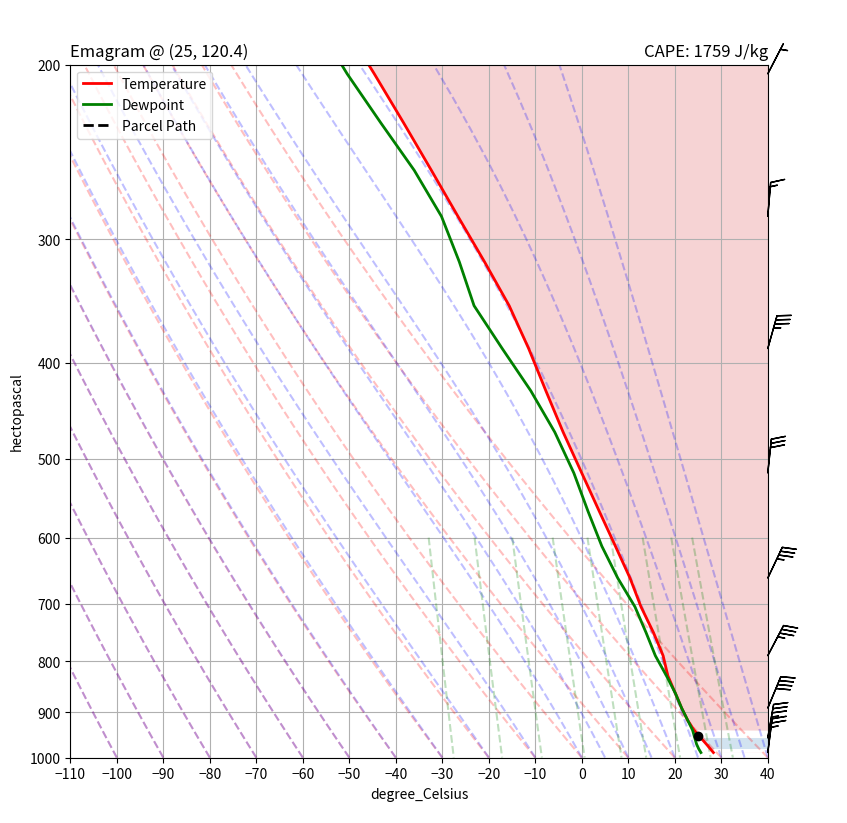
艾玛图
艾玛图
小结
本文以 wrfout 文件为基础,结合 wrf-python 进行数据提取与垂直插值,利用 MetPy 自动化绘制艾玛图。 该方法统一了从原始数据到气象专业图表的处理流程,可快速生成含温度、露点、风场及 CAPE 区域的标准化图表。 流程易于扩展至批量处理与时空对比,为 WRF 模拟的热力学诊断提供高效、可复现的解决方案。
本文参与 腾讯云自媒体同步曝光计划,分享自微信公众号。
原始发表:2025-12-12,如有侵权请联系 cloudcommunity@tencent.com 删除
评论
登录后参与评论
推荐阅读
目录
腾讯云开发者

Copyright © 2013 - 2026 Tencent Cloud. All Rights Reserved. 腾讯云 版权所有
深圳市腾讯计算机系统有限公司 ICP备案/许可证号:粤B2-20090059  粤公网安备44030502008569号
腾讯云计算(北京)有限责任公司 京ICP证150476号 | 京ICP备11018762号