噬菌体基因组快速注释工具——pharokka教程

噬菌体基因组快速注释工具——pharokka教程

用户1075469
发布于 2026-03-25 12:28:51
发布于 2026-03-25 12:28:51
Hello,Hello小伙伴们大家好,近年来,随着高通量测序技术的发展,越来越多的噬菌体基因组被解析,噬菌体组学研究也逐渐成为微生物生态和环境病毒学的研究热点。然而,噬菌体基因组注释与传统细菌或古菌基因组注释有显著差异,现有的通用注释工具在准确性和流程集成方面都存在一定局限,难以满足高通量、标准化的研究需求。今天给大家介绍一款专为噬菌体基因组开发的自动化注释工具——Pharokka。
Pharokka 则是在 Prokka 的理念基础上,针对噬菌体基因组的特殊性进行优化和扩展,专门面向病毒组学领域,进一步提升了噬菌体基因组注释的准确性和便捷性。两款软件在生物信息学社区都得到了广泛应用,为不同类型的基因组注释需求提供了有力支持。
软件工作流程
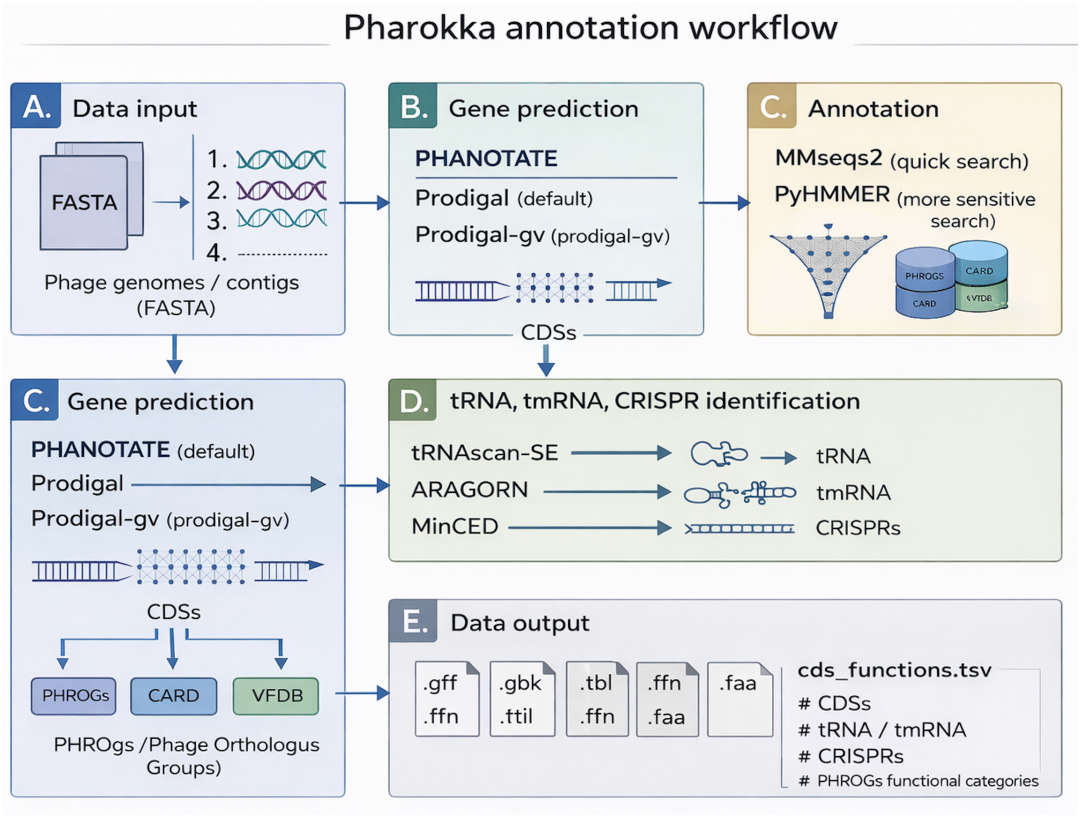
流程解读
(A)输入为组装好的噬菌体完整组装序列或噬菌体 contig;
(B)默认使用 PHANOTATE对噬菌体进行编码基因(CDS)的预测,可选 Prodigal 或Prodigal-gv;
(C)通过 mmseqs2 将 CDS 与 PHROGs、 CARD 和 VFDB 比对做功能注释,使用自 v1.4.0 起,PyHMMER每条 CDS 与 PHROGs 进行注释,该模型基于隐马尔可夫模型(HMM)灵敏度更高;
(D)使用 tRNAscan-SE、Aragorn 和 MinCED 预测 tRNA、tmRNA和 CRISPR 元件;
(E)主要输出为 GFF 文件,直接用于 Roary 等下游泛基因组学流程,此外还会生成汇总统计文件,包含 CDS、tRNA、tmRNA、CRISPR 的计数以及基于 PHROGs 的功能分配
Github: https://github.com/gbouras13/pharokka
官方文档:
https://pharokka.readthedocs.io/en/latest/
数据库:
https://zenodo.org/records/17110353/files/pharokka_v1.8.0_databases.tar.gz
软件安装
# 使用conda创建虚拟环境,并安装pharokka
conda create -n Pharokka -c conda-forge -c bioconda pharokka
# 下载pharokka数据库并解压,如下图所示
wget -c -nv "https://zenodo.org/record/8276347/files/pharokka_v1.8.0_databases.tar.gz"
tar -xzf pharokka_v1.8.0_databases.tar.gz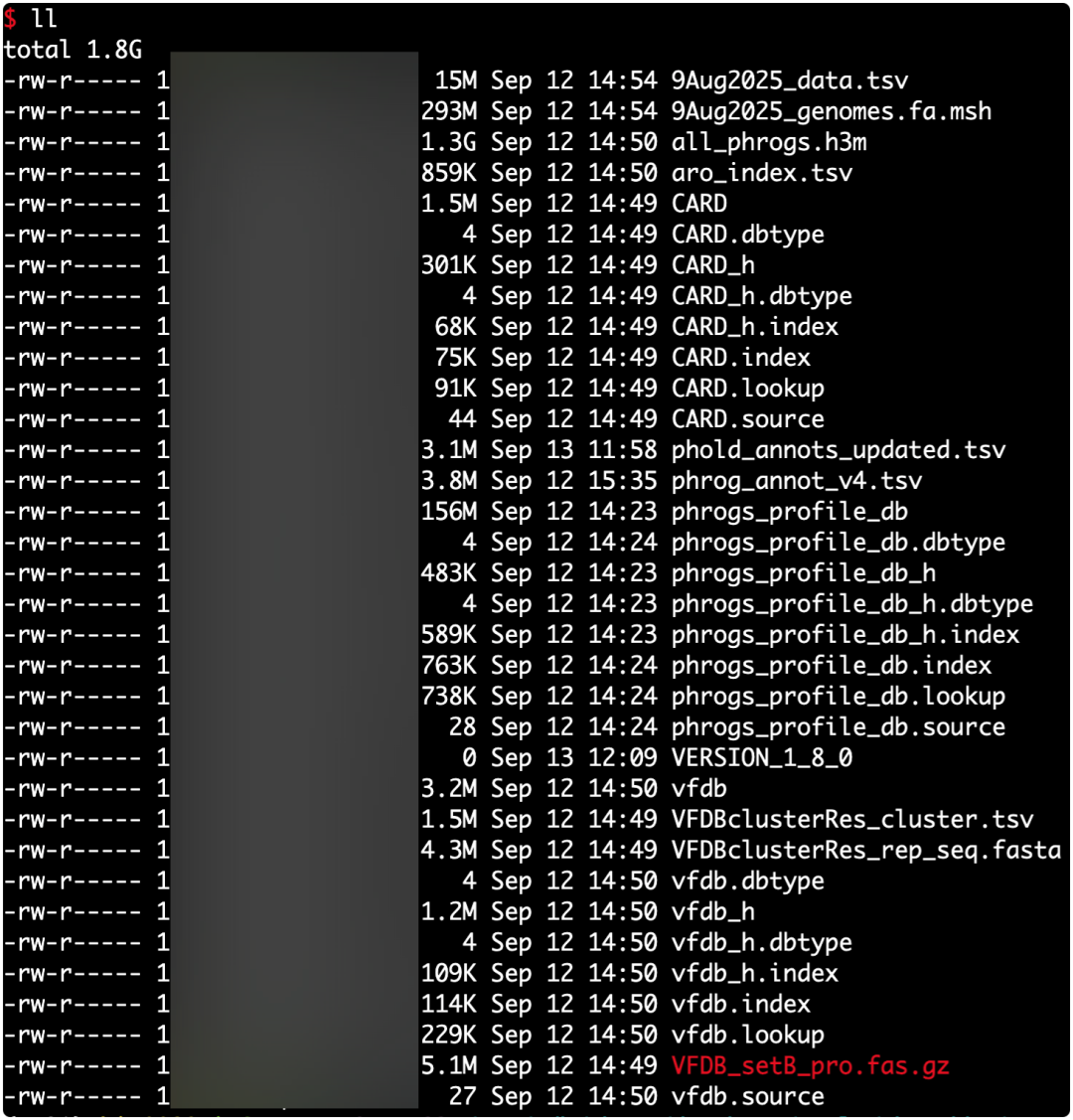
安装说明:
1. 小编的安装方法和作者在Github上提及的方法有所不同,因为小编习惯将每个软件单独创建一个虚拟conda环境;
2. 小编的同事按照官网的方法进行安装,会因为库和包不兼容到导致安装失败;
3. 由于软件依赖的数据库存放在zenodo上使用wget和install_databases.py会下载失败,所以小编建议使用浏览器下载并上传到服务器上。
软件使用方法
# 查看或运行 pharokka.py 时因 NumPy 版本不兼容会触发警告并导致报错
export PYTHONWARNINGS="ignore"
# 查看pharokka帮助文档
pharokka.py --help
usage: pharokka.py [-h] [-i INFILE] [-o OUTDIR] [-d DATABASE] [-t THREADS] [-f] [-p PREFIX] [-l LOCUSTAG] [-g GENE_PREDICTOR] [-m] [-s] [-c CODING_TABLE] [-e EVALUE] [--fast] [--mmseqs2_only] [--meta_hmm] [--dnaapler] [--custom_hmm CUSTOM_HMM] [--genbank] [--terminase]
                   [--terminase_strand TERMINASE_STRAND] [--terminase_start TERMINASE_START] [--skip_extra_annotations] [--skip_mash] [--minced_args MINCED_ARGS] [--mash_distance MASH_DISTANCE] [--trna_scan_model {general,bacterial}] [-V] [--citation]
pharokka: fast phage annotation program
options:
  -h, --help            show this help message and exit
  -i INFILE, --infile INFILE
                        Input genome file in fasta format.
  -o OUTDIR, --outdir OUTDIR
                        Directory to write the output to.
  -d DATABASE, --database DATABASE
                        Database directory. If the databases have been installed in the default directory, this is not required. Otherwise specify the path.
  -t THREADS, --threads THREADS
                        Number of threads. Defaults to 1.
  -f, --force           Overwrites the output directory.
  -p PREFIX, --prefix PREFIX
                        Prefix for output files. This is not required.
  -l LOCUSTAG, --locustag LOCUSTAG
                        User specified locus tag for the gff/gbk files. This is not required. A random locus tag will be generated instead.
  -g GENE_PREDICTOR, --gene_predictor GENE_PREDICTOR
                        User specified gene predictor. Use "-g phanotate" or "-g prodigal" or "-g prodigal-gv" or "-g genbank".
                        Defaults to phanotate usually and prodigal-gv in meta mode.
  -m, --meta            meta mode for metavirome input samples
  -s, --split           split mode for metavirome samples. -m must also be specified.
                        Will output separate split FASTA, gff and genbank files for each input contig.
  -c CODING_TABLE, --coding_table CODING_TABLE
                        translation table for prodigal. Defaults to 11.
  -e EVALUE, --evalue EVALUE
                        E-value threshold for MMseqs2 database PHROGs, VFDB and CARD and PyHMMER PHROGs database search. Defaults to 1E-05.
  --fast, --hmm_only    Runs PyHMMER (HMMs) with PHROGs only, not MMseqs2 with PHROGs, CARD or VFDB.
                        Designed for phage isolates, will not likely be faster for large metagenomes.
  --mmseqs2_only        Runs MMseqs2 with PHROGs, CARD and VFDB only (same as Pharokka v1.3.2 and prior). Default in meta mode.
  --meta_hmm            Overrides --mmseqs2_only in meta mode. Will run both MMseqs2 and PyHMMER.
  --dnaapler            Runs dnaapler to automatically re-orient all contigs to begin with terminase large subunit if found.
                        Recommended over using '--terminase'.
  --custom_hmm CUSTOM_HMM
                        Run pharokka with a custom HMM profile database suffixed .h3m.
                        Please use create this with the create_custom_hmm.py script.
  --genbank             Flag denoting that -i/--input is a genbank file instead of the usual FASTA file.
                         The CDS calls in this file will be preserved and re-annotated.
  --terminase           Runs terminase large subunit re-orientation mode.
                        Single genome input only and requires --terminase_strand and --terminase_start to be specified.
  --terminase_strand TERMINASE_STRAND
                        Strand of terminase large subunit. Must be "pos" or "neg".
  --terminase_start TERMINASE_START
                        Start coordinate of the terminase large subunit.
  --skip_extra_annotations
                        Skips tRNAscan-SE 2, MinCED and Aragorn.
  --skip_mash           Skips running mash to find the closest match for each contig in INPHARED.
  --minced_args MINCED_ARGS
                        extra commands to pass to MINced (please omit the leading hyphen for the first argument). You will need to use quotation marks e.g. --minced_args "minNR 2 -minRL 21"
  --mash_distance MASH_DISTANCE
                        mash distance for the search against INPHARED. Defaults to 0.2.
  --trna_scan_model {general,bacterial}
                        tRNAscan-SE model
  -V, --version         Print pharokka Version
  --citation            Print pharokka Citation
重要参数解释:
参数 | 说明 |
|---|---|
-i, --infile | 输入组装好的基因组文件,支持基因组完全或草图 |
-o, --outdir | 输出目录 |
-d, --database | 数据库目录;若数据库已安装在默认位置可不指定,否则需提供路径 |
-t, --threads | 使用线程数,默认 1 |
-f, --force | 强制覆盖已存在的输出目录 |
-p, --prefix | 输出文件名前缀(可选) |
-l, --locustag | GFF/GBK 文件的 locus tag;不指定则随机生成 |
-g, --gene_predictor | 基因预测软件(phanotate / prodigal / prodigal-gv / genbank);通常默认使用 phanotate;在 meta 模式下默认使用 prodigal-gv |
-m, --meta | meta 模式:用于宏病毒组(metavirome)输入数据 |
-s, --split | split 模式:用于宏病毒组样本,需同时指定 -m;为每条 contig 分别输出 FASTA、GFF 和 GenBank 文件 |
-c, --coding_table | Prodigal 使用的翻译表(translation table),默认 11 |
-e, --evalue | 基因组注释过程E-value 阈值,用于 MMseqs2(PHROGs、VFDB、CARD)及 PyHMMER(PHROGs HMM)搜索,默认 1e-5 |
--dnaapler | 运行 dnaapler:若检测到 terminase large subunit,则自动将 contig 重定向并以其作为起始位点(推荐优先使用) |
--custom_hmm | 使用自定义 HMM profile 数据库(后缀为 .h3m),建议使用 create_custom_hmm.py 脚本生成 |
--genbank | 指定输入文件为 GenBank 格式(而非 FASTA);保留其中 CDS 预测结果并重新进行注释 |
--terminase | terminase 重定向模式:仅支持单基因组输入,且需同时指定 terminase_strand 和 terminase_start |
--terminase_strand | terminase large subunit 所在链方向(pos 或 neg) |
--terminase_start | terminase large subunit 的起始坐标 |
--skip_extra_annotations | 跳过额外注释步骤,包括 tRNAscan-SE 2、MinCED 和 Aragorn |
--skip_mash | 跳过 mash 步骤,不在 INPHARED 中搜索最接近匹配序列 |
--minced_args | 传递给 MinCED 的附加参数(第一个参数不加连字符,需使用引号包裹) |
--mash_distance | mash 距离阈值(用于 INPHARED 搜索),默认 0.2 |
--trna_scan_model | tRNAscan-SE 模型选择(general 或 bacterial) |
-V, --version | 输出 Pharokka 版本信息 |
--citation | 输出 Pharokka 的引用信息 |
注意:在查看pharokka.py帮助或者运行pharokka.py时由于脚本使用的numpy版本不兼容导致程序出警告,必须使用export PYTHONWARNINGS="ignore"进行忽略,否则程序会报错,无法获得正确的结果。
实战演练
数据来源:NCBI GeneBank数据库登录号-MW460250.1
# 使用phanotate预测基因组CDS
pharokka.py -d Pharokka/Version-V4 -g phanotate -i MW460250.1.fasta -o MW460250.1 --threads 16 --force --prefix MW460250.1 --locustag MW460250.1 --dnaapler
# 使用prodigal-gv预测基因组CDS 指定 tRNAscan 模型
pharokka.py -d Pharokka/Version-V4 -g prodigal-gv -i MW460250.1.fasta -o MW460250.1 --threads 16 --force --prefix MW460250.1 --locustag MW460250.1  --trna_scan_model general
结果展示
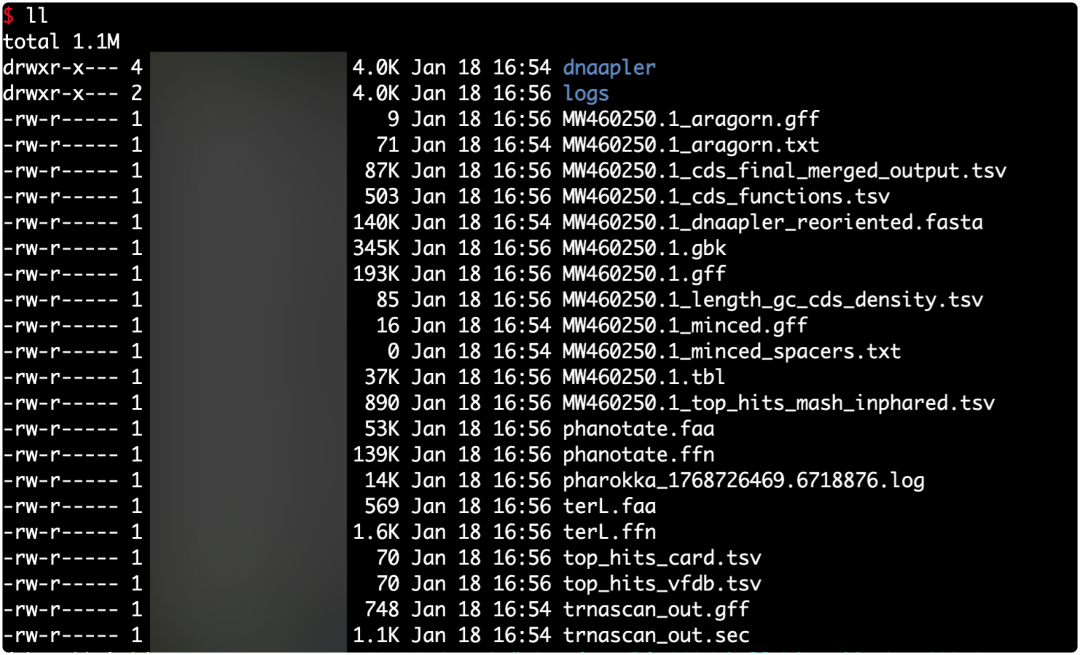
核心结果解读
MW460250.1.gbk
- 注释完成的 GenBank 文件
- 包含 CDS、功能注释、tRNA、基因坐标等信息
- 常用于:基因组展示、Geneious/Artemis 可视化、后续提交或整理
MW460250.1.gff
- 注释结果的 GFF3 格式文件
- 记录每个基因/功能元件在基因组中的位置
- 常用于:IGV、Artemis、下游基因结构分析
MW460250.1.cds_final_merged_output.tsv
- CDS 注释主结果表(最重要的结果文件之一)
- 汇总所有预测 CDS 及其最终注释信息
- 通常包含:基因 ID、起止位置、方向、功能描述、数据库命中结果
- 适合用于:功能统计、结构蛋白筛选、绘图与下游分析
MW460250.1.cds_functions.tsv
- CDS 功能注释简表
- 仅保留功能相关字段,适合快速浏览或做统计汇总
- 常用于:统计结构蛋白、未知蛋白比例等
参考文献
- George Bouras, Roshan Nepal, Ghais Houtak.et el Pharokka: a fast scalable bacteriophage annotation tool, Bioinformatics, Volume 39, Issue 1, January 2023, btac776, https://doi.org/10.1093/bioinformatics/btac776
- Enault F, Briet A, Bouteille L, Roux S, Sullivan MB, Petit M-A, et al. Phages rarely encode antibiotic resistance genes: a cautionary tale for virome analyses. ISME J. 2017;11(1):237–247. doi:10.1038/ismej.2016.90.
- McNair K, Zhou C, Dinsdale EA, Souza B, Edwards RA. PHANOTATE: a novel approach to gene identification in phage genomes. Bioinformatics. 2019;35(22):4537–4542. doi:10.1093/bioinformatics/btz265.
- Hyatt D, Chen G-L, LoCascio PF, Land ML, Larimer FW, Hauser LJ. Prodigal: prokaryotic gene recognition and translation initiation site identification. BMC Bioinformatics. 2010;11:119. doi:10.1186/1471-2105-11-119.
- Fremin BJ, Bhatt AS, Kyrpides NC, et al. Thousands of small, novel genes predicted in global phage genomes. Cell Reports. 2022;39(12):110984. doi:10.1016/j.celrep.2022.110984.
关于小编
小编就职于中国热带农业科学院,环境与植物保护研究所农业农村部热带地区低碳绿色农业重点实验室。目前实验室主要以研究方向是使用宏基因组学、宏病毒组等多组学研究微生物对土壤,大气等介质中元素循环的作用,环境中微生物功能基因的挖掘。
本文参与 腾讯云自媒体同步曝光计划,分享自微信公众号。
原始发表:2026-01-18,如有侵权请联系 cloudcommunity@tencent.com 删除
目录
腾讯云开发者

Copyright © 2013 - 2026 Tencent Cloud. All Rights Reserved. 腾讯云 版权所有
深圳市腾讯计算机系统有限公司 ICP备案/许可证号:粤B2-20090059  粤公网安备44030502008569号
腾讯云计算(北京)有限责任公司 京ICP证150476号 | 京ICP备11018762号