mysql执行show processlist输出的内容是啥?
原创
mysql执行show processlist输出的内容是啥?
原创
大大刺猬
发布于 2026-03-20 17:28:23
发布于 2026-03-20 17:28:23
导读
mysql dba最常用的命令可能是show processlist,至少我是, 那么这条命令输出了啥呢? 请看:
(root@127.0.0.1) [(none)]> show processlist;
+----+-----------------+-----------------+------+---------+------+------------------------+------------------+
| Id | User            | Host            | db   | Command | Time | State                  | Info             |
+----+-----------------+-----------------+------+---------+------+------------------------+------------------+
|  5 | event_scheduler | localhost       | NULL | Daemon  | 3223 | Waiting on empty queue | NULL             |
|  8 | root            | localhost:37412 | NULL | Query   |    0 | init                   | show processlist |
+----+-----------------+-----------------+------+---------+------+------------------------+------------------+
2 rows in set, 1 warning (0.00 sec)

(root@127.0.0.1) [(none)]> show warnings\G
*************************** 1. row ***************************
  Level: Warning
   Code: 1287
Message: 'INFORMATION_SCHEMA.PROCESSLIST' is deprecated and will be removed in a future release. Please use performance_schema.processlist instead
1 row in set (0.00 sec)

(root@127.0.0.1) [(none)]>
输出很简单, 就是连接信息和一个warnings(建议换performance_schema.processlist).
各字段是啥意思,官网也有解释:https://dev.mysql.com/doc/refman/8.0/en/show-processlist.html, 简单整理下:
对象 | 描述 |
|---|---|
Id | 连接id |
User | 客户端用户名或者内部线程名 |
Host | 客户端IP. |
db | 客户端登录的db信息. |
Command | 客户端当前执行的状态 |
Time | 客户端当前状态的持续时间 |
State | 客户端当前状态的具体状态 |
Info | 执行的sql语句 |
各堆栈信息如下:
show [full] processlist的堆栈信息如下,走的List_process_list::operator
#0  0x0000000000eee2b4 in List_process_list::operator()(THD*) ()
#1  0x0000000000d72b15 in Global_THD_manager::do_for_all_thd_copy(Do_THD_Impl*) ()
#2  0x0000000000eec8e9 in mysqld_list_processes(THD*, char const*, bool, bool) ()
#3  0x0000000000eed072 in Sql_cmd_show_processlist::execute_inner(THD*) ()
#4  0x0000000000ecce64 in Sql_cmd_dml::execute(THD*) ()
#5  0x0000000000e7310f in mysql_execute_command(THD*, bool) ()
#6  0x0000000000e76da0 in dispatch_sql_command(THD*, Parser_state*) ()
#7  0x0000000000e7813e in dispatch_command(THD*, COM_DATA const*, enum_server_command) ()
#8  0x0000000000e7a51e in do_command(THD*) ()
#9  0x0000000000fd13e8 in handle_connection ()
#10 0x00000000027c86e5 in pfs_spawn_thread ()
#11 0x00007f0ddea74ea5 in start_thread () from /lib64/libpthread.so.0
#12 0x00007f0ddce8996d in clone () from /lib64/libc.so.6如果启用了performance_schema_show_processlist,则show [full] processlist的堆栈如下:
#0  0x000000000137da44 in build_processlist_query(YYLTYPE const&, THD*, bool) ()
#1  0x00000000012da7c5 in PT_show_processlist::make_cmd(THD*) ()
#2  0x0000000000e49307 in LEX::make_sql_cmd(Parse_tree_root*) ()
#3  0x0000000000de2b2a in THD::sql_parser() ()
#4  0x0000000000e71e15 in parse_sql(THD*, Parser_state*, Object_creation_ctx*) ()
#5  0x0000000000e76acd in dispatch_sql_command(THD*, Parser_state*) ()
#6  0x0000000000e7813e in dispatch_command(THD*, COM_DATA const*, enum_server_command) ()
#7  0x0000000000e7a51e in do_command(THD*) ()
#8  0x0000000000fd13e8 in handle_connection ()
#9  0x00000000027c86e5 in pfs_spawn_thread ()
#10 0x00007fb28a513ea5 in start_thread () from /lib64/libpthread.so.0
#11 0x00007fb28892896d in clone () from /lib64/libc.so.6
select * from information_schema.processlist是走的Fill_process_list::operator, 堆栈信息如下:
#0  0x0000000000eeeac4 in Fill_process_list::operator()(THD*) ()
#1  0x0000000000d72b15 in Global_THD_manager::do_for_all_thd_copy(Do_THD_Impl*) ()
#2  0x0000000000ede143 in fill_schema_processlist(THD*, Table_ref*, Item*) ()
#3  0x0000000000ee5ae5 in do_fill_information_schema_table(THD*, Table_ref*, Item*) ()
#4  0x00000000013b0cfd in MaterializeInformationSchemaTableIterator::Init() ()
#5  0x0000000000f4c27c in Query_expression::ExecuteIteratorQuery(THD*) ()
#6  0x0000000000f4c69c in Query_expression::execute(THD*) ()
#7  0x0000000000ecce64 in Sql_cmd_dml::execute(THD*) ()
#8  0x0000000000e7310f in mysql_execute_command(THD*, bool) ()
#9  0x0000000000e76da0 in dispatch_sql_command(THD*, Parser_state*) ()
#10 0x0000000000e7813e in dispatch_command(THD*, COM_DATA const*, enum_server_command) ()
#11 0x0000000000e7a51e in do_command(THD*) ()
#12 0x0000000000fd13e8 in handle_connection ()
#13 0x00000000027c86e5 in pfs_spawn_thread ()
#14 0x00007f9d6e718ea5 in start_thread () from /lib64/libpthread.so.0
#15 0x00007f9d6cb2d96d in clone () from /lib64/libc.so.6
我们后续看的都是performance_schema_show_processlist=OFF(默认)的情况.
Id
客户端连接id, 每次连接都会+1, 即:new_id = thread_id_counter++
所以可以通过该值的大小来判断哪些连接先连过来. 在其它表里面通常使用processlist_id来区分.
kill连接或者查询的时候也是使用的这个id.
KILL [CONNECTION | QUERY] processlist_id默认是connection.
User
mysql用户, 有3种情况:
- mysql用户,通过账号密码登录的mysql账号.

- system user.一些内部线程的账号, 比如主从复制中从库的IO/SQL线程

- unauthenticated user 还没登录数据库服务器的时候显示的信息.
我们可以使用之前自己编写的驱动来模拟, 也可以就telnet模拟, 反正就是别把密码信息发过去就行:

其实还有第4种: event启用之后,会注册一个用户:event_scheduler

其实还有第5种, 我们查询mysql.user的时候,会发现存在3个特殊的用户:
mysql.infoschema information_schema库下视图的DEFINER
mysql.sys sys库下视图的DEFINER
mysql.session 内部使用的
Host
该会话的客户端信息, 如果是TCP/IP连接的,通常包含host和port; 如果是socket连接的,则固定为localhost; 如果是system user的, 则为空; 一些内部使用的,也固定为localhost.
db
该会话默认的数据库信息, 可以使用use来切换. 有了默认的db信息后,sql语句中如果表未带schema信息,则默认使用该db名字作为该表的schema
Command
该会话执行的命令类型, 有很多种, 我们可以查询官网:https://dev.mysql.com/doc/refman/8.0/en/thread-commands.html
该命令和mysql连接协议中的类型(enum_server_command:COM_XXX)对应(). 我们简单整理下, 也顺便回忆下连接协议
id | 连接协议com | processlist中的Command | 连接协议描述 | processlist中command描述 |
|---|---|---|---|---|
0 | Sleep | 空闲状态,就是啥也不干 | ||
1 | COM_QUIT | Quit | 退出连接,客户端执行exit/quit或者ctrl就是发的这个包 | 线程关闭,就是客户端端口连接 |
2 | COM_INIT_DB | Init DB | 切换数据库的, 就是执行use dbname语句. | 在执行use dbname, 有时候卡的时候能看到这个状态 |
3 | COM_QUERY | Query | 发送SQL语句的, | 开始执行SQL语句 |
4 | COM_FIELD_LIST | Field List | 查看表结构的,就是desc tblname | 连接正在查看表字段信息 |
5 | COM_CREATE_DB | Create DB | 没见过, create database语句是使用的COM_QUERY过去的, 服务端也拒绝这包 | 线程正在执行创建数据库的操作 |
6 | COM_DROP_DB | Drop DB | 没见过,drop database语句是使用的COM_QUERY过去的 | 线程正在执行删除数据库的操作 |
7 | COM_REFRESH | Refresh | 5.7.11就移除了,现在是走COM_QUERY过去的 | flush log之类的 |
8 | COM_DEPRECATED_1 | Shutdown | 走COM_QUERY了 | 正在停库 |
9 | COM_STATISTICS | Statistics | The statistics are refreshed at the time of executing this command | The thread is producing server status information. |
10 | COM_PROCESS_INFO | Processlist | 移除了 | The thread is producing information about server threads. |
11 | COM_CONNECT | Connect | 移除了 | Used by replication receiver threads connected to the source, and by replication worker threads |
12 | COM_PROCESS_KILL | Kill | 移除了 | 正在kill其它线程 |
13 | COM_DEBUG | Debug | 告诉服务器要做个dump, 可以使用mysqladmin debug来发送, 数据包是:b'\x01\x00\x00\x00\r' | 正在生成debug信息 |
14 | COM_PING | Ping | 探活, 可以使用mysqladmin ping来做, 数据包是:b'\x01\x00\x00\x00\x0e' | 正在处理一个Ping请求. |
15 | COM_TIME | Time | 未使用 | 未使用 |
16 | COM_DELAYED_INSERT | Delayed insert | delayed insert | delayed insert |
17 | COM_CHANGE_USER | Change user | 改变当前连接用户 | 正在change user |
18 | COM_BINLOG_DUMP | Binlog Dump | 告诉服务端我要的binlog信息 | 这个连接是来要binlog的 |
19 | COM_TABLE_DUMP | Table Dump | ||
20 | COM_CONNECT_OUT | Connect Out | ||
21 | COM_REGISTER_SLAVE | Register Replica | 注册从库信息 | 正在注册从库 |
22 | COM_STMT_PREPARE | Prepare | ||
23 | COM_STMT_EXECUTE | Execute | ||
24 | COM_STMT_SEND_LONG_DATA | Long Data | ||
25 | COM_STMT_CLOSE | Close stmt | ||
26 | COM_STMT_RESET | Reset stmt | ||
27 | COM_SET_OPTION | Set option | 设置一些连接选项的,就是Capabilities Flags, 连接只会居然还可以设置, 之前都是连接的时候设置的.... | 客户端在设置连接选项 |
28 | COM_STMT_FETCH | Fetch | ||
29 | COM_DAEMON | Daemon | 内部线程 | |
30 | COM_BINLOG_DUMP_GTID | Binlog Dump GTID | 告诉服务端我要的binlog对应的gtid信息 | 这个连接是来要Binlog的,而且是根据gtid的方式 |
31 | COM_RESET_CONNECTION | Reset Connection | 重置连接状态 | |
32 | COM_CLONE | clone | ||
33 | COM_SUBSCRIBE_GROUP_REPLICATION_STREAM | Group Replication Data Stream subscription | mgr相关的 | mgr相关的 |
34 | COM_END | Error | ||
大部分客户端命令都是使用COM_QUERY来做的, 所以连接协议还是比较简单的. 服务端也可以通过command的值判断客户端在干嘛,当然info能直接看到具体的SQL了,而stat甚至能看到各个sql具体的状态.
主从连接过程: 建立连接,查询基础参数,注册从库,发送binlog信息, 主库主动推送binlog和心跳.
Time
该SQL处于该状态的时间, 通常可以当作是SQL执行时间(如果command不是Sleep的话).
State
各Command的具体状态, 其实叫stage可能更好理解. 这部分内容非常多, 我们可以分4部分来看:
- 通用线程状态: 一般SQL
- 主从相关线程状态
- 主库的binlog dump线程状态
- 从库的slave_io线程状态
- 从库的slave_sql线程状态
- 主从连接时的线程状态, 比如Killing replica
- NDB集群线程状态
- Event线程状态
各stage加起来有上百个, 该怎么分析呢? 以往我们是打断点, 但代码里有debug,不用白不用:
mysqld-debug --debug执行一条简单的'select * from db1.t1'得到的各状态如下:
T@8: | THD::enter_stage: 'starting' ../../mysql-8.0.37/sql/conn_handler/init_net_server_extension.cc:111
T@8: | | | | | THD::enter_stage: 'Executing hook on transaction begin.' ../../mysql-8.0.37/sql/rpl_handler.cc:1477
T@8: | | | | | THD::enter_stage: 'starting' ../../mysql-8.0.37/sql/rpl_handler.cc:1479
T@8: | | | | | | | | THD::enter_stage: 'checking permissions' ../../mysql-8.0.37/sql/auth/sql_authorization.cc:2146
T@8: | | | | | | | | THD::enter_stage: 'Opening tables' ../../mysql-8.0.37/sql/sql_base.cc:5797
T@8: | | | | | THD::enter_stage: 'init' ../../mysql-8.0.37/sql/sql_select.cc:772
T@8: | | | | | | | THD::enter_stage: 'System lock' ../../mysql-8.0.37/sql/lock.cc:332
T@8: | | | | | | | | THD::enter_stage: 'optimizing' ../../mysql-8.0.37/sql/sql_optimizer.cc:354
T@8: | | | | | | | | THD::enter_stage: 'statistics' ../../mysql-8.0.37/sql/sql_optimizer.cc:694
T@8: | | | | | | | | THD::enter_stage: 'preparing' ../../mysql-8.0.37/sql/sql_optimizer.cc:778
T@8: | | | | | | THD::enter_stage: 'executing' ../../mysql-8.0.37/sql/sql_union.cc:1670
T@8: | | | | | THD::enter_stage: 'end' ../../mysql-8.0.37/sql/sql_select.cc:805
T@8: | | | | THD::enter_stage: 'query end' ../../mysql-8.0.37/sql/sql_parse.cc:4881
T@8: | | | | | THD::enter_stage: 'waiting for handler commit' ../../mysql-8.0.37/sql/handler.cc:1610
T@8: | | | | THD::enter_stage: 'closing tables' ../../mysql-8.0.37/sql/sql_parse.cc:4944
T@8: | | | THD::enter_stage: 'freeing items' ../../mysql-8.0.37/sql/sql_parse.cc:5413
T@8: | | THD::enter_stage: 'cleaning up' ../../mysql-8.0.37/sql/sql_parse.cc:2489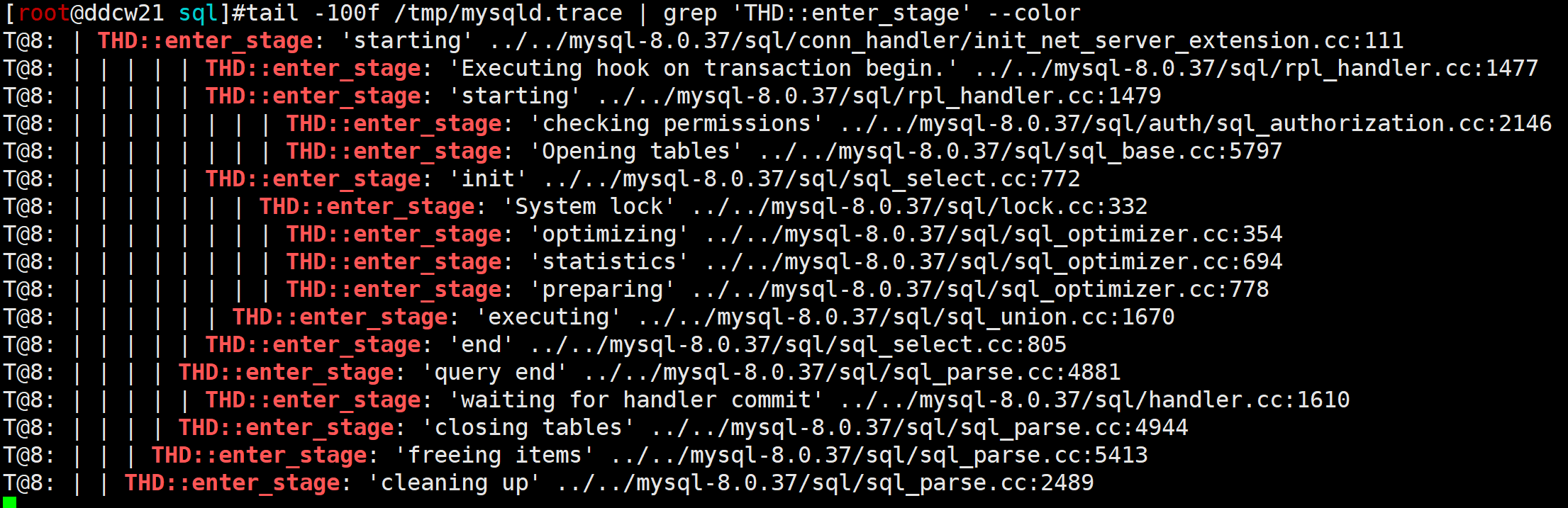
我们来简单看看:
starting: 开始的第一个stage,
Executing hook on transaction begin: 事务开始了,RUN_HOOK(transaction, trans_begin, (thd, ret))
第二个starting: 看下前一个状态而已, THD_STAGE_INFO(thd, old_stage)
checking permissions: 检查权限, 如果表很多,然后使用mysqldump备份任意数据(主要是去获取元数据信息),就有机会看到这个状态
Opening tables: 打开表, 如果该表被Lock了,则会变成Waiting for table metadata lock状态.
init: sql执行前的初始化,
System lock: 在锁表中, 这种状态一般都很短, 在从库会比较常见(个人经验).
optimizing: 正在优化SQL
statistics: 正在根据统计信息计算执行计划
preparing: 执行前的一些准备
executing: sql执行中
end: 执行结束了
query end: sql执行结束了, 可以释放一些资源了
waiting for handler commit: 等待内部提交(binlog之类的), 如果磁盘满了,写不了binlog了就能看到这个状态
closing tables: 释放表
freeing items: 释放一些资源, 比如:thd->lex->destroy
cleaning up: 跑完一条SQL了.可以准备下一条了.
其它命令所产生的state就请读者自行验证了.
Info
显示客户端执行的SQL,
show processlist最大长度是100字节,
/** Characters shown for the command in 'show processlist'. */
constexpr const size_t PROCESS_LIST_WIDTH{100};
information_schema.processlist最大长度是65535字节
/* Characters shown for the command in 'information_schema.processlist' */
constexpr const size_t PROCESS_LIST_INFO_WIDTH{65535};
可以使用如下脚本验证:
tstr = ''
for i in range(10000):
	tstr += 'A' + str(i).zfill(6)
print(f'select sleep(100),"{tstr}";')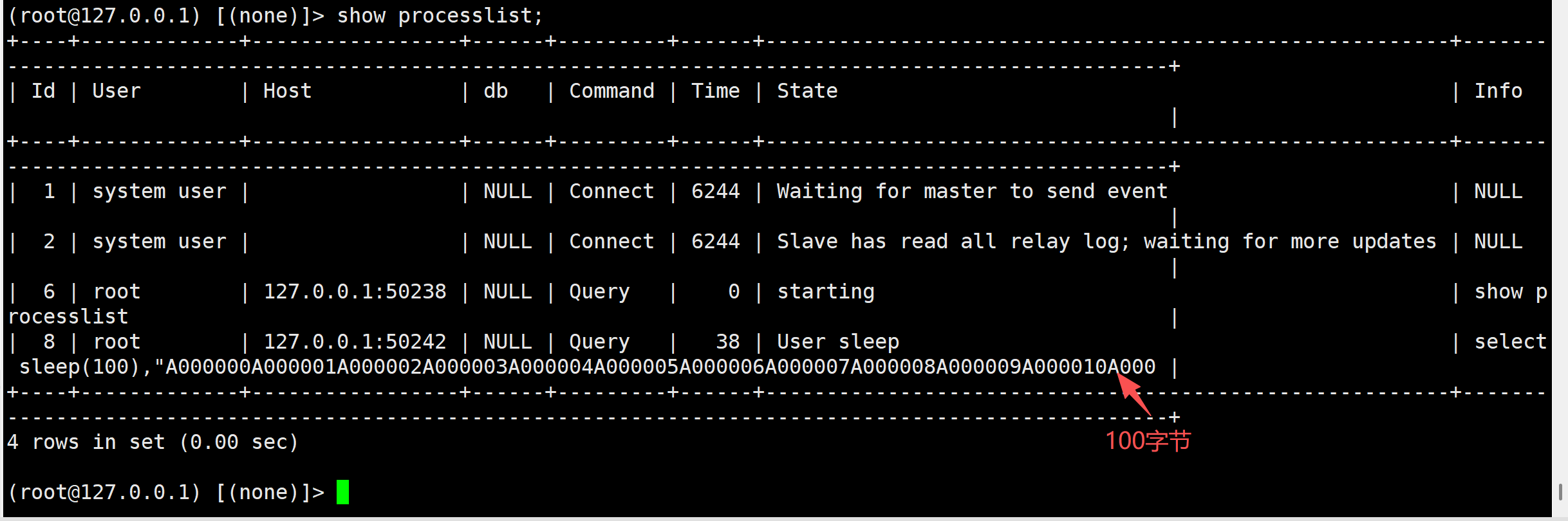
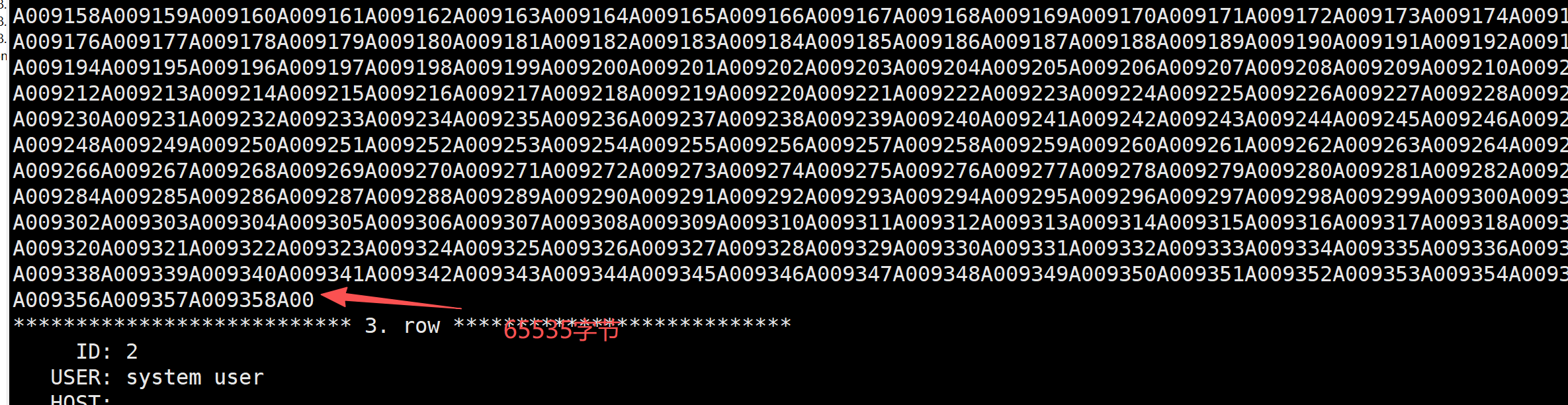
查询的information_schema.processlist的info计算如下:
19 + (9358+1)*7 + 3 = 65535show full processlist的info大小限制是max_allowed_packet, 默认67108864, 但如果启用了performance_schema_show_processlist,则大小限制是1024
我们还可以查询performance_schema.processlist,其info大小是COL_INFO_SIZE, 即1024
总结
show processlist显示的sql虽然只有1024,但基本上够用了, 如果要查看更详细的sql可以使用show full processlist
show processlist中的time就是当前Command的时间, 如果Command是Query则可以当作是sql的当前执行时间.
show processlist中的Id是递增的, 能看到连接的限后顺序, 也能反映一个系统平均的新连接数, 太大的话, 说明短连接多.
show processlist中的State能看到各Command具体的状态, 如果某个状态持续时间过长,则能对应某些原因. 比如: 看到大量的线程处于waiting for handler commit状态,则表明磁盘可能满了.
参考:
https://dev.mysql.com/doc/refman/8.0/en/thread-information.html
原创声明:本文系作者授权腾讯云开发者社区发表,未经许可,不得转载。
如有侵权,请联系 cloudcommunity@tencent.com 删除。
目录
腾讯云开发者

Copyright © 2013 - 2026 Tencent Cloud. All Rights Reserved. 腾讯云 版权所有
深圳市腾讯计算机系统有限公司 ICP备案/许可证号:粤B2-20090059  粤公网安备44030502008569号
腾讯云计算(北京)有限责任公司 京ICP证150476号 | 京ICP备11018762号