PCIE C2C in Nvidia orin/thor chip

PCIE C2C in Nvidia orin/thor chip

用户9732312
发布于 2026-03-18 20:52:32
发布于 2026-03-18 20:52:32
Chip to Chip Communication
The NVIDIA® Software Communication Interface for Chip to Chip over direct PCIe connection (NvSciC2cPcie) provides the ability for user applications to exchange data across two NVIDIA DRIVE AGX DevKits interconnected on a direct PCIe connection. The direct PCIe connection is between the first/one NVIDIA DRIVE AGX Developer Kits as a PCIe Root Port with the second/other NVIDIA DRIVE AGX DevKit as a PCIe Endpoint.
SoC
- NVIDIA DRIVE Orin as PCIe Root Port
- NVIDIA DRIVE Orin as PCIe Endpoint
Topology
- NVIDIA DRIVE AGX Orin DevKit as PCIe Root Port <> NVIDIA DRIVE AGX Orin DevKit as PCIe Endpoint
- VIDIA DRIVE Recorder Orin A as PCIe Endpoint <> NVIDIA DRIVE Recorder Orin B as Root Port
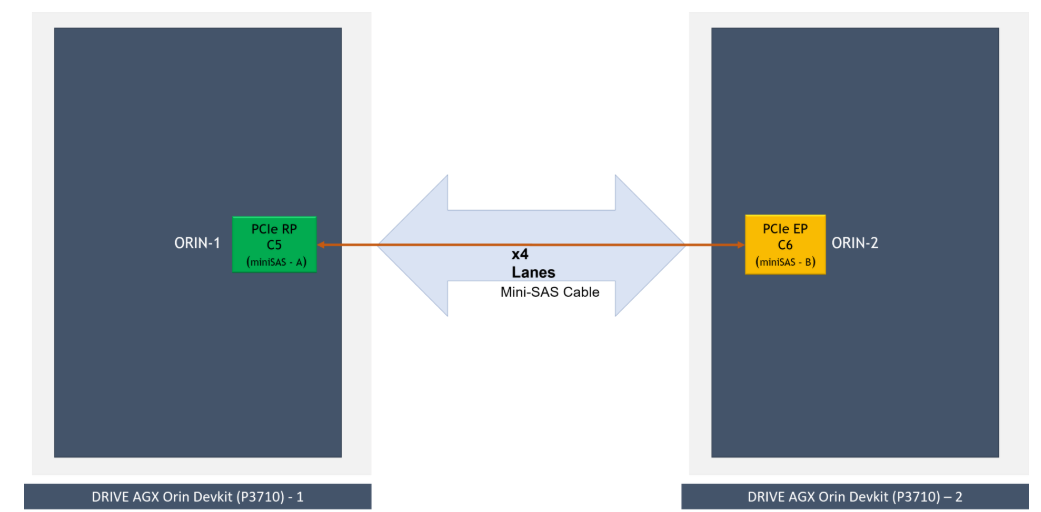
在orin/thor 芯片中,为了满足VLA等大模型的算力需求,如果单soc的算力不够,可以使用多芯片方案,芯片间通过pcie进行chip 2 chip的通信(C2C).可以在chip 2 chip 间进行大数据传输,如camera的图片,模型计算的中间值等。
Platform Setup
The following platform configurations are required for NvSciC2cPcie communication with NVIDIA DRIVE AGX Orin DevKit. Similar connections are required for other platforms.
- miniSAS Port-A of NVIDIA DRIVE AGX Orin DevKit -1 connected to miniSAS Port-B of NVIDIA DRIVE AGX Orin DevKit - 2 with a PCIe miniSAS cable.
- The PCIe controllers of the two NVIDIA DRIVE AGX Orin DevKits when interconnected back-to-back have PCIe re-timers, and the PCIe re-timer firmware must be flashed for the appropriate PCIe lane configuration.
- For custom platform PCIe controllers used, configure lane and clock accordingly.
- Each PCIe contoller in NVIDIA DRIVE AGX Orin Devkit has PCIe EDMA engine. NvSciC2cPcie uses only one DMA Write channel of the assigned PCIe controller for all the NvSciC2cPcie transfers.
- NvSciC2cPcie transfer is in the FIFO mechanism, and there is no load balancing or scheduling policy to prioritize the specific request.
在Nvidia的芯片的pcie 中,支持如下feature
- 支持C2C 传输
- 支持EDMA传输
- 支持hotplug
- 支持多lane ,带宽可达64Gb/s
PCIE 作为kernel moudle 存在,在系统启动后,由sytemd 加载
Linux Kernel Module Insertion
NvSciC2cPcie only runs on select platforms: NVIDIA DRIVE AGX Orin DevKit and NVIDIA DRIVE Recorder. Before user applications can exercise NvSciC2cPcie interface, you must insert the Linux kernel modules for NvSciC2cPcie. They are not loaded by default on NVIDIA DRIVE® OS Linux boot. To insert the required Linux kernel module:
- On first/one Orin configured as PCIe Root Port
sudo modprobe nvscic2c-pcie-epc
- On second/other Orin DevKit configured as PCIe Endpoint
sudo modprobe nvscic2c-pcie-epf
A recommendation is to load nvscic2c-pcie-ep* kernel modules immediately after boot. This allows the nvscic2c-pcie software stack to allocate contiguous physical pages for its internal operation for each of the nvscic2c-pcie endpoints configured.
进行hotplug时,需要运行下面的脚本,
PCIe Hot-Plug
Once loaded, Orin DevKit enabled as PCIe Endpoint is hot-plugged and enumerated as a PCIe device with Orin DevKit configured as PCIe Root Port (miniSAS cable connected to miniSAS port-A). The following must be executed on Orin DevKit configured as PCIe Endpoint (miniSAS cable connected to miniSAS port-B):
sudo -s
cd /sys/kernel/config/pci_ep/
mkdir functions/nvscic2c_epf_22CC/func
echo 0x10DE > functions/nvscic2c_epf_22CC/func/vendorid
echo 0x22CC > functions/nvscic2c_epf_22CC/func/deviceid
ln -s functions/nvscic2c_epf_22CC/func controllers/141c0000.pcie_ep
echo 0 > controllers/141c0000.pcie_ep/start
echo 1 > controllers/141c0000.pcie_ep/start
The previous steps, including Linux kernel module insertion, can be added as a linux systemd service to facilitate auto-availability of NvSciC2cPcie software at boot.
PCIe Hot-Unplug
To tear down the connection between PCIe Root Port and PCIe Endpoint, PCIe hot-unplug PCIe Endpoint from PCIe Root Port. Refer to the Restrictions section for more information.
The PCIe Hot-Unplug is always executed from PCIe Endpoint [NVIDIA DRIVE AGX Orin DevKit (miniSAS cable connected to miniSAS port-B)] by initiating the power-down off the PCIe Endpoint controller and subsequently unbinding the nvscic2c-pcie-epf module with the PCIe Endpoint.
Prerequisite: PCIe Hot-Unplug must be attempted only when the PCIe Endpoint is successfully hot-plugged into PCIe Root Port and NvSciIpc(INTER_CHIP, PCIE) channels are enumerated.
To PCIe hot-unplug, execute the following on NVIDIA DRIVE AGX Orin DevKit configured as PCIe Endpoint (miniSAS cable connected to miniSAS port-B). This makes NvSciIpc(INTER_CHIP, PCIE) channels disappear on both the PCIe inter-connected NVIDIA DRIVE AGX Orin DevKits.
sudo -s
cd /sys/kernel/config/pci_ep/
echo 0 > controllers/141c0000.pcie_ep/start
unlink controllers/141c0000.pcie_ep/func
Successful PCIe hot-unplug of PCIe Endpoint from PCIe Root Port makes the NvSciIpc(INTER_CHIP, PCIE) channels as listed, NvSciIpc (INTER_CHIP, PCIe) channels, go away on both the NVIDIA DRIVE AGX Orin DevKits, and you can proceed with power-cycle/off of one or both the NVIDIA DRIVE AGX Orin DevKits.
PCIe Hot-Replug
To re-establish the PCIe connection between PCIe Endpoint and PCIe Root Port, the user must PCIe hot-replug PCIe Endpoint to PCIe Root Port.
When both the SoCs were power-cycled after PCIe hot-unplug previously, you must follow the usual steps of PCIe hot-plug. However, if one of the two SoCs power-cycled/rebooted then, PCIe hot-replug is required to re-establish the connection between them.
PCIE 启动 big pic
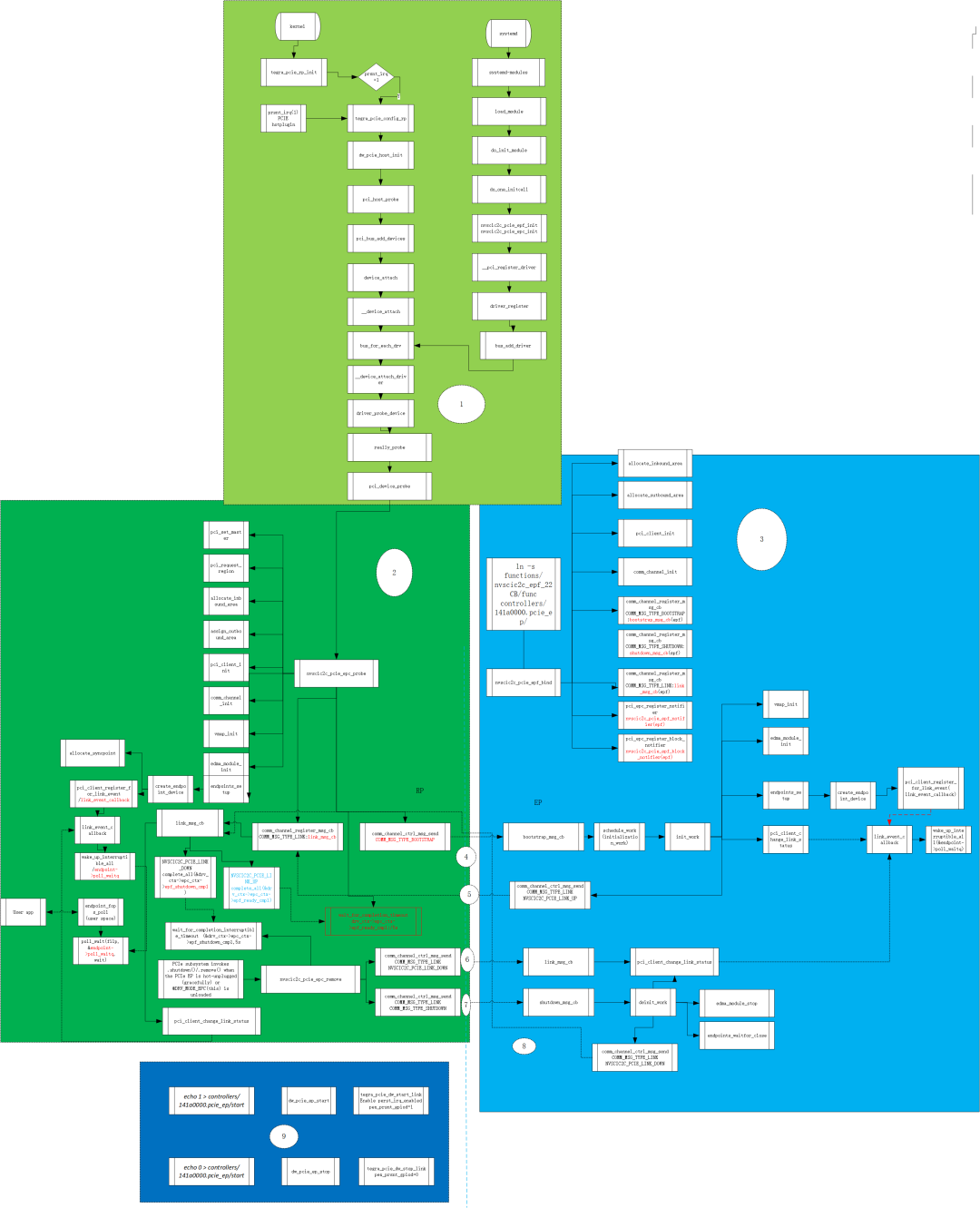
1.kernel 启动后,systemd 加载RC 和EP的ko
2.RC 进行资源的输出化并等待和EP link
3.EP 上电后,RC执行hotplug,进行和EP端的link,并初始化channel
4.RC/ep建立连接后,提供channel进行RC/EP通信,并监听其运行状态,进行hot-unplug/reboot等
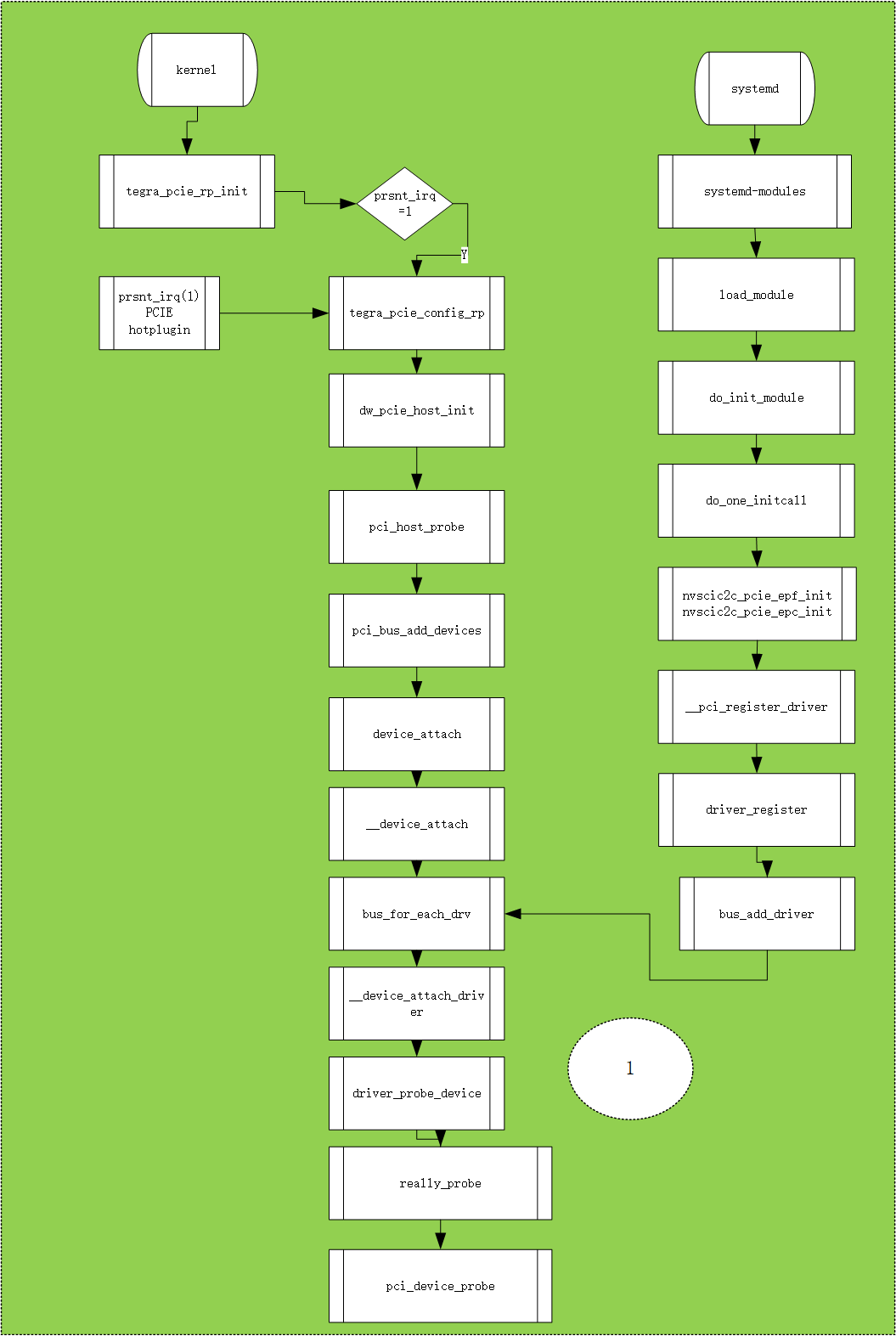
kernel 启动后,systemd 加载RC 和EP的ko
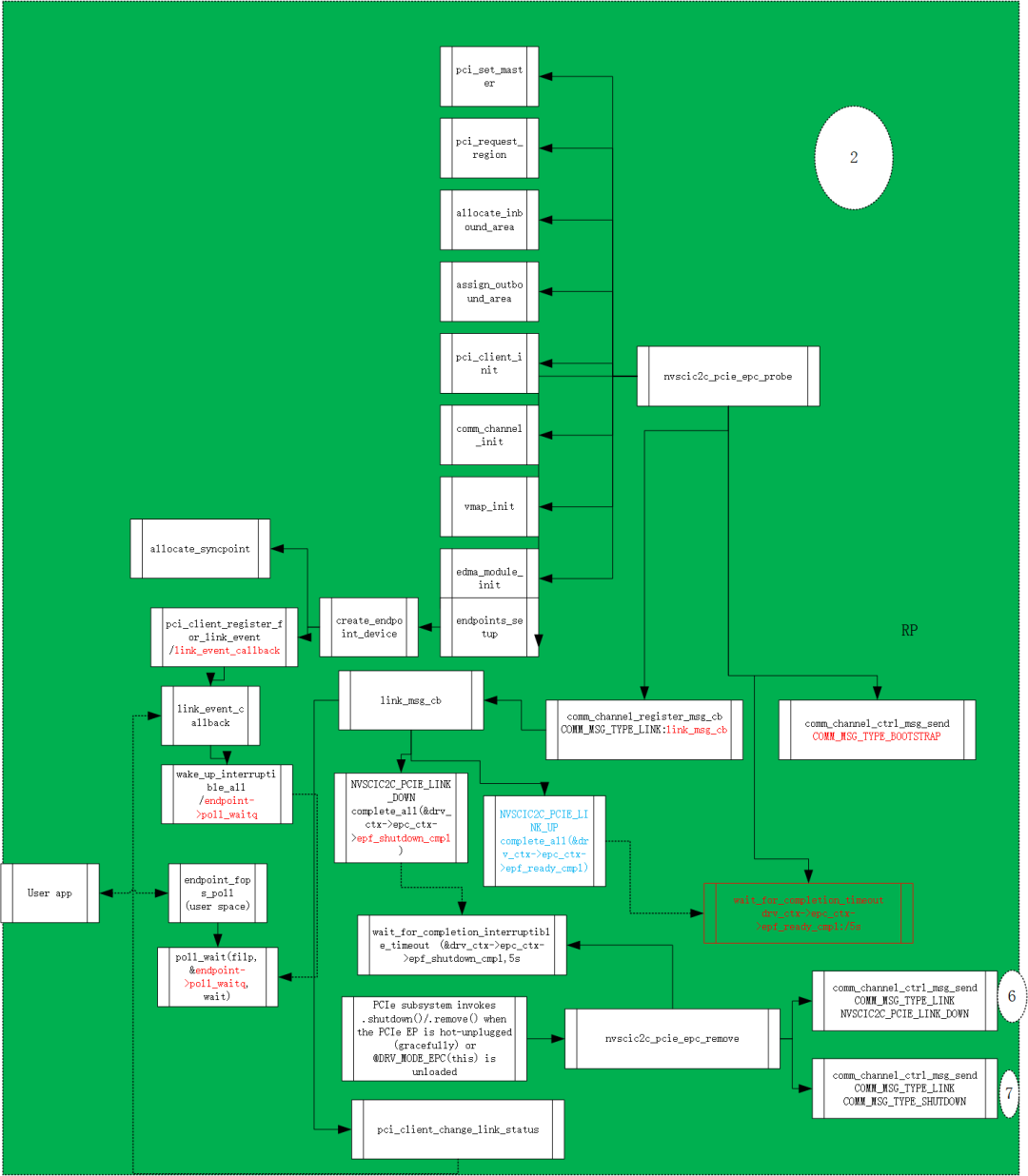
RC probe
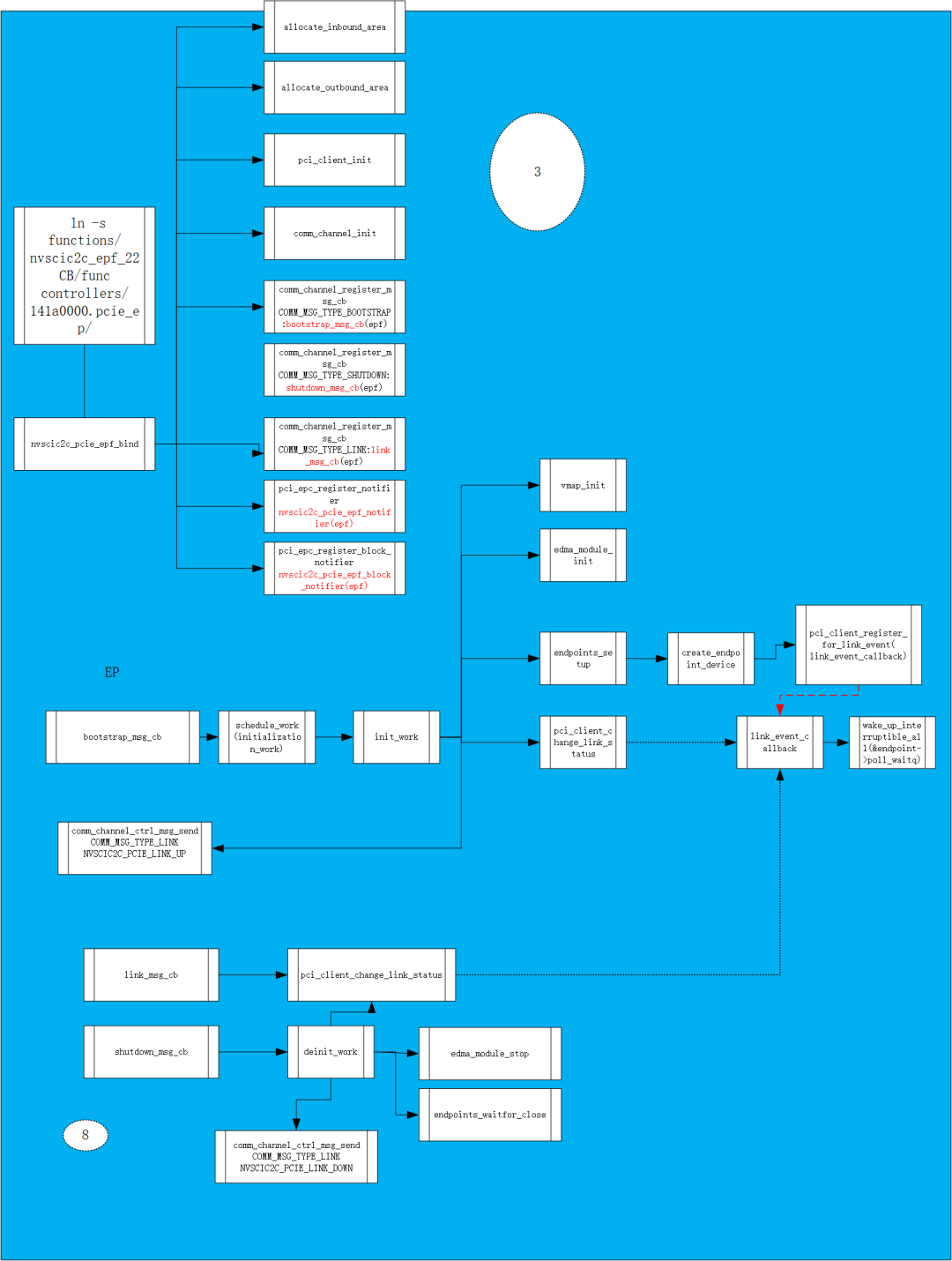
EP config
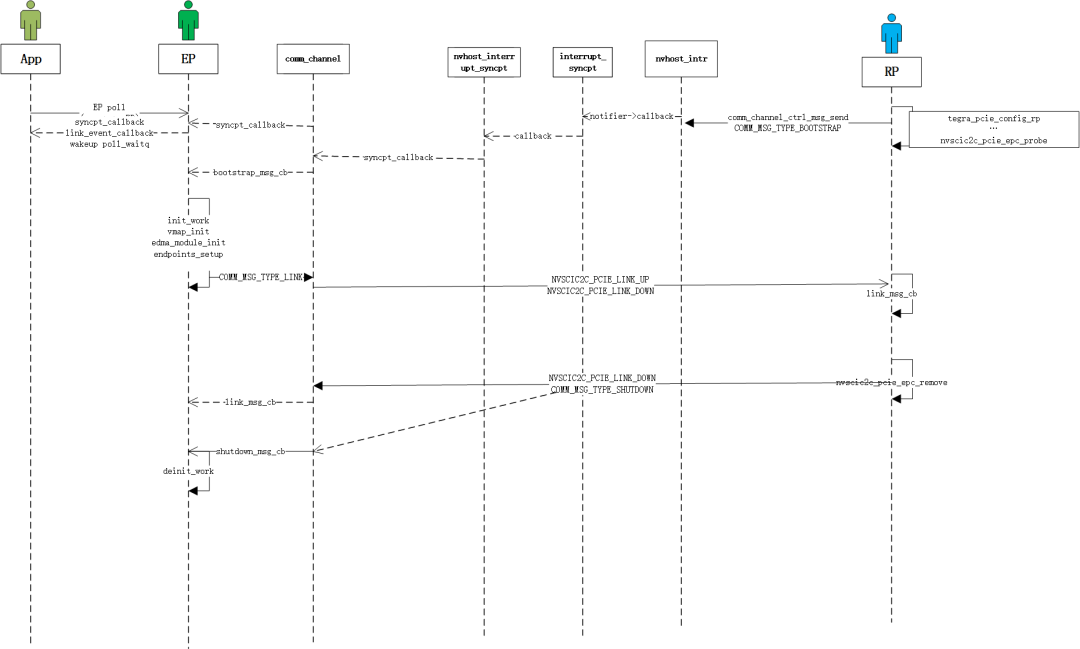
User case 1 app epoll
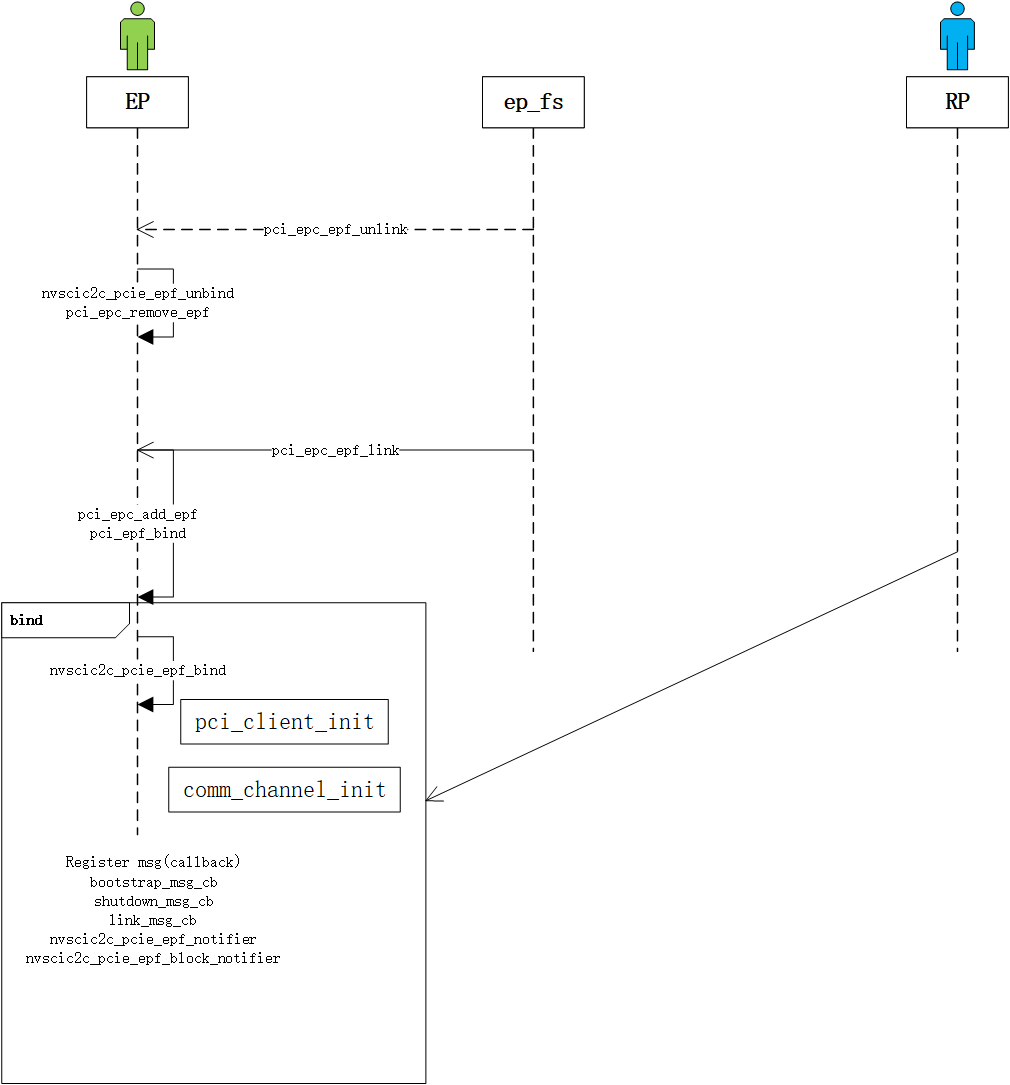
User case 2 ep unlink/link
ln -s functions/nvscic2c_epf_22CC/func controllers/141c0000.pcie_epunlink controllers/141c0000.pcie_ep/func
User case 3 RC shutdown/ep active
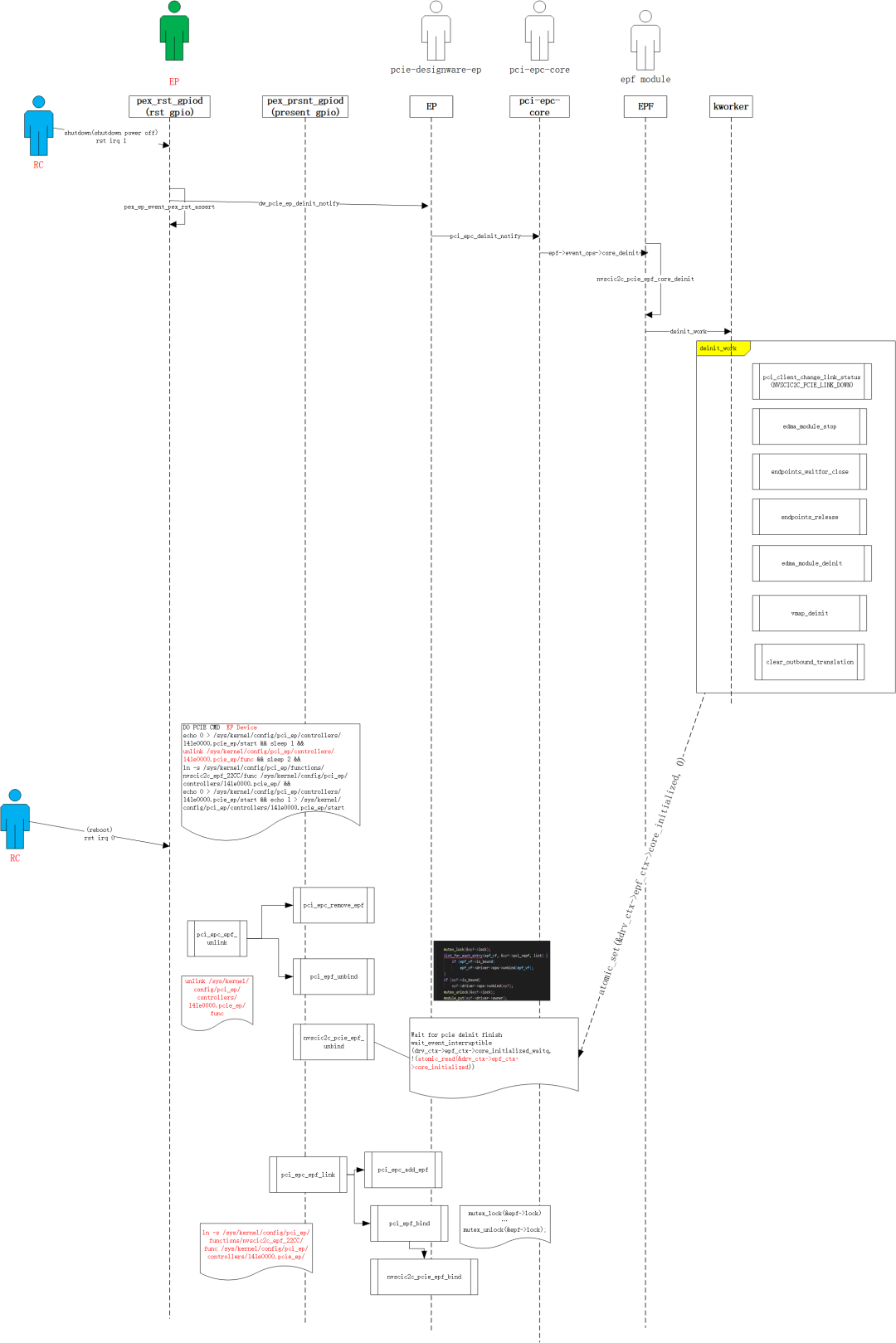
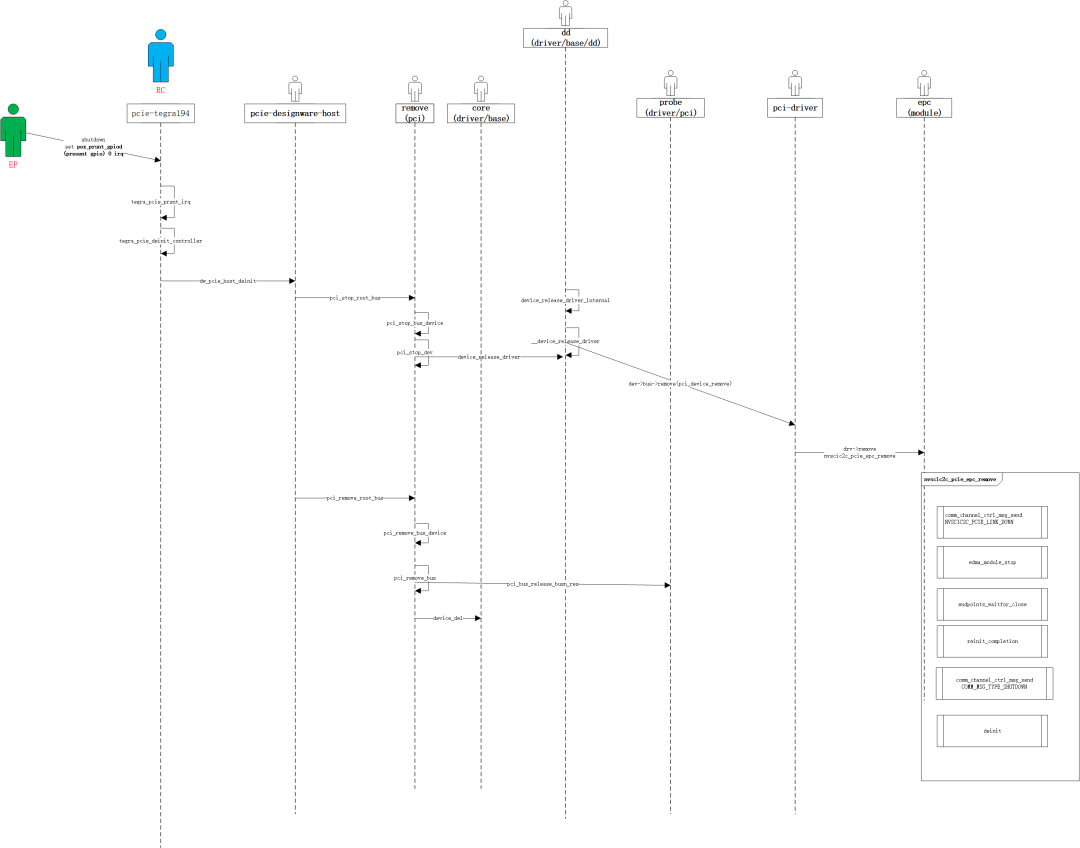
User case 4 EP shutdown/RC active
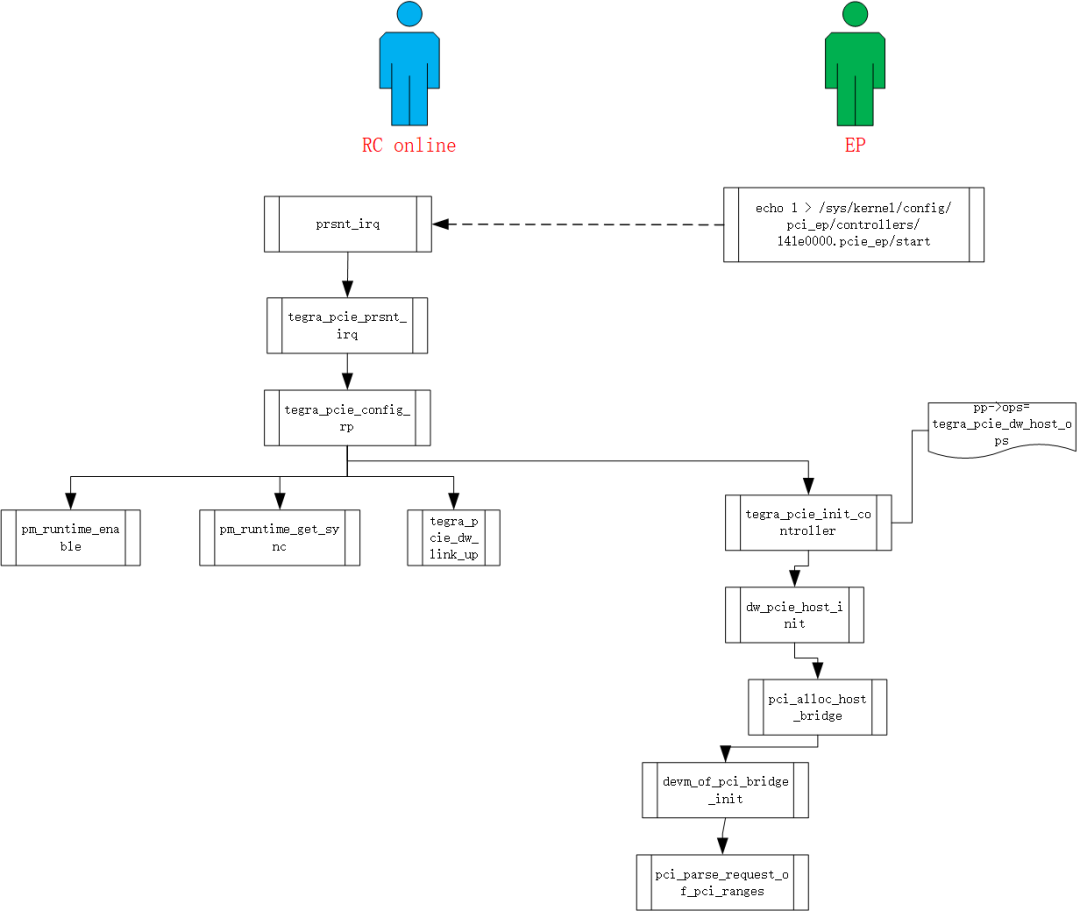
User case 5 EP hotplug
本文参与 腾讯云自媒体同步曝光计划,分享自微信公众号。
原始发表:2025-07-23,如有侵权请联系 cloudcommunity@tencent.com 删除
目录
腾讯云开发者

Copyright © 2013 - 2026 Tencent Cloud. All Rights Reserved. 腾讯云 版权所有
深圳市腾讯计算机系统有限公司 ICP备案/许可证号:粤B2-20090059  粤公网安备44030502008569号
腾讯云计算(北京)有限责任公司 京ICP证150476号 | 京ICP备11018762号