GitHub 狂飙 2.5 万标星,这款「会自愈」的 Python 爬虫框架杀疯了!

GitHub 狂飙 2.5 万标星,这款「会自愈」的 Python 爬虫框架杀疯了!

开源星探
发布于 2026-03-16 19:03:32
发布于 2026-03-16 19:03:32
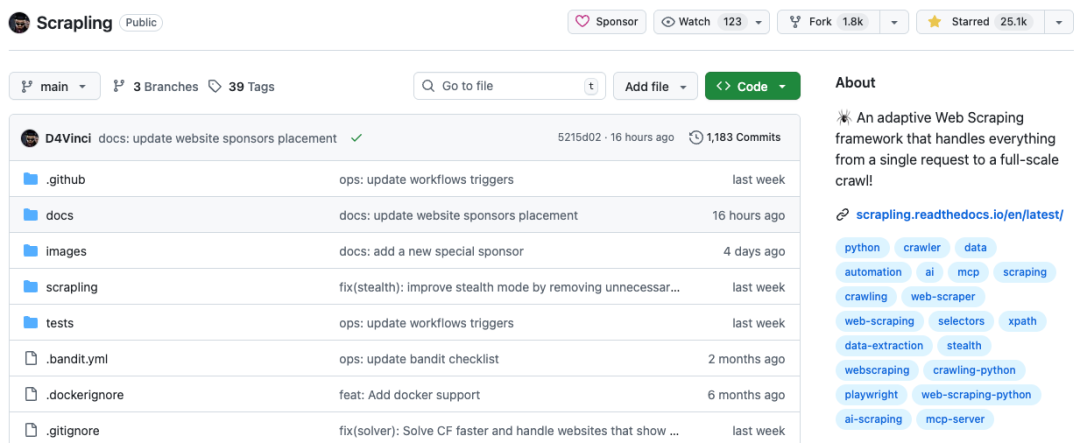
最近 GitHub 上爆火的一个项目,25.1k stars 涨势喜人!
做过爬虫的小伙伴应该经历过,花了好几天写好的爬虫脚本,网站一改版全白搭。CSS 选择器失效、XPath 路径不对,一切又得重来。这种「网站一变,代码就挂」的噩梦,相信很多开发者都经历过。
这还不算完,现在的网站反爬机制越来越强,Cloudflare Turnstile、人机验证、指纹检测... 想采集数据简直像是在打游击战。
传统的 BeautifulSoup 虽然简单,但性能跟不上大规模爬取;Scrapy 功能强大,但是学习曲线陡峭,新手很难上手。
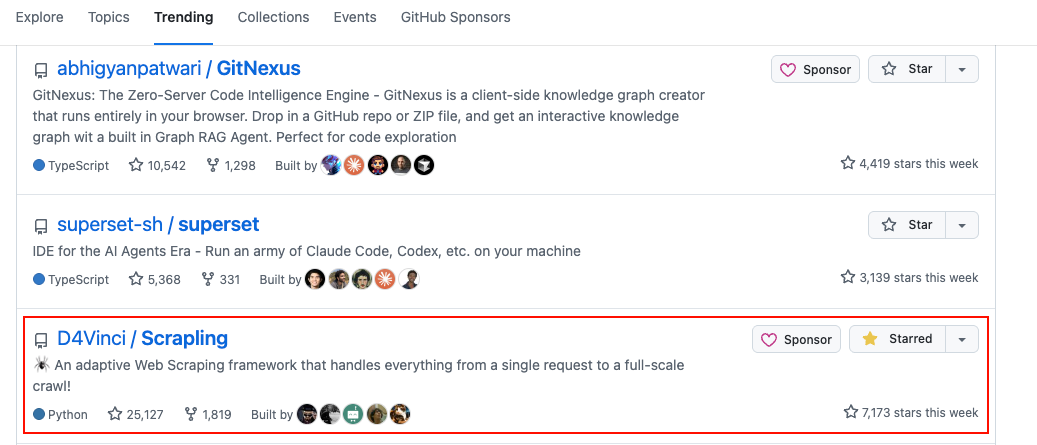
就在这个时候,一个横空出世的项目打破了这个困局。周涨星更是接近 8000 颗,目前在 GitHub Trending 周榜稳居不下!
而且还能同 OpenClaw 小龙虾🦞组合使用。
它就是 Scrapling —— 一个让爬虫能够「自我进化」的自适应 Web 爬虫框架。
项目简介
Scrapling 是开源的一个自适应 Web 爬虫框架,它不是另一个「能爬」的库,而是让爬虫会「学习」和「适应」的框架。
它的核心理念是:一个框架,零妥协 —— 从单次请求到全规模爬取,都能轻松搞定。
这个项目最吸引人的地方在于,它的解析器能够学习网站的结构,当页面更新时自动重新定位元素。
同时,它的请求器能够开箱即用地绕过 Cloudflare Turnstile 等反爬虫系统。而且它的爬虫框架让你能用几行 Python 代码就实现并发、多会话爬取,支持暂停/恢复和自动代理轮换。
Scrapling 是由开发者为 Web 爬虫开发者和普通用户打造的,无论是新手还是老手,都能找到适合自己的用法。
核心亮点
1、🧠 自适应元素追踪
这是 Scrapling 最炸裂的功能。传统的爬虫依赖精确的 CSS 选择器或 XPath 路径,网站一改版就全挂了。
但 Scrapling 的解析器并非依赖精确路径,而是借助智能算法学习元素的视觉特征与上下文关系。
当网站改版后,只需开启 adaptive=True,系统就会利用多维相似度算法自动找回元素。
你还可以使用 auto_save=True 在第一次爬取时保存元素特征,之后即使网站改版也能自动定位。
from scrapling.fetchers import StealthyFetcher

page = StealthyFetcher.fetch('https://example.com', headless=True)
products = page.css('.product', auto_save=True)  # 第一次爬取时保存元素特征

# 后来网站改版了,没关系,开启 adaptive=True 自动找回!
products = page.css('.product', adaptive=True)
这种「一次编写,永久适配」的特性,简直是爬虫开发者的福音!
2、🛡️ 反反爬虫利器
Scrapling 提供了四种不同类型的 Fetcher,覆盖从简单到复杂的所有场景:
- • Fetcher:快速 HTTP 请求,支持 TLS 指纹伪装,可以模拟 Chrome、Firefox 等浏览器的指纹
- • AsyncFetcher:异步版本,性能更强
- • StealthyFetcher:绕过 Cloudflare 等反爬系统,开箱即用
- • DynamicFetcher:基于 Playwright 的动态页面抓取,支持完整的浏览器自动化
特别是 StealthyFetcher,它具备先进的隐身能力和指纹伪装功能,可以轻松绕过所有类型的 Cloudflare Turnstile/Interstitial 验证,完全自动化处理,无需人工干预。
from scrapling.fetchers import StealthyFetcher, StealthySession

with StealthySession(headless=True, solve_cloudflare=True) as session:
    page = session.fetch('https://nopecha.com/demo/cloudflare')
    data = page.css('#padded_content a').getall()
除此之外,Scrapling 还内置了 ProxyRotator,支持循环或自定义轮换策略,适用于所有会话类型,还支持每个请求单独覆盖代理配置。
3、⚡ 性能炸裂
Scrapling 不仅功能强大,性能也是一绝。根据官方提供的基准测试数据,在文本提取速度测试(5000 个嵌套元素)中:
可以看到,Scrapling 比 BeautifulSoup 快了 700+ 倍!而且它的内存占用极低,优化的数据结构和懒加载确保了最小的内存 footprint。
JSON 序列化也比标准库快 10 倍。这个性能表现,对于大规模爬取来说简直是如虎添翼。
4、🕷️ 完整爬虫框架
Scrapling 提供了类似 Scrapy 的 Spider API,让你可以轻松构建完整的爬虫应用:
from scrapling.spiders import Spider, Response

class MySpider(Spider):
    name = "demo"
    start_urls = ["https://example.com/"]

    async def parse(self, response: Response):
        for item in response.css('.product'):
            yield {"title": item.css('h2::text').get()}

MySpider().start()
它的核心特性包括:
- • 并发爬取:可配置的并发限制、按域名限流和下载延迟
- • 多会话支持:在单个爬虫中统一接口支持 HTTP 请求和隐身无头浏览器,可以按 ID 路由请求到不同的会话
- • 暂停和恢复:基于检查点的爬取持久化,按 Ctrl+C 优雅关闭,重启后从停止的地方继续
- • 流式模式:通过
async for item in spider.stream()实时流式输出爬取的项目,带有实时统计 —— 非常适合 UI、管道和长时间运行的爬虫 - • 阻塞请求检测:自动检测和重试阻塞的请求,支持自定义逻辑
- • 内置导出:通过钩子和你自己的管道导出结果,或使用内置的 JSON/JSONL 导出
最厉害的是,你可以在同一个爬虫中使用多种会话类型!
from scrapling.spiders import Spider, Request, Response
from scrapling.fetchers import FetcherSession, AsyncStealthySession

class MultiSessionSpider(Spider):
    name = "multi"
    start_urls = ["https://example.com/"]

    def configure_sessions(self, manager):
        manager.add("fast", FetcherSession(impersonate="chrome"))
        manager.add("stealth", AsyncStealthySession(headless=True), lazy=True)

    async def parse(self, response: Response):
        for link in response.css('a::attr(href)').getall():
            if "protected" in link:
                yield Request(link, sid="stealth")
            else:
                yield Request(link, sid="fast", callback=self.parse)
5、🤖 AI 友好
Scrapling 内置了 MCP Server,可以直接与 Claude、Cursor 等 AI 工具集成,实现 AI 辅助的数据提取。
这个 MCP 服务器具有强大的自定义功能,利用 Scrapling 在传递给 AI 之前提取目标内容,从而加快操作速度,并通过最小化 token 使用来降低成本。
配合 Claw Agent,你可以打造完整的本地 AI 数据管道,让 AI 帮你完成数据提取、清洗、分析的全流程。
快速安装
Scrapling 需要 Python 3.10 或更高版本进行安装:
pip install scrapling这个安装只包含解析器引擎及其依赖项,不包含任何请求器或命令行依赖项。
如果你要使用任何额外功能、请求器或它们的类,需要安装请求器的依赖和浏览器依赖:
pip install "scrapling[fetchers]"
scrapling install  # 正常安装
# 或者强制重新安装
scrapling install --force
这会下载所有浏览器,以及它们的系统依赖和指纹操作依赖。
额外的功能包:
# 安装 MCP 服务器功能
pip install "scrapling[ai]"

# 安装 shell 功能(Web 爬虫 shell 和 extract 命令)
pip install "scrapling[shell]"

# 安装所有功能
pip install "scrapling[all]"
你也可以使用 Docker:
docker pull pyd4vinci/scrapling
# 或者从 GitHub 注册表下载
docker pull ghcr.io/d4vinci/scrapling:latest
基础使用
1、HTTP 请求(支持会话)
from scrapling.fetchers import Fetcher, FetcherSession

with FetcherSession(impersonate='chrome') as session:
    page = session.get('https://quotes.toscrape.com/', stealthy_headers=True)
    quotes = page.css('.quote .text::text').getall()

# 或者使用一次性请求
page = Fetcher.get('https://quotes.toscrape.com/')
quotes = page.css('.quote .text::text').getall()
2、高级隐身模式
from scrapling.fetchers import StealthyFetcher, StealthySession

with StealthySession(headless=True, solve_cloudflare=True) as session:
    page = session.fetch('https://nopecha.com/demo/cloudflare', google_search=False)
    data = page.css('#padded_content a').getall()

# 或者使用一次性请求方式
page = StealthyFetcher.fetch('https://nopecha.com/demo/cloudflare')
data = page.css('#padded_content a').getall()
3、完整浏览器自动化
from scrapling.fetchers import DynamicFetcher, DynamicSession

with DynamicSession(headless=True, disable_resources=False, network_idle=True) as session:
    page = session.fetch('https://quotes.toscrape.com/', load_dom=False)
    data = page.xpath('//span[@class="text"]/text()').getall()

# 或者使用一次性请求方式
page = DynamicFetcher.fetch('https://quotes.toscrape.com/')
data = page.css('.quote .text::text').getall()
4、构建完整的爬虫
from scrapling.spiders import Spider, Request, Response

class QuotesSpider(Spider):
    name = "quotes"
    start_urls = ["https://quotes.toscrape.com/"]
    concurrent_requests = 10

    async def parse(self, response: Response):
        for quote in response.css('.quote'):
            yield {
                "text": quote.css('.text::text').get(),
                "author": quote.css('.author::text').get(),
            }

        next_page = response.css('.next a')
        if next_page:
            yield response.follow(next_page[0].attrib['href'])

result = QuotesSpider().start()
print(f"Scraped {len(result.items)} quotes")
result.items.to_json("quotes.json")
5、暂停和恢复长时间运行的爬虫
QuotesSpider(crawldir="./crawl_data").start()按 Ctrl+C 优雅暂停 —— 进度会自动保存。之后,当你再次启动爬虫时,传递相同的 crawldir,它就会从停止的地方继续。
6、命令行使用
Scrapling 还提供了强大的命令行界面:
# 启动交互式 Web 爬虫 shell
scrapling shell

# 直接提取页面内容到文件,无需编程
scrapling extract get 'https://example.com' content.md
scrapling extract get 'https://example.com' content.txt --css-selector '#fromSkipToProducts' --impersonate 'chrome'
scrapling extract fetch 'https://example.com' content.md --css-selector '#fromSkipToProducts' --no-headless
scrapling extract stealthy-fetch 'https://nopecha.com/demo/cloudflare' captchas.html --css-selector '#padded_content a' --solve-cloudflare
适用场景
Scrapling 的适用场景非常广泛:
- • 电商价格监控:即使网站改版也不怕,一次编写永久适配
- • 竞品数据追踪:自动化收集竞品信息,支持大规模并发
- • AI 训练数据收集:快速、稳定地获取大量训练数据
- • SEO 分析:监控搜索引擎排名、竞争对手的 SEO 策略
- • 个人知识库构建:自动收集、整理感兴趣的内容
- • 新闻聚合:实时抓取多个新闻源的最新资讯
技术特点
除了前面提到的核心功能,Scrapling 还有很多技术亮点:
- • 92% 测试覆盖率:代码质量有保障
- • 完整的类型提示:优秀的 IDE 支持和代码补全,每次更改都会自动用 PyRight 和 MyPy 扫描整个代码库
- • 交互式 Web 爬虫 Shell:可选的内置 IPython shell,集成 Scrapling,提供快捷方式和新工具来加速 Web 爬虫脚本开发,比如将 curl 请求转换为 Scrapling 请求,在浏览器中查看请求结果
- • 丰富的导航 API:高级 DOM 遍历,支持父、兄弟和子导航方法
- • 增强的文本处理:内置正则表达式、清理方法和优化的字符串操作
- • 自动选择器生成:为任何元素生成健壮的 CSS/XPath 选择器
- • 熟悉的 API:类似 Scrapy/BeautifulSoup,使用与 Scrapy/Parsel 相同的伪元素
写在最后
Scrapling = 自适应解析 + 反爬绕过 + 高性能 + AI 集成,是 2026 年最值得关注的 Python 爬虫框架!
它不仅解决了传统爬虫的痛点,还带来了全新的爬虫开发体验。无论是新手还是老手,都能快速上手,写出高效、稳定、易于维护的爬虫代码。
如果你还在为网站改版、反爬虫机制、性能问题而烦恼,不妨试试 Scrapling,相信它会给你带来惊喜!
GitHub:
https://github.com/D4Vinci/Scrapling

如果本文对您有帮助,也请帮忙点个 赞👍 + 在看 哈!❤️
在看你就赞赞我!

本文参与 腾讯云自媒体同步曝光计划,分享自微信公众号。
原始发表:2026-03-07,如有侵权请联系 cloudcommunity@tencent.com 删除
评论
登录后参与评论
推荐阅读
目录
腾讯云开发者

Copyright © 2013 - 2026 Tencent Cloud. All Rights Reserved. 腾讯云 版权所有
深圳市腾讯计算机系统有限公司 ICP备案/许可证号:粤B2-20090059  粤公网安备44030502008569号
腾讯云计算(北京)有限责任公司 京ICP证150476号 | 京ICP备11018762号