昇腾推理引擎性能测试套件 MindIE Benchmark

昇腾推理引擎性能测试套件 MindIE Benchmark

AlphaHinex
发布于 2026-03-16 16:08:23
发布于 2026-03-16 16:08:23
MindIE Benchmark
MindIE Benchmark 是 昇腾推理引擎[1](MindIE,Mind Inference Engine)中推理服务组件 MindIE Service 组件包含的性能测试套件,提供测试大语言模型在不同配置参数下推理性能和精度的能力。
详细信息可参见官方文档 MindIE Benchmark 1.0.0 功能介绍[2]。
MindIE Benchmark 支持 Client 和 Engine 两种不同的推理模式:
- Client 模式调用 MindIE Client 的 .generate()[3] 和 .generate_stream()[4] 接口,对应 MindIE Server 的 兼容Triton的文本推理接口[5] 和 兼容Triton的流式推理接口[6]。适用于模拟多用户并发场景,主要用于测量服务化性能。Client测量的吞吐量为用户真实感知的吞吐量,其计入包括网络请求和数据处理等消耗的时间。
- Engine 模式直接调用底层 API,并将 NPU 推理返回的结果暂存,当所有推理完成后再由 CPU 处理暂存的数据,其测量的吞吐量更接近 NPU 卡的真实性能。
Client 推理模式样例
- 文本非流式推理
benchmark \
--DatasetPath "/{数据集路径}/GSM8K" \
--DatasetType "gsm8k" \
--ModelName llama_7b \
--ModelPath "/{模型权重路径}/llama_7b" \
--TestType client \
--Http https://{ipAddress}:{port} \
--ManagementHttp https://{managementIpAddress}:{managementPort} \
--Concurrency 128 \
--TaskKind text \
--Tokenizer True \
--MaxOutputLen 512
- 文本流式推理
benchmark \
--DatasetPath "/{数据集路径}/GSM8K" \
--DatasetType "gsm8k" \
--ModelName llama_7b \
--ModelPath "/{模型权重路径}/llama_7b" \
--TestType client \
--Http https://{ipAddress}:{port} \
--ManagementHttp https://{managementIpAddress}:{managementPort} \
--Concurrency 128 \
--TaskKind stream \
--Tokenizer True \
--MaxOutputLen 512
Engine 推理模式样例
- 文本推理模式
# Engine模式 文本推理
benchmark \
--DatasetPath "/{数据集路径}/GSM8K" \
--DatasetType gsm8k \
--ModelName baichuan2_13b \
--ModelPath "/{模型权重路径}/baichuan2-13b" \
--TestType engine \
--MaxOutputLen 512 \
--Tokenizer True
测试数据集
支持的数据集以及数据集获取链接,可在 MindIE 镜像中获取,以 1.0.0 版本为例,镜像中 /usr/local/Ascend/atb-models/tests/modeltest/README_NEW.md[7] 文档包含支持数据集相关信息如下:
支持数据集 | 下载地址 |
|---|---|
BoolQ | dev.jsonl[8] |
CEval | ceval-exam[9] |
CMMLU | cmmlu[10] |
HumanEval | humaneval[11] |
HumanEval_X | cpp[12]java[13]go[14]js[15]python[16] |
GSM8K | gsm8k[17] |
LongBench | longbench[18] |
MMLU | mmlu[19] |
NeedleBench | PaulGrahamEssays[20]multi_needle_reasoning_en[21]multi_needle_reasoning_zh[22]names[23]needles[24]zh_finance[25]zh_game[26]zh_general[27]zh_government[28]zh_movie[29]zh_tech[30] |
TextVQA | train_val_images.zip[31]textvqa_val.jsonl[32]textvqa_val_annotations.json[33] |
VideoBench | Eval_QA/[34]Video-Bench[35] |
VocalSound | VocalSound 16kHz Version[36] |
TruthfulQA | truthfulqa[37] |
实测数据
环境准备
以使用 swr.cn-south-1.myhuaweicloud.com/ascendhub/mindie:1.0.0-800I-A2-py311-openeuler24.03-lts 镜像和 GSM8K 数据集为例(测试数据集在 /data 路径下):
# 启动容器
docker run -it -d --net=host --shm-size=1800g \
    --name=mindie-bench \
    --privileged \
    --device=/dev/davinci_manager \
    --device=/dev/hisi_hdc \
    --device=/dev/devmm_svm \
    --device=/dev/davinci0 \
    --device=/dev/davinci1 \
    --device=/dev/davinci2 \
    --device=/dev/davinci3 \
    --device=/dev/davinci4 \
    --device=/dev/davinci5 \
    --device=/dev/davinci6 \
    --device=/dev/davinci7 \
    -v /usr/local/Ascend/driver:/usr/local/Ascend/driver:ro \
    -v /usr/local/Ascend/firmware:/usr/local/Ascend/firmware \
    -v /usr/local/sbin/npu-smi:/usr/local/sbin/npu-smi \
    -v /usr/local/sbin:/usr/local/sbin:ro \
    -v /etc/hccn.conf:/etc/hccn.conf \
    -v /data:/data:rw \
swr.cn-south-1.myhuaweicloud.com/ascendhub/mindie:1.0.0-800I-A2-py311-openeuler24.03-lts bash
# 进入容器
docker exec -it mindie-bench bash
# 修改 benchmark 中 config.json 文件权限
chmod 640 /usr/local/lib/python3.11/site-packages/mindiebenchmark/config/config.json
Client 模式非流式推理性能测试
# Client 模式非流式 128 并发数执行性能测试
nohup benchmark \
--DatasetPath "/data/test.jsonl" \
--DatasetType "gsm8k" \
--ModelName llama_7b \
--ModelPath "/{模型权重路径}/llama_7b" \
--TestType client \
--Http https://{ipAddress}:{port} \
--ManagementHttp https://{managementIpAddress}:{managementPort} \
--Concurrency 128 \
--TaskKind text \
--Tokenizer True \
--MaxOutputLen 2048 \
> /home/client_text_128.log 2>&1 &
mindie 2.0 需要先设定
MINDIE_LOG_TO_STDOUT环境变量,否则日志中没有输出内容:export MINDIE_LOG_TO_STDOUT="benchmark:1; client:1"
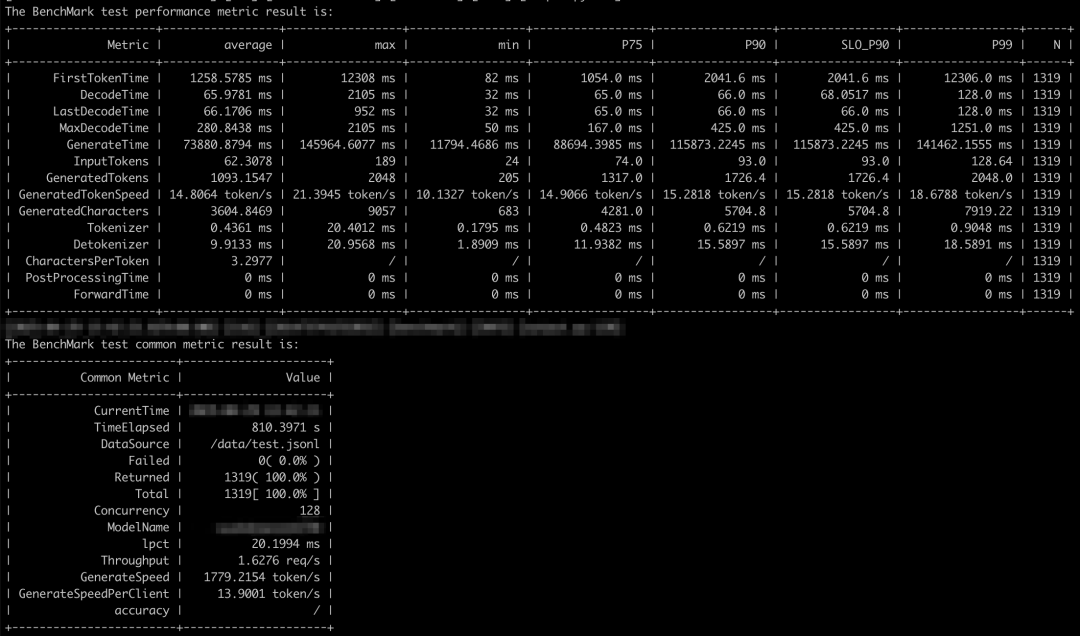
client-text
client-text
Client 模式流式推理性能测试
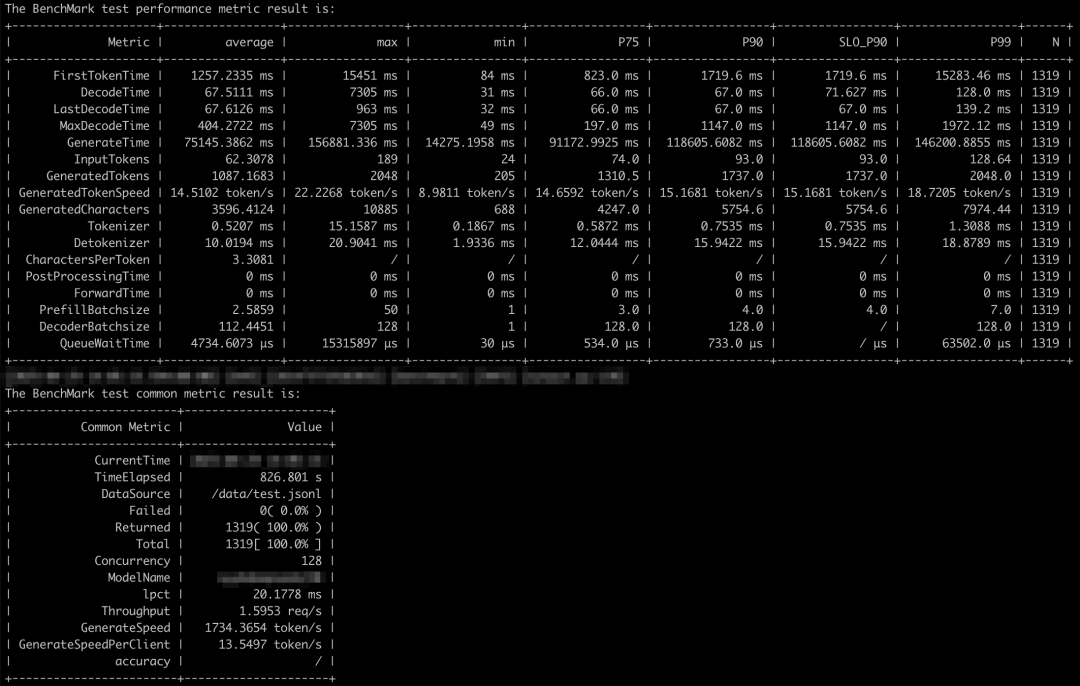
client-stream
client-stream
性能监控
MindIE Service 中提供了普罗米修斯格式的服务监控指标查询接口:GET: http(s)://{ip}:{port}/metrics。
- {ip}字段优先读取环境变量值MIES_CONTAINER_MANAGEMENT_IP;如果没有该环境变量,则取配置文件的“managementIpAddress”参数;如果配置文件中没有“managementIpAddress”参数,则取配置文件的“ipAddress”参数。
- {port}字段读取配置文件的“metricsPort”参数。
如需使用该接口,请确保在启动服务前,开启服务化监控开关。开启服务化监控功能的命令如下:
export MIES_SERVICE_MONITOR_MODE=1
接口详情可参考 服务监控指标查询接口(普罗格式)[38]。
使用 Prometheus 存储和检索监控数据
使用 ARM 版镜像启动 Prometheus 服务:
# 拉取镜像
$ docker pull prom/prometheus-linux-arm64:v3.3.0
# 启动容器
$ docker run --name prometheus -d -p 9090:9090 \
-v /root/prometheus-conf:/etc/prometheus/ \
prom/prometheus-linux-arm64:v3.3.0
Prometheus 配置 MindIE Metrics 端点地址时,需要添加 fallback_scrape_protocol: PrometheusText0.0.4[39]:
# /root/prometheus-conf/prometheus.yml
...
scrape_configs:
...
    -job_name:"mindie"
    # set fallback_scrape_protocol to be compatible with mindie metrics API's response content type (application/json)
    fallback_scrape_protocol:PrometheusText0.0.4
    static_configs:
      -targets:["localhost:1027","localhost:1028"]
        labels:
          app:"mindie"
# 重启容器
docker restart prometheus
更新配置重启容器后,可通过 http://localhost:9090 访问 Prometheus Web UI。
节点监控
普罗米修斯官方也提供了很多 Exporter 组件用于监控各类资源使用情况,如监控计算资源节点的 Node Exporter[40]。同样可以通过官方镜像快速启动:
# 拉取镜像
$ docker pull prom/node-exporter:v1.9.1 --platform arm64
# 启动容器
$ docker run -d \
  --net="host" \
  --pid="host" \
  -v "/:/host:ro,rslave" \
  prom/node-exporter:v1.9.1 \
  --path.rootfs=/host
node_exporter 默认监听 HTTP 9100 端口。容器启动成功后,可添加到 Prometheus 配置文件中:
# /root/prometheus-conf/prometheus.yml
...
scrape_configs:
...
  - job_name: "node"
    static_configs:
      - targets: ["localhost:9100"]
        labels:
          app: "node"
包含 Node Exporter 和 MindIE Metrics 的完整配置文件可参考 prometheus.yml[41]。
使用 Grafana 可视化监控数据
使用 ARM 版镜像启动 Grafana 服务:
# 拉取镜像
$ docker pull grafana/grafana:11.6.0 --platform arm64
# 启动容器
$ docker run -d --name=grafana -p 3000:3000 grafana/grafana:11.6.0
容器启动成功后,访问 http://localhost:3000/ 可进入 Grafana Web UI。默认用户名和密码均为 admin,第一次登录会需要修改密码。
以下内容引自 MindIE服务化部署实现监控功能[42]:
点击 Connection > Data sources > Add new data source,选择 prometheus,之后把 prometheus 的 URL http://localhost:9090/ 填上去,点击最下面 Save & test。
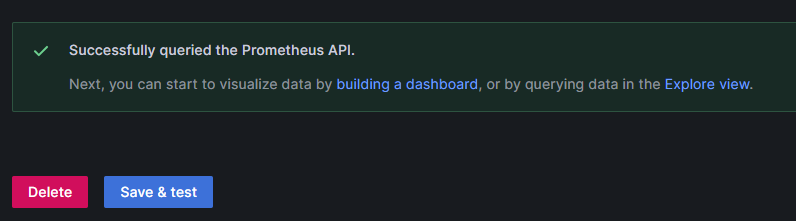
datasource
datasource
之后可以在 Grafana 页面建立 dashboard,在 Home > Dashboards > New dashboard 建立 dashboard, Dashboard 手动构建较麻烦,可以参考一些 Grafana教程 https://imageslr.com/2024/grafana.html。
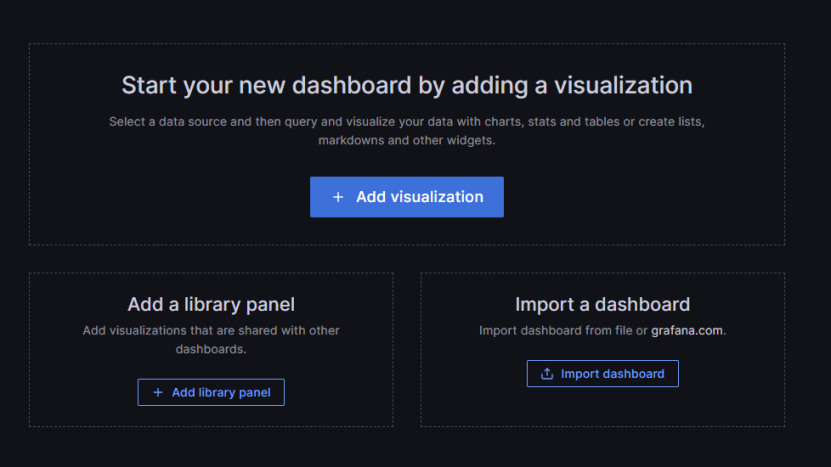
dashboard
dashboard
好在可以通过 json 格式输入或 json 文件 import 快速构建 dashboard 这里选择参考下面 vllm 的 grafana json 文件,将其中的 vllm: 字段去掉(因为 MindIE 的 metrics 字段和 vllm 的 metric 有区别) http://www.gitpp.com/digiman/vllm/-/blob/main/examples/production_monitoring/grafana.json?ref_type=heads
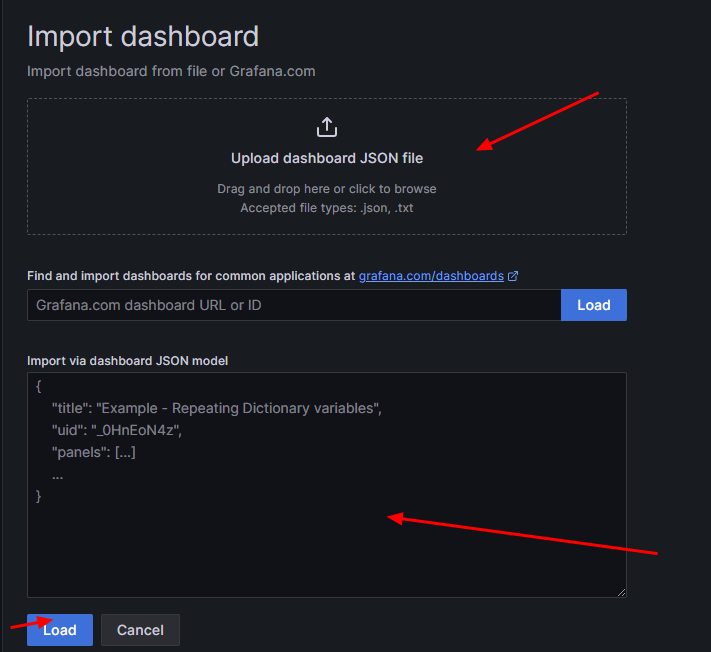
import
import
最终得到MindIE指标监控看板界面
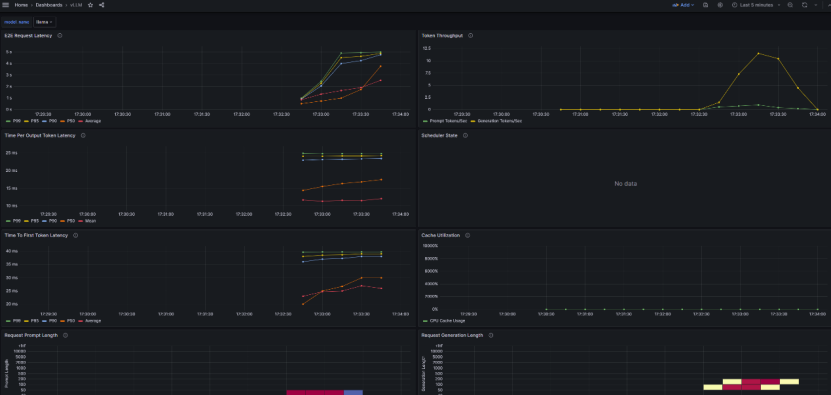
mindie-dashboard
mindie-dashboard
MindIE Dashboard json 配置文件可参考 mindie-dashboard.json[43]。
Node Exporter Dashboard json 配置文件可从 https://grafana.com/grafana/dashboards/16098-node-exporter-dashboard-20240520-job/ 下载,或直接使用 node-exporter-dashboard.json[44]。
实测数据
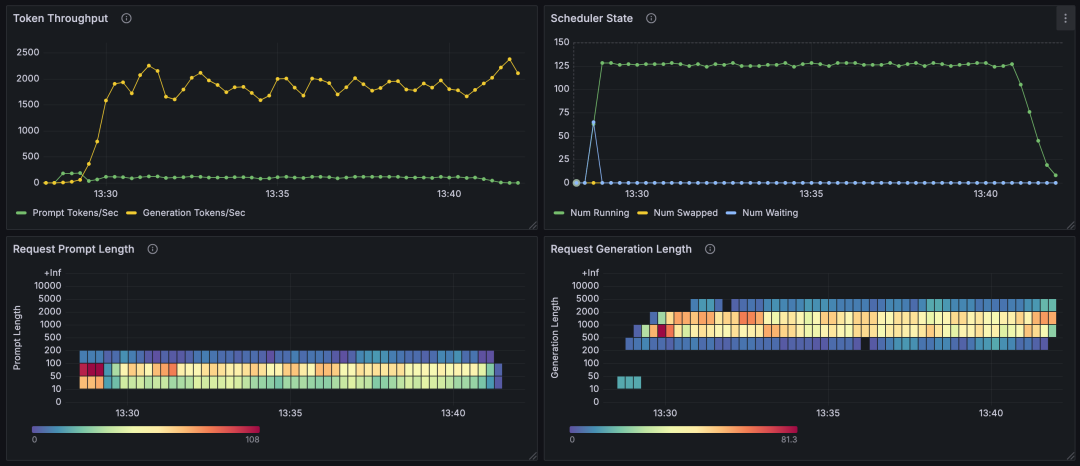
client-text-grafana
client-text-grafana
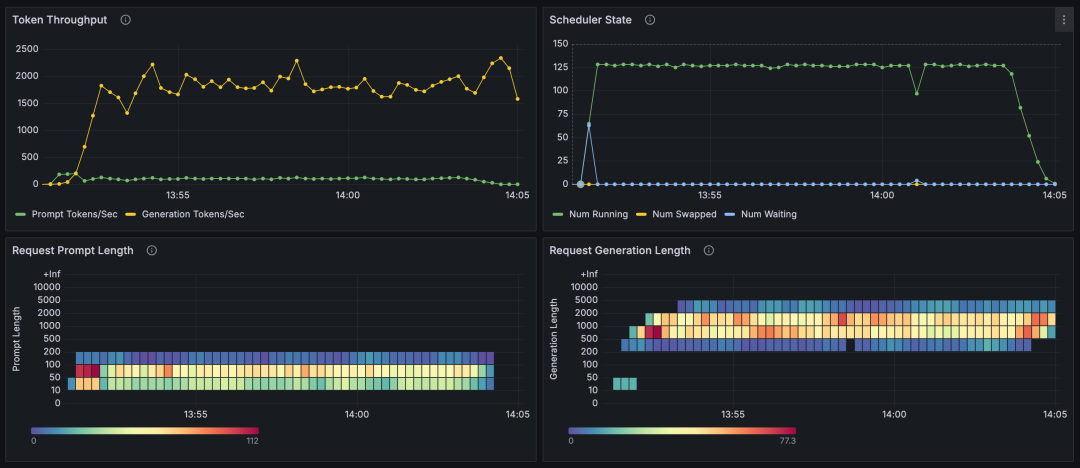
client-stream-grafana
client-stream-grafana
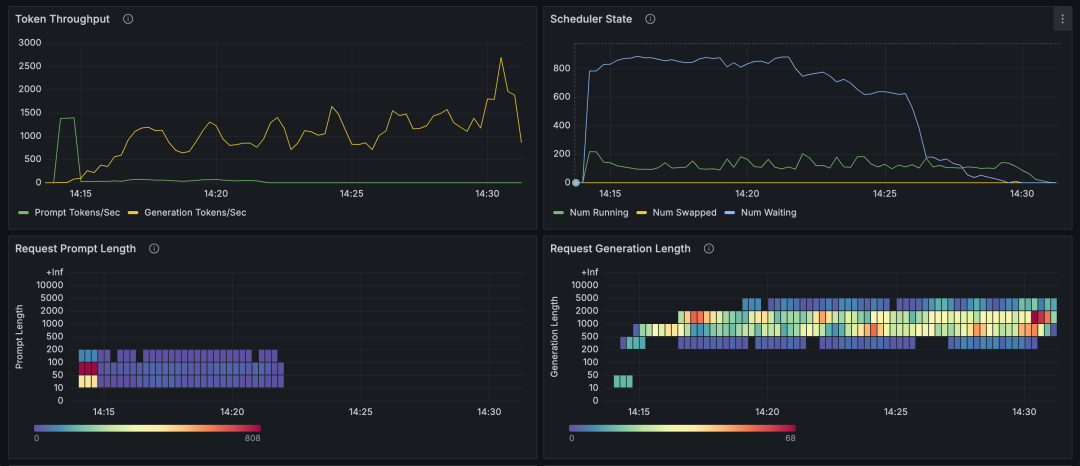
client-stream-1000-grafana
client-stream-1000-grafana
由上面的图表可知(使用 GSM8K 数据集):
- 128 并发进行推理时,流式及非流式推理性能差别不大:请求提示词 token 数在
10~200范围,响应 token 数在200~5000范围,并行推理数基本能够稳定在 128,等待推理的请求数基本为 0,每秒生成 token 数量在1500~2000左右。 - 1000 并发时:出现大量等待请求,并行推理数与等待请求数呈互补型波动,每秒生成 token 数也呈现出较大范围的波动。
每秒输出 token 总数,会受到输入 token 数、输出 token 数、并行推理数、等待请求数的影响:
- 输入输出 token 数越多,能够并行的推理数就会越少;
- 等待的请求数增多,并行推理数也会减少;
- 并行推理数下降,每秒输出的 token 总数就会下降;
- 并行推理数最大值,受限于 NPU 卡的性能和 maxBatchSize 配置参数及 TotalBlockNum 影响。计算 maxBatchSize 最大值,可参考 性能调优流程[45] 文档;TotalBlockNum 值也可参照该文档,且可能会根据不同的输入输出 token 数而变化。
参考资料
[1]
昇腾推理引擎: https://www.hiascend.com/document/detail/zh/mindie/100/whatismindie/mindie_what_0001.html
[2]
MindIE Benchmark 1.0.0 功能介绍: https://www.hiascend.com/document/detail/zh/mindie/100/mindieservice/servicedev/mindie_service0150.html
[3]
.generate(): https://www.hiascend.com/document/detail/zh/mindie/100/mindieservice/servicedev/mindie_service0192.html
[4]
.generate_stream(): https://www.hiascend.com/document/detail/zh/mindie/100/mindieservice/servicedev/mindie_service0193.html
[5]
兼容Triton的文本推理接口: https://www.hiascend.com/document/detail/zh/mindie/100/mindieservice/servicedev/mindie_service0085.html
[6]
兼容Triton的流式推理接口: https://www.hiascend.com/document/detail/zh/mindie/100/mindieservice/servicedev/mindie_service0086.html
[7]
/usr/local/Ascend/atb-models/tests/modeltest/README_NEW.md: https://github.com/AlphaHinex/AlphaHinex.github.io/blob/develop/source/contents/mindie-benchmark/README_NEW.md
[8]
dev.jsonl: https://storage.cloud.google.com/boolq/dev.jsonl
[9]
ceval-exam: https://huggingface.co/datasets/ceval/ceval-exam/resolve/main/ceval-exam.zip
[10]
cmmlu: https://huggingface.co/datasets/haonan-li/cmmlu/resolve/main/cmmlu_v1_0_1.zip
[11]
humaneval: https://github.com/openai/human-eval/raw/refs/heads/master/data/HumanEval.jsonl.gz
[12]
cpp: https://huggingface.co/datasets/THUDM/humaneval-x/tree/main/data/cpp/data
[13]
java: https://huggingface.co/datasets/THUDM/humaneval-x/tree/main/data/java/data
[14]
go: https://huggingface.co/datasets/THUDM/humaneval-x/tree/main/data/go/data
[15]
js: https://huggingface.co/datasets/THUDM/humaneval-x/tree/main/data/js/data
[16]
python: https://huggingface.co/datasets/THUDM/humaneval-x/tree/main/data/python/data
[17]
gsm8k: https://github.com/openai/grade-school-math/blob/master/grade_school_math/data/test.jsonl
[18]
longbench: https://huggingface.co/datasets/THUDM/LongBench/resolve/main/data.zip
[19]
mmlu: https://people.eecs.berkeley.edu/~hendrycks/data.tar
[20]
PaulGrahamEssays: https://huggingface.co/datasets/opencompass/NeedleBench/tree/main
[21]
multi_needle_reasoning_en: https://huggingface.co/datasets/opencompass/NeedleBench/tree/main
[22]
multi_needle_reasoning_zh: https://huggingface.co/datasets/opencompass/NeedleBench/tree/main
[23]
names: https://huggingface.co/datasets/opencompass/NeedleBench/tree/main
[24]
needles: https://huggingface.co/datasets/opencompass/NeedleBench/tree/main
[25]
zh_finance: https://huggingface.co/datasets/opencompass/NeedleBench/tree/main
[26]
zh_game: https://huggingface.co/datasets/opencompass/NeedleBench/tree/main
[27]
zh_general: https://huggingface.co/datasets/opencompass/NeedleBench/tree/main
[28]
zh_government: https://huggingface.co/datasets/opencompass/NeedleBench/tree/main
[29]
zh_movie: https://huggingface.co/datasets/opencompass/NeedleBench/tree/main
[30]
zh_tech: https://huggingface.co/datasets/opencompass/NeedleBench/tree/main
[31]
train_val_images.zip: https://dl.fbaipublicfiles.com/textvqa/images/train_val_images.zip
[32]
textvqa_val.jsonl: https://ofasys-wlcb.oss-cn-wulanchabu.aliyuncs.com/Qwen-VL/evaluation/textvqa/textvqa_val.jsonl
[33]
textvqa_val_annotations.json: https://ofasys-wlcb.oss-cn-wulanchabu.aliyuncs.com/Qwen-VL/evaluation/textvqa/textvqa_val_annotations.json
[34]
Eval_QA/: https://github.com/PKU-YuanGroup/Video-Bench
[35]
Video-Bench: https://huggingface.co/datasets/LanguageBind/Video-Bench/tree/main
[36]
VocalSound 16kHz Version: https://www.dropbox.com/s/c5ace70qh1vbyzb/vs_release_16k.zip?dl=1
[37]
truthfulqa: https://huggingface.co/datasets/domenicrosati/TruthfulQA/tree/main
[38]
服务监控指标查询接口(普罗格式): https://www.hiascend.com/document/detail/zh/mindie/100/mindieservice/servicedev/mindie_service0103.html
[39]
fallback_scrape_protocol: PrometheusText0.0.4: https://github.com/prometheus/prometheus/issues/15485#issuecomment-2541713114
[40]
Node Exporter: https://prometheus.io/download/#node_exporter
[41]
prometheus.yml: https://github.com/AlphaHinex/AlphaHinex.github.io/blob/develop/source/contents/mindie-benchmark/prometheus.yml
[42]
MindIE服务化部署实现监控功能: https://www.hiascend.com/developer/techArticles/20250327-1
[43]
mindie-dashboard.json: https://alphahinex.github.io/contents/mindie-benchmark/mindie-dashboard.json
[44]
node-exporter-dashboard.json: https://alphahinex.github.io/contents/mindie-benchmark/node-exporter-dashboard.json
[45]
性能调优流程: https://www.hiascend.com/document/detail/zh/mindie/100/mindieservice/servicedev/mindie_service0105.html#ZH-CN_TOPIC_0000002151290336__li14344155810581
本文参与 腾讯云自媒体同步曝光计划,分享自微信公众号。
原始发表:2025-05-03,如有侵权请联系 cloudcommunity@tencent.com 删除
评论
登录后参与评论
推荐阅读
目录
腾讯云开发者

Copyright © 2013 - 2026 Tencent Cloud. All Rights Reserved. 腾讯云 版权所有
深圳市腾讯计算机系统有限公司 ICP备案/许可证号:粤B2-20090059  粤公网安备44030502008569号
腾讯云计算(北京)有限责任公司 京ICP证150476号 | 京ICP备11018762号