Spring AI系列之简介与快速入门

Spring AI系列之简介与快速入门

SmileNicky
发布于 2026-03-15 08:27:01
发布于 2026-03-15 08:27:01
Spring AI 简介与快速入门
1. 什么是 Spring AI?
Spring AI 是 Spring 官方推出的开源框架,旨在将人工智能(AI)功能无缝集成到 Java 应用程序中。它借鉴了 LangChain 和 LlamaIndex 的设计理念,提供统一的抽象和模块化接口,简化了 AI 模型的接入和管理,降低了开发复杂度。
Spring AI 的核心特性
- 集成性强:深度集成 Spring Boot 和 Spring Cloud,提供一致的编程模型
- 多模型支持:支持 OpenAI、Anthropic Claude、Google Vertex AI、DeepSeek 等主流模型
- 向量数据库支持:内置支持 Pinecone、Qdrant、Redis、Milvus 等,便于实现 RAG
- 功能丰富:涵盖聊天模型、嵌入模型、图像生成、语音处理等多种 AI 功能
2. 环境准备
- JDK 17 或更高版本,提供一个JDK17的下载地址: https://www.injdk.cn
- Spring Boot 3.2.x / 3.3.x / 3.4.x(与 Spring AI 版本对应)
- 一个 AI 模型的 API Key(如 DeepSeek、OpenAI)
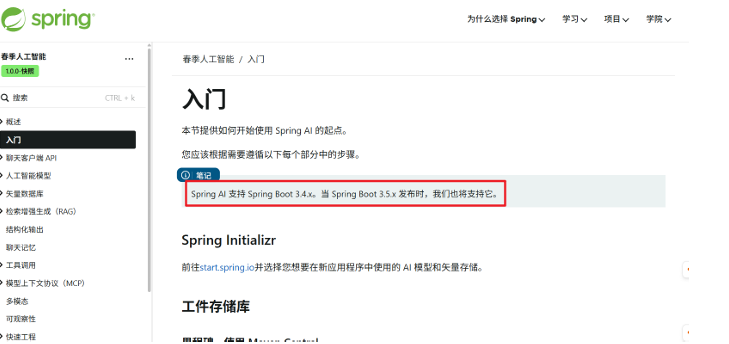
版本提示:Spring AI 当前最新稳定版为
1.0.0-M7,对应 Spring Boot 3.3.x。若使用 Spring Boot 3.4.x,需使用1.0.0-SNAPSHOT或等待正式版发布。
在这里插入图片描述
3. 创建第一个 Spring AI 项目
3.1 使用 Spring Initializr 创建项目
访问 start.spring.io,选择:
- Spring Boot 版本:3.3.4(推荐,对应 Spring AI M7)
- 依赖:Spring Web、Spring AI OpenAI Starter
或者手动添加依赖(以 DeepSeek 为例):
<parent>
    <groupId>org.springframework.boot</groupId>
    <artifactId>spring-boot-starter-parent</artifactId>
    <version>3.3.4</version>
</parent>

<properties>
    <spring-ai.version>1.0.0-M7</spring-ai.version>
</properties>

<dependencies>
    <dependency>
        <groupId>org.springframework.boot</groupId>
        <artifactId>spring-boot-starter-web</artifactId>
    </dependency>
    <dependency>
        <groupId>org.springframework.ai</groupId>
        <artifactId>spring-ai-openai-spring-boot-starter</artifactId>
        <version>${spring-ai.version}</version>
    </dependency>
</dependencies>

<repositories>
    <repository>
        <id>spring-milestones</id>
        <name>Spring Milestones</name>
        <url>https://repo.spring.io/milestone</url>
    </repository>
</repositories>
3.2 配置 DeepSeek API
在 application.yml 中配置(推荐 YAML 格式):
spring:
  ai:
    openai:
      api-key: ${DEEPSEEK_API_KEY}  # 建议从环境变量读取
      base-url: https://api.deepseek.com/v1
      chat:
        options:
          model: deepseek-chat
          temperature: 0.7
      # DeepSeek 暂不支持嵌入模型,显式禁用避免启动异常
      embedding:
        enabled: false
或使用 application.properties:
spring.ai.openai.api-key=${DEEPSEEK_API_KEY}
spring.ai.openai.base-url=https://api.deepseek.com/v1
spring.ai.openai.chat.options.model=deepseek-chat
spring.ai.openai.chat.options.temperature=0.7
spring.ai.openai.embedding.enabled=false
Temperature控制模型响应的随机性或“创造性”。 较低值(0.0-0.3):响应更确定、更集中。更适合事实类问题、分类问题或一致 性至关重要的任务。 中等值(0.4-0.7):在确定性和创造性之间取得平衡。适用于一般用例。 值越高 (0.8-1.0):回复更具创意、多样性,且可能带来惊喜。更适合创意写作、 头脑风暴或生成多样化选项
3.3 编写 Controller
import org.springframework.ai.chat.model.ChatResponse;
import org.springframework.ai.chat.prompt.Prompt;
import org.springframework.ai.openai.OpenAiChatModel;
import org.springframework.ai.chat.messages.UserMessage;
import org.springframework.web.bind.annotation.GetMapping;
import org.springframework.web.bind.annotation.RequestParam;
import org.springframework.web.bind.annotation.RestController;
import reactor.core.publisher.Flux;

import java.util.Map;

@RestController
public class ChatController {

    private final OpenAiChatModel chatModel;

    public ChatController(OpenAiChatModel chatModel) {
        this.chatModel = chatModel;
    }

    /**
     * 同步调用:一次性返回完整响应
     */
    @GetMapping(value = "/chat/{message}")
    public Map<String, String> generate(
            @PathVariable("message") String message) {
        return Map.of("generation", chatModel.call(message));
    }

    /**
     * 流式调用:SSE 实时推送,逐字返回
     */
    @GetMapping("/chat/stream/{message}")
    public Flux<String> generateStream(
            @PathVariable("message") String message) {
        Prompt prompt = new Prompt(new UserMessage(message));
        return chatModel.stream(prompt)
                .map(response -> response.getResult().getOutput().getContent());
    }
}
3.4 测试效果
启动应用后访问:
- 同步接口:
http://localhost:8080/chat/你好 - 流式接口:
http://localhost:8080/chat/stream/你好
4. Spring AI 自动配置的核心 Bean
Bean 名称 | 类型 | 作用 |
|---|---|---|
openAiChatModel | OpenAiChatModel | 用于与模型交互的底层客户端 |
chatClientBuilder | ChatClient.Builder | 用于构建 ChatClient 实例的构造器 |
通过 ChatClient 可以更优雅地构建提示和处理响应(推荐用法):
package com.example.ai.controller;

import lombok.extern.slf4j.Slf4j;
import org.springframework.ai.chat.client.ChatClient;
import org.springframework.web.bind.annotation.*;
import reactor.core.publisher.Flux;

@RestController
@CrossOrigin(origins = "*")
@Slf4j
public class ChatController {

    private final ChatClient chatClient;

    public ChatController(ChatClient.Builder builder) {
        this.chatClient = builder.defaultSystem("你是一个AI智能应用").build();
    }

    @GetMapping(value = "/chat/{message}")
    public String chat(@PathVariable("message") String message) {
        return chatClient.prompt()
                .user(message)
                .call()
                .content();
    }

    @GetMapping("/chat/stream/{message}")
    public Flux<String> generateStream(@PathVariable("message") String message) {
        return chatClient.prompt()
                .user(message)
                .stream()
                .content();
    }

}
5. 配置文件方式
下面通过配置文件方式创建ChatClient
package com.example.ai.config;

import org.springframework.ai.chat.client.ChatClient;
import org.springframework.ai.openai.OpenAiChatModel;
import org.springframework.context.annotation.Bean;
import org.springframework.context.annotation.Configuration;

@Configuration
public class ChatConfig {
    @Bean
    public ChatClient chatClient(ChatClient.Builder builder) {
        return builder.defaultSystem("你是一个AI聊天助手")
                .build();
    }
}
然后业务层:
@Autowired
private  ChatClient chatClient;
参考资源
本文参与 腾讯云自媒体同步曝光计划,分享自作者个人站点/博客。
原始发表:2026-03-11,如有侵权请联系 cloudcommunity@tencent.com 删除
评论
登录后参与评论
推荐阅读
目录
腾讯云开发者

Copyright © 2013 - 2026 Tencent Cloud. All Rights Reserved. 腾讯云 版权所有
深圳市腾讯计算机系统有限公司 ICP备案/许可证号:粤B2-20090059  粤公网安备44030502008569号
腾讯云计算(北京)有限责任公司 京ICP证150476号 | 京ICP备11018762号