useEffectEvent 让实时数据流告别无效刷新
原创
useEffectEvent 让实时数据流告别无效刷新
原创
用户12060837
发布于 2026-02-17 21:45:02
发布于 2026-02-17 21:45:02
1 引言
面对成千上万的SKU、分布全国各地的仓库节点以及多渠道销售平台,库存数据需要以秒级甚至毫秒级的速度在各个系统间同步。传统的库存管理系统往往因数据延迟导致超卖、缺货等严重问题,而基于React构建的现代供应链管理系统在追求实时性的过程中,也面临着严峻的技术挑战。
当使用WebSocket、Server-Sent Events等技术实现实时库存同步时,React开发者常常陷入依赖数组的两难困境:将频繁变化的库存状态加入useEffect的依赖数组会导致WebSocket连接频繁重建,产生大量无效刷新;而忽略这些依赖则会引发闭包陷阱,使得回调函数中的库存数据严重滞后。这种困境不仅影响系统性能,更可能导致库存数据显示错误,造成实际业务损失。
React 19.2引入的useEffectEventHook正是为了解决这一核心矛盾而生。本文将深入探讨如何利用useEffectEvent优化新零售供应链系统中的库存同步机制,通过具体的业务场景和代码示例,展示这一新特性如何帮助前端开发者构建既高效又可靠的实时库存管理系统。
2 库存同步场景分析:实时数据流的复杂性
2.1 新零售库存同步的技术特点
新零售供应链中的库存同步具有三大特点:多源性、高频性和强一致性。库存数据可能来源于电商平台、实体门店、仓储管理系统等多个渠道,且更新频率极高,同时要求各系统间的数据保持高度一致。
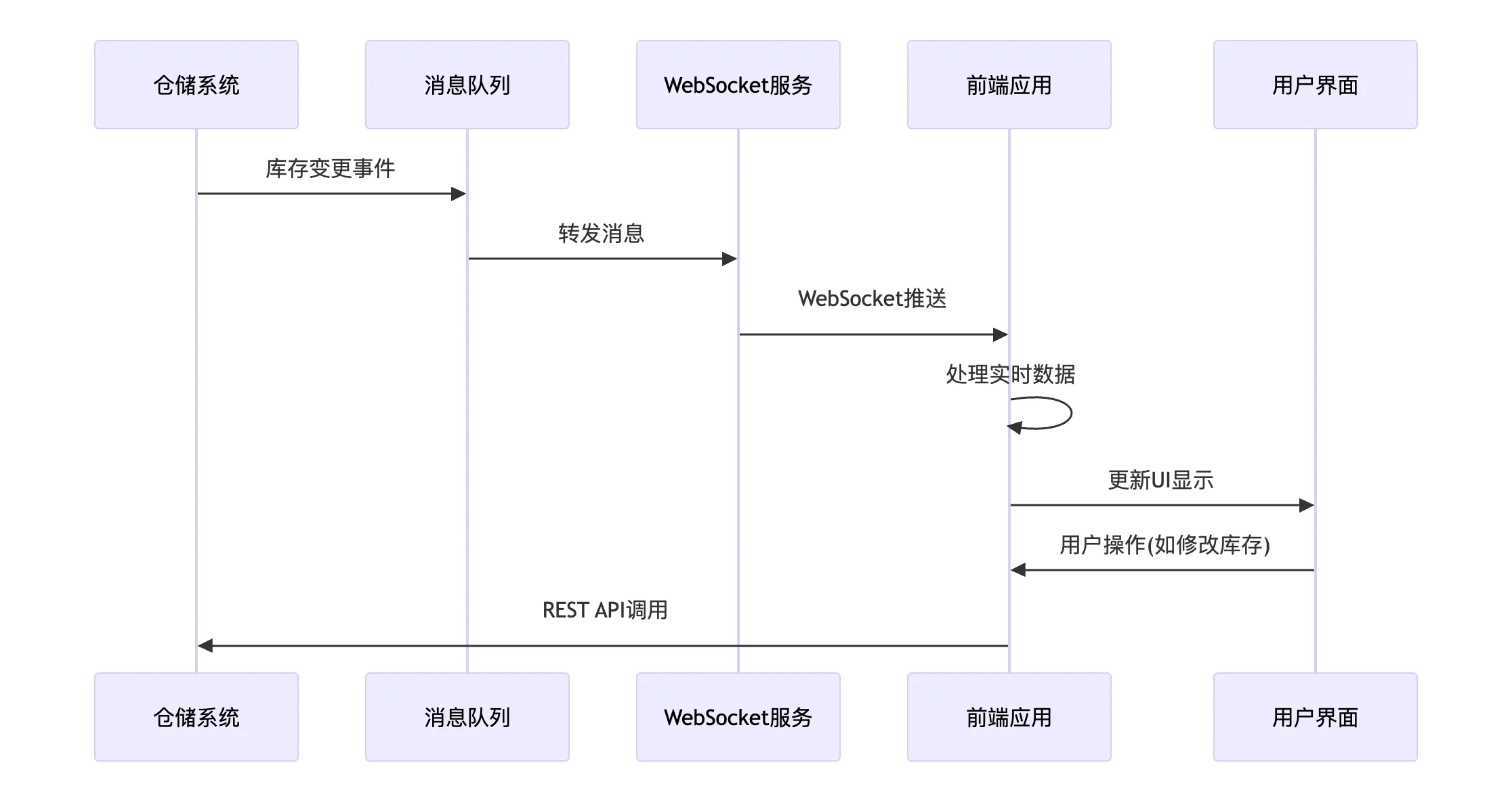
从技术架构角度看,典型的库存同步系统包含以下组件:
- 数据采集层:从各数据源收集库存变更事件
- 消息队列层:缓冲和处理实时数据流
- WebSocket服务层:向客户端推送实时更新
- 前端展示层:实时显示库存状态并处理用户操作
下面的序列图展示了库存同步的完整数据流程:
2.2 传统实现方式的性能瓶颈
在传统的React实现中,库存同步功能通常使用useEffect结合WebSocket实现:
展开
代码语言:JavaScript
自动换行
AI代码解释
function InventorySync({ productId, warehouseId }) {
  const [inventory, setInventory] = useState(0);
  const [threshold, setThreshold] = useState(10); // 库存阈值
  const [syncEnabled, setSyncEnabled] = useState(true); // 同步开关

  // 问题:当threshold或syncEnabled变化时,WebSocket会重建
  useEffect(() => {
    if (!syncEnabled) return;

    const ws = new WebSocket(`wss://inventory/ws/${productId}`);

    ws.onmessage = (event) => {
      const data = JSON.parse(event.data);

      // 闭包陷阱:这里的threshold可能是旧值
      if (data.stockLevel < threshold) {
        showLowStockWarning(data);
      }

      setInventory(data.stockLevel);
    };

    return () => ws.close();
  }, [productId, warehouseId, syncEnabled, threshold]); // 依赖过多导致频繁重连

  return (
    <div>
      <div>当前库存: {inventory}</div>
      <button onClick={() => setSyncEnabled(!syncEnabled)}>
        {syncEnabled ? '暂停同步' : '开启同步'}
      </button>
    </div>
  );
}代码问题分析:
- 过度重建WebSocket连接:
threshold或syncEnabled的变化会导致WebSocket连接重建,而实际上这些变化不应触发重连 - 闭包陷阱风险:即使将
threshold加入依赖数组,回调函数中仍可能捕获过时值 - 性能浪费:频繁的连接重建消耗大量网络资源和服务器性能
3 useEffectEvent 原理解析:解决闭包陷阱的利器
3.1 设计理念与工作机制
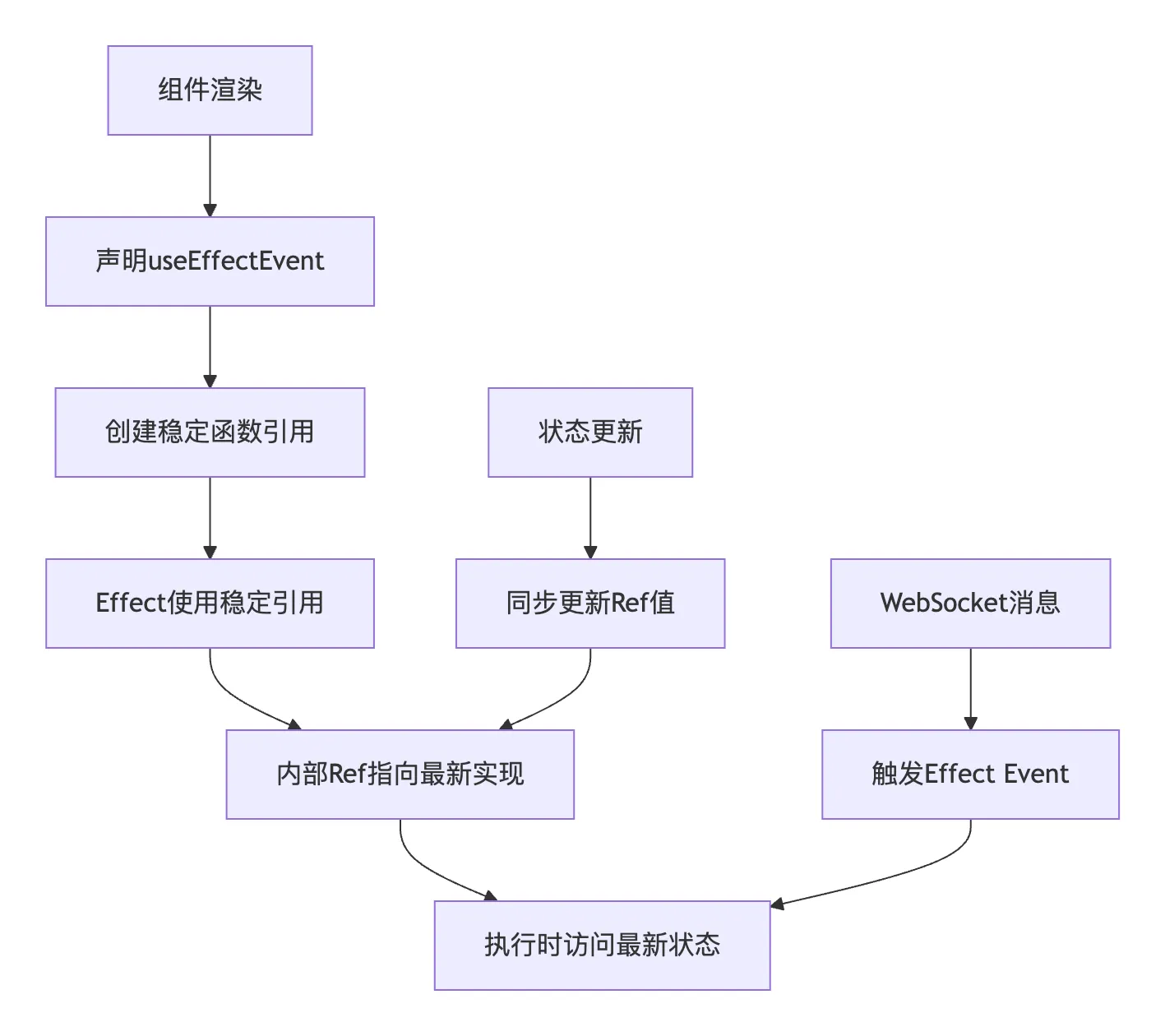
useEffectEvent是React团队为Effect模式设计的一个"有原则的逃生舱",它的核心目标是解耦响应式逻辑与非响应式逻辑。在库存同步场景中,某些值(如productId)是响应式的——当它们变化时,WebSocket连接应该重建;而某些值(如threshold、syncEnabled)应该是非响应式的——它们的变化不应触发WebSocket重建,但回调函数需要访问它们的最新值。
useEffectEvent的工作原理可以通过以下流程图清晰展示:
3.2 与传统解决方案的对比
在useEffectEvent出现之前,开发者通常使用useRef方案解决闭包问题:
展开
代码语言:JavaScript
自动换行
AI代码解释
// 传统的useRef解决方案
function InventorySyncWithRef({ productId, warehouseId }) {
  const [inventory, setInventory] = useState(0);
  const [threshold, setThreshold] = useState(10);
  const [syncEnabled, setSyncEnabled] = useState(true);

  // 使用ref存储最新值
  const thresholdRef = useRef(threshold);
  const syncEnabledRef = useRef(syncEnabled);

  // 同步ref与state
  useEffect(() => {
    thresholdRef.current = threshold;
    syncEnabledRef.current = syncEnabled;
  }, [threshold, syncEnabled]);

  useEffect(() => {
    if (!syncEnabledRef.current) return;

    const ws = new WebSocket(`wss://inventory/ws/${productId}`);

    ws.onmessage = (event) => {
      const data = JSON.parse(event.data);

      // 通过ref访问最新值
      if (data.stockLevel < thresholdRef.current) {
        showLowStockWarning(data);
      }

      setInventory(data.stockLevel);
    };

    return () => ws.close();
  }, [productId, warehouseId]); // 依赖数组简化了

  return (
    <div>
      <div>当前库存: {inventory}</div>
      <button onClick={() => setSyncEnabled(!syncEnabled)}>
        {syncEnabled ? '暂停同步' : '开启同步'}
      </button>
    </div>
  );
}useRef方案的问题:
- 冗余代码:需要手动声明ref和同步effect
- 易出错:容易遗漏ref的更新,导致数据过时
- 可维护性差:业务逻辑被ref管理代码淹没
4 库存同步实战优化:useEffectEvent的应用
4.1 基础库存同步功能优化
以下是用useEffectEvent优化的库存同步实现:
展开
代码语言:JavaScript
自动换行
AI代码解释
import { useState, useEffect, useEffectEvent } from 'react';

function InventorySyncOptimized({ productId, warehouseId }) {
  const [inventory, setInventory] = useState(0);
  const [threshold, setThreshold] = useState(10);
  const [syncEnabled, setSyncEnabled] = useState(true);
  const [connectionStatus, setConnectionStatus] = useState('connecting');

  // 使用useEffectEvent处理库存更新逻辑
  const handleInventoryUpdate = useEffectEvent((inventoryData) => {
    // 此处总是能获取到最新的threshold和syncEnabled
    if (!syncEnabled) return;

    if (inventoryData.stockLevel < threshold) {
      showLowStockWarning(inventoryData, threshold);
    }

    // 更新库存状态
    setInventory(inventoryData.stockLevel);

    // 记录库存变更日志
    logInventoryChange(inventoryData, {
      productId,
      warehouseId,
      timestamp: Date.now()
    });
  });

  // 使用useEffectEvent处理连接状态变化
  const handleStatusChange = useEffectEvent((status) => {
    // 总是能访问到最新的connectionStatus进行对比
    if (status !== connectionStatus) {
      logConnectionChange(connectionStatus, status, { productId, warehouseId });
      setConnectionStatus(status);
    }
  });

  useEffect(() => {
    if (!syncEnabled) {
      handleStatusChange('paused');
      return;
    }

    const ws = new WebSocket(`wss://inventory/ws/${productId}`);

    ws.onopen = () => handleStatusChange('connected');
    ws.onclose = () => handleStatusChange('disconnected');
    ws.onerror = () => handleStatusChange('error');

    ws.onmessage = (event) => {
      const data = JSON.parse(event.data);
      handleInventoryUpdate(data);
    };

    return () => {
      ws.close();
      handleStatusChange('disconnected');
    };
  }, [productId, warehouseId, syncEnabled]); // 只有真正的依赖项

  return (
    <div className="inventory-sync">
      <div className="inventory-display">
        <span className="label">当前库存:</span>
        <span className="value">{inventory}</span>
      </div>
      <div className="controls">
        <button
          onClick={() => setSyncEnabled(!syncEnabled)}
          className={syncEnabled ? 'active' : 'inactive'}
        >
          {syncEnabled ? '暂停同步' : '开启同步'}
        </button>
        <ConnectionStatus status={connectionStatus} />
      </div>
    </div>
  );
}优化效果分析:
- 关注点分离:将库存更新逻辑(
handleInventoryUpdate)和连接状态处理(handleStatusChange)提取为独立的Effect Events - 精准依赖控制:WebSocket Effect只依赖真正需要触发重建的
productId、warehouseId和syncEnabled - 实时数据访问:在
handleInventoryUpdate中,总是能获取到最新的threshold和syncEnabled状态
4.2 多仓库库存聚合同步
在实际的新零售场景中,经常需要同时监控多个仓库的库存情况:
展开
代码语言:JavaScript
自动换行
AI代码解释
function MultiWarehouseInventory({ productId, warehouseIds }) {
  const [aggregateInventory, setAggregateInventory] = useState(0);
  const [warehouseData, setWarehouseData] = useState({});
  const [syncConfig, setSyncConfig] = useState({
    lowStockThreshold: 10,
    syncInterval: 5000,
    enabledWarehouses: warehouseIds
  });

  // 使用useEffectEvent处理单个仓库的库存更新
  const handleWarehouseUpdate = useEffectEvent((warehouseId, inventoryData) => {
    // 总是能访问到最新的syncConfig
    if (!syncConfig.enabledWarehouses.includes(warehouseId)) return;

    setWarehouseData(prev => ({
      ...prev,
      [warehouseId]: {
        ...inventoryData,
        lastUpdated: Date.now(),
        isLowStock: inventoryData.stockLevel < syncConfig.lowStockThreshold
      }
    }));
  });

  // 使用useEffectEvent聚合库存数据
  const updateAggregateInventory = useEffectEvent(() => {
    // 基于所有启用仓库的数据计算总库存
    const total = Object.values(warehouseData)
      .filter(item => syncConfig.enabledWarehouses.includes(item.warehouseId))
      .reduce((sum, item) => sum + item.stockLevel, 0);

    setAggregateInventory(total);

    // 库存预警检查
    if (total < syncConfig.lowStockThreshold) {
      showAggregateLowStockWarning(total, syncConfig.lowStockThreshold);
    }
  });

  // 设置多个WebSocket连接
  useEffect(() => {
    const connections = [];

    warehouseIds.forEach(warehouseId => {
      const ws = new WebSocket(
        `wss://inventory/ws/${productId}/${warehouseId}`
      );

      ws.onmessage = (event) => {
        const data = JSON.parse(event.data);
        handleWarehouseUpdate(warehouseId, data);
      };

      connections.push(ws);
    });

    return () => {
      connections.forEach(ws => ws.close());
    };
  }, [productId, warehouseIds]);

  // 使用useEffectEvent优化定时聚合
  const aggregateInventoryEvent = useEffectEvent(() => {
    updateAggregateInventory();
  });

  // 定时更新聚合库存
  useEffect(() => {
    const interval = setInterval(() => {
      aggregateInventoryEvent();
    }, syncConfig.syncInterval);

    return () => clearInterval(interval);
  }, [syncConfig.syncInterval]);

  return (
    <div className="multi-warehouse-inventory">
      <div className="aggregate-section">
        <h3>总库存: {aggregateInventory}</h3>
        <SyncConfigEditor
          config={syncConfig}
          onConfigChange={setSyncConfig}
        />
      </div>
      <WarehouseInventoryList
        data={warehouseData}
        config={syncConfig}
      />
    </div>
  );
}
5 高级应用场景与最佳实践
5.1 库存同步与订单处理的协同
在实际供应链系统中,库存同步需要与订单处理系统紧密协同:
展开
代码语言:JavaScript
自动换行
AI代码解释
function InventoryOrderIntegration({ productId }) {
  const [inventory, setInventory] = useState(0);
  const [pendingOrders, setPendingOrders] = useState([]);
  const [reservationPolicy, setReservationPolicy] = useState({
    enableAutoReserve: true,
    reserveThreshold: 5
  });

  // 使用useEffectEvent处理库存更新和订单预留
  const handleInventoryAndOrder = useEffectEvent((inventoryData) => {
    const currentInventory = inventoryData.stockLevel;

    // 更新库存状态
    setInventory(currentInventory);

    // 自动预留逻辑
    if (reservationPolicy.enableAutoReserve &&
        currentInventory <= reservationPolicy.reserveThreshold) {

      const reserveQuantity = calculateReserveQuantity(
        currentInventory,
        reservationPolicy
      );

      // 创建预留记录
      createInventoryReservation(productId, reserveQuantity);
    }

    // 检查待处理订单
    processPendingOrders(currentInventory, pendingOrders);
  });

  // 处理订单创建
  const handleOrderCreated = useEffectEvent((orderData) => {
    // 总是能访问到最新的inventory状态
    if (orderData.quantity > inventory) {
      // 库存不足,加入待处理队列
      setPendingOrders(prev => [...prev, orderData]);
      showInsufficientInventoryWarning(orderData, inventory);
    } else {
      // 库存充足,直接处理订单
      processOrderImmediately(orderData);
      // 更新库存
      setInventory(prev => prev - orderData.quantity);
    }
  });

  useEffect(() => {
    const ws = new WebSocket(`wss://inventory/ws/${productId}`);

    ws.onmessage = (event) => {
      const data = JSON.parse(event.data);
      handleInventoryAndOrder(data);
    };

    return () => ws.close();
  }, [productId]);

  return (
    <div className="inventory-order-integration">
      <InventoryDisplay
        inventory={inventory}
        onOrderCreate={handleOrderCreated}
      />
      <PendingOrdersList
        orders={pendingOrders}
        onInventoryUpdate={() => setInventory(inventory)}
      />
    </div>
  );
}
5.2 错误处理与重试机制
健壮的库存同步系统需要完善的错误处理和重试机制:https://zhuanlan.zhihu.com/p/2007202578803476328
展开
代码语言:JavaScript
自动换行
AI代码解释
function RobustInventorySync({ productId, maxRetries = 3 }) {
  const [inventory, setInventory] = useState(0);
  const [error, setError] = useState(null);
  const [retryCount, setRetryCount] = useState(0);
  const [connectionState, setConnectionState] = useState({
    status: 'connecting',
    lastSuccess: null,
    retryBackoff: 1000
  });

  // 使用useEffectEvent处理连接错误
  const handleConnectionError = useEffectEvent((error) => {
    // 总是能访问到最新的connectionState和retryCount
    if (retryCount >= maxRetries) {
      setError({
        type: 'max_retries_exceeded',
        message: `Maximum retry attempts (${maxRetries}) exceeded`,
        lastError: error
      });
      setConnectionState(prev => ({ ...prev, status: 'failed' }));
      return;
    }

    // 指数退避重连
    const backoffDelay = connectionState.retryBackoff * Math.pow(2, retryCount);

    setConnectionState(prev => ({
      ...prev,
      status: 'reconnecting',
      retryBackoff: backoffDelay
    }));

    setTimeout(() => {
      setRetryCount(prev => prev + 1);
      initializeConnection(); // 重新初始化连接
    }, backoffDelay);

    logConnectionError(error, {
      productId,
      retryCount,
      backoffDelay
    });
  });

  // 使用useEffectEvent处理成功的库存更新
  const handleSuccessfulUpdate = useEffectEvent((inventoryData) => {
    setInventory(inventoryData.stockLevel);
    setError(null);
    setRetryCount(0);
    setConnectionState(prev => ({
      status: 'connected',
      lastSuccess: Date.now(),
      retryBackoff: 1000
    }));

    // 记录成功同步
    logSuccessfulSync(inventoryData);
  });

  const initializeConnection = useEffectEvent(() => {
    try {
      const ws = new WebSocket(`wss://inventory/ws/${productId}`);

      ws.onopen = () => {
        setConnectionState(prev => ({ ...prev, status: 'connected' }));
      };

      ws.onmessage = (event) => {
        const data = JSON.parse(event.data);
        handleSuccessfulUpdate(data);
      };

      ws.onerror = (error) => {
        handleConnectionError(error);
      };

      ws.onclose = () => {
        if (connectionState.status !== 'reconnecting') {
          handleConnectionError(new Error('WebSocket connection closed unexpectedly'));
        }
      };

      return ws;
    } catch (error) {
      handleConnectionError(error);
      return null;
    }
  });

  useEffect(() => {
    const ws = initializeConnection();

    return () => {
      if (ws) {
        ws.close();
      }
    };
  }, [productId]);

  return (
    <div className="robust-inventory-sync">
      <InventoryDisplay inventory={inventory} />
      <ConnectionStatus
        state={connectionState}
        error={error}
        retryCount={retryCount}
      />
      {error && (
        <ErrorRecovery
          error={error}
          onRetry={() => {
            setRetryCount(0);
            setError(null);
            initializeConnection();
          }}
        />
      )}
    </div>
  );
}
7 总结
通过本文的深入分析和实战演示,我们可以看到useEffectEvent这一React新特性在解决库存同步实时数据流问题上的显著优势。它通过分离响应式逻辑与非响应式逻辑,有效解决了长期困扰React开发者的闭包陷阱与过度重渲染之间的矛盾。
在库存同步场景中的核心价值:
- 精准的依赖控制:只有真正需要触发WebSocket重建的参数(如
productId、warehouseId)被包含在依赖数组中,避免了无效刷新 - 实时数据准确性:确保库存回调函数始终能访问到最新的阈值、配置状态,避免因闭包问题导致的预警漏报或误报
- 性能显著提升:通过减少不必要的WebSocket重建,大幅降低了网络开销和服务器压力
- 代码可维护性:将库存处理逻辑与连接管理逻辑分离,使代码更清晰易懂
适用场景推荐:
- 多仓库库存聚合:需要同时监控多个数据源并保持连接稳定性的场景
- 动态配置同步:库存阈值、同步开关等配置变化不应触发连接重建的场景
- 错误恢复机制:需要实现指数退避等复杂重连逻辑的场景
随着React 19.2的稳定发布,useEffectEvent已成为React开发生态的标准组成部分。在新零售供应链系统的前端架构中积极采纳这一模式,结合适当的性能监控和日志记录,可以构建出既高效又可靠的实时库存同步系统,为供应链管理决策提供强有力的技术支持。
原创声明:本文系作者授权腾讯云开发者社区发表,未经许可,不得转载。
如有侵权,请联系 cloudcommunity@tencent.com 删除。
目录
腾讯云开发者

Copyright © 2013 - 2026 Tencent Cloud. All Rights Reserved. 腾讯云 版权所有
深圳市腾讯计算机系统有限公司 ICP备案/许可证号:粤B2-20090059  粤公网安备44030502008569号
腾讯云计算(北京)有限责任公司 京ICP证150476号 | 京ICP备11018762号