零基础学习HTML(17)——input标签(一)

零基础学习HTML(17)——input标签(一)

Dragon水魅
发布于 2026-01-23 18:52:18
发布于 2026-01-23 18:52:18
注:学习笔记基于小甲鱼学习视频,官方论坛: https://fishc.com.cn/forum.php
官方资料
鱼C课程案例库:https://ilovefishc.com/html5/ html5速查手册:https://man.ilovefishc.com/html5/ css速查手册:https://man.ilovefishc.com/css3/
学习正文
- input 标签可以向 button 一样成为提交按钮,往往通过一些全局事件onclick()来绑定JS
<!DOCTYPE html>
<html>
<head>
    <title>第十七节课</title>
    <meta charset="utf-8">
	<title>input</title>
</head>
<body>
	<p>小甲鱼的课程</p>
	<input type="button" value="按钮">
    <button type="button">按钮</button>
    <input type="button" value="按钮" onclick="fishc()">
    <script>
        function fishc() {
            alert("我爱鱼C");
        }
    </script>
</body>
</html>
在这里插入图片描述
当把type值设置为 radio,便可以实现单选框(单选需要相同的 name):
<!DOCTYPE html>
<html>
<head>
    <title>第十七节课</title>
    <meta charset="utf-8">
	<title>input</title>
</head>
<body>
    <input type="radio" name="myredio"> 女
    <input type="radio" name="myredio"> 男
    <input type="radio" name="myredio">非男非女
</body>
</html>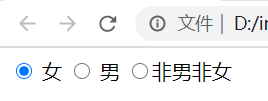
在这里插入图片描述
将 type 设置为 checkbox 可以实现多选:
<!DOCTYPE html>
<html>
<head>
    <title>第十七节课</title>
    <meta charset="utf-8">
	<title>input</title>
</head>
<body>
    <input type="checkbox" name="fruit">西瓜
    <input type="checkbox" name="fruit">香蕉
    <input type="checkbox" name="fruit">草莓
</body>
</html>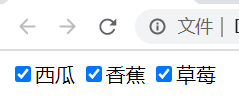
在这里插入图片描述
input 还可以显示时间格式:
<!DOCTYPE html>
<html>
<head>
    <title>第十七节课</title>
    <meta charset="utf-8">
	<title>input</title>
</head>
<body>
    时间:<input type="time" name="time">
    <br><br>
    日期:<input type="date" name="date">
    <br><br>
    年月:<input type="month" name="month">
    <br><br>
    星期:<input type="week" name="week">
    <br><br>
    本地日期和时间:<input type="datetime-local" name="datetime-local">
</body>
</html>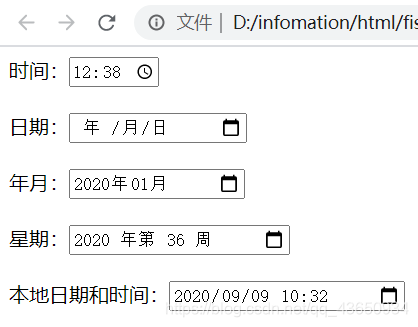
在这里插入图片描述
html 中的保留字符:

在这里插入图片描述
本文参与 腾讯云自媒体同步曝光计划,分享自作者个人站点/博客。
原始发表:2026-01-23,如有侵权请联系 cloudcommunity@tencent.com 删除
目录
腾讯云开发者

Copyright © 2013 - 2026 Tencent Cloud. All Rights Reserved. 腾讯云 版权所有
深圳市腾讯计算机系统有限公司 ICP备案/许可证号:粤B2-20090059  粤公网安备44030502008569号
腾讯云计算(北京)有限责任公司 京ICP证150476号 | 京ICP备11018762号