《Java 程序设计》第 13 章 - 输入输出详解

《Java 程序设计》第 13 章 - 输入输出详解

啊阿狸不会拉杆
发布于 2026-01-20 16:05:28
发布于 2026-01-20 16:05:28
大家好!今天我们来深入学习《Java 程序设计》中的第 13 章 —— 输入输出(I/O)。I/O 操作是程序与外部世界交互的重要方式,无论是读取配置文件、保存用户数据还是网络通信,都离不开 I/O。本章将从基础的流操作讲到 NIO.2,帮助大家全面掌握 Java 中的 I/O 知识。
本章知识思维导图
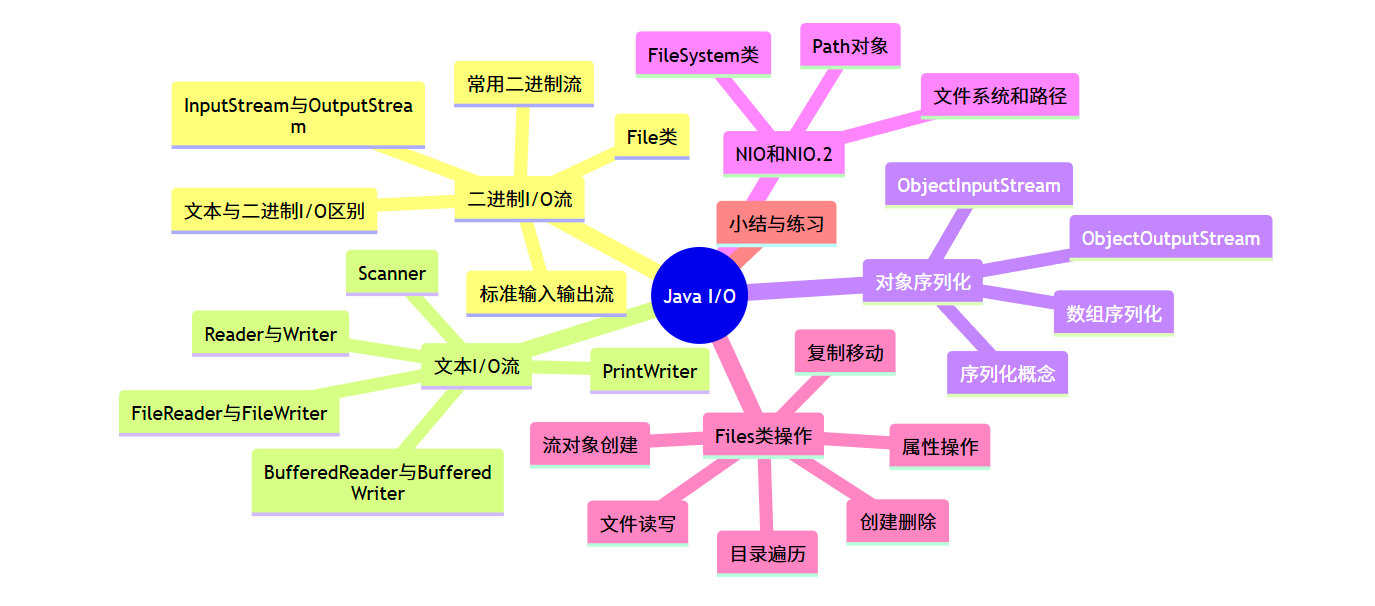
13.1 二进制 I/O 流
二进制 I/O 流以字节为单位处理数据,适用于所有类型的文件,包括文本文件、图像、音频等。
13.1.1 File 类应用
File类是 Java 中处理文件和目录的基础类,它封装了文件或目录的路径信息,但并不直接操作文件内容。
常用方法示例:
import java.io.File;
import java.io.IOException;

public class FileDemo {
    public static void main(String[] args) {
        // 创建File对象,指向当前目录下的test.txt文件
        File file = new File("test.txt");

        try {
            // 判断文件是否存在
            if (file.exists()) {
                System.out.println("文件已存在");
                // 获取文件名
                System.out.println("文件名: " + file.getName());
                // 获取文件绝对路径
                System.out.println("绝对路径: " + file.getAbsolutePath());
                // 获取文件大小(字节)
                System.out.println("文件大小: " + file.length() + " bytes");
                // 判断是否为文件
                System.out.println("是否为文件: " + file.isFile());
                // 判断是否为目录
                System.out.println("是否为目录: " + file.isDirectory());
            } else {
                System.out.println("文件不存在,创建新文件");
                // 创建新文件
                boolean created = file.createNewFile();
                if (created) {
                    System.out.println("文件创建成功");
                }
            }

            // 创建目录
            File dir = new File("testDir");
            if (dir.mkdir()) {
                System.out.println("目录创建成功");
            }

            // 列出目录下的所有文件和子目录
            File currentDir = new File(".");
            String[] files = currentDir.list();
            if (files != null) {
                System.out.println("\n当前目录下的文件和目录:");
                for (String f : files) {
                    System.out.println(f);
                }
            }

        } catch (IOException e) {
            e.printStackTrace();
        } finally {
            // 删除文件
            if (file.delete()) {
                System.out.println("\n文件已删除");
            }
            // 删除目录
            File dir = new File("testDir");
            if (dir.delete()) {
                System.out.println("目录已删除");
            }
        }
    }
}
运行结果:
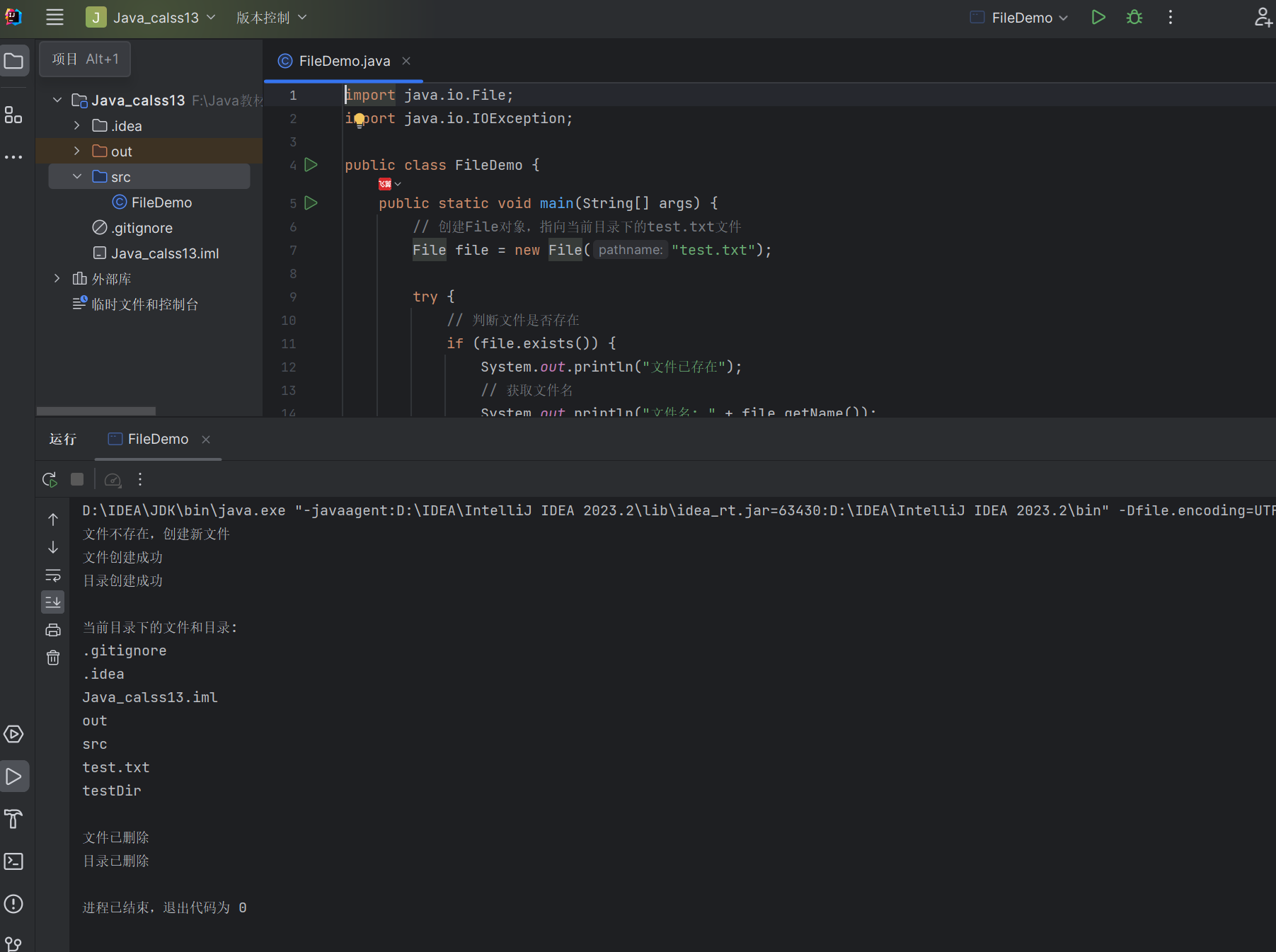
13.1.2 文本 I/O 与二进制 I/O
- 文本 I/O:以字符为单位处理数据,需要进行字符编码转换(如 UTF-8、GBK),适用于文本文件。
- 二进制 I/O:以字节为单位处理数据,直接操作原始数据,适用于所有类型的文件。
示例:存储数字 100 的区别
import java.io.*;

public class TextVsBinary {
    public static void main(String[] args) {
        // 二进制方式写入数字100
        try (FileOutputStream fos = new FileOutputStream("binary.dat")) {
            fos.write(100);  // 写入一个字节,值为100
        } catch (IOException e) {
            e.printStackTrace();
        }

        // 文本方式写入数字100
        try (FileWriter fw = new FileWriter("text.txt")) {
            fw.write("100");  // 写入三个字符:'1','0','0'
        } catch (IOException e) {
            e.printStackTrace();
        }

        // 验证文件大小
        System.out.println("binary.dat大小: " + new File("binary.dat").length() + "字节");
        System.out.println("text.txt大小: " + new File("text.txt").length() + "字节");
    }
}
运行结果:
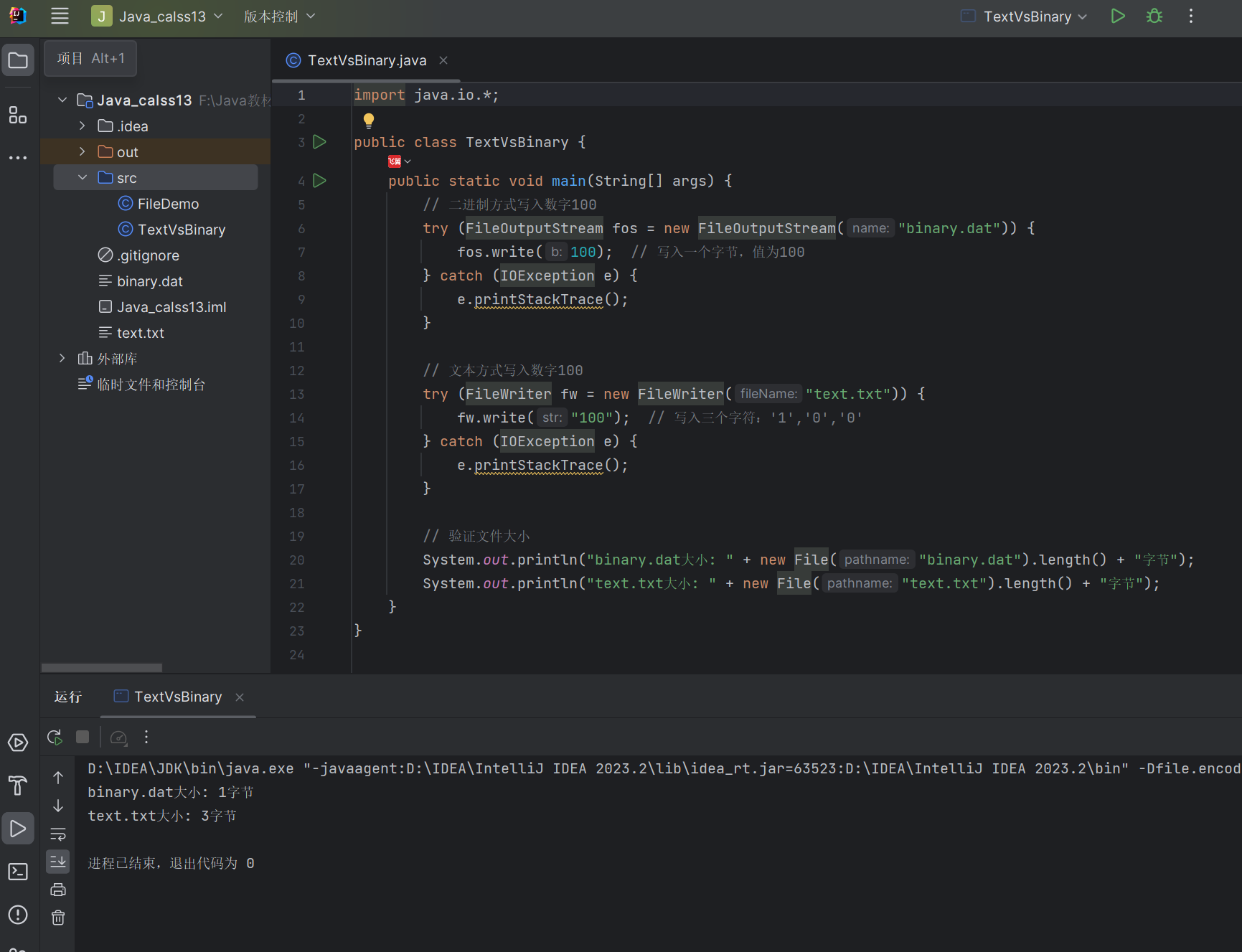
13.1.3 InputStream 类和 OutputStream 类
InputStream和OutputStream是所有二进制输入输出流的抽象基类,定义了基本的读写方法。
类图:
@startuml
abstract class InputStream {
    + read(): int
    + read(byte[] b): int
    + read(byte[] b, int off, int len): int
    + close(): void
    + available(): int
    + skip(long n): long
    + mark(int readlimit): void
    + reset(): void
    + markSupported(): boolean
}

abstract class OutputStream {
    + write(int b): void
    + write(byte[] b): void
    + write(byte[] b, int off, int len): void
    + flush(): void
    + close(): void
}

InputStream <|-- FileInputStream
InputStream <|-- BufferedInputStream
InputStream <|-- DataInputStream
InputStream <|-- ObjectInputStream

OutputStream <|-- FileOutputStream
OutputStream <|-- BufferedOutputStream
OutputStream <|-- DataOutputStream
OutputStream <|-- ObjectOutputStream
@enduml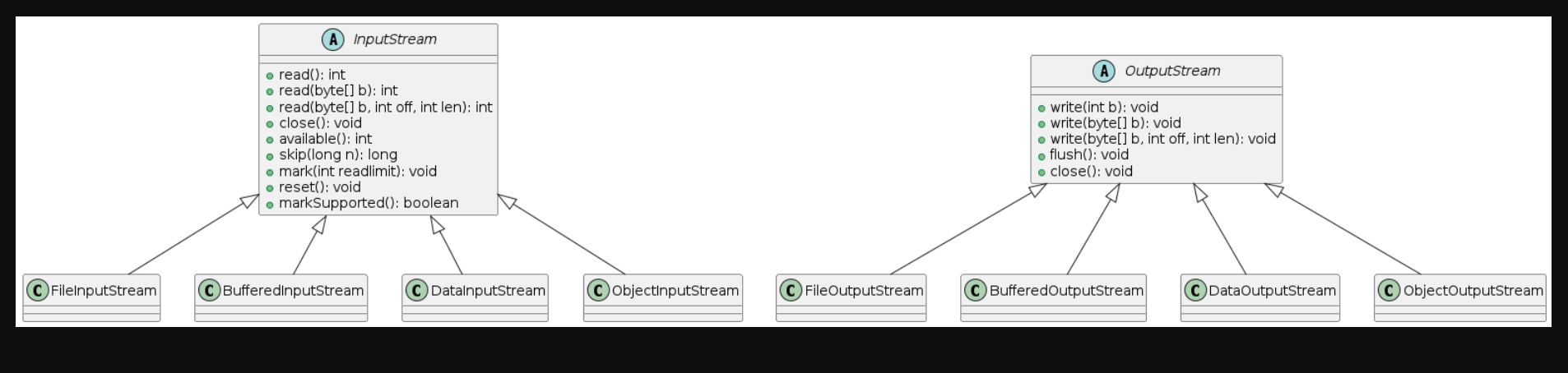
13.1.4 常用二进制 I/O 流
- FileInputStream/FileOutputStream:直接从文件读取 / 写入字节
- BufferedInputStream/BufferedOutputStream:带缓冲区的流,提高读写效率
- DataInputStream/DataOutputStream:可以读写基本数据类型
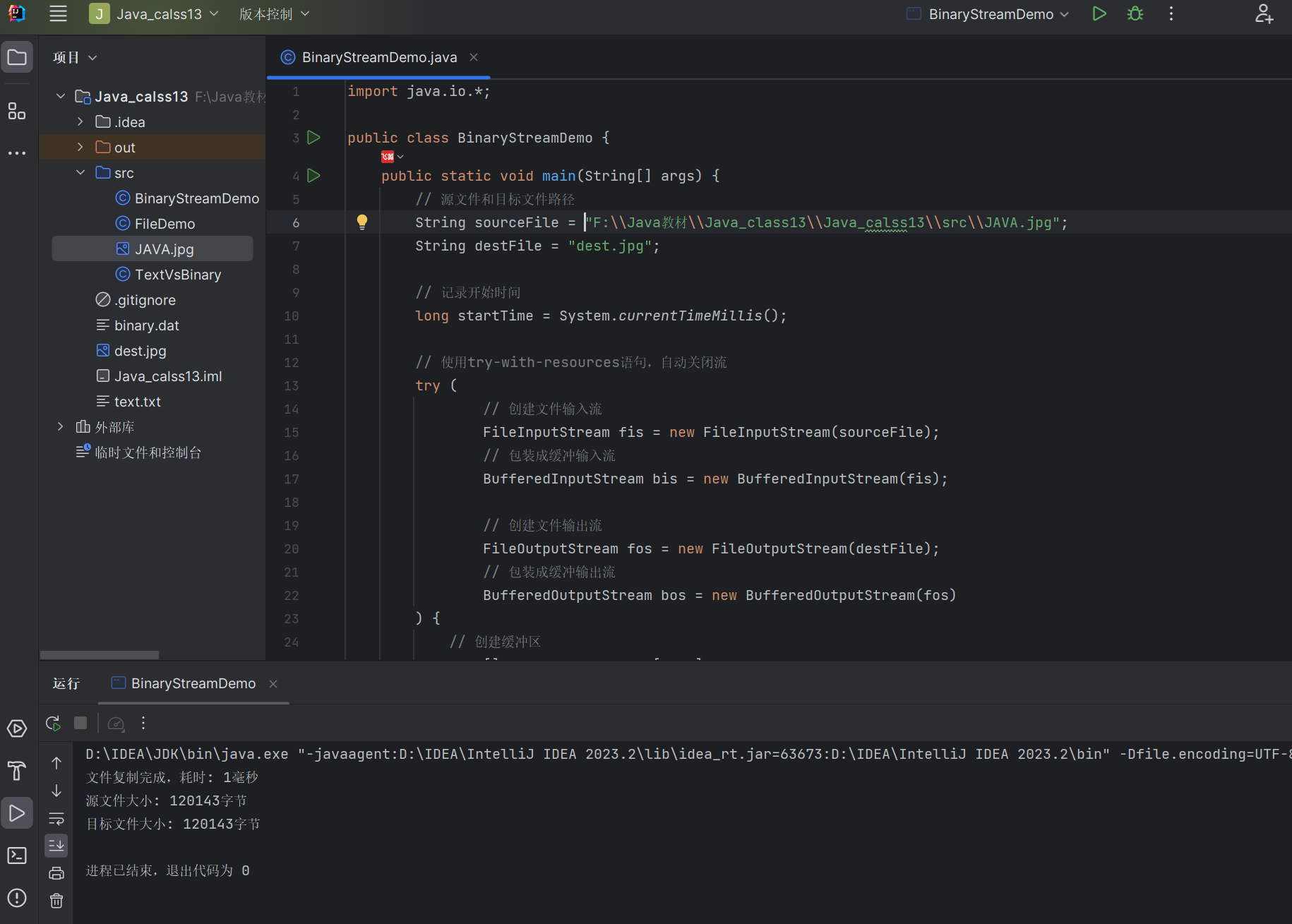
综合示例:使用缓冲流复制图片文件
import java.io.*;

public class BinaryStreamDemo {
    public static void main(String[] args) {
        // 源文件和目标文件路径
        String sourceFile = "source.jpg";
        String destFile = "dest.jpg";

        // 记录开始时间
        long startTime = System.currentTimeMillis();

        // 使用try-with-resources语句,自动关闭流
        try (
            // 创建文件输入流
            FileInputStream fis = new FileInputStream(sourceFile);
            // 包装成缓冲输入流
            BufferedInputStream bis = new BufferedInputStream(fis);

            // 创建文件输出流
            FileOutputStream fos = new FileOutputStream(destFile);
            // 包装成缓冲输出流
            BufferedOutputStream bos = new BufferedOutputStream(fos)
        ) {
            // 创建缓冲区
            byte[] buffer = new byte[1024];
            int bytesRead;

            // 读取数据并写入
            while ((bytesRead = bis.read(buffer)) != -1) {
                bos.write(buffer, 0, bytesRead);
            }

            // 刷新缓冲区,确保所有数据都写入文件
            bos.flush();

            long endTime = System.currentTimeMillis();
            System.out.println("文件复制完成,耗时: " + (endTime - startTime) + "毫秒");
            System.out.println("源文件大小: " + new File(sourceFile).length() + "字节");
            System.out.println("目标文件大小: " + new File(destFile).length() + "字节");

        } catch (FileNotFoundException e) {
            System.out.println("文件未找到: " + e.getMessage());
        } catch (IOException e) {
            System.out.println("I/O错误: " + e.getMessage());
        }
    }
}
运行结果:
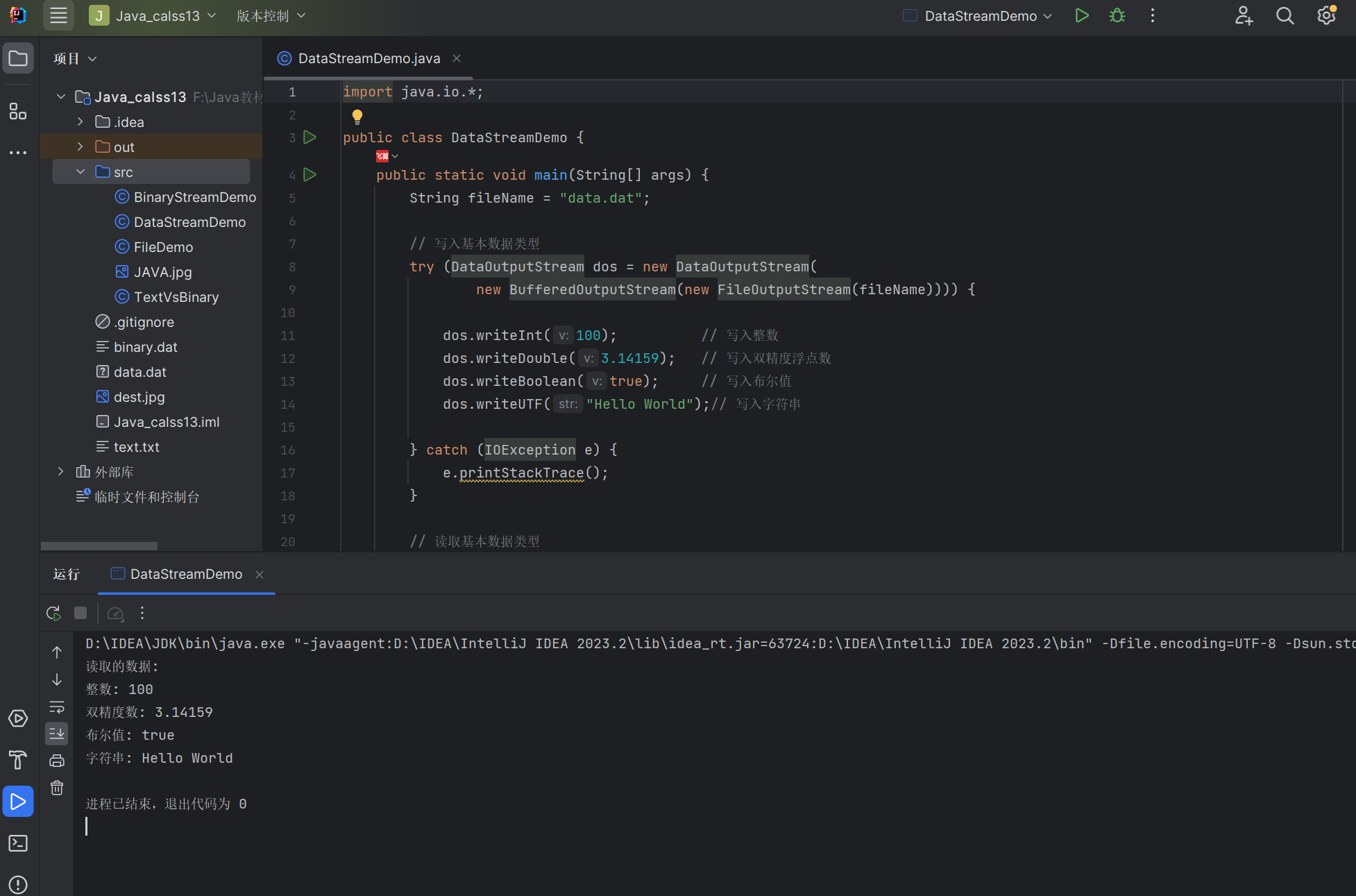
示例:使用 Data 流读写基本数据类型
import java.io.*;

public class DataStreamDemo {
    public static void main(String[] args) {
        String fileName = "data.dat";

        // 写入基本数据类型
        try (DataOutputStream dos = new DataOutputStream(
             new BufferedOutputStream(new FileOutputStream(fileName)))) {

            dos.writeInt(100);          // 写入整数
            dos.writeDouble(3.14159);   // 写入双精度浮点数
            dos.writeBoolean(true);     // 写入布尔值
            dos.writeUTF("Hello World");// 写入字符串

        } catch (IOException e) {
            e.printStackTrace();
        }

        // 读取基本数据类型
        try (DataInputStream dis = new DataInputStream(
             new BufferedInputStream(new FileInputStream(fileName)))) {

            int intValue = dis.readInt();
            double doubleValue = dis.readDouble();
            boolean booleanValue = dis.readBoolean();
            String stringValue = dis.readUTF();

            System.out.println("读取的数据:");
            System.out.println("整数: " + intValue);
            System.out.println("双精度数: " + doubleValue);
            System.out.println("布尔值: " + booleanValue);
            System.out.println("字符串: " + stringValue);

        } catch (IOException e) {
            e.printStackTrace();
        }
    }
}
运行结果:
13.1.5 标准输入输出流
Java 提供了三个标准流对象:
System.in:标准输入流,默认是键盘System.out:标准输出流,默认是控制台System.err:标准错误流,默认是控制台
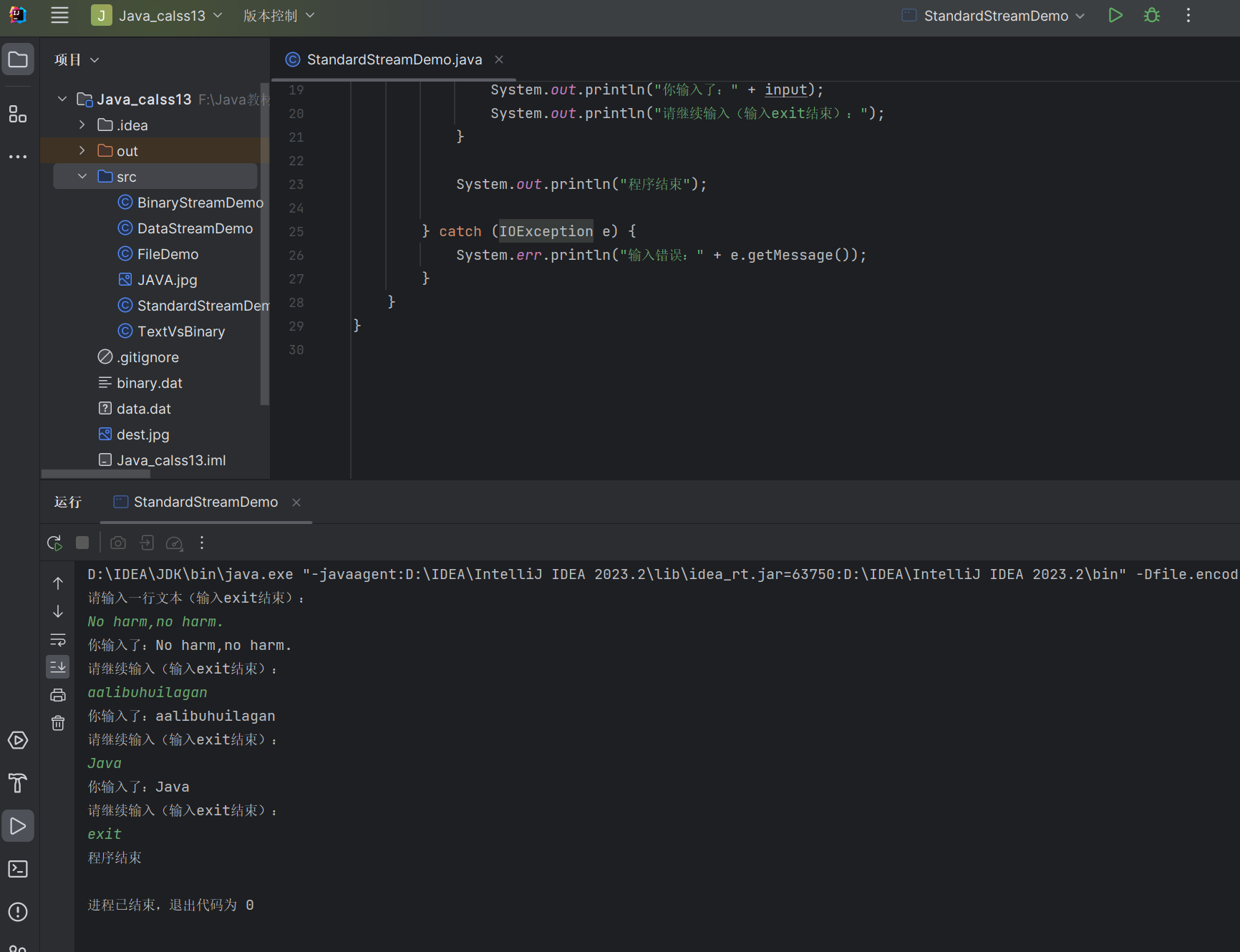
示例:从键盘读取输入并输出
import java.io.*;

public class StandardStreamDemo {
    public static void main(String[] args) {
        System.out.println("请输入一行文本(输入exit结束):");

        // 使用BufferedReader包装标准输入流
        try (BufferedReader br = new BufferedReader(
             new InputStreamReader(System.in))) {

            String input;
            // 循环读取输入
            while ((input = br.readLine()) != null) {
                // 如果输入exit,则退出循环
                if ("exit".equalsIgnoreCase(input)) {
                    break;
                }
                // 输出读取的内容
                System.out.println("你输入了:" + input);
                System.out.println("请继续输入(输入exit结束):");
            }

            System.out.println("程序结束");

        } catch (IOException e) {
            System.err.println("输入错误:" + e.getMessage());
        }
    }
}
运行结果:
13.2 文本 I/O 流
文本 I/O 流以字符为单位处理数据,专门用于处理文本文件,会自动进行字符编码转换。
13.2.1 Reader 类和 Writer 类
Reader和Writer是所有字符输入输出流的抽象基类。
类图:
@startuml
abstract class Reader {
    + read(): int
    + read(char[] cbuf): int
    + read(char[] cbuf, int off, int len): int
    + close(): void
    + skip(long n): long
    + mark(int readAheadLimit): void
    + reset(): void
    + markSupported(): boolean
}

abstract class Writer {
    + write(int c): void
    + write(char[] cbuf): void
    + write(char[] cbuf, int off, int len): void
    + write(String str): void
    + write(String str, int off, int len): void
    + flush(): void
    + close(): void
}

Reader <|-- InputStreamReader
Reader <|-- FileReader
Reader <|-- BufferedReader
Reader <|-- StringReader

Writer <|-- OutputStreamWriter
Writer <|-- FileWriter
Writer <|-- BufferedWriter
Writer <|-- PrintWriter
Writer <|-- StringWriter
@enduml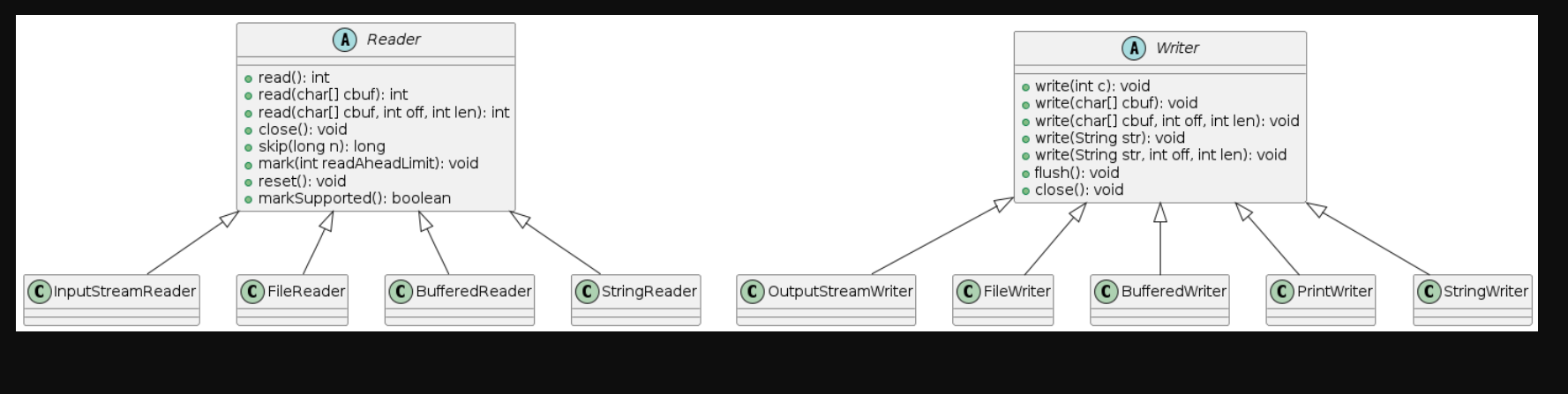
13.2.2 FileReader 类和 FileWriter 类
FileReader和FileWriter是用于读写字符文件的便捷类,使用平台默认的字符编码。
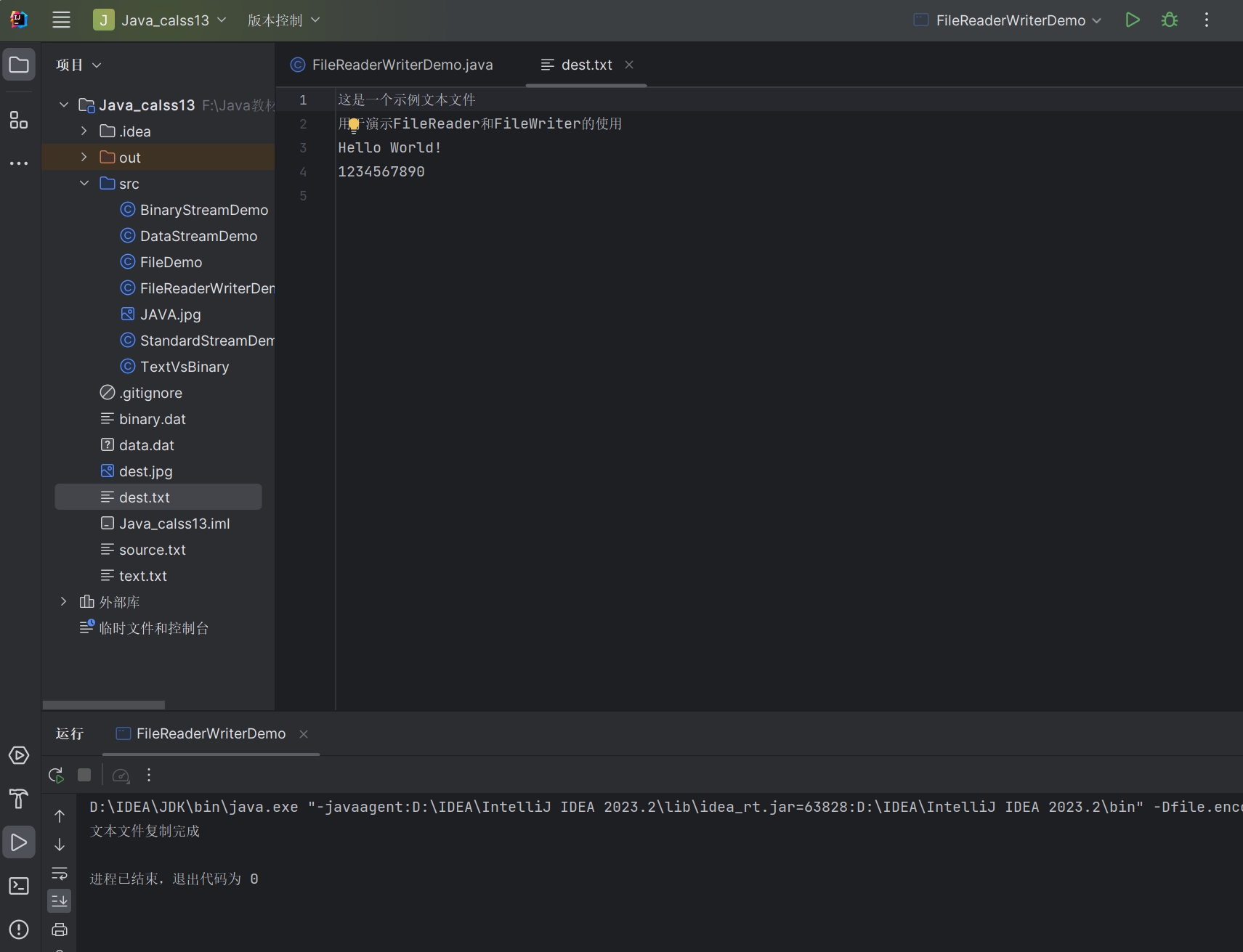
示例:使用 FileReader 和 FileWriter 复制文本文件
import java.io.*;

public class FileReaderWriterDemo {
    public static void main(String[] args) {
        String sourceFile = "source.txt";
        String destFile = "dest.txt";

        // 先创建一个源文件并写入内容
        createSampleFile(sourceFile);

        // 复制文件
        try (
            FileReader fr = new FileReader(sourceFile);
            FileWriter fw = new FileWriter(destFile)
        ) {
            char[] buffer = new char[1024];
            int charsRead;

            // 读取并写入
            while ((charsRead = fr.read(buffer)) != -1) {
                fw.write(buffer, 0, charsRead);
            }

            System.out.println("文本文件复制完成");

        } catch (IOException e) {
            e.printStackTrace();
        }
    }

    // 创建示例文件
    private static void createSampleFile(String fileName) {
        try (FileWriter fw = new FileWriter(fileName)) {
            fw.write("这是一个示例文本文件\n");
            fw.write("用于演示FileReader和FileWriter的使用\n");
            fw.write("Hello World!\n");
            fw.write("1234567890\n");
        } catch (IOException e) {
            e.printStackTrace();
        }
    }
}
13.2.3 BufferedReader 类和 BufferedWriter 类
带缓冲区的字符流,提供了更高效的读写操作,还提供了readLine()等便捷方法。
示例:使用缓冲字符流读写文本文件
import java.io.*;

public class BufferedReaderWriterDemo {
    public static void main(String[] args) {
        String fileName = "poem.txt";

        // 写入诗歌
        try (BufferedWriter bw = new BufferedWriter(new FileWriter(fileName))) {
            bw.write("静夜思");
            bw.newLine();  // 写入换行符
            bw.write("床前明月光,");
            bw.newLine();
            bw.write("疑是地上霜。");
            bw.newLine();
            bw.write("举头望明月,");
            bw.newLine();
            bw.write("低头思故乡。");

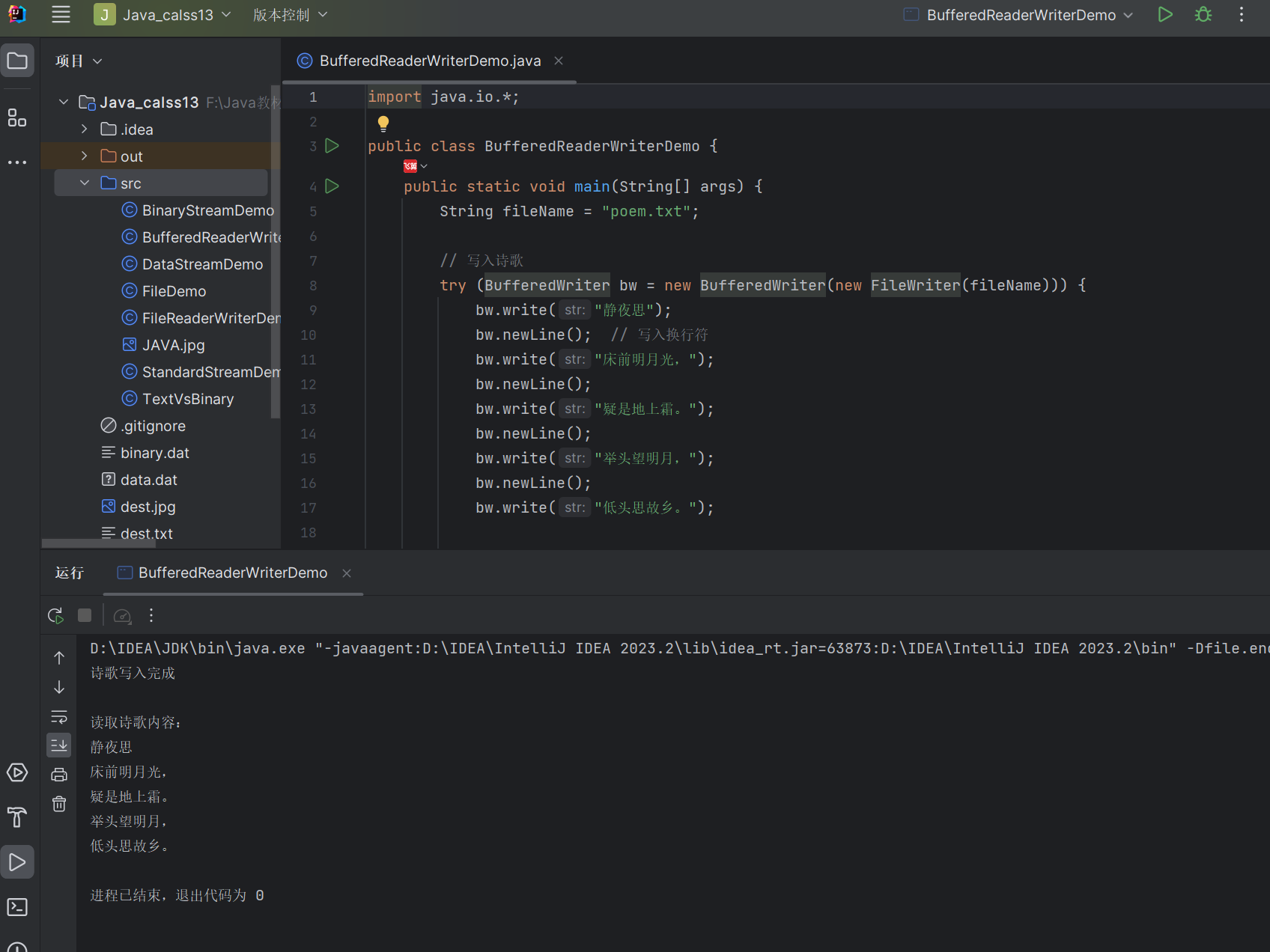
            System.out.println("诗歌写入完成");
        } catch (IOException e) {
            e.printStackTrace();
        }

        // 读取诗歌
        try (BufferedReader br = new BufferedReader(new FileReader(fileName))) {
            System.out.println("\n读取诗歌内容:");
            String line;
            // 逐行读取
            while ((line = br.readLine()) != null) {
                System.out.println(line);
            }
        } catch (IOException e) {
            e.printStackTrace();
        }
    }
}
运行结果:
13.2.4 PrintWriter 类
PrintWriter提供了便捷的打印方法,可以格式化输出,常用于生成文本文件。
示例:使用 PrintWriter 写入格式化数据
import java.io.*;

public class PrintWriterDemo {
    public static void main(String[] args) {
        String fileName = "student.txt";

        // 学生数据
        String[] names = {"张三", "李四", "王五"};
        int[] ages = {20, 21, 19};
        double[] scores = {85.5, 92.0, 78.5};

        try (PrintWriter pw = new PrintWriter(new FileWriter(fileName))) {
            // 写入标题
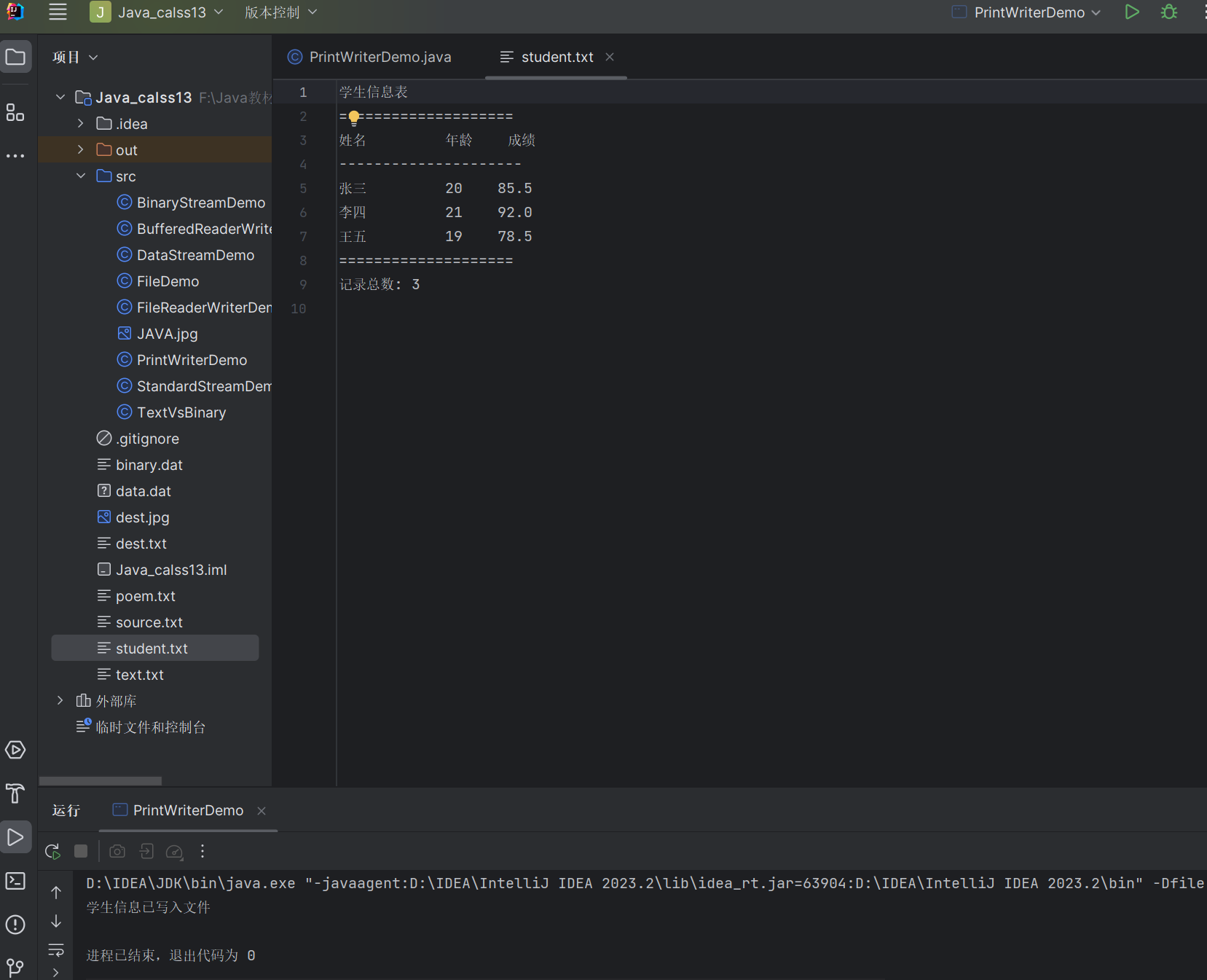
            pw.println("学生信息表");
            pw.println("====================");
            // 写入表头
            pw.printf("%-10s %-5s %-6s%n", "姓名", "年龄", "成绩");
            pw.println("---------------------");

            // 写入学生数据
            for (int i = 0; i < names.length; i++) {
                pw.printf("%-10s %-5d %.1f%n", names[i], ages[i], scores[i]);
            }

            pw.println("====================");
            pw.println("记录总数: " + names.length);

            System.out.println("学生信息已写入文件");
        } catch (IOException e) {
            e.printStackTrace();
        }
    }
}
生成的文件内容:
13.2.5 使用 Scanner 对象
Scanner类提供了更便捷的文本输入处理方式,可以解析基本数据类型和字符串。
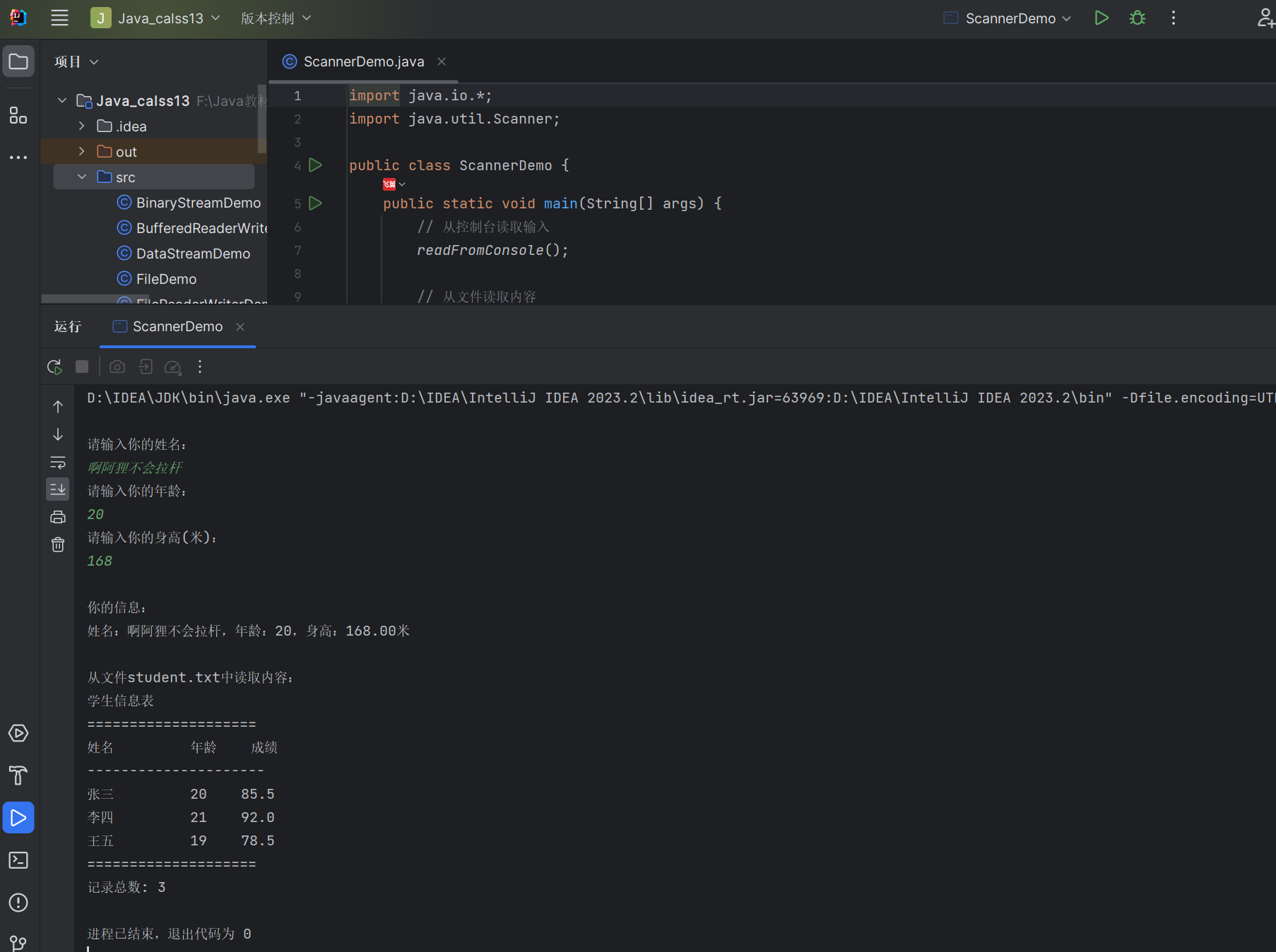
示例:使用 Scanner 读取文件和控制台输入
import java.io.*;
import java.util.Scanner;

public class ScannerDemo {
    public static void main(String[] args) {
        // 从控制台读取输入
        readFromConsole();

        // 从文件读取内容
        readFromFile("student.txt");
    }

    // 从控制台读取输入
    private static void readFromConsole() {
        Scanner scanner = new Scanner(System.in);

        System.out.println("\n请输入你的姓名:");
        String name = scanner.nextLine();

        System.out.println("请输入你的年龄:");
        int age = scanner.nextInt();
        scanner.nextLine(); // 消耗换行符

        System.out.println("请输入你的身高(米):");
        double height = scanner.nextDouble();

        System.out.println("\n你的信息:");
        System.out.printf("姓名:%s,年龄:%d,身高:%.2f米%n", name, age, height);

        scanner.close();
    }

    // 从文件读取内容
    private static void readFromFile(String fileName) {
        try (Scanner scanner = new Scanner(new File(fileName))) {
            System.out.println("\n从文件" + fileName + "中读取内容:");

            // 设置分隔符为换行符
            scanner.useDelimiter("\n");

            // 逐行读取
            while (scanner.hasNext()) {
                String line = scanner.next();
                System.out.println(line);
            }
        } catch (FileNotFoundException e) {
            e.printStackTrace();
        }
    }
}
运行结果:
综合案例:文本文件分析器
import java.io.*;
import java.util.*;

public class TextAnalyzer {
    public static void main(String[] args) {
        String inputFile = "sample.txt";
        String outputFile = "analysis_result.txt";

        // 创建示例文件
        createSampleFile(inputFile);

        // 分析文件
        Map<String, Integer> wordCount = new HashMap<>();
        int lineCount = 0;
        int charCount = 0;

        try (BufferedReader br = new BufferedReader(new FileReader(inputFile))) {
            String line;

            // 逐行读取并分析
            while ((line = br.readLine()) != null) {
                lineCount++;  // 行数加1
                charCount += line.length();  // 字符数累加

                // 处理每行内容,提取单词
                String[] words = line.trim().split("\\s+");
                for (String word : words) {
                    // 去除标点符号
                    word = word.replaceAll("[^a-zA-Z0-9]", "").toLowerCase();
                    if (!word.isEmpty()) {
                        // 统计单词出现次数
                        wordCount.put(word, wordCount.getOrDefault(word, 0) + 1);
                    }
                }
            }

            System.out.println("文件分析完成");
            System.out.println("总行数: " + lineCount);
            System.out.println("总字符数: " + charCount);
            System.out.println("不同单词数: " + wordCount.size());

            // 将结果写入文件
            writeAnalysisResult(outputFile, lineCount, charCount, wordCount);

        } catch (IOException e) {
            e.printStackTrace();
        }
    }

    // 创建示例文件
    private static void createSampleFile(String fileName) {
        try (PrintWriter pw = new PrintWriter(new FileWriter(fileName))) {
            pw.println("Hello world! This is a sample text file.");
            pw.println("It contains several lines of text, with some repeated words.");
            pw.println("Hello again! This line is the third line of the sample file.");
            pw.println("Java programming is fun. Java is also powerful.");
        } catch (IOException e) {
            e.printStackTrace();
        }
    }

    // 写入分析结果
    private static void writeAnalysisResult(String fileName, int lineCount,
                                          int charCount, Map<String, Integer> wordCount) {
        try (PrintWriter pw = new PrintWriter(new FileWriter(fileName))) {
            pw.println("文本文件分析结果");
            pw.println("==================");
            pw.println("总行数: " + lineCount);
            pw.println("总字符数: " + charCount);
            pw.println("不同单词数: " + wordCount.size());
            pw.println("\n单词出现频率:");
            pw.println("------------------");

            // 将单词按出现次数排序
            List<Map.Entry<String, Integer>> sortedWords = new ArrayList<>(wordCount.entrySet());
            sortedWords.sort((e1, e2) -> e2.getValue().compareTo(e1.getValue()));

            // 写入排序后的单词频率
            for (Map.Entry<String, Integer> entry : sortedWords) {
                pw.printf("%-10s 出现了 %d 次%n", entry.getKey(), entry.getValue());
            }

            System.out.println("分析结果已写入文件: " + fileName);
        } catch (IOException e) {
            e.printStackTrace();
        }
    }
}
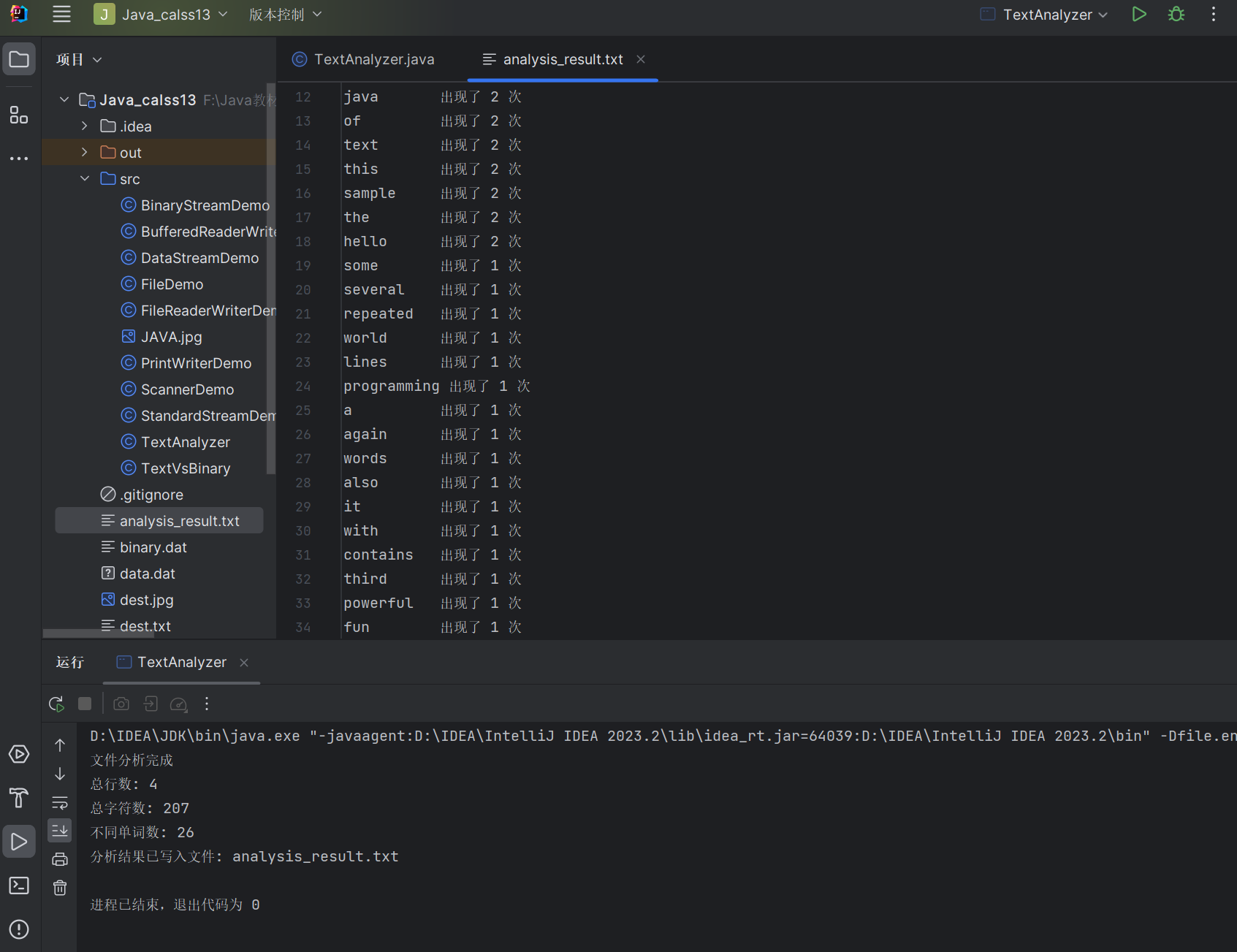
运行结果:
13.3 对象序列化
对象序列化是将对象转换为字节序列的过程,反序列化则是将字节序列恢复为对象的过程。
13.3.1 对象序列化与对象流
- 实现
Serializable接口的类的对象才能被序列化 ObjectOutputStream用于将对象写入输出流ObjectInputStream用于从输入流读取对象
可序列化类示例:
import java.io.Serializable;

// 实现Serializable接口
public class Person implements Serializable {
    // 序列化版本号,确保序列化和反序列化的兼容性
    private static final long serialVersionUID = 1L;

    private String name;
    private int age;
    private transient String password;  // transient修饰的字段不会被序列化

    public Person(String name, int age, String password) {
        this.name = name;
        this.age = age;
        this.password = password;
    }

    @Override
    public String toString() {
        return "Person{name='" + name + "', age=" + age + ", password='" + password + "'}";
    }
}
13.3.2 向 ObjectOutputStream 中写入对象,从 ObjectInputStream 中读出对象
示例:对象的序列化和反序列化
import java.io.*;

public class ObjectSerializationDemo {
    public static void main(String[] args) {
        String fileName = "person.ser";

        // 创建一个Person对象
        Person person = new Person("张三", 30, "secret123");
        System.out.println("序列化前的对象: " + person);

        // 序列化对象到文件
        try (ObjectOutputStream oos = new ObjectOutputStream(
             new FileOutputStream(fileName))) {
            oos.writeObject(person);
            System.out.println("对象序列化完成");
        } catch (IOException e) {
            e.printStackTrace();
        }

        // 从文件反序列化对象
        try (ObjectInputStream ois = new ObjectInputStream(
             new FileInputStream(fileName))) {
            Person deserializedPerson = (Person) ois.readObject();
            System.out.println("反序列化后的对象: " + deserializedPerson);
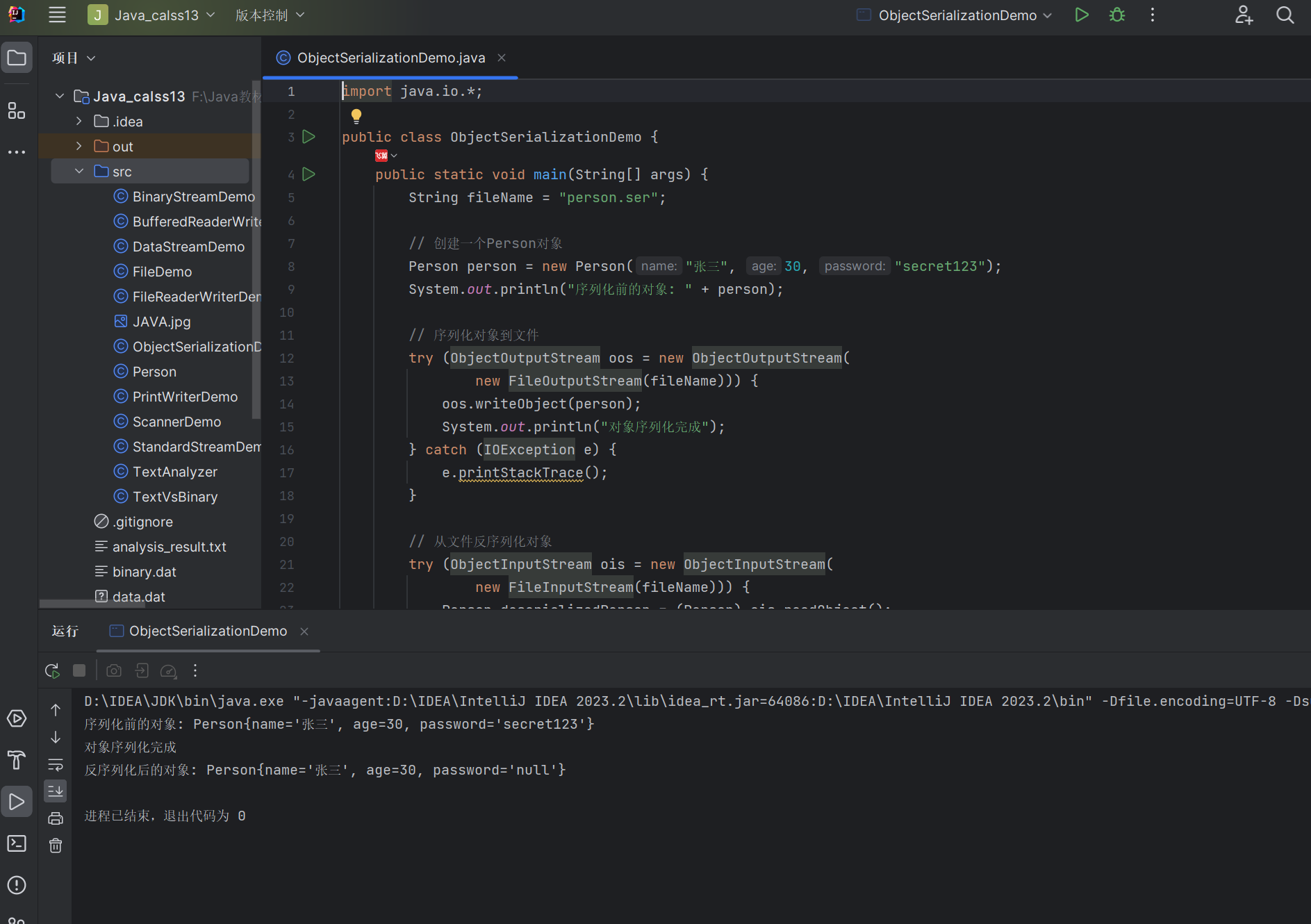
            // 注意:transient字段password没有被序列化,所以是null
        } catch (IOException | ClassNotFoundException e) {
            e.printStackTrace();
        }
    }
}
运行结果:
13.3.3 序列化数组
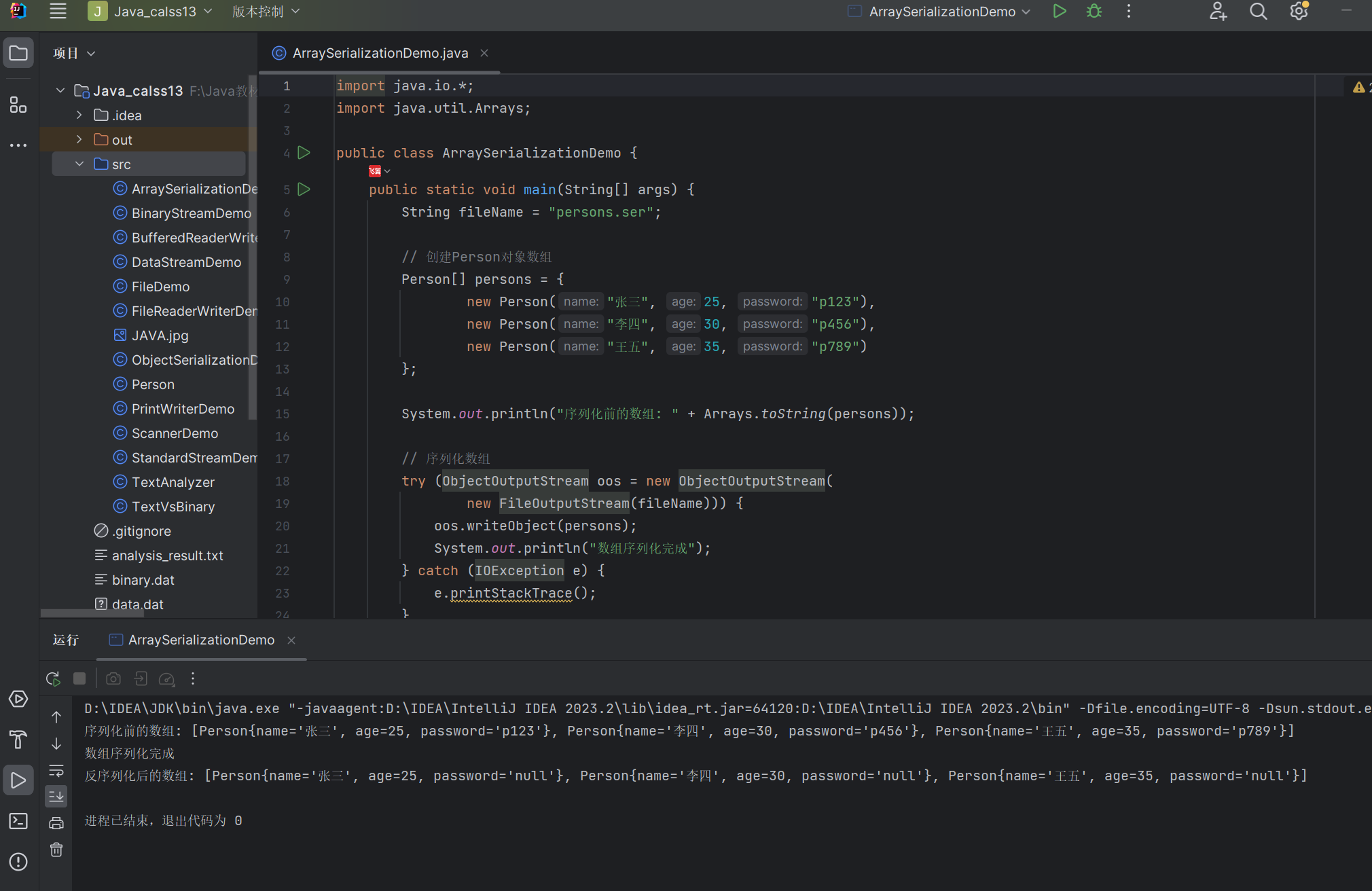
数组对象默认是可序列化的,只要数组元素的类型是可序列化的。
示例:序列化和反序列化对象数组
import java.io.*;
import java.util.Arrays;

public class ArraySerializationDemo {
    public static void main(String[] args) {
        String fileName = "persons.ser";

        // 创建Person对象数组
        Person[] persons = {
            new Person("张三", 25, "p123"),
            new Person("李四", 30, "p456"),
            new Person("王五", 35, "p789")
        };

        System.out.println("序列化前的数组: " + Arrays.toString(persons));

        // 序列化数组
        try (ObjectOutputStream oos = new ObjectOutputStream(
             new FileOutputStream(fileName))) {
            oos.writeObject(persons);
            System.out.println("数组序列化完成");
        } catch (IOException e) {
            e.printStackTrace();
        }

        // 反序列化数组
        try (ObjectInputStream ois = new ObjectInputStream(
             new FileInputStream(fileName))) {
            Person[] deserializedPersons = (Person[]) ois.readObject();
            System.out.println("反序列化后的数组: " + Arrays.toString(deserializedPersons));
        } catch (IOException | ClassNotFoundException e) {
            e.printStackTrace();
        }
    }
}
运行结果:
13.4 NIO 和 NIO.2
Java NIO(New IO)是从 Java 1.4 开始引入的新 IO API,提供了与传统 IO 不同的工作方式。NIO.2 是 Java 7 中引入的增强版,提供了更强大的文件系统操作能力。
13.4.1 文件系统和路径
NIO.2 引入了FileSystem和Path接口,用于表示文件系统和文件路径,提供了更灵活的文件系统访问方式。
13.4.2 FileSystem 类
FileSystem类表示一个文件系统,可以通过FileSystems工具类获取。
13.4.3 Path 对象
Path接口表示文件系统中的路径,可以通过Paths.get()方法创建。
示例:Path 和 FileSystem 的使用
import java.nio.file.*;
import java.nio.file.attribute.BasicFileAttributes;
import java.io.IOException;

public class NioDemo {
    public static void main(String[] args) {
        // 获取默认文件系统
        FileSystem fs = FileSystems.getDefault();
        System.out.println("文件系统分隔符: " + fs.getSeparator());

        // 创建Path对象
        Path path = Paths.get("src", "main", "java", "com", "example", "demo.java");
        System.out.println("Path: " + path);

        // Path的常用方法
        System.out.println("文件名: " + path.getFileName());
        System.out.println("父路径: " + path.getParent());
        System.out.println("根路径: " + path.getRoot());
        System.out.println("名称数量: " + path.getNameCount());

        System.out.println("路径组成部分:");
        for (Path name : path) {
            System.out.println("  " + name);
        }

        // 转换为绝对路径
        Path absolutePath = path.toAbsolutePath();
        System.out.println("绝对路径: " + absolutePath);

        // 解析相对路径
        Path resolvedPath = path.resolve("../../test.txt");
        System.out.println("解析后的路径: " + resolvedPath);
        System.out.println("规范化后的路径: " + resolvedPath.normalize());

        // 检查文件是否存在
        Path testPath = Paths.get("test.txt");
        System.out.println("test.txt是否存在: " + Files.exists(testPath));

        // 创建文件并检查
        try {
            Files.createFile(testPath);
            System.out.println("test.txt创建后是否存在: " + Files.exists(testPath));

            // 获取文件属性
            BasicFileAttributes attrs = Files.readAttributes(testPath, BasicFileAttributes.class);
            System.out.println("是否为文件: " + attrs.isRegularFile());
            System.out.println("是否为目录: " + attrs.isDirectory());
            System.out.println("文件大小: " + attrs.size() + " bytes");
            System.out.println("创建时间: " + attrs.creationTime());

        } catch (IOException e) {
            e.printStackTrace();
        } finally {
            // 删除文件
            try {
                Files.deleteIfExists(testPath);
                System.out.println("test.txt删除后是否存在: " + Files.exists(testPath));
            } catch (IOException e) {
                e.printStackTrace();
            }
        }
    }
}
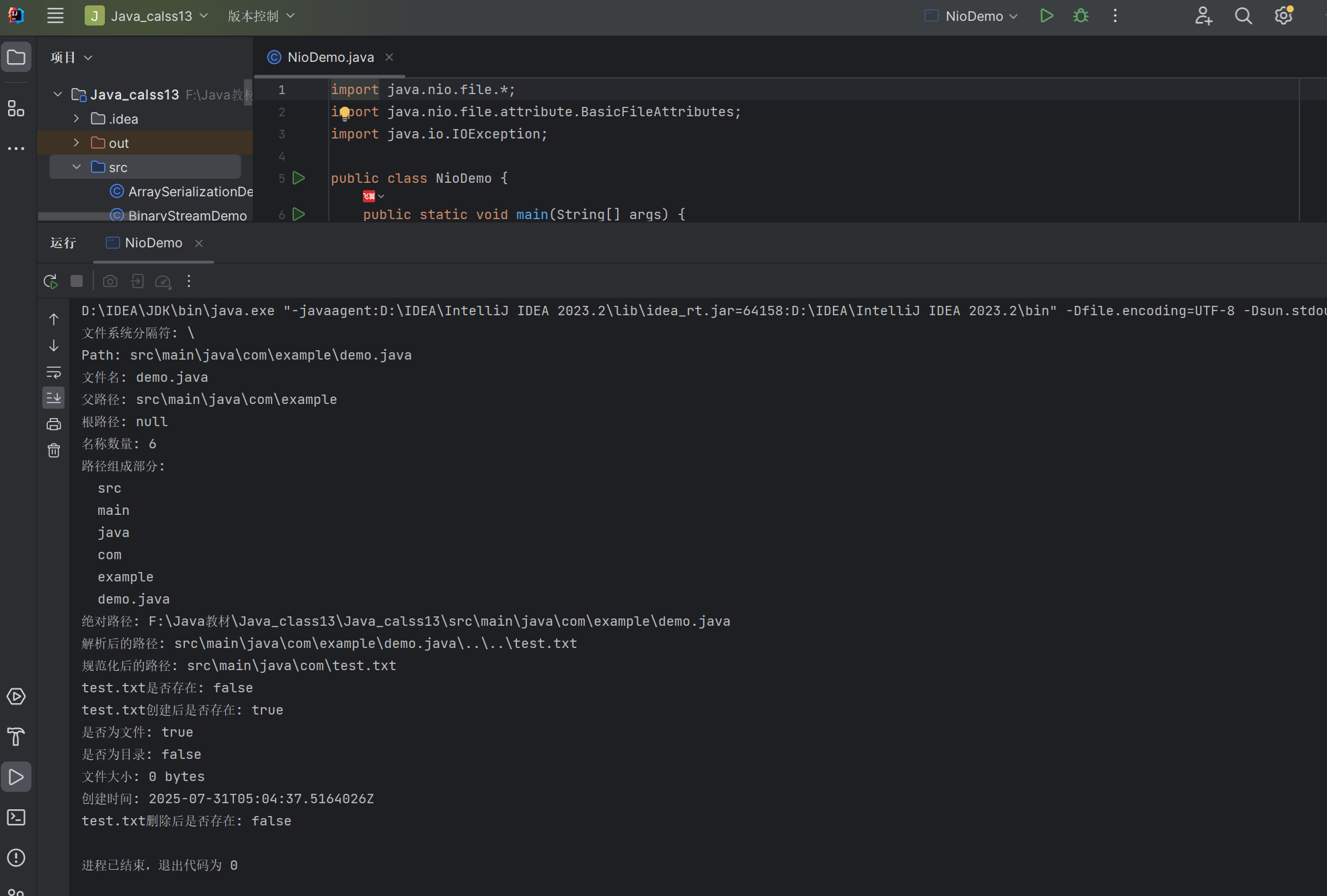
运行结果:
13.5 Files 类操作
Files类提供了一系列静态方法,用于操作文件和目录。
13.5.1 创建和删除目录及文件
示例:创建和删除文件及目录
import java.nio.file.*;
import java.io.IOException;

public class FilesCreateDeleteDemo {
    public static void main(String[] args) {
        // 创建文件
        Path file = Paths.get("testfile.txt");
        try {
            if (Files.notExists(file)) {
                Files.createFile(file);
                System.out.println("文件创建成功: " + file);
            } else {
                System.out.println("文件已存在: " + file);
            }
        } catch (IOException e) {
            System.out.println("创建文件失败: " + e.getMessage());
        }

        // 创建目录
        Path dir = Paths.get("testdir");
        try {
            if (Files.notExists(dir)) {
                Files.createDirectory(dir);
                System.out.println("目录创建成功: " + dir);
            } else {
                System.out.println("目录已存在: " + dir);
            }
        } catch (IOException e) {
            System.out.println("创建目录失败: " + e.getMessage());
        }

        // 创建多级目录
        Path multiDir = Paths.get("parent", "child", "grandchild");
        try {
            if (Files.notExists(multiDir)) {
                Files.createDirectories(multiDir);
                System.out.println("多级目录创建成功: " + multiDir);
            } else {
                System.out.println("多级目录已存在: " + multiDir);
            }
        } catch (IOException e) {
            System.out.println("创建多级目录失败: " + e.getMessage());
        }

        // 删除文件和目录
        try {
            if (Files.deleteIfExists(file)) {
                System.out.println("文件已删除: " + file);
            }

            if (Files.deleteIfExists(dir)) {
                System.out.println("目录已删除: " + dir);
            }

            // 从最内层目录开始删除
            Files.deleteIfExists(multiDir);
            Files.deleteIfExists(multiDir.getParent());
            Files.deleteIfExists(multiDir.getParent().getParent());
            System.out.println("多级目录已删除");
        } catch (IOException e) {
            System.out.println("删除失败: " + e.getMessage());
        }
    }
}
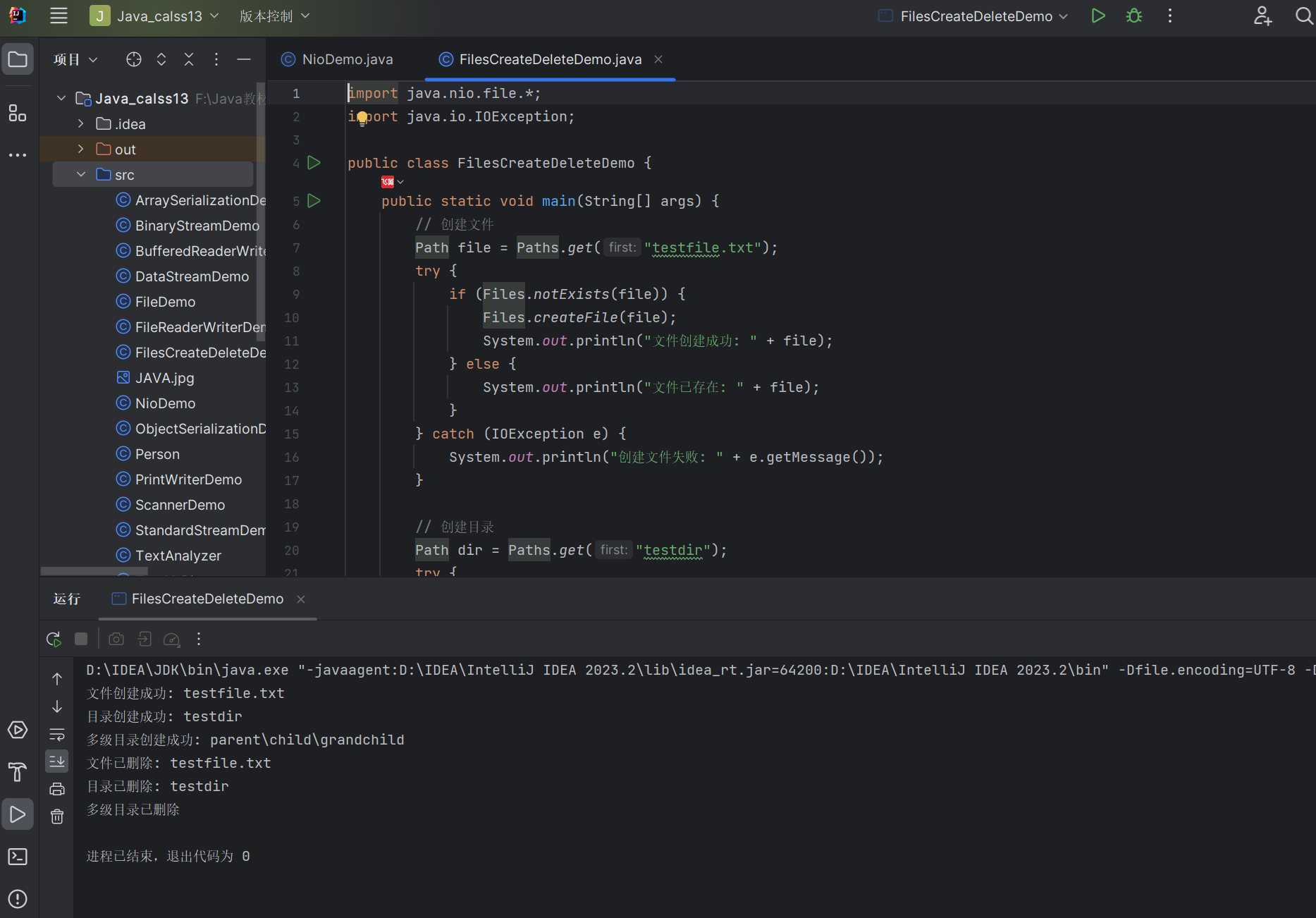
运行结果:
13.5.2 文件属性操作
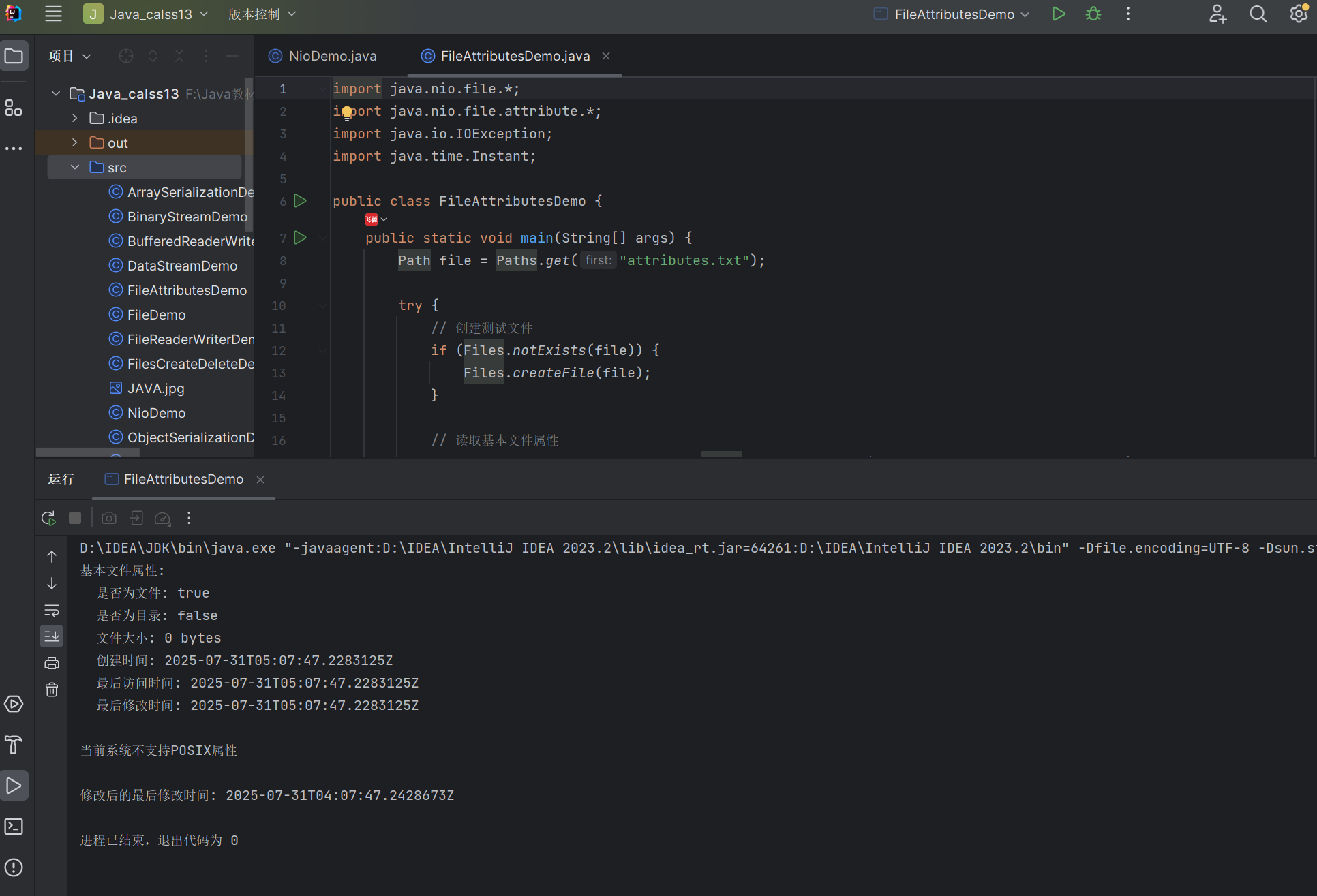
示例:文件属性操作
import java.nio.file.*;
import java.nio.file.attribute.*;
import java.io.IOException;
import java.time.Instant;

public class FileAttributesDemo {
    public static void main(String[] args) {
        Path file = Paths.get("attributes.txt");

        try {
            // 创建测试文件
            if (Files.notExists(file)) {
                Files.createFile(file);
            }

            // 读取基本文件属性
            BasicFileAttributes basicAttrs = Files.readAttributes(file, BasicFileAttributes.class);
            System.out.println("基本文件属性:");
            System.out.println("  是否为文件: " + basicAttrs.isRegularFile());
            System.out.println("  是否为目录: " + basicAttrs.isDirectory());
            System.out.println("  文件大小: " + basicAttrs.size() + " bytes");
            System.out.println("  创建时间: " + basicAttrs.creationTime());
            System.out.println("  最后访问时间: " + basicAttrs.lastAccessTime());
            System.out.println("  最后修改时间: " + basicAttrs.lastModifiedTime());

            // 读取POSIX文件属性(适用于Linux/macOS)
            try {
                PosixFileAttributes posixAttrs = Files.readAttributes(file, PosixFileAttributes.class);
                System.out.println("\nPOSIX文件属性:");
                System.out.println("  所有者: " + posixAttrs.owner().getName());
                System.out.println("  组: " + posixAttrs.group().getName());
                System.out.println("  权限: " + PosixFilePermissions.toString(posixAttrs.permissions()));
            } catch (UnsupportedOperationException e) {
                System.out.println("\n当前系统不支持POSIX属性");
            }

            // 修改文件最后修改时间
            FileTime newTime = FileTime.from(Instant.now().minusSeconds(3600)); // 1小时前
            Files.setLastModifiedTime(file, newTime);
            System.out.println("\n修改后的最后修改时间: " +
                              Files.readAttributes(file, BasicFileAttributes.class).lastModifiedTime());

        } catch (IOException e) {
            e.printStackTrace();
        } finally {
            // 清理测试文件
            try {
                Files.deleteIfExists(file);
            } catch (IOException e) {
                e.printStackTrace();
            }
        }
    }
}
13.5.3 文件和目录的复制与移动
示例:文件和目录的复制与移动
import java.nio.file.*;
import java.io.IOException;

public class FilesCopyMoveDemo {
    public static void main(String[] args) {
        // 创建测试文件和目录
        Path sourceFile = Paths.get("source.txt");
        Path targetFile = Paths.get("target.txt");
        Path sourceDir = Paths.get("sourcedir");
        Path targetDir = Paths.get("targetdir");

        try {
            // 创建源文件和目录(先检查是否存在)
            if (!Files.exists(sourceFile)) {  // 检查文件是否存在
                Files.createFile(sourceFile);
                Files.write(sourceFile, "Hello, World!".getBytes());
            } else {
                System.out.println("源文件已存在,无需创建: " + sourceFile);
            }

            if (!Files.exists(sourceDir)) {  // 检查目录是否存在
                Files.createDirectory(sourceDir);
                Path subFile = Paths.get(sourceDir.toString(), "file1.txt");
                if (!Files.exists(subFile)) {  // 检查子文件是否存在
                    Files.createFile(subFile);
                }
            } else {
                System.out.println("源目录已存在,无需创建: " + sourceDir);
            }

            // 复制文件
            Files.copy(sourceFile, targetFile, StandardCopyOption.REPLACE_EXISTING);
            System.out.println("文件复制成功: " + sourceFile + " -> " + targetFile);
            System.out.println("复制的文件内容: " + new String(Files.readAllBytes(targetFile)));

            // 复制目录(需要递归复制)
            copyDirectory(sourceDir, targetDir);
            System.out.println("目录复制成功: " + sourceDir + " -> " + targetDir);
            System.out.println("目标目录是否包含文件: " +
                    Files.exists(Paths.get(targetDir.toString(), "file1.txt")));

            // 移动文件
            Path movedFile = Paths.get("moved.txt");
            Files.move(targetFile, movedFile, StandardCopyOption.REPLACE_EXISTING);
            System.out.println("文件移动成功: " + targetFile + " -> " + movedFile);
            System.out.println("原文件是否存在: " + Files.exists(targetFile));

            // 移动目录
            Path movedDir = Paths.get("moveddir");
            Files.move(targetDir, movedDir, StandardCopyOption.REPLACE_EXISTING);
            System.out.println("目录移动成功: " + targetDir + " -> " + movedDir);
            System.out.println("原目录是否存在: " + Files.exists(targetDir));

        } catch (IOException e) {
            e.printStackTrace();
        } finally {
            // 清理所有创建的文件和目录
            try {
                Files.deleteIfExists(sourceFile);
                Files.deleteIfExists(targetFile);
                Files.deleteIfExists(Paths.get(sourceDir.toString(), "file1.txt"));
                Files.deleteIfExists(sourceDir);
                Files.deleteIfExists(Paths.get(targetDir.toString(), "file1.txt"));
                Files.deleteIfExists(targetDir);
                Files.deleteIfExists(Paths.get("moveddir", "file1.txt"));
                Files.deleteIfExists(Paths.get("moveddir"));
                Files.deleteIfExists(Paths.get("moved.txt"));
            } catch (IOException e) {
                e.printStackTrace();
            }
        }
    }

    // 递归复制目录
    private static void copyDirectory(Path sourceDir, Path targetDir) throws IOException {
        if (Files.notExists(targetDir)) {
            Files.createDirectory(targetDir);
        }

        // 遍历源目录中的所有条目
        try (DirectoryStream<Path> stream = Files.newDirectoryStream(sourceDir)) {
            for (Path entry : stream) {
                Path targetEntry = targetDir.resolve(entry.getFileName());

                if (Files.isDirectory(entry)) {
                    // 如果是目录,递归复制
                    copyDirectory(entry, targetEntry);
                } else {
                    // 如果是文件,直接复制
                    Files.copy(entry, targetEntry, StandardCopyOption.REPLACE_EXISTING);
                }
            }
        }
    }
}
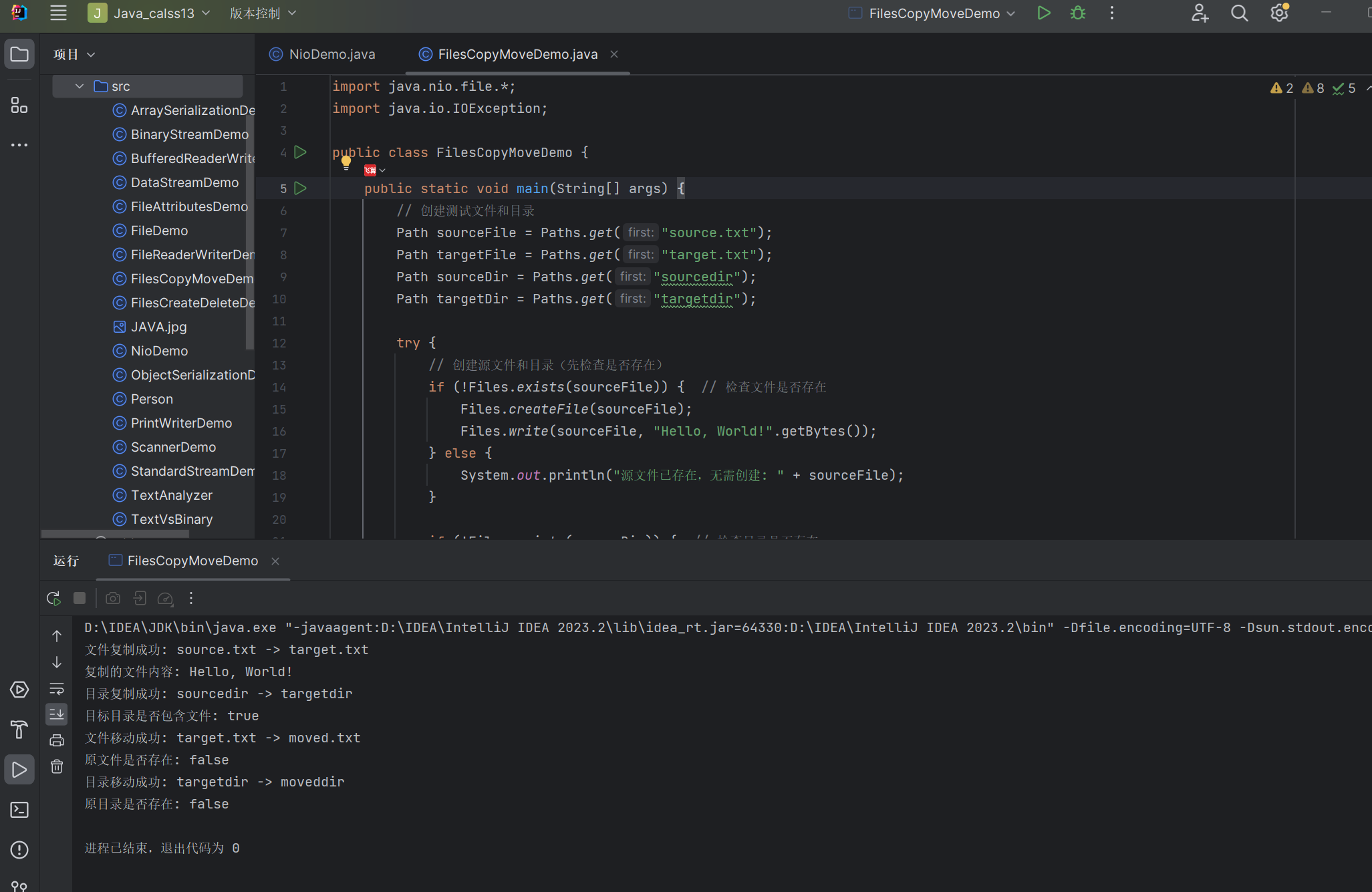
运行结果:
13.5.4 获取目录的对象
示例:遍历目录
import java.nio.file.*;
import java.nio.file.attribute.BasicFileAttributes; // 新增的导入语句
import java.io.IOException;

public class DirectoryTraversalDemo {
    public static void main(String[] args) {
        // 创建测试目录结构
        Path rootDir = Paths.get("testtree");
        createTestDirectoryStructure(rootDir);

        System.out.println("===== 使用DirectoryStream遍历目录 =====");
        try (DirectoryStream<Path> stream = Files.newDirectoryStream(rootDir)) {
            for (Path entry : stream) {
                printEntry(entry, 0);
            }
        } catch (IOException e) {
            e.printStackTrace();
        }

        System.out.println("\n===== 使用Files.walkFileTree遍历目录 =====");
        try {
            Files.walkFileTree(rootDir, new SimpleFileVisitor<Path>() {
                @Override
                public FileVisitResult visitFile(Path file, BasicFileAttributes attrs) {
                    printEntry(file, getDepth(rootDir, file));
                    return FileVisitResult.CONTINUE;
                }

                @Override
                public FileVisitResult preVisitDirectory(Path dir, BasicFileAttributes attrs) {
                    printEntry(dir, getDepth(rootDir, dir));
                    return FileVisitResult.CONTINUE;
                }
            });
        } catch (IOException e) {
            e.printStackTrace();
        }

        // 清理测试目录
        deleteDirectory(rootDir);
    }

    // 创建测试目录结构
    private static void createTestDirectoryStructure(Path rootDir) {
        try {
            Files.createDirectory(rootDir);
            Files.createFile(rootDir.resolve("file1.txt"));
            Files.createFile(rootDir.resolve("file2.txt"));

            Path subDir1 = rootDir.resolve("subdir1");
            Files.createDirectory(subDir1);
            Files.createFile(subDir1.resolve("subfile1.txt"));

            Path subDir2 = rootDir.resolve("subdir2");
            Files.createDirectory(subDir2);
            Files.createFile(subDir2.resolve("subfile2.txt"));

            Path subSubDir = subDir2.resolve("subsubdir");
            Files.createDirectory(subSubDir);
            Files.createFile(subSubDir.resolve("subsubfile.txt"));
        } catch (IOException e) {
            e.printStackTrace();
        }
    }

    // 打印目录条目,带缩进
    private static void printEntry(Path entry, int depth) {
        StringBuilder indent = new StringBuilder();
        for (int i = 0; i < depth; i++) {
            indent.append("  ");
        }

        String type = Files.isDirectory(entry) ? "D" : "F";
        System.out.printf("%s[%s] %s%n", indent, type, entry.getFileName());
    }

    // 计算相对深度
    private static int getDepth(Path root, Path entry) {
        int depth = 0;
        Path current = entry;
        while (!current.equals(root)) {
            current = current.getParent();
            depth++;
        }
        return depth;
    }

    // 递归删除目录
    private static void deleteDirectory(Path dir) {
        try {
            Files.walkFileTree(dir, new SimpleFileVisitor<Path>() {
                @Override
                public FileVisitResult visitFile(Path file, BasicFileAttributes attrs) throws IOException {
                    Files.delete(file);
                    return FileVisitResult.CONTINUE;
                }

                @Override
                public FileVisitResult postVisitDirectory(Path dir, IOException exc) throws IOException {
                    Files.delete(dir);
                    return FileVisitResult.CONTINUE;
                }
            });
        } catch (IOException e) {
            e.printStackTrace();
        }
    }
}
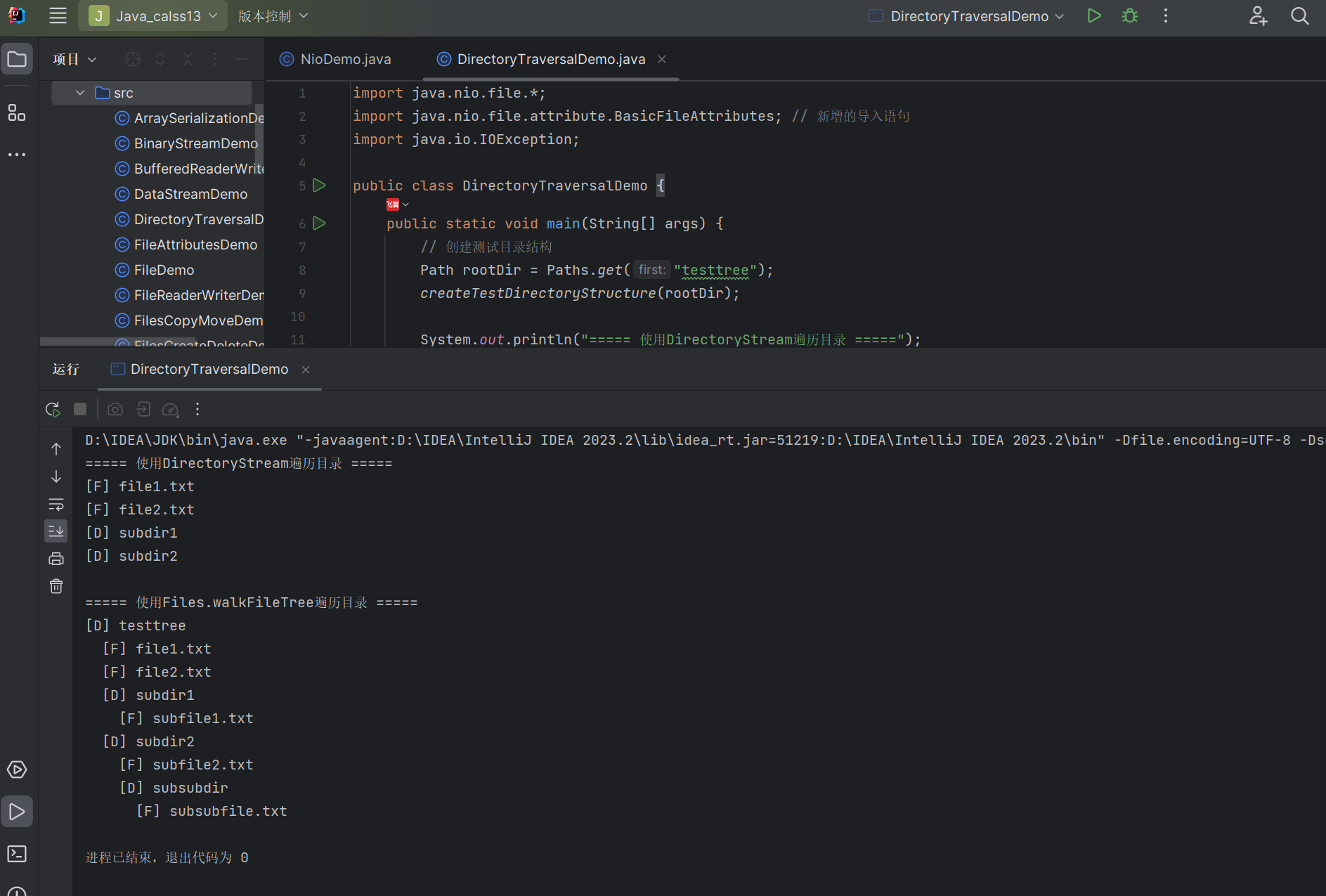
运行结果:
13.5.5 小文件的读写
对于小文件,可以使用Files类的readAllBytes()、write()等方法进行便捷读写。
示例:小文件的读写
import java.nio.file.*;
import java.io.IOException;
import java.nio.charset.StandardCharsets;
import java.util.List;

public class SmallFileDemo {
    public static void main(String[] args) {
        Path file = Paths.get("smallfile.txt");

        try {
            // 写入字节数组
            byte[] data = "Hello, World! 你好,世界!".getBytes(StandardCharsets.UTF_8);
            Files.write(file, data);
            System.out.println("文件写入成功,大小: " + Files.size(file) + " bytes");

            // 读取字节数组
            byte[] readData = Files.readAllBytes(file);
            System.out.println("读取的内容: " + new String(readData, StandardCharsets.UTF_8));

            // 写入字符串列表(每行一个字符串)
            List<String> lines = List.of(
                "第一行:Java NIO",
                "第二行:文件操作",
                "第三行:小文件读写"
            );
            Files.write(file, lines, StandardCharsets.UTF_8);
            System.out.println("\n写入多行文本后,文件大小: " + Files.size(file) + " bytes");

            // 读取所有行
            List<String> readLines = Files.readAllLines(file, StandardCharsets.UTF_8);
            System.out.println("读取的行内容:");
            for (int i = 0; i < readLines.size(); i++) {
                System.out.printf("  第%d行: %s%n", i + 1, readLines.get(i));
            }

        } catch (IOException e) {
            e.printStackTrace();
        } finally {
            // 清理文件
            try {
                Files.deleteIfExists(file);
            } catch (IOException e) {
                e.printStackTrace();
            }
        }
    }
}
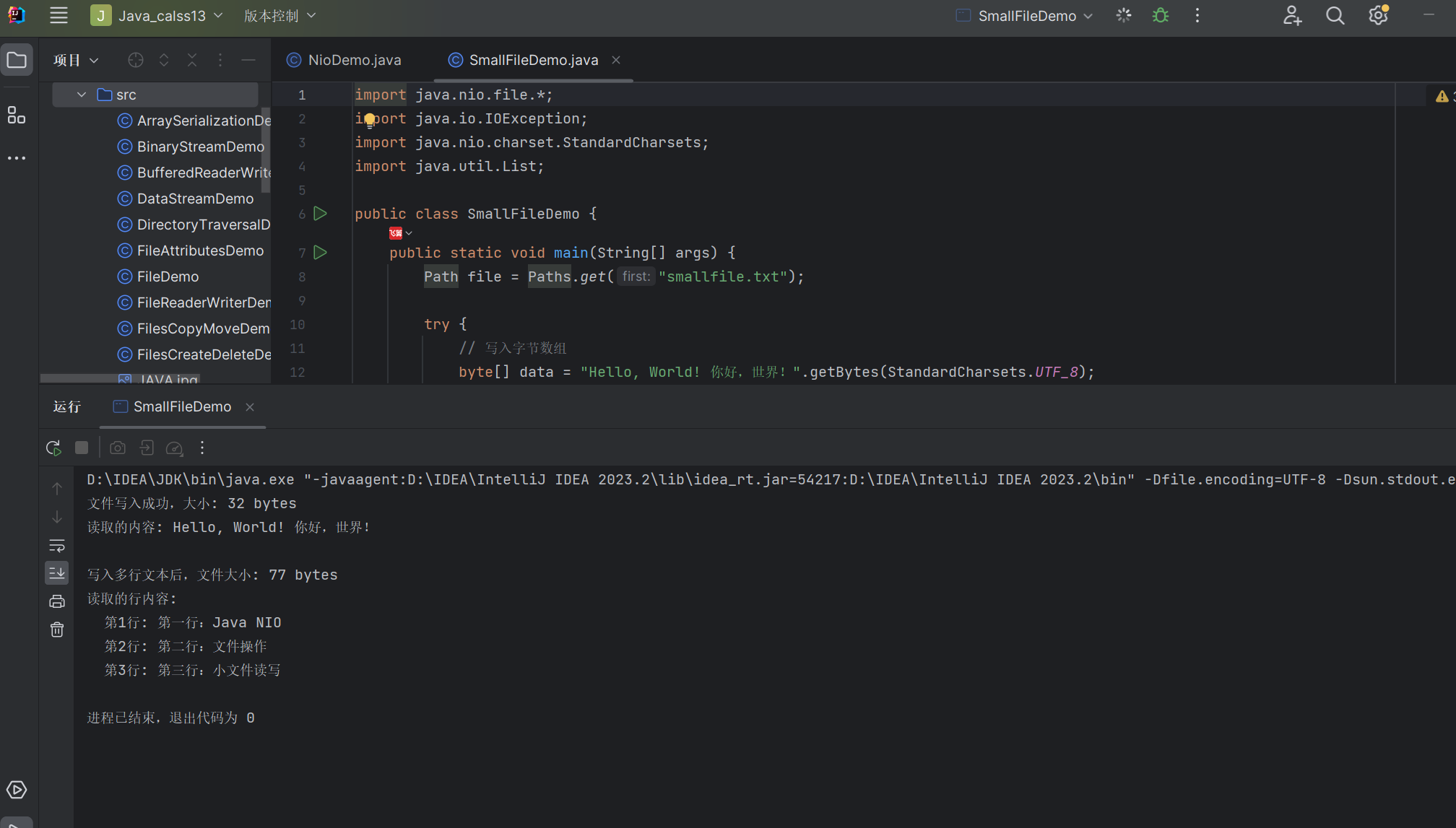
运行结果:
13.5.6 使用 Files 类创建流对象
Files类提供了便捷方法创建各种流对象,如newInputStream()、newOutputStream()等。
示例:使用 Files 类创建流对象
import java.nio.file.*;
import java.io.*;
import java.nio.charset.StandardCharsets;
import java.util.stream.Stream;

public class FilesStreamsDemo {
    public static void main(String[] args) {
        Path file = Paths.get("streamfile.txt");

        try {
            // 使用newBufferedWriter写入文件
            try (BufferedWriter writer = Files.newBufferedWriter(
                 file, StandardCharsets.UTF_8)) {
                writer.write("Java NIO流操作示例");
                writer.newLine();
                writer.write("使用Files类创建流对象");
                writer.newLine();
                writer.write("这是第三行文本");
            }
            System.out.println("文件写入完成");

            // 使用newBufferedReader读取文件
            System.out.println("\n使用BufferedReader读取:");
            try (BufferedReader reader = Files.newBufferedReader(
                 file, StandardCharsets.UTF_8)) {
                String line;
                while ((line = reader.readLine()) != null) {
                    System.out.println("  " + line);
                }
            }

            // 使用newInputStream读取文件
            System.out.println("\n使用InputStream读取:");
            try (InputStream is = Files.newInputStream(file);
                 BufferedReader reader = new BufferedReader(
                 new InputStreamReader(is, StandardCharsets.UTF_8))) {
                System.out.println("  " + reader.readLine());
            }

            // 使用lines()方法获取Stream<String>
            System.out.println("\n使用Stream<String>读取:");
            try (Stream<String> stream = Files.lines(file, StandardCharsets.UTF_8)) {
                stream.forEach(line -> System.out.println("  " + line));
            }

        } catch (IOException e) {
            e.printStackTrace();
        } finally {
            // 清理文件
            try {
                Files.deleteIfExists(file);
            } catch (IOException e) {
                e.printStackTrace();
            }
        }
    }
}
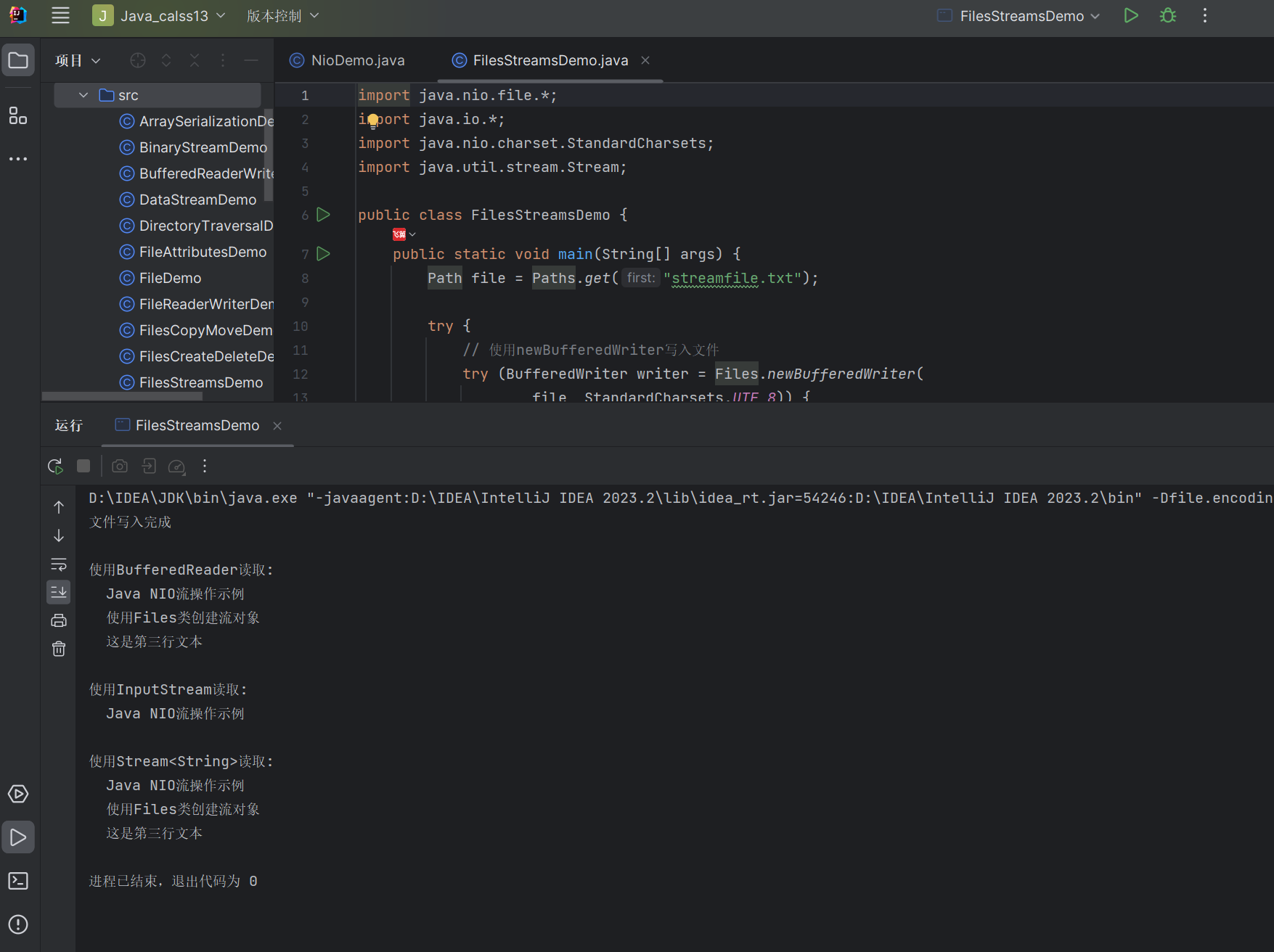
运行结果:
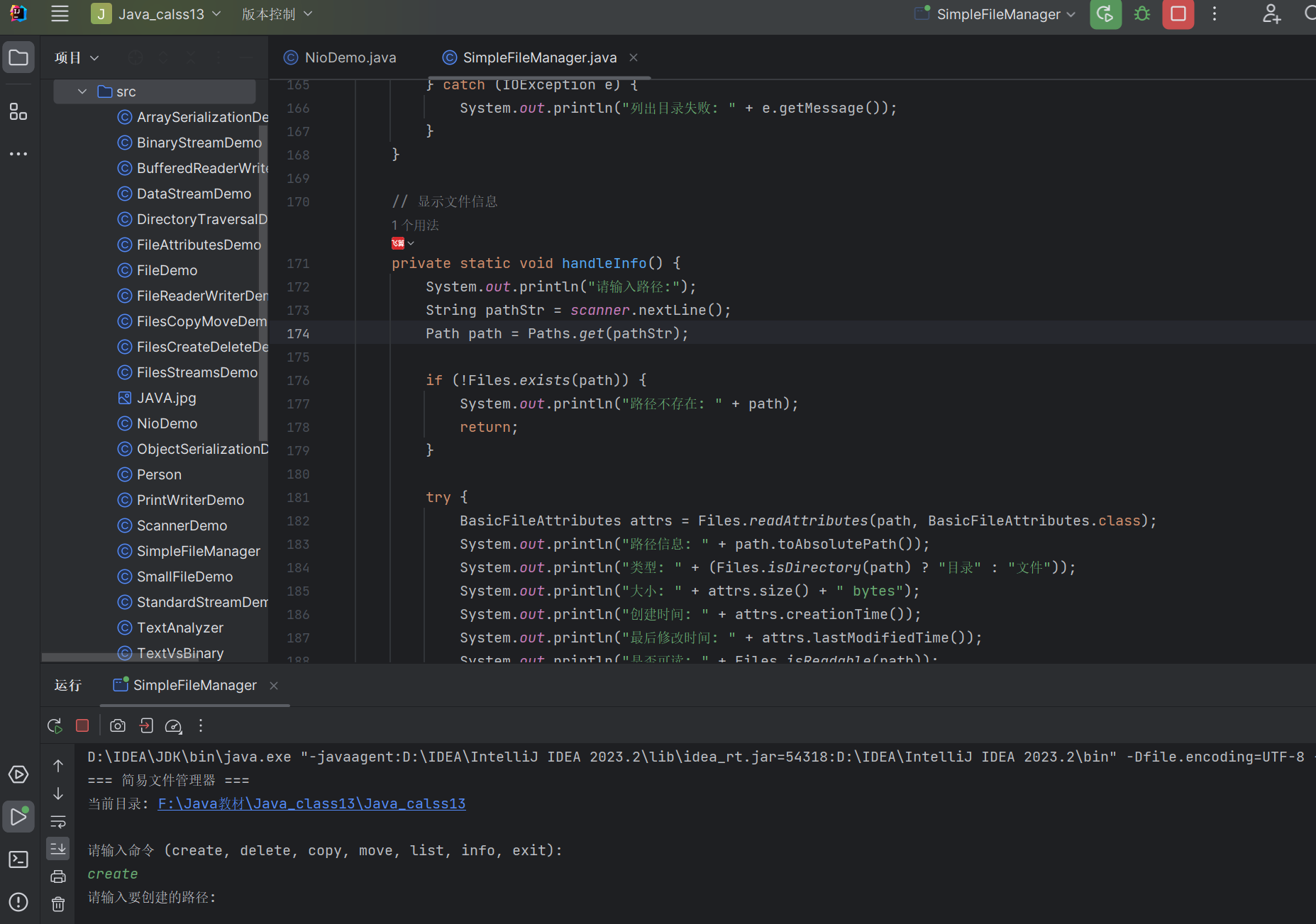
综合案例:文件管理器
import java.nio.file.*;
import java.nio.file.attribute.BasicFileAttributes; // 新增:文件属性类
import java.io.IOException;
import java.util.Scanner;

public class SimpleFileManager {
    private static Scanner scanner = new Scanner(System.in);

    public static void main(String[] args) {
        System.out.println("=== 简易文件管理器 ===");
        System.out.println("当前目录: " + Paths.get("").toAbsolutePath());

        String command;
        do {
            System.out.println("\n请输入命令 (create, delete, copy, move, list, info, exit):");
            command = scanner.nextLine().trim().toLowerCase();

            switch (command) {
                case "create":
                    handleCreate();
                    break;
                case "delete":
                    handleDelete();
                    break;
                case "copy":
                    handleCopy();
                    break;
                case "move":
                    handleMove();
                    break;
                case "list":
                    handleList();
                    break;
                case "info":
                    handleInfo();
                    break;
                case "exit":
                    System.out.println("退出程序");
                    break;
                default:
                    System.out.println("未知命令,请重试");
            }
        } while (!command.equals("exit"));

        scanner.close();
    }

    // 创建文件或目录
    private static void handleCreate() {
        System.out.println("请输入要创建的路径:");
        String pathStr = scanner.nextLine();
        Path path = Paths.get(pathStr);

        System.out.println("创建类型 (file/dir):");
        String type = scanner.nextLine().trim().toLowerCase();

        try {
            if (type.equals("file")) {
                Files.createFile(path);
                System.out.println("文件创建成功: " + path);
            } else if (type.equals("dir")) {
                Files.createDirectories(path);
                System.out.println("目录创建成功: " + path);
            } else {
                System.out.println("无效的类型");
            }
        } catch (IOException e) {
            System.out.println("创建失败: " + e.getMessage());
        }
    }

    // 删除文件或目录
    private static void handleDelete() {
        System.out.println("请输入要删除的路径:");
        String pathStr = scanner.nextLine();
        Path path = Paths.get(pathStr);

        if (!Files.exists(path)) {
            System.out.println("路径不存在: " + path);
            return;
        }

        try {
            if (Files.isDirectory(path)) {
                // 递归删除目录
                deleteDirectory(path);
                System.out.println("目录删除成功: " + path);
            } else {
                Files.delete(path);
                System.out.println("文件删除成功: " + path);
            }
        } catch (IOException e) {
            System.out.println("删除失败: " + e.getMessage());
        }
    }

    // 复制文件或目录
    private static void handleCopy() {
        System.out.println("请输入源路径:");
        String sourceStr = scanner.nextLine();
        Path source = Paths.get(sourceStr);

        System.out.println("请输入目标路径:");
        String targetStr = scanner.nextLine();
        Path target = Paths.get(targetStr);

        if (!Files.exists(source)) {
            System.out.println("源路径不存在: " + source);
            return;
        }

        try {
            if (Files.isDirectory(source)) {
                copyDirectory(source, target);
                System.out.println("目录复制成功: " + source + " -> " + target);
            } else {
                Files.copy(source, target, StandardCopyOption.REPLACE_EXISTING);
                System.out.println("文件复制成功: " + source + " -> " + target);
            }
        } catch (IOException e) {
            System.out.println("复制失败: " + e.getMessage());
        }
    }

    // 移动文件或目录
    private static void handleMove() {
        System.out.println("请输入源路径:");
        String sourceStr = scanner.nextLine();
        Path source = Paths.get(sourceStr);

        System.out.println("请输入目标路径:");
        String targetStr = scanner.nextLine();
        Path target = Paths.get(targetStr);

        if (!Files.exists(source)) {
            System.out.println("源路径不存在: " + source);
            return;
        }

        try {
            Files.move(source, target, StandardCopyOption.REPLACE_EXISTING);
            System.out.println("移动成功: " + source + " -> " + target);
        } catch (IOException e) {
            System.out.println("移动失败: " + e.getMessage());
        }
    }

    // 列出目录内容
    private static void handleList() {
        System.out.println("请输入要列出的目录路径(留空表示当前目录):");
        String pathStr = scanner.nextLine().trim();
        Path dir = pathStr.isEmpty() ? Paths.get("") : Paths.get(pathStr);

        if (!Files.exists(dir) || !Files.isDirectory(dir)) {
            System.out.println("不是有效的目录: " + dir);
            return;
        }

        System.out.println("目录 " + dir.toAbsolutePath() + " 中的内容:");
        try (DirectoryStream<Path> stream = Files.newDirectoryStream(dir)) {
            for (Path entry : stream) {
                String type = Files.isDirectory(entry) ? "D" : "F";
                System.out.printf("  [%s] %s%n", type, entry.getFileName());
            }
        } catch (IOException e) {
            System.out.println("列出目录失败: " + e.getMessage());
        }
    }

    // 显示文件信息
    private static void handleInfo() {
        System.out.println("请输入路径:");
        String pathStr = scanner.nextLine();
        Path path = Paths.get(pathStr);

        if (!Files.exists(path)) {
            System.out.println("路径不存在: " + path);
            return;
        }

        try {
            BasicFileAttributes attrs = Files.readAttributes(path, BasicFileAttributes.class);
            System.out.println("路径信息: " + path.toAbsolutePath());
            System.out.println("类型: " + (Files.isDirectory(path) ? "目录" : "文件"));
            System.out.println("大小: " + attrs.size() + " bytes");
            System.out.println("创建时间: " + attrs.creationTime());
            System.out.println("最后修改时间: " + attrs.lastModifiedTime());
            System.out.println("是否可读: " + Files.isReadable(path));
            System.out.println("是否可写: " + Files.isWritable(path));
        } catch (IOException e) {
            System.out.println("获取信息失败: " + e.getMessage());
        }
    }

    // 递归复制目录
    private static void copyDirectory(Path sourceDir, Path targetDir) throws IOException {
        if (Files.notExists(targetDir)) {
            Files.createDirectory(targetDir);
        }

        try (DirectoryStream<Path> stream = Files.newDirectoryStream(sourceDir)) {
            for (Path entry : stream) {
                Path targetEntry = targetDir.resolve(entry.getFileName());

                if (Files.isDirectory(entry)) {
                    copyDirectory(entry, targetEntry);
                } else {
                    Files.copy(entry, targetEntry, StandardCopyOption.REPLACE_EXISTING);
                }
            }
        }
    }

    // 递归删除目录
    private static void deleteDirectory(Path dir) throws IOException {
        Files.walkFileTree(dir, new SimpleFileVisitor<Path>() {
            @Override
            public FileVisitResult visitFile(Path file, BasicFileAttributes attrs) throws IOException {
                Files.delete(file);
                return FileVisitResult.CONTINUE;
            }

            @Override
            public FileVisitResult postVisitDirectory(Path dir, IOException exc) throws IOException {
                Files.delete(dir);
                return FileVisitResult.CONTINUE;
            }
        });
    }
}
13.6 小结
本章我们学习了 Java 中的输入输出操作,包括:
- 二进制 I/O 流:以字节为单位处理数据,适用于所有类型的文件。
InputStream和OutputStream是所有二进制流的基类。 - 文本 I/O 流:以字符为单位处理数据,适用于文本文件。
Reader和Writer是所有字符流的基类。 - 对象序列化:将对象转换为字节序列以便存储或传输,需要实现
Serializable接口,使用ObjectInputStream和ObjectOutputStream。 - NIO 和 NIO.2:提供了更高效的 I/O 操作方式,引入了
Path、FileSystem等类来表示文件系统和路径。 - Files 类操作:提供了丰富的静态方法,简化了文件和目录的创建、删除、复制、移动等操作。
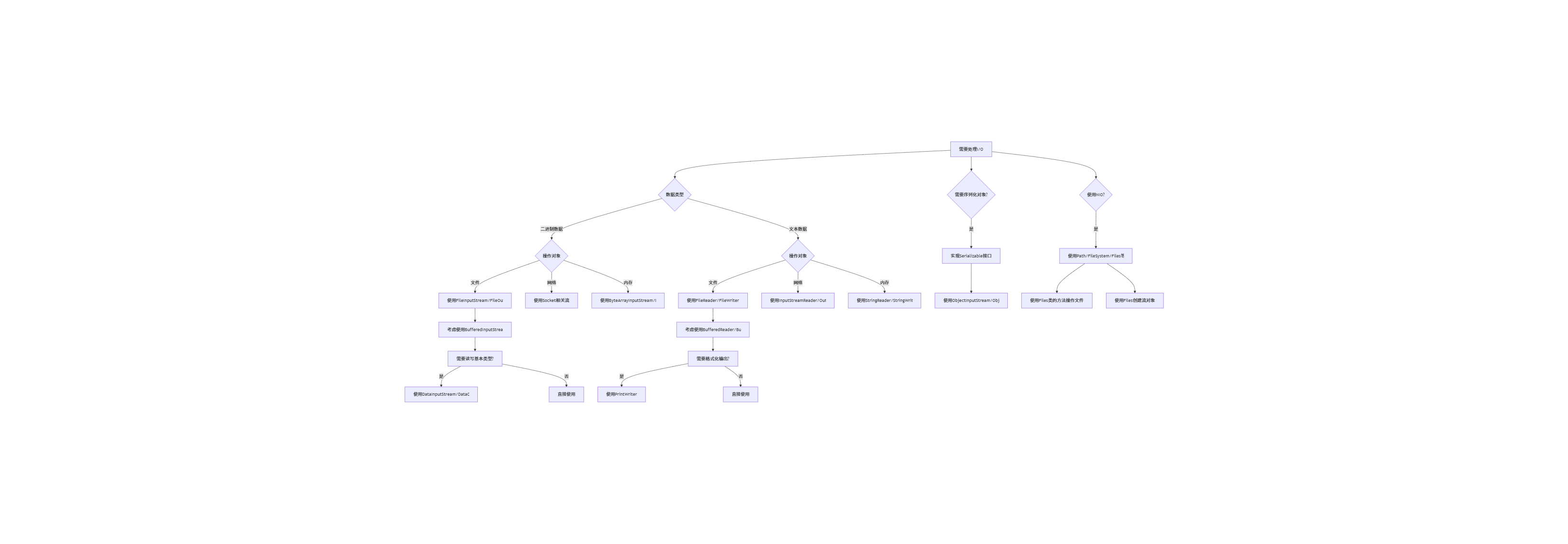
I/O 流选择流程图:
编程练习
- 文件加密工具:编写一个程序,能够对指定文件进行加密和解密。可以使用简单的异或运算对每个字节进行处理。
- 日志分析器:编写一个程序,分析 Web 服务器的访问日志,统计不同 IP 地址的访问次数,以及最常访问的页面。
- 文件备份工具:编写一个程序,能够将指定目录下的所有文件备份到另一个目录,并保持原有的目录结构。可以添加定时备份功能。
- 序列化对象管理器:编写一个程序,能够管理一系列可序列化的对象,支持添加、删除、查询和保存到文件、从文件加载等功能。
- 文本文件搜索引擎:编写一个程序,能够在指定目录下的所有文本文件中搜索包含特定关键字的文件,并显示关键字所在的行。
希望通过本章的学习,你已经掌握了 Java 中输入输出的各种操作。I/O 是 Java 编程中非常重要的一部分,多动手练习才能真正掌握这些知识。如果有任何疑问,欢迎在评论区留言讨论!
本文参与 腾讯云自媒体同步曝光计划,分享自作者个人站点/博客。
原始发表:2025-07-31,如有侵权请联系 cloudcommunity@tencent.com 删除
评论
登录后参与评论
推荐阅读
目录
腾讯云开发者

Copyright © 2013 - 2026 Tencent Cloud. All Rights Reserved. 腾讯云 版权所有
深圳市腾讯计算机系统有限公司 ICP备案/许可证号:粤B2-20090059  粤公网安备44030502008569号
腾讯云计算(北京)有限责任公司 京ICP证150476号 | 京ICP备11018762号