MyBatis-Plus使用

MyBatis-Plus使用

趙卋傑
发布于 2026-01-12 16:14:25
发布于 2026-01-12 16:14:25
1.MyBatis-Plus介绍
MyBatis-Plus(简称MP)是一个MyBatis的增强工具,在MyBatis的基础上只做增强不做改变,为简化开
发.提高效率而生
特性:
- 润物无声:只做增强不做改变,引入它不会对现有工程产生影响,如丝般顺滑。
- 效率至上:只需简单配置,即可快速进行单表CRUD操作,从而节省大量时间。
- 丰富功能:代码生成、自动分页、逻辑删除、自动填充、拦截器等功能一应俱全
- 广泛认可:连续5年获得开源中国年度最佳开源项目殊荣,Github累计16KStar.
- 支持数据库:
PostgreSQL, MySQL, MariaDB, Oracle, SQL Server, OceanBase, H2, DB2...
(任何能使用MyBatis进行增删改查,并且支持标准SQL的数据库应该都在MyBatis-Plus的支持范围内)
2.准备工作
2.1 数据准备
-- 创建数据库
DROP DATABASE IF EXISTS mybatis_test;

CREATE DATABASE mybatis_test DEFAULT CHARACTER SET utf8mb4;

-- 使用数据数据
USE mybatis_test;

-- 创建表[用户表]
DROP TABLE IF EXISTS user_info;
CREATE TABLE `user_info` (
        `id` INT ( 11 ) NOT NULL AUTO_INCREMENT,
        `username` VARCHAR ( 127 ) NOT NULL,
        `password` VARCHAR ( 127 ) NOT NULL,
        `age` TINYINT ( 4 ) NOT NULL,
        `gender` TINYINT ( 4 ) DEFAULT '0' COMMENT '1-男 2-女 0-默认',
        `phone` VARCHAR ( 15 ) DEFAULT NULL,
        `delete_flag` TINYINT ( 4 ) DEFAULT 0 COMMENT '0-正常, 1-删除',
        `create_time` DATETIME DEFAULT now(),
        `update_time` DATETIME DEFAULT now() ON UPDATE now(),
        PRIMARY KEY ( `id` )
) ENGINE = INNODB DEFAULT CHARSET = utf8mb4;

-- 添加用户信息
INSERT INTO mybatis_test.user_info( username, `password`, age, gender, phone )
VALUES ( 'admin', 'admin', 18, 1, '18612340001' );
INSERT INTO mybatis_test.user_info( username, `password`, age, gender, phone )
VALUES ( 'zhangsan', 'zhangsan', 18, 1, '18612340002' );
INSERT INTO mybatis_test.user_info( username, `password`, age, gender, phone )
VALUES ( 'lisi', 'lisi', 18, 1, '18612340003' );
INSERT INTO mybatis_test.user_info( username, `password`, age, gender, phone )
VALUES ( 'wangwu', 'wangwu', 18, 1, '18612340004' );
2.2 项目准备
创建SpringBoot工程,添加依赖
<!--springboot2-->
<dependency>
    <groupId>com.baomidou</groupId>
    <artifactId>mybatis-plus-boot-starter</artifactId>
    <version>3.5.12</version>
</dependency>

<!--springboot3-->
<dependency>
    <groupId>com.baomidou</groupId>
    <artifactId>mybatis-plus-spring-boot3-starter</artifactId>
    <version>3.5.12</version>
</dependency>
3.编码
3.1 创建实体类
package com.example.mybatis.plus.model;

import lombok.Data;import java.util.Date;
@Data
public class UserInfo {
    private Integer id;
    private String username;
    private String password;
    private Integer age;
    private Integer gender;
    private String phone;
    private Integer deleteFlag;
    private Date createTime;
    private Date updateTime;
}
3.2 创建接口类
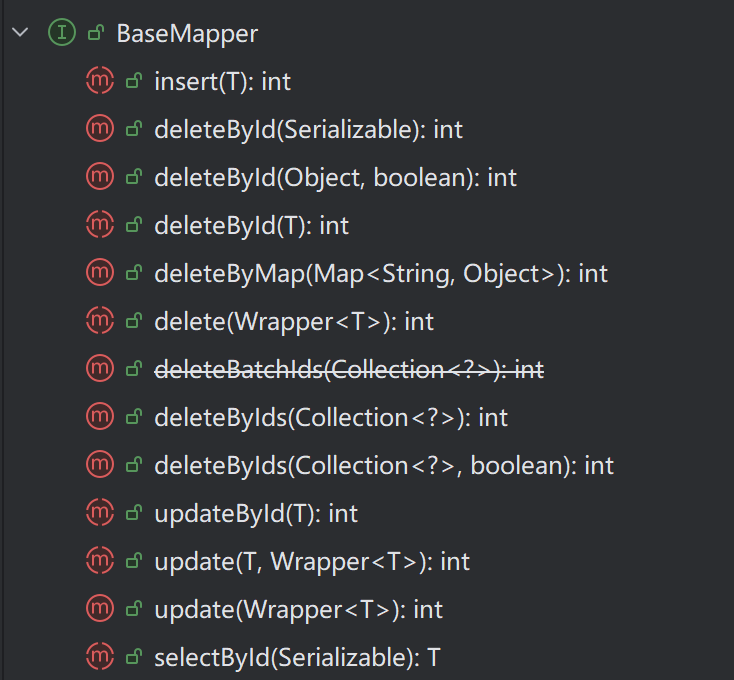
MybatisPlus提供了一个基础的BaseMapper接口,已经实现了单表的CRUD,我们自定义的
Mapper只需要继承这个BaseMapper,就无需自己实现单表CRUD了
public interface UserInfoMapper extends BaseMapper<UserInfo> {
}
3.3 配置yml文件
# 数据库连接配置
spring:
  datasource:
    url: jdbc:mysql://127.0.0.1:3306/mybatis_test?characterEncoding=utf8&useSSL=false
    username: root
    password: jqka
    driver-class-name: com.mysql.cj.jdbc.Driver
mybatis-plus:
  configuration: # 配置打印 MyBatis日志
    log-impl: org.apache.ibatis.logging.stdout.StdOutImpl
  mapper-locations: "classpath*:/mapper/**.xml" # Mapper.xml
3.4 CRUD测试
@SpringBootTest
class UserInfoMapperTest {
    @Autowired
    private UserInfoMapper userInfoMapper;


    @Test
    void testInsert() {
        UserInfo userInfo = new UserInfo();
        userInfo.setUsername("小明");
        userInfo.setPassword("123456");
        userInfo.setAge(22);
        userInfo.setGender(1);
        userInfo.setPhone("17533322222");
        userInfoMapper.insert(userInfo);
    }

    @Test
    void testSelectById() {
        UserInfo userInfo = userInfoMapper.selectById(1);
        System.out.println(userInfo);
    }

    @Test
    void testSelectByIds() {
        List<UserInfo> userInfos = userInfoMapper.selectByIds(Arrays.asList(1, 2, 3));
        userInfos.forEach(System.out::println);
    }

    @Test
    void testUpdateById() {
        UserInfo userInfo = userInfoMapper.selectById(1);
        userInfo.setGender(0);
        userInfoMapper.updateById(userInfo);
    }

    @Test
    void testDeleteById() {
        userInfoMapper.deleteById(1);
    }

}
4.MyBatis-Plus复杂操作
4.1 常见注解
在上面的程序中,MyBatis是如何知道,我们要操作的是哪张表,表里有哪些字段呢?
public interface UserInfoMapper extends BaseMapper<UserInfo> {
}UserInfoMapper在继承BaseMapper时,指定了一个泛型,这个UserInfo就是与数据库表相对应的实
体类.
MyBatis-Plus会根据这个实体类来推断表的信息.
- 表名:实体类的驼峰表示法转换成蛇形表示法(下划线分割),作为表名.比如UserInfo->user_info
- 字段:根据实体类的属性名转换为蛇形表示法作为字段名.比如deleteFlag->delete_flag
- 主键:默认为id
那如果实体类和数据库不是按照上述规则定义的呢?MyBatis-Plus也给我们提供了一下注解,让我们标
识表的信息.
4.1.1 @TableName
修改实体类名UserInfo为Userinfo,重新执行测试方法testSelectByld
运行结果:

从日志可以看到,默认查找的表名为userinfo.
我们可以通过@TableName来标识实体类对应的表
@Data
@TableName("user_info")
public class Userinfo {
    private Integer id;
    private String username;
    private String password;
    private Integer age;
    private Integer gender;
    private String phone;
    private Integer deleteFlag;
    private Date createTime;
    private Date updateTime;
}
4.1.2 @TableField
修改属性名 deleteFlag为 deleteflag,重新执行测试方法testSelectByld
运行结果:

从日志可以看到,根据属性名转换后的字段名为:deleteflag.
我们可以通过@TableField来标识对应的字段名
@Data
@TableName("user_info")
public class Userinfo {
    private Integer id;
    private String username;
    private String password;
    private Integer age;
    private Integer gender;
    private String phone;
    @TableField("delete_flag")
    private Integer deleteflag;
    private Date createTime;
    private Date updateTime;
}
4.1.3 @Tabled
修改属性名id为userld,重新执行测试方法testSelectByld
运行结果:

我们可以通过@TableId来指定对应的主键
@Data
@TableName("user_info")
public class Userinfo {
    @TableId("id")
    private Integer userId;
    private String username;
    private String password;
    private Integer age;
    private Integer gender;
    private String phone;
    @TableField("delete_flag")
    private Integer deleteflag;
    private Date createTime;
    private Date updateTime;
}
指定自增类型
@TableId(type = IdType.AUTO)
private Integer id;
若已生成随机数id,要先将该数据进行删除再修改

4.2 条件构造器
MyBatis-Plus提供了一套强大的条件构造器(Wrapper),用于构建复杂的数据库查询条件.Wrapper类
允许开发者以链式调用的方式构造查询条件,无需编写繁琐的SQL语句,从而提高开发效率并减少SQL
注入的风险.
在 MyBatis-Plus 中,Wrapper 类是构建查询和更新条件的核心工具。以下是主要的 Wrapper 类及其功能:
- AbstractWrapper:这是一个抽象基类,提供了所有 Wrapper 类共有的方法和属性。它定义了条件构造的基本逻辑,包括字段(column)、值(value)、操作符(condition)等。所有的 QueryWrapper、UpdateWrapper、LambdaQueryWrapper 和 LambdaUpdateWrapper 都继承自 AbstractWrapper。
- QueryWrapper:专门用于构造查询条件,支持基本的等于、不等于、大于、小于等各种常见操作。它允许你以链式调用的方式添加多个查询条件,并且可以组合使用
and和or逻辑。 - UpdateWrapper:用于构造更新条件,可以在更新数据时指定条件。与 QueryWrapper 类似,它也支持链式调用和逻辑组合。使用 UpdateWrapper 可以在不创建实体对象的情况下,直接设置更新字段和条件。
- LambdaQueryWrapper:这是一个基于 Lambda 表达式的查询条件构造器,它通过 Lambda 表达式来引用实体类的属性,从而避免了硬编码字段名。这种方式提高了代码的可读性和可维护性,尤其是在字段名可能发生变化的情况下。
- LambdaUpdateWrapper:类似于 LambdaQueryWrapper,LambdaUpdateWrapper 是基于 Lambda 表达式的更新条件构造器。它允许你使用 Lambda 表达式来指定更新字段和条件,同样避免了硬编码字段名的问题。
4.2.1 QueryWrapper
QueryWrapper并不只用于查询语句,无论是修改,删除,查询,都可以使用QueryWrapper来构建查询条件.
为什么 QueryWrapper 不支持 Insert?
-
QueryWrapper的设计初衷是生成WHERE条件片段(用于SELECT/UPDATE/DELETE)。 -
INSERT操作不需要WHERE条件,而是需要设置VALUES,因此 MyBatis-Plus 用 实体类 来承载插入数据。
查询
SELECT id,username,password,age FROM user_info WHERE age = 18 AND username "%min%" @Test
void testQueryWrapper() {
QueryWrapper<UserInfo> queryWrapper = new QueryWrapper<UserInfo>()
.select("id","username","password","age")
.eq("age",18)
.like("username","min");
List<UserInfo> userInfos = userInfoMapper.selectList(queryWrapper);
userInfos.forEach(System.out::println);
}// 数据库字段是user_name,实体类属性是username,通过@TableField指定映射
@TableField(value = "user_name")
private String username;
// 其他字段...当使用 QueryWrapper 不指定 select 时,MyBatis-Plus 会自动使用 @TableField 配置的别名生成 SQL:
QueryWrapper<User> wrapper = new QueryWrapper<>();
wrapper.eq("age", 18); // 条件:年龄=18

List<User> users = userMapper.selectList(wrapper);
生成的 SQL 会自动使用别名映射:
SELECT id, user_name, age FROM user WHERE age = 18注意: 默认情况下Mybatis-Plus会根据@TableFiled生成别名,当指定了QueryWrapper的select属性后 就仅仅是属性值而没有了别名.查询出来的结果会对应不上 解决办法: 1.自己写自定义SQL 2.实体类名和字段名保持一致 3.不指定QueryWrapper的select字段 4.使用LambdaQueryWrapper实现
更新
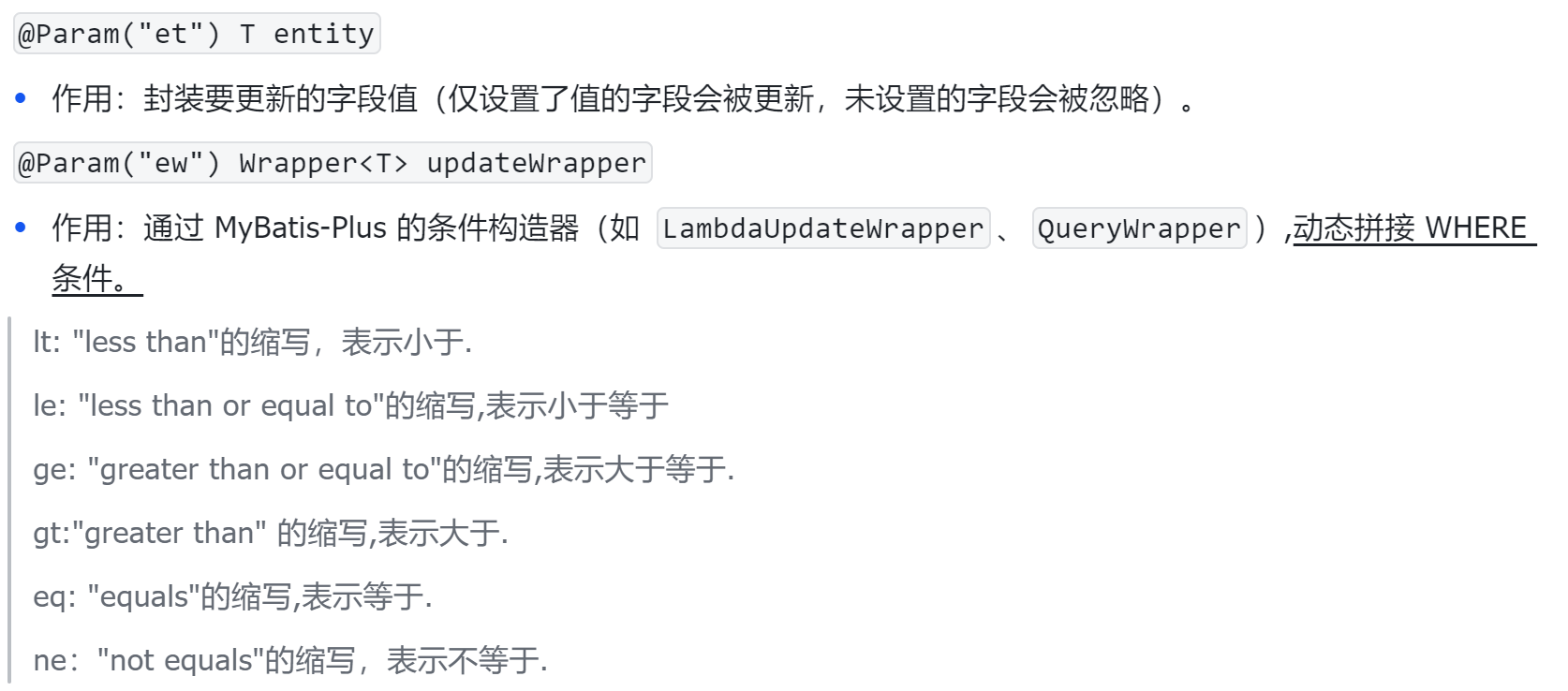
UPDATE user_info SET delete_flag=? WHERE age < 20 @Test
void testUpdateByQueryWrapper() {
QueryWrapper<UserInfo> queryWrapper = new QueryWrapper<UserInfo>()
.lt("age",20);
UserInfo userInfo = new UserInfo();
userInfo.setDeleteFlag(1);
userInfoMapper.update(userInfo,queryWrapper);
}
4.2.2 UpdateWrapper
对于更新,我们也可以直接使用UpdateWrapper,在不创建实体对象的情况下,直接设置更新字段和条件. 体现在更新操作UserInfo userInfo = new UserInfo();
基础更新
UPDATE user_info SET delete_flag=0, age=5 WHERE id IN (1,2,3) @Test
void testUpdateByUpdateWrapper() {
UpdateWrapper<UserInfo> updateWrapper = new UpdateWrapper<UserInfo>()
.set("delete_flag",0)
.eq("age",5)
.in("id",List.of(1,2,3));
}基于SQL更新
UPDATE user_info SET age = age+10 WHERE id IN (1,2,3) @Test
void testUpdateBySQLUpdateWrapper() {
UpdateWrapper<UserInfo> updateWrapper = new UpdateWrapper<UserInfo>()
.setSql("age=age+10")
.in("id",List.of(1,2,3));
userInfoMapper.update(updateWrapper);
}4.2.3 LambdaQueryWrapper
QueryWrapper和UpdateWrapper存在一个问题,就是需要写死字段名,如果字段名发生变更,可能会
因为测试不到位酿成事故.
MyBatis-Plus给我们提供了一种基于Lambda表达式的条件构造器,它通过Lambda表达式来引用实体
类的属性,从而避免了硬编码字段名,也提高了代码的可读性和可维护性
- LambdaQueryWrapper
- LambdaUpdateWrapper
分别对应上述的QueryWrapper和UpdateWrapper
@Test
void testLambdaQueryWrapper() {
    QueryWrapper<UserInfo> queryWrapper = new QueryWrapper<>();
    queryWrapper.lambda()
            .select(UserInfo::getUsername,UserInfo::getAge,UserInfo::getGender,UserInfo::getPhone)
            .eq(UserInfo::getId,1);
    userInfoMapper.selectList(queryWrapper).forEach(System.out::println);

}
4.2.4 LambdaUpdateWrapper
LambdaUpdateWrapper用法和 LambdaQueryWrapper相似
@Test
void testLambdaUpdateWrapper() {
    UpdateWrapper<UserInfo> updateWrapper = new UpdateWrapper<>();
    updateWrapper.lambda()
            .set(UserInfo::getAge,18)
            .set(UserInfo::getGender,1)
            .in(UserInfo::getId,List.of(1,2,3));
    userInfoMapper.update(updateWrapper);

}
4.3 自定义SQL
4.3.1 代码示例1
在实际的开发中,MyBatis-Plus提供的操作不能满足我们的实际需求,MyBatis-Plus也提供了自定义
SQL的功能,我们可以利用Wrapper构造查询条件,再结合Mapper编写SQL
注意事项
- 版本要求:确保你的项目中使用的
mybatis-plus版本至少为3.0.7,以支持自定义 SQL 功能。 - 参数命名:在自定义 SQL 时,传递 Wrapper 对象作为参数时,参数名必须为
ew,或者使用注解@Param(Constants.WRAPPER)明确指定参数为 Wrapper 对象。 - 使用 {ew.customSqlSegment}:在 SQL 语句中,使用 {ew.customSqlSegment} 来引用 Wrapper 对象生成的 SQL 片段。
- 不支持基于 entity 的 where 语句:自定义 SQL 时,Wrapper 对象不会基于实体类自动生成 where 子句,你需要手动编写完整的 SQL 语句。
@Select("select id,username,password,age from user_info ${ew.customSqlSegment}")
//使用注解
List<UserInfo> selectByCustomSql(@Param(Constants.WRAPPER) Wrapper<UserInfo> wrapper);
//传递 Wrapper 对象作为参数时,参数名必须为 ew
List<UserInfo> selectByCustomSql(@Param("ew") Wrapper<UserInfo> wrapper);
//参数名既不是 ew,也没有 @Param(Constants.WRAPPER) 注解,会导致 SQL 解析失败
List<UserInfo> selectByCustomSql(@Param("condition") Wrapper<UserInfo> wrapper);@Test
void selectByCustomSql() {
QueryWrapper<UserInfo> queryWrapper = new QueryWrapper<UserInfo>()
.eq("age",18);
userInfoMapper.selectByCustomSql(queryWrapper).forEach(System.out::println);
}4.3.2 代码示例2
MyBatis-Plus在MyBatis的基础上只做增强不做改变,所以也支持XML的实现方式
上述功能也可以使用XML的方式完成
mybatis-plus:
mapper-locations: "classpath*:/mapper/**.xml" # Mapper.xml List<UserInfo> selectByCustomSql2(@Param(Constants.WRAPPER) Wrapper<UserInfo> wrapper);<?xml version="1.0" encoding="UTF-8"?>
<!DOCTYPE mapper PUBLIC "-//mybatis.org//DTD Mapper 3.0//EN"
"http://mybatis.org/dtd/mybatis-3-mapper.dtd">
<mapper namespace="com.example.mybatis.plus.mapper.UserInfoMapper">
<select id="selectByCustomSql2" resultType="com.example.mybatis.plus.model.UserInfo">
select id,username,password,age from user_info ${ew.customSqlSegment}
</select>
</mapper>@Test
void selectByCustomSql2() {
QueryWrapper<UserInfo> queryWrapper = new QueryWrapper<>();
queryWrapper.eq("age", 18);
userInfoMapper.selectByCustomSql2(queryWrapper);
}4.3.3 代码示例3
UPDATE user_info SET age = age+10 WHERE id IN (1,2,3) @Update("update user_info set age = age + #{age} ${ew.customSqlSegment}")
Integer updateByCustomSql(@Param("age") Integer age, @Param(Constants.WRAPPER) Wrapper<UserInfo> wrapper);@Test
void updateByCustomSql() {
QueryWrapper<UserInfo> queryWrapper = new QueryWrapper<>();
queryWrapper.in("id",List.of(1,2,3));
userInfoMapper.updateByCustomSql(10,queryWrapper);
}5.@RequestParam vs @Param
@RequestParam 和 @Param 是两个完全不同框架、不同用途的注解,主要区别如下表:
特性 | @RequestParam (Spring MVC) | @Param (MyBatis) |
|---|---|---|
所属框架 | Spring Web | MyBatis / MyBatis-Plus |
应用层级 | Controller 层(Web 请求处理) | Mapper 层(数据访问层) |
核心作用 | 绑定 HTTP 请求参数到方法参数 | 给 Mapper 方法参数命名,供 XML/SQL 引用 |
参数来源 | HTTP 请求(URL 参数、表单数据) | 方法调用时传入的 Java 对象 |
处理位置 | Spring MVC 的 HandlerAdapter | MyBatis 的 SQL 解析引擎 |
是否必需 | 可选(可通过 required=false 关闭) | 多参数时必需,单参数时可选 |
默认值支持 | ✅ (defaultValue 属性) | ❌ |
参数验证 | ✅ (可结合 @Valid) | ❌ |
一、@RequestParam 详解(Spring MVC)
作用:从 HTTP 请求中提取参数绑定到 Controller 方法参数
适用场景:处理浏览器/客户端发送的请求参数
核心特性:
@GetMapping("/users")
public List<User> getUsers(
    @RequestParam("page") int page,  // 强制要求 URL 有 page 参数
    @RequestParam(value = "size", defaultValue = "10") int size, // 默认值
    @RequestParam(value = "keyword", required = false) String keyword // 可选参数
) {
    // 业务逻辑
}
工作原理:
- 客户端请求:
GET /users?page=2&size=20&keyword=Alice - Spring MVC 解析:
- 将
page=2→int page - 将
size=20→int size(若未传则用默认值 10) - 将
keyword=Alice→String keyword(若未传则为null)
- 将
注意事项:
参数名匹配规则:
// 当注解 value 省略时,默认使用变量名匹配
@RequestParam int page // 等价于 @RequestParam("page")二、@Param 详解(MyBatis)
作用:给 Mapper 接口方法的参数命名,用于 XML/SQL 中的参数引用
适用场景:MyBatis 的 SQL 映射文件/注解中引用 Java 参数
核心特性:
public interface UserMapper {
    // 单参数可省略 @Param
    User selectById(Long id);

    // 多参数必须使用 @Param
    List<User> selectByCondition(
        @Param("name") String name,
        @Param("minAge") int minAge
    );

    // 动态条件查询(固定要求 @Param("ew"))
    List<User> selectByWrapper(@Param("ew") Wrapper<User> wrapper);
}
XML 中的引用:
<select id="selectByCondition" resultType="User">
    SELECT * FROM user
    WHERE
        name = #{name}   <!-- 引用 @Param("name") 参数 -->
        AND age >= #{minAge} <!-- 引用 @Param("minAge") -->
        ${ew.customSqlSegment} <!-- 固定引用 @Param("ew") 的 Wrapper -->
</select>
注意事项:
多参数时必须使用(避免 MyBatis 参数绑定异常)
在注解式 SQL 中同样需要:
@Select("SELECT * FROM user WHERE name = #{name} AND age >= #{minAge}")
List<User> selectByCondition(
    @Param("name") String name,
    @Param("minAge") int minAge
);
在动态 SQL 中引用集合参数:
<select id="selectByIds">
    SELECT * FROM user
    WHERE id IN
    <foreach item="id" collection="idList" open="(" separator="," close=")">
        #{id}
    </foreach>
</select>
需配合 @Param("idList") 声明集合参数名
// Mapper 接口声明
List<User> selectByIds(@Param("idList") List<Long> ids);
本文参与 腾讯云自媒体同步曝光计划,分享自作者个人站点/博客。
原始发表:2026-01-12,如有侵权请联系 cloudcommunity@tencent.com 删除
评论
登录后参与评论
推荐阅读
目录
腾讯云开发者

Copyright © 2013 - 2026 Tencent Cloud. All Rights Reserved. 腾讯云 版权所有
深圳市腾讯计算机系统有限公司 ICP备案/许可证号:粤B2-20090059  粤公网安备44030502008569号
腾讯云计算(北京)有限责任公司 京ICP证150476号 | 京ICP备11018762号