python实战 | 如何使用海外代理IP抓取Amazon黑五数据
原创
python实战 | 如何使用海外代理IP抓取Amazon黑五数据
原创
阿秋数据采集
发布于 2025-12-19 16:53:49
发布于 2025-12-19 16:53:49
家人们!黑五又要来了,作为全球最大的电商购物狂欢节,Amazon上的商品数据变化可谓是瞬息万变,尤其是像iPhone17这种热门新品,价格波动、库存情况、用户评价等数据,都是跨境电商卖家和数据分析师的“香饽饽”。但你懂的,直接用本地IP去 scrape 亚马逊,准保被Amazon的网站机制怼一脸:刚抓了几个SKU,IP就被Ban了、验证码狂跳、数据刷不出来……
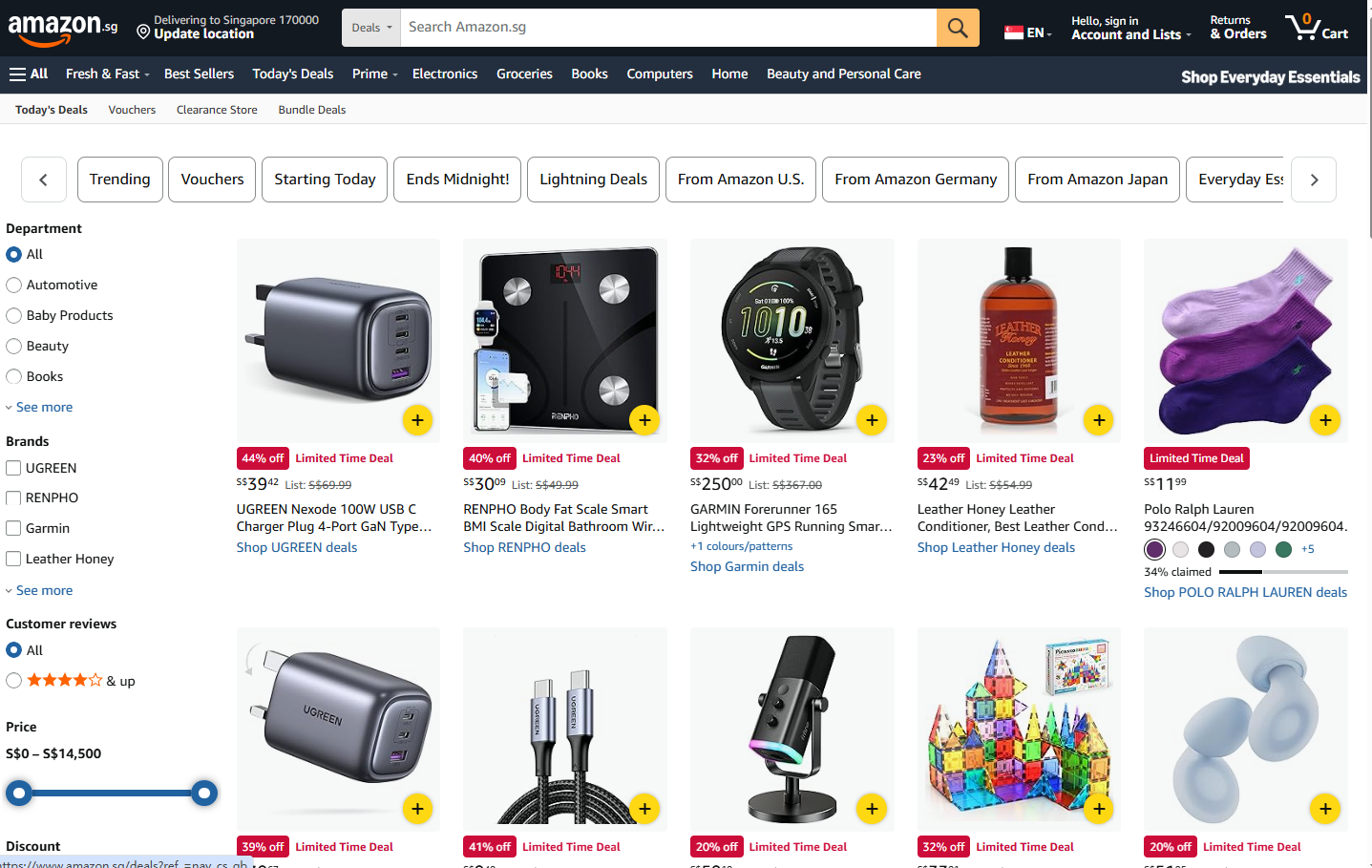
今天哥们儿就来手把手教你,如何用海外代理IP采集Amazon上iPhone17的售卖数据,顺带带你看看怎么分析这堆数据,看完你就能上手撸代码了!
一、为什么采集Amazon数据,非得用海外代理IP?
先说结论:
Amazon.com 对中国大陆 IP 并不友好。
大家都知道,Amazon作为全球电商巨头,用户流量巨大,网站的机制也是超级严密。如果你想用本地IP去硬刚Amazon的风控系统,那我敬你是条汉子,这分分钟就被识别为“异常流量”,直接封IP或者弹出验证码。更别提黑五期间,服务器负载高,针对这部分的访问限制会更严。
为啥呢?原因很简单:
- 你用的是本地IP;
- 你的访问都来自相同的IP地址,网站已经识别到“是bot在搞事”。
这一点,海外代理IP就是破局的关键了!海外代理IP可以让你的请求来自不同的IP,而不是盯着一个IP死薅数据。而且高质量的代理更不会轻易掉链子,能保证请求的稳定性、防止运行中断,能高效帮助你完成数据采集任务。
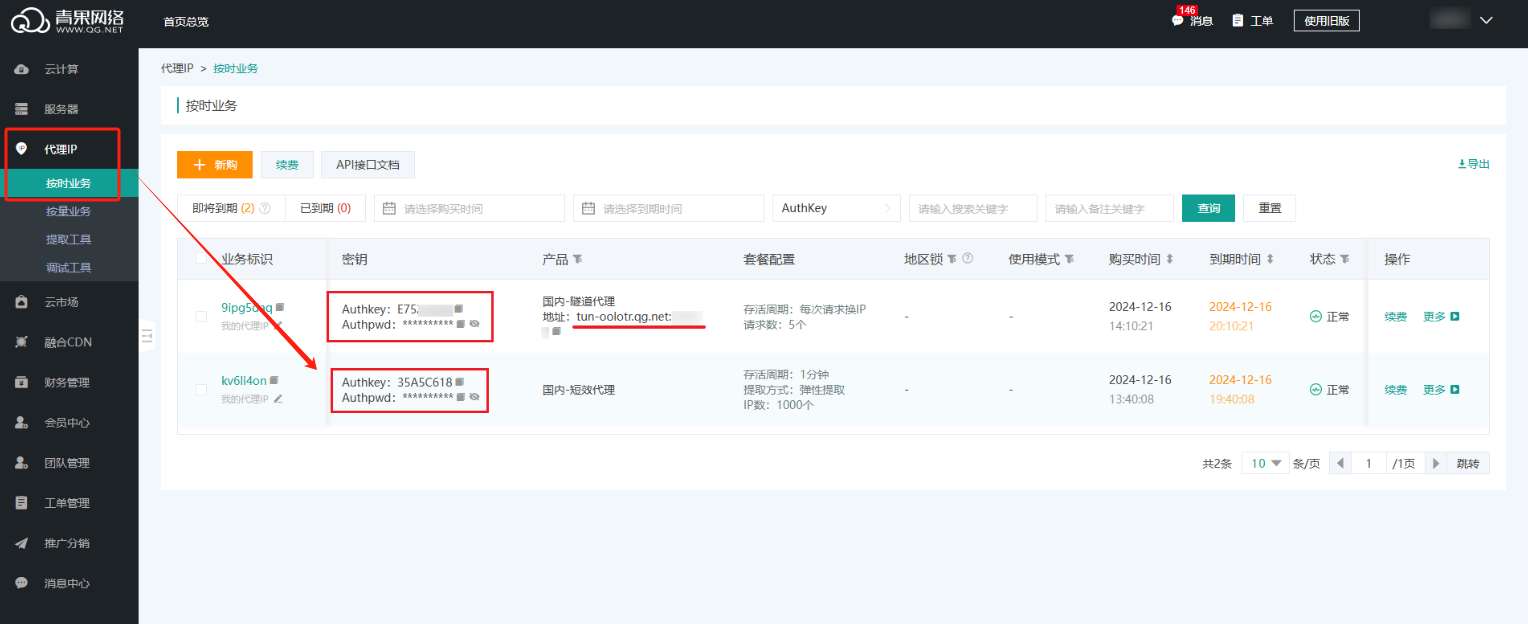
import requests
API_URL = "https://overseas.proxy.qg.net/get?key=yourkey&num=1&area=&isp=&format=txt&seq=\r\n&distinct=false"
def get_proxy():
ip = requests.get(API_URL, timeout=10).text.strip()
return {
"http": ip,
"https": ip
}ok,接下来还是围绕我们今天的主题,如何用海外代理爬亚马逊iPhone17的数据。
二、实战操作
2.1 配置环境
在开始爬虫之前,我们需要以下工具和环境:
Python 编程环境:Python 3,
搭配基础包:requests 和 lxml。
pip install requests lxml2.2 扒页面结构,明确目标数据
先把目标说清楚,避免很多人一上来就乱抓。
采集的数据字段包括:
- 商品标题
- 商品链接
- 当前售价
- 评论
- 评论数量
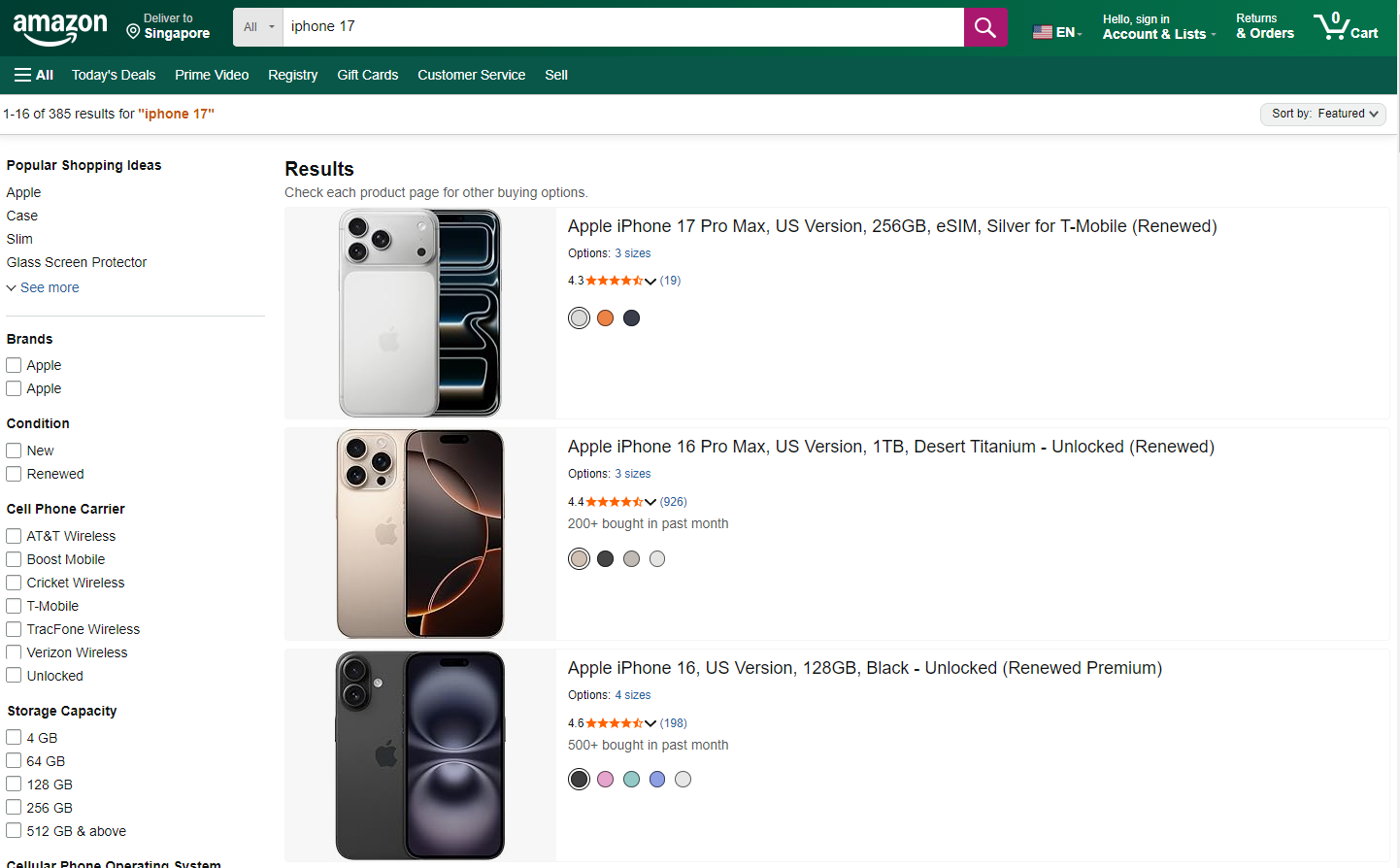
我们以这个搜索 URL 为例(示意):
https://www.amazon.com/s?k=iPhone+17想把这类页面上的商品售卖信息抓下来,我们需要做以下几个步骤:
- 打开目标页面,找到商品列表区域。F12 看 DOM,打开后按F5刷新一下:
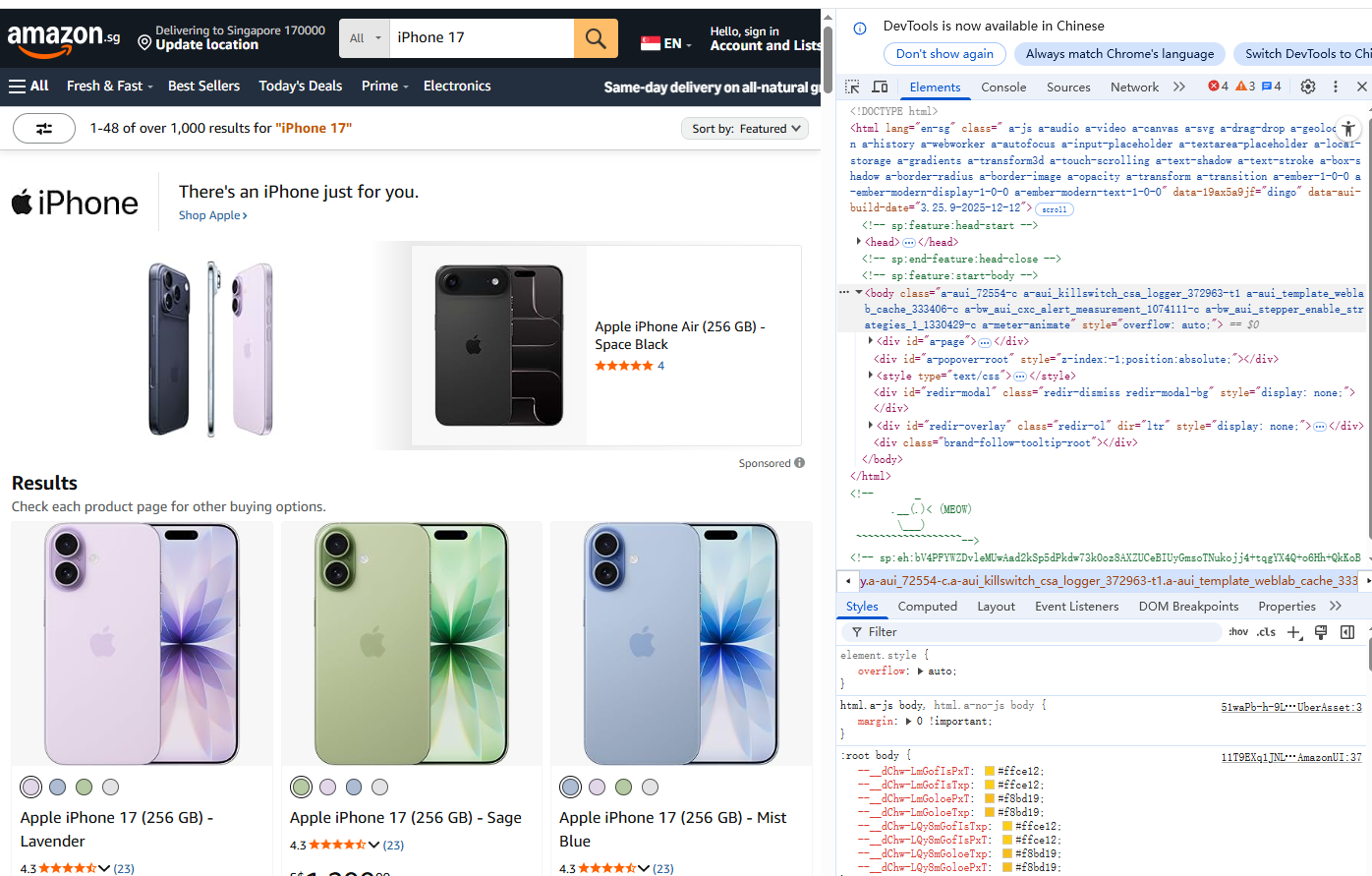
所有商品列表,都在一个统一的大容器中
<div class="s-main-slot s-result-list s-search-results sg-row">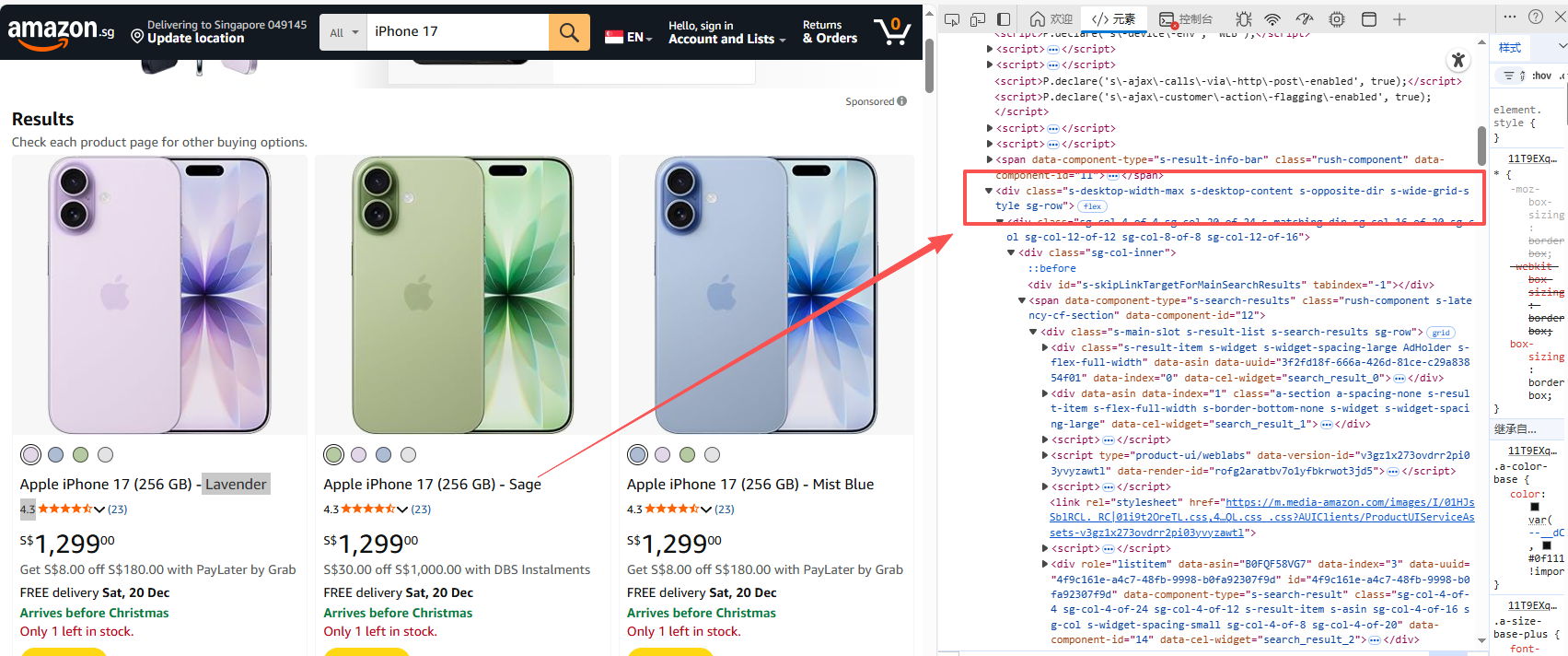
这个 div,就是整个搜索结果页的主容器。
XPath 示例:
//div[contains(@class,"s-main-slot")]单个商品的父级容器
在主容器下,每一个商品,都是一个 div:
 <div data-component-type="s-search-result"
      class="sg-col-inner">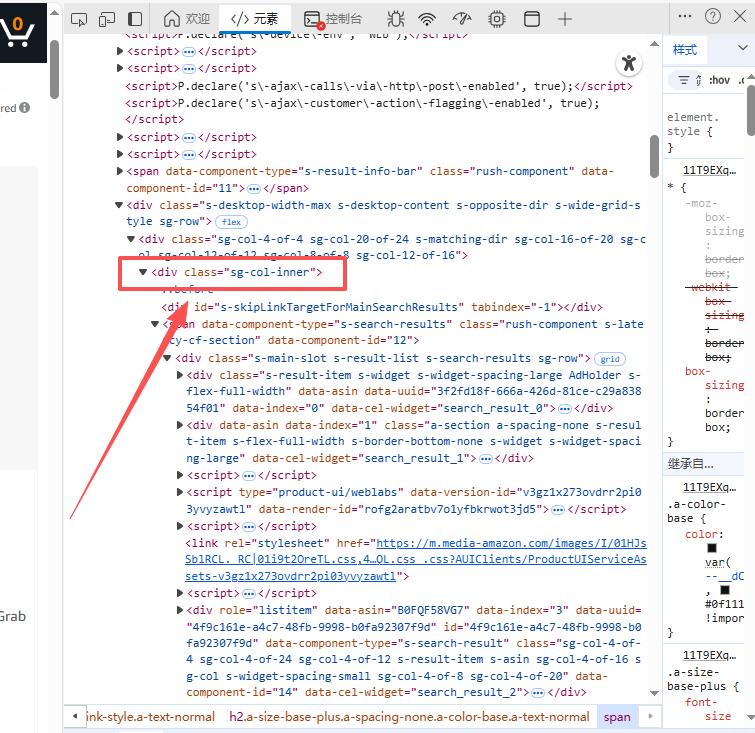
也就是说:
每一个
data-component-type="s-search-result",就是一个商品卡片
XPath 示例(非常关键):
//div[@data-component-type="s-search-result"]后面所有字段,都是从这个节点往下找。
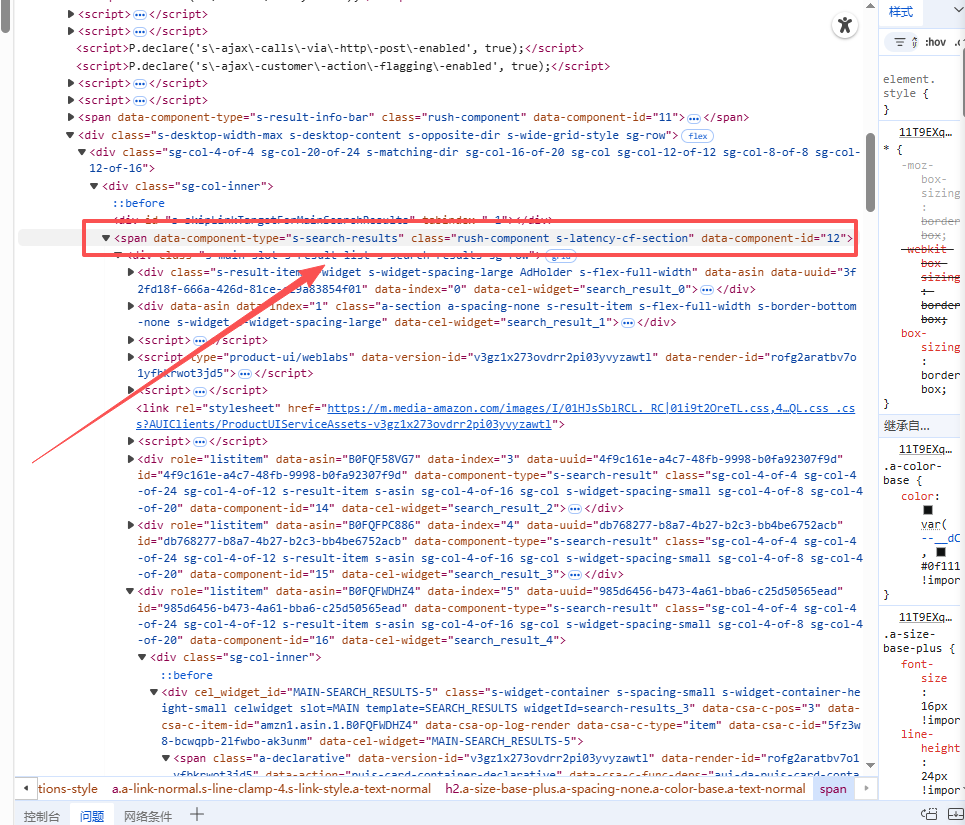
如商品价格价格在 <span class="a-price"> 内,分整数字和分数部分。整数字在 <span class="a-price-whole">,分数在 <span class="a-price-fraction">,符号在$。
- 类名:a-price(主容器),a-price-whole,a-price-fraction。
- XPath 示例:.//span[@class="a-price-whole"]/text() 和 .//span[@class="a-price-fraction"]/text()(组合成完整价格,如 "1,499.00")。
- 特性:如果有折扣,原价在 <span class="a-price a-text-price"> 或 <span class="a-offscreen">(屏幕外,供无障碍阅读)。黑五期间常有额外折扣类如 a-text-price。
<span class="a-price" data-a-size="xl" data-a-color="base">
  <span class="a-offscreen">$1,499.00</span>
  <span aria-hidden="true">
    <span class="a-price-symbol">$</span>
    <span class="a-price-whole">1,499</span>
    <span class="a-price-decimal">.</span>
    <span class="a-price-fraction">00</span>
  </span>
</span>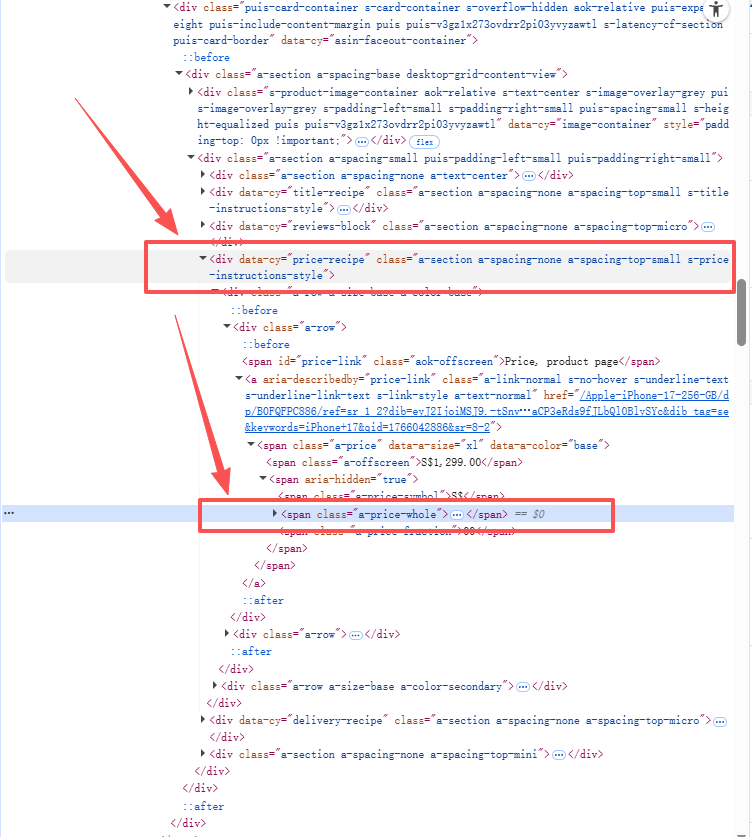
其他以此类推,不赘述啦。
我们可以得出:一般每一个商品信息会用一个标签包裹起来,主要包含以下内容:
- 商品标题:存放在 <h2> 标签内的 <span> 中;
- 商品价格:在 a-price 类的 <span> 标签中;
- 商品链接:位于 <a> 标签的 href 属性;
- 详细信息:如评分、评论数,会分散在 a-icon-alt 和 a-size-small 类的标签中。
这时候我们就可以确定爬取数据的路径了。
2.3 核心代码实现
我们把功能解耦合,分为:中间件配置(代理)、请求发送、数据清洗。
2.3.1 中间件配置
要实现IP轮询,我们需要调用青果网络的API接口获取实时IP。
敲黑板!这里的API是核心配置:
import requests
from lxml import etree
import time
import random

# 功能:通过 API 获取青果网络海外代理 IP
# 这就是我们的“外挂”接口
def get_proxy_middleware():
    # 青果网络提取链接,此处替换为你自己的 key
    api_url = "https://overseas.proxy.qg.net/get?key=yourkey&num=1&area=&isp=&format=txt&seq=\r\n&distinct=false"

    try:
        response = requests.get(api_url, timeout=5)
        if response.status_code == 200:
            ip_port = response.text.strip()
            # 构造 Requests 库需要的 proxies 字典
            return {
                "http": f"http://{ip_port}",
                "https": f"http://{ip_port}"
            }
    except Exception as e:
        print(f"代理获取异常,请检查网络连通性: {e}")
    return None

# 伪装 Header,防止被反爬策略识别
headers = {
    "User-Agent": "Mozilla/5.0 (Windows NT 10.0; Win64; x64) AppleWebKit/537.36 (KHTML, like Gecko) Chrome/128.0.0.0 Safari/537.36",
    "Accept-Language": "en-US,en;q=0.9",
}
2.3.2 业务逻辑层
利用requests挂载代理,通过lxml进行数据提取。这里我们要加一点容错机制,保证代码的健壮性。
def run_spider(keyword):
    target_url = f"https://www.amazon.com/s?k={keyword}"

    # 获取代理 IP
    proxy = get_proxy_middleware()
    if not proxy:
        print("代理池枯竭,任务终止")
        return

    print(f"正在进行全量抓取,当前节点: {proxy},关键词: {keyword}")

    try:
        # 发起 HTTP 请求
        resp = requests.get(target_url, headers=headers, proxies=proxy, timeout=10)

        # 简单校验一下状态码
        if resp.status_code == 200:
            # 避免被亚马逊的风控识别为 robot
            if "Robot Check" in resp.text:
                 print("触发验证码风控,建议切换IP重试")
                 return

            parse_html(resp.text)
        else:
            print(f"请求失败,状态码: {resp.status_code}")

    except Exception as e:
        print(f"发生未知错误: {e}")

def parse_html(html_str):
    tree = etree.HTML(html_str)

    # 获取所有商品卡片节点
    items = tree.xpath('//div[@data-component-type="s-search-result"]')

    data_list = []

    for item in items:
        try:
            # 数据清洗与提取
            title = item.xpath('.//h2//span/text()')
            # 三元表达式处理空值,防止 Index Out of Bounds
            title_str = title[0] if title else "无标题数据"

            price = item.xpath('.//span[@class="a-price"]//span[@class="a-offscreen"]/text()')
            price_str = price[0] if price else "暂无报价"

            link = item.xpath('.//h2//a/@href')
            link_str = "https://www.amazon.com" + link[0] if link else ""

            # 结构化数据
            sku_data = {
                "Title": title_str,
                "Price": price_str,
                "Url": link_str
            }
            data_list.append(sku_data)
            print(sku_data) # 控制台输出,实时监控抓取进度

        except Exception as e:
            continue

    return data_list
2.3.3 启动入口
if __name__ == "__main__":
    # 假设 iPhone 17 已经预售或我们要抓取相关周边
    search_key = "iPhone 17"
    run_spider(search_key)
2.3.4 存数据!
import csv

# ... 前面爬取和解析得到 product_list ...

# 存成CSV文件
filename = "amazon_iphone17_blackfriday.csv"
with open(filename, 'w', newline='', encoding='utf-8-sig') as csvfile:  # utf-8-sig 防止中文乱码
    fieldnames = ['title', 'price', 'link', 'rating', 'reviews']  # 定义列名
    writer = csv.DictWriter(csvfile, fieldnames=fieldnames)

    writer.writeheader()  # 写入标题行
    for prop in product_list:
        writer.writerow(prop)  # 写入一行数据

print(f"【数据已保存】: 共 {len(product_list)} 条记录到 {filename}")
更高级点存数据库(比如SQLite)适合数据量大或者需要复杂查询的情况,稍微麻烦点,但更规范。
三、数据分析
数据采集完了,我们可以用Python简单分析一下这些数据,比如用Pandas计算平均价格、最高评分等。
import pandas as pd

df = pd.read_csv("amazon_iphone17_blackfriday.csv")
avg_price = df['price'].str.replace('$', '').str.replace(',', '').astype(float).mean()
print(f"iPhone17平均价格:${avg_price:.2f}")

# 简单可视化(需安装matplotlib)
import matplotlib.pyplot as plt
df['rating'] = df['rating'].str.extract('(\d+\.\d+)').astype(float)
df.plot(kind='bar', x='title', y='rating')
plt.title("iPhone17变体评分对比")
plt.show()
通过分析,你能发现黑五期间iPhone17的价格折扣力度、热门变体(如Pro Max的销量更高)等insights,帮你决策跨境电商选品。
也可以直接丢给 Pandas、或者喂给 AI 做结构化分析。
四、总结
- 选对代理:千万别图便宜用劣质代理,亚马逊的黑名单库比你想象的要全。青果网络这类头部厂商的IP池,清理度高,能大幅提高我们的业务成功率。
- 轮换+延时: 虽然我们用了代理,但要严格控制代码武德。再加上
time.sleep()频率随机,模拟真实人类的操作次数。 - 快速迭代:先跑通Demo,再根据业务需求做增量更新。
- 数据存下来: 存CSV或数据库,别让辛苦爬的数据飞了。
- 低调干活: 控制速度,看 robots.txt,别碰不能爬的。灵活调整策略,才能在数据的“战场”上立于不败之地
好啦,从代理配置到代码落地全讲完了,剩下的就是动手实操啦~
以及,青果网络也有免费测试,对爬虫工程师来说上手成本也很低,用来跑Amazon这种站点会省掉很多无意义的折腾。有需要的可以去瞅瞅~
原创声明:本文系作者授权腾讯云开发者社区发表,未经许可,不得转载。
如有侵权,请联系 cloudcommunity@tencent.com 删除。
原创声明:本文系作者授权腾讯云开发者社区发表,未经许可,不得转载。
如有侵权,请联系 cloudcommunity@tencent.com 删除。
评论
登录后参与评论
推荐阅读
目录
腾讯云开发者

Copyright © 2013 - 2026 Tencent Cloud. All Rights Reserved. 腾讯云 版权所有
深圳市腾讯计算机系统有限公司 ICP备案/许可证号:粤B2-20090059  粤公网安备44030502008569号
腾讯云计算(北京)有限责任公司 京ICP证150476号 | 京ICP备11018762号