unity开发中文字竖着显示
原创
unity开发中文字竖着显示
原创
张曙光
发布于 2025-12-18 11:28:42
发布于 2025-12-18 11:28:42
文字竖着排列在游戏开发中其实不是一个常见的功能,比较不适合人的阅读习惯.所以,unity并没有支持竖着排版的功能 ,所以,就需要我们自己来实现.下面介绍几种方便实现的功能:
第一种:
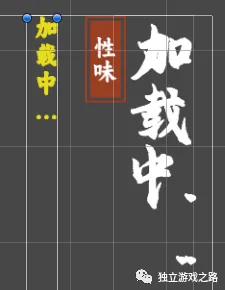
通过压缩text的区域,让字体强行的排成一排
图片
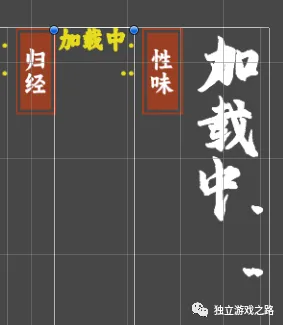
这种只适合固定长度的字,如果字数一多,就会显示不全,如果通过代码根据列数来设置text的宽度.就会变成下面这样
图片
所以,除非,你的项目中的字是固定的,而且在某一个分辨率下运行,否则就会穿帮.
第二种
使用特殊字体
有的字体是默认竖排的,但是一般不容易找到合适的字体,所以,这方法实用起来也不合适.
第三种
将字符串里面的每个字后面都加上"\n"
using System.Collections;
using System.Collections.Generic;
using UnityEngine;
using UnityEngine.UI;
[ExecuteInEditMode]
public class linetext : MonoBehaviour
{

    public Text text;
    string Str;
    string Str_temp;
    int Strlength;
    private void OnEnable()
    {
        Str = text.text;
        Strlength = Str.Length;

        for (int i = 0; i < Strlength ; i++)
        {
            Str_temp += Str[i] + "\n";
        }

        text.text = Str_temp;
    }
}
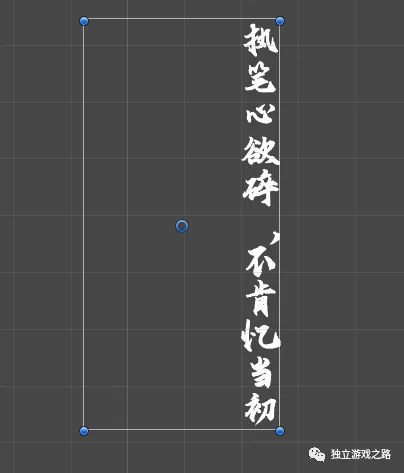
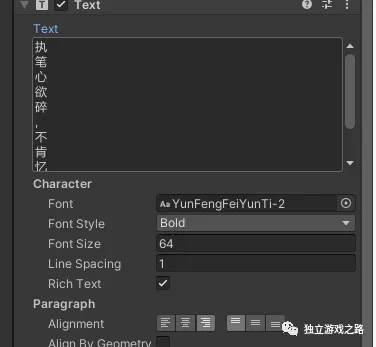
那么这个脚本挂载在text组件上,就可以实现竖着排字的效果,但是在检视面板上组件的字也变成竖着的了.
图片
检视面板
图片
那么这个调试起来似乎也不方便.
另一种办法
加<br>,也可以实现竖着排列:
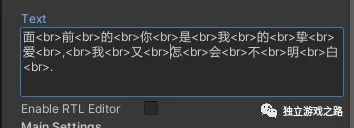
图片
效果:
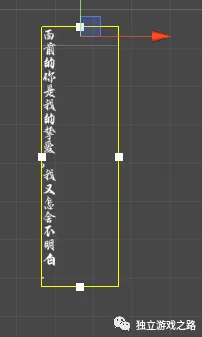
图片
第四种
这个需要用到Text(TMP),即新的文本组件,我们把字旋转90度,然后再将组件旋转90度即可,详细如下:
首先是字旋转90度:
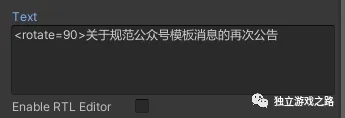
图片
那么字的表现如下:
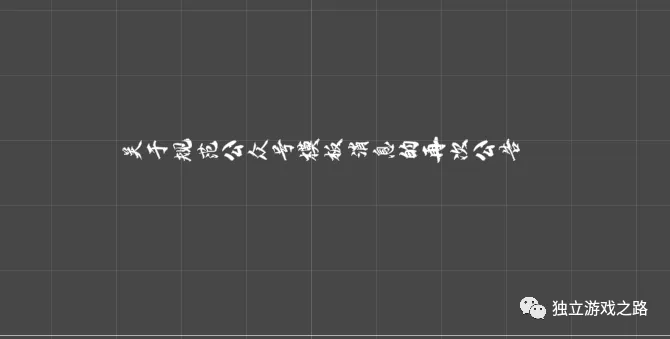
图片
接下来我们把组件旋转90度,你就会发现,这好像就是竖着排的了
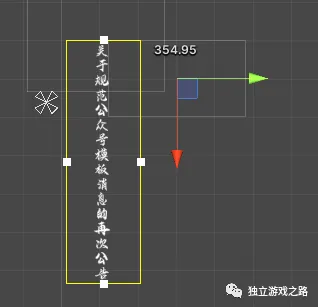
图片
注意,这个并不适用于旧版文字组件.
第五种
网络上的办法,与第三种办法比较相同:
//----------------------------------------------
// 竖排多排文字
//----------------------------------------------
using UnityEngine;
using UnityEngine.UI;
using System.Collections.Generic;
using System.Text.RegularExpressions;
using System;
[ExecuteInEditMode]
public class UIVirticalText : BaseMeshEffect
{
public float spacing = 1;
private float lineSpacing = 1;
private float textSpacing = 1;
private float xOffset = 0;
private float yOffset = 0;
private readonly string strRegex = @"(\n)";
public override void ModifyMesh(VertexHelper helper)
{
if (!IsActive())
return;
List<UIVertex> verts = new List<UIVertex>();
helper.GetUIVertexStream(verts);
Text text = GetComponent<Text>();
string realText = GetStringNoHtml(text.text);
TextGenerator tg = text.cachedTextGenerator;
lineSpacing = text.fontSize * text.lineSpacing;
textSpacing = text.fontSize * spacing;
xOffset = text.rectTransform.sizeDelta.x / 2 - text.fontSize / 2;
yOffset = text.rectTransform.sizeDelta.y / 2 - text.fontSize / 2;
List<UILineInfo> lines = new List<UILineInfo>();
tg.GetLines(lines);
int needDelNum = 0;
for (int i = 0; i < lines.Count; i++)
{
UILineInfo line = lines[i];
int step = i;
int current = 0;
int endCharIdx = (i + 1 == lines.Count) ? tg.characterCountVisible : lines[i + 1].startCharIdx;
for (int j = line.startCharIdx; j < endCharIdx; j++)
{
bool isMatch = Regex.IsMatch(text.text[j].ToString(), strRegex);
bool isShow = (realText.Length > j - needDelNum) &&
text.text[j].ToString() == realText[j - needDelNum].ToString();
if (!isMatch && isShow)
{
modifyText(helper, j - needDelNum, current++, step);
}
else
{
needDelNum++;
if (isMatch)
{
break;
}
}
}
}
}
void modifyText(VertexHelper helper, int i, int charYPos, int charXPos)
{
UIVertex lb = new UIVertex();
helper.PopulateUIVertex(ref lb, i * 4);
UIVertex lt = new UIVertex();
helper.PopulateUIVertex(ref lt, i * 4 + 1);
UIVertex rt = new UIVertex();
helper.PopulateUIVertex(ref rt, i * 4 + 2);
UIVertex rb = new UIVertex();
helper.PopulateUIVertex(ref rb, i * 4 + 3);
Vector3 center = Vector3.Lerp(lb.position, rt.position, 0.5f);
Matrix4x4 move = Matrix4x4.TRS(-center, Quaternion.identity, Vector3.one);
float x = -charXPos * lineSpacing + xOffset;
float y = -charYPos * textSpacing + yOffset;
Vector3 pos = new Vector3(x, y, 0);
Matrix4x4 place = Matrix4x4.TRS(pos, Quaternion.identity, Vector3.one);
Matrix4x4 transform = place * move;
lb.position = transform.MultiplyPoint(lb.position);
lt.position = transform.MultiplyPoint(lt.position);
rt.position = transform.MultiplyPoint(rt.position);
rb.position = transform.MultiplyPoint(rb.position);
helper.SetUIVertex(lb, i * 4);
helper.SetUIVertex(lt, i * 4 + 1);
helper.SetUIVertex(rt, i * 4 + 2);
helper.SetUIVertex(rb, i * 4 + 3);
}
private string GetStringNoHtml(string strHtml)
{
if (String.IsNullOrEmpty(strHtml))
{
return strHtml;
}
else
{
string[] aryReg ={
@"<script[^>]*?>.*?</script>",
@"<!--.*\n(-->)?",
@"<(\/\s*)?(.|\n)*?(\/\s*)?>",
@"<(\w|\s|""|'| |=|\\|\.|\/|#)*",
@"([\r\n|\s])*",
@"&(quot|#34);",
@"&(amp|#38);",
@"&(lt|#60);",
@"&(gt|#62);",
@"&(nbsp|#160);",
@"&(iexcl|#161);",
@"&(cent|#162);",
@"&(pound|#163);",
@"&(copy|#169);",
@"&#(\d+);"};
string newReg = aryReg[0];
string strOutput = strHtml.Replace(" ", " ");
for (int i = 0; i < aryReg.Length; i++)
{
Regex regex = new Regex(aryReg[i], RegexOptions.IgnoreCase);
strOutput = regex.Replace(strOutput, "");
}
strOutput.Replace("<", ">");
strOutput.Replace(">", "<");
return strOutput.Replace(" ", " ");
}
}
}直接挂载脚本到text组件上即可.
注意,这个只适用与旧版文本组件!!!
原创声明:本文系作者授权腾讯云开发者社区发表,未经许可,不得转载。
如有侵权,请联系 cloudcommunity@tencent.com 删除。
原创声明:本文系作者授权腾讯云开发者社区发表,未经许可,不得转载。
如有侵权,请联系 cloudcommunity@tencent.com 删除。
评论
登录后参与评论
推荐阅读
腾讯云开发者

Copyright © 2013 - 2026 Tencent Cloud. All Rights Reserved. 腾讯云 版权所有
深圳市腾讯计算机系统有限公司 ICP备案/许可证号:粤B2-20090059  粤公网安备44030502008569号
腾讯云计算(北京)有限责任公司 京ICP证150476号 | 京ICP备11018762号