MySQL包安装(三)
原创

2.2.3 SUSE资源库安装MySQL
2.2.3.1 MySQL 8.0
1opensuse15:~ # wget https://repo.mysql.com//mysql80-community-release-sl15-1.noarch.rpm
2
3opensuse15:~ # rpm -Uvh mysql80-community-release-sl15-1.noarch.rpm
4
5opensuse15:~ # rpm --import https://repo.mysql.com/RPM-GPG-KEY-mysql-2023
6opensuse15:~ # zypper refresh
7
8opensuse15:~ # zypper search "mysql-community-server"
9Loading repository data...
10Warning: Repository 'Update repository of openSUSE Backports' metadata expired since 2025-05-26 06:48:52 CST.
11Warning: Repository 'Main Update Repository' metadata expired since 2025-05-17 16:03:01 CST.
12
13    Warning: Repository metadata expired: Check if'autorefresh' is turned on (zypper lr), otherwise
14    manually refresh the repository (zypper ref). If this does not solve the issue, it could be that
15    you are using a broken mirror or the server has actually discontinued to support the repository.
16
17Reading installed packages...
18
19S | Name                         | Summary                                      | Type
20--+------------------------------+----------------------------------------------+--------
21| mysql-community-server       | A very fast and reliable SQL database server | package
22| mysql-community-server-debug | The debug version of MySQL server            | package
23
24opensuse15:~ # zypper info "mysql-community-server"
25Loading repository data...
26Warning: Repository 'Update repository of openSUSE Backports' metadata expired since 2025-05-26 06:48:52 CST.
27Warning: Repository 'Main Update Repository' metadata expired since 2025-05-17 16:03:01 CST.
28
29    Warning: Repository metadata expired: Check if'autorefresh' is turned on (zypper lr), otherwise
30    manually refresh the repository (zypper ref). If this does not solve the issue, it could be that
31    you are using a broken mirror or the server has actually discontinued to support the repository.
32
33Reading installed packages...
34
35
36Information for package mysql-community-server:
37-----------------------------------------------
38Repository     : MySQL 8.0 Community Server
39Name           : mysql-community-server
40Version        :8.0.42-1.sl15
41Arch           : x86_64
42Vendor         : Oracle and/or its affiliates
43Installed Size :401.1 MiB
44Installed      : No
45Status         : not installed
46Source package : mysql-community-8.0.42-1.sl15.src
47Upstream URL   : http://www.mysql.com/
48Summary        : A very fast and reliable SQL database server
49Description    :
50    The MySQL(TM) software delivers a very fast, multi-threaded, multi-user,
51    and robust SQL (Structured Query Language) database server. MySQL Server
52    is intended for mission-critical, heavy-load production systems as well
53    as for embedding into mass-deployed software. MySQL is a trademark of
54    Oracle and/or its affiliates
55
56    The MySQL software has Dual Licensing, which means you can use the MySQL
57    software free of charge under the GNU General Public License
58(http://www.gnu.org/licenses/). You can also purchase commercial MySQL
59    licenses from Oracle and/or its affiliates if you do not wish to be bound by the terms of
60    the GPL. See the chapter "Licensing and Support"in the manual for
61    further info.
62
63    The MySQL web site (http://www.mysql.com/) provides the latest news and
64    information about the MySQL software.  Also please see the documentation
65    and the manual formore information.
66
67    This package includes the MySQL server binary as well as related utilities
68    to run and administer a MySQL server.
69
70opensuse15:~ # zypper install -y mysql-community-server
71
72opensuse15:~ # systemctl enable --now mysql
73
74opensuse15:~ # mysql -V
75mysql  Ver 8.0.42 for Linux on x86_64 (MySQL Community Server - GPL)
76opensuse15:~ # systemctl status mysql
77● mysql.service - MySQL Server
78     Loaded: loaded (/usr/lib/systemd/system/mysql.service; enabled; preset: disabled)
79     Active: active (running) since Tue 2025-05-27 11:38:33 CST; 35s ago
80       Docs: man:mysqld(8)
81             http://dev.mysql.com/doc/refman/en/using-systemd.html
82    Process: 13955ExecStartPre=/usr/bin/mysqld_pre_systemd (code=exited, status=0/SUCCESS)
83   Main PID: 14019(mysqld)
84     Status: "Server is operational"
85      Tasks: 38(limit: 2250)
86        CPU: 6.301s
87     CGroup: /system.slice/mysql.service
88             └─14019 /usr/sbin/mysqld
89
90May 2711:38:25 opensuse15 systemd[1]: Starting MySQL Server...
91May 2711:38:32 opensuse15 (mysqld)[14019]: mysql.service: Referenced but unset environment variable evaluates t>
92May 2711:38:33 opensuse15 systemd[1]: Started MySQL Server.
93
94# 获取MySQL初始密码
95opensuse15:~ # grep 'temporary password' /var/log/mysql/mysqld.log
962025-05-27T03:38:27.924298Z 6[Note][MY-010454][Server] A temporary password is generated for root@localhost: rhjiMe?S1g*S
97# "rhjiMe?S1g*S"就是MySQL的初始密码
98
99# 修改mysql密码
100[root@rocky9 ~]# mysqladmin -uroot -p'rhjiMe?S1g*S' password 123456
101mysqladmin: [Warning] Using a password on the command line interface can be insecure.
102Warning: Since password will be sent to server in plain text, use ssl connection to ensure password safety.
103mysqladmin: unable to change password; error: 'Your password does not satisfy the current policy requirements'
104# 上面报错提示密码太简单
105
106[root@rocky9 ~]# mysqladmin -uroot -p'rhjiMe?S1g*S' password Raymond@2025
107mysqladmin: [Warning] Using a password on the command line interface can be insecure.
108Warning: Since password will be sent to server in plain text, use ssl connection to ensure password safety
109
110opensuse15:~ # mysql -uroot -p'Raymond@2025'
111mysql: [Warning] Using a password on the command line interface can be insecure.
112Welcome to the MySQL monitor.  Commands end with ; or \g.
113Your MySQL connection id is 11
114Server version: 8.0.42 MySQL Community Server - GPL
115
116Copyright (c)2000, 2025, Oracle and/or its affiliates.
117
118Oracle is a registered trademark of Oracle Corporation and/or its
119affiliates. Other names may be trademarks of their respective
120owners.
121
122Type 'help;' or '\h'for help. Type '\c' to clear the current input statement.
123
124mysql> status
125--------------
126mysql  Ver 8.0.42 for Linux on x86_64 (MySQL Community Server - GPL)
127
128Connection id:		11
129Current database:
130Current user:		root@localhost
131SSL:			Not in use
132Current pager:		less
133Using outfile:		''
134Using delimiter:	;
135Server version:		8.0.42 MySQL Community Server - GPL
136Protocol version:	10
137Connection:		Localhost via UNIX socket
138Server characterset:	utf8mb4
139Db     characterset:	utf8mb4
140Client characterset:	utf8mb4
141Conn.  characterset:	utf8mb4
142UNIX socket:		/var/lib/mysql/mysql.sock
143Binary data as:		Hexadecimal
144Uptime:			2 min 38 sec
145
146Threads: 2  Questions: 11  Slow queries: 0  Opens: 140  Flush tables: 3  Open tables: 56  Queries per second avg: 0.069
147--------------
148
149mysql> show databases;
150+--------------------+
151| Database           |
152+--------------------+
153| information_schema |
154| mysql              |
155| performance_schema |
156| sys                |
157+--------------------+
1584 rows inset(0.00 sec)
159
160mysql>exit
161Bye
2.2.3.2 MySQL 8.4
在openSUSE上安装MySQL:
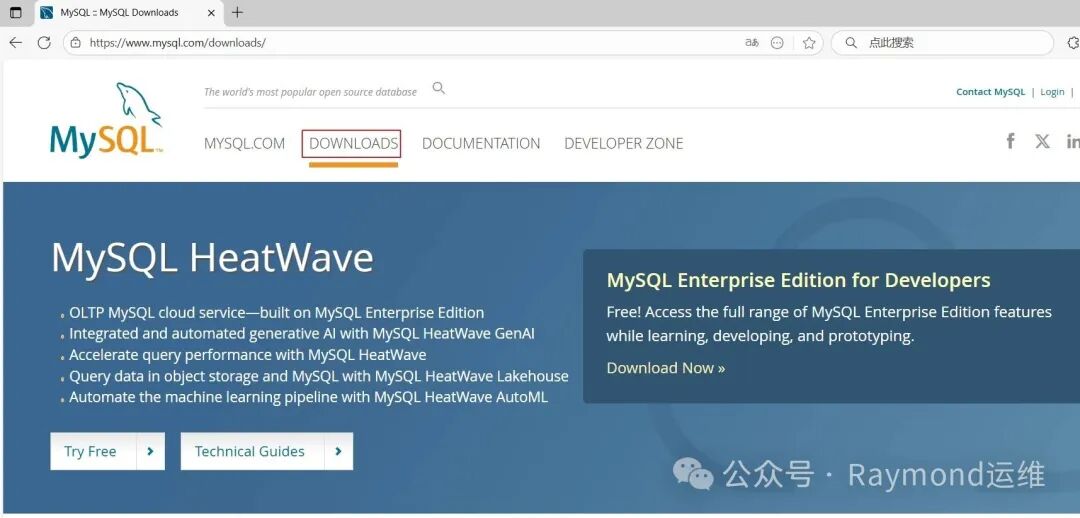
去“https://www.mysql.com/”网站下载,选择“DOWNLOADS”,如图36所示。
t36
图36 下载SUSE仓库包
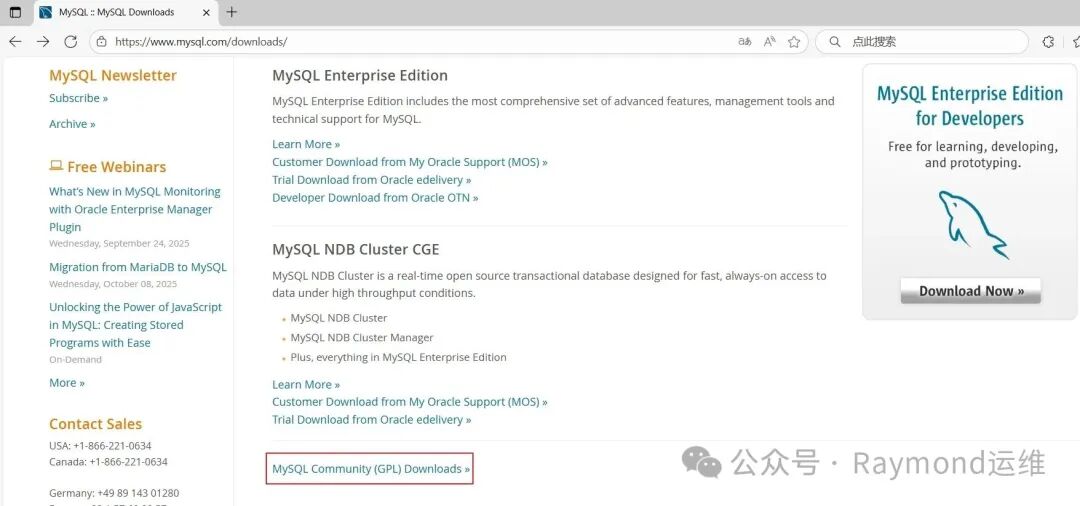
选择“MySQL Community (GPL) Downloads”,如图37所示。
t37
图37 下载SUSE仓库包
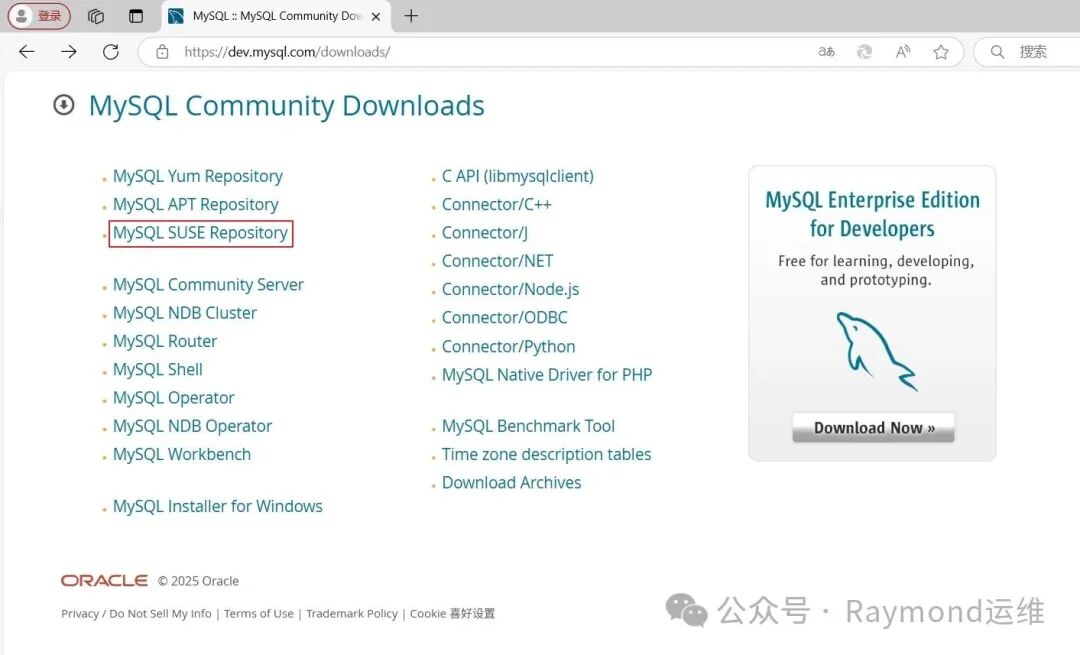
选择“MySQL SUSE Repository(MySQL SUSE资源库)”,如图38所示。
t38
图38 下载SUSE仓库包
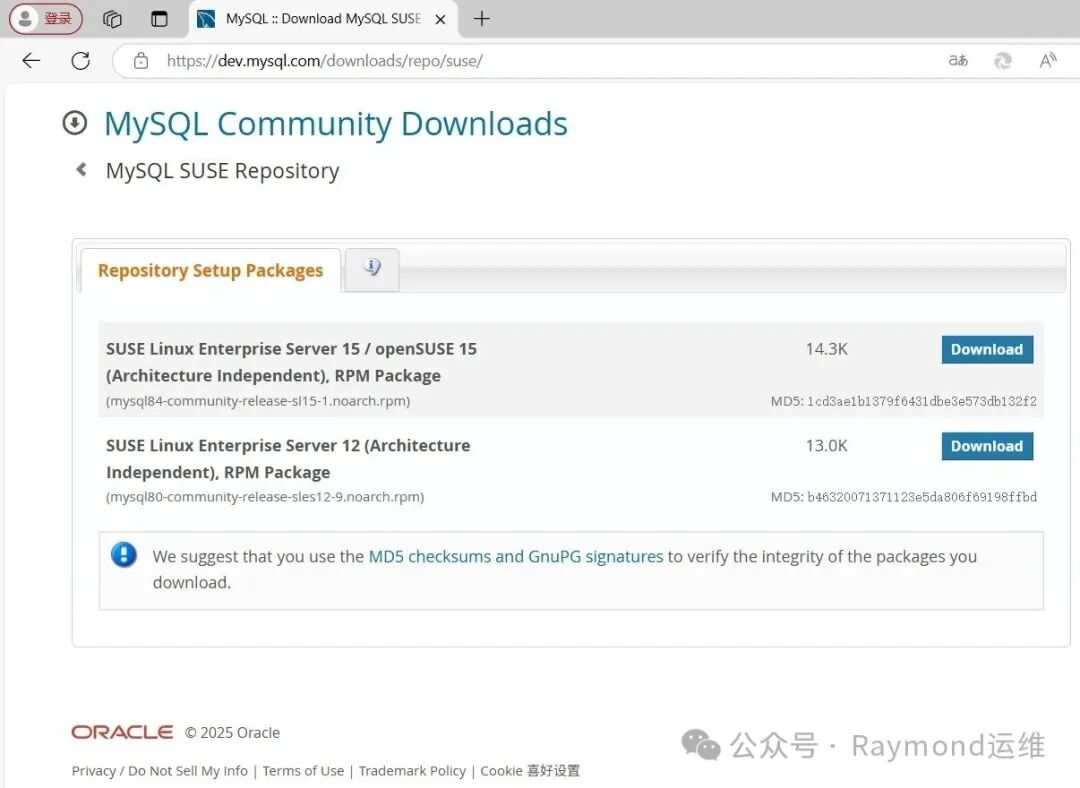
然后根据系统版本下载相应的安装包,如图39所示。
t39
图39 下载SUSE仓库包
1opensuse15:~ # wget https://dev.mysql.com/get/mysql84-community-release-sl15-1.noarch.rpm
2
3opensuse15:~ # rpm -Uvh mysql84-community-release-sl15-1.noarch.rpm
4
5opensuse15:~ # zypper update -y mysql84-community-release
6
7opensuse15:~ # zypper refresh
8
9opensuse15:~ # zypper install -y mysql-community-server
10
11opensuse15:~ # systemctl enable --now mysql
12
13opensuse15:~ # ls /var/lib/mysql
14#ib_16384_0.dblwr  auto.cnf       ca.pem           ibdata1    mysql.sock             private_key.pem  sys
15#ib_16384_1.dblwr  binlog.000001  client-cert.pem  ibtmp1     mysql.sock.lock        public_key.pem   undo_001
16#innodb_redo       binlog.index   client-key.pem   mysql      mysql_upgrade_history  server-cert.pem  undo_002
17#innodb_temp       ca-key.pem     ib_buffer_pool   mysql.ibd  performance_schema     server-key.pem
18
19opensuse15:~ # mysql -V
20mysql  Ver 8.4.5 for Linux on x86_64 (MySQL Community Server - GPL)
21
22opensuse15:~ # systemctl status mysql
23● mysql.service - MySQL Server
24     Loaded: loaded (/usr/lib/systemd/system/mysql.service; enabled; preset: disabled)
25     Active: active (running) since Fri 2025-04-18 22:06:26 CST; 54s ago
26       Docs: man:mysqld(8)
27             http://dev.mysql.com/doc/refman/en/using-systemd.html
28    Process: 14025ExecStartPre=/usr/bin/mysqld_pre_systemd (code=exited, status=0/SUCCESS)
29   Main PID: 14088(mysqld)
30     Status: "Server is operational"
31      Tasks: 35(limit: 2250)
32        CPU: 5.552s
33     CGroup: /system.slice/mysql.service
34             └─14088 /usr/sbin/mysqld
35
36Apr 1822:06:18 opensuse15 systemd[1]: Starting MySQL Server...
37Apr 1822:06:24 opensuse15 (mysqld)[14088]: mysql.service: Referenced but unset environment variable evaluates to an>
38Apr 1822:06:26 opensuse15 systemd[1]: Started MySQL Server.
39
40# 获取MySQL初始密码
41opensuse15:~ # grep 'temporary password' /var/log/mysql/mysqld.log
422025-04-18T14:06:21.043078Z 6[Note][MY-010454][Server] A temporary password is generated for root@localhost: Wwm:uvwie3sx
43# "Wwm:uvwie3sx"就是MySQL的初始密码
44
45# 修改mysql密码
46[root@rocky9 ~]# mysqladmin -uroot -p'Wwm:uvwie3sx' password 123456
47mysqladmin: [Warning] Using a password on the command line interface can be insecure.
48Warning: Since password will be sent to server in plain text, use ssl connection to ensure password safety.
49mysqladmin: unable to change password; error: 'Your password does not satisfy the current policy requirements'
50# 上面报错提示密码太简单
51
52[root@rocky9 ~]# mysqladmin -uroot -p'Wwm:uvwie3sx' password Raymond@2025
53mysqladmin: [Warning] Using a password on the command line interface can be insecure.
54Warning: Since password will be sent to server in plain text, use ssl connection to ensure password safety
55
56opensuse15:~ # mysql -uroot -p'Raymond@2025'
57mysql: [Warning] Using a password on the command line interface can be insecure.
58Welcome to the MySQL monitor.  Commands end with ; or \g.
59Your MySQL connection id is 11
60Server version: 8.4.5 MySQL Community Server - GPL
61
62Copyright (c)2000, 2025, Oracle and/or its affiliates.
63
64Oracle is a registered trademark of Oracle Corporation and/or its
65affiliates. Other names may be trademarks of their respective
66owners.
67
68Type 'help;' or '\h'for help. Type '\c' to clear the current input statement.
69
70mysql> status
71--------------
72mysql  Ver 8.4.5 for Linux on x86_64 (MySQL Community Server - GPL)
73
74Connection id:		11
75Current database:
76Current user:		root@localhost
77SSL:			Not in use
78Current pager:		less
79Using outfile:		''
80Using delimiter:	;
81Server version:		8.4.5 MySQL Community Server - GPL
82Protocol version:	10
83Connection:		Localhost via UNIX socket
84Server characterset:	utf8mb4
85Db     characterset:	utf8mb4
86Client characterset:	utf8mb4
87Conn.  characterset:	utf8mb4
88UNIX socket:		/var/lib/mysql/mysql.sock
89Binary data as:		Hexadecimal
90Uptime:			3 min 22 sec
91
92Threads: 2  Questions: 12  Slow queries: 0  Opens: 140  Flush tables: 3  Open tables: 56  Queries per second avg: 0.059
93--------------
94
95mysql> show databases;
96+--------------------+
97| Database           |
98+--------------------+
99| information_schema |
100| mysql              |
101| performance_schema |
102| sys                |
103+--------------------+
1044 rows inset(0.01 sec)
105
106mysql>exit
107Bye
原创声明:本文系作者授权腾讯云开发者社区发表,未经许可,不得转载。
如有侵权,请联系 cloudcommunity@tencent.com 删除。
原创声明:本文系作者授权腾讯云开发者社区发表,未经许可,不得转载。
如有侵权,请联系 cloudcommunity@tencent.com 删除。
评论
登录后参与评论
推荐阅读
目录
腾讯云开发者

Copyright © 2013 - 2026 Tencent Cloud. All Rights Reserved. 腾讯云 版权所有
深圳市腾讯计算机系统有限公司 ICP备案/许可证号:粤B2-20090059  粤公网安备44030502008569号
腾讯云计算(北京)有限责任公司 京ICP证150476号 | 京ICP备11018762号