MySQL包安装(二)
原创

2.2.1.2 MySQL 8.4
在Rocky 10和Almalinux 10上安装MySQL:
1[root@rocky10 ~]# yum list mysql*-server --showduplicates
2Last metadata expiration check: 0:00:29 ago on Tue 10 Jun 202511:20:22 AM CST.
3Available Packages
4mysql8.4-server.x86_64                                   8.4.4-2.el10                                   appstream
5
6[root@rocky10 ~]# yum install -y mysql8.4-server
7
8[root@rocky10 ~]# systemctl enable --now mysqld
9
10[root@rocky10 ~]# ls /var/lib/mysql
11 auto.cnf          client-key.pem      '#innodb_redo'     mysql_upgrade_history   public_key.pem
12 binlog.000001    '#ib_16384_0.dblwr''#innodb_temp'     mysql_upgrade_info      server-cert.pem
13 binlog.index     '#ib_16384_1.dblwr'   mysql             mysqlx.sock             server-key.pem
14 ca-key.pem        ib_buffer_pool       mysql.ibd         mysqlx.sock.lock        sys
15 ca.pem            ibdata1              mysql.sock        performance_schema      undo_001
16 client-cert.pem   ibtmp1               mysql.sock.lock   private_key.pem         undo_002
17
18[root@rocky10 ~]# mysql -V
19mysql  Ver 8.4.4 for Linux on x86_64 (Source distribution)
20
21[root@rocky10 ~]# systemctl status mysqld
22● mysqld.service - MySQL 8.4 database server
23     Loaded: loaded (/usr/lib/systemd/system/mysqld.service; enabled; preset: disabled)
24     Active: active (running) since Tue 2025-06-10 11:22:48 CST; 32s ago
25 Invocation: 9156f6bbf370431887df1a3d38689b85
26    Process: 1529ExecStartPre=/usr/libexec/mysql-check-socket (code=exited, status=0/SUCCESS)
27    Process: 1555ExecStartPre=/usr/libexec/mysql-prepare-db-dir mysqld.service (code=exited, status=0/SUCCESS)
28   Main PID: 1628(mysqld)
29     Status: "Server is operational"
30      Tasks: 35(limit: 10497)
31     Memory: 440.3M (peak: 454.9M)
32        CPU: 2.949s
33     CGroup: /system.slice/mysqld.service
34             └─1628 /usr/libexec/mysqld --basedir=/usr
35
36Jun 1011:22:44 rocky10 systemd[1]: Starting mysqld.service - MySQL 8.4 database server...
37Jun 1011:22:44 rocky10 mysql-prepare-db-dir[1555]: Initializing MySQL database
38Jun 1011:22:48 rocky10 systemd[1]: Started mysqld.service - MySQL 8.4 database server.
39
40[root@rocky10 ~]# mysql
41Welcome to the MySQL monitor.  Commands end with ; or \g.
42Your MySQL connection id is 8
43Server version: 8.4.4 Source distribution
44
45Copyright (c)2000, 2025, Oracle and/or its affiliates.
46
47Oracle is a registered trademark of Oracle Corporation and/or its
48affiliates. Other names may be trademarks of their respective
49owners.
50
51Type 'help;' or '\h'for help. Type '\c' to clear the current input statement.
52
53mysql> status
54--------------
55mysql  Ver 8.4.4 for Linux on x86_64 (Source distribution)
56
57Connection id:		8
58Current database:
59Current user:		root@localhost
60SSL:			Not in use
61Current pager:		stdout
62Using outfile:		''
63Using delimiter:	;
64Server version:		8.4.4 Source distribution
65Protocol version:	10
66Connection:		Localhost via UNIX socket
67Server characterset:	utf8mb4
68Db     characterset:	utf8mb4
69Client characterset:	utf8mb4
70Conn.  characterset:	utf8mb4
71UNIX socket:		/var/lib/mysql/mysql.sock
72Binary data as:		Hexadecimal
73Uptime:			58 sec
74
75Threads: 2  Questions: 6  Slow queries: 0  Opens: 120  Flush tables: 3  Open tables: 36  Queries per second avg: 0.103
76--------------
77
78mysql> show databases;
79+--------------------+
80| Database           |
81+--------------------+
82| information_schema |
83| mysql              |
84| performance_schema |
85| sys                |
86+--------------------+
874 rows inset(0.01 sec)
88
89mysql>exit
90Bye
在CentOS Stream 10上安装MySQL:
1[root@centos10 ~]# yum list mysql-server --showduplicates
2Last metadata expiration check: 0:02:19 ago on Fri 18 Apr 2025 08:47:00 PM CST.
3Available Packages
4mysql-server.x86_64                                      8.4.2-1.el10                                       appstream
5mysql-server.x86_64                                      8.4.2-4.el10                                       appstream
6mysql-server.x86_64                                      8.4.2-5.el10                                       appstream
7
8[root@centos10 ~]# yum install -y mysql-server
9
10[root@centos10 ~]# systemctl enable --now mysqld
11
12[root@centos10 ~]# ls /var/lib/mysql
13 auto.cnf        client-cert.pem      ibdata1         mysql.ibd               mysqlx.sock          server-cert.pem
14 binlog.000001   client-key.pem       ibtmp1          mysql.sock              mysqlx.sock.lock     server-key.pem
15 binlog.index   '#ib_16384_0.dblwr''#innodb_redo'   mysql.sock.lock         performance_schema   sys
16 ca-key.pem     '#ib_16384_1.dblwr''#innodb_temp'   mysql_upgrade_history   private_key.pem      undo_001
17 ca.pem          ib_buffer_pool       mysql           mysql_upgrade_info      public_key.pem       undo_002
18
19[root@centos10 ~]# mysql -V
20mysql  Ver 8.4.2 for Linux on x86_64 (Source distribution)
21
22[root@centos10 ~]# systemctl status mysqld
23● mysqld.service - MySQL 8.4 database server
24     Loaded: loaded (/usr/lib/systemd/system/mysqld.service; enabled; preset: disabled)
25     Active: active (running) since Fri 2025-04-18 20:52:36 CST; 1min 29s ago
26 Invocation: 88e292c61b504209b59f1c6c66e8a394
27    Process: 1460ExecStartPre=/usr/libexec/mysql-check-socket (code=exited, status=0/SUCCESS)
28    Process: 1483ExecStartPre=/usr/libexec/mysql-prepare-db-dir mysqld.service (code=exited, status=0/SUCCESS)
29   Main PID: 1556(mysqld)
30     Status: "Server is operational"
31      Tasks: 34(limit: 10497)
32     Memory: 446.1M (peak: 454M)
33        CPU: 3.678s
34     CGroup: /system.slice/mysqld.service
35             └─1556 /usr/libexec/mysqld --basedir=/usr
36
37Apr 1820:52:31 centos10 systemd[1]: Starting mysqld.service - MySQL 8.4 database server...
38Apr 1820:52:32 centos10 mysql-prepare-db-dir[1483]: Initializing MySQL database
39Apr 1820:52:36 centos10 systemd[1]: Started mysqld.service - MySQL 8.4 database server.
40
41[root@centos10 ~]# mysql
42Welcome to the MySQL monitor.  Commands end with ; or \g.
43Your MySQL connection id is 8
44Server version: 8.4.2 Source distribution
45
46Copyright (c)2000, 2024, Oracle and/or its affiliates.
47
48Oracle is a registered trademark of Oracle Corporation and/or its
49affiliates. Other names may be trademarks of their respective
50owners.
51
52Type 'help;' or '\h'for help. Type '\c' to clear the current input statement.
53
54mysql> status
55--------------
56mysql  Ver 8.4.2 for Linux on x86_64 (Source distribution)
57
58Connection id:		8
59Current database:
60Current user:		root@localhost
61SSL:			Not in use
62Current pager:		stdout
63Using outfile:		''
64Using delimiter:	;
65Server version:		8.4.2 Source distribution
66Protocol version:	10
67Connection:		Localhost via UNIX socket
68Server characterset:	utf8mb4
69Db     characterset:	utf8mb4
70Client characterset:	utf8mb4
71Conn.  characterset:	utf8mb4
72UNIX socket:		/var/lib/mysql/mysql.sock
73Binary data as:		Hexadecimal
74Uptime:			1 min 54 sec
75
76Threads: 2  Questions: 6  Slow queries: 0  Opens: 120  Flush tables: 3  Open tables: 36  Queries per second avg: 0.052
77--------------
78
79mysql> show databases;
80+--------------------+
81| Database           |
82+--------------------+
83| information_schema |
84| mysql              |
85| performance_schema |
86| sys                |
87+--------------------+
884 rows inset(0.00 sec)
89
90mysql>exit
91Bye
在Rocky 8/9、Almalinux 8/9、CentOS Stream 8/9、openEuler 22.03/24.03 LTS、AnolisOS 8/23、OpenCloudOS 8/9、Kylin Server v10、UOS Server v20上安装MySQL:
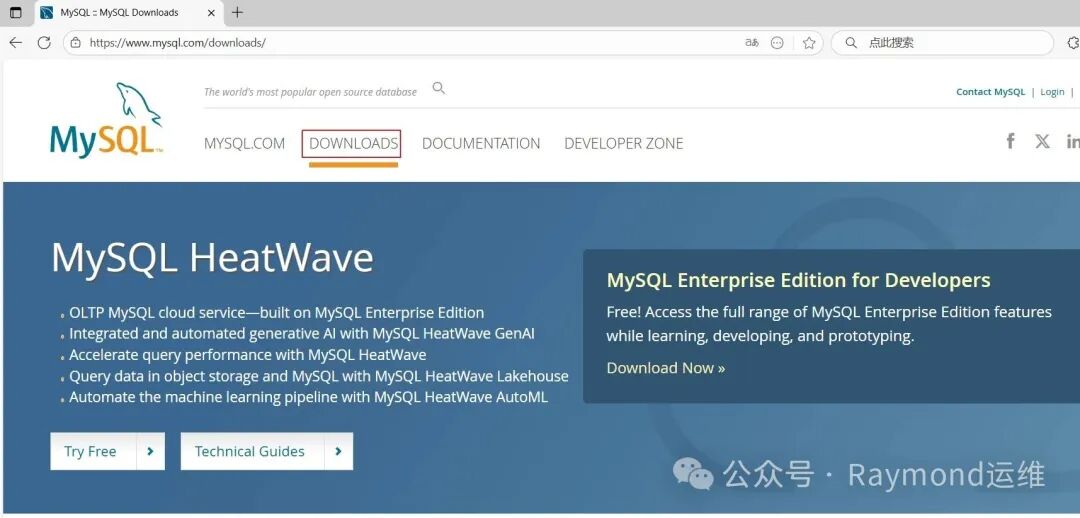
去“https://www.mysql.com/”网站下载,选择“DOWNLOADS”,如图6所示。
t6
图6 下载Yum仓库包
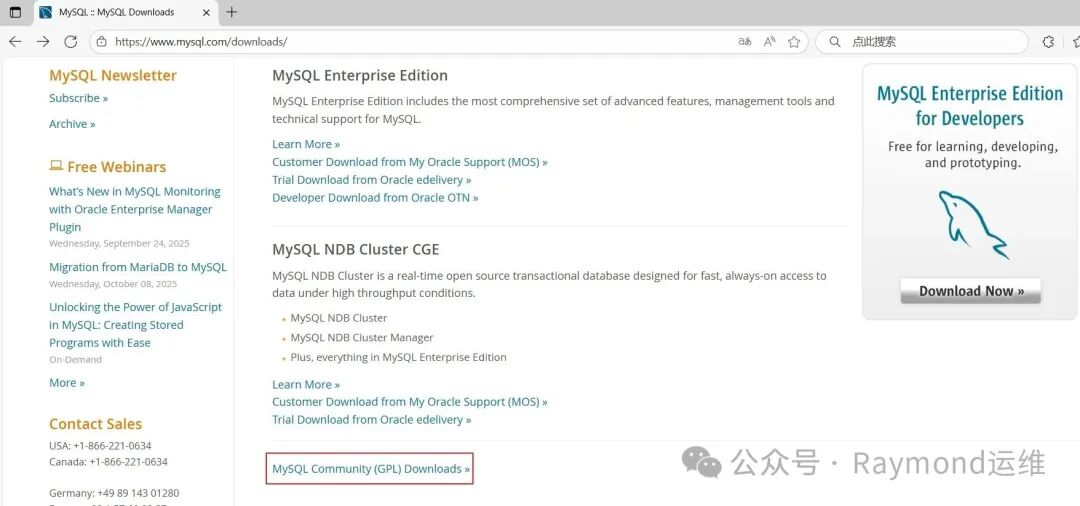
选择“MySQL Community (GPL) Downloads”,如图7所示。
t7
图7 下载Yum仓库包
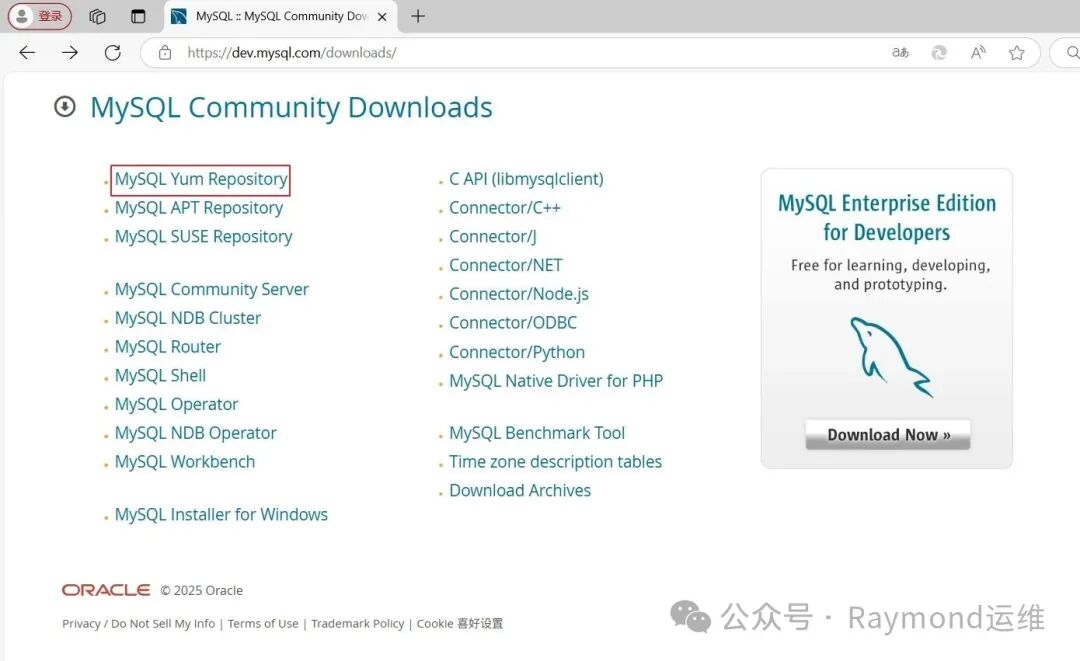
选择“MySQL Yum Repository(MySQL Yum资源库)”,如图8所示。
t8
图8 下载Yum仓库包
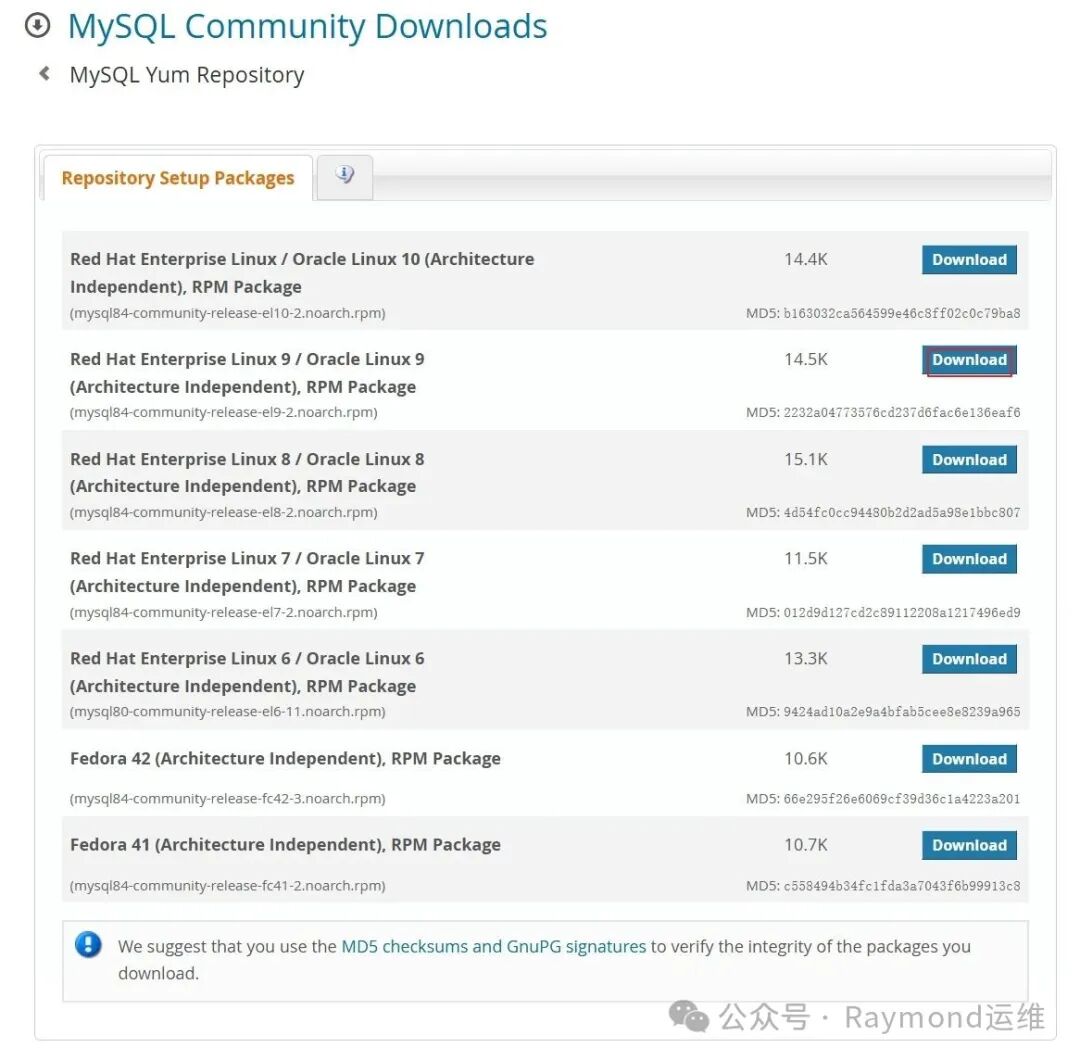
然后根据系统版本下载相应的安装包,如图9所示。
t9
图9 下载Yum仓库包
Rocky 9、Almalinux 9、CentOS Stream 9、AnolisOS 23、OpenCloudOS 9:
1# Rocky、Almalinux、CentOS、AnolisOS、OpenCloudOS、Kylin Server默认没有wget包,需要安装
2yum install-ywget
3
4[root@rocky9 ~]# wget https://dev.mysql.com/get/mysql84-community-release-el9-1.noarch.rpm
5
6[root@rocky9 ~]# rpm -ivh mysql84-community-release-el9-1.noarch.rpm
7
8[root@rocky9 ~]# yum makecache
9
10[root@rocky9 ~]# yum list mysql-community-server --showduplicates
11Last metadata expiration check: 0:00:06 ago on Fri 18 Apr 2025 07:37:00 PM CST.
12Available Packages
13mysql-community-server.x86_64                           8.4.0-1.el9                           mysql-8.4-lts-community
14mysql-community-server.x86_64                           8.4.2-1.el9                           mysql-8.4-lts-community
15mysql-community-server.x86_64                           8.4.3-1.el9                           mysql-8.4-lts-community
16mysql-community-server.x86_64                           8.4.4-1.el9                           mysql-8.4-lts-community
17mysql-community-server.x86_64                           8.4.5-1.el9                           mysql-8.4-lts-community
18
19[root@rocky9 ~]# yum install -y mysql-community-server
20
21[root@rocky9 ~]# systemctl enable --now mysqld
22
23[root@rocky9 ~]# ls /var/lib/mysql
24 auto.cnf        client-cert.pem      ibdata1         mysql.ibd               private_key.pem   undo_001
25 binlog.000001   client-key.pem       ibtmp1          mysql.sock              public_key.pem    undo_002
26 binlog.index   '#ib_16384_0.dblwr''#innodb_redo'   mysql.sock.lock         server-cert.pem
27 ca-key.pem     '#ib_16384_1.dblwr''#innodb_temp'   mysql_upgrade_history   server-key.pem
28 ca.pem          ib_buffer_pool       mysql           performance_schema      sys
29
30[root@rocky9 ~]# mysql -V
31mysql  Ver 8.4.5 for Linux on x86_64 (MySQL Community Server - GPL
32
33[root@rocky9 ~]# systemctl status mysqld
34● mysqld.service - MySQL Server
35     Loaded: loaded (/usr/lib/systemd/system/mysqld.service; enabled; preset: disabled)
36     Active: active (running) since Sat 2025-04-12 21:14:16 CST; 49s ago
37       Docs: man:mysqld(8)
38             http://dev.mysql.com/doc/refman/en/using-systemd.html
39    Process: 12094ExecStartPre=/usr/bin/mysqld_pre_systemd (code=exited, status=0/SUCCESS)
40   Main PID: 12159(mysqld)
41     Status: "Server is operational"
42      Tasks: 35(limit: 10892)
43     Memory: 443.0M
44        CPU: 3.806s
45     CGroup: /system.slice/mysqld.service
46             └─12159 /usr/sbin/mysqld
47
48Apr 1221:14:11 rocky9 systemd[1]: Starting MySQL Server...
49Apr 1221:14:16 rocky9 systemd[1]: Started MySQL Server.
50
51# 获取MySQL初始密码
52[root@rocky9 ~]# grep password /var/log/mysqld.log
532025-04-12T13:52:56.917890Z 6[Note][MY-010454][Server] A temporary password is generated for root@localhost: jqdeiDdgi3_I
54# "jqdeiDdgi3_I"就是MySQL的初始密码
55
56# 修改mysql密码
57[root@rocky9 ~]# mysqladmin -uroot -p'jqdeiDdgi3_I' password 123456
58mysqladmin: [Warning] Using a password on the command line interface can be insecure.
59Warning: Since password will be sent to server in plain text, use ssl connection to ensure password safety.
60mysqladmin: unable to change password; error: 'Your password does not satisfy the current policy requirements'
61# 上面报错提示密码太简单
62
63[root@rocky9 ~]# mysqladmin -uroot -p'jqdeiDdgi3_I' password Raymond@2025
64mysqladmin: [Warning] Using a password on the command line interface can be insecure.
65Warning: Since password will be sent to server in plain text, use ssl connection to ensure password safety.
66
67[root@rocky9 ~]# mysql -uroot -p'Raymond@2025'
68mysql: [Warning] Using a password on the command line interface can be insecure.
69Welcome to the MySQL monitor.  Commands end with ; or \g.
70Your MySQL connection id is 9
71Server version: 8.4.5 MySQL Community Server - GPL
72
73Copyright (c)2000, 2025, Oracle and/or its affiliates.
74
75Oracle is a registered trademark of Oracle Corporation and/or its
76affiliates. Other names may be trademarks of their respective
77owners.
78
79Type 'help;' or '\h'for help. Type '\c' to clear the current input statement.
80
81mysql> status
82--------------
83mysql  Ver 8.4.5 for Linux on x86_64 (MySQL Community Server - GPL)
84
85Connection id:		9
86Current database:
87Current user:		root@localhost
88SSL:			Not in use
89Current pager:		stdout
90Using outfile:		''
91Using delimiter:	;
92Server version:		8.4.5 MySQL Community Server - GPL
93Protocol version:	10
94Connection:		Localhost via UNIX socket
95Server characterset:	utf8mb4
96Db     characterset:	utf8mb4
97Client characterset:	utf8mb4
98Conn.  characterset:	utf8mb4
99UNIX socket:		/var/lib/mysql/mysql.sock
100Binary data as:		Hexadecimal
101Uptime:			59 sec
102
103Threads: 2  Questions: 9  Slow queries: 0  Opens: 130  Flush tables: 3  Open tables: 46  Queries per second avg: 0.152
104--------------
105
106mysql> show databases;
107+--------------------+
108| Database           |
109+--------------------+
110| information_schema |
111| mysql              |
112| performance_schema |
113| sys                |
114+--------------------+
1154 rows inset(0.01 sec)
116
117mysql>exit
118Bye
Rocky 8、Almalinux 8、CentOS Stream 8、AnolisOS 8、OpenCloudOS 8:
1# Rocky、Almalinux、CentOS、AnolisOS、OpenCloudOS、Kylin Server默认没有wget包,需要安装
2[root@rocky8 ~]# yum install -y wget
3
4[root@rocky8 ~]# wget https://dev.mysql.com/get/mysql84-community-release-el8-1.noarch.rpm
5
6[root@rocky8 ~]# rpm -ivh mysql84-community-release-el8-1.noarch.rpm
7
8[root@rocky8 ~]# yum makecache
9
10[root@rocky8 ~]# yum list mysql-community-server --showduplicates
11Last metadata expiration check: 0:01:43 ago on Sat 12 Apr 202511:29:44 PM CST.
12Error: No matching Packages to list
13# 找不到安装包
在“Rocky 8、Almalinux 8、CentOS Stream 8、AnolisOS 8、OpenCloudOS 8”操作系统上添加镜像仓库后,找不到安装包,需要从官方网站下载安装包来安装。
去“https://www.mysql.com/”网站下载,选择“DOWNLOADS”,如图10所示。
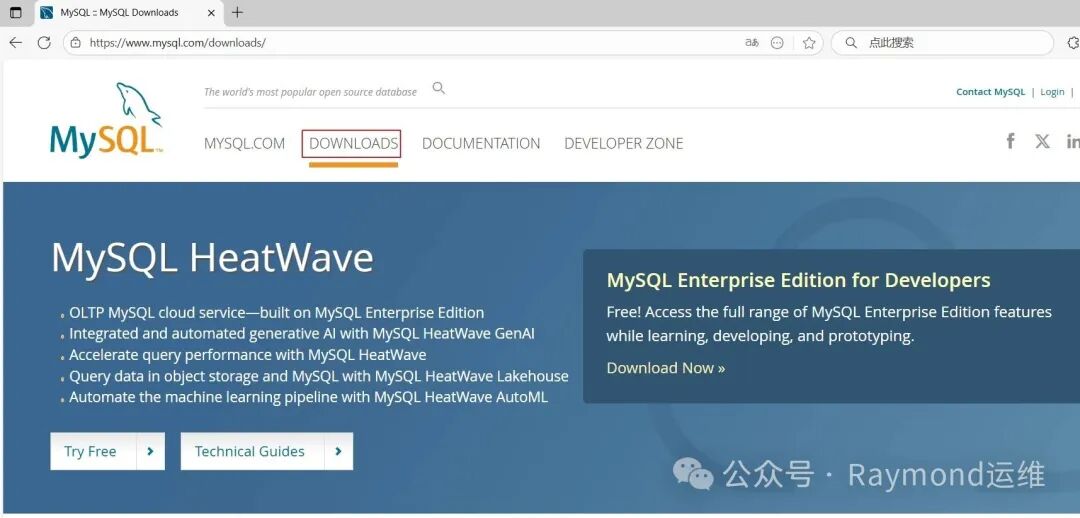
t10
图10 下载MySQL RPM包
选择“MySQL Community (GPL) Downloads”,如图11所示。
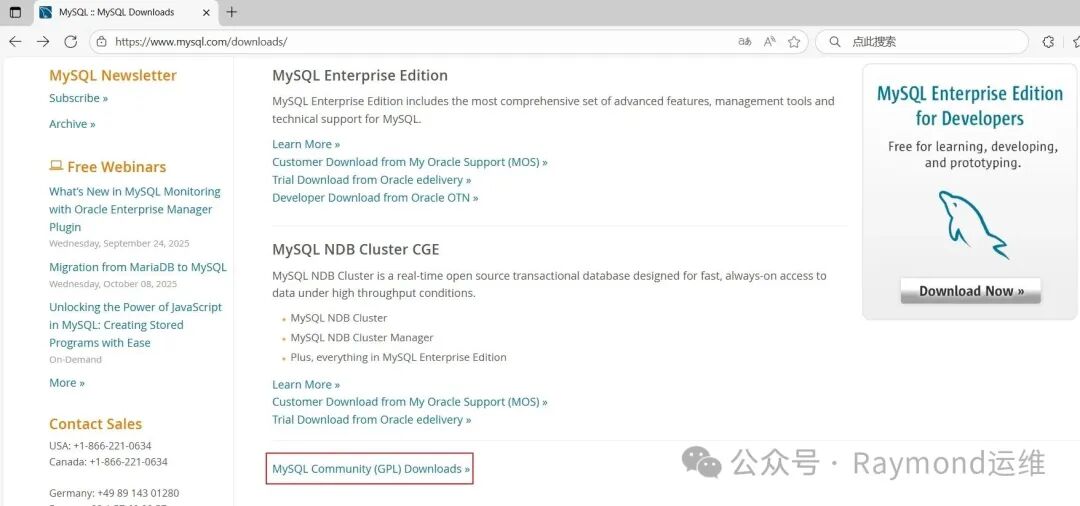
t11
图11 下载MySQL RPM包
选择“MySQL Community Server(MySQL社区服务器)”,如图12所示。
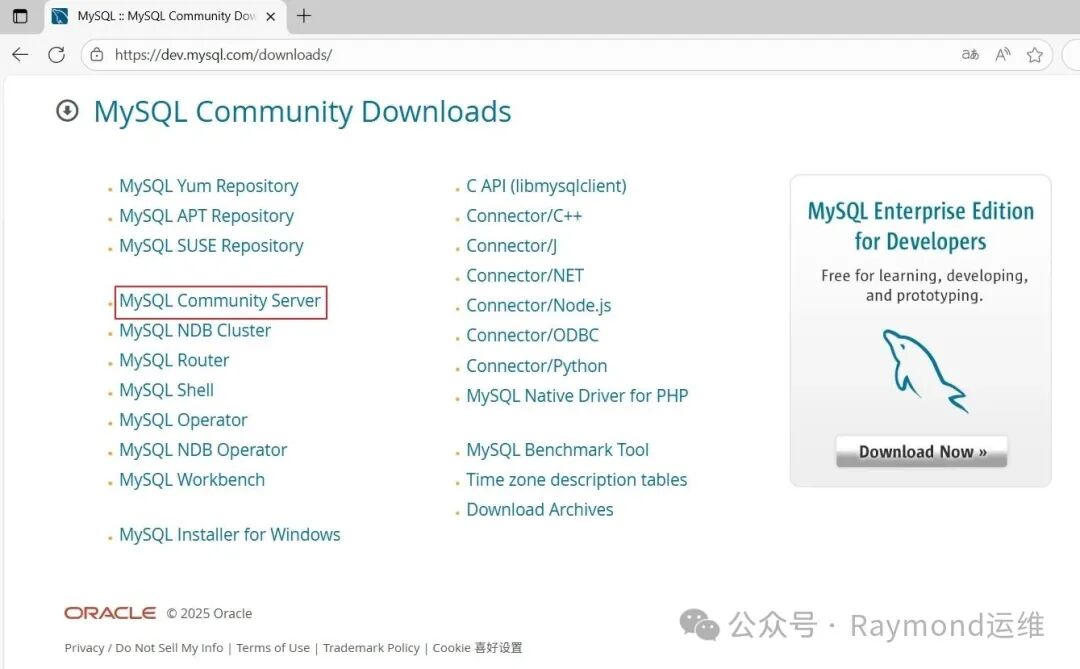
t12
图12 下载MySQL RPM包
"Select Version(选择版本)"为:8.4.5 LTS,“Select Operating System(选择操作系统)”为:Red Hat Enterprise Linux / Oracle Linux,"Select OS Version(选择操作系统版本)"为:Red Hat Enterprise Linux 8 / Oracle Linux 8 (x86 , 64-bit),然后选择”RPM Bundel“后面的”Download“,如图13所示。
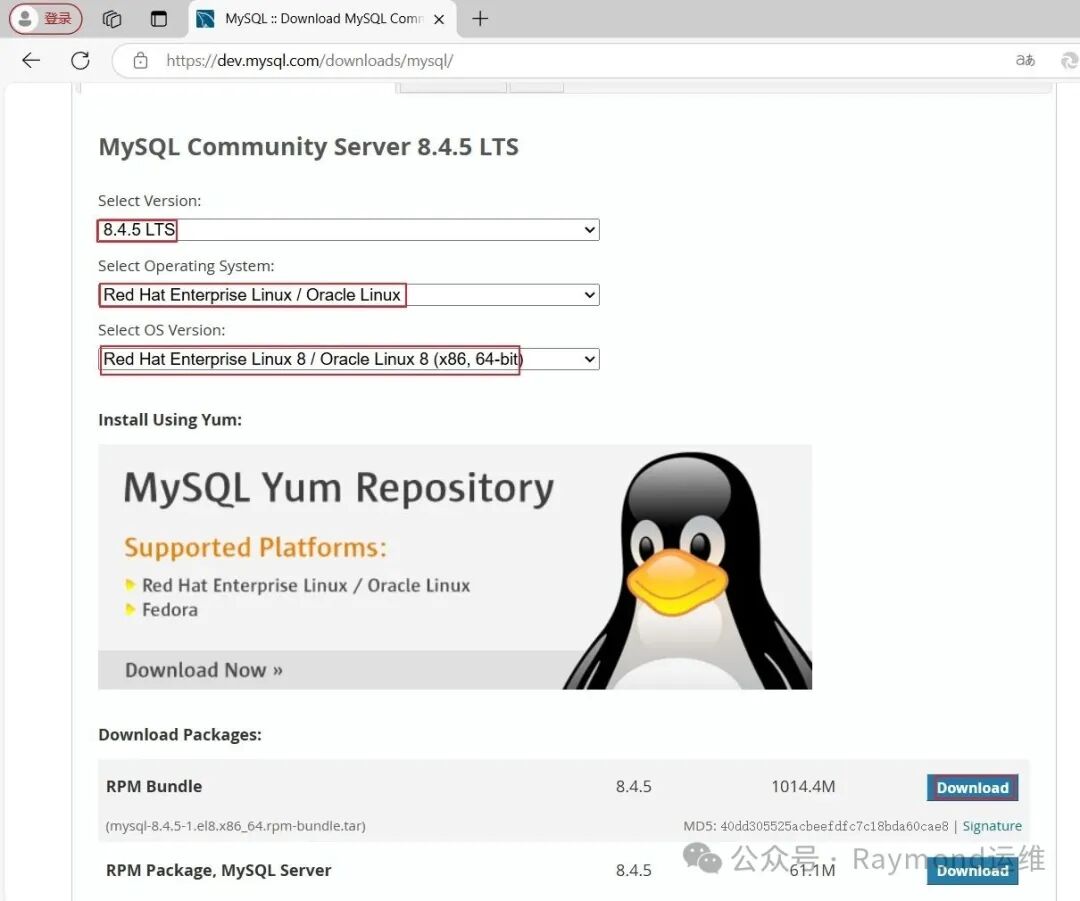
t13
图13 下载MySQL RPM包
1[root@rocky8 ~]# wget https://dev.mysql.com/get/Downloads/MySQL-8.4/mysql-8.4.5-1.el8.x86_64.rpm-bundle.tar
2
3[root@rocky8 ~]# tar xf mysql-8.4.5-1.el8.x86_64.rpm-bundle.tar
4
5[root@rocky8 ~]# yum install -y perl libaio
6
7[root@rocky8 ~]# rpm -ivh mysql-community-client-plugins-8.4.5-1.el8.x86_64.rpm
8
9[root@rocky8 ~]# rpm -ivh mysql-community-common-8.4.5-1.el8.x86_64.rpm
10
11[root@rocky8 ~]# rpm -ivh mysql-community-libs-8.4.5-1.el8.x86_64.rpm
12
13[root@rocky8 ~]# rpm -ivh mysql-community-client-8.4.5-1.el8.x86_64.rpm
14
15[root@rocky8 ~]# rpm -ivh mysql-community-icu-data-files-8.4.5-1.el8.x86_64.rpm
16
17[root@rocky8 ~]# yum install -y net-tools
18
19[root@rocky8 ~]# rpm -ivh mysql-community-server-8.4.5-1.el8.x86_64.rpm
20
21[root@rocky8 ~]# systemctl enable --now mysqld
22
23[root@rocky8 ~]# ls /var/lib/mysql
24 auto.cnf        client-cert.pem      ibdata1         mysql.ibd               private_key.pem   undo_001
25 binlog.000001   client-key.pem       ibtmp1          mysql.sock              public_key.pem    undo_002
26 binlog.index   '#ib_16384_0.dblwr''#innodb_redo'   mysql.sock.lock         server-cert.pem
27 ca-key.pem     '#ib_16384_1.dblwr''#innodb_temp'   mysql_upgrade_history   server-key.pem
28 ca.pem          ib_buffer_pool       mysql           performance_schema      sys
29
30[root@rocky8 ~]# mysql -V
31mysql  Ver 8.4.5 for Linux on x86_64 (MySQL Community Server - GPL)
32
33[root@rocky8 ~]# systemctl status mysqld
34● mysqld.service - MySQL Server
35   Loaded: loaded (/usr/lib/systemd/system/mysqld.service; enabled; vendor preset: disabled)
36   Active: active (running) since Sat 2025-04-19 01:13:21 CST; 35s ago
37     Docs: man:mysqld(8)
38           http://dev.mysql.com/doc/refman/en/using-systemd.html
39  Process: 15045ExecStartPre=/usr/bin/mysqld_pre_systemd (code=exited, status=0/SUCCESS)
40 Main PID: 15112(mysqld)
41   Status: "Server is operational"
42    Tasks: 35(limit: 12176)
43   Memory: 469.9M
44   CGroup: /system.slice/mysqld.service
45           └─15112 /usr/sbin/mysqld
46
47Apr 19 01:13:17 anolis8 systemd[1]: Starting MySQL Server...
48Apr 19 01:13:21 anolis8 systemd[1]: Started MySQL Server.
49
50# 获取MySQL初始密码
51[root@rocky8 ~]# grep password /var/log/mysqld.log
522025-04-18T17:13:19.074870Z 6[Note][MY-010454][Server] A temporary password is generated for root@localhost: gOtp+U:/L11&
53# "y7:Fc>lcCpl!"就是MySQL的初始密码
54
55# 修改mysql密码
56[root@rocky8 ~]# mysqladmin -uroot -p'gOtp+U:/L11&' password 123456
57mysqladmin: [Warning] Using a password on the command line interface can be insecure.
58Warning: Since password will be sent to server in plain text, use ssl connection to ensure password safety.
59mysqladmin: unable to change password; error: 'Your password does not satisfy the current policy requirements'
60# 上面报错提示密码太简单
61
62[root@rocky8 ~]# mysqladmin -uroot -p'gOtp+U:/L11&' password Raymond@2025
63mysqladmin: [Warning] Using a password on the command line interface can be insecure.
64Warning: Since password will be sent to server in plain text, use ssl connection to ensure password safety.
65
66[root@rocky8 ~]#
67
68mysql: [Warning] Using a password on the command line interface can be insecure.
69Welcome to the MySQL monitor.  Commands end with ; or \g.
70Your MySQL connection id is 9
71Server version: 8.4.5 MySQL Community Server - GPL
72
73Copyright (c)2000, 2025, Oracle and/or its affiliates.
74
75Oracle is a registered trademark of Oracle Corporation and/or its
76affiliates. Other names may be trademarks of their respective
77owners.
78
79Type 'help;' or '\h'for help. Type '\c' to clear the current input statement.
80
81mysql> status
82--------------
83mysql  Ver 8.4.5 for Linux on x86_64 (MySQL Community Server - GPL)
84
85Connection id:		9
86Current database:
87Current user:		root@localhost
88SSL:			Not in use
89Current pager:		stdout
90Using outfile:		''
91Using delimiter:	;
92Server version:		8.4.5 MySQL Community Server - GPL
93Protocol version:	10
94Connection:		Localhost via UNIX socket
95Server characterset:	utf8mb4
96Db     characterset:	utf8mb4
97Client characterset:	utf8mb4
98Conn.  characterset:	utf8mb4
99UNIX socket:		/var/lib/mysql/mysql.sock
100Binary data as:		Hexadecimal
101Uptime:			1 min 48 sec
102
103Threads: 2  Questions: 9  Slow queries: 0  Opens: 130  Flush tables: 3  Open tables: 46  Queries per second avg: 0.083
104--------------
105
106mysql> show databases;
107+--------------------+
108| Database           |
109+--------------------+
110| information_schema |
111| mysql              |
112| performance_schema |
113| sys                |
114+--------------------+
1154 rows inset(0.00 sec)
116
117mysql>exit
118Bye
openEuler 22.03/24.03 LTS、Kylin Server v10、UOS Server v20:
1# Rocky、Almalinux、CentOS、AnolisOS、OpenCloudOS、Kylin Server默认没有wget包,需要安装
2[root@openeuler2403 ~]#  yum install -y wget
3
4[root@openeuler2403 ~]#  wget https://dev.mysql.com/get/mysql84-community-release-el8-1.noarch.rpm
5
6[root@openeuler2403 ~]#  rpm -ivh mysql84-community-release-el8-1.noarch.rpm
7
8[root@openeuler2403 ~]#  yum makecache
9
10[root@openeuler2403 ~]#  yum list mysql-community-server --showduplicates
11Last metadata expiration check: 0:00:19 ago on Fri 18 Apr 2025 03:09:05 PM CST.
12Available Packages
13mysql-community-server.x86_64                           8.4.0-1.el8                           mysql-8.4-lts-community
14mysql-community-server.x86_64                           8.4.2-1.el8                           mysql-8.4-lts-community
15mysql-community-server.x86_64                           8.4.3-1.el8                           mysql-8.4-lts-community
16mysql-community-server.x86_64                           8.4.4-1.el8                           mysql-8.4-lts-community
17mysql-community-server.x86_64                           8.4.5-1.el8                           mysql-8.4-lts-communit
18
19[root@openeuler2403 ~]# yum install -y mysql-community-server
20
21[root@openeuler2403 ~]# systemctl enable --now mysqld
22
23[root@openeuler2403 ~]# ls /var/lib/mysql
24 auto.cnf        client-cert.pem      ibdata1         mysql.ibd               private_key.pem   undo_001
25 binlog.000001   client-key.pem       ibtmp1          mysql.sock              public_key.pem    undo_002
26 binlog.index   '#ib_16384_0.dblwr''#innodb_redo'   mysql.sock.lock         server-cert.pem
27 ca-key.pem     '#ib_16384_1.dblwr''#innodb_temp'   mysql_upgrade_history   server-key.pem
28 ca.pem          ib_buffer_pool       mysql           performance_schema      sys
29
30[root@openeuler2403 ~]# mysql -V
31mysql  Ver 8.4.5 for Linux on x86_64 (MySQL Community Server - GPL)
32
33[root@openeuler2403 ~]# systemctl status mysqld
34● mysqld.service - MySQL Server
35     Loaded: loaded (/usr/lib/systemd/system/mysqld.service; enabled; preset: disabled)
36     Active: active (running) since Fri 2025-04-18 15:25:52 CST; 38s ago
37       Docs: man:mysqld(8)
38             http://dev.mysql.com/doc/refman/en/using-systemd.html
39    Process: 1793ExecStartPre=/usr/bin/mysqld_pre_systemd (code=exited, status=0/SUCCESS)
40   Main PID: 1859(mysqld)
41     Status: "Server is operational"
42      Tasks: 35(limit: 8901)
43     Memory: 467.2M ()
44     CGroup: /system.slice/mysqld.service
45             └─1859 /usr/sbin/mysqld
46
47Apr 1815:25:48 openeuler2403 systemd[1]: Starting MySQL Server...
48Apr 1815:25:51 openeuler2403 (mysqld)[1859]: mysqld.service: Referenced but unset environment variable evaluates to>
49Apr 1815:25:52 openeuler2403 systemd[1]: Started MySQL Server.
50
51# 获取MySQL初始密码
52[root@openeuler2403 ~]# grep password /var/log/mysqld.log
532025-04-18T07:25:49.630875Z 6[Note][MY-010454][Server] A temporary password is generated for root@localhost: beM?N(3yyz&y
54# "jqdeiDdgi3_I"就是MySQL的初始密码
55
56# 修改mysql密码
57[root@openeuler2403 ~]# mysqladmin -uroot -p'beM?N(3yyz&y' password 123456
58mysqladmin: [Warning] Using a password on the command line interface can be insecure.
59Warning: Since password will be sent to server in plain text, use ssl connection to ensure password safety.
60mysqladmin: unable to change password; error: 'Your password does not satisfy the current policy requirements'
61# 上面报错提示密码太简单
62
63[root@openeuler2403 ~]# mysqladmin -uroot -p'beM?N(3yyz&y' password Raymond@2025
64mysqladmin: [Warning] Using a password on the command line interface can be insecure.
65Warning: Since password will be sent to server in plain text, use ssl connection to ensure password safety.
66
67[root@openeuler2403 ~]# mysql -uroot -p'Raymond@2025'
68mysql: [Warning] Using a password on the command line interface can be insecure.
69Welcome to the MySQL monitor.  Commands end with ; or \g.
70Your MySQL connection id is 10
71Server version: 8.4.5 MySQL Community Server - GPL
72
73Copyright (c)2000, 2025, Oracle and/or its affiliates.
74
75Oracle is a registered trademark of Oracle Corporation and/or its
76affiliates. Other names may be trademarks of their respective
77owners.
78
79Type 'help;' or '\h'for help. Type '\c' to clear the current input statement.
80
81mysql> status
82--------------
83mysql  Ver 8.4.5 for Linux on x86_64 (MySQL Community Server - GPL)
84
85Connection id:		10
86Current database:
87Current user:		root@localhost
88SSL:			Not in use
89Current pager:		stdout
90Using outfile:		''
91Using delimiter:	;
92Server version:		8.4.5 MySQL Community Server - GPL
93Protocol version:	10
94Connection:		Localhost via UNIX socket
95Server characterset:	utf8mb4
96Db     characterset:	utf8mb4
97Client characterset:	utf8mb4
98Conn.  characterset:	utf8mb4
99UNIX socket:		/var/lib/mysql/mysql.sock
100Binary data as:		Hexadecimal
101Uptime:			2 min 18 sec
102
103Threads: 2  Questions: 12  Slow queries: 0  Opens: 140  Flush tables: 3  Open tables: 56  Queries per second avg: 0.086
104--------------
105
106mysql> show databases;
107+--------------------+
108| Database           |
109+--------------------+
110| information_schema |
111| mysql              |
112| performance_schema |
113| sys                |
114+--------------------+
1154 rows inset(0.01 sec)
116
117mysql>exit
118Bye
在CentOS 7上安装MySQL:
1# Rocky、Almalinux、CentOS、AnolisOS、OpenCloudOS、Kylin Server默认没有wget包,需要安装
2[root@centos7 ~]# yum install -y wget
3
4[root@centos7 ~]# wget https://dev.mysql.com/get/mysql84-community-release-el7-1.noarch.rpm
5
6[root@centos7 ~]# rpm -ivh mysql84-community-release-el7-1.noarch.rpm
7
8[root@centos7 ~]# yum makecache
9
10[root@centos7 ~]# yum list mysql-community-server --showduplicates
11Loaded plugins: fastestmirror
12Loading mirror speeds from cached hostfile
13Available Packages
14mysql-community-server.x86_64                           8.4.0-1.el7                           mysql-8.4-lts-community
15mysql-community-server.x86_64                           8.4.2-1.el7                           mysql-8.4-lts-community
16mysql-community-server.x86_64                           8.4.3-1.el7                           mysql-8.4-lts-community
17mysql-community-server.x86_64                           8.4.4-1.el7                           mysql-8.4-lts-community
18mysql-community-server.x86_64                           8.4.5-1.el7                           mysql-8.4-lts-communit
19
20[root@centos7 ~]# yum install -y mysql-community-server
21
22[root@centos7 ~]# systemctl enable --now mysqld
23
24[root@centos7 ~]# mysql -V
25mysql  Ver 8.4.5 for Linux on x86_64 (MySQL Community Server - GPL)
26
27[root@centos7 ~]# systemctl status mysqld
28● mysqld.service - MySQL Server
29   Loaded: loaded (/usr/lib/systemd/system/mysqld.service; enabled; vendor preset: disabled)
30   Active: active (running) since Sat 2025-04-19 04:07:32 CST; 38s ago
31     Docs: man:mysqld(8)
32           http://dev.mysql.com/doc/refman/en/using-systemd.html
33  Process: 1185ExecStartPre=/usr/bin/mysqld_pre_systemd (code=exited, status=0/SUCCESS)
34 Main PID: 1249(mysqld)
35   Status: "Server is operational"
36   CGroup: /system.slice/mysqld.service
37           └─1249 /usr/sbin/mysqld
38
39Apr 19 04:07:27 centos7 systemd[1]: Starting MySQL Server...
40Apr 19 04:07:32 centos7 systemd[1]: Started MySQL Server.
41
42# 获取mysql初始密码
43[root@centos7 ~]# grep password /var/log/mysqld.log
442025-04-18T20:07:29.114303Z 6[Note][MY-010454][Server] A temporary password is generated for root@localhost: )puUpc=M8VJk
45# “)puUpc=M8VJk”就是mysql的初始密码
46
47# 修改mysql密码
48[root@centos7 ~]# mysqladmin -uroot -p')puUpc=M8VJk' password 123456
49mysqladmin: [Warning] Using a password on the command line interface can be insecure.
50Warning: Since password will be sent to server in plain text, use ssl connection to ensure password safety.
51mysqladmin: unable to change password; error: 'Your password does not satisfy the current policy requirements'
52# 上面报错提示密码太简单
53
54[root@centos7 ~]# mysqladmin -uroot -p')puUpc=M8VJk' password Raymond@2025
55mysqladmin: [Warning] Using a password on the command line interface can be insecure.
56Warning: Since password will be sent to server in plain text, use ssl connection to ensure password safety.
57
58[root@centos7 ~]# mysql -uroot -p'Raymond@2025'
59mysql: [Warning] Using a password on the command line interface can be insecure.
60Welcome to the MySQL monitor.  Commands end with ; or \g.
61Your MySQL connection id is 10
62Server version: 8.4.5 MySQL Community Server - GPL
63
64Copyright (c)2000, 2025, Oracle and/or its affiliates.
65
66Oracle is a registered trademark of Oracle Corporation and/or its
67affiliates. Other names may be trademarks of their respective
68owners.
69
70Type 'help;' or '\h'for help. Type '\c' to clear the current input statement.
71
72mysql> status
73--------------
74mysql  Ver 8.4.5 for Linux on x86_64 (MySQL Community Server - GPL)
75
76Connection id:		10
77Current database:
78Current user:		root@localhost
79SSL:			Not in use
80Current pager:		stdout
81Using outfile:		''
82Using delimiter:	;
83Server version:		8.4.5 MySQL Community Server - GPL
84Protocol version:	10
85Connection:		Localhost via UNIX socket
86Server characterset:	utf8mb4
87Db     characterset:	utf8mb4
88Client characterset:	utf8mb4
89Conn.  characterset:	utf8mb4
90UNIX socket:		/var/lib/mysql/mysql.sock
91Binary data as:		Hexadecimal
92Uptime:			2 min 11 sec
93
94Threads: 2  Questions: 12  Slow queries: 0  Opens: 140  Flush tables: 3  Open tables: 56  Queries per second avg: 0.091
95--------------
96
97mysql> show databases;
98+--------------------+
99| Database           |
100+--------------------+
101| information_schema |
102| mysql              |
103| performance_schema |
104| sys                |
105+--------------------+
1064 rows inset(0.00 sec)
107
108mysql>exit
109Bye
在Kylin Server V11上安装MySQL:
在“Kylin Server V11”操作系统官方没有镜像仓库,需要从官方网站下载安装包来安装。
去“https://www.mysql.com/”网站下载,选择“DOWNLOADS”,如图14所示。
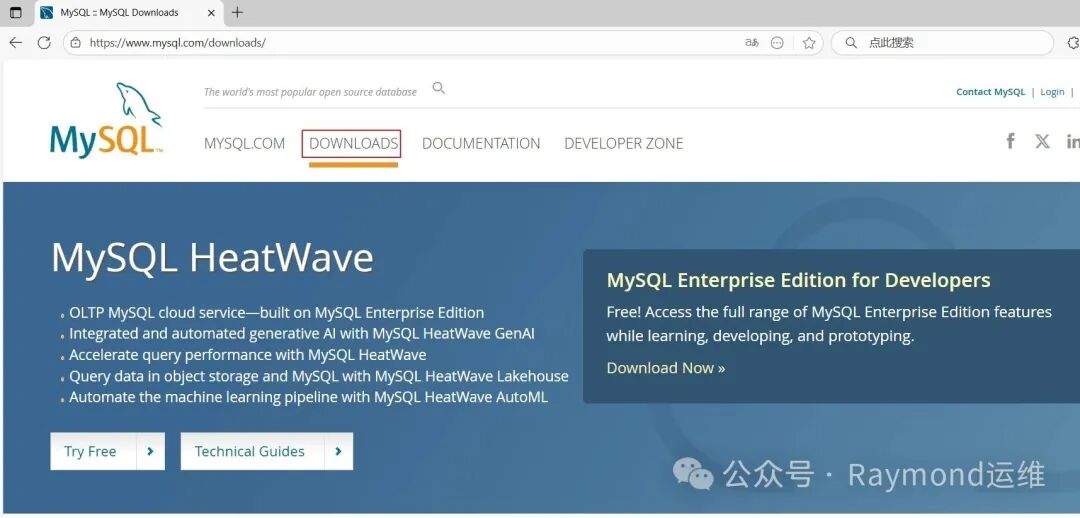
t14
图14 下载MySQL RPM包
选择“MySQL Community (GPL) Downloads”,如图15所示。
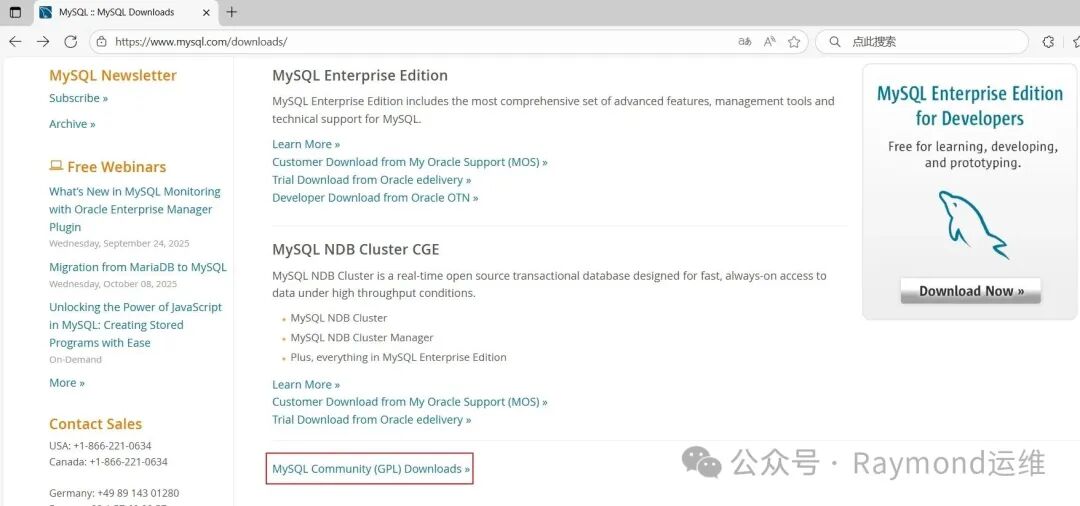
t15
图15 下载MySQL RPM包
选择“MySQL Community Server(MySQL社区服务器)”,如图16所示。
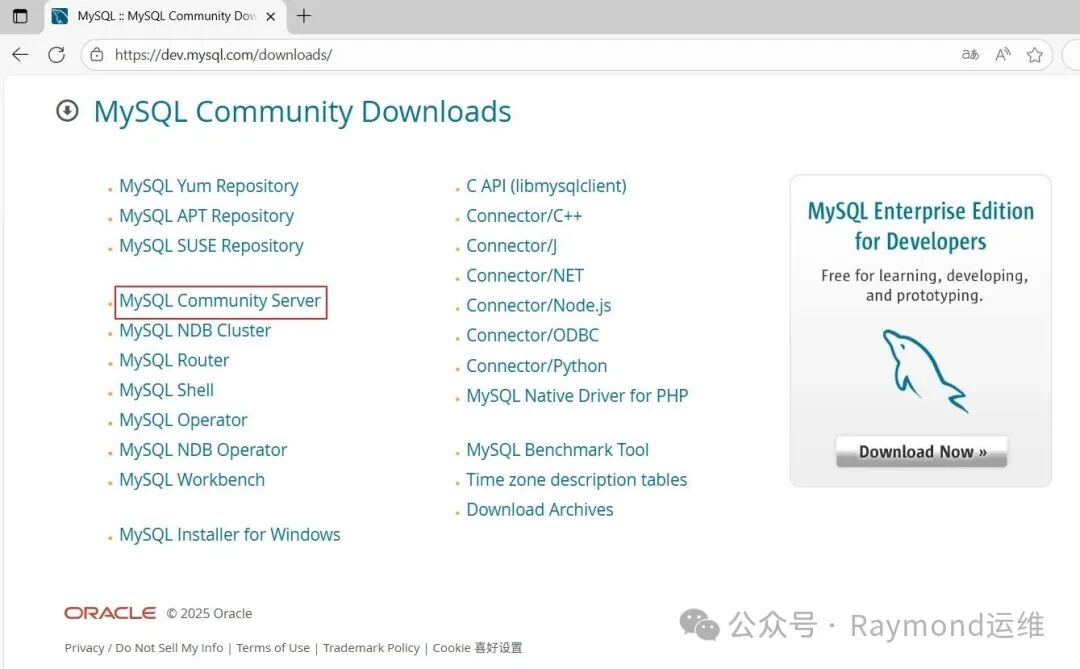
t16
图16 下载MySQL RPM包
"Select Version(选择版本)"为:8.4.6 LTS,“Select Operating System(选择操作系统)”为:Red Hat Enterprise Linux / Oracle Linux,"Select OS Version(选择操作系统版本)"为:Red Hat Enterprise Linux 9 / Oracle Linux 9 (x86 , 64-bit),然后选择”RPM Bundel“后面的”Download“,如图17所示。
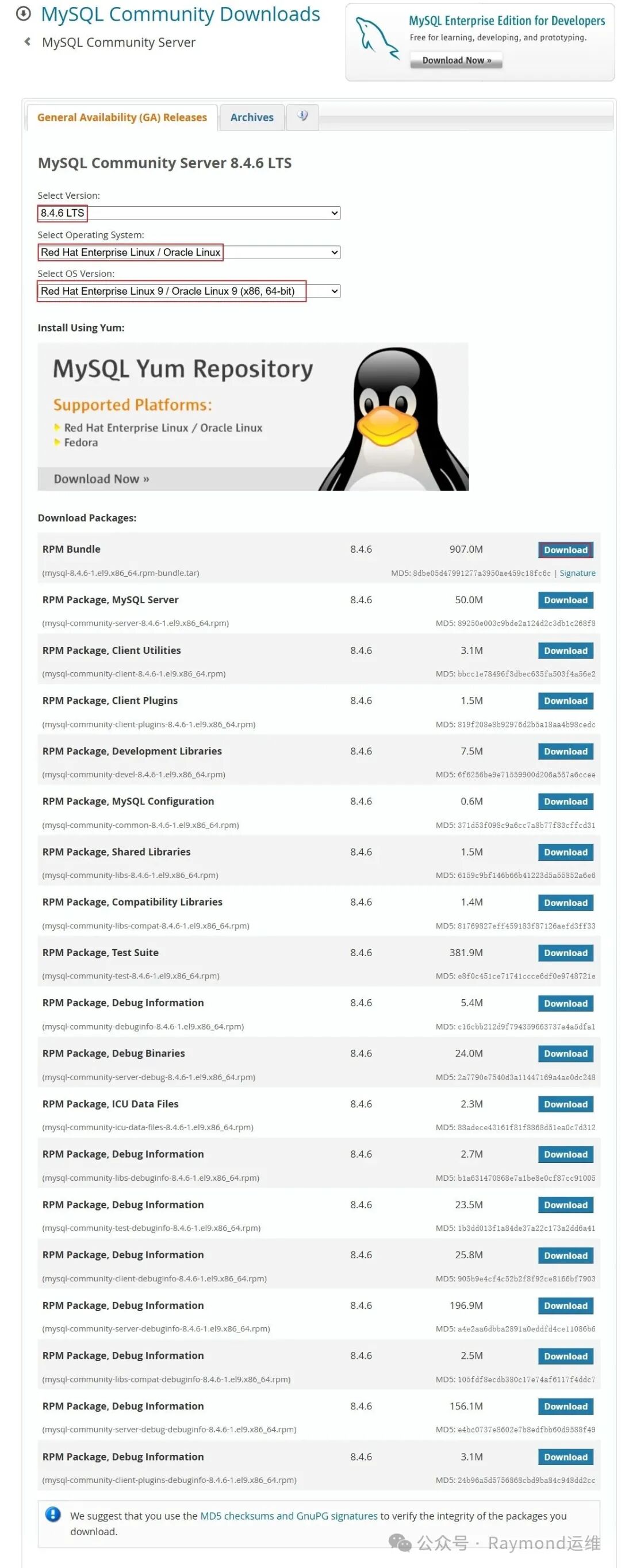
t17
图17 下载MySQL RPM包
# Rocky、Almalinux、CentOS、AnolisOS、OpenCloudOS、Kylin Server默认没有wget包,需要安装
2yum install-ywget
3
4[root@kylin11 ~]# wget https://cdn.mysql.com//Downloads/MySQL-8.4/mysql-8.4.6-1.el9.x86_64.rpm-bundle.tar
5
6[root@kylin11 ~]# tar xf mysql-8.4.6-1.el9.x86_64.rpm-bundle.tar
7
8[root@kylin11 ~]# yum install -y perl libaio
9
10[root@kylin11 ~]# rpm -ivh mysql-community-client-plugins-8.4.6-1.el9.x86_64.rpm
11
12[root@kylin11 ~]# rpm -ivh mysql-community-common-8.4.6-1.el9.x86_64.rpm
13
14[root@kylin11 ~]# rpm -ivh mysql-community-libs-8.4.6-1.el9.x86_64.rpm
15
16[root@kylin11 ~]# rpm -ivh mysql-community-client-8.4.6-1.el9.x86_64.rpm
17
18[root@kylin11 ~]# rpm -ivh mysql-community-icu-data-files-8.4.6-1.el9.x86_64.rpm
19
20[root@kylin11 ~]# yum install -y net-tools
21
22[root@kylin11 ~]# rpm -ivh mysql-community-server-8.4.6-1.el9.x86_64.rpm
23
24[root@kylin11 ~]# systemctl enable --now mysqld
25
26[root@kylin11 ~]# ls /var/lib/mysql
27 auto.cnf        client-cert.pem      ibdata1         mysql.ibd               private_key.pem   undo_001
28 binlog.000001   client-key.pem       ibtmp1          mysql.sock              public_key.pem    undo_002
29 binlog.index   '#ib_16384_0.dblwr''#innodb_redo'   mysql.sock.lock         server-cert.pem
30 ca-key.pem     '#ib_16384_1.dblwr''#innodb_temp'   mysql_upgrade_history   server-key.pem
31 ca.pem          ib_buffer_pool       mysql           performance_schema      sys
32
33[root@kylin11 ~]# mysql -V
34mysql  Ver 8.4.6 for Linux on x86_64 (MySQL Community Server - GPL)
35
36[root@kylin11 ~]# systemctl status mysqld
37● mysqld.service - MySQL Server
38     Loaded: loaded (/usr/lib/systemd/system/mysqld.service; enabled; preset: disabled)
39     Active: active (running) since Sat 2025-09-13 13:30:44 CST; 1min 39s ago
40       Docs: man:mysqld(8)
41             http://dev.mysql.com/doc/refman/en/using-systemd.html
42    Process: 2982ExecStartPre=/usr/bin/mysqld_pre_systemd (code=exited, status=0/SUCCESS)
43   Main PID: 3048(mysqld)
44     Status: "Server is operational"
45      Tasks: 34(limit: 8626)
46     Memory: 436.5M ()
47     CGroup: /system.slice/mysqld.service
48             └─3048 /usr/sbin/mysqld
49
50Sep 1313:30:40 kylin11 systemd[1]: Starting MySQL Server...
51Sep 1313:30:43 kylin11 (mysqld)[3048]: mysqld.service: Referenced but unset environment variable evaluates to a>
52Sep 1313:30:44 kylin11 systemd[1]: Started MySQL Server.
53
54# 获取MySQL初始密码
55[root@kylin11 ~]# grep password /var/log/mysqld.log
562025-09-13T05:30:41.773786Z 6[Note][MY-010454][Server] A temporary password is generated for root@localhost: S4-=kZYlF,cJ
57# "S4-=kZYlF,cJ"就是MySQL的初始密码
58
59# 修改mysql密码
60[root@kylin11 ~]# mysqladmin -uroot -p'S4-=kZYlF,cJ' password 123456
61mysqladmin: [Warning] Using a password on the command line interface can be insecure.
62Warning: Since password will be sent to server in plain text, use ssl connection to ensure password safety.
63mysqladmin: unable to change password; error: 'Your password does not satisfy the current policy requirements'
64# 上面报错提示密码太简单
65
66[root@kylin11 ~]# mysqladmin -uroot -p'S4-=kZYlF,cJ' password Raymond@2025
67mysqladmin: [Warning] Using a password on the command line interface can be insecure.
68Warning: Since password will be sent to server in plain text, use ssl connection to ensure password safety.
69
70[root@kylin11 ~]# mysql -uroot -p'Raymond@2025'
71mysql: [Warning] Using a password on the command line interface can be insecure.
72Welcome to the MySQL monitor.  Commands end with ; or \g.
73Your MySQL connection id is 10
74Server version: 8.4.6 MySQL Community Server - GPL
75
76Copyright (c)2000, 2025, Oracle and/or its affiliates.
77
78Oracle is a registered trademark of Oracle Corporation and/or its
79affiliates. Other names may be trademarks of their respective
80owners.
81
82Type 'help;' or '\h'for help. Type '\c' to clear the current input statement.
83
84mysql> status
85--------------
86mysql  Ver 8.4.6 for Linux on x86_64 (MySQL Community Server - GPL)
87
88Connection id:		10
89Current database:
90Current user:		root@localhost
91SSL:			Not in use
92Current pager:		stdout
93Using outfile:		''
94Using delimiter:	;
95Server version:		8.4.6 MySQL Community Server - GPL
96Protocol version:	10
97Connection:		Localhost via UNIX socket
98Server characterset:	utf8mb4
99Db     characterset:	utf8mb4
100Client characterset:	utf8mb4
101Conn.  characterset:	utf8mb4
102UNIX socket:		/var/lib/mysql/mysql.sock
103Binary data as:		Hexadecimal
104Uptime:			4 min 9 sec
105
106Threads: 2  Questions: 12  Slow queries: 0  Opens: 140  Flush tables: 3  Open tables: 56  Queries per second avg: 0.048
107--------------
108
109mysql> show databases;
110+--------------------+
111| Database           |
112+--------------------+
113| information_schema |
114| mysql              |
115| performance_schema |
116| sys                |
117+--------------------+
1184 rows inset(0.01 sec)
119
120mysql>exit
121Bye
2.2.2 Apt资源库安装MySQL
2.2.2.1 MySQL 8.0
在Ubuntu上安装MySQL:
1root@ubuntu2404:~# apt-cache madison mysql-server
2mysql-server |8.0.42-0ubuntu0.24.04.1 | https://mirrors.aliyun.com/ubuntu noble-updates/main amd64 Packages
3mysql-server |8.0.42-0ubuntu0.24.04.1 | https://mirrors.aliyun.com/ubuntu noble-security/main amd64 Packages
4mysql-server |8.0.36-2ubuntu3 | https://mirrors.aliyun.com/ubuntu noble/main amd64 Packages
5
6root@ubuntu2404:~# apt install -y mysql-server
7
8root@ubuntu2404:~# systemctl enable --now mysql
9
10root@ubuntu2404:~# mysql -V
11mysql  Ver 8.0.42-0ubuntu0.24.04.1 for Linux on x86_64 ((Ubuntu))
12
13root@ubuntu2404:~# systemctl status mysql
14● mysql.service - MySQL Community Server
15     Loaded: loaded (/usr/lib/systemd/system/mysql.service; enabled; preset: enabled)
16     Active: active (running) since Mon 2025-05-26 19:51:22 CST; 1min 3s ago
17   Main PID: 2211(mysqld)
18     Status: "Server is operational"
19      Tasks: 37(limit: 2214)
20     Memory: 364.0M (peak: 378.3M)
21        CPU: 1.604s
22     CGroup: /system.slice/mysql.service
23             └─2211 /usr/sbin/mysqld
24
25May 2619:51:21 ubuntu2404 systemd[1]: Starting mysql.service - MySQL Community Server...
26May 2619:51:22 ubuntu2404 systemd[1]: Started mysql.service - MySQL Community Server.
27
28root@ubuntu2404:~# mysql
29Welcome to the MySQL monitor.  Commands end with ; or \g.
30Your MySQL connection id is 8
31Server version: 8.0.42-0ubuntu0.24.04.1 (Ubuntu)
32
33Copyright (c)2000, 2025, Oracle and/or its affiliates.
34
35Oracle is a registered trademark of Oracle Corporation and/or its
36affiliates. Other names may be trademarks of their respective
37owners.
38
39Type 'help;' or '\h'for help. Type '\c' to clear the current input statement.
40
41mysql> status
42--------------
43mysql  Ver 8.0.42-0ubuntu0.24.04.1 for Linux on x86_64 ((Ubuntu))
44
45Connection id:		8
46Current database:
47Current user:		root@localhost
48SSL:			Not in use
49Current pager:		stdout
50Using outfile:		''
51Using delimiter:	;
52Server version:		8.0.42-0ubuntu0.24.04.1 (Ubuntu)
53Protocol version:	10
54Connection:		Localhost via UNIX socket
55Server characterset:	utf8mb4
56Db     characterset:	utf8mb4
57Client characterset:	utf8mb4
58Conn.  characterset:	utf8mb4
59UNIX socket:		/var/run/mysqld/mysqld.sock
60Binary data as:		Hexadecimal
61Uptime:			1 min 26 sec
62
63Threads: 2  Questions: 5  Slow queries: 0  Opens: 119  Flush tables: 3  Open tables: 38  Queries per second avg: 0.058
64--------------
65
66mysql> show databases;
67+--------------------+
68| Database           |
69+--------------------+
70| information_schema |
71| mysql              |
72| performance_schema |
73| sys                |
74+--------------------+
754 rows inset(0.00 sec)
76
77mysql>exit
78Bye
在Debian上安装MySQL:
1root@debian12:~# wget https://repo.mysql.com/mysql-apt-config_0.8.29-1_all.deb
2
3root@debian12:~# dpkg -i mysql-apt-config_0.8.29-1_all.deb
4Selecting previously unselected package mysql-apt-config.
5dpkg: regarding mysql-apt-config_0.8.29-1_all.deb containing mysql-apt-config, pre-dependency problem:
6 mysql-apt-config pre-depends on gnupg
7  gnupg is not installed. # 提示没有安装gnupg
8
9dpkg: error processing archive mysql-apt-config_0.8.29-1_all.deb (--install):
10 pre-dependency problem - not installing mysql-apt-config
11Errors were encountered while processing:
12 mysql-apt-config_0.8.29-1_all.deb
13
14root@debian12:~# apt install -y gnupg
15
16root@debian12:~# dpkg -i mysql-apt-config_0.8.29-1_all.deb
使用箭头键导航到 "MySQL Server & Cluster (Currently selected: mysql-8.0)" 选项,然后按下 Enter 键,这将允许你选择具体的 MySQL 服务器版本,如图18所示。
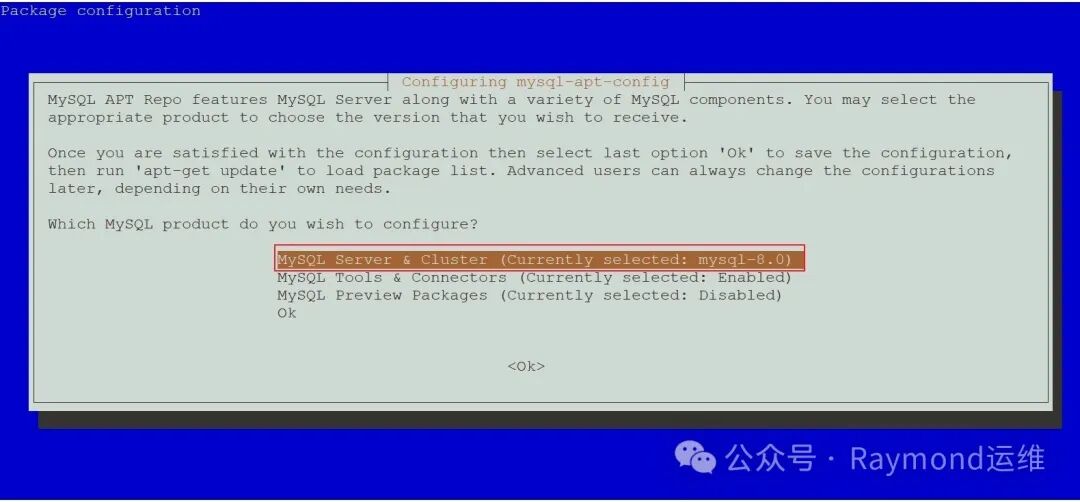
t18
图18 选择MySQL版本
在版本选择界面中,选择 "mysql-8.0" 版本(或其他你想要的版本)并按 Enter,如图19所示。
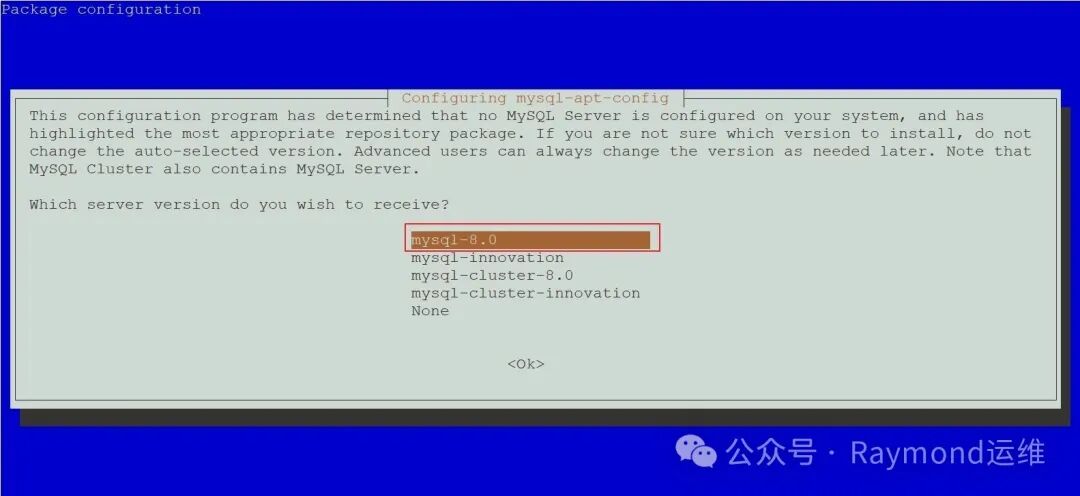
t19
图19 选择MySQL版本
使用箭头键导航到 "Ok" 选项,按下 Enter 键,确认并保存配置,如图20所示。
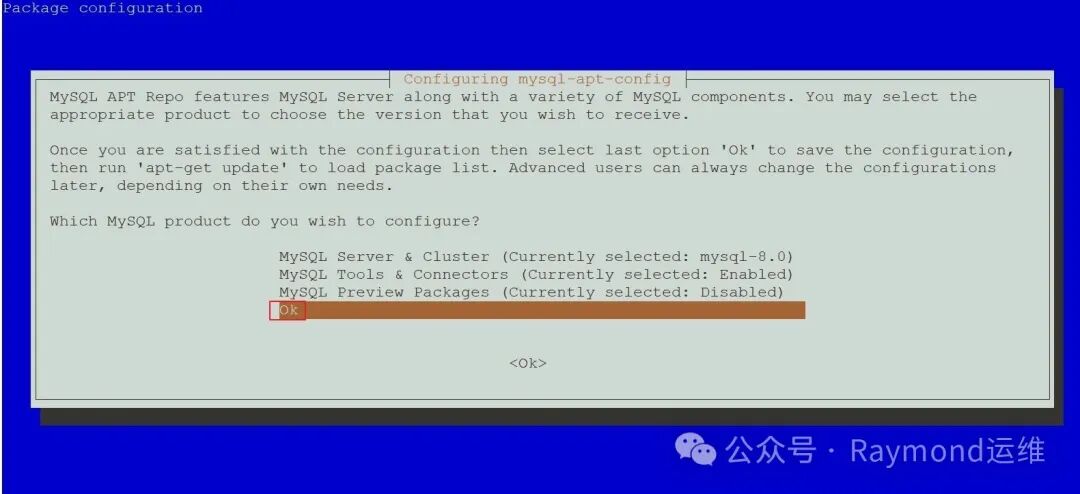
t20
图20 确认选择
1root@debian12:~# apt update
2
3root@debian12:~# apt-cache madison mysql-community-server
4mysql-community-server |8.0.42-1debian12 | http://repo.mysql.com/apt/debian bookworm/mysql-8.0 amd64 Packages
5mysql-community |8.0.42-1debian12 | http://repo.mysql.com/apt/debian bookworm/mysql-8.0 Sources
6
7root@debian12:~# apt install -y mysql-community-server
输入MySQL root用户密码,然后按下 Enter 键,如图21所示。
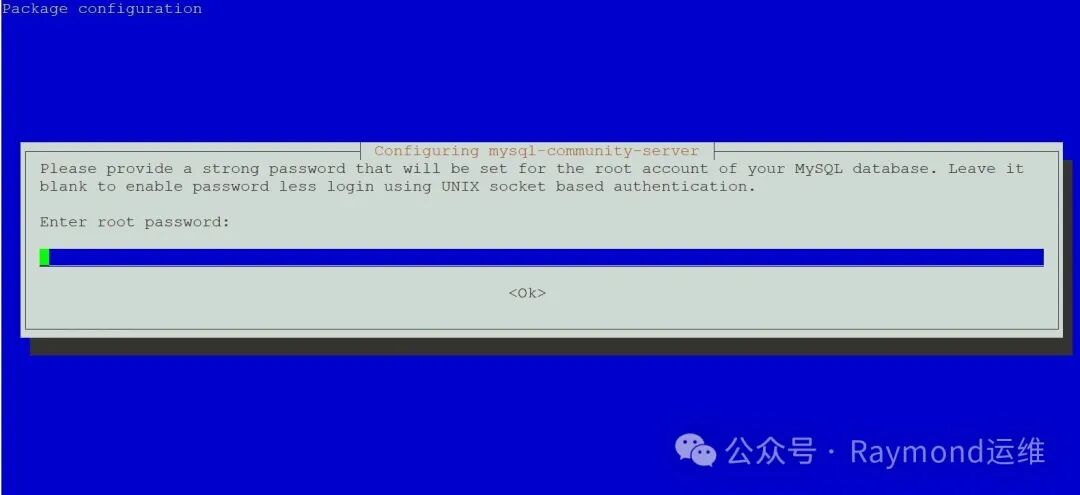
t21
图21 输入MySQL root用户密码
在下面提示直接按下 Enter 键,如图22所示。
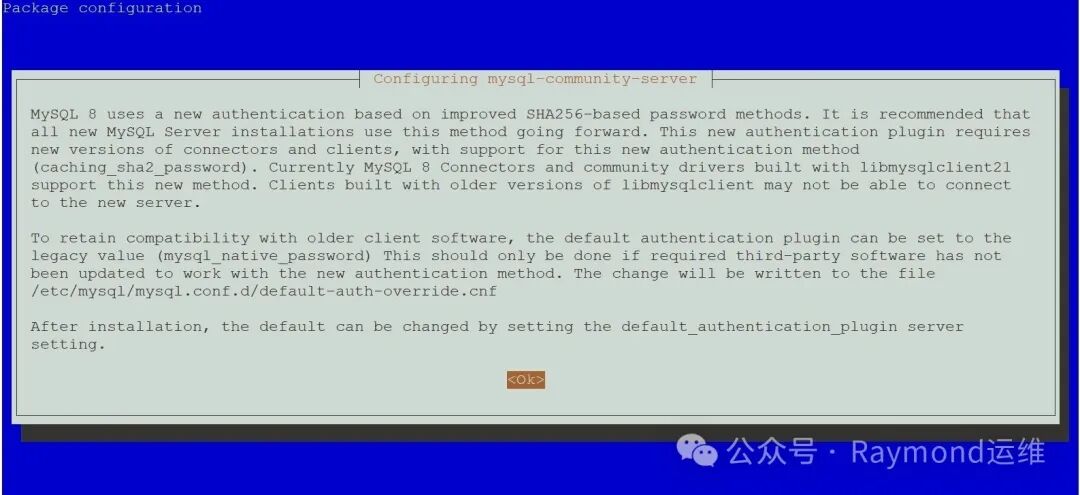
t22
图22 确认提示信息
选择“Use Strong Password Encryption (RECOMMENDED)”,然后按下 Enter 键,如图23所示。
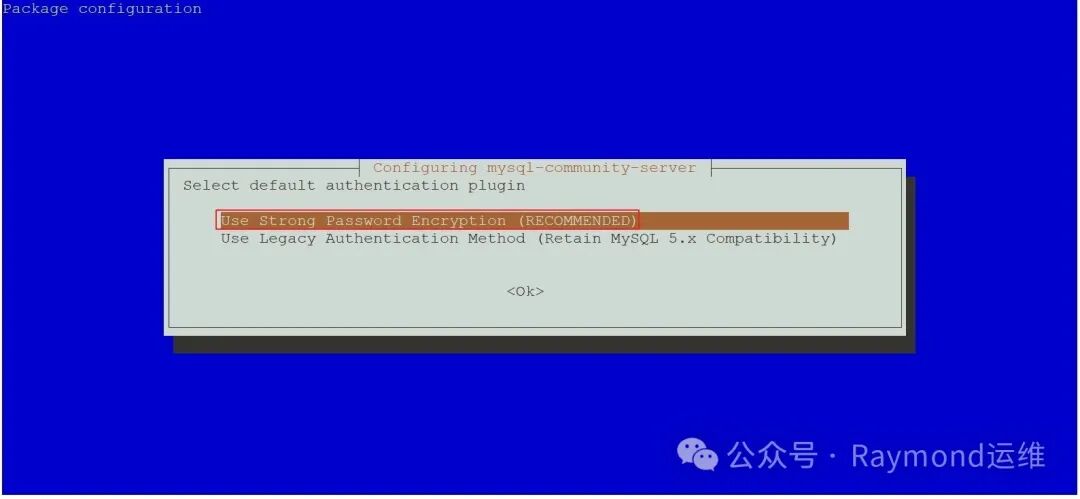
t23
图23 选择默认身份验证插件
1root@debian12:~# systemctl enable --now mysql
2
3root@debian12:~# mysql -V
4mysql  Ver 8.0.42 for Linux on x86_64 (MySQL Community Server - GPL)
5
6root@debian12:~# systemctl status mysql
7● mysql.service - MySQL Community Server
8     Loaded: loaded (/lib/systemd/system/mysql.service; enabled; preset: enabled)
9     Active: active (running) since Mon 2025-05-26 21:52:30 CST; 1min 1s ago
10       Docs: man:mysqld(8)
11             http://dev.mysql.com/doc/refman/en/using-systemd.html
12   Main PID: 2575(mysqld)
13     Status: "Server is operational"
14      Tasks: 38(limit: 2273)
15     Memory: 370.3M
16        CPU: 1.506s
17     CGroup: /system.slice/mysql.service
18             └─2575 /usr/sbin/mysqld
19
20May 2621:52:30 debian12 systemd[1]: Starting mysql.service - MySQL Community Server...
21May 2621:52:30 debian12 systemd[1]: Started mysql.service - MySQL Community Server.
22
23root@debian12:~# mysql
24Welcome to the MySQL monitor.  Commands end with ; or \g.
25Your MySQL connection id is 9
26Server version: 8.0.42 MySQL Community Server - GPL
27
28Copyright (c)2000, 2025, Oracle and/or its affiliates.
29
30Oracle is a registered trademark of Oracle Corporation and/or its
31affiliates. Other names may be trademarks of their respective
32owners.
33
34Type 'help;' or '\h'for help. Type '\c' to clear the current input statement.
35
36mysql> status
37--------------
38mysql  Ver 8.0.42 for Linux on x86_64 (MySQL Community Server - GPL)
39
40Connection id:		9
41Current database:
42Current user:		root@localhost
43SSL:			Not in use
44Current pager:		stdout
45Using outfile:		''
46Using delimiter:	;
47Server version:		8.0.42 MySQL Community Server - GPL
48Protocol version:	10
49Connection:		Localhost via UNIX socket
50Server characterset:	utf8mb4
51Db     characterset:	utf8mb4
52Client characterset:	utf8mb4
53Conn.  characterset:	utf8mb4
54UNIX socket:		/var/run/mysqld/mysqld.sock
55Binary data as:		Hexadecimal
56Uptime:			1 min 22 sec
57
58Threads: 2  Questions: 7  Slow queries: 0  Opens: 119  Flush tables: 3  Open tables: 38  Queries per second avg: 0.085
59--------------
60
61mysql> show databases;
62+--------------------+
63| Database           |
64+--------------------+
65| information_schema |
66| mysql              |
67| performance_schema |
68| sys                |
69+--------------------+
704 rows inset(0.00 sec)
71
72mysql>exit
73Bye
2.2.2.2 MySQL 8.4
在Ubuntu、Debian上安装MySQL:
去“https://www.mysql.com/”网站下载,选择“DOWNLOADS”,如图24所示。
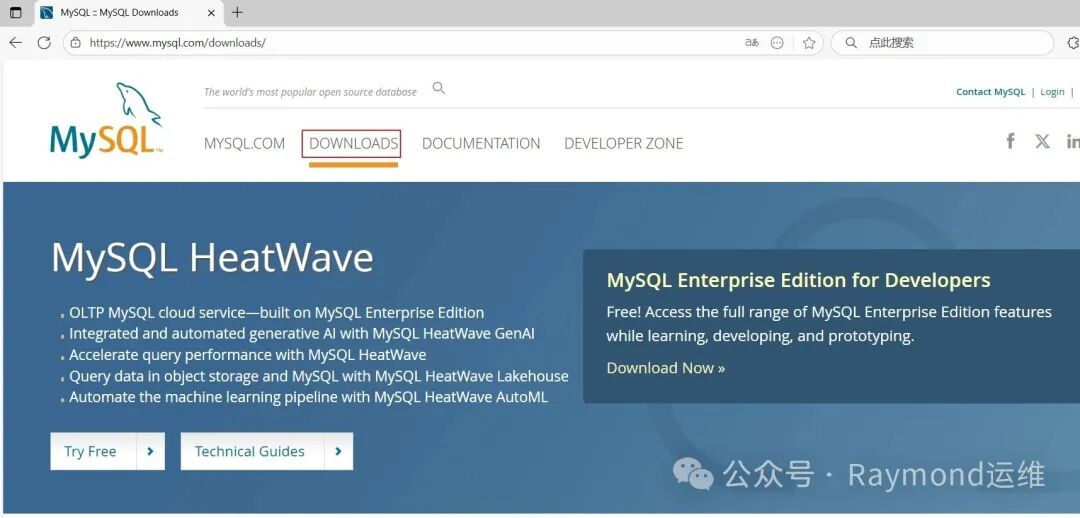
t24
图24 下载APT仓库包
选择“MySQL Community (GPL) Downloads”,如图25所示。
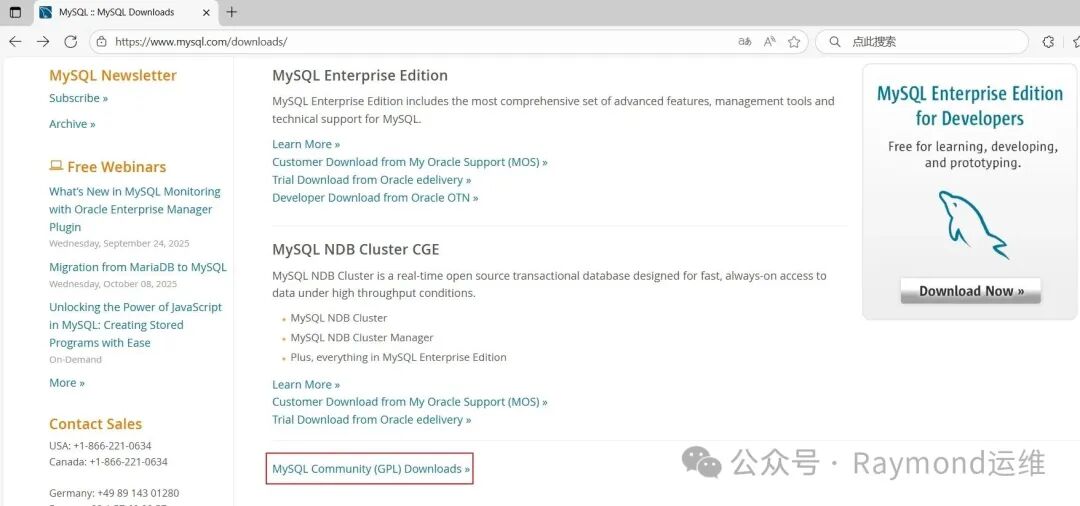
t25
图25 下载APT仓库包
选择“MySQL APT Repository(MySQL APT资源库)”,如图26所示。
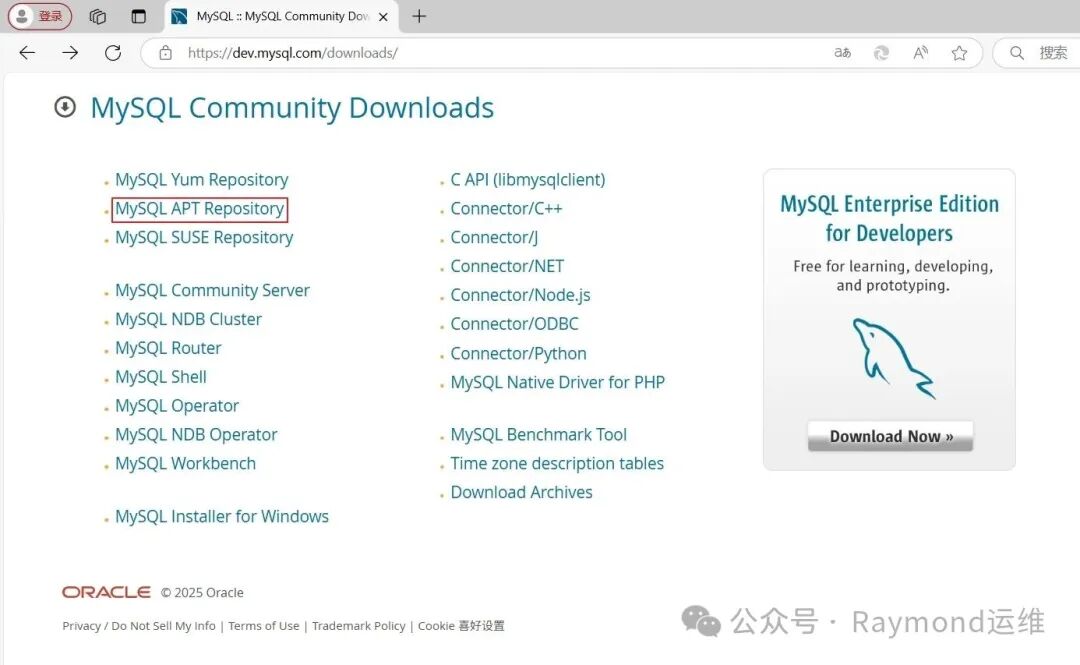
t26
图26 下载APT仓库包
然后根据系统版本下载相应的安装包,如图27所示。
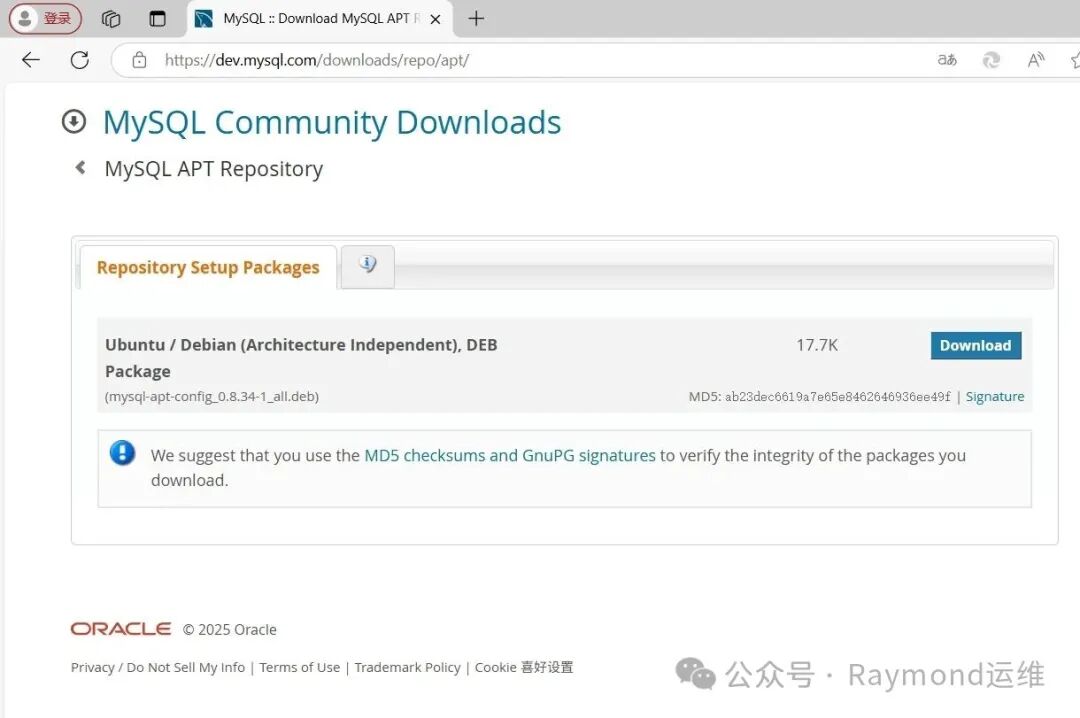
t27
图27 下载APT仓库包
在Ubuntu上安装MySQL:
1root@ubuntu2404:~# wget https://dev.mysql.com/get/mysql-apt-config_0.8.34-1_all.deb
2
3root@ubuntu2404:~# dpkg -i mysql-apt-config_0.8.34-1_all.deb
使用箭头键导航到 "MySQL Server & Cluster (Currently selected: mysql-8.4-lts)" 选项,然后按下 Enter 键,这将允许你选择具体的 MySQL 服务器版本,如图28所示。
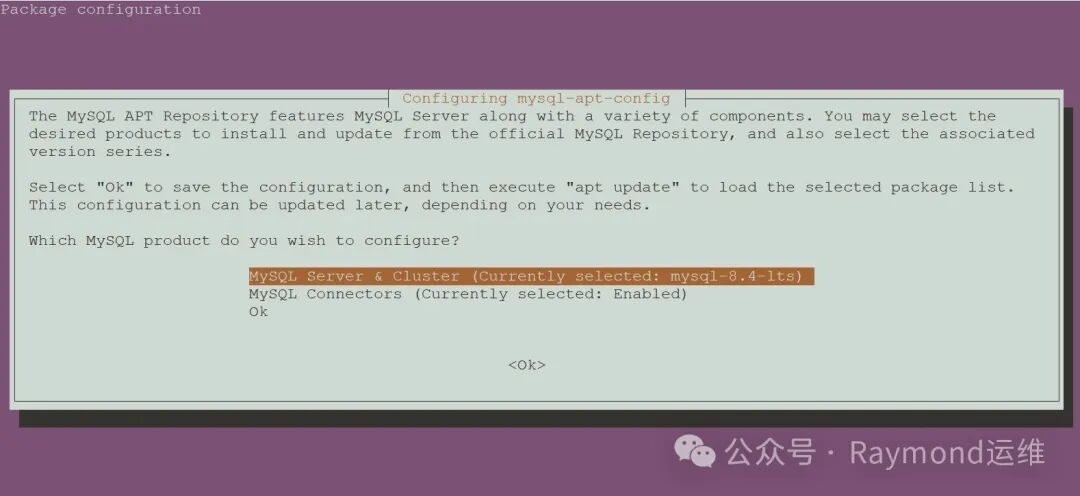
t28
图28 选择MySQL版本
在版本选择界面中,选择 "mysql-8.4-lts" 版本(或其他你想要的版本)并按 Enter,如图29所示。
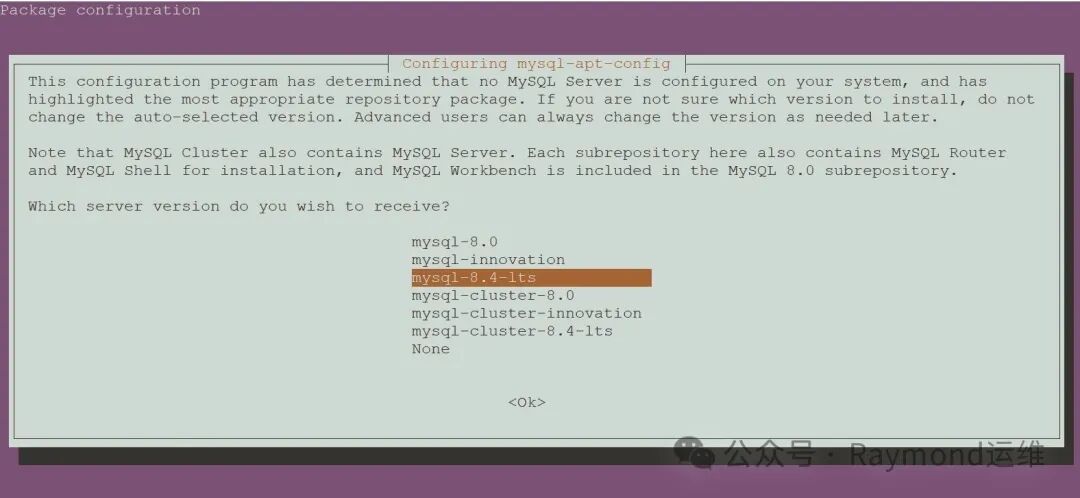
t29
图29 选择MySQL版本
使用箭头键导航到 "Ok" 选项,按下 Enter 键,确认并保存配置,如图30所示。
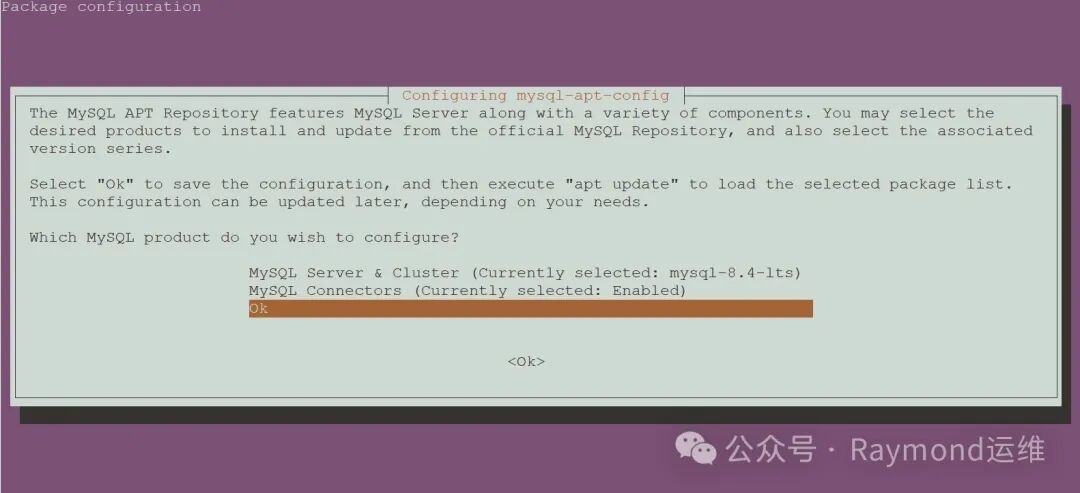
t30
图30 确认选择
1root@ubuntu2404:~# apt update
2
3root@ubuntu2404:~# apt-cache madison mysql-community-server
4mysql-community-server |8.4.5-1ubuntu24.04 | http://repo.mysql.com/apt/ubuntu noble/mysql-8.4-lts amd64 Packages
5mysql-community |8.4.5-1ubuntu24.04 | http://repo.mysql.com/apt/ubuntu noble/mysql-8.4-lts Sources
6
7root@ubuntu2404:~# apt install -y  mysql-community-server
输入MySQL root用户密码,然后按下 Enter 键,如图31所示。
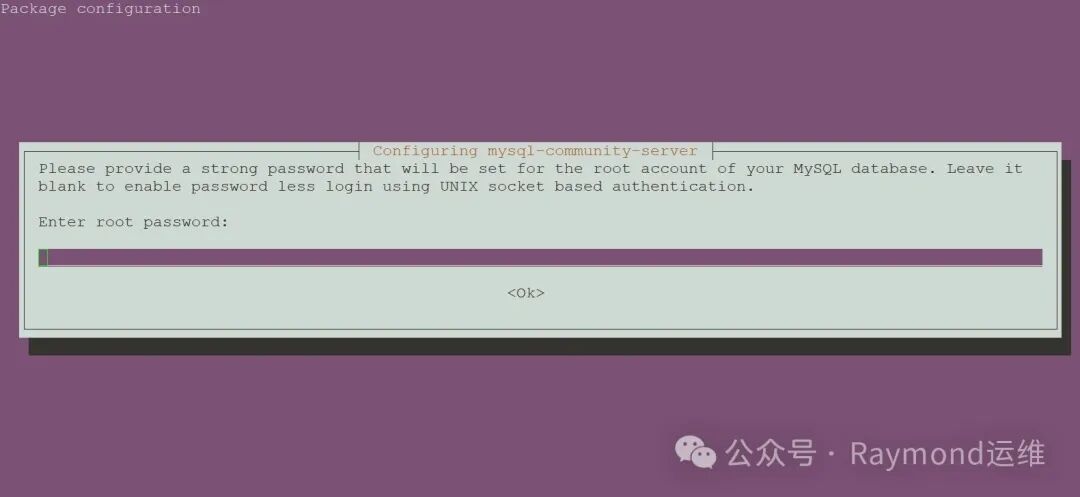
t31
图31 输入MySQL root用户密码
1root@ubuntu2404:~# systemctl enable --now mysql
2
3root@ubuntu2404:~# mysql -V
4mysql  Ver 8.4.5 for Linux on x86_64 (MySQL Community Server - GPL)
5
6root@ubuntu2404:~# systemctl status mysql
7● mysql.service - MySQL Community Server
8     Loaded: loaded (/usr/lib/systemd/system/mysql.service; enabled; preset: enabled)
9     Active: active (running) since Fri 2025-04-18 21:27:29 CST; 1min 44s ago
10       Docs: man:mysqld(8)
11             http://dev.mysql.com/doc/refman/en/using-systemd.html
12   Main PID: 2546(mysqld)
13     Status: "Server is operational"
14      Tasks: 34(limit: 2214)
15     Memory: 428.5M (peak: 442.6M)
16        CPU: 2.447s
17     CGroup: /system.slice/mysql.service
18             └─2546 /usr/sbin/mysqld
19
20Apr 1821:27:28 ubuntu2404 systemd[1]: Starting mysql.service - MySQL Community Server...
21Apr 1821:27:29 ubuntu2404 systemd[1]: Started mysql.service - MySQL Community Server.
22
23root@ubuntu2204:~# mysql
24mysql: [Warning] Using a password on the command line interface can be insecure.
25Welcome to the MySQL monitor.  Commands end with ; or \g.
26Your MySQL connection id is 9
27Server version: 8.4.5 MySQL Community Server - GPL
28
29Copyright (c)2000, 2025, Oracle and/or its affiliates.
30
31Oracle is a registered trademark of Oracle Corporation and/or its
32affiliates. Other names may be trademarks of their respective
33owners.
34
35Type 'help;' or '\h'for help. Type '\c' to clear the current input statement.
36
37mysql> status
38--------------
39mysql  Ver 8.4.5 for Linux on x86_64 (MySQL Community Server - GPL)
40
41Connection id:		9
42Current database:
43Current user:		root@localhost
44SSL:			Not in use
45Current pager:		stdout
46Using outfile:		''
47Using delimiter:	;
48Server version:		8.4.5 MySQL Community Server - GPL
49Protocol version:	10
50Connection:		Localhost via UNIX socket
51Server characterset:	utf8mb4
52Db     characterset:	utf8mb4
53Client characterset:	utf8mb4
54Conn.  characterset:	utf8mb4
55UNIX socket:		/var/run/mysqld/mysqld.sock
56Binary data as:		Hexadecimal
57Uptime:			2 min 14 sec
58
59Threads: 2  Questions: 6  Slow queries: 0  Opens: 119  Flush tables: 3  Open tables: 38  Queries per second avg: 0.044
60--------------
61
62mysql> show databases;
63+--------------------+
64| Database           |
65+--------------------+
66| information_schema |
67| mysql              |
68| performance_schema |
69| sys                |
70+--------------------+
714 rows inset(0.01 sec)
72
73mysql>exit
74Bye
在Debian上安装MySQL:
1root@debian12:~# wget https://dev.mysql.com/get/mysql-apt-config_0.8.34-1_all.deb
2
3root@debian12:~# dpkg -i  mysql-apt-config_0.8.34-1_all.deb
4dpkg: regarding mysql-apt-config_0.8.34-1_all.deb containing mysql-apt-config, pre-dependency problem:
5 mysql-apt-config pre-depends on gnupg
6  gnupg is not installed. # 提示没有安装gnupg
7
8dpkg: error processing archive mysql-apt-config_0.8.34-1_all.deb (--install):
9 pre-dependency problem - not installing mysql-apt-config
10Errors were encountered while processing:
11 mysql-apt-config_0.8.34-1_all.deb
12
13root@debian12:~# apt install -y gnupg
14
15root@debian12:~# dpkg -i  mysql-apt-config_0.8.34-1_all.deb
使用箭头键导航到 "MySQL Server & Cluster (Currently selected: mysql-8.4-lts)" 选项,然后按下 Enter 键,这将允许你选择具体的 MySQL 服务器版本,如图32所示。
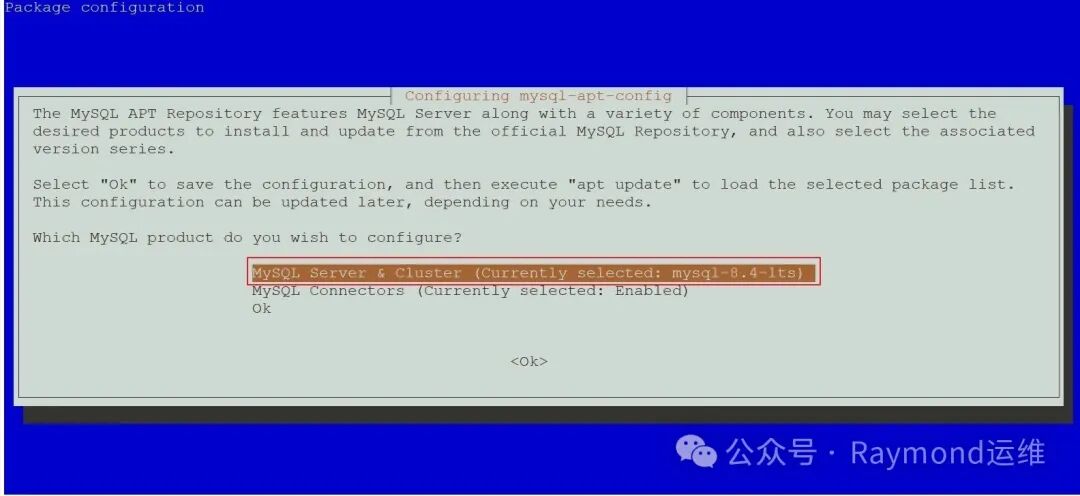
t32
图32 选择MySQL版本
在版本选择界面中,选择 "mysql-8.4-lts" 版本(或其他你想要的版本)并按 Enter,如图33所示。
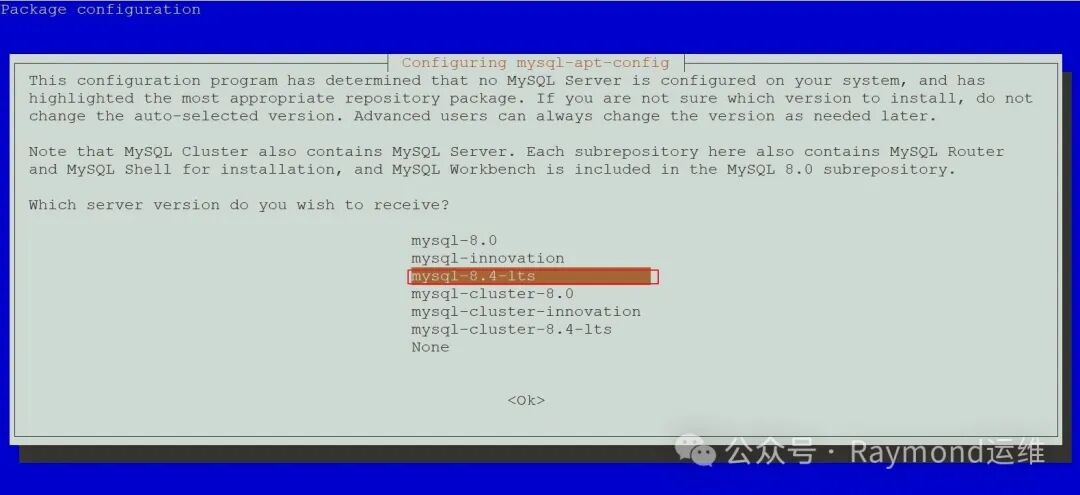
t33
图33 选择MySQL版本
使用箭头键导航到 "Ok" 选项,按下 Enter 键,确认并保存配置,如图34所示。
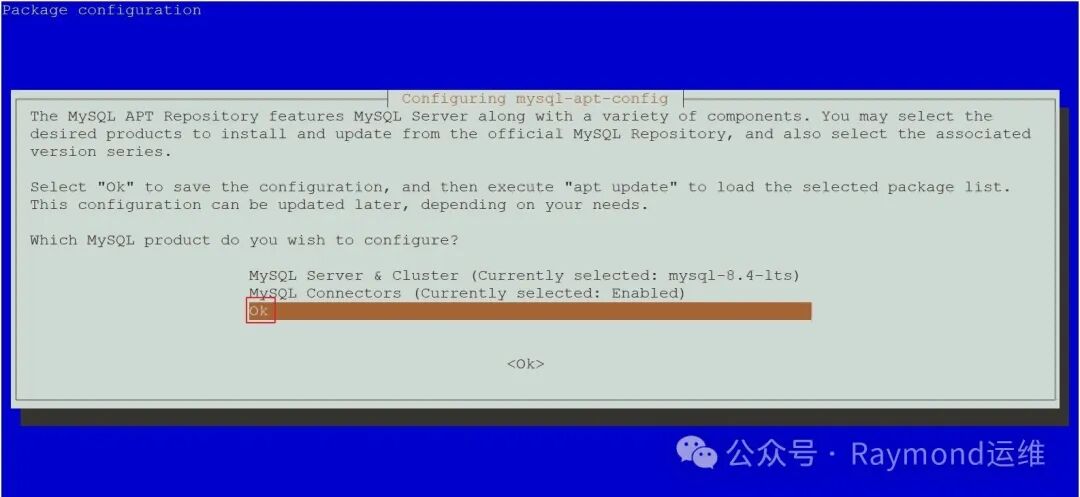
t34
图34 确认选择
1root@debian12:~# apt update
2
3root@debian12:~# apt-cache madison mysql-community-server
4mysql-community-server |8.4.5-1debian12 | http://repo.mysql.com/apt/debian bookworm/mysql-8.4-lts amd64 Packages
5mysql-community |8.4.5-1debian12 | http://repo.mysql.com/apt/debian bookworm/mysql-8.4-lts Sources
6
7root@debian12:~# apt install -y  mysql-community-server
输入MySQL root用户密码,然后按下 Enter 键,如图35所示。
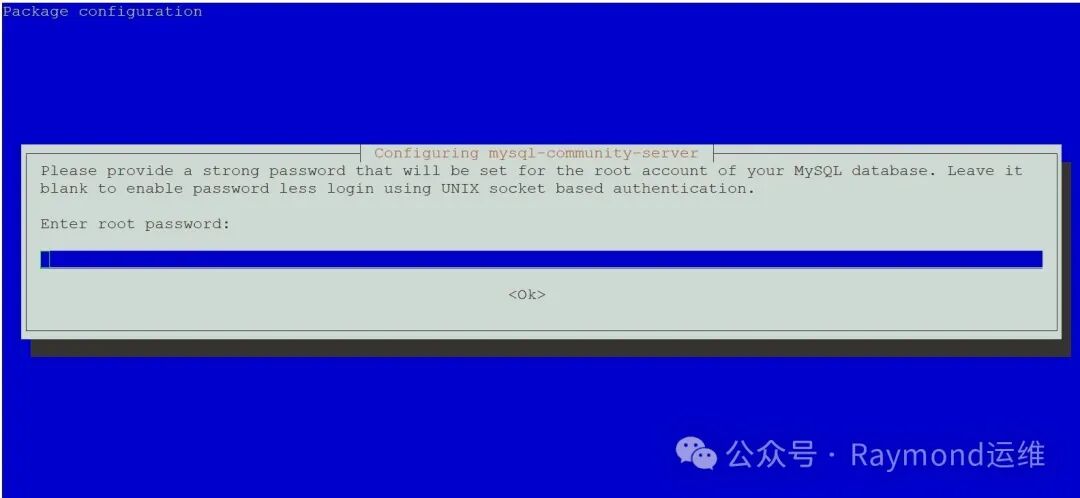
t35
图35 输入MySQL root用户密码
1root@debian12:~# systemctl enable --now mysql
2
3root@debian12:~# mysql -V
4mysql  Ver 8.4.5 for Linux on x86_64 (MySQL Community Server - GPL)
5
6root@debian12:~# systemctl status mysql
7● mysql.service - MySQL Community Server
8     Loaded: loaded (/lib/systemd/system/mysql.service; enabled; preset: enabled)
9     Active: active (running) since Fri 2025-04-18 22:52:11 CST; 1min 4s ago
10       Docs: man:mysqld(8)
11             http://dev.mysql.com/doc/refman/en/using-systemd.html
12   Main PID: 2115(mysqld)
13     Status: "Server is operational"
14      Tasks: 34(limit: 2273)
15     Memory: 436.0M
16        CPU: 1.437s
17     CGroup: /system.slice/mysql.service
18             └─2115 /usr/sbin/mysqld
19
20Apr 1822:52:10 debian12 systemd[1]: Starting mysql.service - MySQL Community Server...
21Apr 1822:52:11 debian12 systemd[1]: Started mysql.service - MySQL Community Server.
22
23root@debian12:~# mysql
24Welcome to the MySQL monitor.  Commands end with ; or \g.
25Your MySQL connection id is 8
26Server version: 8.4.5 MySQL Community Server - GPL
27
28Copyright (c)2000, 2025, Oracle and/or its affiliates.
29
30Oracle is a registered trademark of Oracle Corporation and/or its
31affiliates. Other names may be trademarks of their respective
32owners.
33
34Type 'help;' or '\h'for help. Type '\c' to clear the current input statement.
35
36mysql> status
37--------------
38mysql  Ver 8.4.5 for Linux on x86_64 (MySQL Community Server - GPL)
39
40Connection id:		8
41Current database:
42Current user:		root@localhost
43SSL:			Not in use
44Current pager:		stdout
45Using outfile:		''
46Using delimiter:	;
47Server version:		8.4.5 MySQL Community Server - GPL
48Protocol version:	10
49Connection:		Localhost via UNIX socket
50Server characterset:	utf8mb4
51Db     characterset:	utf8mb4
52Client characterset:	utf8mb4
53Conn.  characterset:	utf8mb4
54UNIX socket:		/var/run/mysqld/mysqld.sock
55Binary data as:		Hexadecimal
56Uptime:			1 min 29 sec
57
58Threads: 2  Questions: 6  Slow queries: 0  Opens: 119  Flush tables: 3  Open tables: 38  Queries per second avg: 0.067
59--------------
60
61mysql> show databases;
62+--------------------+
63| Database           |
64+--------------------+
65| information_schema |
66| mysql              |
67| performance_schema |
68| sys                |
69+--------------------+
704 rows inset(0.01 sec)
71
72mysql>exit
73Bye
原创声明:本文系作者授权腾讯云开发者社区发表,未经许可,不得转载。
如有侵权,请联系 cloudcommunity@tencent.com 删除。
原创声明:本文系作者授权腾讯云开发者社区发表,未经许可,不得转载。
如有侵权,请联系 cloudcommunity@tencent.com 删除。
评论
登录后参与评论
推荐阅读
目录
腾讯云开发者

Copyright © 2013 - 2026 Tencent Cloud. All Rights Reserved. 腾讯云 版权所有
深圳市腾讯计算机系统有限公司 ICP备案/许可证号:粤B2-20090059  粤公网安备44030502008569号
腾讯云计算(北京)有限责任公司 京ICP证150476号 | 京ICP备11018762号