基于 Vue3 + Pinia 的购物车模块开发实践:AI 辅助高效实现全流程
原创
基于 Vue3 + Pinia 的购物车模块开发实践:AI 辅助高效实现全流程
原创
china马斯克
修改于 2025-09-26 16:11:47
修改于 2025-09-26 16:11:47
友友们,早上好啊。今天继续AI工具实战系列。我将分享最近几个月使用ai工具用于工作的那些事。既是一次知识的分享,又是一次自我的一次总结,也希望自己的一些使用经验可以帮助到大家。下面正文开始
一、任务目标
本次的项目是一个私活,主要是给一个甲方做个电商项目。我们都知道,在电商前端开发中,购物车模块是核心功能之一,其状态管理直接影响用户体验。 首先我先定下了本次需要进行实现的目标。
任务目标:为某电商项目开发购物车模块,需实现以下功能:
- 商品添加(重复商品自动累加数量)
- 商品数量修改
- 商品删除
- 实时计算购物车总价
- 页面刷新后数据持久化
技术选型:
- 前端框架:Vue3 Composition API
- 状态管理:Pinia(替代 Vuex 的新一代状态管理库)
- 构建工具:Vite(极速启动的开发环境)
- AI 辅助:CodeBuddy
二、AI 协作开发全流程
1. 初始需求输入
通过 CodeBuddy 的自然语言交互界面输入核心需求:
"基于 Vue3 和 Pinia 开发购物车模块,要求:
1. Pinia 存储购物车列表(含 id、name、price、quantity 字段)
2. 实现以下方法:
- addCart(item): 添加商品(已存在则更新数量)
- updateQuantity(id, quantity): 修改数量
- deleteCart(id): 删除商品
- getTotalPrice(): 计算总价
3. 前端组件显示购物车列表和总价
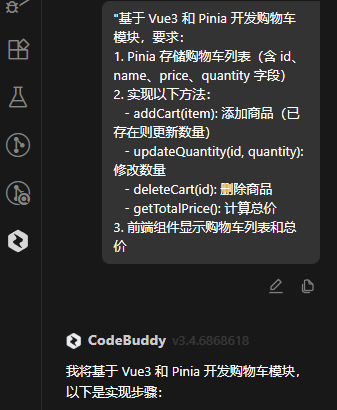
提出需求
2. AI 生成初始代码
Pinia Store 核心代码(cartStore.js):
import { defineStore } from 'pinia'
import { ref } from 'vue'

export const useCartStore = defineStore('cart', () => {
  const cartItems = ref([])

  const addCart = (item) => {
    const existingItem = cartItems.value.find(i => i.id === item.id)
    if (existingItem) {
      existingItem.quantity += item.quantity
    } else {
      cartItems.value.push({...item})
    }
  }

  const updateQuantity = (id, quantity) => {
    const item = cartItems.value.find(i => i.id === id)
    if (item) item.quantity = quantity
  }

  const deleteCart = (id) => {
    cartItems.value = cartItems.value.filter(i => i.id !== id)
  }

  const getTotalPrice = () => {
    return cartItems.value.reduce(
      (total, item) => total + (item.price * item.quantity),
      0
    )
  }

  return { cartItems, addCart, updateQuantity, deleteCart, getTotalPrice }
})
Vue 组件实现(Cart.vue):
<template>
  <div class="cart-container">
    <h2>购物车</h2>
    <div v-for="item in cartItems" :key="item.id" class="cart-item">
      <span>{{ item.name }}</span>
      <span>单价: ¥{{ item.price }}</span>
      <input
        type="number"
        v-model.number="item.quantity"
        @change="updateQuantity(item.id, item.quantity)"
        min="1"
      >
      <button @click="deleteCart(item.id)">删除</button>
    </div>
    <div class="total-price">总价: ¥{{ totalPrice }}</div>
  </div>
</template>

<script setup>
import { useCartStore } from '@/stores/cartStore'
import { computed } from 'vue'

const cartStore = useCartStore()
const cartItems = cartStore.cartItems
const totalPrice = computed(() => cartStore.getTotalPrice())

const updateQuantity = (id, quantity) => {
  cartStore.updateQuantity(id, quantity)
}

const deleteCart = (id) => {
  cartStore.deleteCart(id)
}
</script>
3. 问题发现与修复
测试反馈:当添加已存在商品时,系统会新增一条记录而非更新数量。
问题定位:检查 AI 生成的 addCart 方法发现逻辑错误:
// 错误实现(会重复添加商品)
const addCart = (item) => {
  const existingItem = cartItems.value.find(i => i.id === item.id)
  if (existingItem) {
    existingItem.quantity += item.quantity  // 缺少直接返回导致继续执行
  }
  cartItems.value.push({...item})  // 错误:无论是否找到都会执行
}修正方案:通过 CodeBuddy 输入修正需求:
"修复 addCart 方法:当商品已存在时只更新数量,不新增记录"
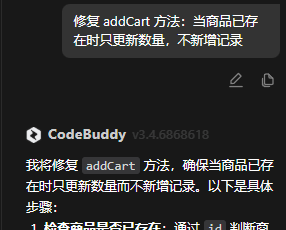
修改问题
修正后代码:
const addCart = (item) => {
  const existingItem = cartItems.value.find(i => i.id === item.id)
  if (existingItem) {
    existingItem.quantity += item.quantity
    return  // 关键修复:添加返回语句
  }
  cartItems.value.push({...item})
}
三、数据持久化实现
1. 需求输入
"使用 localStorage 实现 Pinia 购物车状态持久化,要求:
1. 页面加载时从 localStorage 恢复数据
2. 状态变更时自动同步到 localStorage"
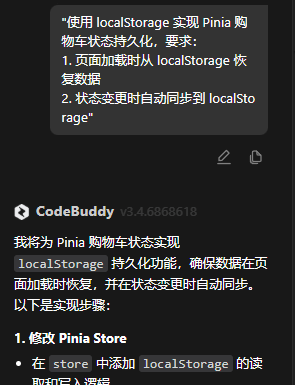
实现持久化功能
2. AI 生成持久化方案
修改后的 cartStore.js:
import { defineStore } from 'pinia'
import { ref, onMounted } from 'vue'

export const useCartStore = defineStore('cart', () => {
  const cartItems = ref([])
  const STORAGE_KEY = 'vue-cart-items'

  // 初始化加载数据
  onMounted(() => {
    const saved = localStorage.getItem(STORAGE_KEY)
    if (saved) cartItems.value = JSON.parse(saved)
  })

  // 状态变更监听
  cartItems.subscribe((items) => {
    localStorage.setItem(STORAGE_KEY, JSON.stringify(items))
  })

  // ...保留原有业务方法...
  return { cartItems, addCart, updateQuantity, deleteCart, getTotalPrice }
})
四、最终效果验证
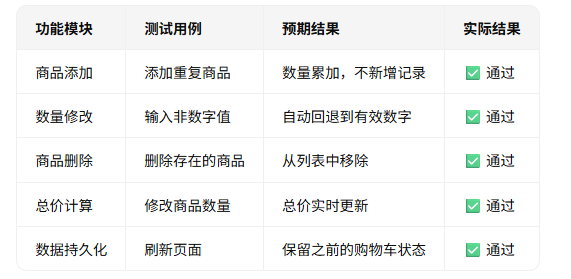
功能实现测试表
五、注意事项和总结
我们在提出需求时,尤其是代码生成中,必须指定完整的数据结构(如商品字段)。同时尽量明确业务规则(如"重复添加更新数量")。当 AI 输出不符合预期时,提供具体测试用例和错误现象。最后计算了下完成这部分功能的时间,1小时40分钟左右就搞定了,比以前直接手搓快了很多。当然上面的代码都还有优化空间,具体的可以后续按照需求慢慢再优化。好了,本期的分享就到这里,希望对有类似项目需求的朋友们有所帮助!
原创声明:本文系作者授权腾讯云开发者社区发表,未经许可,不得转载。
如有侵权,请联系 cloudcommunity@tencent.com 删除。
目录
腾讯云开发者

Copyright © 2013 - 2026 Tencent Cloud. All Rights Reserved. 腾讯云 版权所有
深圳市腾讯计算机系统有限公司 ICP备案/许可证号:粤B2-20090059  粤公网安备44030502008569号
腾讯云计算(北京)有限责任公司 京ICP证150476号 | 京ICP备11018762号