搭建内网DNS
原创

OS配置如下
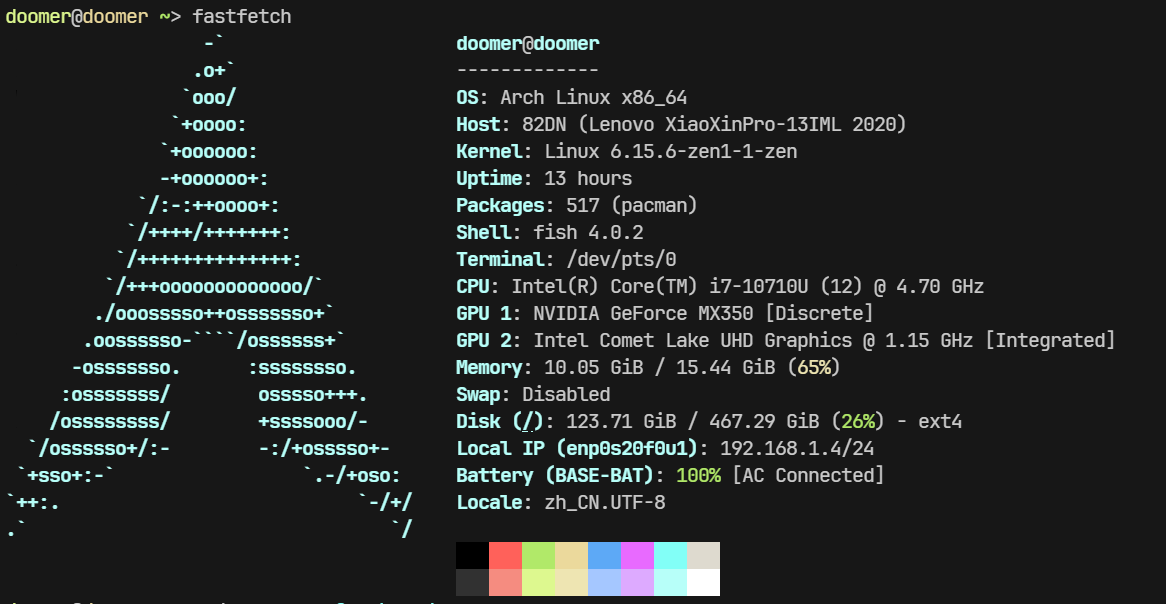
使用unbound作为dns服务器
下载
sudo pacman -S unbound一,编辑配置文件
sudo nano /etc/unbound/unbound.confserver:
interface: 0.0.0.0
port: 53
do-ip4: yes
do-ip6: no
do-udp: yes
do-tcp: yes
access-control: 192.168.1.0/24 allow
verbosity: 1
cache-max-ttl: 86400
cache-min-ttl: 3600
harden-dnssec-stripped: yes
harden-referral-path: yes
# Local zone for yuanzhou.site
local-zone: "yuanzhou.site." static
local-data: "yuanzhou.site. IN A 192.168.1.4"
local-data: "reposity.yuanzhou.site. IN A 192.168.1.4"
local-data: "git.yuanzhou.site. IN A 192.168.1.4"
local-data: "oss.yuanzhou.site. IN A 192.168.1.4"
forward-zone:
name: "."
forward-addr: 223.5.5.5
forward-first: yes通过该配置可以将yuanzhou.site解析到192.168.1.4其他域名转发到223.5.5.5解析
二,其他设置
# 确保权限争取
sudo chown unbound:unbound /etc/unbound/unbound.conf
sudo chmod 644 /etc/unbound/unbound.conf
# 设置自启
sudo systemctl enable unbound
sudo systemctl start unbound
# 配置域名解析
sudo bash -c 'echo "nameserver 127.0.0.1" > /etc/resolv.conf'三,测试配置
dig yuanzhou.site
;; ANSWER SECTION:
yuanzhou.site. 3600 IN A 192.168.1.4
dig jd.com
;; ANSWER SECTION:
jd.com. 1638 IN A 211.144.27.126
jd.com. 1638 IN A 106.39.171.134
jd.com. 1638 IN A 111.13.149.108
jd.com. 1638 IN A 211.144.24.218四,一键脚本
#!/bin/bash
# DNS Server Setup Script for Arch Linux
# Install Unbound
sudo pacman -S unbound
# Backup original config
sudo mv /etc/unbound/unbound.conf /etc/unbound/unbound.conf.bak 2>/dev/null
# Create Unbound configuration
sudo bash -c 'cat > /etc/unbound/unbound.conf' << 'EOF'
server:
    interface: 0.0.0.0
    port: 53
    do-ip4: yes
    do-ip6: no
    do-udp: yes
    do-tcp: yes
    access-control: 192.168.1.0/24 allow
    verbosity: 1
    cache-max-ttl: 86400
    cache-min-ttl: 3600
    harden-dnssec-stripped: yes
    harden-referral-path: yes

    # Local zone for yuanzhou.site
    local-zone: "yuanzhou.site." static
    local-data: "yuanzhou.site. IN A 192.168.1.4"
    local-data: "reposity.yuanzhou.site. IN A 192.168.1.4"
    local-data: "git.yuanzhou.site. IN A 192.168.1.4"
    local-data: "oss.yuanzhou.site. IN A 192.168.1.4"
forward-zone:
    name: "."
    forward-addr: 223.5.5.5
    forward-first: yes
EOF
# Set permissions
sudo chown unbound:unbound /etc/unbound/unbound.conf
sudo chmod 644 /etc/unbound/unbound.conf
# Enable and start Unbound service
sudo systemctl enable unbound
sudo systemctl start unbound
# Configure local DNS resolution
sudo bash -c 'echo "nameserver 127.0.0.1" > /etc/resolv.conf'
# Prevent resolv.conf from being overwritten
sudo chattr +i /etc/resolv.conf
# Test configuration
echo "Testing DNS resolution..."
dig yuanzhou.site @127.0.0.1
dig jd.com @127.0.0.1
echo "DNS server setup complete. Please verify the dig output above."配置ssl
使用nginx作为反向代理,docker部署,已gitea示例
一,创建证书
# 创建私钥
openssl genrsa -out yuanzhou.site.key 2048
# 创建证书签名请求
openssl req -new -key yuanzhou.site.key -out yuanzhou.site.csr
# 生成自签名证书(有效期 365 天)
openssl x509 -req -days 365 -in yuanzhou.site.csr \
  -signkey yuanzhou.site.key -out yuanzhou.site.crt
二,docker部署nginx和gitea
services:
  ## 部署nginx,映射配置文件个密钥
  nginx:
    image: nginx
    container_name: nginx
    ports:
      - "80:80"
      - "443:443"
    volumes:
      - ./nginx/conf:/etc/nginx/conf.d
      - ./nginx/cert:/etc/nginx/cert
    networks:
      - dev
  gitea:
    image: gitea/gitea:nightly
    container_name: gitea
    environment:
      - USER_UID=1000
      - USER_GID=1000
    networks:
      - dev
    volumes:
      - gitea:/data
      - /etc/timezone:/etc/timezone:ro
      - /etc/localtime:/etc/localtime:ro
    ports:
      - "3000:3000"
      - "22:22"
  runner:
    image: gitea/act_runner
    container_name: runner
    volumes:
      - ./data/act_runner:/data
      - /var/run/docker.sock:/var/run/docker.sock
    environment:
      - GITEA_INSTANCE_URL=http://gitea:3000
      - GITEA_RUNNER_REGISTRATION_TOKEN=2eKpHJ3uUFu5kyv0C6HXFDQ3MOQKcqxHuhtuP172
    networks:
      - dev
networks:
  dev:
    driver: bridge
    name: dev
三,nginx的配置文件
# /etc/nginx/conf.d/registry.conf
upstream gitea {
  server gitea:3000;  # gitea容器的端口
}

server {
  listen 80;
  server_name git.yuanzhou.site;

  location / {
    proxy_pass http://gitea;
    proxy_set_header Host $host;
    proxy_set_header X-Real-IP $remote_addr;
    proxy_set_header X-Forwarded-For $proxy_add_x_forwarded_for;
    proxy_set_header X-Forwarded-Proto $scheme;

    # 客户端上传镜像超时设置
    client_max_body_size 0;
    proxy_read_timeout 900;
    proxy_send_timeout 900;
  }
}

server {
  listen 443 ssl;
  server_name git.yuanzhou.site;

  ssl_certificate /etc/nginx/cert/yuanzhou.site.crt;
  ssl_certificate_key /etc/nginx/cert/yuanzhou.site.key;

  # 强化的SSL配置
  ssl_protocols TLSv1.2 TLSv1.3;
  ssl_ciphers 'ECDHE-ECDSA-AES256-GCM-SHA384:ECDHE-RSA-AES256-GCM-SHA384';
  ssl_prefer_server_ciphers on;
  ssl_session_cache shared:SSL:10m;
  ssl_session_timeout 10m;

  location / {
    proxy_pass http://gitea;

    # Docker客户端特殊配置
    proxy_set_header X-Forwarded-Proto "https";
    proxy_set_header X-Forwarded-Port $server_port;

    # 大文件传输配置
    client_max_body_size 0;
    chunked_transfer_encoding on;
  }
}
将配置文件放在docker容器映射conf目录并把签名和证书放到映射的cert目录中
ps: 可以将证书下载到本地,添加信任,浏览器之后不会报不信任证书
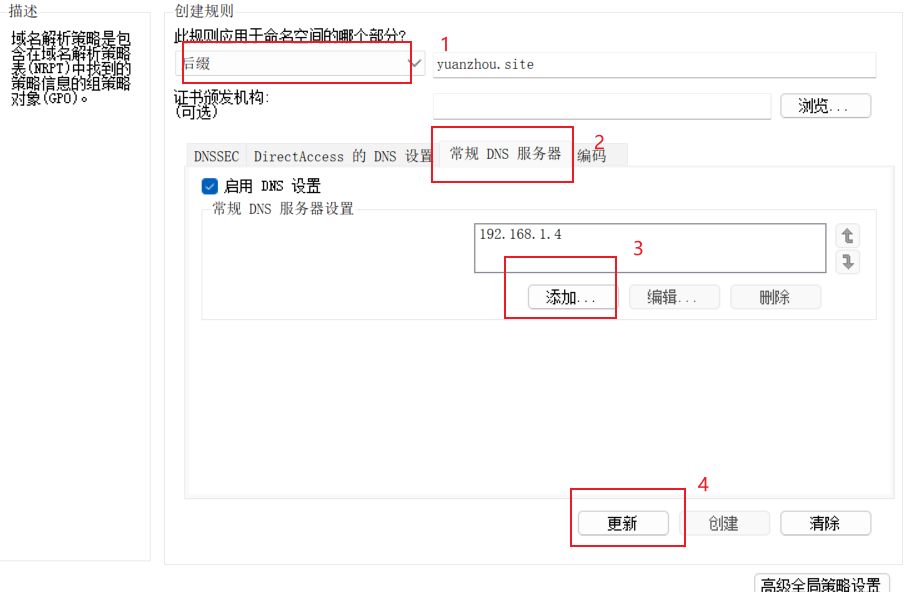
Windows配置DNS
此处的DNS配置仅为yuanzhou.site单个域名配置,其他域名不受影响
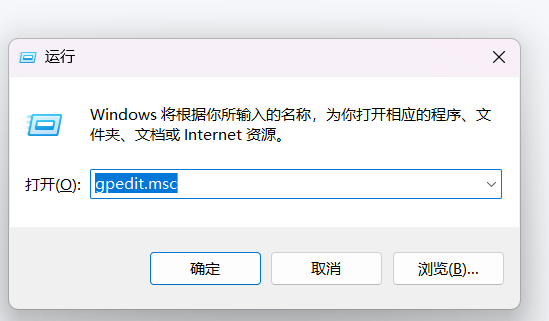
win+R运行命令gpedit.msc
点击计算机配置 --> windows配置 --> 域名解析策略
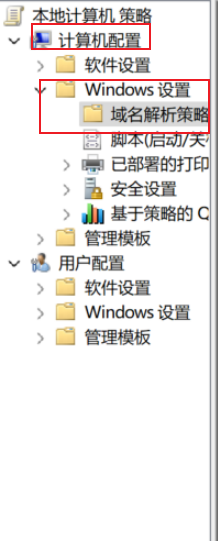
创建新的规则
原创声明:本文系作者授权腾讯云开发者社区发表,未经许可,不得转载。
如有侵权,请联系 cloudcommunity@tencent.com 删除。
目录
腾讯云开发者

Copyright © 2013 - 2026 Tencent Cloud. All Rights Reserved. 腾讯云 版权所有
深圳市腾讯计算机系统有限公司 ICP备案/许可证号:粤B2-20090059  粤公网安备44030502008569号
腾讯云计算(北京)有限责任公司 京ICP证150476号 | 京ICP备11018762号