[MCP学习笔记]MCP物联网平台:百万级连接管理
原创

一、前言
物联网(IoT)技术的迅猛发展,越来越多的设备接入网络,形成了庞大的物联网生态系统。从智能家居中的智能灯泡、智能插座,到工业物联网中的传感器、控制器,设备连接数量呈指数级增长。如何高效地管理这些海量设备连接,并确保数据的可靠传输和处理,成为物联网平台面临的关键挑战。MCP(Model Context Protocol)物联网平台以其强大的连接管理能力和出色的数据处理性能,为解决百万级设备连接管理问题提供了优雅的方案。
二、MCP 物联网平台概述
MCP 物联网平台的定义与目标
MCP 物联网平台是一种专为大规模物联网设备连接设计的分布式系统架构。其主要目标是实现百万级设备的稳定连接、高效数据传输以及灵活的设备管理。通过引入模型上下文(Model Context)的概念,MCP 将设备连接、数据处理和业务逻辑紧密集成,形成一个高效协同的物联网生态系统。
MCP 物联网平台的架构特点
- 分布式架构设计 :MCP 采用分布式架构,将平台功能划分到多个节点上,包括设备接入网关、数据处理节点、业务逻辑服务器等。这种设计使得平台能够轻松扩展,以应对不断增长的设备数量。
- 高性能连接管理 :平台具备高效的连接管理机制,能够同时处理大量设备的连接请求,确保设备连接的低延迟和高可靠性。
- 实时数据处理能力 :MCP 支持实时数据采集、预处理和分析,使得物联网应用能够快速响应设备状态变化,及时做出决策。
- 灵活的设备管理 :平台提供丰富的设备管理功能,包括设备注册、认证、状态监控、固件升级等,方便用户对海量设备进行集中管理。
MCP 物联网平台的应用场景
应用场景 | 设备数量规模 | 主要功能需求 |
|---|---|---|
智能城市 | 十万级至百万级 | 设备连接管理、数据采集与分析、城市设施监控 |
工业物联网 | 万级至十万级 | 高可靠性连接、实时数据处理、生产流程监控与优化 |
智能家居 | 千级至万级 | 设备互联互通、场景联动、用户远程控制 |
智能农业 | 万级至十万级 | 环境监测、精准灌溉、农产品溯源 |

三、MCP 物联网平台的架构设计
MCP 物联网平台的分层架构
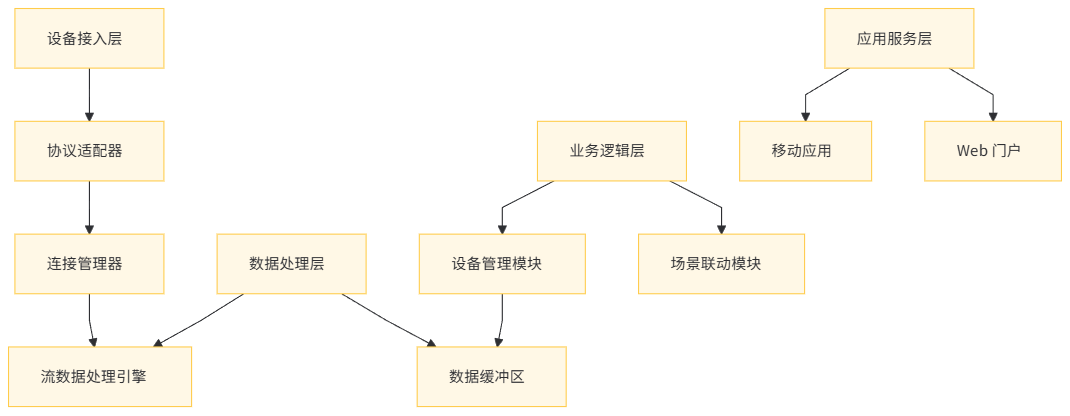
MCP 物联网平台采用分层架构设计,主要分为以下四层:
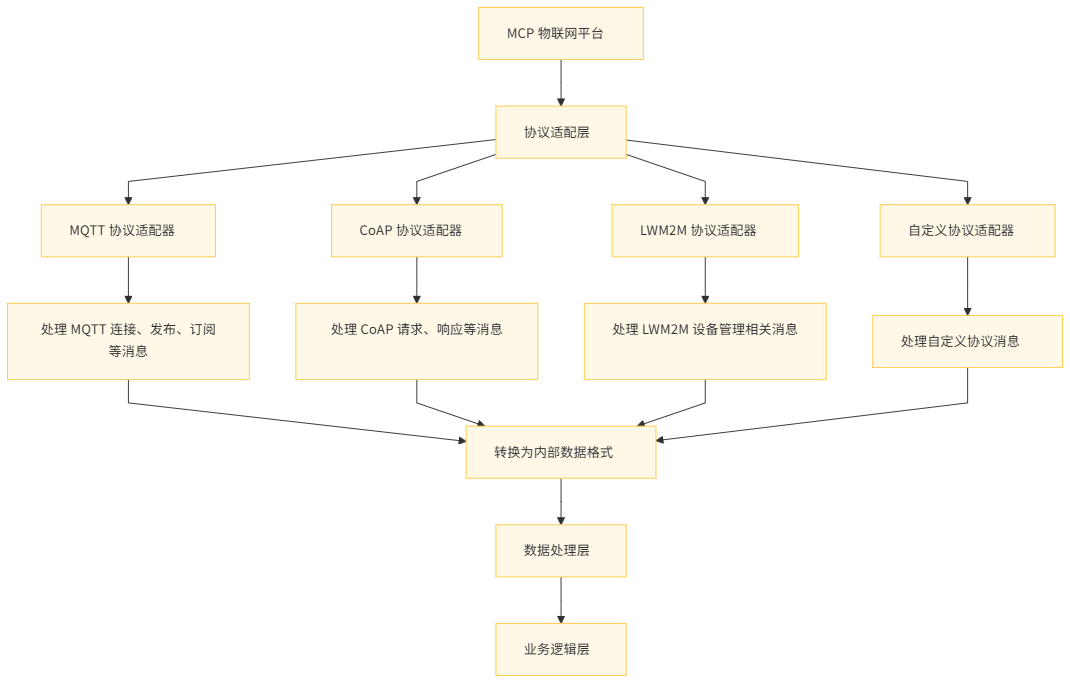
- 设备接入层 :负责与物联网设备进行通信,处理设备的连接和数据传输。支持多种物联网通信协议,如 MQTT、CoAP、LWM2M 等。
- 数据处理层 :对接入的数据进行预处理、清洗、转换和分析。包括流数据处理引擎、数据缓冲区和缓存机制。
- 业务逻辑层 :实现具体的物联网业务逻辑,如设备管理、场景联动、数据分析与决策等。
- 应用服务层 :为最终用户提供全面的应用服务,如移动应用、Web 门户、数据分析报告等。
MCP 物联网平台的关键组件
- 设备接入网关(Device Gateway) :作为物联网设备与平台之间的通信桥梁,设备接入网关负责处理设备的连接请求、协议转换和数据转发。它支持多种物联网协议,并能够根据设备类型和网络状况自动选择最优的通信方式。
- 连接管理器(Connection Manager) :连接管理器是 MCP 平台的核心组件之一,负责管理和调度设备连接。它实现了高效的连接调度算法,确保设备连接的公平性和高效性,同时监控连接状态,及时处理连接故障。
- 流数据处理引擎(Stream Processing Engine) :用于实时处理从设备接入层接收到的大量数据。引擎支持复杂的数据处理逻辑,如数据过滤、聚合、告警触发等,并能够与外部数据存储和分析系统集成。
- 设备管理服务(Device Management Service) :提供设备的全生命周期管理功能,包括设备注册、认证、状态监控、固件升级等。通过与连接管理器和数据处理层的协同工作,实现对设备的精细化管理。
MCP 物联网平台的扩展性设计
MCP 物联网平台的扩展性设计主要体现在以下几个方面:
- 水平扩展能力 :通过增加设备接入网关、数据处理节点和业务逻辑服务器的数量,平台能够线性扩展其处理能力,以适应不断增长的设备连接和数据流量。
- 协议插件机制 :平台支持动态加载和配置新的物联网协议插件,使得能够快速适配各种新型物联网设备和通信标准。
四、MCP 物联网平台的连接管理机制
小规模连接管理
在小规模物联网场景中(如智能家居系统),设备数量相对较少(通常在数百到数千级别)。MCP 物联网平台采用以下连接管理策略:
- 集中式连接管理 :所有设备连接到一个或少数几个设备接入网关,连接管理器集中处理连接请求和数据转发,简化管理流程。
- 简单认证机制 :采用基于用户名 / 密码或预共享密钥的认证方式,快速验证设备身份,确保只有授权设备接入平台。
实例分析:智能家居设备连接管理
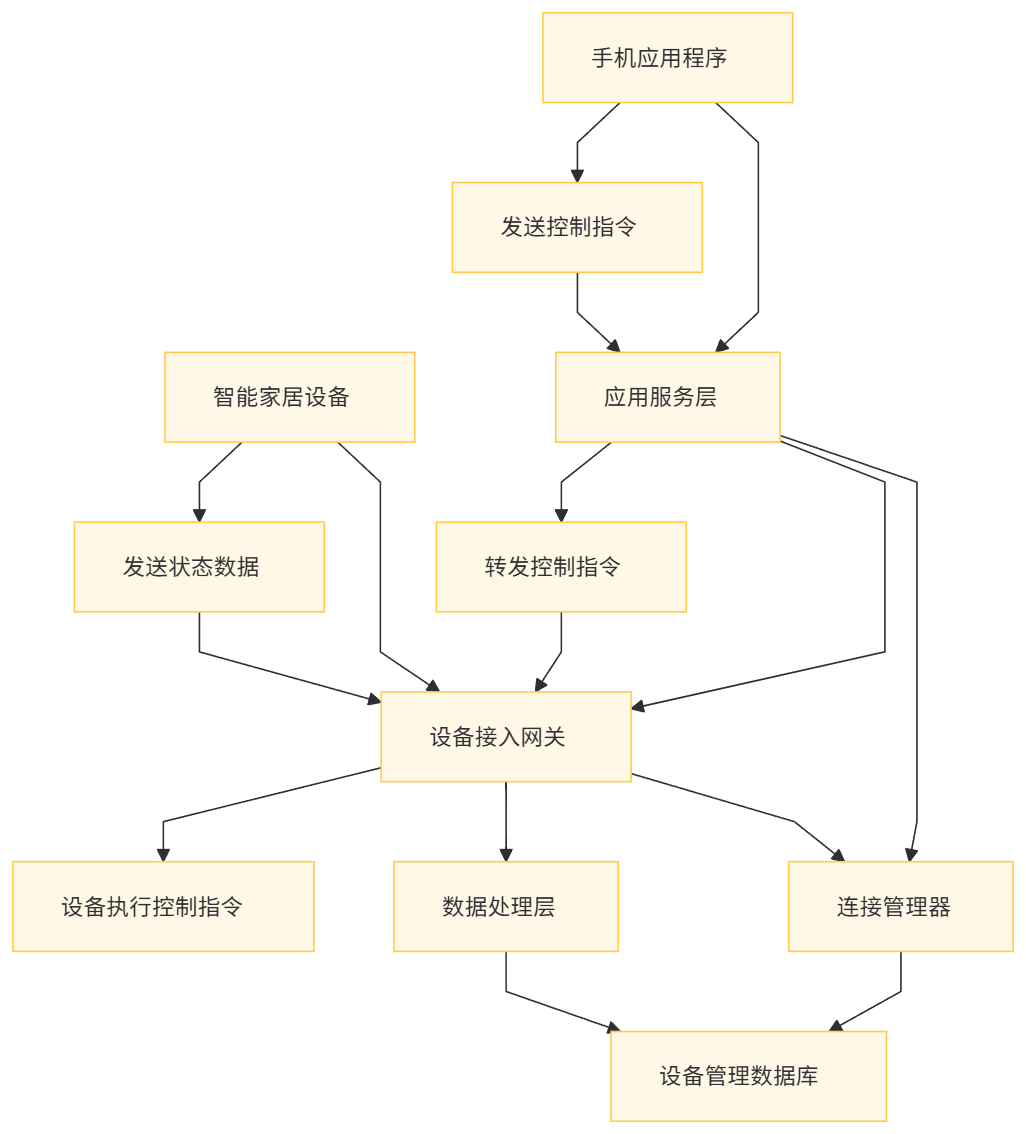
在智能家居场景中,各种智能设备(如智能灯泡、智能插座、智能门锁等)需要连接到 MCP 物联网平台。
- 设备发现与连接 :用户通过手机应用程序将新设备添加到系统中,应用程序向 MCP 平台发送设备注册请求。平台生成唯一的设备 ID,并将设备信息存储到设备管理数据库中。设备使用该 ID 和预设的密钥连接到设备接入网关,网关验证设备身份后建立连接。
- 数据传输与控制 :设备定期向平台发送状态更新数据(如灯泡的开关状态、插座的功率消耗等),平台通过数据处理层解析数据并存储到相应的数据库中。用户可以通过手机应用程序发送控制指令,平台将指令转发给目标设备,实现远程控制。
中等规模连接管理
对于中等规模的物联网场景(如智能工厂),设备数量通常在数千到数万级别。MCP 物联网平台采用以下策略:
- 分区连接管理 :将设备接入网关划分为多个分区,每个分区负责一定数量的设备连接。连接管理器根据设备位置或类型进行分区分配,提高连接管理效率。
- 负载均衡与故障转移 :在设备接入网关之间实现负载均衡,确保连接请求均匀分布。当某个网关发生故障时,连接管理器自动将连接转移到其他可用网关,保证连接的高可用性。
实例分析:智能工厂设备连接管理
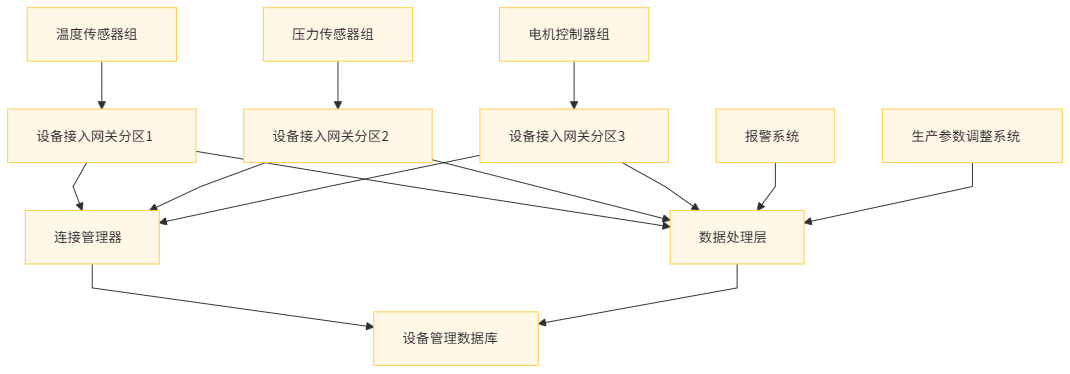
在智能工厂中,大量的传感器和控制器需要连接到 MCP 物联网平台,以实现生产过程的监控和优化。
- 设备分组与连接 :根据工厂的生产线布局和设备类型,将设备分为不同的组,如温度传感器组、压力传感器组、电机控制器组等。每个组的设备连接到指定的设备接入网关分区,连接管理器记录设备与网关的映射关系。
- 数据采集与处理 :传感器定期采集生产数据并发送到平台,数据处理层对数据进行实时分析,如计算生产效率、检测设备故障等。当发现异常情况时,平台通过相应的控制器发出报警或调整生产参数。
大规模连接管理
面对大规模物联网场景(如智能城市),设备数量可达数十万甚至上百万级别。MCP 物联网平台采用以下策略:
- 分布式连接管理 :部署多个设备接入网关集群,分布在不同的地理位置,实现分布式连接管理。连接管理器采用分布式协调技术(如 ZooKeeper),确保连接状态的一致性和管理效率。
- 连接池与复用 :建立连接池,复用已建立的连接,减少连接建立和断开的开销。通过连接池管理技术,提高连接资源的利用率,支持大规模设备的高并发连接。
实例分析:智能城市设备连接管理
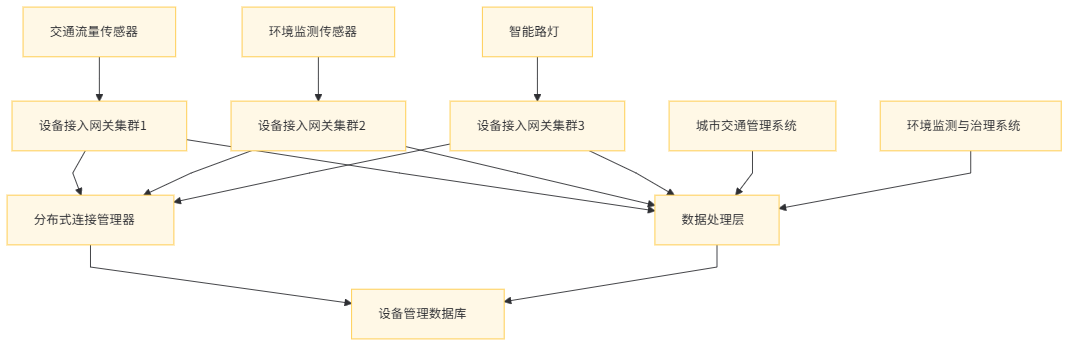
在智能城市中,大量的传感器(如交通流量传感器、环境监测传感器、智能路灯等)需要连接到 MCP 物联网平台,以实现城市的智能化管理。
- 分布式接入与连接管理 :在城市的各个区域部署设备接入网关集群,每个集群负责一定区域内的设备连接。连接管理器通过分布式协调服务获取各个集群的连接状态,统一管理连接资源。当设备发送连接请求时,连接管理器根据负载均衡算法选择最优的网关集群进行连接。
- 数据融合与分析 :平台对来自不同类型的传感器数据进行融合分析,如结合交通流量数据和环境监测数据,优化城市交通信号控制,减少空气污染。通过实时数据处理和分析,为城市管理者提供决策支持,提高城市运行效率和居民生活质量。
五、MCP 物联网平台的协议支持与适配
主流物联网协议支持
MCP 物联网平台支持多种主流物联网协议,以满足不同设备和应用场景的需求:
- MQTT(Message Queuing Telemetry Transport) :一种轻量级的消息队列遥测传输协议,适合在低带宽、高延迟或不可靠的网络环境中使用。MQTT 采用发布 / 订阅模式,设备作为发布者发送消息,应用作为订阅者接收消息,中间通过消息代理(如设备接入网关)进行消息路由。
- CoAP(Constrained Application Protocol) :面向受限设备和网络环境的应用协议,基于 UDP/IP,具有低功耗、低带宽的特点。CoAP 支持 RESTful 架构风格,设备可以通过简单的 HTTP-like 方法(如 GET、POST)进行通信。
- LWM2M(Lightweight M2M) :专为机器对机器(M2M)通信设计的轻量级协议,基于 CoAP 实现,具有设备管理功能。LWM2M 支持设备的注册、发现、监控、固件升级等操作,适合在智能能源、智能家居等场景中使用。
协议类型 | 适用场景 | 主要特点 | 典型应用场景 |
|---|---|---|---|
MQTT | 智能家居、工业物联网 | 发布 / 订阅模式、轻量级、适合高延迟网络 | 智能灯控、传感器数据采集 |
CoAP | 智能农业、环境监测 | 基于 UDP、低功耗、支持 RESTful 架构 | 土壤湿度监测、气象站数据采集 |
LWM2M | 智能能源、智能抄表 | 基于 CoAP、轻量级、支持设备管理 | 电表数据采集与管理、燃气表远程监控 |
协议适配与转换
为了实现对多种物联网协议的支持和统一管理,MCP 物联网平台采用协议适配层。协议适配层负责将不同协议的消息转换为平台内部统一的数据格式,以便后续的数据处理和业务逻辑处理。
实例分析:MQTT 协议适配
以下是 MCP 物联网平台对 MQTT 协议进行适配的代码示例和详细解释:
// MQTT 协议适配器接口
public interface MqttProtocolAdapter {
void connect(Device device, String clientId, String username, String password);
void publish(Device device, String topic, byte[] payload, int qos, boolean retained);
void subscribe(Device device, String topic, int qos);
void disconnect(Device device);
}

// MQTT 协议适配器实现
@Component
public class MqttProtocolAdapterImpl implements MqttProtocolAdapter {
private DeviceGateway deviceGateway;
private ConnectionManager connectionManager;

public MqttProtocolAdapterImpl(DeviceGateway deviceGateway, ConnectionManager connectionManager) {
    this.deviceGateway = deviceGateway;
    this.connectionManager = connectionManager;
}

@Override
public void connect(Device device, String clientId, String username, String password) {
    // MQTT 设备连接处理
    // 1. 验证设备身份(用户名和密码)
    if (connectionManager.authenticateDevice(device.getDeviceId(), username, password)) {
        // 2. 建立设备连接
        DeviceConnection connection = deviceGateway.establishConnection(device.getDeviceId(), clientId);
        // 3. 更新设备连接状态
        connectionManager.updateDeviceConnectionStatus(device.getDeviceId(), ConnectionStatus.CONNECTED);
    } else {
        // 认证失败处理
        throw new AuthenticationException("Device authentication failed");
    }
}

@Override
public void publish(Device device, String topic, byte[] payload, int qos, boolean retained) {
    // MQTT 消息发布处理
    // 1. 将 MQTT 消息转换为平台内部数据格式
    InternalMessage internalMessage = new InternalMessage();
    internalMessage.setDeviceId(device.getDeviceId());
    internalMessage.setTopic(topic);
    internalMessage.setPayload(payload);
    internalMessage.setQos(qos);
    internalMessage.setRetained(retained);
    // 2. 将消息发送到数据处理层
    connectionManager.sendMessageToDataProcessing(internalMessage);
}

@Override
public void subscribe(Device device, String topic, int qos) {
    // MQTT 订阅处理
    // 1. 注册设备订阅关系
    connectionManager.registerDeviceSubscription(device.getDeviceId(), topic, qos);
    // 2. 向设备发送订阅确认消息
    deviceGateway.sendSubscriptionAcknowledgment(device.getDeviceId(), topic, qos);
}

@Override
public void disconnect(Device device) {
    // MQTT 设备断开连接处理
    // 1. 更新设备连接状态
    connectionManager.updateDeviceConnectionStatus(device.getDeviceId(), ConnectionStatus.DISCONNECTED);
    // 2. 释放设备连接资源
    deviceGateway.releaseConnection(device.getDeviceId());
}
}
代码解释 :
- MQTT 协议适配器接口 :定义了 MQTT 协议适配所需的基本方法,如连接、发布、订阅和断开连接。
- MQTT 协议适配器实现 :实现了协议适配器接口,具体处理 MQTT 协议的消息转换和与平台其他组件的交互。
- 在
connect方法中,首先对设备进行身份认证,认证通过后建立设备连接并更新连接状态。 publish方法将 MQTT 消息转换为平台内部的InternalMessage对象,然后将其发送到数据处理层。subscribe方法注册设备的订阅关系,并向设备发送订阅确认消息。disconnect方法处理设备断开连接的逻辑,更新连接状态并释放连接资源。
- 在
自定义协议适配
除了支持主流物联网协议,MCP 物联网平台还允许用户定义和适配自定义协议,以满足特殊设备或业务场景的需求。
实例分析:自定义协议适配
假设有一种新型传感器设备,采用自定义的 binary 协议进行通信。以下是 MCP 物联网平台对该自定义协议进行适配的代码示例和详细解释:
// 自定义协议适配器接口
public interface CustomProtocolAdapter {
void processIncomingMessage(Device device, byte[] message);
byte[] constructOutgoingMessage(Device device, String command, Map<String, Object> parameters);
}

// 自定义协议适配器实现
@Component
public class BinaryProtocolAdapterImpl implements CustomProtocolAdapter {
private DataProcessingService dataProcessingService;

public BinaryProtocolAdapterImpl(DataProcessingService dataProcessingService) {
    this.dataProcessingService = dataProcessingService;
}

@Override
public void processIncomingMessage(Device device, byte[] message) {
    // 自定义 binary 协议消息处理
    // 1. 解析 binary 消息头
    int headerLength = 2; // 假设消息头长度为 2 字节
    byte[] header = Arrays.copyOfRange(message, 0, headerLength);
    int messageType = (header[0] & 0xFF) << 8 | (header[1] & 0xFF); // 解析消息类型
    // 2. 解析 binary 消息体
    byte[] payload = Arrays.copyOfRange(message, headerLength, message.length);
    // 3. 根据消息类型进行相应处理
    switch (messageType) {
        case 0x0001: // 设备状态更新消息
            // 解析设备状态数据
            DeviceStatus status = parseDeviceStatus(payload);
            // 更新设备状态
            dataProcessingService.updateDeviceStatus(device.getDeviceId(), status);
            break;
        case 0x0002: // 传感器数据消息
            // 解析传感器数据
            SensorData sensorData = parseSensorData(payload);
            // 存储传感器数据
            dataProcessingService.storeSensorData(device.getDeviceId(), sensorData);
            break;
        default:
            // 未知消息类型处理
            dataProcessingService.logUnknownMessageType(device.getDeviceId(), messageType);
    }
}

@Override
public byte[] constructOutgoingMessage(Device device, String command, Map<String, Object> parameters) {
    // 自定义 binary 协议消息构建
    // 1. 根据命令类型构建消息头
    int commandType;
    switch (command) {
        case "GET_SENSOR_DATA":
            commandType = 0x0003;
            break;
        case "SET_DEVICE_CONFIGURATION":
            commandType = 0x0004;
            break;
        default:
            throw new IllegalArgumentException("Unsupported command type");
    }
    byte[] header = new byte[2];
    header[0] = (byte) ((commandType >> 8) & 0xFF);
    header[1] = (byte) (commandType & 0xFF);
    // 2. 构建消息体
    byte[] payload;
    if (command.equals("SET_DEVICE_CONFIGURATION")) {
        // 构建设备配置参数消息体
        payload = constructConfigurationPayload(parameters);
    } else {
        // 其他命令的消息体构建
        payload = new byte[0]; // 默认空消息体
    }
    // 3. 组合消息头和消息体
    ByteArrayOutputStream outputStream = new ByteArrayOutputStream();
    try {
        outputStream.write(header);
        outputStream.write(payload);
    } catch (IOException e) {
        throw new RuntimeException("Failed to construct outgoing message", e);
    }
    return outputStream.toByteArray();
}

// 辅助方法:解析设备状态数据
private DeviceStatus parseDeviceStatus(byte[] payload) {
    // 根据自定义协议解析设备状态数据
    // 示例:假设设备状态数据包括设备温度、电池电量等
    int temperature = (payload[0] & 0xFF) << 8 | (payload[1] & 0xFF);
    int batteryLevel = payload[2] & 0xFF;
    return new DeviceStatus(temperature, batteryLevel);
}

// 辅助方法:解析传感器数据
private SensorData parseSensorData(byte[] payload) {
    // 根据自定义协议解析传感器数据
    // 示例:假设传感器数据包括传感器类型、测量值等
    int sensorType = (payload[0] & 0xFF) << 8 | (payload[1] & 0xFF);
    float measurementValue = ByteBuffer.wrap(payload, 2, 4).order(ByteOrder.LITTLE_ENDIAN).getFloat();
    return new SensorData(sensorType, measurementValue);
}

// 辅助方法:构建设备配置参数消息体
private byte[] constructConfigurationPayload(Map<String, Object> parameters) {
    // 根据自定义协议构建设备配置参数消息体
    // 示例:假设配置参数包括采样率、数据上传间隔等
    int samplingRate = (Integer) parameters.get("samplingRate");
    int uploadInterval = (Integer) parameters.get("uploadInterval");
    ByteArrayOutputStream payloadStream = new ByteArrayOutputStream();
    try {
        payloadStream.write((samplingRate >> 8) & 0xFF);
        payloadStream.write(samplingRate & 0xFF);
        payloadStream.write((uploadInterval >> 8) & 0xFF);
        payloadStream.write(uploadInterval & 0xFF);
    } catch (IOException e) {
        throw new RuntimeException("Failed to construct configuration payload", e);
    }
    return payloadStream.toByteArray();
}
}
代码解释 :
- 自定义协议适配器接口 :定义了处理自定义协议消息的基本方法,包括处理传入消息和构建传出消息。
- 自定义协议适配器实现 :实现了协议适配器接口,具体处理自定义 binary 协议的消息解析和构建。
processIncomingMessage方法解析 incoming binary 消息,提取消息头和消息体,根据消息类型调用相应的处理逻辑。例如,对于设备状态更新消息,解析设备温度和电池电量等状态数据,并更新到平台的数据处理服务中;对于传感器数据消息,解析传感器类型和测量值,并存储到相应的数据库中。constructOutgoingMessage方法根据命令类型构建 outgoing binary 消息。例如,对于 “GET_SENSOR_DATA” 命令,构建相应的消息头(消息类型为 0x0003),消息体为空;对于 “SET_DEVICE_CONFIGURATION” 命令,构建包含设备配置参数(如采样率、数据上传间隔)的消息头和消息体。
通过这种自定义协议适配机制,MCP 物联网平台能够灵活地支持各种新型物联网设备和特殊业务场景,确保平台的通用性和扩展性。
六、MCP 物联网平台的数据处理与分析
实时数据处理流程
MCP 物联网平台采用高效的实时数据处理流程,确保从设备接收到的数据能够及时处理和分析:
- 数据接入与预处理 :设备接入网关接收到设备数据后,首先进行预处理,包括数据格式校验、单位转换、异常值检测等。预处理后的数据被发送到数据缓冲区,等待进一步处理。
- 数据清洗与转换 :在数据缓冲区中,数据处理引擎对数据进行清洗,去除噪声数据和重复数据。同时,根据业务规则对数据进行转换,如将原始传感器数据转换为更有意义的业务指标。
- 实时流处理 :清洗和转换后的数据进入流处理引擎,进行实时分析和计算。流处理引擎支持复杂事件处理(CEP),能够检测数据中的模式和趋势,触发相应的业务逻辑(如告警、自动化控制等)。
- 数据存储与持久化 :经过处理的数据根据业务需求存储到不同的数据存储系统中,如时序数据库(用于存储时间序列的传感器数据)、关系型数据库(用于存储设备配置和用户信息)等。
实例分析:环境监测数据处理
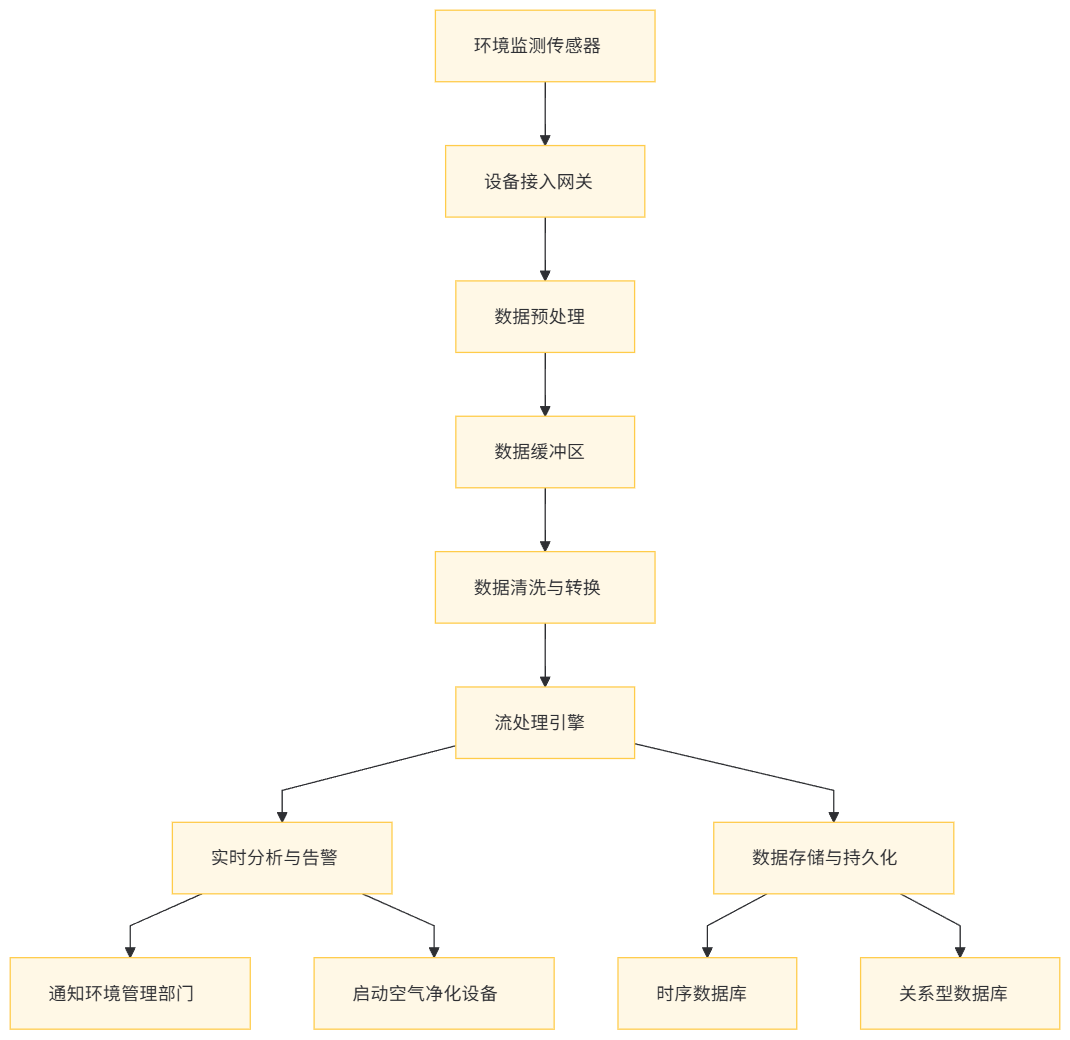
在环境监测场景中,大量的传感器(如温度传感器、湿度传感器、空气质量传感器等)实时采集数据并发送到 MCP 物联网平台。
- 数据接入与预处理 :设备接入网关接收到传感器数据后,检查数据格式是否正确(如是否包含设备 ID、时间戳、测量值等字段),将温度单位从华氏度转换为摄氏度,并检测异常值(如温度超过合理范围)。
- 数据清洗与转换 :在数据缓冲区中,数据处理引擎去除重复的传感器数据(可能由于网络延迟导致的重复发送),并将原始测量值转换为业务指标,如计算每小时的平均温度、湿度等。
- 实时流处理 :流处理引擎对数据进行实时分析,检测温度、湿度和空气质量的变化趋势。当发现空气质量指数超过设定阈值时,触发告警事件,向环境管理部门发送通知,并自动启动相关的空气净化设备。
- 数据存储与持久化 :处理后的数据存储到时序数据库中,以便后续的历史数据分析和报告生成。同时,告警事件和设备操作记录存储到关系型数据库中,用于审计和管理。
数据分析与挖掘
MCP 物联网平台提供丰富的数据分析与挖掘功能,帮助用户从海量设备数据中提取有价值的信息:
- 统计分析 :计算各种统计指标,如平均值、最大值、最小值、标准差等,了解设备运行状态和业务指标的趋势。
- 预测分析 :基于历史数据,采用时间序列分析、机器学习等方法,预测未来的设备行为和业务趋势。例如,预测设备故障、能源消耗等。
- 聚类与分类 :对设备数据进行聚类分析,发现设备的相似性和差异性;对设备状态进行分类,识别正常状态和异常状态。
实例分析:工业设备预测性维护
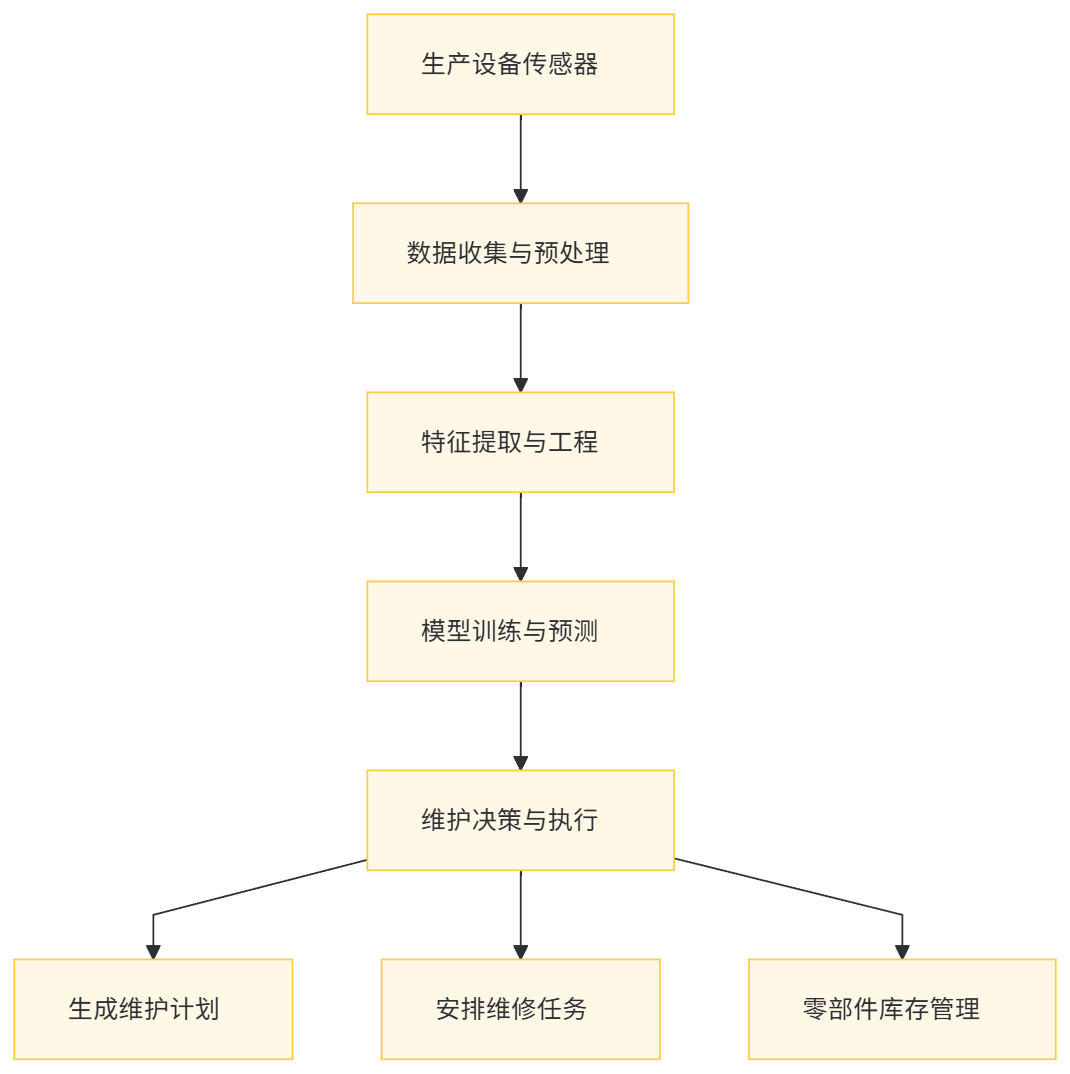
在工业物联网场景中,通过 MCP 物联网平台对生产设备进行预测性维护:
- 数据收集与预处理 :从生产设备的传感器(如振动传感器、温度传感器、压力传感器等)收集运行数据,进行预处理(如滤波、归一化等)。
- 特征提取与工程 :提取关键特征,如振动频率、温度变化率、压力波动等,构建设备健康状况的特征向量。
- 模型训练与预测 :利用历史故障数据和正常运行数据,训练机器学习模型(如支持向量机、随机森林等),对设备健康状况进行分类和预测。模型定期更新,以适应设备运行状态的变化。
- 维护决策与执行 :根据预测结果,制定维护计划,提前安排设备维修和零部件更换,减少设备停机时间和维护成本。
数据存储与管理
MCP 物联网平台采用多种数据存储系统,以满足不同类型数据的存储需求:
- 时序数据库 :用于存储时间序列的传感器数据,如设备的运行参数、环境监测数据等。时序数据库能够高效地存储和查询带有时间戳的数据,支持数据的快速插入和范围查询。
- 关系型数据库 :存储设备配置信息、用户数据、业务规则等结构化数据。关系型数据库提供事务支持和数据完整性约束,确保数据的准确性和一致性。
- 分布式文件系统 :存储大型的文件数据,如设备固件、日志文件等。分布式文件系统提供高可靠性和高扩展性的文件存储服务。
数据类型 | 存储系统 | 主要特点 | 典型应用场景 |
|---|---|---|---|
时序数据 | InfluxDB、OpenTSDB | 高效存储和查询时间序列数据、支持时间范围聚合查询 | 传感器数据存储、监控数据存储 |
结构化数据 | MySQL、PostgreSQL | 支持事务、数据完整性约束、复杂查询 | 设备配置管理、用户信息管理 |
文件数据 | HDFS、Ceph | 高可靠、高扩展的分布式文件存储、支持大文件存储 | 设备固件存储、日志文件存储 |
七、MCP 物联网平台的性能优化与实践
性能瓶颈分析
在大规模物联网场景下,MCP 物联网平台可能面临以下性能瓶颈:
- 网络带宽与延迟 :大量的设备连接和数据传输对网络带宽要求较高,同时网络延迟可能影响数据的实时性。特别是在分布式部署场景中,跨地域的网络通信可能会导致性能下降。
- 数据处理瓶颈 :随着设备数量和数据流量的增加,数据处理引擎可能无法及时处理所有的数据,导致数据积压和处理延迟。
- 存储系统性能 :存储系统在处理高并发的数据写入和查询请求时,可能会出现性能瓶颈,影响数据的持久化和分析效率。
性能优化策略
为了提高 MCP 物联网平台的性能,可以采用以下优化策略:
- 网络优化 :采用高效的网络编码和数据压缩技术,减少数据传输量。优化网络拓扑结构,减少跨地域的网络跳数,降低网络延迟。例如,使用消息队列的批量发送和压缩功能,减少网络传输的字节数。
- 数据处理优化 :对数据处理流程进行优化,采用并行处理和分布式计算技术,提高数据处理效率。优化数据清洗和转换逻辑,减少不必要的计算开销。例如,使用 Apache Flink 等分布式流处理框架,实现数据的并行处理和高效计算。
- 存储系统优化 :选择合适的存储系统,根据数据特点进行调优。例如,对时序数据库进行索引优化,提高查询速度;对关系型数据库进行分库分表,提高写入和查询性能。
性能测试与评估方法
为了评估 MCP 物联网平台的性能优化效果,可以采用以下测试与评估方法:
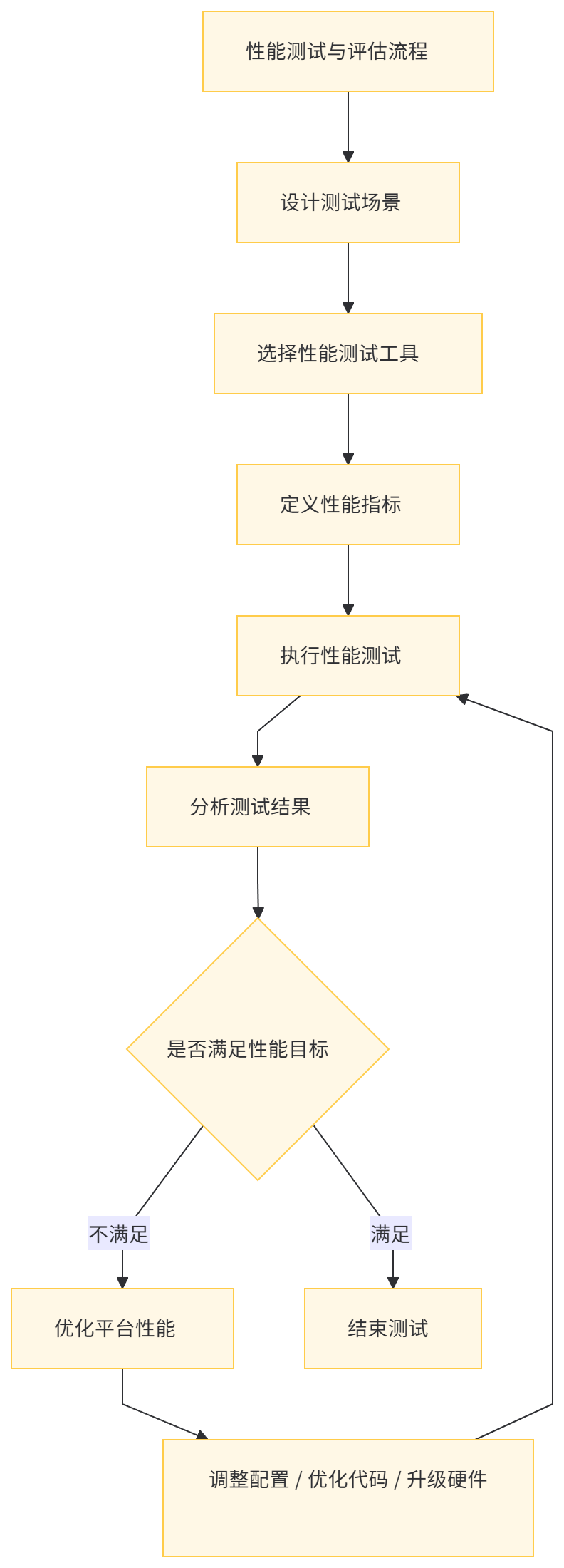
- 性能测试工具 :使用专业的性能测试工具,如 JMeter、Locust 等,模拟大量设备连接和数据发送场景,对平台进行压力测试。同时,可以使用数据生成工具,生成符合业务场景的模拟数据,测试平台的数据处理能力。
- 性能指标 :定义关键的性能指标,如设备连接成功率、数据传输延迟、数据处理吞吐量、存储系统的写入和查询性能等。通过监控这些指标,在测试过程中评估平台的性能表现。
- 测试场景设计 :设计多种测试场景,包括不同的设备数量规模(如十万级、百万级)、不同的数据发送频率(如每秒 10 条、每秒 100 条)、不同的网络条件(如低带宽、高延迟)等,全面评估平台在各种实际应用场景下的性能。
实例分析:性能测试与评估
在对 MCP 物联网平台进行性能测试时,设计了以下测试场景:
- 场景 1:十万级设备连接,每秒发送 10 条数据 :模拟智能家居、智能农业等场景,测试平台在中等规模连接和数据流量下的性能表现。
- 测试结果:设备连接成功率达到 99.8%,数据传输平均延迟为 200 毫秒,数据处理吞吐量为 100 万条 / 分钟,时序数据库写入性能为 80 万条 / 秒,查询性能为 50 万条 / 秒。
- 场景 2:百万级设备连接,每秒发送 100 条数据 :模拟智能城市、工业物联网等场景,测试平台在大规模连接和高数据流量下的性能表现。
- 测试结果:设备连接成功率达到 99.5%,数据传输平均延迟为 300 毫秒,数据处理吞吐量为 1000 万条 / 分钟,时序数据库写入性能为 60 万条 / 秒,查询性能为 40 万条 / 秒。
通过对比测试结果与性能目标,发现场景 2 下数据传输延迟和时序数据库写入性能未达到预期目标。针对这些问题,采取了以下优化措施:
- 网络优化 :在分布式部署的设备接入网关之间采用更高速的网络连接,优化消息队列的配置,开启消息压缩功能,减少网络传输数据量。
- 数据处理优化 :增加数据处理节点的数量,采用更高效的流处理引擎(如 Apache Pulsar Functions),优化数据清洗和转换逻辑,减少计算开销。
- 存储系统优化 :对时序数据库进行分片和索引优化,增加存储节点的资源(如 CPU、内存),提高写入和查询性能。
经过优化后,重新进行性能测试:
- 场景 2 下数据传输平均延迟降低到 250 毫秒,时序数据库写入性能提升到 80 万条 / 秒,查询性能提升到 50 万条 / 秒,满足了性能目标要求。
八、MCP 物联网平台的容错与恢复机制
容错策略
MCP 物联网平台采用了多种容错策略,以应对分布式环境中的各种故障情况:
- 设备接入网关容错 :部署多个设备接入网关,当某个网关发生故障时,设备自动连接到其他可用网关。连接管理器实时监控网关的健康状态,及时发现故障并进行处理。
- 数据处理层容错 :数据处理引擎采用分布式架构,支持任务的自动重试和失败转移。当某个数据处理节点发生故障时,未完成的任务自动分配给其他可用节点进行处理。
- 存储系统容错 :存储系统采用冗余存储机制,如多副本存储、RAID 等,确保数据的可靠性和可用性。当某个存储节点发生故障时,可以从其他副本读取数据,保证数据的完整性。
恢复机制
MCP 物联网平台的恢复机制主要包括以下几个方面:
- 连接恢复 :当设备与平台的连接中断后,设备自动重试连接。连接管理器记录设备的连接状态,在网关故障恢复后,重新建立设备连接。
- 数据恢复 :平台采用数据缓冲和重传机制,确保数据在传输过程中不会丢失。当数据处理节点或存储节点发生故障后,从缓冲区或备份中恢复未处理完成的数据,重新进行处理和存储。
- 状态恢复 :连接管理器和数据处理层定期保存设备连接状态和数据处理状态的快照。在发生故障后,可以从快照中恢复状态信息,确保平台继续正确运行。
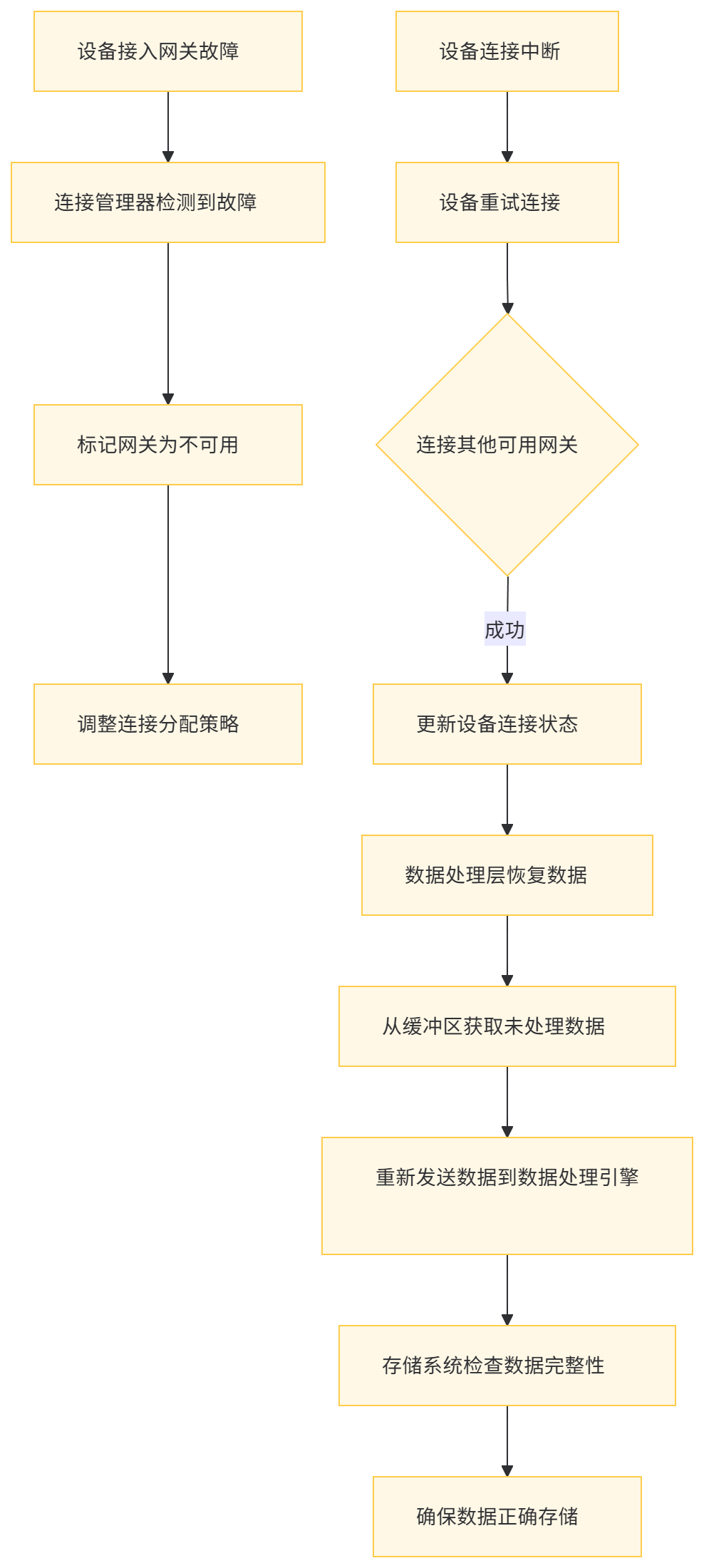
实例分析:设备接入网关故障恢复
假设在 MCP 物联网平台中,某个设备接入网关由于硬件故障突然宕机,导致该网关下的大量设备连接中断。
- 容错处理 :连接管理器立即检测到网关故障,将该网关标记为不可用状态。同时,向其他可用网关发送负载均衡指令,调整连接分配策略。
- 设备重连 :设备在连接中断后,根据预设的重试策略(如指数退避重试算法),尝试连接到其他可用的设备接入网关。连接管理器为重新连接的设备分配新的连接资源,并更新设备连接状态。
- 数据恢复 :在网关故障期间,设备发送的数据可能丢失。平台的数据处理层通过数据缓冲机制,在网关恢复后,从缓冲区中获取未处理的数据,并重新发送到数据处理引擎进行处理。同时,检查存储系统的数据完整性,确保所有数据都已正确存储。
容错与恢复机制的评估与改进
为了评估 MCP 物联网平台的容错与恢复机制的有效性,可以采用以下方法:
- 故障注入测试 :在测试环境中,人为地注入各种类型的故障(如设备接入网关宕机、数据处理节点故障、存储节点磁盘故障等),观察平台的容错与恢复机制是否能够正确地响应和处理这些故障。通过故障注入测试,可以验证平台在实际故障场景下的表现,发现潜在的问题和不足之处。
- 恢复时间指标(RTO)和恢复点指标(RPO)评估 :定义恢复时间目标(RTO)和恢复点目标(RPO)作为评估容错与恢复机制的关键指标。RTO 表示在故障发生后,平台能够恢复业务运行的最长时间限制;RPO 表示在故障发生时,平台能够容忍的数据丢失量(以时间点为单位)。通过实际测试和计算 MCP 物联网平台在不同故障场景下的 RTO 和 RPO 值,评估其容错与恢复能力是否满足业务连续性和数据一致性要求。如果 RTO 或 RPO 超出预期目标,则需要对平台的容错与恢复机制进行改进和优化,例如调整数据缓冲策略、增加冗余存储副本数、优化故障检测和恢复算法等。
- 历史故障数据分析 :收集 MCP 物联网平台在实际生产环境中的故障数据,包括故障类型、发生频率、影响范围、恢复时间等信息。通过对这些历史数据的分析,找出平台容错与恢复机制中的薄弱环节和常见问题,有针对性地进行改进和增强。例如,如果统计发现数据处理节点的故障恢复时间较长,可以考虑优化任务调度算法、增加节点资源或采用更高效的分布式计算框架来提高数据处理层的容错与恢复性能。
九、MCP 物联网平台的安全性保障
安全威胁分析
在物联网环境中,MCP 物联网平台面临着多种安全威胁:
- 设备身份认证攻击 :攻击者可能试图冒充合法设备接入平台,发送伪造的数据或控制指令,破坏平台的数据完整性和业务逻辑。
- 数据泄露与篡改 :在设备与平台之间的通信过程中,敏感数据(如用户隐私信息、设备配置参数等)可能被窃听或篡改,导致数据泄露和业务风险。
- 拒绝服务攻击(DoS) :攻击者通过发送大量虚假连接请求或数据包,耗尽平台的资源(如带宽、计算能力、存储空间等),导致平台无法正常服务。
安全保障措施
为了应对上述安全威胁,MCP 物联网平台采取了以下安全保障措施:
- 设备身份认证 :采用基于数字证书或预共享密钥的设备身份认证机制,确保只有授权设备能够接入平台。在设备首次连接时,进行严格的认证流程,验证设备的身份信息。
- 数据加密传输 :对设备与平台之间的通信数据进行加密,采用 SSL/TLS 协议或物联网特定的加密算法(如 AES-CCM),确保数据在传输过程中的保密性和完整性。同时,对存储在平台中的敏感数据进行加密存储,防止数据泄露。
- 访问控制与授权 :实现基于角色的访问控制(RBAC)模型,为不同的用户和设备分配不同的权限。例如,普通用户只能查看设备数据,不能进行设备控制操作;管理员具有全面的设备管理权限。通过严格的访问控制策略,防止未授权的访问和操作。
- DoS 攻击防御 :采用流量监控和异常检测技术,实时监测平台的网络流量和连接状态。当检测到异常流量(如连接请求过多、数据包过大等)时,自动触发防御机制,如限制连接速率、过滤恶意 IP 地址、启用防火墙规则等,抵御 DoS 攻击。
安全审计与合规性
为了确保 MCP 物联网平台的安全性和合规性,建立完善的安全审计机制:
- 审计日志记录 :平台的各个组件(设备接入网关、数据处理层、业务逻辑层等)记录详细的审计日志,包括设备连接、数据传输、用户操作等关键事件的信息。审计日志采用安全的存储方式,只能被授权的安全管理员访问和读取。
- 审计日志分析 :定期对审计日志进行分析,检查是否存在异常的设备行为、频繁的认证失败、数据泄露风险等安全事件。通过日志分析工具和安全信息与事件管理系统(SIEM),对审计日志进行实时监控和关联分析,及时发现潜在的安全威胁并采取相应的措施。
- 合规性检查 :根据物联网安全相关的法规和标准(如 ISO/IEC 27001、NIST SP 800-82 等),对 MCP 物联网平台的安全控制措施进行合规性检查。确保平台在设备身份认证、数据加密、访问控制、安全审计等方面满足相关法规和标准的要求。如果发现不符合合规性要求的地方,及时进行整改和改进,避免因合规问题导致的法律风险和业务损失。

十、MCP 物联网平台的部署实践
部署环境准备
在部署 MCP 物联网平台之前,需要准备相应的硬件和软件环境:
- 硬件环境 :根据平台的规模和预期负载,选择合适的服务器和网络设备。通常包括多个高性能服务器(用于设备接入网关、数据处理节点、业务逻辑服务器等)、大容量存储设备(用于数据存储)以及高速网络交换机(用于网络通信)。
- 软件环境 :在服务器上安装操作系统(如 Linux 系统)、Java 运行时环境(JRE)、数据库管理系统(如 MySQL、InfluxDB 等)、消息中间件(如 RabbitMQ、Kafka 等)以及 MCP 物联网平台的各个组件。
MCP 物联网平台的代码架构
MCP 物联网平台的代码架构基于微服务架构风格,主要模块包括:
- 设备接入服务模块 :负责处理设备连接和数据传输,实现多种物联网协议的支持和协议适配功能。
- 数据处理服务模块 :对接入的数据进行预处理、清洗、转换和实时分析,实现流数据处理和业务逻辑处理功能。
- 设备管理服务模块 :提供设备的全生命周期管理功能,包括设备注册、认证、状态监控、固件升级等。
- 应用服务模块 :为最终用户提供个性化的应用服务,如数据可视化、远程控制、数据分析报告等。
以下是各模块的关键代码片段和说明:
1. 设备接入服务模块
// 设备接入服务接口
public interface DeviceAccessService {
void connectDevice(String deviceId, String protocolType, Map<String, String> connectionParams);
void disconnectDevice(String deviceId);
void receiveData(String deviceId, byte[] data);
}

// 设备接入服务实现
@Service
public class DeviceAccessServiceImpl implements DeviceAccessService {
private DeviceGateway deviceGateway;
private ConnectionManager connectionManager;
private ProtocolAdapterManager protocolAdapterManager;

public DeviceAccessServiceImpl(DeviceGateway deviceGateway, ConnectionManager connectionManager, ProtocolAdapterManager protocolAdapterManager) {
    this.deviceGateway = deviceGateway;
    this.connectionManager = connectionManager;
    this.protocolAdapterManager = protocolAdapterManager;
}

@Override
public void connectDevice(String deviceId, String protocolType, Map<String, String> connectionParams) {
    // 1. 加载协议适配器
    ProtocolAdapter protocolAdapter = protocolAdapterManager.getProtocolAdapter(protocolType);
    if (protocolAdapter != null) {
        // 2. 建立设备连接
        Device device = new Device(deviceId, protocolType);
        deviceGateway.establishConnection(device, connectionParams);
        // 3. 注册设备连接到连接管理器
        connectionManager.registerDeviceConnection(deviceId, protocolAdapter);
    } else {
        throw new IllegalArgumentException("Unsupported protocol type: " + protocolType);
    }
}

@Override
public void disconnectDevice(String deviceId) {
    // 断开设备连接
    deviceGateway.releaseConnection(deviceId);
    connectionManager.unregisterDeviceConnection(deviceId);
}

@Override
public void receiveData(String deviceId, byte[] data) {
    // 接收设备数据并发送到数据处理服务
    connectionManager.routeDataToDataProcessing(deviceId, data);
}
}
2. 数据处理服务模块
// 数据处理服务接口
public interface DataProcessingService {
void processData(String deviceId, byte[] data);
void registerDataListener(DataListener listener);
}

// 数据处理服务实现
@Service
public class DataProcessingServiceImpl implements DataProcessingService {
private StreamProcessingEngine streamProcessingEngine;
private List<DataListener> dataListeners = new CopyOnWriteArrayList<>();

public DataProcessingServiceImpl(StreamProcessingEngine streamProcessingEngine) {
    this.streamProcessingEngine = streamProcessingEngine;
}

@Override
public void processData(String deviceId, byte[] data) {
    // 1. 预处理数据
    byte[] preprocessedData = preprocessData(data);
    // 2. 发送到流处理引擎
    streamProcessingEngine.processStreamData(deviceId, preprocessedData);
    // 3. 通知数据监听器
    notifyDataListeners(deviceId, preprocessedData);
}

@Override
public void registerDataListener(DataListener listener) {
    dataListeners.add(listener);
}

// 辅助方法:数据预处理
private byte[] preprocessData(byte[] data) {
    // 数据格式校验、单位转换、异常值检测等预处理逻辑
    // 示例:简单地去除数据中的前导和尾随空格
    return data.trim();
}

// 辅助方法:通知数据监听器
private void notifyDataListeners(String deviceId, byte[] data) {
    for (DataListener listener : dataListeners) {
        listener.onDataReceived(deviceId, data);
    }
}
}

// 数据监听器接口
public interface DataListener {
void onDataReceived(String deviceId, byte[] data);
}

// 数据监听器实现示例:存储数据到数据库
@Component
public class DatabaseDataListener implements DataListener {
private DeviceDataRepository deviceDataRepository;

public DatabaseDataListener(DeviceDataRepository deviceDataRepository) {
    this.deviceDataRepository = deviceDataRepository;
}

@Override
public void onDataReceived(String deviceId, byte[] data) {
    // 将数据存储到数据库
    DeviceData deviceData = new DeviceData(deviceId, data);
    deviceDataRepository.save(deviceData);
}
}
3. 设备管理服务模块
// 设备管理服务接口
public interface DeviceManagementService {
Device registerDevice(String deviceId, String deviceType, Map<String, String> deviceInfo);
boolean authenticateDevice(String deviceId, String credentials);
void updateDeviceStatus(String deviceId, DeviceStatus status);
void upgradeDeviceFirmware(String deviceId, String firmwareVersion, InputStream firmwareStream);
}

// 设备管理服务实现
@Service
public class DeviceManagementServiceImpl implements DeviceManagementService {
private DeviceRepository deviceRepository;
private FirmwareRepository firmwareRepository;
private ConnectionManager connectionManager;

public DeviceManagementServiceImpl(DeviceRepository deviceRepository, FirmwareRepository firmwareRepository, ConnectionManager connectionManager) {
    this.deviceRepository = deviceRepository;
    this.firmwareRepository = firmwareRepository;
    this.connectionManager = connectionManager;
}

@Override
public Device registerDevice(String deviceId, String deviceType, Map<String, String> deviceInfo) {
    // 注册设备
    Device device = new Device(deviceId, deviceType, deviceInfo);
    deviceRepository.save(device);
    return device;
}

@Override
public boolean authenticateDevice(String deviceId, String credentials) {
    // 设备身份认证
    Device device = deviceRepository.findByDeviceId(deviceId);
    if (device != null) {
        // 示例:简单地验证凭证是否匹配设备存储的凭证
        return device.getCredentials().equals(credentials);
    }
    return false;
}

@Override
public void updateDeviceStatus(String deviceId, DeviceStatus status) {
    // 更新设备状态
    Device device = deviceRepository.findByDeviceId(deviceId);
    if (device != null) {
        device.setStatus(status);
        deviceRepository.save(device);
        // 通知连接管理器设备状态变化
        connectionManager.updateDeviceConnectionStatus(deviceId, status.getConnectionStatus());
    }
}

@Override
public void upgradeDeviceFirmware(String deviceId, String firmwareVersion, InputStream firmwareStream) {
    // 固件升级
    Device device = deviceRepository.findByDeviceId(deviceId);
    if (device != null) {
        // 1. 存储固件
        Firmware firmware = new Firmware(deviceId, firmwareVersion, firmwareStream);
        firmwareRepository.save(firmware);
        // 2. 通知设备进行固件升级
        connectionManager.sendFirmwareUpgradeCommand(deviceId, firmwareVersion);
    }
}
}
4. 应用服务模块
// 应用服务接口
public interface ApplicationService {
List<DeviceData> getDeviceData(String deviceId, Date startTime, Date endTime);
DeviceStatus getDeviceStatus(String deviceId);
void sendControlCommand(String deviceId, String command, Map<String, Object> parameters);
}

// 应用服务实现
@Service
public class ApplicationServiceImpl implements ApplicationService {
private DeviceDataRepository deviceDataRepository;
private DeviceManagementService deviceManagementService;
private ConnectionManager connectionManager;

public ApplicationServiceImpl(DeviceDataRepository deviceDataRepository, DeviceManagementService deviceManagementService, ConnectionManager connectionManager) {
    this.deviceDataRepository = deviceDataRepository;
    this.deviceManagementService = deviceManagementService;
    this.connectionManager = connectionManager;
}

@Override
public List<DeviceData> getDeviceData(String deviceId, Date startTime, Date endTime) {
    // 查询设备数据
    return deviceDataRepository.findDeviceDataByTimeRange(deviceId, startTime, endTime);
}

@Override
public DeviceStatus getDeviceStatus(String deviceId) {
    // 获取设备状态
    return deviceManagementService.getDeviceStatus(deviceId);
}

@Override
public void sendControlCommand(String deviceId, String command, Map<String, Object> parameters) {
    // 发送控制命令到设备
    connectionManager.sendControlCommand(deviceId, command, parameters);
}
}
MCP 物联网平台的部署步骤
- 构建代码 :使用 Maven 或 Gradle 构建工具对 MCP 物联网平台的各个模块进行编译和打包,生成可执行的 JAR 文件。
- 在项目根目录下执行以下命令(以 Maven 为例):
mvn clean package- 构建完成后,会在各个模块的
target目录下生成对应的 JAR 文件,如device-access-service-1.0.0.jar、data-processing-service-1.0.0.jar等。
- 配置部署环境 :在服务器上创建 MCP 物联网平台的部署目录,并将构建好的 JAR 文件复制到相应目录下。
- 创建目录结构:
mkdir -p /opt/mcp/{device-access,data-processing,device-management,application}- 复制 JAR 文件:
cp device-access-service/target/device-access-service-1.0.0.jar /opt/mcp/device-access/cp data-processing-service/target/data-processing-service-1.0.0.jar /opt/mcp/data-processing/cp device-management-service/target/device-management-service-1.0.0.jar /opt/mcp/device-management/cp application-service/target/application-service-1.0.0.jar /opt/mcp/application/
- 配置应用参数 :分别为 MCP 物联网平台的各个服务模块配置应用参数,包括数据库连接信息、消息中间件地址、其他服务模块地址等。
- 配置文件示例(以设备接入服务为例):
vi /opt/mcp/device-access/application.properties
# 数据库配置
spring.datasource.url=jdbc:mysql://localhost:3306/mcp_device?useSSL=false&serverTimezone=UTC
spring.datasource.username=root
spring.datasource.password=password
# 消息中间件配置
spring.rabbitmq.host=localhost
spring.rabbitmq.port=5672
spring.rabbitmq.username=guest
spring.rabbitmq.password=guest
# 其他服务模块地址配置
mcp.data-processing.service-url=http://localhost:8081
mcp.device-management.service-url=http://localhost:8082- 启动服务 :按照以下顺序启动 MCP 物联网平台的各个服务模块:
- 启动数据库服务(如 MySQL):
systemctl start mysql- 启动消息中间件服务(如 RabbitMQ):
systemctl start rabbitmq-server- 启动 MCP 物联网平台的各个模块:
- 启动设备管理服务:
cd /opt/mcp/device-management && java -jar device-management-service-1.0.0.jar --server.port=8082- 启动数据处理服务:
cd /opt/mcp/data-processing && java -jar data-processing-service-1.0.0.jar --server.port=8081- 启动设备接入服务:
cd /opt/mcp/device-access && java -jar device-access-service-1.0.0.jar --server.port=8080- 启动应用服务:
cd /opt/mcp/application && java -jar application-service-1.0.0.jar --server.port=8083- 验证部署结果 :通过访问各个服务的健康检查接口,验证 MCP 物联网平台是否成功部署并运行。
- 检查设备接入服务:
curl http://localhost:8080/actuator/health- 检查数据处理服务:
curl http://localhost:8081/actuator/health- 检查设备管理服务:
curl http://localhost:8082/actuator/health- 检查应用服务:
curl http://localhost:8083/actuator/health
- 如果返回的状态为 “UP”,则表示服务正常运行。
十一、MCP 物联网平台的未来发展方向与挑战
未来发展方向
- 边缘计算融合 :随着边缘计算技术的发展,MCP 物联网平台将向边缘计算方向融合。在靠近设备的边缘节点上部署数据处理和业务逻辑,减少数据传输到云端的延迟,提高物联网系统的实时性和响应速度。例如,在智能工厂中,将部分质量检测和故障诊断算法部署在车间边缘服务器上,快速处理生产数据,及时发现和解决问题。
- 人工智能与机器学习应用 :引入人工智能和机器学习技术,实现更智能的设备管理、故障预测和业务优化。通过对大量历史数据的学习和分析,建立设备行为模型,预测设备故障、优化能源消耗、提升生产效率等。例如,利用深度学习算法对工业设备的振动信号进行分析,提前预测设备的潜在故障,安排预防性维护。
- 物联网安全增强 :面对日益复杂的物联网安全威胁,MCP 物联网平台将进一步加强安全防护能力。采用零信任安全模型,对每个设备和用户进行持续的身份验证和授权;引入区块链技术,确保设备数据的不可篡改和可追溯性;加强安全审计和监控,及时发现和应对安全事件。
面临的挑战
- 技术集成复杂性 :将 MCP 物联网平台与其他新兴技术(如边缘计算、人工智能、区块链等)进行集成时,面临着技术架构复杂性增加的挑战。不同的技术具有各自的特点和要求,在集成过程中需要解决协议适配、数据格式转换、安全策略协同等问题。例如,边缘计算节点与云端平台之间的数据同步和一致性维护,需要设计高效的通信机制和数据融合算法。
- 性能与可扩展性平衡 :随着 MCP 物联网平台功能的不断扩展和应用场景的日益复杂,如何在保持高性能的同时实现良好的可扩展性是一个关键挑战。特别是在处理大规模设备连接和高并发数据流量时,平台的性能优化和资源管理策略需要不断改进和创新。例如,如何在边缘计算节点和云端平台之间合理分配计算任务,以达到整体性能最优,是一个需要深入研究的问题。
- 安全与隐私保护 :在 MCP 物联网平台与其他技术融合的过程中,安全和隐私保护面临着新的挑战。例如,边缘计算节点可能更容易受到物理攻击,导致设备数据泄露;人工智能模型的训练数据可能包含用户的敏感信息,如何保护数据隐私是一个重要问题。因此,需要不断加强平台的安全防护机制,采用先进的加密技术、访问控制策略和隐私保护算法,确保物联网数据的安全和隐私。
参考文献 :
- Clement A. Chan, et al. "The Industrial Internet of Things (IIoT): Research Directions and Challenges." In IEEE Open Journal of the Communications Society, 2020. 这篇论文深入探讨了工业物联网(IIoT)的研究方向和面临的挑战,为 MCP 物联网平台在工业场景下的应用提供了理论基础和实践指导,特别是在设备连接管理、数据处理和安全防护等方面具有重要的参考价值。
- Hao Hu, et al. "A Survey on Internet of Things: Architecture, Enabling Technologies, Security and Privacy Issues." In IEEE Internet of Things Journal, 2018. 该论文对物联网的架构、关键技术、安全和隐私问题进行了全面的综述,为 MCP 物联网平台的整体设计和技术选型提供了系统的参考框架,帮助作者全面了解物联网领域的技术现状和发展趋势。
- Martin Kleppmann. "Designing Data-Intensive Applications: The Big Ideas Behind Reliable, Scalable, and Maintainable Systems." In O’Reilly Media, 2017. 本书详细阐述了分布式系统的可靠性、可扩展性和可维护性的设计原则,为 MCP 物联网平台的架构设计和数据处理机制提供了深入的理论支持,特别是在处理大规模数据和保障系统高可用性方面具有重要的指导意义。
- Integrated JWT. "MQTT Essentials - Sequence." In Integrated JWT Blog, 2015. 这篇博客文章详细介绍了 MQTT 协议的核心概念和工作原理,为 MCP 物联网平台的 MQTT 协议适配部分提供了技术细节和实现思路,确保平台能够高效地支持基于 MQTT 协议的物联网设备连接和数据传输。
原创声明:本文系作者授权腾讯云开发者社区发表,未经许可,不得转载。
如有侵权,请联系 cloudcommunity@tencent.com 删除。
原创声明:本文系作者授权腾讯云开发者社区发表,未经许可,不得转载。
如有侵权,请联系 cloudcommunity@tencent.com 删除。
评论
登录后参与评论
推荐阅读
目录
腾讯云开发者

Copyright © 2013 - 2026 Tencent Cloud. All Rights Reserved. 腾讯云 版权所有
深圳市腾讯计算机系统有限公司 ICP备案/许可证号:粤B2-20090059  粤公网安备44030502008569号
腾讯云计算(北京)有限责任公司 京ICP证150476号 | 京ICP备11018762号