187.HarmonyOS NEXT系列教程之列表切换案例交互实现详解
原创
187.HarmonyOS NEXT系列教程之列表切换案例交互实现详解
原创
全栈若城
发布于 2025-03-22 23:37:27
发布于 2025-03-22 23:37:27
温馨提示:本篇博客的详细代码已发布到 git : https://gitcode.com/nutpi/HarmonyosNext 可以下载运行哦!

HarmonyOS NEXT系列教程之列表切换案例交互实现详解
效果演示
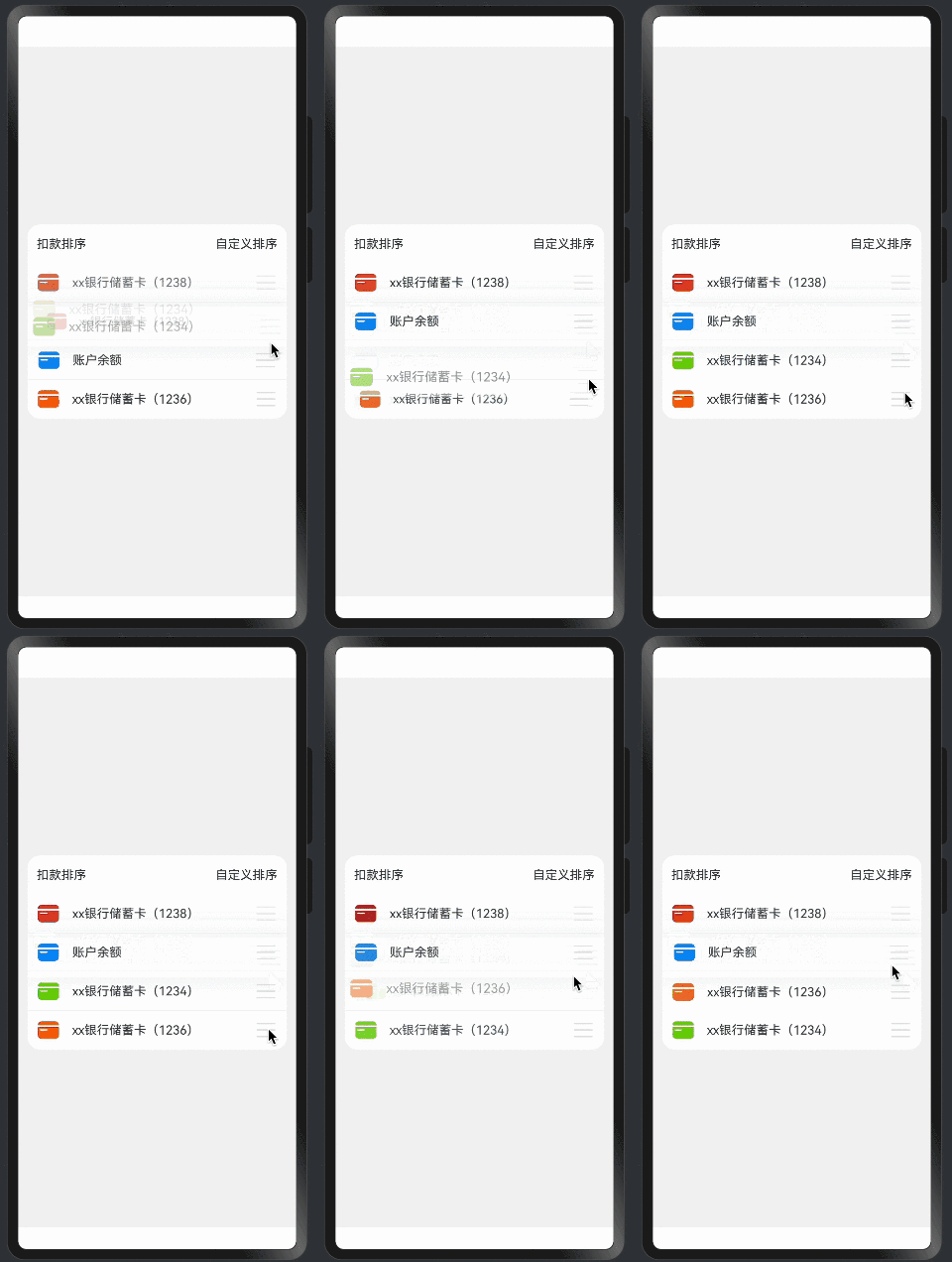
1. 交互系统概述
1.1 交互类型
// 支持的交互类型
1. 长按拖动排序
2. 左滑删除
3. 点击选择
4. 拖拽动画
1.2 手势配置
// 组合手势配置
.gesture(
    GestureGroup(GestureMode.Sequence,
        LongPressGesture()
            .onAction((event: GestureEvent) => {
                // 长按处理
            }),
        PanGesture()
            .onActionUpdate((event: GestureEvent) => {
                // 拖动处理
            })
    )
)
2. 长按手势实现
2.1 长按处理
onLongPress(item: T): void {
    const index: number = this.deductionData.indexOf(item);
    this.dragRefOffset = 0;

    // 添加长按动画效果
    animateTo({
        curve: Curve.Friction,
        duration: commonConstants.ANIMATE_DURATION
    }, () => {
        // 更新状态
        this.state = OperationStatus.PRESSING;
        // 添加视觉效果
        this.modifier[index].hasShadow = true;
        this.modifier[index].scale = 1.04;
    })
}
2.2 视觉反馈
// 长按状态样式
.zIndex(this.currentListItem === item ? 2 : 1)  // 提升层级
.transition(TransitionEffect.OPACITY)            // 透明度过渡
.attributeModifier(this.listExchangeCtrl.getModifier(item))  // 应用修改器
3. 拖动手势实现
3.1 拖动处理
onMove(item: T, offsetY: number): void {
    try {
        const index: number = this.deductionData.indexOf(item);
        // 计算偏移量
        this.offsetY = offsetY - this.dragRefOffset;
        this.modifier[index].offsetY = this.offsetY;

        // 计算移动方向
        const direction: number = this.offsetY > 0 ? 1 : -1;

        // 处理相邻项的缩放效果
        this.handleAdjacentItems(index, direction);

        // 处理位置交换
        this.handlePositionSwap(index, direction);
    } catch (err) {
        logger.error(`onMove err:${JSON.stringify(err)}`);
    }
}
3.2 位置交换
private handlePositionSwap(index: number, direction: number): void {
    // 判断是否需要交换位置
    if (Math.abs(this.offsetY) > ITEM_HEIGHT / 2) {
        // 边界检查
        if (index === 0 && direction === -1) return;
        if (index === this.deductionData.length - 1 && direction === 1) return;

        // 执行交换
        animateTo({
            curve: Curve.Friction,
            duration: commonConstants.ANIMATE_DURATION
        }, () => {
            this.offsetY -= direction * ITEM_HEIGHT;
            this.dragRefOffset += direction * ITEM_HEIGHT;
            this.modifier[index].offsetY = this.offsetY;

            const target = index + direction;
            if (target !== -1 && target <= this.modifier.length) {
                this.changeItem(index, target);
            }
        })
    }
}
4. 滑动删除实现
4.1 滑动配置
// 配置滑动删除按钮
.swipeAction({ end: this.defaultDeleteBuilder(item) })

// 删除按钮构建器
@Builder
defaultDeleteBuilder(item: Object) {
    Image($r("app.media.list_exchange_icon_delete"))
        .width($r('app.integer.list_exchange_icon_size'))
        .height($r('app.integer.list_exchange_icon_size'))
        .onClick(() => {
            this.listExchangeCtrl.deleteItem(item);
        })
}
4.2 删除处理
deleteItem(item: T): void {
    try {
        const index: number = this.deductionData.indexOf(item);
        this.dragRefOffset = 0;

        // 执行删除动画
        animateTo({
            curve: Curve.Friction,
            duration: 300,
            onFinish: () => {
                // 删除数据
                this.modifier.splice(index, 1);
                this.deductionData.splice(index, 1);
            }
        }, () => {
            this.state = OperationStatus.DELETE;
            this.modifier[index].offsetX = 150;
            this.modifier[index].opacity = 0;
        })
    } catch (err) {
        console.error(`delete err:${JSON.stringify(err)}`);
    }
}
5. 动画效果实现
5.1 过渡动画
// 配置过渡效果
.transition(TransitionEffect.OPACITY)  // 透明度过渡
.animation({                          // 自定义动画
    duration: 300,
    curve: Curve.EaseInOut
})
5.2 拖拽动画
// 拖拽状态动画
private applyDragAnimation(index: number): void {
    animateTo({
        curve: curves.interpolatingSpring(14, 1, 170, 17)
    }, () => {
        this.state = OperationStatus.IDLE;
        this.modifier[index].hasShadow = false;
        this.modifier[index].scale = 1;
        this.modifier[index].offsetY = 0;
    })
}
6. 性能优化
6.1 手势优化
// 使用事件节流
private throttle(fn: Function, delay: number): Function {
    let lastTime = 0;
    return (...args) => {
        const now = Date.now();
        if (now - lastTime >= delay) {
            fn.apply(this, args);
            lastTime = now;
        }
    }
}

// 应用节流
.onActionUpdate(this.throttle((event) => {
    this.handleDrag(event);
}, 16))  // 60fps
6.2 动画优化
// 使用硬件加速
.renderMode(RenderMode.Hardware)

// 优化动画性能
animateTo({
    duration: commonConstants.ANIMATE_DURATION,
    curve: curves.interpolatingSpring(14, 1, 170, 17)
})
7. 最佳实践
7.1 交互建议
- 提供清晰的视觉反馈
- 实现平滑的动画效果
- 处理边界情况
- 优化用户体验
7.2 性能建议
- 使用事件节流
- 优化动画性能
- 减少不必要的更新
- 实现错误处理
8. 小结
本篇教程详细介绍了:
- 交互系统的设计实现
- 手势处理的具体方法
- 动画效果的实现方式
- 性能优化的策略
- 最佳实践建议
这些内容帮助你理解列表切换案例的交互实现。下一篇将详细介绍动画效果和样式控制的实现。
原创声明:本文系作者授权腾讯云开发者社区发表,未经许可,不得转载。
如有侵权,请联系 cloudcommunity@tencent.com 删除。
目录
腾讯云开发者

Copyright © 2013 - 2026 Tencent Cloud. All Rights Reserved. 腾讯云 版权所有
深圳市腾讯计算机系统有限公司 ICP备案/许可证号:粤B2-20090059  粤公网安备44030502008569号
腾讯云计算(北京)有限责任公司 京ICP证150476号 | 京ICP备11018762号