118.HarmonyOS NEXT 跑马灯组件详解(六):事件处理机制
原创
118.HarmonyOS NEXT 跑马灯组件详解(六):事件处理机制
原创
全栈若城
发布于 2025-03-18 22:29:22
发布于 2025-03-18 22:29:22
温馨提示:本篇博客的详细代码已发布到 git : https://gitcode.com/nutpi/HarmonyosNext 可以下载运行哦!
HarmonyOS NEXT 跑马灯组件详解(六):事件处理机制
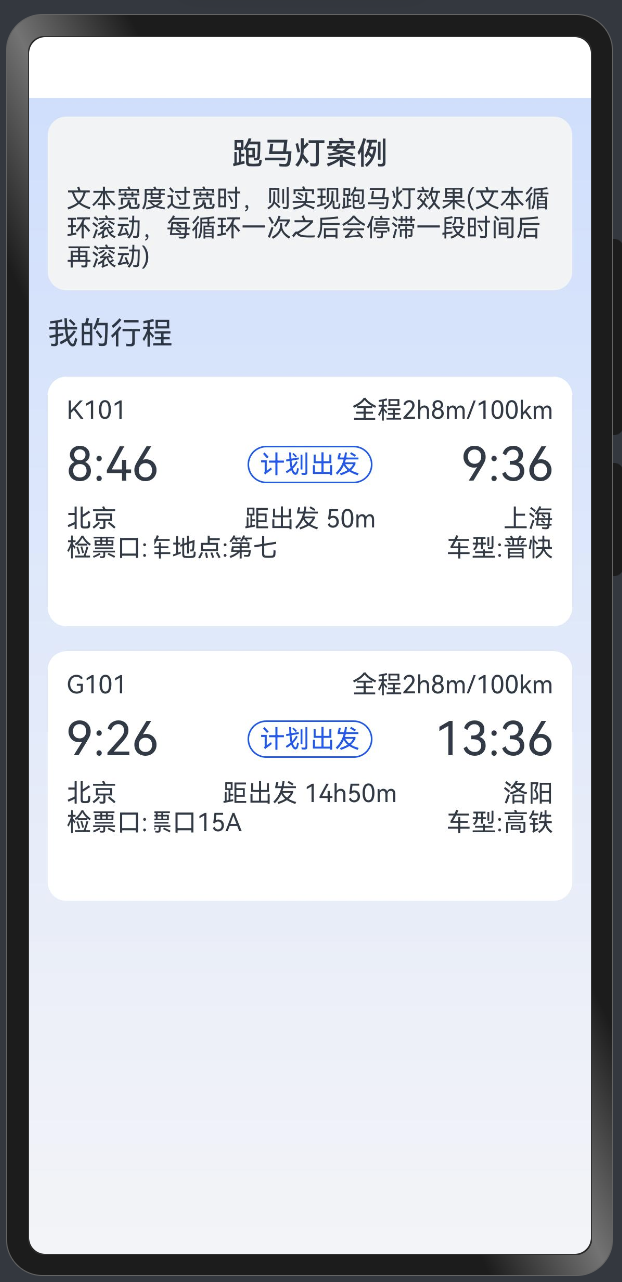
效果演示
1. 事件处理概述
MarqueeSection组件实现了多种事件处理机制,包括:
- 区域变化事件
- 组件出现事件
- 动画完成事件
- 生命周期事件
2. 区域变化事件
2.1 事件监听实现
.onAreaChange((oldValue, newValue) => {
    logger.info(`TextArea oldValue:${JSON.stringify(oldValue)},
                newValue:${JSON.stringify(newValue)}`);

    // 获取组件尺寸
    let modePosition = componentUtils.getRectangleById('marquee');

    // 更新宽度信息
    this.updateWidthInfo(modePosition, newValue);

    // 处理文本偏移
    this.handleTextOffset();
})
2.2 宽度更新处理
private updateWidthInfo(modePosition: any, newValue: any) {
    this.ticketCheckScrollWidth = Number(px2vp(modePosition.size.width));
    this.ticketCheckTextWidth = Number(newValue.width);
}
3. 组件出现事件
3.1 事件处理
.onAppear(() => {
    // 开始滚动动画
    this.scrollAnimation();
})
3.2 动画初始化
private initializeAnimation() {
    if (this.ticketCheckTextWidth < this.ticketCheckScrollWidth) {
        return;
    }
    this.scrollAnimation();
}
4. 动画完成事件
4.1 完成回调
onFinish: () => {
    // 重置偏移量
    this.resetOffset();

    // 处理循环逻辑
    this.handleIteration();

    // 设置下一次动画
    this.scheduleNextAnimation();
}
4.2 循环处理
private handleIteration() {
    if (this.marqueeAnimationModifier.iterations > 1) {
        if (this.count === this.marqueeAnimationModifier.iterations) {
            this.count = 1;
            return;
        }
        this.count++;
    }
}
5. 生命周期事件
5.1 组件出现前
aboutToAppear(): void {
    // 清除定时器
    clearTimeout(this.timer);
}
5.2 组件消失前
aboutToDisappear(): void {
    // 清理资源
    this.cleanup();
}
6. 事件工具方法
6.1 偏移量重置
private resetOffset() {
    this.ticketCheckTextOffset =
        this.marqueeAnimationModifier.playMode === PlayMode.Normal ?
        0 :
        -(2 * this.ticketCheckTextWidth +
          this.marqueeScrollModifier.space -
          this.ticketCheckScrollWidth);
}
6.2 下一次动画调度
private scheduleNextAnimation() {
    this.timer = setTimeout(() => {
        this.scrollAnimation();
    }, this.marqueeAnimationModifier.delayTime);
}
7. 错误处理
7.1 异常捕获
try {
    this.handleAreaChange(oldValue, newValue);
} catch (error) {
    logger.error('Area change error:', error.toString());
}
7.2 参数验证
private validateParameters(value: any): boolean {
    if (!value || typeof value.width !== 'number') {
        logger.warn('Invalid parameter');
        return false;
    }
    return true;
}
8. 最佳实践
8.1 事件处理优化
// 使用防抖处理频繁事件
private debounce(func: Function, wait: number) {
    let timeout: number;
    return (...args: any[]) => {
        clearTimeout(timeout);
        timeout = setTimeout(() => {
            func.apply(this, args);
        }, wait);
    };
}
8.2 资源清理
private cleanup() {
    // 清除定时器
    clearTimeout(this.timer);

    // 重置状态
    this.count = 1;
    this.ticketCheckTextOffset = 0;
}
9. 注意事项
- 事件监听
- 及时移除不需要的监听
- 避免重复监听
- 处理边界情况
- 资源管理
- 及时清理资源
- 避免内存泄漏
- 合理使用定时器
- 错误处理
- 完善的错误捕获
- 合适的降级策略
- 日志记录
通过以上详细讲解,你应该能够理解MarqueeSection组件的事件处理机制。合理处理各种事件可以提高组件的稳定性和用户体验。
原创声明:本文系作者授权腾讯云开发者社区发表,未经许可,不得转载。
如有侵权,请联系 cloudcommunity@tencent.com 删除。
原创声明:本文系作者授权腾讯云开发者社区发表,未经许可,不得转载。
如有侵权,请联系 cloudcommunity@tencent.com 删除。
评论
登录后参与评论
推荐阅读
目录
腾讯云开发者

Copyright © 2013 - 2026 Tencent Cloud. All Rights Reserved. 腾讯云 版权所有
深圳市腾讯计算机系统有限公司 ICP备案/许可证号:粤B2-20090059  粤公网安备44030502008569号
腾讯云计算(北京)有限责任公司 京ICP证150476号 | 京ICP备11018762号