Linux——进程状态


1. 进程状态
- 为了弄明白正在运行的进程是什么意思,我们需要知道进程的不同状态。一个进程可以有多个状态,在Linux内核中,进程也可以叫做任务。 所谓的状态就是一个整型变量,在task_struct中的一个整型变量。 下面是进程状态在Kernel源代码中的定义:
/*
* The task state array is a strange "bitmap" of
* reasons to sleep. Thus "running" is zero, and
* you can test for combinations of others with
* simple bit tests.
*/
static const char * const task_state_array[] = {
"R (running)", /* 0 */
"S (sleeping)", /* 1 */
"D (disk sleep)", /* 2 */
"T (stopped)", /* 4 */
"t (tracing stop)", /* 8 */
"X (dead)", /* 16 */
"Z (zombie)", /* 32 */
};
提问:为什么要有进程状态呢? 回答:在日常生活中,可能你感冒了,你会对室友说,我今天状态不好就不去上课了。这里的状态就决定了你的后续动作——不去上课了。在Linux中也是如此,Linux可能存在很多的进程,操作系统要根据它们的状态来决定后续对这些进程的操作。
1.1 通俗的5种状态
进程的状态,通俗的来讲有5种:创建状态、就绪状态、堵塞状态、执行状态、终止状态。 最基本的状态就是:运行状态、就绪状态、堵塞状态。
- 就绪状态:进程已经具备运行条件,但是由于没有空闲的CPU,而暂时不能运行。
- 运行状态:进程正在运行,占用CPU资源。
- 堵塞状态:因为正在等待某一事件而暂时不能运行,如程序正在执行sleep,或者等待输入。 创建态与结束态
- 创建态:进程正在被创建,操作系统为分配资源、初始化PCB
- 进程终止从系统中撤销,操作系统会回收进程拥有的资源。
1.2 进程具体的状态
上面的状态好像和前面我们所写的状态不太一样啊,确实,在前面我们所写为的为进程具体的状态,相当于通俗状态的具体实例。 再来看看代码:
/*
* The task state array is a strange "bitmap" of
* reasons to sleep. Thus "running" is zero, and
* you can test for combinations of others with
* simple bit tests.
*/
static const char * const task_state_array[] = {
"R (running)", /* 0 */
"S (sleeping)", /* 1 */
"D (disk sleep)", /* 2 */
"T (stopped)", /* 4 */
"t (tracing stop)", /* 8 */
"X (dead)", /* 16 */
"Z (zombie)", /* 32 */
};- R运行状态(running):并不意味着进程一定在运行,它表明进程要么在运行中要么在运行队列里。对于了就绪状态和运行状态。
- S睡眠状态(sleeping):意味着进程在等待事件完成(这里的睡眠有时候也叫做可中断睡眠)。对于了堵塞状态。
- D磁盘休眠状态(Disk sleep)有时候也叫不可中断睡眠状态(uninterruptible sleep),在这个状态的进程通常会等待IO的结束。
- T停止状态(stopped):可以通过发送SIGSTOP信号给进程来停止进程,这个被暂停的进程可以发送SIGCONT信号让进程继续运行。
- X死亡状态(dead):这个状态只是一个返回状态,你不会在任务列表里看到这个状态。 说了这么多,有没有可信度呢?当然了下面就是查看进程状态。
1.3 进程状态的查看
ps aux / ps axj 命令有什么区别呢? aux,axj其实是分开看的:a-u-x-j
- ps a显示现行终端机下的所有程序,包括其他用户的程序。
- ps u以用户为主的格式来显示程序状态。
- ps x显示所有程序,不以终端机来区分。
- ps j显示进程归属的进程组id、会话id、父进程id
也就是说,ps aux就是以用户为主打印所有进程。ps axj打印所有进程并显示pid、ppid。 先写一个程序让它跑起来,然后观察它的状态。
#include <stdio.h>
#include <unistd.h>
#include <sys/types.h>
int main()
{
	while(1)
	{
		printf("I am a process!\n");
		sleep(1);//休眠一秒
	}
	return 0;
}
makefile的配置:
mybin:test1.c
	gcc -o mybin test1.c
.PHONY:clean
clean:
	rm -f mybin
把xshell开个双窗口,来观察进程的状态,一个用来运行程序,一个用来观察状态。
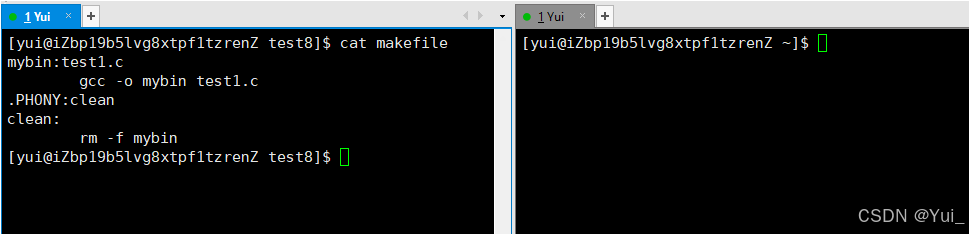
窗口
在此之前,我们还要在写一个循环擦查看进程状态的指令。
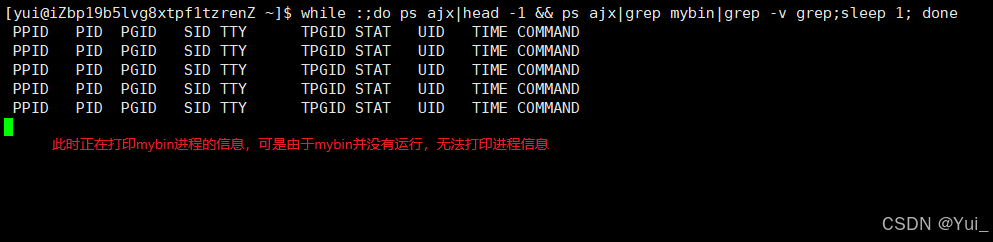
指令
while :;do ps ajx|head -1 && ps ajx|grep mybin|grep -v grep;sleep 1; done每秒打印一次mybin进程的状态。下面让我们运行一下程序来看看吧。

进程状态
从该程序我们可以看出该进程的各个信息,其中有个信息是有关进程状态的。就是STAT。
可是在上面的图片中为什么我们进程显示的状态是S呢?S可是睡眠的意思啊。令人费解,程序不是正在运行吗?其实图片没有错的,在我们的程序中存在一个sleep函数会让程序休眠一秒钟,进程不能在它睡眠期间还把它放在运行状态,这也就是导致了,mybin的运行状态只有一瞬间,运气好的话可能能捕捉到这一瞬间。
那么思考一下,如果把sleep去掉,STAT会是什么状态呢?
答案还是S,这是因为cout的缘故,printf也会存在休眠时间的,CPU的速度是非常快的,printf的休眠时间对于CPU的速度来说就显得非常漫长了,所以STAT依旧会显示S。
那么如何才能显示R呢?把printf去掉就可以,直接让程序执行死循环。
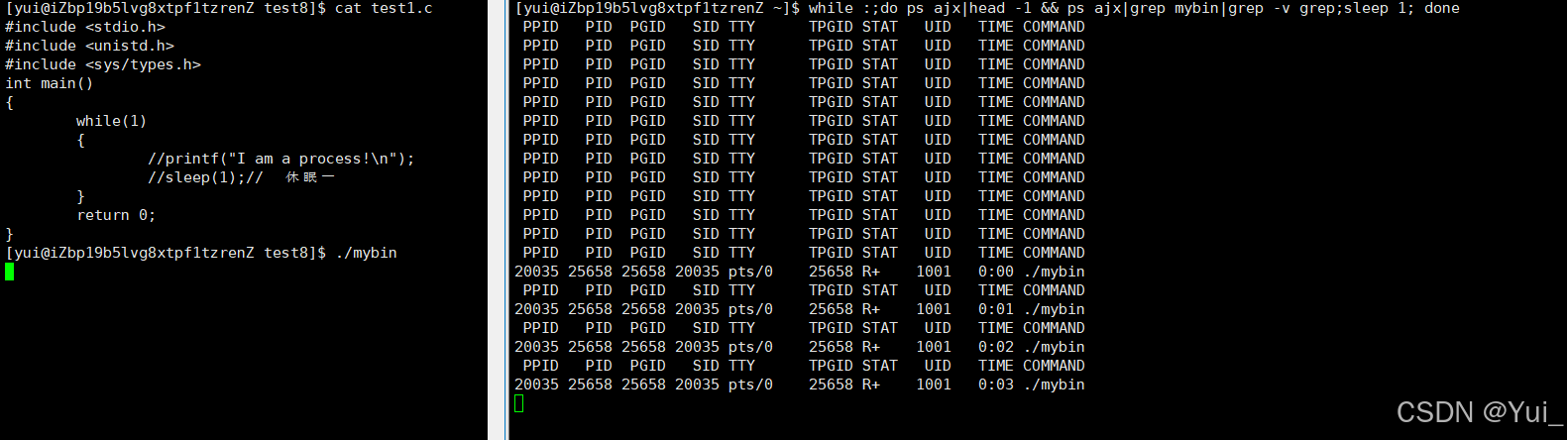
例子
就是如此。
#include <stdio.h>
#include <unistd.h>
#include <sys/types.h>
int main()
{
    int a = 0;
	while(1)
	{
        scanf("%d",&a);
	}
	return 0;
}
1.4 介绍僵尸进程与孤儿进程
Z(zombie)-僵尸进程
- 僵尸状态(Zombies)是一个比较特殊的状态,当进程退出并且父进程没有读取到子进程退出的返回代码就会产生僵尸进程。
- 僵尸进程会终止状态保持在进程表中,并且会一直等待父进程读取退出状态代码。
- 所以,只要子进程退出,父进程还在运行,但是父进程没有读取子进程的状态,子进程进入僵尸状态。 创建一个维持30秒的僵尸进程:
#include <stdio.h>
#include <stdlib.h>
int main()
{
	pid_t id = fork();
	if(id<0)
	{
		//程序出错
		perror("fork");
		return 1;
	}
	else if(id > 0)
	{
		printf("parent[%d] is sleeping...\n",getpid());
		sleep(30);
	}
	else
	{
		printf("child[%d] is begin Z...\n",getpid());
		sleep(5);
		exit(-1);
	}
	return 0;
}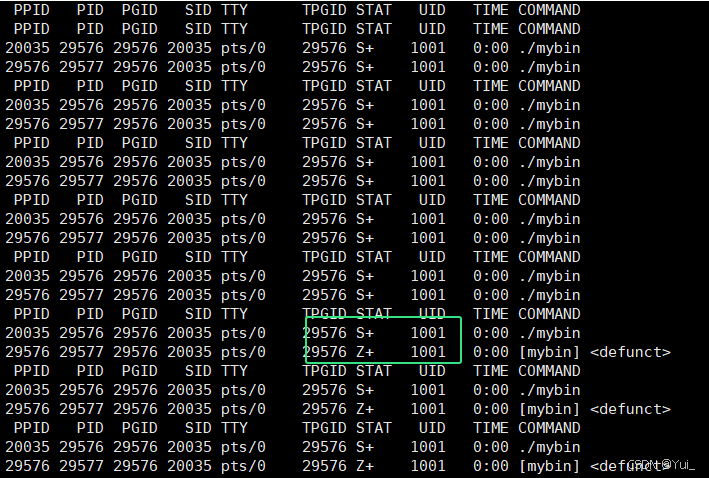
僵尸进程
僵尸进程的危害
- 进程的退出状态必须维持下去,因为它要告诉关心它的进程(父进程),父进程的任务,我完成的如何。可是父进程如果一直不读取,那子进程就一直处于Z状态。
- 维护退出状态本身就是要用数据维护,也属于进程的基本信息,所以保存task_struct(PCB)中,Z状态一直不退出,PCB将会一直维护它,不退出。
- 那父进程创建了很多子进程,就是不回收,就会导致内存的资源的浪费。因为数据结构对象就要占用内存。
- 僵尸进程会导致内存泄漏!
孤儿进程
- 父进程如果提前退出,那么子进程后退出,进入Z之后如何处理。
- 父进程先退出,子进程就称为“孤儿进程”
- 孤儿进程会被1号进程收养。
#include <stdio.h>
#include <stdlib.h>
int main()
{
	pid_t id = fork();
	if(id<0)
	{
		//程序出错
		perror("fork");
		return 1;
	}
	else if(id > 0)
	{
		printf("parent[%d] is sleeping...\n",getpid());
		sleep(3);
		exit(-1);
	}
	else
	{
		printf("child[%d] is begin Z...\n",getpid());
		sleep(10);
	}
	return 0;
}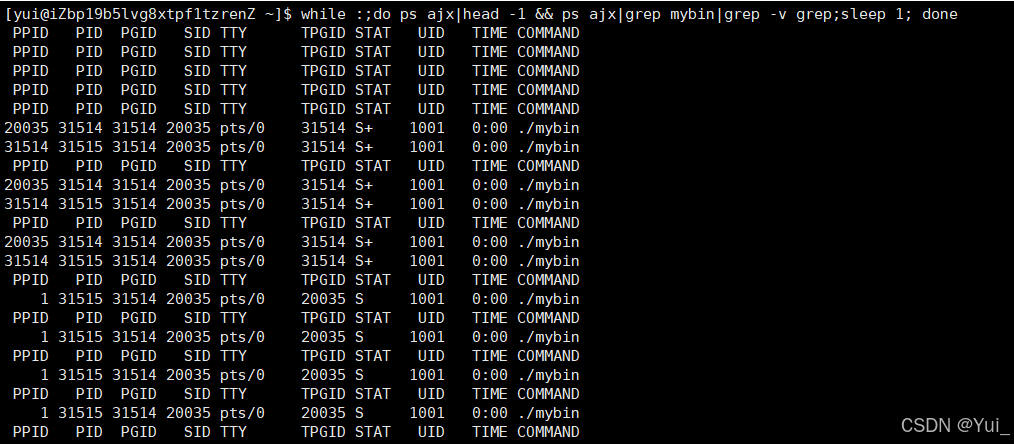
孤儿进程
可以看到,子进程被1号进程接管了。
本文参与 腾讯云自媒体同步曝光计划,分享自作者个人站点/博客。
原始发表:2024-09-14,如有侵权请联系 cloudcommunity@tencent.com 删除
目录
腾讯云开发者

Copyright © 2013 - 2026 Tencent Cloud. All Rights Reserved. 腾讯云 版权所有
深圳市腾讯计算机系统有限公司 ICP备案/许可证号:粤B2-20090059  粤公网安备44030502008569号
腾讯云计算(北京)有限责任公司 京ICP证150476号 | 京ICP备11018762号