PHP使用简单强大OCR工具EasyOCR


简介
EasyOCR是一个功能强大的开源光学字符识别OCR(Optical Character Recognition,光学字符识别)库,它基于深度学习模型,能够快速准确地识别图片中的文字,并将这些文字转换为可编辑和可搜索的文本格式。与传统的 OCR 工具相比,EasyOCR 不仅识别速度快,还能处理各种复杂的文本图像,如弯曲的文本、不同字体、各种语言混合的文本等。
在本文中,我们将介绍EasyOCR在Python和PHP两种脚本基本使用方法和最佳实践
特点和优势
- 多语言支持:EasyOCR支持包括中文简体、英文在内的80多种语言的文本识别,这使其能够广泛应用于不同语言和地区的场景。
- 易于安装和使用:EasyOCR提供了简单易用的API,用户可以通过简单的Python代码实现复杂的文字识别任务。同时,它也支持GPU加速,能够显著提高识别速度和效率。
- 灵活性强:EasyOCR不仅支持单语言识别,还能够处理多语言混合的情况,这对于包含多种语言文本的图片识别非常有用。此外,它还支持对识别结果进行后处理,如去噪、二值化、旋转校正等,以提高识别精度。
- 广泛的应用场景:EasyOCR适用于多种需要从图像中提取文本的场景,如文档数字化、名片信息提取、车牌识别、街道标识识别、产品包装信息提取、手写文字识别等。这些应用场景涵盖了学习、工作、生活等多个方面,为用户提供了极大的便利。
- 面向开发者的SDK集成:EasyOCR不仅为消费者提供服务,更主要面向开发,能够提供本地化的开发SDK集成,与C/S、B/S及Android移动端项目进行原生集成。这使得开发者可以将其集成到自己的应用中,实现更丰富的功能和更好的用户体验。
- 商业支持:随着版本的更新和迭代,EasyOCR在商业领域也得到了广泛的应用。它能够为银行、爬虫应用、支付、大数据处理以及在线游戏图形数据分析处理等领域提供OCR引擎支持,帮助这些行业实现更高效的数据处理和分析。
环境配置
如何构建环境:PHP快速入门开源大模型平台魔塔ModelScope
查看已有的虚拟环境
conda env list

# conda environments:
#
base                     /home/www/anaconda3
tinywan-modelscope       /home/www/anaconda3/envs/tinywan-modelscope
激活虚拟环境
conda activate tinywan-modelscope
查看Python环境
python -V

Python 3.10.13
<?php
/**
 * @desc phpy.php
 * @author Tinywan(ShaoBo Wan)
 */
declare(strict_types=1);

// 导入 Python 模块
$os = PyCore::import("os");
echo $os->version(). PHP_EOL;
测试打印
/usr/local/php-8.2.14/bin/php phpy01.php

posix.uname_result(sysname='Linux', nodename='ShaoBoWan', release='4.15.0-137-generic', version='#141-Ubuntu SMP Fri Feb 19 13:46:27 UTC 2021'  machine='x86_64')
输出以上信息表示环境和扩展没问题啦!
安装easyocr
pip install easyocr
安装过程
Looking in indexes: https://mirrors.cloud.aliyuncs.com/pypi/simple
Collecting easyocr
  Downloading https://mirrors.cloud.aliyuncs.com/pypi/packages/cb/0e/09bafec31db720e796d3f5b0814c37c5fdb59dcd35a2c6c6b1c774b09646/easyocr-1.7.1-py3-none-any.whl (2.9 MB)
     ━━━━━━━━━━━━━━━━━━━━━━━━━━━━━━━━━━━━━━━━ 2.9/2.9 MB 10.3 MB/s eta 0:00:00
Requirement already satisfied: torch in /home/www/anaconda3/envs/tinywan-modelscope/lib/python3.10/site-packages (from easyocr) (2.2.1)
Requirement already satisfied: torchvision>=0.5 in /home/www/anaconda3/envs/tinywan-modelscope/lib/python3.10/site-packages (from easyocr) (0.17.1)
Collecting opencv-python-headless (from easyocr)
  Downloading https://mirrors.cloud.aliyuncs.com/pypi/packages/d1/09/248f86a404567303cdf120e4a301f389b68e3b18e5c0cc428de327da609c/opencv_python_headless-4.10.0.84-cp37-abi3-manylinux_2_17_x86_64.manylinux2014_x86_64.whl (49.9 MB)
     ━━━━━━━━━━━━━━━━━━━━━━━━━━━━━━━━━━━━━━━━ 49.9/49.9 MB 51.2 MB/s eta 0:00:00
Requirement already satisfied: scipy in /home/www/anaconda3/envs/tinywan-modelscope/lib/python3.10/site-packages (from easyocr) (1.12.0)
Requirement already satisfied: numpy in /home/www/anaconda3/envs/tinywan-modelscope/lib/python3.10/site-packages (from easyocr) (1.26.4)
Requirement already satisfied: Pillow in /home/www/anaconda3/envs/tinywan-modelscope/lib/python3.10/site-packages (from easyocr) (10.2.0)
Collecting scikit-image (from easyocr)
  Downloading https://mirrors.cloud.aliyuncs.com/pypi/packages/40/2e/8b39cd2c347490dbe10adf21fd50bbddb1dada5bb0512c3a39371285eb62/scikit_image-0.24.0-cp310-cp310-manylinux_2_17_x86_64.manylinux2014_x86_64.whl (14.9 MB)
     ━━━━━━━━━━━━━━━━━━━━━━━━━━━━━━━━━━━━━━━━ 14.9/14.9 MB 63.3 MB/s eta 0:00:00
Collecting python-bidi (from easyocr)
  Downloading https://mirrors.cloud.aliyuncs.com/pypi/packages/0a/af/3a29cee9d2b8feaa796f567debf456adb506811bdd333eff77c138b95137/python_bidi-0.6.0-cp310-cp310-manylinux_2_17_x86_64.manylinux2014_x86_64.whl (281 kB)
     ━━━━━━━━━━━━━━━━━━━━━━━━━━━━━━━━━━━━━━━━ 281.3/281.3 kB 37.9 MB/s eta 0:00:00
Requirement already satisfied: PyYAML in /home/www/anaconda3/envs/tinywan-modelscope/lib/python3.10/site-packages (from easyocr) (6.0.1)
Collecting Shapely (from easyocr)
  Downloading https://mirrors.cloud.aliyuncs.com/pypi/packages/2b/a6/302e0d9c210ccf4d1ffadf7ab941797d3255dcd5f93daa73aaf116a4db39/shapely-2.0.6-cp310-cp310-manylinux_2_17_x86_64.manylinux2014_x86_64.whl (2.5 MB)
     ━━━━━━━━━━━━━━━━━━━━━━━━━━━━━━━━━━━━━━━━ 2.5/2.5 MB 83.6 MB/s eta 0:00:00
Collecting pyclipper (from easyocr)
  Downloading https://mirrors.cloud.aliyuncs.com/pypi/packages/1c/81/4aa8403e587a4c60e00b479c11254a6e3200f3b985dcf4caecf0d8c21261/pyclipper-1.3.0.post5-cp310-cp310-manylinux_2_12_x86_64.manylinux2010_x86_64.whl (908 kB)
     ━━━━━━━━━━━━━━━━━━━━━━━━━━━━━━━━━━━━━━━━ 908.3/908.3 kB 70.6 MB/s eta 0:00:00
Collecting ninja (from easyocr)
  Downloading https://mirrors.cloud.aliyuncs.com/pypi/packages/6d/92/8d7aebd4430ab5ff65df2bfee6d5745f95c004284db2d8ca76dcbfd9de47/ninja-1.11.1.1-py2.py3-none-manylinux1_x86_64.manylinux_2_5_x86_64.whl (307 kB)
     ━━━━━━━━━━━━━━━━━━━━━━━━━━━━━━━━━━━━━━━━ 307.2/307.2 kB 41.5 MB/s eta 0:00:00
Requirement already satisfied: filelock in /home/www/anaconda3/envs/tinywan-modelscope/lib/python3.10/site-packages (from torch->easyocr) (3.13.1)
Requirement already satisfied: typing-extensions>=4.8.0 in /home/www/anaconda3/envs/tinywan-modelscope/lib/python3.10/site-packages (from torch->easyocr) (4.10.0)
Requirement already satisfied: sympy in /home/www/anaconda3/envs/tinywan-modelscope/lib/python3.10/site-packages (from torch->easyocr) (1.12)
Requirement already satisfied: networkx in /home/www/anaconda3/envs/tinywan-modelscope/lib/python3.10/site-packages (from torch->easyocr) (3.2.1)
Requirement already satisfied: jinja2 in /home/www/anaconda3/envs/tinywan-modelscope/lib/python3.10/site-packages (from torch->easyocr) (3.1.3)
Requirement already satisfied: fsspec in /home/www/anaconda3/envs/tinywan-modelscope/lib/python3.10/site-packages (from torch->easyocr) (2024.2.0)
Requirement already satisfied: nvidia-cuda-nvrtc-cu12==12.1.105 in /home/www/anaconda3/envs/tinywan-modelscope/lib/python3.10/site-packages (from torch->easyocr) (12.1.105)
Requirement already satisfied: nvidia-cuda-runtime-cu12==12.1.105 in /home/www/anaconda3/envs/tinywan-modelscope/lib/python3.10/site-packages (from torch->easyocr) (12.1.105)
Requirement already satisfied: nvidia-cuda-cupti-cu12==12.1.105 in /home/www/anaconda3/envs/tinywan-modelscope/lib/python3.10/site-packages (from torch->easyocr) (12.1.105)
Requirement already satisfied: nvidia-cudnn-cu12==8.9.2.26 in /home/www/anaconda3/envs/tinywan-modelscope/lib/python3.10/site-packages (from torch->easyocr) (8.9.2.26)
Requirement already satisfied: nvidia-cublas-cu12==12.1.3.1 in /home/www/anaconda3/envs/tinywan-modelscope/lib/python3.10/site-packages (from torch->easyocr) (12.1.3.1)
Requirement already satisfied: nvidia-cufft-cu12==11.0.2.54 in /home/www/anaconda3/envs/tinywan-modelscope/lib/python3.10/site-packages (from torch->easyocr) (11.0.2.54)
Requirement already satisfied: nvidia-curand-cu12==10.3.2.106 in /home/www/anaconda3/envs/tinywan-modelscope/lib/python3.10/site-packages (from torch->easyocr) (10.3.2.106)
Requirement already satisfied: nvidia-cusolver-cu12==11.4.5.107 in /home/www/anaconda3/envs/tinywan-modelscope/lib/python3.10/site-packages (from torch->easyocr) (11.4.5.107)
Requirement already satisfied: nvidia-cusparse-cu12==12.1.0.106 in /home/www/anaconda3/envs/tinywan-modelscope/lib/python3.10/site-packages (from torch->easyocr) (12.1.0.106)
Requirement already satisfied: nvidia-nccl-cu12==2.19.3 in /home/www/anaconda3/envs/tinywan-modelscope/lib/python3.10/site-packages (from torch->easyocr) (2.19.3)
Requirement already satisfied: nvidia-nvtx-cu12==12.1.105 in /home/www/anaconda3/envs/tinywan-modelscope/lib/python3.10/site-packages (from torch->easyocr) (12.1.105)
Requirement already satisfied: triton==2.2.0 in /home/www/anaconda3/envs/tinywan-modelscope/lib/python3.10/site-packages (from torch->easyocr) (2.2.0)
Requirement already satisfied: nvidia-nvjitlink-cu12 in /home/www/anaconda3/envs/tinywan-modelscope/lib/python3.10/site-packages (from nvidia-cusolver-cu12==11.4.5.107->torch->easyocr) (12.4.99)
Collecting imageio>=2.33 (from scikit-image->easyocr)
  Downloading https://mirrors.cloud.aliyuncs.com/pypi/packages/1e/b7/02adac4e42a691008b5cfb31db98c190e1fc348d1521b9be4429f9454ed1/imageio-2.35.1-py3-none-any.whl (315 kB)
     ━━━━━━━━━━━━━━━━━━━━━━━━━━━━━━━━━━━━━━━━ 315.4/315.4 kB 33.4 MB/s eta 0:00:00
Collecting tifffile>=2022.8.12 (from scikit-image->easyocr)
  Downloading https://mirrors.cloud.aliyuncs.com/pypi/packages/da/3a/22edea4fd64c40394e4c38ead42c95f5f339c52650ea9b3a870d1c091697/tifffile-2024.8.28-py3-none-any.whl (226 kB)
     ━━━━━━━━━━━━━━━━━━━━━━━━━━━━━━━━━━━━━━━━ 226.1/226.1 kB 5.4 MB/s eta 0:00:00
Requirement already satisfied: packaging>=21 in /home/www/anaconda3/envs/tinywan-modelscope/lib/python3.10/site-packages (from scikit-image->easyocr) (24.0)
Collecting lazy-loader>=0.4 (from scikit-image->easyocr)
  Downloading https://mirrors.cloud.aliyuncs.com/pypi/packages/83/60/d497a310bde3f01cb805196ac61b7ad6dc5dcf8dce66634dc34364b20b4f/lazy_loader-0.4-py3-none-any.whl (12 kB)
Requirement already satisfied: MarkupSafe>=2.0 in /home/www/anaconda3/envs/tinywan-modelscope/lib/python3.10/site-packages (from jinja2->torch->easyocr) (2.1.5)
Requirement already satisfied: mpmath>=0.19 in /home/www/anaconda3/envs/tinywan-modelscope/lib/python3.10/site-packages (from sympy->torch->easyocr) (1.3.0)
Installing collected packages: python-bidi, pyclipper, ninja, tifffile, Shapely, opencv-python-headless, lazy-loader, imageio, scikit-image, easyocr
  Attempting uninstall: lazy-loader
    Found existing installation: lazy_loader 0.3
    Uninstalling lazy_loader-0.3:
      Successfully uninstalled lazy_loader-0.3
Successfully installed Shapely-2.0.6 easyocr-1.7.1 imageio-2.35.1 lazy-loader-0.4 ninja-1.11.1.1 opencv-python-headless-4.10.0.84 pyclipper-1.3.0.post5 python-bidi-0.6.0 scikit-image-0.24.0 tifffile-2024.8.28

[notice] A new release of pip is available: 24.0 -> 24.2
[notice] To update, run: pip install --upgrade pip
查看已安装的版本
(tinywan-modelscope) www@ pip list |grep easyocr

easyocr                      1.7.1

[notice] A new release of pip is available: 24.0 -> 24.2
[notice] To update, run: pip install --upgrade pip
使用
本次OCR需要识别的图片demo.png

Python脚本
编写OCR识别脚本resty_easyocr.py
import easyocr
import sys

def extract_text_from_image(image_path):
    """
    从给定的图片路径中提取文本。

    参数:
    image_path (str): 图片文件的路径。

    返回:
    str: 提取的文本,每行文本之间用换行符分隔。
    """
    # 初始化EasyOCR,指定需要识别的语言,这里是中国简体(ch_sim)和英文(en)
    reader = easyocr.Reader(['ch_sim', 'en'])
    # 使用readtext方法从图片中读取文本
    results = reader.readtext(image_path)
    # 初始化一个空字符串用于存储提取的文本
    text = ""
    # 遍历识别结果
    for result in results:
        # 每个result是一个元组,其中result[0]是边界框信息,result[1]是识别到的文本
        # 这里我们只需要文本部分,并将其添加到text字符串中,每个文本后添加一个换行符
        text += result[1] + "\n"
    # 返回最终提取的文本
    return text

if __name__ == "__main__":
    # 检查是否提供了命令行参数(图片路径)
    if len(sys.argv) != 2:
        print("Usage: python script.py <image_path>")
        sys.exit(1)  # 非零退出码表示错误

    # 从命令行参数中获取图片路径
    image_path = sys.argv[1]
    # 调用函数提取文本
    text = extract_text_from_image(image_path)
    # 打印提取的文本
    print(text)
执行命令识别结果
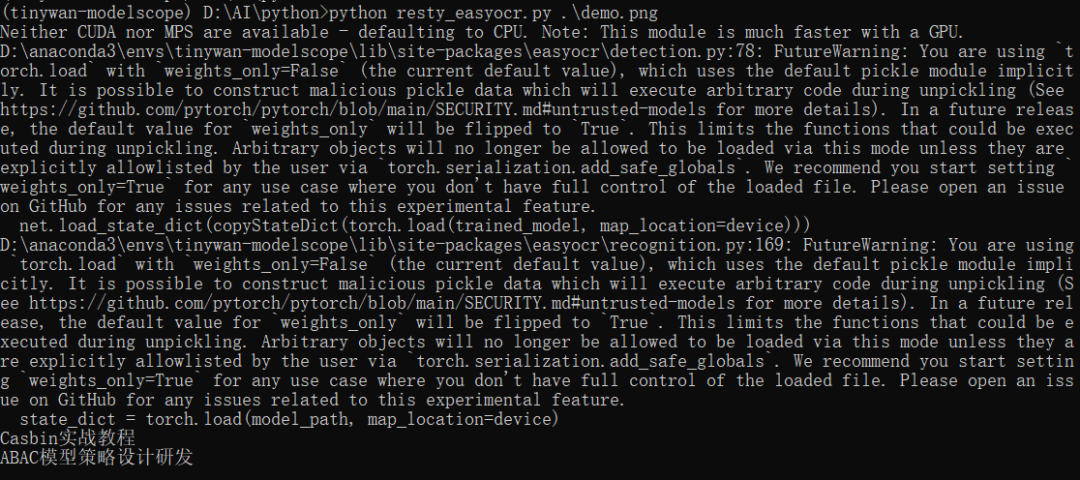
(tinywan-modelscope) D:\AI\python>python resty_easyocr.py .\demo.png
Neither CUDA nor MPS are available - defaulting to CPU. Note: This module is much faster with a GPU.
D:\anaconda3\envs\tinywan-modelscope\lib\site-packages\easyocr\detection.py:78: FutureWarning: You are using `torch.load` with `weights_only=False` (the current default value), which uses the default pickle module implicitly. It is possible to construct malicious pickle data which will execute arbitrary code during unpickling (See https://github.com/pytorch/pytorch/blob/main/SECURITY.md#untrusted-models for more details). In a future release, the default value for `weights_only` will be flipped to `True`. This limits the functions that could be executed during unpickling. Arbitrary objects will no longer be allowed to be loaded via this mode unless they are explicitly allowlisted by the user via `torch.serialization.add_safe_globals`. We recommend you start setting `weights_only=True` for any use case where you don't have full control of the loaded file. Please open an issue on GitHub for any issues related to this experimental feature.
  net.load_state_dict(copyStateDict(torch.load(trained_model, map_location=device)))
D:\anaconda3\envs\tinywan-modelscope\lib\site-packages\easyocr\recognition.py:169: FutureWarning: You are using `torch.load` with `weights_only=False` (the current default value), which uses the default pickle module implicitly. It is possible to construct malicious pickle data which will execute arbitrary code during unpickling (See https://github.com/pytorch/pytorch/blob/main/SECURITY.md#untrusted-models for more details). In a future release, the default value for `weights_only` will be flipped to `True`. This limits the functions that could be executed during unpickling. Arbitrary objects will no longer be allowed to be loaded via this mode unless they are explicitly allowlisted by the user via `torch.serialization.add_safe_globals`. We recommend you start setting `weights_only=True` for any use case where you don't have full control of the loaded file. Please open an issue on GitHub for any issues related to this experimental feature.
  state_dict = torch.load(model_path, map_location=device)
Casbin实战教程
ABAC模型策略设计研发
PHP脚本
通过韩大佬提供转换地址:https://swoole.com/py2php/
转换后的脚本resty_easyocr.php
<?php
/**
 * @desc phpy.php
 * @author Tinywan(ShaoBo Wan)
 */
declare(strict_types=1);

$operator = PyCore::import("operator");
$builtins = PyCore::import("builtins");
$easyocr = PyCore::import('easyocr');

function extract_text_from_image($image_path)
{
    $reader = $easyocr->Reader(new PyList(["ch_sim", "en"]));
    $results = $reader->readtext($image_path);
    $text = "";
    $__iter = PyCore::iter($results);
    while ($current = PyCore::next($__iter)) {
        $result = $current;
        $text += $result[1] + "\n";
    }
    return $text;
}


$image_path = ''./demo.png';';
$text = extract_text_from_image($image_path);
PyCore::print($text);
如果事先没有安装检测模型和识别模型,第一次执行脚本时会自动下载2种模型文件
/usr/local/php-8.2.14/bin/php resty_easyocr.php
Neither CUDA nor MPS are available - defaulting to CPU. Note: This module is much faster with a GPU.
Downloading detection model, please wait. This may take several minutes depending upon your network connection.
Progress: |--------------------------------------------------| 0.3% Complete
 We recommend you start setting `weights_only=True` for any use case where you don't have full control of the loaded file. Please open an issue on GitHub for any issues related to this experimental feature.
  state_dict = torch.load(model_path, map_location=device)
Casbin实战教程
ABAC模型策略设计研发
本文参与 腾讯云自媒体同步曝光计划,分享自微信公众号。
原始发表:2024-08-31,如有侵权请联系 cloudcommunity@tencent.com 删除
目录
腾讯云开发者

Copyright © 2013 - 2026 Tencent Cloud. All Rights Reserved. 腾讯云 版权所有
深圳市腾讯计算机系统有限公司 ICP备案/许可证号:粤B2-20090059  粤公网安备44030502008569号
腾讯云计算(北京)有限责任公司 京ICP证150476号 | 京ICP备11018762号