@Validated和@Valid区别

@Validated和@Valid区别

Java_慈祥
发布于 2024-08-06 14:09:08
发布于 2024-08-06 14:09:08
@Validated和@Valid区别
分组:
定义接口 ,根据接口 将不同的校验规则分给不同的组,在使用时,指定不同的校验规则
接口类
Group1.Java
package com.example.validateddemo.interfaces;
/**
 * 校验分组1
 * @author He Changjie on 2020/9/5
 */
public interface Group1 {
}
Group2.Java
package com.example.validateddemo.interfaces;

/**
 * 校验分组2
 * @author He Changjie on 2020/9/5
 */
public interface Group2 {
}
实体类
使用注解时,可以给属性设置多个校验进行分组!
User2Dto.Java
package com.example.validateddemo.entity.dto;
import com.example.validateddemo.interfaces.Group1;
import com.example.validateddemo.interfaces.Group2;
import lombok.Data;
import javax.validation.constraints.*;
@Data
public class User2Dto {
    /**
     * 用户名
     */
    @NotBlank(message = "用户名不能为空!", groups = {Group1.class})		//给属性设置组!
    private String username;
    /**
     * 性别
     */
    @NotBlank(message = "性别不能为空!")
    private String gender;
    /**
     * 年龄
     */
    @Min(value = 1, message = "年龄有误!", groups = {Group1.class})		//设置 Group1
    @Max(value = 120, message = "年龄有误!", groups = {Group2.class})	//设置 Group2
    private int age;
    /**
     * 地址
     */
    @NotBlank(message = "地址不能为空!")
    private String address;
    /**
     * 邮箱
     */
    @Email(message = "邮箱有误!", groups = {Group2.class})
    private String email;
    /**
     * 手机号码 正则表达式...
     */
    @Pattern(regexp = "^(13[0-9]|14[579]|15[0-3,5-9]|16[6]|17[0135678]|18[0-9]|19[89])\\d{8}$",message = "手机号码有误!", groups = {Group2.class})
    private String mobile;
}
控制类
Controller 中指定了,校验的组类型!
Demo1Controller.Java
package com.example.validateddemo.controller;

import com.example.validateddemo.base.Result;
import com.example.validateddemo.entity.dto.Team1Dto;
import com.example.validateddemo.entity.dto.User1Dto;
import com.example.validateddemo.entity.dto.User2Dto;
import com.example.validateddemo.interfaces.Group1;
import com.example.validateddemo.interfaces.Group2;
import com.example.validateddemo.utils.ResultUtil;
import org.springframework.validation.annotation.Validated;
import org.springframework.web.bind.annotation.PostMapping;
import org.springframework.web.bind.annotation.RequestBody;
import org.springframework.web.bind.annotation.RequestMapping;
import org.springframework.web.bind.annotation.RestController;

/**
 * @author He Changjie on 2020/9/5
 */
@RestController
@RequestMapping("/api/v1")
public class Demo1Controller {

	//不指定分组,即是默认组 或 Default.Class 即对没有进行分组的JSR303 数据进行校验!
    @PostMapping("/insert3")
    public Result validatedDemo3(@Validated @RequestBody User2Dto user2Dto){
        return ResultUtil.success(user2Dto);
    }
    @PostMapping("/insert4")
    public Result validatedDemo4(@Validated(Group1.class) @RequestBody User2Dto user2Dto){
        return ResultUtil.success(user2Dto);
    }
    @PostMapping("/insert5")
    public Result validatedDemo5(@Validated(Group2.class) @RequestBody User2Dto user2Dto){
        return ResultUtil.success(user2Dto);
    }
}
测试:
查看insert4 使用了Group1 的组校验~
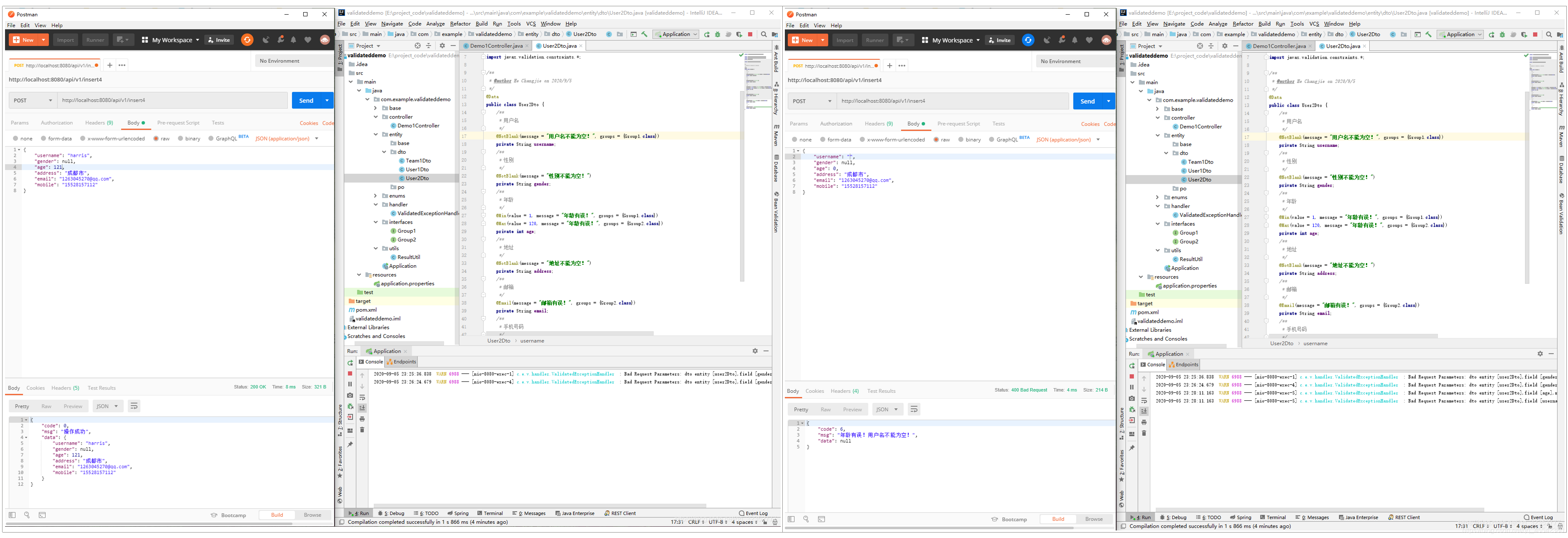
查看insert5 使用了Group2 的组校验~
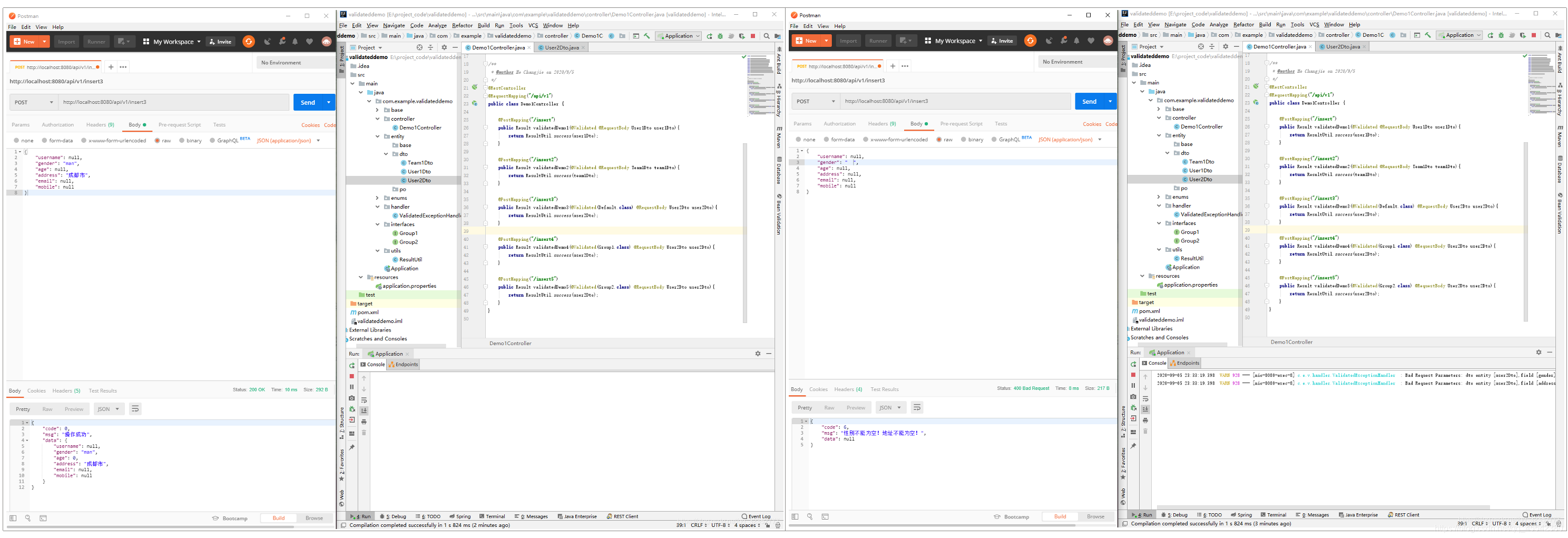
不指定组使用默认组进行校验! 则,没有进行分组的JSR303 注解生效进行校验通过!
总结:
@Validated
- 注解,可以使用 分组进行校验!
- 定义分组接口,根据接口来给实体类上的
校验注解进行分组!groups = {组接口.class} - Controller 上使用时候可以指定,校验实体的组
不指定即没有组的校验进行校验核对!@Validated(组接口.class)
嵌套验证:@Valid
实体:
在比较两者嵌套验证时,先说明下什么叫做嵌套验证。比如我们现在有个实体叫做Item:
Item带有很多属性,属性里面有属性id,属性值id,属性名和属性值,如下所示:
- 其中包含一个List类型的数据
或其它引用类型!
Item.Java
public class Item {

    @NotNull(message = "id不能为空")
    @Min(value = 1, message = "id必须为正整数")
    private Long id;

    @NotNull(message = "props不能为空")
    @Size(min = 1, message = "至少要有一个属性")
    private List<Prop> props;
}
Prop.Java
public class Prop {

    @NotNull(message = "pid不能为空")
    @Min(value = 1, message = "pid必须为正整数")
    private Long pid;

    @NotNull(message = "vid不能为空")
    @Min(value = 1, message = "vid必须为正整数")
    private Long vid;

    @NotBlank(message = "pidName不能为空")
    private String pidName;

    @NotBlank(message = "vidName不能为空")
    private String vidName;
}Prop属性 属性这个实体也有自己的验证机制,比如属性和属性值id不能为空,属性名和属性值不能为空等
控制类:
ItemController.Java
@RestController
public class ItemController {
    @RequestMapping("/item/add")
    public void addItem(@Validated Item item, BindingResult bindingResult) {
        doSomething();
    }
}- 程序校验时候:
如果Item实体的props属性不额外加注释,只有**
@NotNull**和**@Size** 无论入参采用@Validated还是@Valid验证 Spring Validation框架只会对Item的id和props做非空和数量验证, 不会对props字段里的Prop实体进行字段验证 - 也就是@Validated和@Valid加在方法参数前,都不会自动对参数进行嵌套验证。 也就是说如果传的List中有Prop的pid为空或者是负数,入参验证不会检测出来。
更改:实体:
为了能够进行嵌套验证,必须手动在Item实体的props字段上明确指出这个字段里面的实体也要进行验证。
- 由于@Validated不能用在成员属性(字段)上
- 但是@Valid能加在成员属性(字段)上,而且@Valid类注解上也说明了它支持嵌套验证功能
由此推断:
- @Valid加在方法参数时并不能够自动进行嵌套验证
- 而是用在需要嵌套验证类的相应字段上,来配合方法参数上@Validated或@Valid来进行嵌套验证
Item.Java
public class Item {

    @NotNull(message = "id不能为空")
    @Min(value = 1, message = "id必须为正整数")
    private Long id;

    @Valid // 嵌套验证必须用@Valid
    @NotNull(message = "props不能为空")
    @Size(min = 1, message = "props至少要有一个自定义属性")
    private List<Prop> props;
}
然后我们在ItemController的addItem函数上再使用@Validated或者@Valid,就能对Item的入参进行嵌套验证。
总结:
嵌套验证:
- 就是说,注解只能对,实体普通属性进行校验,如果是引用类型,且也是一个对象类型
注解并不会自动的进行,校验内部的元素! - @Validated和@Valid加在方法参数前,都不会自动对参数进行嵌套验证 由于@Validated不能用在成员属性(字段)上 @Valid能加在成员属性(字段)上,而且@Valid类注解上也说明了它支持嵌套验证功能。
- 所以,如果校验需要在实现上对象,进行嵌套验证实体内部的对象,可以使用
@Valid对实体属性进行嵌套校验!
异常处理:
BindingResult
Controller控制层写参数接收的入口
- 需要注意的是@Valid 和 BindingResult 是一 一对应的, 如果有多个@Valid
那么每个@Valid后面都需要添加BindingResult用于接收bean中的校验信息.
配套使用!
随意一个Controller
@RequestMapping(value = "/test", method = RequestMethod.POST, produces = MediaType.APPLICATION_JSON_VALUE)
public @ResponseBody ResponseEntity<Pesponsibles> testBindingResult(@Valid @RequestBody Parameter parameter,BindingResult bindingResult)
{
	log.info("test start");
	Pesponsibles pesponsibles=new Pesponsibles();

	//判断是否存在,校验异常数据!打印日志!
	if(bindingResult.hasErrors()){
		 List<FieldError> fieldErrors = bindingResult.getFieldErrors(); //获取校验异常集合!
		 //遍历 输出日志!
		 fieldErrors.forEach(fieldError -> {
            //日志打印不符合校验的字段名和错误提示
            log.error("error field is : {} ,message is : {}", fieldError.getField(), fieldError.getDefaultMessage());
          });
        //控制台查看!
		 for(int i=0;i<fieldErrors.size();i++){
            //控制台打印不符合校验的字段名和错误提示
			System.out.println("error field is :"+fieldErrors.get(i).getField()+",message is :"+fieldErrors.get(i).getDefaultMessage());
		 }
		//返回前台数据异常!这里就根据自己项目情况而定
		return new ResponseEntity<>(pesponsibles, HttpStatus.BAD_REQUEST);
	}

	//没有异常操作...👍
	return new ResponseEntity<>(pesponsibles, HttpStatus.OK);
}
总结:
@Valid / @Validated 要和 BindingResult 搭配使用,用来输出获取校验失败的数据,返回前端。
- 如果是使用Spring表单 还可以可以Spring表单进行绑定使用展示异常信息,**
目前少见了!** - 根据实际开发需求来做,讲异常信息包装返回前端进行展示,**
提示用户!**
全局异常处理类:
可以先了解:此篇文章:异常处理!
因为每个Controller 都会需要进行 BindingResult 可能会比较麻烦,可以使用全局异常进行捕获处理!
全局处理异常类
package com.example.validateddemo.handler;

import com.example.validateddemo.base.Result;
import com.example.validateddemo.enums.ResultEnum;
import com.example.validateddemo.utils.ResultUtil;
import lombok.extern.slf4j.Slf4j;
import org.springframework.http.HttpStatus;
import org.springframework.validation.BindingResult;
import org.springframework.validation.FieldError;
import org.springframework.validation.ObjectError;
import org.springframework.web.bind.MethodArgumentNotValidException;
import org.springframework.web.bind.annotation.ControllerAdvice;
import org.springframework.web.bind.annotation.ExceptionHandler;
import org.springframework.web.bind.annotation.ResponseBody;
import org.springframework.web.bind.annotation.ResponseStatus;
import java.util.List;

@Slf4j
@ControllerAdvice
public class ValidatedExceptionHandler {

    /**
     * 处理@Validated参数校验失败异常
     * @param exception 异常类
     * @return 响应
     */
    @ResponseBody
    //@ResponseStatus的作用就是为了改变HTTP响应的状态码
    @ResponseStatus(HttpStatus.BAD_REQUEST)		//改变响应时候 HttpStatus状态 400 接口异常!
    @ExceptionHandler(MethodArgumentNotValidException.class)
    public Result exceptionHandler(MethodArgumentNotValidException exception){
        BindingResult result = exception.getBindingResult();
        StringBuilder stringBuilder = new StringBuilder();
        if (result.hasErrors()) {
            List<ObjectError> errors = result.getAllErrors();
            if (errors != null) {
                errors.forEach(p -> {
                    FieldError fieldError = (FieldError) p;
                    log.warn("Bad Request Parameters: dto entity [{}],field [{}],message [{}]",fieldError.getObjectName(), fieldError.getField(), fieldError.getDefaultMessage());
                    stringBuilder.append(fieldError.getDefaultMessage());
                });
            }
        }
        return ResultUtil.validatedException(stringBuilder.toString());
    }
}
@ControllerAdvice 注解
@ControllerAdvice ,很多初学者可能都没有听说过这个注解
- 这是一个非常有用的注解,顾名思义,这是一个增强的 Controller。用这个可以实现三个方面的功能: 全局异常处理 全局数据绑定 全局数据预处理
+ @ExceptionHandler 实现全局异常处理!
注解声明异常类型, 当类中出现改异常会进入该方法处理
- 在单个,Controller中也可以使用,但是进限于声明的Controller
- 声明在
@ControllerAdvice类中则全局的Controller 都会有这个方法,任何地方出现异常都会走到这方法中!
全局异常
当将异常抛到controller时,可以对异常进行统一处理:
- 规定返回的json格式
- 或 跳转到一个错误页面
@ControllerAdvice
public class MyGlobalExceptionHandler {

	//注解捕获, Exception类型异常, 即所有的异常都将捕获!
    @ExceptionHandler(Exception.class)
    public ModelAndView customException(Exception e) {
        ModelAndView mv = new ModelAndView();
        mv.addObject("message", e.getMessage());
        mv.setViewName("myerror");
        return mv;
    }
}
在该类中,可以定义多个方法,不同的方法处理不同的异常
- 例如专门处理空指针的方法
- 专门处理数组越界的方法…
- 也可以直接向上面代码一样,在一个方法中处理所有的异常信息。
- 学习后续扩展!
总结:@ControllerAdvice
就相当于一个全局的Controller 累下的方法,可以被所有的Controller类共享…可以做**全局异常**,**初始化数据** 数据绑定!
本文参与 腾讯云自媒体同步曝光计划,分享自作者个人站点/博客。
原始发表:2024-08-06,如有侵权请联系 cloudcommunity@tencent.com 删除
目录
腾讯云开发者

Copyright © 2013 - 2026 Tencent Cloud. All Rights Reserved. 腾讯云 版权所有
深圳市腾讯计算机系统有限公司 ICP备案/许可证号:粤B2-20090059  粤公网安备44030502008569号
腾讯云计算(北京)有限责任公司 京ICP证150476号 | 京ICP备11018762号