Linux系统之NTP服务器配置方法
原创


在这里插入图片描述
一、NTP介绍
1.1 NTP简介
NTP(Network Time Protocol,网络时间协议)是一种用于同步计算机时间的协议。它是一种客户端-服务器协议,用于同步计算机的时钟。通过连接到网络上的时间服务器,计算机可以获取精确的时间信息,确保其时钟与网络上的其他设备保持同步。
1.2 NTP使用场景
NTP(Network Time Protocol,网络时间协议)服务器主要用于同步计算机和网络设备的时间,以确保系统的时间准确性和一致性。NTP服务器的使用场景包括以下几个方面:
- 网络管理:在一个大型企业或组织的内部网络中,经常有许多计算机和网络设备需要精确地同步时间,以确保网络设备之间的数据同步和日志记录的准确性。NTP服务器可以通过对这些设备提供统一的时间同步,保证整个网络系统的时间一致。
- 安全性管理:网络安全监控和审计是确保企业信息安全的重要组成部分,而NTP服务器可以保证事件日志和安全日志的时间戳是准确的,避免了网络攻击和其他安全问题的发生和掩盖。
- 公共服务:许多公共服务需要同步时间,例如银行交易、证券交易等金融交易系统和公共服务设施,如电力系统、水力系统和天气预报等,都需要同步时间,以确保数据的准确性和一致性。NTP服务器可以为这些服务提供可靠的时间同步服务。
- 科学研究:精确的时间同步对于科学研究至关重要,例如卫星通信、天文观测、地震监测等,需要精确的时间同步来保证数据的可信性和准确性。NTP服务器可以提供高精度时间同步服务,满足科学研究的需求。
二、本次实践介绍
2.1 本次实践介绍
1.本次主要部署NTP服务器;
2.业务服务器指定NTP服务器,保持时间同步。
2.2 本次环境规划
hostname | IP地址 | 操作系统版本 | 角色 |
|---|---|---|---|
jeven | 192.168.3.166 | centos 7.6 | NTP服务器 |
docker | 192.168.3.127 | centos 7.6 | 业务服务器 |
三、NTP服务器配置
3.1 检查当前yum仓库
- 检查当前yum仓库状态
[root@jeven ~]# yum repolist enabled
Loaded plugins: fastestmirror, langpacks
Loading mirror speeds from cached hostfile
repo id                                     repo name                                                                  status
!base/7/x86_64                              CentOS-7 - Base - mirrors.aliyun.com                                       10,072
!extras/7/x86_64                            CentOS-7 - Extras - mirrors.aliyun.com                                        518
!gitlab-ce/7                                Gitlab CE Repository                                                          934
!pgdg-common/7/x86_64                       PostgreSQL common RPMs for RHEL / CentOS 7 - x86_64                           497
!pgdg11/7/x86_64                            PostgreSQL 11 for RHEL / CentOS 7 - x86_64                                  1,595
!pgdg12/7/x86_64                            PostgreSQL 12 for RHEL / CentOS 7 - x86_64                                  1,261
!pgdg13/7/x86_64                            PostgreSQL 13 for RHEL / CentOS 7 - x86_64                                  1,021
!pgdg14/7/x86_64                            PostgreSQL 14 for RHEL / CentOS 7 - x86_64                                    762
!pgdg15/7/x86_64                            PostgreSQL 15 for RHEL / CentOS 7 - x86_64                                    473
!updates/7/x86_64                           CentOS-7 - Updates - mirrors.aliyun.com                                     5,367
repolist: 22,500- 如果yum仓库未配置镜像源,可以使用国内镜像源。
curl -o /etc/yum.repos.d/CentOS-Base.repo https://mirrors.aliyun.com/repo/Centos-7.repo
sed -i -e '/mirrors.cloud.aliyuncs.com/d' -e '/mirrors.aliyuncs.com/d' /etc/yum.repos.d/CentOS-Base.repo
3.2 安装chrony
使用yum直接安装chrony
yum -y install chrony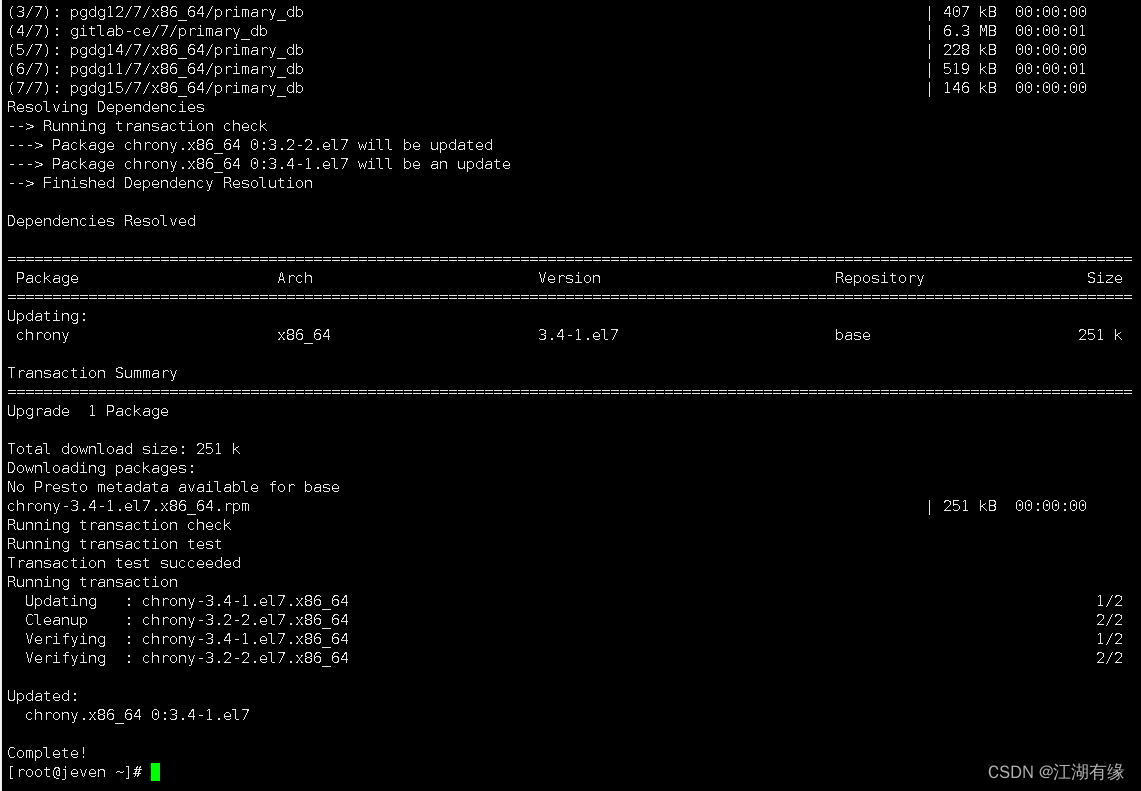
在这里插入图片描述
3.3 启动chronyd服务
启动chronyd服务
systemctl enable --now chronyd检查当前chrony服务状态
[root@jeven ~]# systemctl status chronyd
● chronyd.service - NTP client/server
   Loaded: loaded (/usr/lib/systemd/system/chronyd.service; enabled; vendor preset: enabled)
   Active: active (running) since Wed 2023-11-01 16:36:53 CST; 28s ago
     Docs: man:chronyd(8)
           man:chrony.conf(5)
  Process: 31095 ExecStartPost=/usr/libexec/chrony-helper update-daemon (code=exited, status=0/SUCCESS)
  Process: 31090 ExecStart=/usr/sbin/chronyd $OPTIONS (code=exited, status=0/SUCCESS)
 Main PID: 31092 (chronyd)
    Tasks: 1
   Memory: 464.0K
   CGroup: /system.slice/chronyd.service
           └─31092 /usr/sbin/chronyd
3.4关闭防火墙和selinux
- 关闭防火墙
systemctl stop firewalld && systemctl disable firewalld- 关闭selinux
sed -i 's/SELINUX=enforcing/SELINUX=disabled/' /etc/selinux/config
setenforce 0
reboot # 重启系统- 查看当前selinux状态
[root@jeven ~]# getenforce
Disabled
3.5 修改chrony.conf配置文件
修改/etc/chrony.conf 文件
vim /etc/chrony.conf- 从外部获取时间源,修改内容如下:
server ntp1.aliyun.com iburst
allow 192.168.3.0/24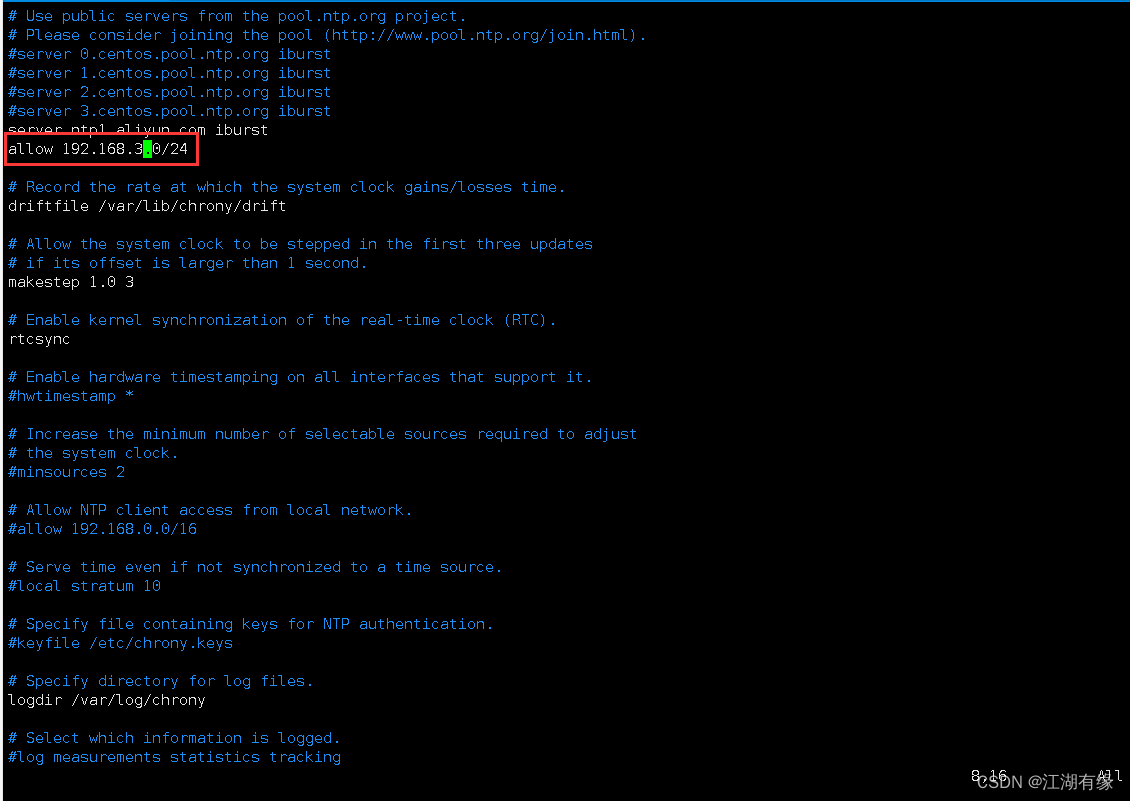
在这里插入图片描述
- 从本地获取时间源,注释掉server语句,修改内容如下:
allow 192.168.3.0/24
local stratum 10
3.6 重启chronyd
重启chronyd服务
systemctl restart chronyd四、业务服务器配置
4.1 安装chrony
直接安装chrony软件
yum -y install chrony4.2 启动chronyd服务
启动chronyd服务
systemctl enable --now chronyd4.3 修改chrony.conf配置文件
chrony.conf配置文件
vim /etc/chrony.confpool 192.168.3.166 iburst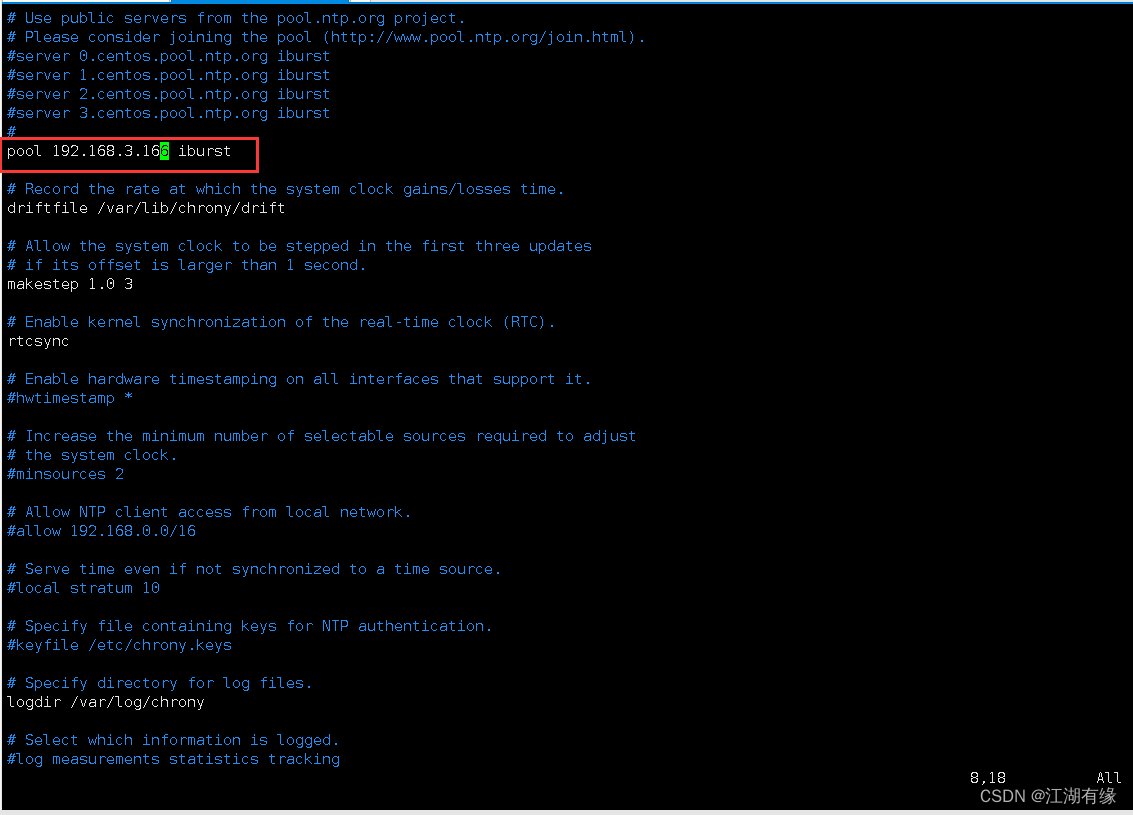
在这里插入图片描述
4.4 重启chronyd服务
重启chronyd服务
systemctl restart chronyd五、测试业务服务器时间状态
5.1 查看时间同步状态
执行以下命令,查看时间同步状态。
[root@docker ~]# chronyc sources
210 Number of sources = 1
MS Name/IP address         Stratum Poll Reach LastRx Last sample
===============================================================================
^* jeven.dhcp-route              3   6    17    10    +15us[  +52us] +/-   23ms
5.2 列出NTP服务器
执行以下命令,列出NTP服务器的详细信息。
[root@docker ~]# chronyc sources -v
210 Number of sources = 1

  .-- Source mode  '^' = server, '=' = peer, '#' = local clock.
 / .- Source state '*' = current synced, '+' = combined , '-' = not combined,
| /   '?' = unreachable, 'x' = time may be in error, '~' = time too variable.
||                                                 .- xxxx [ yyyy ] +/- zzzz
||      Reachability register (octal) -.           |  xxxx = adjusted offset,
||      Log2(Polling interval) --.      |          |  yyyy = measured offset,
||                                \     |          |  zzzz = estimated error.
||                                 |    |           \
MS Name/IP address         Stratum Poll Reach LastRx Last sample
===============================================================================
^* jeven.dhcp-route              3   6    37     7    +14us[ +175us] +/-   19ms
六、校正错误时间
6.1 修改业务服务器错误时间
设置当前时间为错误时间
date -s "2012-12-12 12:12:12"查看当前时间,发现已经修改为错误时间。
[root@docker ~]# date
Wed Dec 12 12:12:13 CST 2012
6.2 立即时间同步
执行以下命令,手动立即同步时间。
[root@docker ~]# sudo chronyc makestep
200 OK
查看当前时间,发现错误时间已经修改为正确时间。
[root@docker ~]# date
Wed Nov  1 17:09:22 CST 2023
我正在参与2023腾讯技术创作特训营第三期有奖征文,组队打卡瓜分大奖!
原创声明:本文系作者授权腾讯云开发者社区发表,未经许可,不得转载。
如有侵权,请联系 cloudcommunity@tencent.com 删除。
原创声明:本文系作者授权腾讯云开发者社区发表,未经许可,不得转载。
如有侵权,请联系 cloudcommunity@tencent.com 删除。
评论
登录后参与评论
推荐阅读
目录
腾讯云开发者

Copyright © 2013 - 2026 Tencent Cloud. All Rights Reserved. 腾讯云 版权所有
深圳市腾讯计算机系统有限公司 ICP备案/许可证号:粤B2-20090059  粤公网安备44030502008569号
腾讯云计算(北京)有限责任公司 京ICP证150476号 | 京ICP备11018762号