React-生命周期-作用 和 React-组件-CSSTransition
原创
React-生命周期-作用 和 React-组件-CSSTransition
原创
杨不易呀
发布于 2023-09-30 14:41:34
发布于 2023-09-30 14:41:34
constructor 生命周期方法中做什么
- 通过
props接收父组件传递过来的数据 - 通过
this.state初始化内部的数据 - 通过
bind为事件绑定实例 (this)
render 生命周期方法中做什么
- 返回组件的网页结构
componentDidMount 生命周期方法中做什么
- 依赖于 DOM 的操作可以在这里进行
- 在此处发送
网络请求就是最好的地方(官方建议) - 可以在此处添加一些订阅(会在
componentWillUnmount取消订阅)
componentDidUpdate 生命周期方法中做什么
- 可以在此对更新之后的组件进行操作
componentWillUnmount 生命周期方法中做什么
- 在此方法中执行必要的清理操作
- 例如,清除
timer,取消网络请求或清除 - 在
componentDidMount()中创建的订阅等
React-组件-CSSTransition
动画组件
Transition
- 该组件是一个和平台无关的组件(不一定要结合 CSS);
- 在前端开发中,我们一般是结合 CSS 来完成样式,所以比较常用的是 CSSTransition;
CSSTransition
- 在前端开发中,通常使用 CSSTransition 来完成过渡动画效果;
SwitchTransition
- 两个组件显示和隐藏切换时,使用该组件
TransitionGroup
- 将多个动画组件包裹在其中,一般用于列表中元素的动画;
首先来看 CSSTransition,从 CSSTransition 状态开始介绍,CSSTransition 有三个状态:
- appear: 初始
- enter:进入
- exit:退出
当组件 第一次加载,当组件 显示,当组件 退出,的时候会自动查找如下类名:
- -appear
- -appear-active
- -appear-done
通过 CSSTransition 来实现过渡效果
安装 react-transition-group
npm install react-transition-group --save从安装好的库中导入 CSSTransition
import {CSSTransition} from 'react-transition-group';- 利用 CSSTransition 将需要执行过渡效果的组件或元素包裹起来
- 编写对应的 CSS 动画,实现:
.-enter/.-enter-active/.-enter-done
给 CSSTransition 添加一些属性:
- in 属性:取值是一个布尔值, 如果取值为 false 表示触发退出动画, 如果取值是 true 表示触发进入动画
- classNames 属性:指定动画类名的前缀
- timeout 属性:设置动画超时时间
App.js:
import React from 'react';
import './App.css'
import {CSSTransition} from 'react-transition-group';

class App extends React.Component {
    constructor(props) {
        super(props);
        this.state = {
            isShow: false
        }
    }

    render() {
        return (
            <div>
                <CSSTransition in={this.state.isShow}
                               classNames={'box'}
                               timeout={3000}>
                    <div/>
                </CSSTransition>
                <button onClick={() => {
                    this.btnClick()
                }}>显示
                </button>
            </div>
        );
    }

    btnClick() {
        this.setState({
            isShow: true
        })
    }
}

export default App;
App.css:
.box-enter {
    /*
    进入动画执行之前绑定的类名
    */
    width: 0;
    height: 0;
    opacity: 0;
    background: skyblue;
}

.box-enter-active {
    /*
    进入动画执行过程中绑定的类名
    */
    width: 100px;
    height: 100px;
    opacity: 1;
    transition: all 3s;
}

.box-enter-done {
    /*
    进入动画执行完毕之后绑定的类名
    */
    width: 100px;
    height: 100px;
    opacity: 1;
    background: red;
}
退出状态的类名的情况, 修改 App.css 添加如下类名样式:
.box-exit {
    /*
    退出动画执行之前绑定的类名
    */
    width: 100px;
    height: 100px;
    opacity: 1;
    background: red;
}

.box-exit-active {
    /*
    退出动画执行过程中绑定的类名
    */
    width: 0;
    height: 0;
    opacity: 0;
    transition: all 3s;
}

.box-exit-done {
    /*
    退出动画执行完毕之后绑定的类名
    */
    width: 0;
    height: 0;
    opacity: 0;
    background: skyblue;
}
App.js:
import React from 'react';
import './App.css'
import {CSSTransition} from 'react-transition-group';

class App extends React.Component {
    constructor(props) {
        super(props);
        this.state = {
            isShow: false
        }
    }

    render() {
        return (
            <div>
                <CSSTransition in={this.state.isShow}
                               classNames={'box'}
                               timeout={3000}>
                    <div/>
                </CSSTransition>
                <button onClick={() => {
                    this.setState({
                        isShow: true
                    })
                }}>显示
                </button>
                <button onClick={() => {
                    this.setState({
                        isShow: false
                    })
                }}>隐藏
                </button>
            </div>
        );
    }
}

export default App;
如上的退出状态结束之后元素并没有删除,只是进行了隐藏,如果想,在退出状态结束之后将元素进行删除的话需要借助一个 unmountOnExit 进行实现。
- unmountOnExit:如果取值为 true, 那么表示退出动画执行完毕之后删除对应的元素
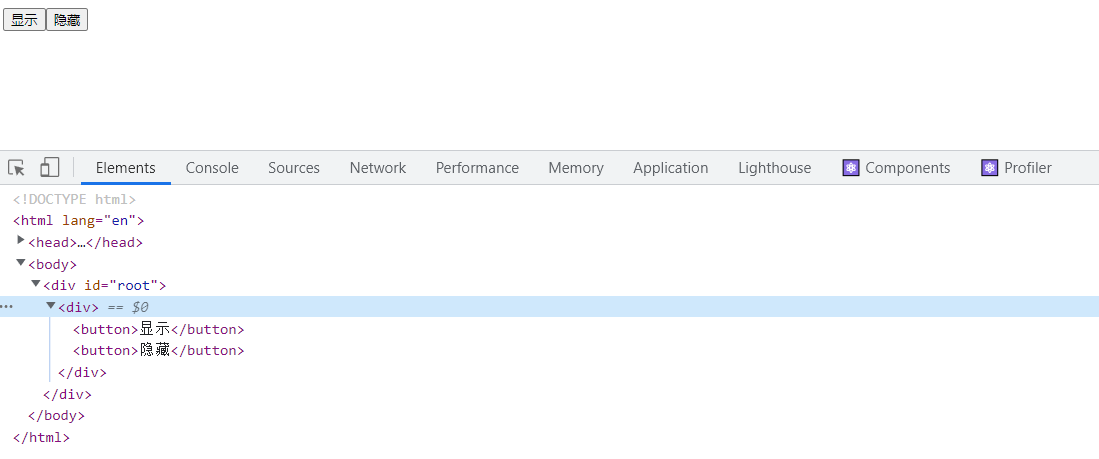
image-20220512180537557
第一次加载时的状态,就是在页面刚加载的时候触发的,修改 App.css 添加第一次加载的类名:
.box-appear {
    /*
    初始化动画执行之前绑定的类名
    */
    width: 0;
    height: 0;
    opacity: 0;
    background: skyblue;
}

.box-appear-active {
    /*
    初始化动画执行过程中绑定的类名
    */
    width: 100px;
    height: 100px;
    opacity: 1;
    transition: all 3s;
}

.box-appear-done {
    /*
    初始化动画执行完毕之后绑定的类名
    */
    width: 100px;
    height: 100px;
    opacity: 1;
    background: red;
}
修改 App.js 给 CSSTransition 添加 appear 属性:
import React from 'react';
import './App.css'
import {CSSTransition} from 'react-transition-group';

class App extends React.Component {
    constructor(props) {
        super(props);
        this.state = {
            isShow: true
        }
    }

    render() {
        return (
            <div>
                <CSSTransition in={this.state.isShow}
                               classNames={'box'}
                               timeout={3000}
                               unmountOnExit={true}
                               appear
                >
                    <div/>
                </CSSTransition>
                <button onClick={() => {
                    this.setState({
                        isShow: true
                    })
                }}>显示
                </button>
                <button onClick={() => {
                    this.setState({
                        isShow: false
                    })
                }}>隐藏
                </button>
            </div>
        );
    }
}

export default App;
输入图片说明
最后
本期结束咱们下次再见👋~
🌊 关注我不迷路,如果本篇文章对你有所帮助,或者你有什么疑问,欢迎在评论区留言,我一般看到都会回复的。大家点赞支持一下哟~ 💗

输入图片说明
原创声明:本文系作者授权腾讯云开发者社区发表,未经许可,不得转载。
如有侵权,请联系 cloudcommunity@tencent.com 删除。
目录
腾讯云开发者

Copyright © 2013 - 2026 Tencent Cloud. All Rights Reserved. 腾讯云 版权所有
深圳市腾讯计算机系统有限公司 ICP备案/许可证号:粤B2-20090059  粤公网安备44030502008569号
腾讯云计算(北京)有限责任公司 京ICP证150476号 | 京ICP备11018762号