并发编程 - 利用Event Bus模式实现目录文件变化捕捉

并发编程 - 利用Event Bus模式实现目录文件变化捕捉

小小工匠
发布于 2023-07-11 11:26:38
发布于 2023-07-11 11:26:38

Pre
需求
JDK自1.7版本后提供了WatchService类,该类可以基于事件通知的方式监控文件或者目录的任何变化,文件的改变相当于每一个事件(Event)的发生,针对不同的时间执行不同的动作,我们将结合NIO2.0中提供的WatchService和上一篇博文实现的Event Bus实现文件目录的监控的功能。
Code
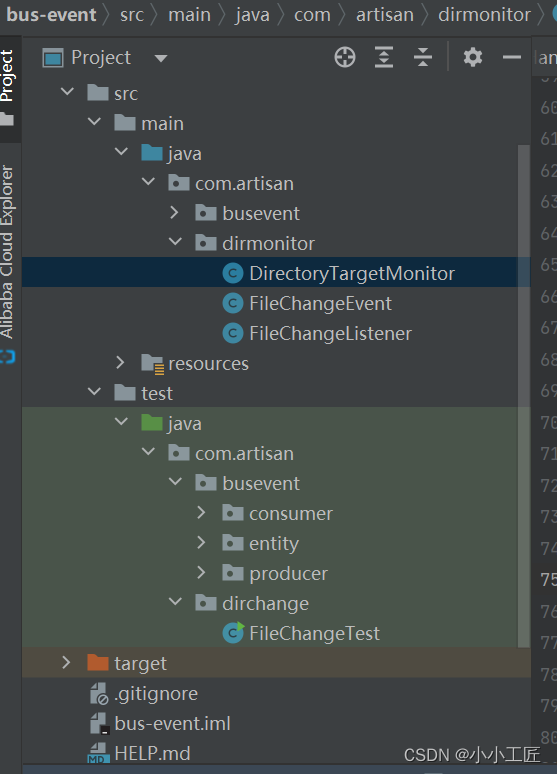
DirectoryTargetMonitor
package com.artisan.dirmonitor;

import com.artisan.busevent.impl.EventBus;
import lombok.extern.slf4j.Slf4j;

import java.nio.file.*;

/**
 * @author 小工匠
 * @version 1.0
 * @mark: show me the code , change the world
 */
@Slf4j
public class DirectoryTargetMonitor {

    private WatchService watchService;

    private final EventBus eventBus;

    private final Path path;

    private volatile boolean start = false;

    public DirectoryTargetMonitor(final EventBus eventBus,
                                  final String targetPath) {
        this(eventBus, targetPath, "");
    }

    /**
     * 构造Monitor的时候需要传入EventBus以及需要监控的目录
     *
     * @param eventBus
     * @param targetPath
     * @param morePaths
     */
    public DirectoryTargetMonitor(final EventBus eventBus,
                                  final String targetPath, final String... morePaths) {
        this.eventBus = eventBus;
        this.path = Paths.get(targetPath, morePaths);
    }

    public void startMonitor() throws Exception {
        this.watchService = FileSystems.getDefault().newWatchService();
        //为路径注册感兴趣的事件
        this.path.register(watchService, StandardWatchEventKinds.ENTRY_MODIFY,
                StandardWatchEventKinds.ENTRY_DELETE, StandardWatchEventKinds.ENTRY_CREATE);
        log.info("The directory {} is monitoring... \n", path);
        this.start = true;
        while (start) {
            WatchKey watchKey = null;
            try {
                //当有事件发生时会返回对应的WatchKey
                watchKey = watchService.take();
                watchKey.pollEvents().forEach(event ->
                {
                    WatchEvent.Kind<?> kind = event.kind();
                    log.info(kind.name());
                    Path path = (Path) event.context();
                    Path child = DirectoryTargetMonitor.this.path.resolve(path);
                    //提交FileChangeEvent到EventBus
                    eventBus.post(new FileChangeEvent(child, kind));
                });
            } catch (Exception e) {
                this.start = false;
            } finally {
                if (watchKey != null) {
                    watchKey.reset();
                }
            }
        }
    }

    public void stopMonitor() throws Exception {
        System.out.printf("The directory [%s] monitor will be stop...\n", path);
        Thread.currentThread().interrupt();
        this.start = false;
        this.watchService.close();
        System.out.printf("The directory [%s] monitor will be stop done.\n", path);
    }
}
在创建WatchService之后将文件的修改、删除、创建等注册给了WatchService,在指定目录下发生诸如此类的事件之后便会收到通知,将事件类型和发生变化的文件Path封装成FileChangeEvent提交给Event Bus。
FileChangeEvent
package com.artisan.dirmonitor;

import java.nio.file.Path;
import java.nio.file.WatchEvent;

/**
 * @author 小工匠
 * @version 1.0
 * @mark: show me the code , change the world
 * @desc : FileChangeEvent比较简单,就是对WatchEvent.Kind和Path的包装,一旦目录发生任何改变,都会提交FileChangeEvent事件
 */
public class FileChangeEvent {
    private final Path path;
    private final WatchEvent.Kind<?> kind;

    public FileChangeEvent(Path path, WatchEvent.Kind<?> kind) {
        this.path = path;
        this.kind = kind;
    }

    public Path getPath() {
        return path;
    }

    public WatchEvent.Kind<?> getKind() {
        return kind;
    }
}
FileChangeListener
package com.artisan.dirmonitor;

import com.artisan.busevent.annotations.Subscribe;
import lombok.extern.slf4j.Slf4j;

/**
 * @author 小工匠
 * @version 1.0
 * @mark: show me the code , change the world
 * @desc: 写一个接受文件目录变化的Subscriber,也就是当目录发生变化时用来接受事件的方法
 */
@Slf4j
public class FileChangeListener {


    @Subscribe
    public void onChange(FileChangeEvent event) {
        log.info("{}-{}\n", event.getPath(), event.getKind());
    }
}
onChange方法由@Subscribe标记,但没有指定topic,当有事件发送到了默认的topic上之后,该方法将被调用执行,接下来我们将FileChangeListener的实例注册给Event Bus并且启动Monitor程序
测试
package com.artisan.dirchange;

import com.artisan.busevent.impl.AsyncEventBus;
import com.artisan.busevent.impl.EventBus;
import com.artisan.dirmonitor.DirectoryTargetMonitor;
import com.artisan.dirmonitor.FileChangeListener;

import java.util.concurrent.Executors;
import java.util.concurrent.ThreadPoolExecutor;

/**
 * @author 小工匠
 * @version 1.0
 * @mark: show me the code , change the world
 */
public class FileChangeTest {

    public static void main(String[] args) throws Exception {
        ThreadPoolExecutor executor = (ThreadPoolExecutor) Executors.newFixedThreadPool(
                Runtime.getRuntime().availableProcessors() * 2);
        final EventBus eventBus = new AsyncEventBus(executor);
        //注册
        eventBus.register(new FileChangeListener());
        DirectoryTargetMonitor monitor = new DirectoryTargetMonitor(eventBus, "D:\\test");
        monitor.startMonitor();
    }
}
在子目录下不断地创建、删除、修改文件,这些事件都将被收集并且提交给EventBus
本文参与 腾讯云自媒体同步曝光计划,分享自作者个人站点/博客。
原始发表:2023-07-09,如有侵权请联系 cloudcommunity@tencent.com 删除
目录
腾讯云开发者

Copyright © 2013 - 2026 Tencent Cloud. All Rights Reserved. 腾讯云 版权所有
深圳市腾讯计算机系统有限公司 ICP备案/许可证号:粤B2-20090059  粤公网安备44030502008569号
腾讯云计算(北京)有限责任公司 京ICP证150476号 | 京ICP备11018762号