NPSMSvc_xxxxxx、McpManagementService、WaaSMedicSvc <读取描述失败。错误代码: 15100 或 2>
原创
NPSMSvc_xxxxxx、McpManagementService、WaaSMedicSvc <读取描述失败。错误代码: 15100 或 2>
原创
Windows技术交流
修改于 2024-06-20 15:10:13
修改于 2024-06-20 15:10:13
搞了个Win11系统,有2个服务显示错误代码:15100,1个显示错误代码:2
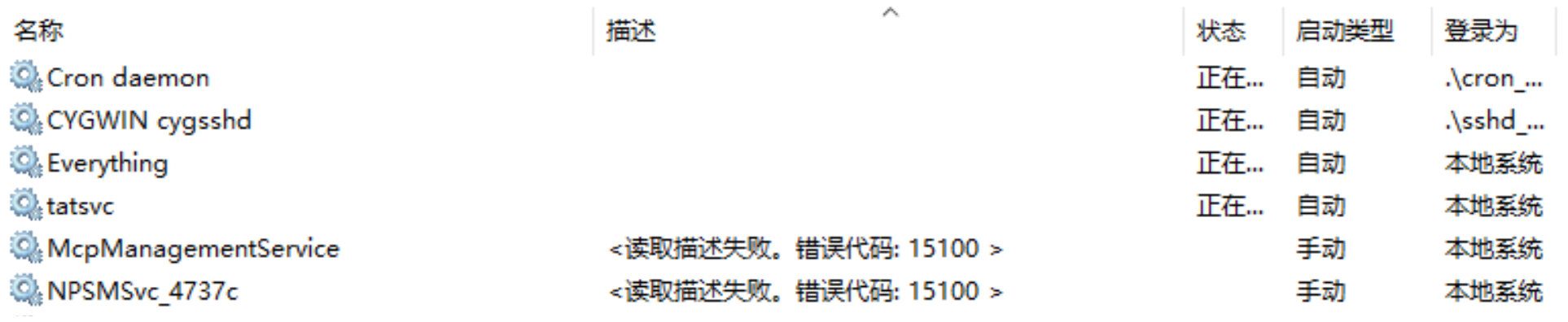

McpManagementService 按这个办法修复
https://www.winhelponline.com/blog/mcpmanagementservice-error-1500-description/?amp=1

翻译成命令就是:
sc.exe config McpManagementService DisplayName= "Universal Print Management Service"
sc.exe description McpManagementService "Universal Print Management Service"
同样的办法,我在server2019上看了下WaaSMedicSvc对应的DISPLAY_NAME 是Windows Update Medic Service,Description是Enables remediation and protection of Windows Update components.
于是改修正的命令就是
sc.exe qc WaaSMedicSvc
sc.exe query WaaSMedicSvc

#提醒下面这2句,需要提权到TrustedInstaller执行(提权参考https://cloud.tencent.com/developer/article/2285183 )
#sc.exe config WaaSMedicSvc DisplayName= "Windows Update Medic Service"
#sc.exe config WaaSMedicSvc DisplayName= "WaaSMedicSvc"
sc.exe description WaaSMedicSvc "Enables remediation and protection of Windows Update components."

sc.exe qc WaaSMedicSvc
sc.exe query WaaSMedicSvc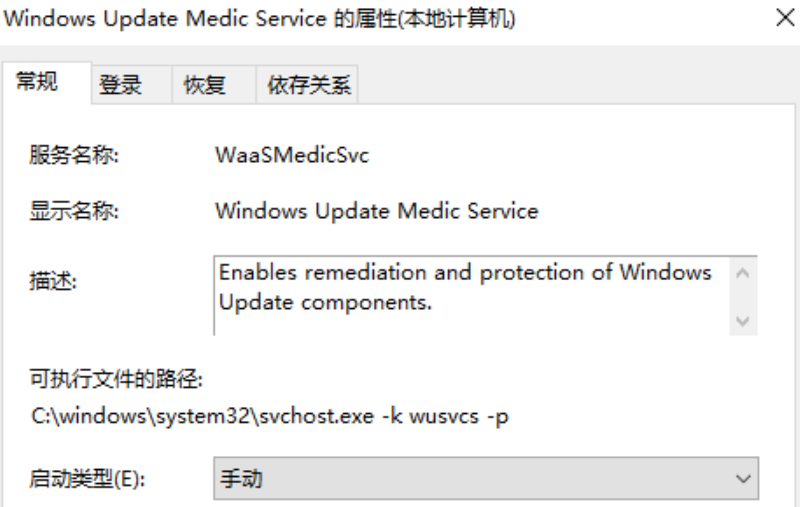
NPSMSvc_xxxxx按这个办法修复
sc.exe delete NPSMSvc_xxxxxx
sc.exe delete NPSMSvc (必须执行这句,否则只执行第一句,重启后还是会出现NPSMSvc_yyyyyy)

跟微软确认,NPSMSvc_xxxxxx和NPSMSvc为now playing session management,是基于用户会话增加媒体播放体验的一个服务。NPSMSvc是模板,NPSMSvc_xxxxxx是基于模块新建的实例,可以删除,也可以忽略。微软承认,NPSMSvc_xxxxxx、McpManagementService <读取描述失败。错误代码: 15100 > 确实是他们显示的问题,仅仅是显示的问题,可以自己修改Description或者忽略
sc.exe description servicename "service's detail description"
例如:
sc.exe description McpManagementService "Universal Print Management Service"
原创声明:本文系作者授权腾讯云开发者社区发表,未经许可,不得转载。
如有侵权,请联系 cloudcommunity@tencent.com 删除。
原创声明:本文系作者授权腾讯云开发者社区发表,未经许可,不得转载。
如有侵权,请联系 cloudcommunity@tencent.com 删除。
评论
登录后参与评论
推荐阅读
目录
腾讯云开发者

Copyright © 2013 - 2026 Tencent Cloud. All Rights Reserved. 腾讯云 版权所有
深圳市腾讯计算机系统有限公司 ICP备案/许可证号:粤B2-20090059  粤公网安备44030502008569号
腾讯云计算(北京)有限责任公司 京ICP证150476号 | 京ICP备11018762号