环信API方法介绍


安装
如果你的项目使用Maven构建并且spring boot是2.4.3以上版本,可以在pom.xml中添加下面代码:
<dependency>
    <groupId>com.easemob.im</groupId>
    <artifactId>im-sdk-core</artifactId>
    <version>0.2.5</version>
</dependency>
如果你使用的spring-boot是2.4.3以下版本的,还需要在pom.xml中添加:
<dependencyManagement>
    <dependencies>
        <dependency>
            <groupId>io.netty</groupId>
            <artifactId>netty-bom</artifactId>
            <version>4.1.59.Final</version>
            <type>pom</type>
            <scope>import</scope>
        </dependency>
        <dependency>
            <groupId>io.projectreactor</groupId>
            <artifactId>reactor-bom</artifactId>
            <version>2020.0.4</version>
            <type>pom</type>
            <scope>import</scope>
        </dependency>
    </dependencies>
</dependencyManagement>
准备
在使用Server SDK之前,需要准备环信appkey、Client ID、ClientSecre。
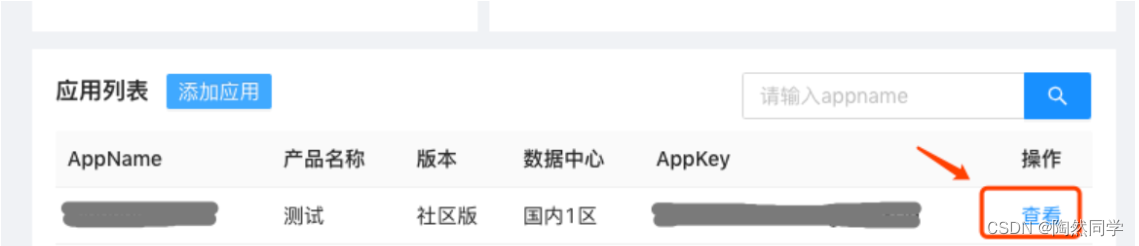
如果你有环信管理后台账号并创建过应用,请先登录环信管理后台,点击 这里,然后到“应用列表” → 点击“查看”即可获取到appkey、Client ID、ClientSecret。
使用
EMService是所有API的入口,可以这样初始化:
EMProperties properties = EMProperties.builder()
.setAppkey(cliProperties.getAppkey())
.setClientId(cliProperties.getClientId())
.setClientSecret(cliProperties.getClientSecret())
.build();
EMService service = new EMService(properties);根据业务资源,API分为:
本文参与 腾讯云自媒体同步曝光计划,分享自作者个人站点/博客。
原始发表:2023-04-13,如有侵权请联系 cloudcommunity@tencent.com 删除
目录
腾讯云开发者

Copyright © 2013 - 2026 Tencent Cloud. All Rights Reserved. 腾讯云 版权所有
深圳市腾讯计算机系统有限公司 ICP备案/许可证号:粤B2-20090059  粤公网安备44030502008569号
腾讯云计算(北京)有限责任公司 京ICP证150476号 | 京ICP备11018762号