彩色的Hello World到彩色的Donuts甜甜圈-蓝桥ROS云课-C++案例

彩色的Hello World到彩色的Donuts甜甜圈-蓝桥ROS云课-C++案例

zhangrelay
发布于 2023-03-31 13:17:21
发布于 2023-03-31 13:17:21
局部:
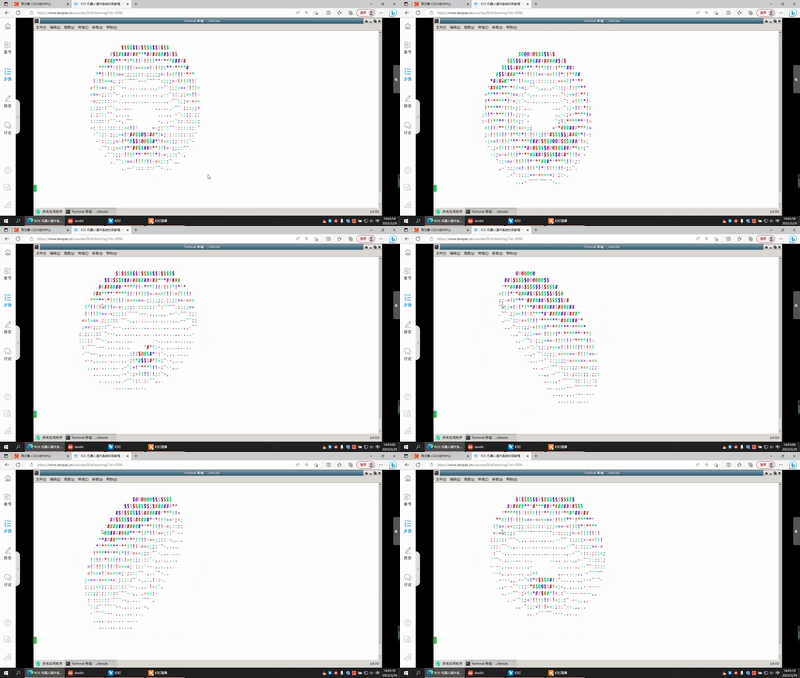
整体:
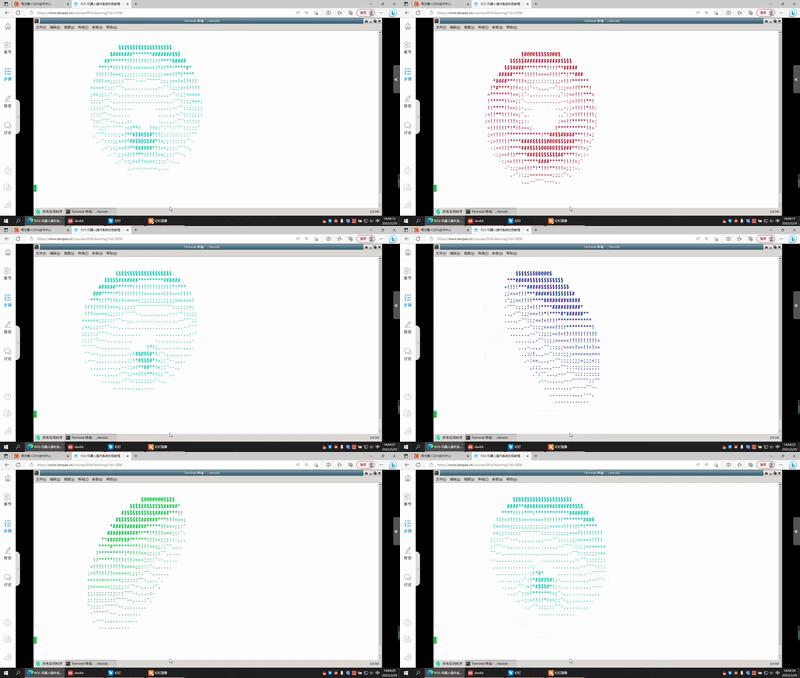
C++的Hello World代码如下:
#include <stdio.h>

int main() {
    printf("Hello world!\n");
    return 0;
}
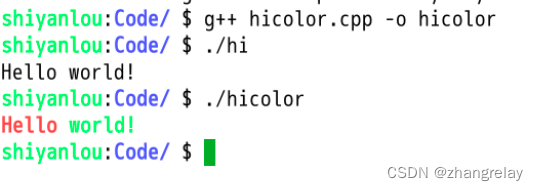
在C++语言中,可以使用ANSI转义码来输出彩色字符串。下面是一个输出彩色Hello world字符串的示例代码:
#include <stdio.h>

int main()
{
    printf("\033[1;31m"); // 设置颜色为红色
    printf("Hello ");
    printf("\033[1;32m"); // 设置颜色为绿色
    printf("world!\n");
    printf("\033[0m"); // 恢复默认颜色
    return 0;
}在上面的代码中,\033代表ANSI转义码的起始符号,[1;31m代表设置颜色为红色的代码,[1;32m代表设置颜色为绿色的代码,[0m代表恢复默认颜色的代码。在输出彩色字符串时,需要先设置颜色代码,然后输出字符串,最后恢复默认颜色。
在云课中试试看吧:
彩色甜甜圈呢?
#include <stdio.h>
#include <math.h>

#define PI 3.14159265

int main()
{
    int r = 10, x, y;
    int i, j;
    float angle = 0.0;
    char colors[7][8] = {"\033[31m", "\033[33m", "\033[32m", "\033[36m", "\033[34m", "\033[35m", "\033[37m"};

    for (i = -r; i <= r; i++)
    {
        for (j = -r; j <= r; j++)
        {
            angle = atan2(j, i) * 180.0 / PI;
            x = (int)(sqrt(i * i + j * j) + 0.5);
            y = (int)(angle / 10 + 0.5) % 7;

            if (x == r)
            {
                printf("%s", colors[y]);
                printf("O ");
                printf("\033[0m");
            }
            else
            {
                printf("  ");
            }
        }
        printf("\n");
    }

    return 0;
}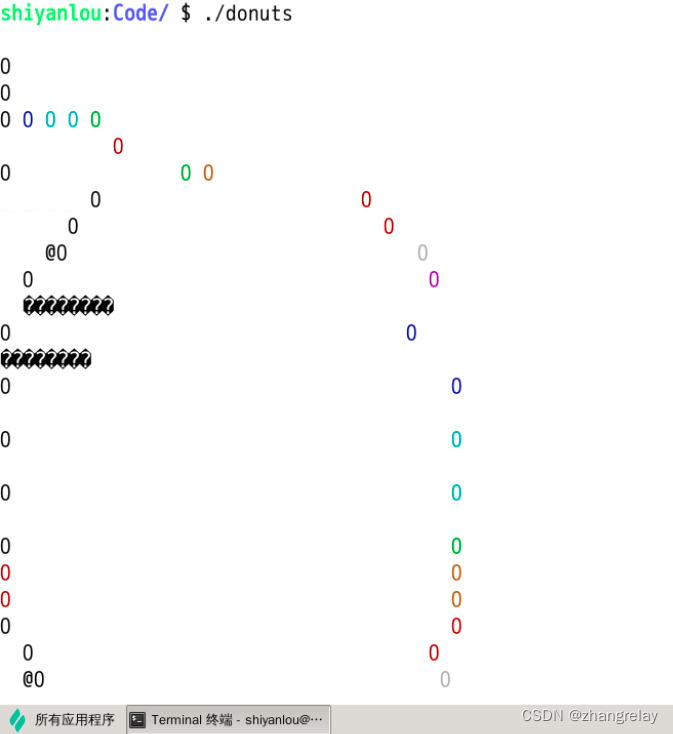
在这个代码中,我们使用了ANSI转义码来实现彩色输出。其中,colors数组保存了七种不同的颜色代码,分别对应不同的角度范围。在循环中,我们使用了数学函数来计算每个点的距离和角度,并根据距离和角度选择不同的颜色输出。最终的效果是一个彩色的甜甜圈。
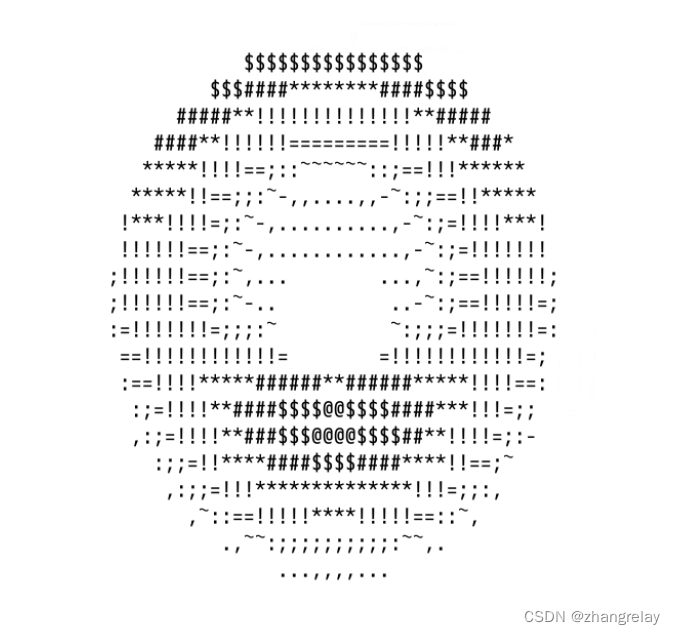
#include <stdio.h>
#include <math.h>
#include <cstring>
#include <unistd.h>

int main() {
    float A = 0, B = 0;
    float i, j;
    int k;
    float z[1760];
    char b[1760];
    printf("\x1b[2J");
    for (;;) {
        memset(b, 32, 1760);
        memset(z, 0, 7040);
        for (j = 0; j < 6.28; j += 0.07) {
            for (i = 0; i < 6.28; i += 0.02) {
                float c = sin(i);
                float d = cos(j);
                float e = sin(A);
                float f = sin(j);
                float g = cos(A);
                float h = d + 2;
                float D = 1 / (c * h * e + f * g + 5);
                float l = cos(i);
                float m = cos(B);
                float n = sin(B);
                float t = c * h * g - f * e;
                int x = 40 + 30 * D * (l * h * m - t * n);
                int y = 12 + 15 * D * (l * h * n + t * m);
                int o = x + 80 * y;
                int N = 8 * ((f * e - c * d * g) * m - c * d * e - f * g - l * d * n);
                if (22 > y && y > 0 && x > 0 && 80 > x && D > z[o]) {
                    z[o] = D;
                    b[o] = ".,-~:;=!*#$@"[N > 0 ? N : 0];
                }
            }
        }
        printf("\x1b[H");
        for (k = 0; k < 1761; k++) {
            putchar(k % 80 ? b[k] : 10);
            A += 0.00004;
            B += 0.00002;
        }
        usleep(30000);
    }
    return 0;
}
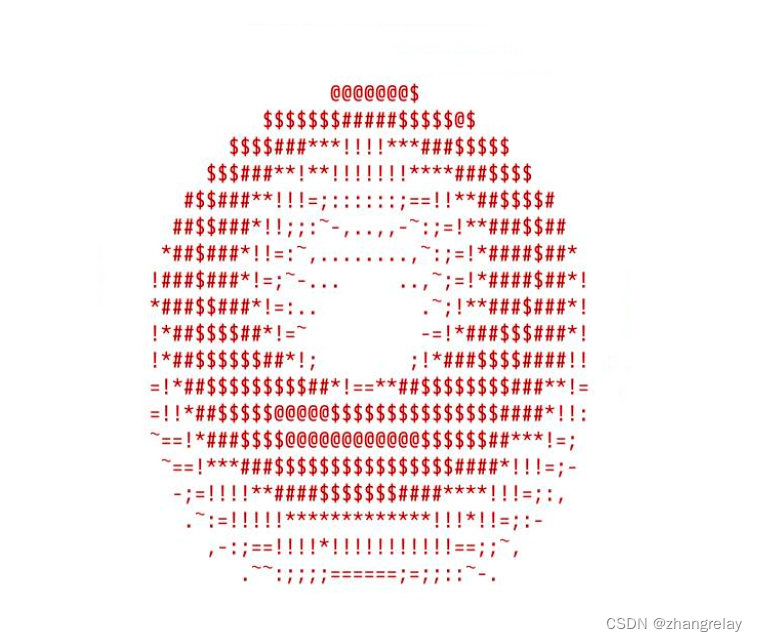
char colors[7][8] = {"\033[31m", "\033[33m", "\033[32m", "\033[36m", "\033[34m", "\033[35m", "\033[37m"};
printf("%s", colors[y]);#include <stdio.h>
#include <math.h>
#include <cstring>
#include <unistd.h>
char colors[7][8] = {"\033[31m", "\033[33m", "\033[32m", "\033[36m", "\033[34m", "\033[35m", "\033[37m"};
int main() {
float A = 0, B = 0;
float i, j;
int k;
float z[1760];
char b[1760];
printf("\x1b[2J");
for (;;) {
memset(b, 32, 1760);
memset(z, 0, 7040);
for (j = 0; j < 6.28; j += 0.07) {
for (i = 0; i < 6.28; i += 0.02) {
float c = sin(i);
float d = cos(j);
float e = sin(A);
float f = sin(j);
float g = cos(A);
float h = d + 2;
float D = 1 / (c * h * e + f * g + 5);
float l = cos(i);
float m = cos(B);
float n = sin(B);
float t = c * h * g - f * e;
int x = 40 + 30 * D * (l * h * m - t * n);
int y = 12 + 15 * D * (l * h * n + t * m);
int o = x + 80 * y;
int N = 8 * ((f * e - c * d * g) * m - c * d * e - f * g - l * d * n);
if (22 > y && y > 0 && x > 0 && 80 > x && D > z[o]) {
z[o] = D;
printf("%s", colors[N/2]);
b[o] = ".,-~:;=!*#$@"[N > 0 ? N : 0];
}
}
}
printf("\x1b[H");
for (k = 0; k < 1761; k++) {
putchar(k % 80 ? b[k] : 10);
A += 0.00004;
B += 0.00002;
}
usleep(100000);
}
return 0;
}
#include <stdio.h>
#include <math.h>
#include <cstring>
#include <unistd.h>
char colors[7][8] = {"\033[31m", "\033[33m", "\033[32m", "\033[36m", "\033[34m", "\033[35m", "\033[37m"};

int main() {
    float A = 0, B = 0;
    float i, j;
    int k;
    float z[1760];
    char b[1760];
    printf("\x1b[2J");
    for (;;) {
        memset(b, 32, 1760);
        memset(z, 0, 7040);
        for (j = 0; j < 6.28; j += 0.07) {
            for (i = 0; i < 6.28; i += 0.02) {
                float c = sin(i);
                float d = cos(j);
                float e = sin(A);
                float f = sin(j);
                float g = cos(A);
                float h = d + 2;
                float D = 1 / (c * h * e + f * g + 5);
                float l = cos(i);
                float m = cos(B);
                float n = sin(B);
                float t = c * h * g - f * e;
                int x = 40 + 30 * D * (l * h * m - t * n);
                int y = 12 + 15 * D * (l * h * n + t * m);
                int o = x + 80 * y;
                int N = 8 * ((f * e - c * d * g) * m - c * d * e - f * g - l * d * n);
                if (22 > y && y > 0 && x > 0 && 80 > x && D > z[o]) {
                    z[o] = D;
                    b[o] = ".,-~:;=!*#$@"[N > 0 ? N : 0];
                }
            }
        }
        printf("\x1b[H");
        for (k = 0; k < 1761; k++) {
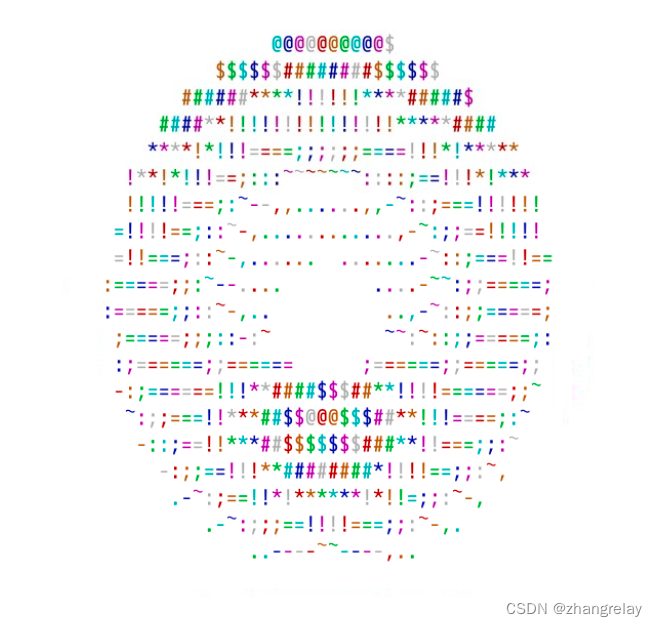
            printf("%s", colors[k%7]);
            putchar(k % 80 ? b[k] : 10);
            A += 0.00004;
            B += 0.00002;
        }
        usleep(100000);
    }
    return 0;
}
\033[0m 关闭所有属性 \033[1m 高亮 \033[2m 亮度减半 \033[3m 斜体 \033[4m 下划线 \033[5m 闪烁 \033[6m 快闪 \033[7m 反显 \033[8m 消隐 \033[9m 中间一道横线 10-19 关于字体的 21-29 基本与1-9正好相反 30-37 设置前景色 40-47 设置背景色 30:黑 31:红 32:绿 33:黄 34:蓝 35:紫 36:深 37:白 38 打开下划线,设置默认前景色 39 关闭下划线,设置默认前景色 40 黑色背景 41 红色背景 42 绿色背景 43 棕色背景 44 蓝色背景 45 品红背景 46 孔雀蓝背景 47 白色背景 48 不知道什么东西 49 设置默认背景色 50-89 没用 90-109 又是设置前景背景的,比之前的颜色浅 \033[nA 光标上移n行 \033[nB 光标下移n行 \033[nC 光标右移n行 \033[nD 光标左移n行 \033[y;xH设置光标位置 \033[2J 清屏 \033[K 清除从光标到行尾的内容 \033[s 保存光标位置 \033[u 恢复光标位置 \033[?25l 隐藏光标 \033[?25h 显示光标
- 安装ncurses库:ncurses是一个用于控制终端屏幕的库,可以用来实现动态彩色甜甜圈的显示。在Linux系统中,可以使用以下命令安装ncurses库:
sudo apt-get install libncurses5-dev libncursesw5-dev- 创建C程序:使用任何文本编辑器创建一个新的C程序,并将其保存为一个.c文件。在程序中,需要包含ncurses.h头文件,以便使用ncurses库中的函数和常量。例如:
#include <ncurses.h>

int main() {
    // 在此处编写程序
    return 0;
}- 初始化屏幕:在程序的开始处,需要调用initscr()函数来初始化终端屏幕。这个函数会打开终端屏幕,并启用ncurses库的各种特性。例如:
int main() {
    initscr();
    // 在此处编写程序
    endwin(); // 关闭终端屏幕
    return 0;
}- 设置颜色:使用start_color()函数来启用颜色模式,并使用init_pair()函数来创建颜色对。例如:
int main() {
    initscr();
    start_color();
    // 创建颜色对
    init_pair(1, COLOR_RED, COLOR_BLACK);
    init_pair(2, COLOR_GREEN, COLOR_BLACK);
    init_pair(3, COLOR_YELLOW, COLOR_BLACK);
    init_pair(4, COLOR_BLUE, COLOR_BLACK);
    init_pair(5, COLOR_MAGENTA, COLOR_BLACK);
    init_pair(6, COLOR_CYAN, COLOR_BLACK);
    // 在此处编写程序
    endwin();
    return 0;
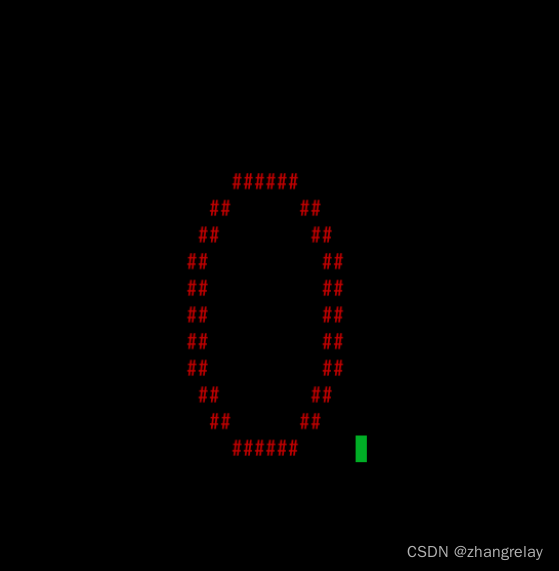
}- 绘制甜甜圈:使用mvprintw()函数来在终端屏幕上输出字符,并使用attron()函数来设置字符的颜色。例如:
int main() {
    initscr();
    start_color();
    // 创建颜色对
    init_pair(1, COLOR_RED, COLOR_BLACK);
    init_pair(2, COLOR_GREEN, COLOR_BLACK);
    init_pair(3, COLOR_YELLOW, COLOR_BLACK);
    init_pair(4, COLOR_BLUE, COLOR_BLACK);
    init_pair(5, COLOR_MAGENTA, COLOR_BLACK);
    init_pair(6, COLOR_CYAN, COLOR_BLACK);
    // 绘制甜甜圈
    attron(COLOR_PAIR(1));
    mvprintw(10, 30, "    ######     ");
    mvprintw(11, 30, "  ##      ##   ");
    mvprintw(12, 30, " ##        ##  ");
    mvprintw(13, 30, "##          ## ");
    mvprintw(14, 30, "##          ## ");
    mvprintw(15, 30, "##          ## ");
    mvprintw(16, 30, "##          ## ");
    mvprintw(17, 30, "##          ## ");
    mvprintw(18, 30, " ##        ##  ");
    mvprintw(19, 30, "  ##      ##   ");
    mvprintw(20, 30, "    ######     ");
    // 在此处编写程序
    endwin();
    return 0;
}- 添加动态效果:使用clear()函数来清空终端屏幕,并使用usleep()函数来添加延时效果。例如:
int main() {
    initscr();
    start_color();
    // 创建颜色对
    init_pair(1, COLOR_RED, COLOR_BLACK);
    init_pair(2, COLOR_GREEN, COLOR_BLACK);
    init_pair(3, COLOR_YELLOW, COLOR_BLACK);
    init_pair(4, COLOR_BLUE, COLOR_BLACK);
    init_pair(5, COLOR_MAGENTA, COLOR_BLACK);
    init_pair(6, COLOR_CYAN, COLOR_BLACK);
    // 绘制甜甜圈
    while (true) {
        clear();
        attron(COLOR_PAIR(1));
        mvprintw(10, 30, "    ######     ");
        mvprintw(11, 30, "  ##      ##   ");
        mvprintw(12, 30, " ##        ##  ");
        mvprintw(13, 30, "##          ## ");
        mvprintw(14, 30, "##          ## ");
        mvprintw(15, 30, "##          ## ");
        mvprintw(16, 30, "##          ## ");
        mvprintw(17, 30, "##          ## ");
        mvprintw(18, 30, " ##        ##  ");
        mvprintw(19, 30, "  ##      ##   ");
        mvprintw(20, 30, "    ######     ");
        refresh();
        usleep(100000);
    }
    endwin();
    return 0;
}- 编译和运行程序:使用gcc编译器将C程序编译为可执行文件,并使用./命令执行程序。例如:
gcc -o myprogram myprogram.c -lncurses
./myprogram
以上就是在Linux系统中使用C编程完成动态彩色甜甜圈显示的具体步骤。
g++ donuts.cpp -o donuts -lncurses
本文参与 腾讯云自媒体同步曝光计划,分享自作者个人站点/博客。
原始发表:2023-03-29,如有侵权请联系 cloudcommunity@tencent.com 删除
腾讯云开发者

Copyright © 2013 - 2026 Tencent Cloud. All Rights Reserved. 腾讯云 版权所有
深圳市腾讯计算机系统有限公司 ICP备案/许可证号:粤B2-20090059  粤公网安备44030502008569号
腾讯云计算(北京)有限责任公司 京ICP证150476号 | 京ICP备11018762号