【Flutter】Flutter 打开第三方应用 ( url_launcher 插件搜索与安装 | url_launcher 插件官方示例 | 打开浏览器 | 打开第三方应用 )

【Flutter】Flutter 打开第三方应用 ( url_launcher 插件搜索与安装 | url_launcher 插件官方示例 | 打开浏览器 | 打开第三方应用 )

韩曙亮
发布于 2023-03-28 21:57:18
发布于 2023-03-28 21:57:18
文章目录
一、url_launcher 插件搜索与安装
1、搜索 url_launcher 插件
借助 url_launcher 第三方插件 , 可以打开第三方应用 ;
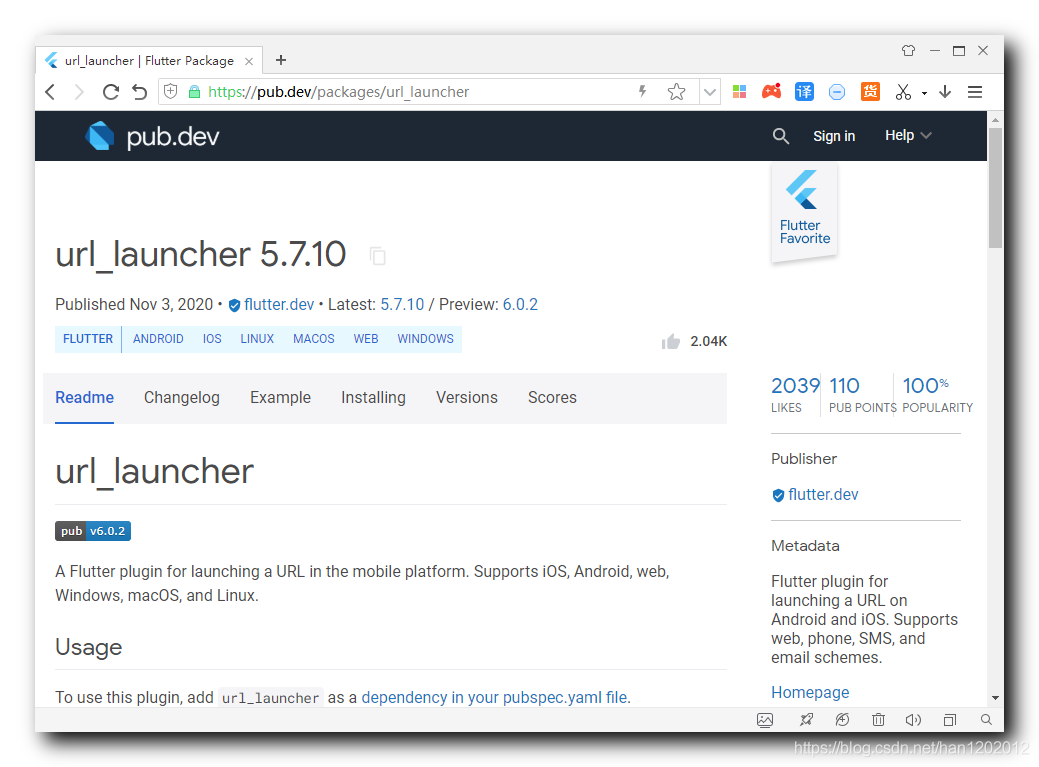
该插件是 Flutter 官方提供的用于打开第三方应用的插件 ;
在 https://pub.dev/packages 搜索并安装 url_launcher 插件 ;
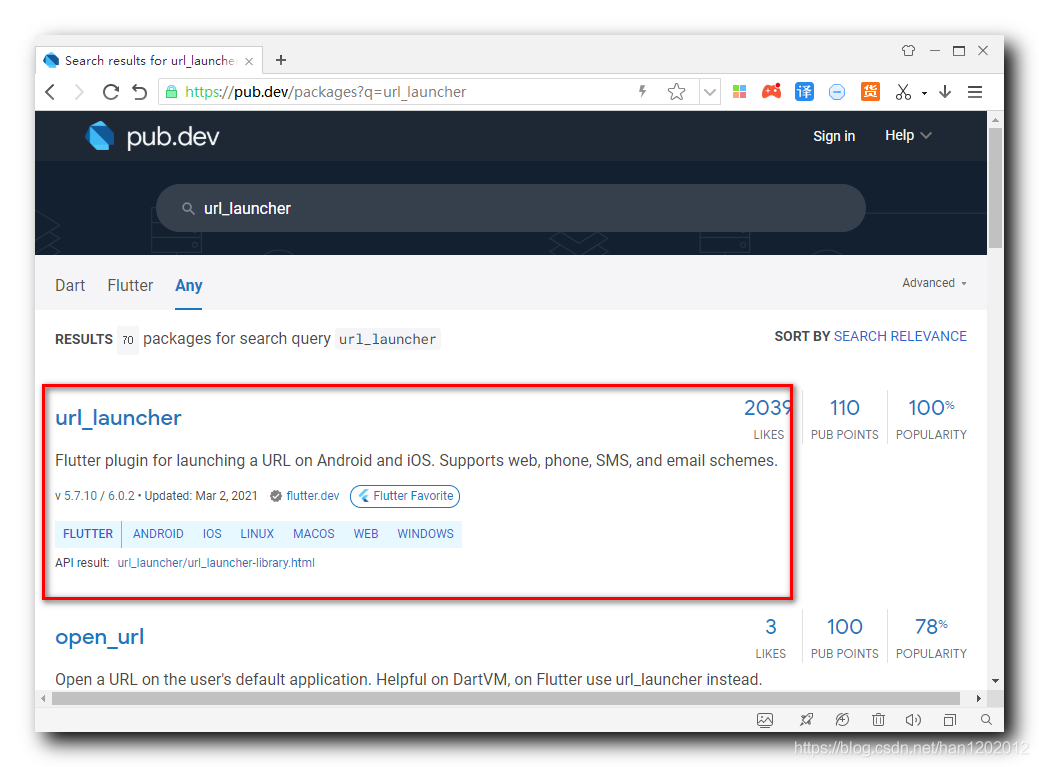
该插件的地址是 https://pub.dev/packages/url_launcher
2、安装 url_launcher 插件
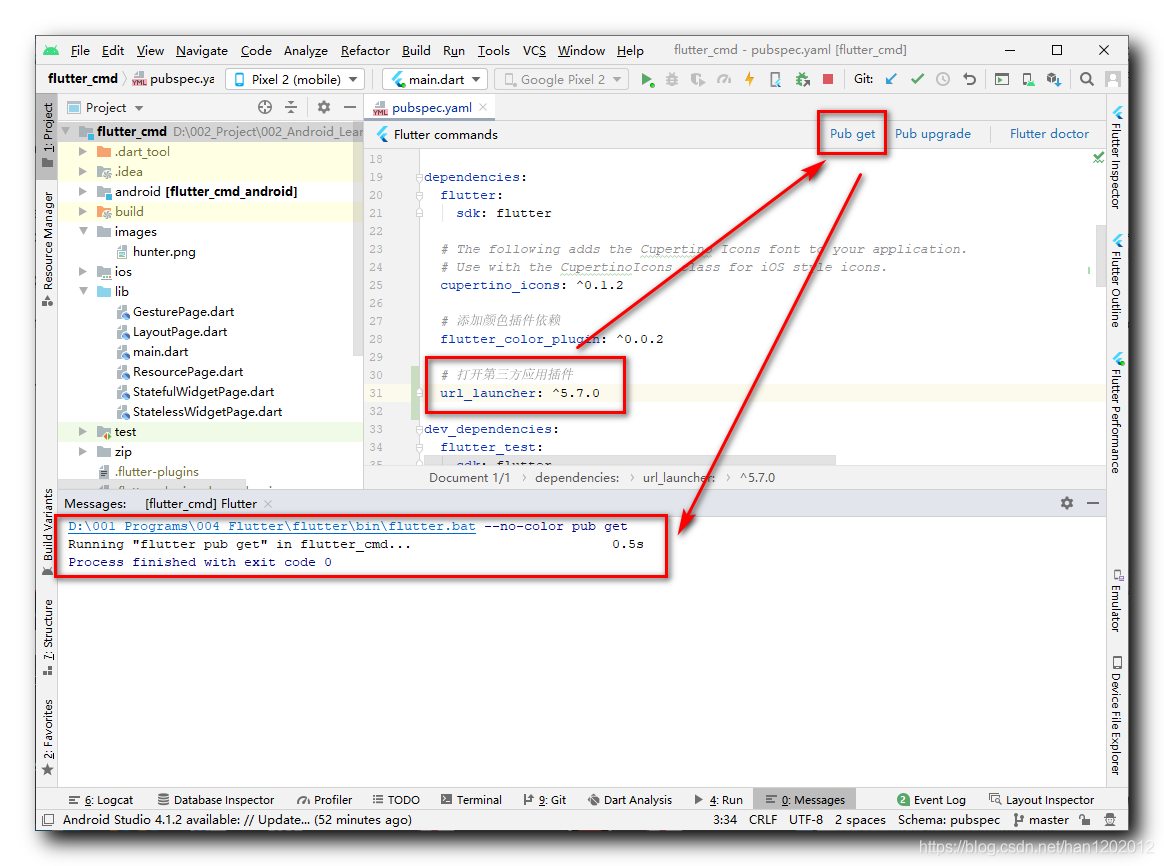
安装插件 : 在 https://pub.dev/packages/url_launcher/install 页面有该插件的安装方法 ;
1 . 配置依赖 : 在 pubspec.yaml 配置文件中配置依赖 ;
dependencies:
  url_launcher: ^5.7.10
2 . 获取插件 : 点击右上角的 " Pub get " 按钮获取该插件 , 在下面的 Message 面板中显示 Running "flutter pub get" in flutter_cmd... 0.5s , 说明插件下载成功 ;
3 . 导入头文件 :
import 'package:url_launcher/url_launcher.dart';二、url_launcher 插件官方示例
官方示例 : 这是 https://pub.dev/packages/url_launcher 页面提供的官方示例代码 ;
import 'package:flutter/material.dart';
import 'package:url_launcher/url_launcher.dart';

void main() {
  runApp(Scaffold(
    body: Center(
      child: RaisedButton(
        onPressed: _launchURL,
        child: Text('Show Flutter homepage'),
      ),
    ),
  ));
}

_launchURL() async {
  const url = 'https://flutter.dev';
  if (await canLaunch(url)) {
    await launch(url);
  } else {
    throw 'Could not launch $url';
  }
}
三、打开浏览器
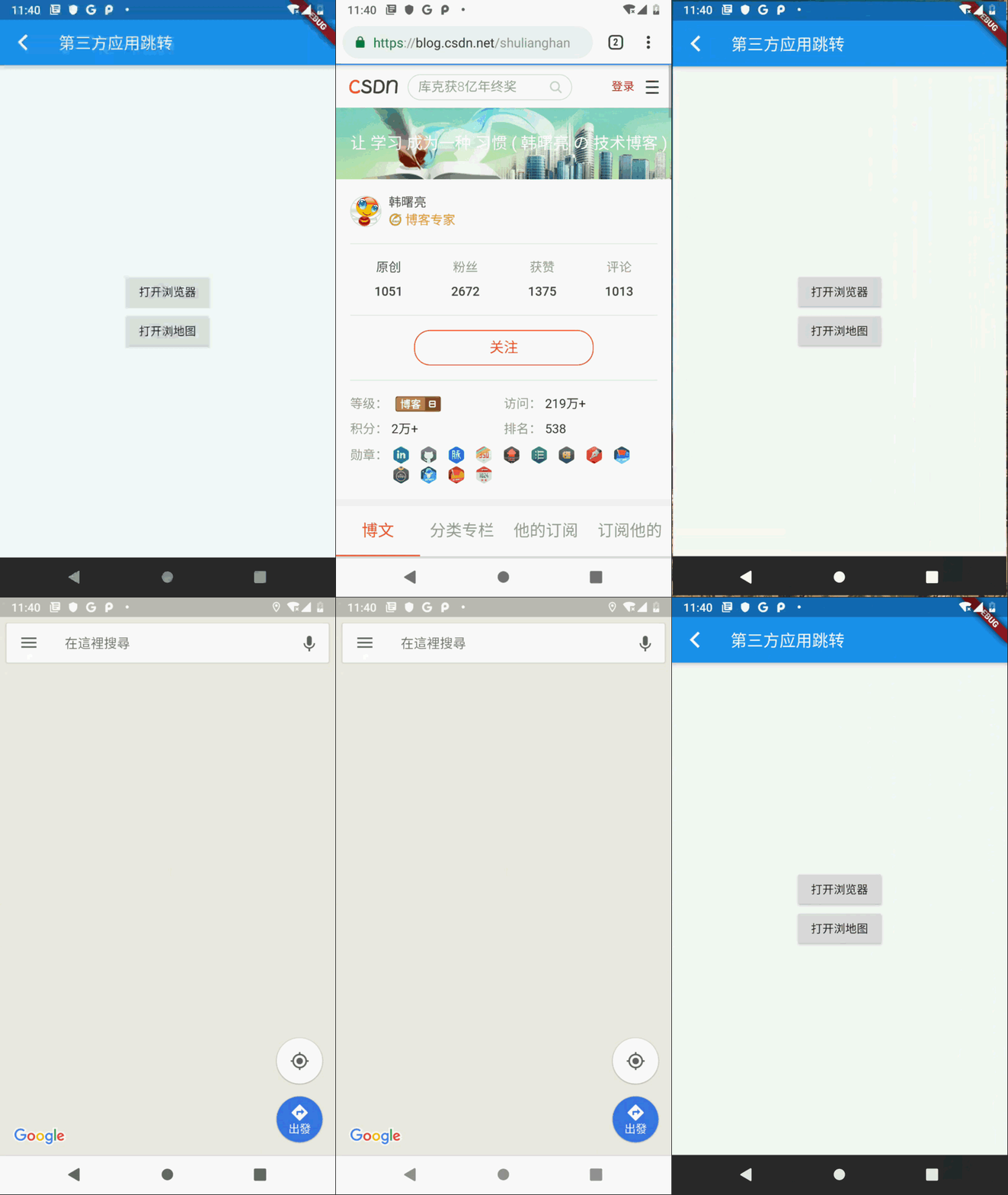
设置 RaisedButton 按钮组件 , 点击该按钮 , 自动打开浏览器 , 并打开本博客主页 ;
// 打开浏览器按钮
RaisedButton(
  // 匿名函数
  onPressed: () async {
    const url = 'https://blog.csdn.net/shulianghan';
    if (await canLaunch(url)) {
      await launch(url);
    } else {
      throw 'Could not launch $url';
    }
  },
  // 按钮显示的组件
  child: Text("打开浏览器"),
),
四、打开第三方应用
打开第三方应用的前提是 , 知道该应用的 schema 或 url , 这些都是由第三方 app 的开发者提供 ;
谷歌地图的 scheme 是 “geo:精度,维度” ;
苹果地图的 url 是 “http://maps.apple.com/?ll=精度,维度”
// 打开 Google 地图
RaisedButton(
  // 匿名函数
  onPressed: () async {
    // Android 谷歌地图的 scheme , 后面是北京市海淀区的经纬度
    const url = 'geo:116.3,39.95';
    if (await canLaunch(url)) {
      // Android 手机, 打开 Google 地图
      await launch(url);
    } else { // 如果安卓手机打不开说明是苹果手机
      const url_ios = 'http://maps.apple.com/?ll=116.3,39.95';
      if (await canLaunch(url_ios)) {
        await launch(url_ios);
      } else {
        throw 'Could not launch $url';
      }
    }
  },
  // 按钮显示的组件
  child: Text("打开地图"),
),
五、完整代码示例
完整代码示例 :
import 'package:flutter/material.dart';
import 'package:url_launcher/url_launcher.dart';

class LauncherPage extends StatefulWidget {
  @override
  _LauncherPageState createState() => _LauncherPageState();
}

class _LauncherPageState extends State<LauncherPage> {
  @override
  Widget build(BuildContext context) {
    return MaterialApp(
      title: "第三方应用跳转",
      theme: ThemeData(primarySwatch: Colors.blue),
      home: Scaffold(
        appBar: AppBar(
          title: Text("第三方应用跳转"),

          leading: GestureDetector(
            onTap: (){
              Navigator.pop(context);
            },
            child: Icon(Icons.arrow_back_ios),
          ),
        ),

        body: Container(
          // 居中显示
          alignment: Alignment.center,

          // 垂直线性布局
          child: Column(
            mainAxisAlignment: MainAxisAlignment.center,

            children: <Widget>[

              // 打开浏览器按钮
              RaisedButton(
                // 匿名函数
                onPressed: () async {
                  const url = 'https://blog.csdn.net/shulianghan';
                  if (await canLaunch(url)) {
                    await launch(url);
                  } else {
                    throw 'Could not launch $url';
                  }
                },

                // 按钮显示的组件
                child: Text("打开浏览器"),
              ),

              // 打开 Google 地图
              RaisedButton(
                // 匿名函数
                onPressed: () async {
                  // Android 谷歌地图的 scheme , 后面是北京市海淀区的经纬度
                  const url = 'geo:116.3,39.95';
                  if (await canLaunch(url)) {
                    // Android 手机, 打开 Google 地图
                    await launch(url);

                  } else { // 如果安卓手机打不开说明是苹果手机
                    const url_ios = 'http://maps.apple.com/?ll=116.3,39.95';
                    if (await canLaunch(url_ios)) {
                      await launch(url_ios);
                    } else {
                      throw 'Could not launch $url';
                    }
                  }
                },

                // 按钮显示的组件
                child: Text("打开地图"),
              ),

            ],
          ),
        ),
      ),
    );
  }
}
运行效果 :
六、相关资源
参考资料 :
- Flutter 官网 : https://flutter.dev/
- Flutter 插件下载地址 : https://pub.dev/packages
- Flutter 开发文档 : https://flutter.cn/docs ( 强烈推荐 )
- 官方 GitHub 地址 : https://github.com/flutter
- Flutter 中文社区 : https://flutter.cn/
- Flutter 实用教程 : https://flutter.cn/docs/cookbook
- Flutter CodeLab : https://codelabs.flutter-io.cn/
- Dart 中文文档 : https://dart.cn/
- Dart 开发者官网 : https://api.dart.dev/
- Flutter 中文网 ( 非官方 , 翻译的很好 ) : https://flutterchina.club/ , http://flutter.axuer.com/docs/
- Flutter 相关问题 : https://flutterchina.club/faq/ ( 入门阶段推荐看一遍 )
博客源码下载 :
- GitHub 地址 : https://github.com/han1202012/flutter_cmd ( 随博客进度一直更新 , 有可能没有本博客的源码 )
- 博客源码快照 : https://download.csdn.net/download/han1202012/15541330 ( 本篇博客的源码快照 , 可以找到本博客的源码 )
本文参与 腾讯云自媒体同步曝光计划,分享自作者个人站点/博客。
原始发表:2021-03-03,如有侵权请联系 cloudcommunity@tencent.com 删除
评论
登录后参与评论
推荐阅读
目录
腾讯云开发者

Copyright © 2013 - 2026 Tencent Cloud. All Rights Reserved. 腾讯云 版权所有
深圳市腾讯计算机系统有限公司 ICP备案/许可证号:粤B2-20090059  粤公网安备44030502008569号
腾讯云计算(北京)有限责任公司 京ICP证150476号 | 京ICP备11018762号